Harmonyos应用实例125:天平解方程实验室
摘要: 该代码实现了一个交互式天平解方程实验工具,用于演示一元一次方程的解法。通过可视化天平平衡原理,学生可以操作"两边同时减3"和"两边同时除以2"等步骤,动态展示方程变换过程。系统随机生成形如ax+b=c的方程,支持砝码增减动画效果,实时更新方程文本显示,并验证学生操作的正确性。核心功能包括随机题目生成、砝码操作动画、等式性质验证等,通过Canvas渲染
·
应用实例五:天平解方程实验室
知识点:第三章《一元一次方程》—— 等式的性质。
功能:模拟天平。左边放 “2x + 3” 的砝码,右边放 “7” 的砝码。学生必须操作"两边同时减3",再"两边同时除以2",动画展示天平始终保持平衡,最终得出x的值。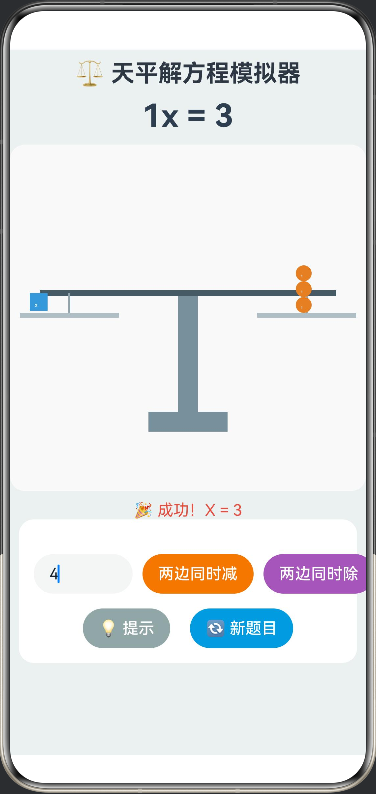
/**
 * 模拟天平解方程
 * 知识点:等式的性质、一元一次方程解法
 */

interface Weight {
  type: 'var' | 'num'; // 'var'表示x, 'num'表示数字
  value: number;       // 显示的数值
  id: number;          // 唯一标识
}

@Entry
@Component
struct BalanceSimulator {
  // 画布上下文
  private settings: RenderingContextSettings = new RenderingContextSettings(true)
  private context: CanvasRenderingContext2D = new CanvasRenderingContext2D(this.settings)

  // 方程状态
  @State private leftWeights: Weight[] = []   // 左盘砝码
  @State private rightWeights: Weight[] = []  // 右盘砝码
  @State private equationText: string = ""    // 当前方程文本
  @State private resultText: string = ""      // 结果提示

  // 动画状态
  @State private animProgress: number = 0     // 动画进度 0.0 - 1.0
  @State private isAnimating: boolean = false

  // 游戏状态
  @State private inputVal: string = ""
  @State private currentStep: number = 0      // 0: 初始, 1: 已减, 2: 已除

  // 常量
  private readonly PILLAR_HEIGHT: number = 200
  private readonly BEAM_WIDTH: number = 300

  // 砝码ID计数器
  private weightIdCounter: number = 0

  aboutToAppear() {
    this.generateProblem()
  }

  // 生成随机题目: ax + b = c
  private generateProblem() {
    this.currentStep = 0
    this.resultText = "请按照等式的性质操作天平"

    // 随机生成 a (2-4), b (1-5), x (1-5)
    const a = Math.floor(Math.random() * 3) + 2
    const b = Math.floor(Math.random() * 5) + 1
    const x = Math.floor(Math.random() * 5) + 1
    const c = a * x + b

    // 初始化左盘: a个x 和 b个1
    this.leftWeights = []
    for(let i=0; i<a; i++) this.leftWeights.push({ type: 'var', value: 1, id: this.weightIdCounter++ })
    for(let i=0; i<b; i++) this.leftWeights.push({ type: 'num', value: 1, id: this.weightIdCounter++ })

    // 初始化右盘: c个1
    this.rightWeights = []
    for(let i=0; i<c; i++) this.rightWeights.push({ type: 'num', value: 1, id: this.weightIdCounter++ })

    this.updateEquationText()
  }

  // 更新方程文本显示
  private updateEquationText() {
    const xCount = this.leftWeights.filter(w => w.type === 'var').length
    const leftNum = this.leftWeights.filter(w => w.type === 'num').length
    const rightNum = this.rightWeights.filter(w => w.type === 'num').length

    let leftStr = ""
    if (xCount > 0) leftStr += `${xCount}x`
    if (leftNum > 0) leftStr += (leftStr ? " + " : "") + `${leftNum}`

    if(leftStr === "") leftStr = "0" // 如果全减完了

    this.equationText = `${leftStr} = ${rightNum}`
  }

  // 操作:两边同时减去 n
  private handleSubtract() {
    if (this.isAnimating) return
    const val = parseInt(this.inputVal)
    if (isNaN(val) || val <= 0) {
      this.resultText = "请输入有效的正整数"
      return
    }

    const leftNum = this.leftWeights.filter(w => w.type === 'num').length
    const rightNum = this.rightWeights.filter(w => w.type === 'num').length

    if (leftNum < val || rightNum < val) {
      this.resultText = "错误!两边砝码数量不足以减去该值!"
      return
    }

    this.playRemoveAnim(val, 'num')
  }

  // 操作:两边同时除以 n
  private handleDivide() {
    if (this.isAnimating) return
    const val = parseInt(this.inputVal)
    if (isNaN(val) || val <= 0) {
      this.resultText = "请输入有效的正整数"
      return
    }

    const xCount = this.leftWeights.filter(w => w.type === 'var').length
    const rightNum = this.rightWeights.filter(w => w.type === 'num').length

    if (xCount % val !== 0 || rightNum % val !== 0) {
      this.resultText = "错误!两边数量不能被整除!"
      return
    }

    if (xCount === 0) {
      this.resultText = "已经没有X了,无需再除"
      return
    }

    this.playDivideAnim(val)
  }

  // 动画:移除砝码 (减法)
  private playRemoveAnim(count: number, type: 'num') {
    this.isAnimating = true
    this.animProgress = 0

    // 简单的定时器动画
    const duration = 500
    const startTime = Date.now()

    const animLoop = () => {
      const now = Date.now()
      this.animProgress = Math.min((now - startTime) / duration, 1.0)

      if (this.animProgress < 1.0) {
        setTimeout(animLoop, 16)
      } else {
        // 动画结束,更新数据
        this.removeWeights(this.leftWeights, count, type)
        this.removeWeights(this.rightWeights, count, type)
        this.isAnimating = false
        this.updateEquationText()
        this.checkStatus()
      }
    }
    animLoop()
  }

  // 动画:分组消失 (除法)
  private playDivideAnim(divisor: number) {
    this.isAnimating = true
    this.animProgress = 0
    const duration = 600
    const startTime = Date.now()

    const animLoop = () => {
      const now = Date.now()
      this.animProgress = Math.min((now - startTime) / duration, 1.0)

      if (this.animProgress < 1.0) {
        setTimeout(animLoop, 16)
      } else {
        // 动画结束,保留 1/divisor
        const newLeftX = this.leftWeights.filter(w => w.type === 'var').length / divisor
        const newRightNum = this.rightWeights.filter(w => w.type === 'num').length / divisor

        // 重建数组
        this.leftWeights = []
        this.rightWeights = []
        for(let i=0; i<newLeftX; i++) this.leftWeights.push({ type: 'var', value: 1, id: this.weightIdCounter++ })
        for(let i=0; i<newRightNum; i++) this.rightWeights.push({ type: 'num', value: 1, id: this.weightIdCounter++ })

        this.isAnimating = false
        this.updateEquationText()
        this.checkStatus()
      }
    }
    animLoop()
  }

  // 辅助:从数组中移除指定数量
  private removeWeights(arr: Weight[], count: number, type: 'num') {
    let removed = 0
    for (let i = arr.length - 1; i >= 0; i--) {
      if (removed < count && arr[i].type === type) {
        arr.splice(i, 1)
        removed++
      }
    }
  }

  // 检查是否解出
  private checkStatus() {
    const xCount = this.leftWeights.filter(w => w.type === 'var').length
    const rightNum = this.rightWeights.filter(w => w.type === 'num').length

    if (xCount === 1 && this.leftWeights.length === 1) {
      this.resultText = `🎉 成功!X = ${rightNum}`
      this.currentStep = 2 // 完成
    }
  }

  // 绘制函数
  private drawScene() {
    const ctx = this.context
    const w = ctx.width
    const h = ctx.height

    ctx.clearRect(0, 0, w, h)

    // 1. 绘制底座
    ctx.fillStyle = '#78909C'
    ctx.fillRect(w/2 - 40, h - 80, 80, 20)
    ctx.fillRect(w/2 - 10, h - 80, 20, -this.PILLAR_HEIGHT + 80)

    // 2. 绘制横梁 (始终保持水平)
    const beamY = h - 80 - this.PILLAR_HEIGHT + 80
    ctx.beginPath()
    ctx.moveTo(w/2 - this.BEAM_WIDTH/2, beamY)
    ctx.lineTo(w/2 + this.BEAM_WIDTH/2, beamY)
    ctx.strokeStyle = '#455A64'
    ctx.lineWidth = 6
    ctx.stroke()

    // 3. 绘制托盘绳索
    const leftPanX = w/2 - this.BEAM_WIDTH/2 + 30
    const rightPanX = w/2 + this.BEAM_WIDTH/2 - 30
    const panY = beamY + 20

    ctx.strokeStyle = '#90A4AE'
    ctx.lineWidth = 2
    ctx.beginPath(); ctx.moveTo(leftPanX, beamY); ctx.lineTo(leftPanX, panY); ctx.stroke()
    ctx.beginPath(); ctx.moveTo(rightPanX, beamY); ctx.lineTo(rightPanX, panY); ctx.stroke()

    // 4. 绘制托盘
    ctx.fillStyle = '#B0BEC5'
    ctx.fillRect(leftPanX - 50, panY, 100, 5)
    ctx.fillRect(rightPanX - 50, panY, 100, 5)

    // 5. 绘制砝码
    this.drawWeights(ctx, this.leftWeights, leftPanX, panY, false)
    this.drawWeights(ctx, this.rightWeights, rightPanX, panY, true)
  }

  // 绘制砝码组
  private drawWeights(ctx: CanvasRenderingContext2D, weights: Weight[], centerX: number, panY: number, isRight: boolean) {
    // 将砝码分类堆叠
    const vars = weights.filter(w => w.type === 'var')
    const nums = weights.filter(w => w.type === 'num')

    let offsetX = -40
    let offsetY = 0

    // 绘制 X 砝码 (蓝色方块)
    vars.forEach((w, i) => {
      const x = centerX + offsetX
      const y = panY - 20 - offsetY

      ctx.fillStyle = '#3498DB'
      ctx.fillRect(x, y, 18, 18)
      ctx.fillStyle = '#FFFFFF'
      ctx.font = 'bold 12px sans-serif'
      ctx.fillText('X', x + 5, y + 14)

      offsetY += 20
      if (offsetY > 60) {
        offsetY = 0
        offsetX += 22
      }
    })

    // 绘制数字砝码 (橙色圆饼)
    offsetY = 0 // 重置Y堆叠
    offsetX += 30 // 拉开距离

    // 动画效果:移除时向上飞
    let opacity = 1.0
    if (this.isAnimating) {
      // 这里简化处理,实际可针对单个物体做更复杂的坐标插值
    }

    nums.forEach((w, i) => {
      const x = centerX + offsetX
      const y = panY - 15 - offsetY

      ctx.beginPath()
      ctx.arc(x + 7, y + 7, 8, 0, 6.28)
      ctx.fillStyle = '#E67E22'
      ctx.fill()
      ctx.fillStyle = '#FFF'
      ctx.font = 'bold 10px sans-serif'
      ctx.fillText('1', x + 4, y + 11)

      offsetY += 16
      if (offsetY > 80) {
        offsetY = 0
        offsetX += 20
      }
    })
  }

  build() {
    Column() {
      // 标题区
      Text('⚖️ 天平解方程模拟器')
        .fontSize(24).fontWeight(FontWeight.Bold).margin({ top: 10 })

      // 方程显示区
      Text(this.equationText)
        .fontSize(32).fontWeight(FontWeight.Bold).fontColor('#2C3E50')
        .margin({ top: 10, bottom: 10 })
        .width('100%')
        .textAlign(TextAlign.Center)

      // 天平画布
      Canvas(this.context)
        .width('100%')
        .height(350)
        .backgroundColor('#F9F9F9')
        .borderRadius(15)
        .onReady(() => {
          this.drawScene()
        })

      // 操作说明
      Text(this.resultText)
        .fontSize(16).fontColor('#E74C3C').margin({ top: 10 })

      // 操作面板
      Column() {
        Row() {
          TextInput({ placeholder: '输入数值', text: this.inputVal })
            .type(InputType.Number)
            .width(100)
            .height(40)
            .onChange((val) => this.inputVal = val)

          Button('两边同时减')
            .margin({ left: 10 })
            .backgroundColor('#E67E22')
            .enabled(!this.isAnimating)
            .onClick(() => {
              this.handleSubtract()
              // 触发重绘
              setInterval(() => this.context && this.drawScene(), 16)
              setTimeout(() => clearInterval, 600)
            })

          Button('两边同时除')
            .margin({ left: 10 })
            .backgroundColor('#9B59B6')
            .enabled(!this.isAnimating)
            .onClick(() => {
              this.handleDivide()
              setInterval(() => this.context && this.drawScene(), 16)
              setTimeout(() => clearInterval, 600)
            })
        }
        .margin({ top: 20 })

        // 提示按钮
        Row() {
          Button('💡 提示')
            .backgroundColor('#95A5A6')
            .onClick(() => {
              const xCount = this.leftWeights.filter(w => w.type === 'var').length
              const leftNum = this.leftWeights.filter(w => w.type === 'num').length
              if (leftNum > 0) this.resultText = `提示:试试先两边同时减去 ${leftNum}`
              else if (xCount > 0) this.resultText = `提示:试试两边同时除以 ${xCount}`
            })

          Button('🔄 新题目')
            .backgroundColor('#3498DB')
            .margin({ left: 20 })
            .onClick(() => {
              this.generateProblem()
              this.drawScene()
            })
        }.margin({ top: 15 })
      }
      .width('95%')
      .padding(15)
      .backgroundColor('#FFFFFF')
      .borderRadius(15)
      .shadow({ radius: 5, color: '#00000010' })
    }
    .width('100%')
    .height('100%')
    .backgroundColor('#ECF0F1')
  }
}

讨论HarmonyOS开发技术,专注于API与组件、DevEco Studio、测试、元服务和应用上架分发等。
更多推荐

 0
0 0
0- 0


 已为社区贡献44条内容

所有评论(0)