74.仪表Gauge-ArkTS
·
4.仪表Gauge-ArkTS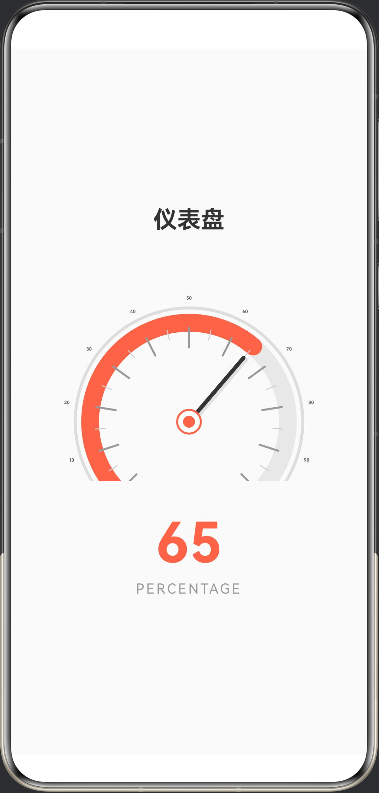
使用 Canvas 绘制仪表盘,精确可靠。
设计特点:
1.Canvas 绘制:使用 2D 绘图 API,完全控制每个元素的位置
2.半圆形设计:
起始角度:135°(左下方)
结束角度:405°(右下方)
总共 270 度的范围
3.元素绘制:
背景圆弧(灰色)
进度圆弧(红色,根据当前值)
指针(从中心指向当前角度)
中心圆点(红色)
刻度文字(0, 25, 50, 75, 100)
4.数值显示:在 Canvas 下方显示 “65%”
所有元素都以 (150, 150) 为圆心计算,确保完美同心!
@Entry
@Component
struct Index {
  @State value: number = 65

  build() {
    Column({ space: 30 }) {
      // 标题
      Text('仪表盘')
        .fontSize(24)
        .fontWeight(FontWeight.Bold)
        .fontColor('#333333')

      // 使用Canvas绘制仪表盘
      GaugeCanvas({ value: this.value })
        .width(320)
        .height(220)

      // 数值显示
      Column({ space: 5 }) {
        Text(this.value.toString())
          .fontSize(56)
          .fontWeight(FontWeight.Bold)
          .fontColor('#FF6347')
        Text('PERCENTAGE')
          .fontSize(14)
          .fontColor('#999999')
          .letterSpacing(2)
      }
    }
    .width('100%')
    .height('100%')
    .justifyContent(FlexAlign.Center)
    .backgroundColor('#FAFAFA')
  }
}

@Component
struct GaugeCanvas {
  @Prop value: number

  private settings: RenderingContextSettings = new RenderingContextSettings(true)
  private context: CanvasRenderingContext2D = new CanvasRenderingContext2D(this.settings)

  build() {
    Canvas(this.context)
      .width(320)
      .height(220)
      .onReady(() => {
        this.drawGauge()
      })
  }

  drawGauge() {
    const centerX = 160
    const centerY = 160
    const radius = 100
    const startAngle = Math.PI * 0.75 // 135度
    const endAngle = Math.PI * 2.25   // 405度

    // 清空画布
    this.context.clearRect(0, 0, 320, 220)

    // 绘制外圈装饰环
    this.context.beginPath()
    this.context.arc(centerX, centerY, radius + 15, startAngle, endAngle)
    this.context.lineWidth = 3
    this.context.strokeStyle = '#DDDDDD'
    this.context.stroke()

    // 绘制背景圆弧
    this.context.beginPath()
    this.context.arc(centerX, centerY, radius, startAngle, endAngle)
    this.context.lineWidth = 18
    this.context.strokeStyle = '#E8E8E8'
    this.context.lineCap = 'round'
    this.context.stroke()

    // 计算当前值对应的角度
    const percentage = this.value / 100
    const currentAngle = startAngle + (endAngle - startAngle) * percentage

    // 绘制进度圆弧
    this.context.beginPath()
    this.context.arc(centerX, centerY, radius, startAngle, currentAngle)
    this.context.lineWidth = 18
    this.context.strokeStyle = '#FF6347'
    this.context.lineCap = 'round'
    this.context.stroke()

    // 绘制刻度和数字
    this.drawTicks(centerX, centerY, radius, startAngle, endAngle)

    // 绘制指针
    const pointerAngle = currentAngle
    const pointerLength = radius - 15
    const pointerX = centerX + pointerLength * Math.cos(pointerAngle)
    const pointerY = centerY + pointerLength * Math.sin(pointerAngle)

    // 指针阴影
    this.context.beginPath()
    this.context.moveTo(centerX + 2, centerY + 2)
    this.context.lineTo(pointerX + 2, pointerY + 2)
    this.context.lineWidth = 5
    this.context.strokeStyle = 'rgba(0,0,0,0.1)'
    this.context.stroke()

    // 指针主体
    this.context.beginPath()
    this.context.moveTo(centerX, centerY)
    this.context.lineTo(pointerX, pointerY)
    this.context.lineWidth = 4
    this.context.strokeStyle = '#333333'
    this.context.stroke()

    // 绘制中心圆点外圈
    this.context.beginPath()
    this.context.arc(centerX, centerY, 12, 0, Math.PI * 2)
    this.context.fillStyle = '#FFFFFF'
    this.context.fill()
    this.context.lineWidth = 2
    this.context.strokeStyle = '#FF6347'
    this.context.stroke()

    // 绘制中心圆点内圈
    this.context.beginPath()
    this.context.arc(centerX, centerY, 6, 0, Math.PI * 2)
    this.context.fillStyle = '#FF6347'
    this.context.fill()
  }

  drawTicks(centerX: number, centerY: number, radius: number, startAngle: number, endAngle: number) {
    // 主刻度(0, 10, 20, ..., 100)
    for (let i = 0; i <= 100; i += 10) {
      const tickPercent = i / 100
      const tickAngle = startAngle + (endAngle - startAngle) * tickPercent

      // 绘制刻度线
      const tickInnerR = radius - 25
      const tickOuterR = radius - 5
      const innerX = centerX + tickInnerR * Math.cos(tickAngle)
      const innerY = centerY + tickInnerR * Math.sin(tickAngle)
      const outerX = centerX + tickOuterR * Math.cos(tickAngle)
      const outerY = centerY + tickOuterR * Math.sin(tickAngle)

      this.context.beginPath()
      this.context.moveTo(innerX, innerY)
      this.context.lineTo(outerX, outerY)
      this.context.lineWidth = 2
      this.context.strokeStyle = '#999999'
      this.context.stroke()

      // 绘制刻度数字
      const textR = radius + 25
      const textX = centerX + textR * Math.cos(tickAngle)
      const textY = centerY + textR * Math.sin(tickAngle)

      this.context.font = 'bold 14px sans-serif'
      this.context.fillStyle = '#666666'
      this.context.textAlign = 'center'
      this.context.textBaseline = 'middle'
      this.context.fillText(i.toString(), textX, textY)
    }

    // 小刻度(每5个单位)
    for (let i = 5; i < 100; i += 10) {
      const tickPercent = i / 100
      const tickAngle = startAngle + (endAngle - startAngle) * tickPercent

      const tickInnerR = radius - 15
      const tickOuterR = radius - 5
      const innerX = centerX + tickInnerR * Math.cos(tickAngle)
      const innerY = centerY + tickInnerR * Math.sin(tickAngle)
      const outerX = centerX + tickOuterR * Math.cos(tickAngle)
      const outerY = centerY + tickOuterR * Math.sin(tickAngle)

      this.context.beginPath()
      this.context.moveTo(innerX, innerY)
      this.context.lineTo(outerX, outerY)
      this.context.lineWidth = 1
      this.context.strokeStyle = '#CCCCCC'
      this.context.stroke()
    }
  }
}

讨论HarmonyOS开发技术,专注于API与组件、DevEco Studio、测试、元服务和应用上架分发等。
更多推荐

 0
0 0
0- 0


 已为社区贡献44条内容

所有评论(0)