72.弹跳的皮球-Arkts
本文实现了一个基于ArkTS的皮球弹跳动画,主要特性包括:1)物理模拟(重力加速度0.5,反弹系数0.7);2)红色皮球(半径50px)在天蓝色背景中的弹跳效果;3)落地时球体变形动画(水平缩放1.2倍,垂直缩放0.8倍);4)自动管理动画生命周期(页面加载启动,销毁清理)。通过定时器(16ms/帧)更新位置和速度,实现皮球从顶部下落、反弹高度逐渐降低直至停止的逼真效果。代码展示了状态管理、动画过
·
2.弹跳的皮球-Arkts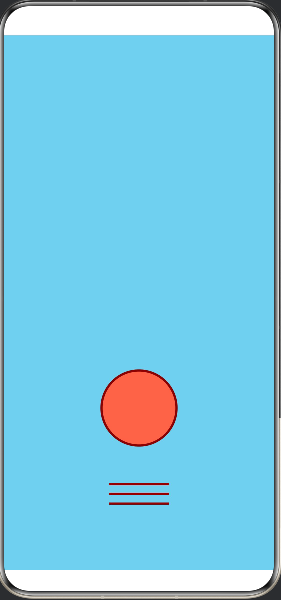
实现了落下的皮球动画效果。
动画特性:
1.物理模拟:
重力加速度:0.5
反弹系数:0.7(每次反弹高度降低)
每帧更新间隔:16ms(约60fps)
2.视觉效果:
🎾 红色皮球(番茄色 #FF6347)
深红色边框和条纹
天蓝色背景(#87CEEB)
球体半径:50像素
3.反弹动画:
落地时球体变形(变宽变扁)
水平缩放:1.2倍,垂直缩放:0.8倍
平滑的变形和恢复动画
4.生命周期管理:
页面加载时自动开始动画
页面销毁时清理定时器
皮球会从顶部开始下落,触底后反弹,每次反弹高度逐渐降低,最终停止。
@Entry
@Component
struct Index {
  @State ballY: number = -100
  @State ballScaleX: number = 1
  @State ballScaleY: number = 1

  private readonly screenHeight: number = 600
  private readonly ballRadius: number = 50
  private readonly gravity: number = 3
  private readonly bounceFactor: number = 0.85
  private velocity: number = 0
  private animationId: number = -1

  aboutToAppear() {
    this.startBallAnimation()
  }

  aboutToDisappear() {
    if (this.animationId !== -1) {
      clearInterval(this.animationId)
    }
  }

  startBallAnimation() {
    this.animationId = setInterval(() => {
      this.velocity += this.gravity
      this.ballY += this.velocity

      if (this.ballY >= this.screenHeight - this.ballRadius * 2) {
        this.ballY = this.screenHeight - this.ballRadius * 2
        this.velocity = -this.velocity * this.bounceFactor

        if (Math.abs(this.velocity) > 2) {
          animateTo({
            duration: 60,
            curve: Curve.EaseOut
          }, () => {
            this.ballScaleX = 1.4
            this.ballScaleY = 0.6
          })

          setTimeout(() => {
            animateTo({
              duration: 60,
              curve: Curve.EaseIn
            }, () => {
              this.ballScaleX = 1
              this.ballScaleY = 1
            })
          }, 60)
        }
      }
    }, 16)
  }

  build() {
    Stack() {
      Column() {
        // 皮球
        Circle()
          .width(this.ballRadius * 2)
          .height(this.ballRadius * 2)
          .fill('#FF6347')
          .stroke('#8B0000')
          .strokeWidth(3)
          .offset({ x: 0, y: this.ballY })
          .scale({ x: this.ballScaleX, y: this.ballScaleY })

        // 皮球上的条纹
        Column() {
          Row()
            .width(80)
            .height(3)
            .backgroundColor('#8B0000')
            .margin({ bottom: 10 })
          Row()
            .width(80)
            .height(3)
            .backgroundColor('#8B0000')
            .margin({ bottom: 10 })
          Row()
            .width(80)
            .height(3)
            .backgroundColor('#8B0000')
        }
        .offset({ x: 0, y: this.ballY + this.ballRadius })
        .scale({ x: this.ballScaleX, y: this.ballScaleY })
      }
    }
    .width('100%')
    .height('100%')
    .backgroundColor('#87CEEB')
  }

讨论HarmonyOS开发技术,专注于API与组件、DevEco Studio、测试、元服务和应用上架分发等。
更多推荐
 0
0 0
0- 0


 已为社区贡献44条内容

所有评论(0)