吉他手必备工具APP:HarmonyOS和弦查询器全栈开发详解
本文介绍了一款基于HarmonyOS的吉他手必备和弦查询APP的全栈开发过程。文章从数据层、渲染层、交互层和算法层四层架构详细拆解开发流程,重点讲解了Canvas指板图的高精度渲染技术。数据层采用类型安全的设计,通过枚举和工厂函数封装和弦数据;渲染层精确还原吉他视觉元素,包括弦线粗细、品丝、手指圆点等细节;交互层提供分类标签、搜索和详情页功能;算法层实现变调夹移调和搜索匹配等核心功能。整个项目使用
吉他手必备工具APP:HarmonyOS和弦查询器全栈开发详解
从数据工程到视觉渲染,解锁 Canvas 绘图的全部技巧
写在前面
做这个项目之前,我调研了几十款吉他类 APP,发现一个规律:好用的和弦工具几乎都围绕数据层和视觉层两个核心展开。
数据层决定了你能展示多少和弦、搜索有多快;视觉层决定了指板图有多直观。本项目的特点是 Canvas 指板图的高精度渲染——弦线粗细还原真实吉他、横按指示清晰可辨、根音颜色高亮。
本文按"数据层 → 渲染层 → 交互层 → 算法层"四层架构,完整拆解开发过程。
开发环境:DevEco Studio 5.0+ / SDK API 23
一、四层架构总览
┌──────────────────────────────────┐
│         交互层 (Interaction)       │
│  分类标签 / 搜索 / 详情页 / 导航   │
├──────────────────────────────────┤
│         算法层 (Algorithm)         │
│  变调夹移调 / 搜索匹配 / 推荐排序   │
├──────────────────────────────────┤
│         渲染层 (Rendering)        │
│  Canvas 2D / 指板图 / 颜色体系     │
├──────────────────────────────────┤
│         数据层 (Data)             │
│  和弦类型 / 指法数据 / 查询接口    │
└──────────────────────────────────┘
二、数据层:和弦库工程化
2.1 类型安全的设计
先用枚举定义所有和弦类型,避免字符串硬编码:
export enum ChordType {
  MAJOR = 'major',
  MINOR = 'minor',
  SEVENTH = '7th',
  MAJ7 = 'maj7',
  MIN7 = 'm7',
  SUS = 'sus',
  DIM = 'dim',
  AUG = 'aug',
  POWER = 'power'
}

export enum ChordCategory {
  OPEN = '开放和弦',
  BARRE = '大横按和弦',
  JAZZ = '爵士和弦'
}
2.2 数据接口设计
export interface Chord {
  name: string;           // "C", "Am", "G7"
  type: ChordType;
  category: ChordCategory;
  frets: number[];        // [-1, 3, 2, 0, 1, 0]
  fingers: number[];       // [0, 3, 2, 0, 1, 0]
  barre?: BarreInfo;       // 横按信息
  notes?: string[];        // ['-', 'C', 'E', 'G', 'C', 'E']
  description?: string;   // 指法文字说明
  groupTag?: string;      // CAGED 系统标签
}
2.3 工厂函数封装
为什么不直接用对象字面量?ArkTS 的严格模式下,对象字面量的类型推断偶尔失败。用工厂函数更安全:
function chord(
  name: string, type: ChordType, category: ChordCategory,
  frets: number[], fingers: number[], description: string,
  notes?: string[], barre?: BarreInfo
): Chord {
  const r: Chord = { name, type, category, frets, fingers, description };
  if (notes !== undefined) { r.notes = notes; }
  if (barre !== undefined) { r.barre = barre; }
  return r;
}
2.4 和弦数据编写
一个和弦数据的完整示例:
// C 和弦
chord(
  'C',                             // 名称
  ChordType.MAJOR,                 // 类型
  ChordCategory.OPEN,              // 分类
  [-1, 3, 2, 0, 1, 0],            // 品格位置
  [0, 3, 2, 0, 1, 0],             // 手指编号
  '无名指5弦3品 · 中指4弦2品 · 食指2弦1品',
  ['-', 'C', 'E', 'G', 'C', 'E']  // 每根弦的音名
)
2.5 横按和弦
横按和弦需要额外的 barre 字段:
// F 和弦(大横按)
chord(
  'F', ChordType.MAJOR, ChordCategory.BARRE,
  [1, 1, 2, 3, 3, 1],
  [1, 1, 2, 3, 4, 1],
  '食指横按1品 · 中指3弦2品 · 无名指4弦3品 · 小指5弦3品',
  ['F', 'C', 'F', 'A', 'C', 'F'],
  { fret: 1, startString: 6, endString: 1 }  // 食指横按1品,6弦到1弦
)
2.6 查询接口
// 获取所有分组
export function getAllChordGroups(): ChordGroup[] {
  return ALL_GROUPS;
}

// 获取全部和弦(扁平列表)
export function getAllChords(): Chord[] {
  const result: Chord[] = [];
  for (const group of ALL_GROUPS) {
    result.push(...group.chords);
  }
  return result;
}

// 模糊搜索
export function searchChords(query: string): Chord[] {
  const q = query.toLowerCase().trim();
  if (!q) return [];
  return getAllChords().filter(chord =>
    chord.name.toLowerCase().includes(q) ||
    chord.description?.toLowerCase().includes(q)
  );
}
三、渲染层:Canvas 指板图
这是本项目的核心难点。一个专业的指板图需要还原真实吉他的视觉效果。
3.1 视觉规格
| 元素 | 规格说明 |
|---|---|
| 弦线粗细 | 6弦3.2px → 1弦1.2px(线性递减) |
| 上枕 | 6px 粗线,深灰色 |
| 品丝 | 1.5px 细线,中灰色 |
| 手指圆点 | 蓝色(#2B5F8A),根音红色(#D14334) |
| 横按 | 蓝色圆弧矩形 + 白色"1" |
| 空弦标记 | 蓝色空心圆 O |
| 不弹标记 | 深色叉号 X |
| 音名 | 底部10px小字 |
| 背景 | 米黄色 #FFF9F0 |
3.2 布局坐标系
         paddingLeft=36
    ┌────────────────────────┐ pt=42
    │  ○  ○  ○  ○  ○  ○    │  ← 空弦/不弹标记区域
    ├════════════════════════┤  ← 上枕(6px粗线)
    │  │  │  │  │  │  │     │
    │  │  │  │  │  │  │     │  fretSpacing
    │  │  │  ●  │  │  │     │  ← 手指圆点
    │  │  │  │  │  │  │     │
    │  │  │  │  │  │  │     │
    ├───┴──┴──┴──┴──┴──┴─────┤
    │  C   E   G   C   E     │  ← 音名
    └────────────────────────┘
    pb=20
              paddingRight=16

    stringSpacing = drawWidth / 5
3.3 完整绘制代码
drawFretboard(): void {
  const ctx = this.context;
  const w = ctx.width;
  const h = ctx.height;

  const pl = 36, pr = 16, pt = 42, pb = 20;
  const drawW = w - pl - pr;
  const drawH = h - pt - pb;
  const stringSpacing = drawW / 5;
  const fretSpacing = drawH / 5;

  ctx.clearRect(0, 0, w, h);

  // ========== 背景 ==========
  ctx.fillStyle = '#FFF9F0';
  this.roundRect(ctx, 0, 0, w, h, 12);
  ctx.fill();

  // ========== 品丝 ==========
  ctx.strokeStyle = '#888888';
  ctx.lineWidth = 1.5;
  for (let f = 0; f <= 5; f++) {
    const y = pt + f * fretSpacing;
    ctx.beginPath();
    ctx.moveTo(pl, y);
    ctx.lineTo(pl + drawW, y);
    ctx.stroke();
  }

  // ========== 上枕(加粗) ==========
  ctx.strokeStyle = '#555555';
  ctx.lineWidth = 6;
  ctx.beginPath();
  ctx.moveTo(pl, pt);
  ctx.lineTo(pl + drawW, pt);
  ctx.stroke();
  ctx.lineWidth = 1.5;

  // ========== 弦线(粗细递减) ==========
  ctx.strokeStyle = '#999999';
  const widths = [3.2, 2.8, 2.4, 2.0, 1.6, 1.2];
  for (let s = 0; s < 6; s++) {
    ctx.lineWidth = widths[s];
    const x = pl + s * stringSpacing;
    ctx.beginPath();
    ctx.moveTo(x, pt);
    ctx.lineTo(x, pt + drawH);
    ctx.stroke();
  }

  // ========== 品号 ==========
  ctx.font = '12px sans-serif';
  ctx.textAlign = 'right';
  ctx.fillStyle = '#666666';
  for (let f = 0; f < 5; f++) {
    ctx.fillText(
      (startFret + f).toString(),
      pl - 8,
      pt + (f + 0.5) * fretSpacing
    );
  }

  const chord = this.chord;
  const frets = chord.frets;
  const fingers = chord.fingers;

  // ========== 手指圆点 ==========
  for (let s = 0; s < 6; s++) {
    const fret = frets[s];
    if (fret <= 0) continue;

    // 横按弦跳过(后面统一绘制)
    if (chord.barre) {
      const b = chord.barre;
      if (fret === b.fret && s >= (6 - b.endString) && s <= (6 - b.startString)) {
        continue;
      }
    }

    const x = pl + s * stringSpacing;
    const y = pt + (fret - startFret + 0.5) * fretSpacing;
    const r = Math.min(stringSpacing * 0.35, fretSpacing * 0.32);

    // 判断是否是根音
    const isRoot = chord.notes?.[s] && chord.notes[s] !== '-' && s >= 2;

    ctx.fillStyle = isRoot ? '#D14334' : '#2B5F8A';
    ctx.beginPath();
    ctx.arc(x, y, r, 0, Math.PI * 2);
    ctx.fill();

    // 手指编号
    if (fingers[s] > 0 && fingers[s] <= 4) {
      ctx.fillStyle = '#FFFFFF';
      ctx.font = `bold ${Math.max(11, r * 1.1)}px sans-serif`;
      ctx.textAlign = 'center';
      ctx.textBaseline = 'middle';
      ctx.fillText(fingers[s].toString(), x, y);
    }
  }

  // ========== 横按指示 ==========
  if (chord.barre) {
    const b = chord.barre;
    const sStart = 6 - b.endString;
    const sEnd = 6 - b.startString;
    const xS = pl + sStart * stringSpacing;
    const xE = pl + sEnd * stringSpacing;
    const yB = pt + (b.fret - startFret + 0.5) * fretSpacing;
    const br = Math.min(stringSpacing * 0.38, fretSpacing * 0.3);

    ctx.fillStyle = '#2B5F8A';
    ctx.beginPath();
    this.roundRect(ctx, xS - br, yB - br, xE - xS + br * 2, br * 2, br);
    ctx.fill();

    ctx.fillStyle = '#FFFFFF';
    ctx.font = `bold ${Math.max(12, br * 1.2)}px sans-serif`;
    ctx.textAlign = 'center';
    ctx.textBaseline = 'middle';
    ctx.fillText('1', (xS + xE) / 2, yB);
  }

  // ========== 空弦 O / 不弹 X ==========
  for (let s = 0; s < 6; s++) {
    const x = pl + s * stringSpacing;
    const y = pt - 10;

    if (frets[s] === 0) {
      ctx.strokeStyle = '#2B5F8A';
      ctx.lineWidth = 1.8;
      ctx.beginPath();
      ctx.arc(x, y, 7, 0, Math.PI * 2);
      ctx.stroke();
    } else if (frets[s] === -1) {
      ctx.strokeStyle = '#333333';
      ctx.lineWidth = 2;
      ctx.beginPath();
      ctx.moveTo(x - 5, y - 5); ctx.lineTo(x + 5, y + 5);
      ctx.moveTo(x + 5, y - 5); ctx.lineTo(x - 5, y + 5);
      ctx.stroke();
    }
  }

  // ========== 音名 ==========
  if (chord.notes) {
    ctx.font = '10px sans-serif';
    ctx.fillStyle = '#555555';
    ctx.textAlign = 'center';
    ctx.textBaseline = 'top';
    for (let s = 0; s < 6; s++) {
      if (chord.notes[s] && chord.notes[s] !== '-') {
        ctx.fillText(chord.notes[s], pl + s * stringSpacing, pt + drawH + 4);
      }
    }
  }
}
3.4 关键踩坑
坑1:Canvas 尺寸为 0
// ❌ 错误:在 build() 中直接绘制
build() {
  Canvas(this.context)
  this.drawFretboard(); // 此时 width/height 可能还是 0
}

// ✅ 正确:在 onReady() 回调中绘制
Canvas(this.context)
  .onReady(() => {
    this.drawFretboard();
  })
坑2:和弦切换不重绘
// 需要用 @Watch 监听变化
@Prop @Watch('onChordChange') chord: Chord;

onChordChange(): void {
  setTimeout(() => { this.drawFretboard(); }, 50);
}
坑3:圆弧矩形
// ArkUI Canvas 没有原生 roundRect,需要自己实现
roundRect(ctx: CanvasRenderingContext2D, x: number, y: number,
          w: number, h: number, r: number): void {
  ctx.moveTo(x + r, y);
  ctx.arcTo(x + w, y, x + w, y + h, r);
  ctx.arcTo(x + w, y + h, x, y + h, r);
  ctx.arcTo(x, y + h, x, y, r);
  ctx.arcTo(x, y, x + w, y, r);
  ctx.closePath();
}
四、交互层:首页与详情
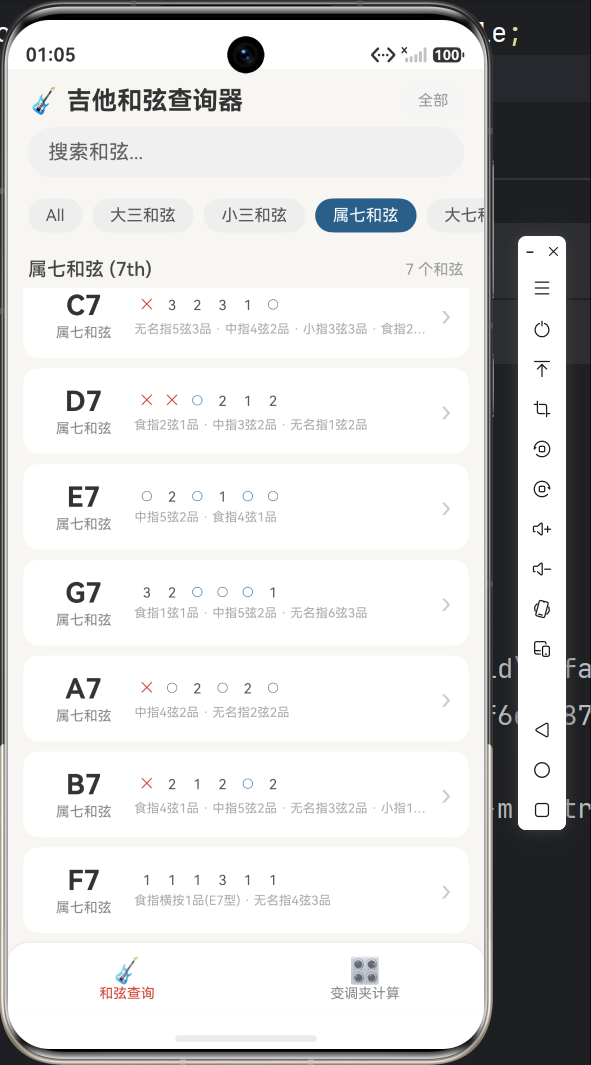
4.1 首页架构
┌─────────────────────────┐
│ 🎸 吉他和弦查询器        │  ← 标题栏
│ [全部][大三][小三][7th]...│  ← 分类标签(横向滚动)
│ 🔍 搜索和弦...           │  ← 搜索栏
│─────────────────────────│
│ 大三和弦 (Major)  7个和弦 │  ← 分类标题 + 计数
│ ┌─────────────────────┐ │
│ │ C    大三和弦    ○2  │ │  ← 和弦卡片
│ │ -1 3 2 0 1 0    ›  │ │
│ ├─────────────────────┤ │
│ │ D    大三和弦    ›  │ │
│ ├─────────────────────┤ │
│ │ E    大三和弦    ›  │ │
│ └─────────────────────┘ │
│─────────────────────────│
│ 🎸 和弦查询  🎛️ 变调夹  │  ← 底部导航
└─────────────────────────┘
4.2 和弦卡片
卡片需要在一行内展示:和弦名称 + 类型 + 品格缩略 + 箭头
@Builder
ChordCard(item: Chord) {
  Row() {
    // 左侧:名称
    Column() {
      Text(item.name)
        .fontSize(22)
        .fontWeight(FontWeight.Bold)
        .fontColor('#333333')
      Text(CHORD_TYPE_LABELS[item.type] ?? '')
        .fontSize(11)
        .fontColor('#888888')
    }
    .width(72)
    .alignItems(HorizontalAlign.Center)

    // 中部:品格缩略
    Column() {
      Row() {
        ForEach(item.frets, (fret: number) => {
          Text(fret === -1 ? '✕' : fret === 0 ? '○' : fret.toString())
            .width(20)
            .textAlign(TextAlign.Center)
            .fontColor(fret === -1 ? '#CC4444' : fret === 0 ? '#2B5F8A' : '#555')
        })
      }
      Text(item.description ?? '').fontSize(10).maxLines(1)
    }
    .layoutWeight(1)

    // 右侧:箭头
    Text('›').fontSize(22).fontColor('#CCC')
  }
  .height(68)
  .backgroundColor('#FFFFFF')
  .borderRadius(12)
  .onClick(() => {
    router.pushUrl({
      url: 'pages/ChordDetail',
      params: { chordName: item.name, chordType: item.type }
    });
  })
}
4.3 详情页布局
详情页分4个卡片区域:
┌─────────────────────────┐
│ ‹ 返回    和弦详情        │  ← 导航栏
│                         │
│ C   [大三和弦]           │  ← 名称 + 类型标签
│ 开放和弦                 │
│                         │
│ ┌─────────────────────┐ │
│ │  ○  ○  ✕            │ │
│ │═════════════════════│ │  ← 指板图(Canvas)
│ │  │  │  │  │  │  │  │ │
│ │  │  │ ●  │  │  │  │ │
│ │  │  ●  │  │  │  │  │ │
│ │  ─  E  G  C  E     │ │
│ └─────────────────────┘ │
│                         │
│ ┌─ 🎯 指法说明 ─────────┐ │
│ │无名指5弦3品·中指4弦2品 │ │
│ │食指2弦1品              │ │
│ │                       │ │
│ │ 6弦  5弦  4弦 3弦 2弦 1弦│
│ │  ✕   3    2   ○   1   ○│ │
│ └───────────────────────┘ │
│                         │
│ ┌─ 🎵 组成音 ───────────┐ │
│ │  [C]  [E]  [G]        │ │
│ └───────────────────────┘ │
│                         │
│ ┌─ 📋 其他大三和弦 ──────┐ │
│ │  [D] [E] [F] [G] [A]  │ │  ← 横向滚动推荐
│ └───────────────────────┘ │
└─────────────────────────┘
4.4 同类型推荐
推荐列表在点击后就地更新,无需跳转:
.onClick(() => {
  this.chordName = related.name;
  this.chordType = related.type;

  this.chord = getAllChords().find(c =>
    c.name === related.name && c.type === related.type
  );

  this.relatedChords = getAllChords()
    .filter(c => c.type === this.chord?.type && c.name !== this.chord?.name)
    .slice(0, 6);
})
五、算法层:变调夹计算
5.1 音乐理论基础
12 平均律:一个八度 = 12 个半音,每个音名占1个位置
位置: 0    1    2    3    4    5    6    7    8    9    10   11
音名: C    C#   D    D#   E    F    F#   G    G#   A    A#   B
5.2 移调公式
变调夹夹在第 N 品时,实际按弦的根音 = 目标音根音 - N 个半音
C 夹 3 品 → A(C 向左移动 3 位)
D 夹 2 品 → C(D 向左移动 2 位)
G 夹 7 品 → D(G 向左移动 7 位)
5.3 代码实现
export function applyCapo(chordName: string, capoFret: number): string {
  const noteNames = ['C','C#','D','D#','E','F','F#','G','G#','A','A#','B'];

  // 正则分离根音和后缀
  const match = chordName.match(/^([A-G][#b]?)(.*)$/);
  if (!match) return chordName;

  let root = match[1];
  const suffix = match[2];

  // 降号转升号
  const flatMap = { 'Bb':'A#', 'Db':'C#', 'Eb':'D#', 'Gb':'F#', 'Ab':'G#' };
  if (root.includes('b')) root = flatMap[root] || root;

  const idx = noteNames.indexOf(root);
  if (idx === -1) return chordName;

  // 核心计算:向左移动 N 个半音(模12)
  return noteNames[(idx - capoFret + 12) % 12] + suffix;
}
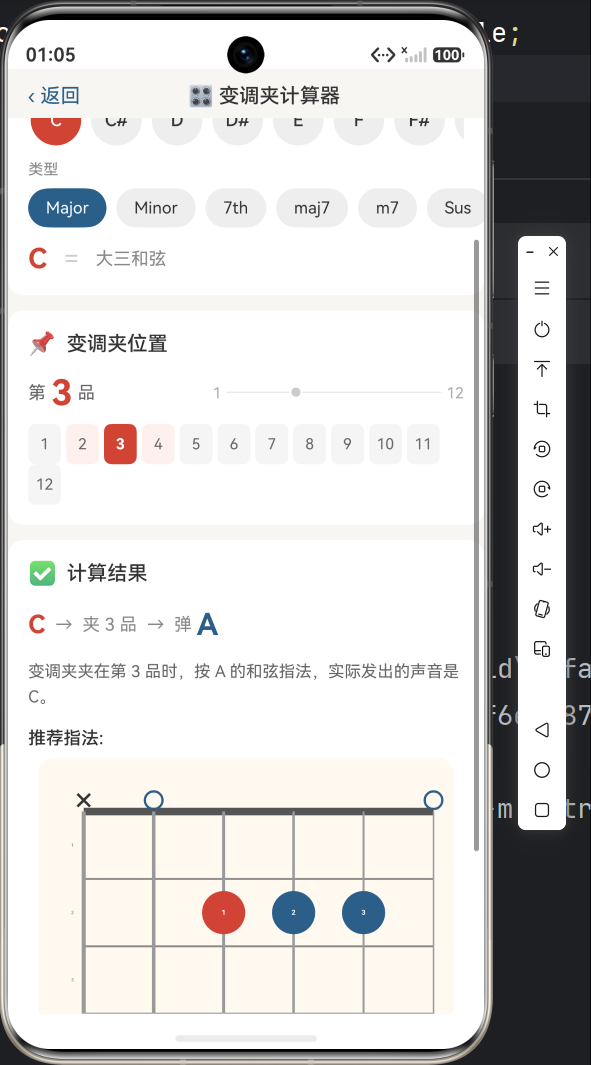
5.4 变调夹计算器 UI
计算器交互流程:
步骤1:选择根音(C, C#, D... 12个按钮)
步骤2:选择和弦类型(Major, Minor, 7th...)
步骤3:选择品格位置(1~12网格按钮)
步骤4:查看结果(公式展示 + 指法图)
@Component
struct CapoTool {
  @State selectedRoot: string = 'C';
  @State selectedType: ChordType = ChordType.MAJOR;
  @State capoFret: number = 3;
  @State resultChordName: string = '';
  @State resultChord: Chord | null = null;

  calculateResult(): void {
    const fullName = this.selectedRoot + this.getTypeSuffix(this.selectedType);
    this.resultChordName = applyCapo(fullName, this.capoFret);
    this.resultChord = getAllChords().find(c => c.name === this.resultChordName);
  }
}
计算结果展示:
C → 夹 3 品 → 弹 A

变调夹夹在第3品时,按 A 的和弦指法,
实际发出的声音是 C。
六、页面路由
6.1 路由配置
resources/base/profile/main_pages.json:
{
  "src": [
    "pages/Index",
    "pages/ChordDetail",
    "pages/CapoTool"
  ]
}
6.2 参数传递
import { router } from '@kit.ArkUI';

// 跳转 + 传参
router.pushUrl({
  url: 'pages/ChordDetail',
  params: {
    chordName: item.name,
    chordType: item.type
  }
});

// 接收参数
aboutToAppear(): void {
  const params = router.getParams() as Record<string, Object>;
  this.chordName = params['chordName'] as string;
  this.chordType = params['chordType'] as ChordType;
}

// 返回
router.back();
七、颜色体系
整个应用使用统一的颜色方案:
| 用途 | 颜色 | 说明 |
|---|---|---|
| 主色(按钮/高亮) | #D14334 | 吉他风格的砖红色 |
| 辅色(分类/指板) | #2B5F8A | 沉稳蓝 |
| 背景 | #F8F6F3 | 暖米色 |
| 指板背景 | #FFF9F0 | 浅米色 |
| 根音圆点 | #D14334 | 与主色统一 |
| 普通圆点 | #2B5F8A | 与辅色统一 |
| 不弹标记 | #333333 | 深灰 |
| 横按 | #2B5F8A | 与辅色统一 |
| 弦线 | #999999 | 中灰 |
八、运行效果
九、后续优化
- 音频引擎:集成音频播放,点击和弦发声
- 指法动画:逐弦演示手指放置顺序
- CAGED 系统:可视化展示 C-A-G-E-D 五种把位
- 调音器:结合麦克风实现实时调音
- 收藏夹:收藏常用和弦快速查找
- 主题切换:暗色模式适配
总结
本项目在四个层面做了一次完整的工程实践:
| 层级 | 核心技术 | 成果 |
|---|---|---|
| 数据层 | 枚举 + 工厂函数 + 分组查询 | 60+ 和弦,9 大类 |
| 渲染层 | Canvas 2D API(7步绘制) | 专业指板图 |
| 交互层 | 分类/搜索/详情/推荐 | 流畅的用户体验 |
| 算法层 | 12平均律 + 移调计算 | 实时变调夹工具 |
代码已在文中完整呈现,遇到问题欢迎评论区讨论!
技术栈:HarmonyOS NEXT + ArkTS + Canvas 2D
和弦数量:60+ | 页面数量:3 | 组件数量:1

讨论HarmonyOS开发技术,专注于API与组件、DevEco Studio、测试、元服务和应用上架分发等。
更多推荐


 7
7 0
0- 0


 已为社区贡献20条内容

所有评论(0)