鸿蒙 Harmony arkTS开发资源Resource string 字符串类型和数字number 变量连接方法,API9的string资源占位符功能
·
需求,多个相似的组件,传入不同的数字,或者字符串,然后根据传入值,把内容显示出来。
需要用到国际化的字符串和传入值一起连接起来,部分代码如下,资源部分不贴出来了。
@Extend(Line)
function lineStyle() {
  .width(CommonConstants.FULL_PARENT)
  .height($r('app.float.line_height'))
  .backgroundColor($r('app.color.line_color'))
}
@Entry
@Component
struct LoginPage {
//组件代码

@Builder HostCell(hostRes:Resource,index:number){
  Row(){
    Text(hostRes)
      .width(100)
      .height(40)
      .fontSize($r('app.float.login_font_size'))
      .textAlign(TextAlign.End)
      .backgroundColor($r('app.color.background'))
    TextInput({placeholder:$r('app.string.host')})
      .width(180)
      .height(40)
      .maxLength(16)
      .fontSize($r('app.float.login_font_size'))
      .backgroundColor($r('app.color.white'))
      .padding(FlexAlign.Center)
  }
  .width('90%')
  .justifyContent(FlexAlign.Center)
  .backgroundColor($r('app.color.background'))
}
//使用方法
build() {
  Column({space:10}) {
    Text($r('app.string.login'))
      .fontSize($r('app.float.page_title_text_size'))
      .margin({ top: $r('app.float.logo_margin_top'), bottom: $r('app.float.logo_margin_bottom') })
    ForEach(this.arr, (item: number) => {
      this.HostCell($r('app.string.hostLab',item.toString()),item)
      Line().lineStyle()
    }, (item: number) => item.toString())
    Row() {
      Text($r('app.string.remember_pass')).fontSize(18).height(40).width('70%').backgroundColor($r('app.color.background'))
      Toggle({ type: ToggleType.Switch }).width(60).height(40).backgroundColor($r('app.color.background'))
    }
    .backgroundColor($r('app.color.background'))
    .padding({left:10})
}
这里关键的一个地方是$r('app.string.hostLab',item.toString())
对应resources.base.element.string文件里
{
  "string": [
{
  "name": "hostLab",
  "value": "Host%s:"
}
]
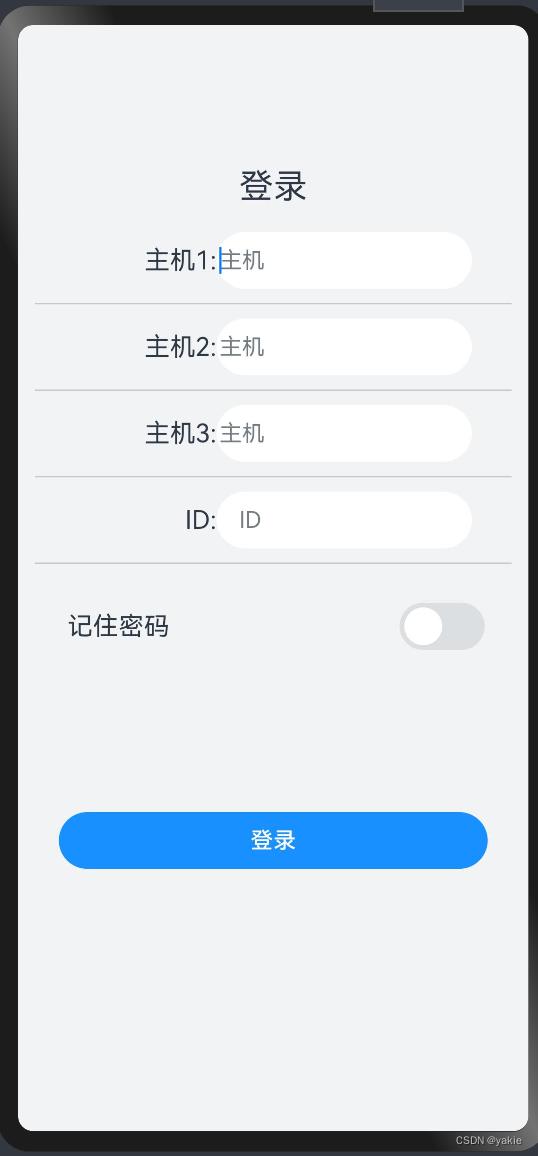
对应效果如图。

讨论HarmonyOS开发技术,专注于API与组件、DevEco Studio、测试、元服务和应用上架分发等。
更多推荐



 2
2 0
0- 0


 已为社区贡献5条内容

所有评论(0)