【鸿蒙】小鱼动画(附源码)
·
一、页面初始化准备
1.1调整布局和容器
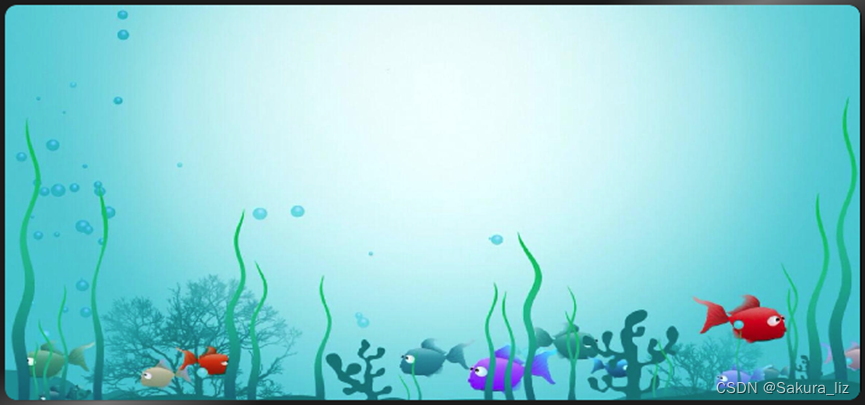
先设置一个Row布局,在写一个stack布局,同时设置背景图片,代码如下:
build() {
  Row() {
    Stack(){

    }
    .height('100%').width('100%')
  }
  .height('100%')
  .width('100%')
  .backgroundImage($r('app.media.sea'))
  .backgroundImageSize({height: '105%', width: '100%'})
}
二.绘制页面
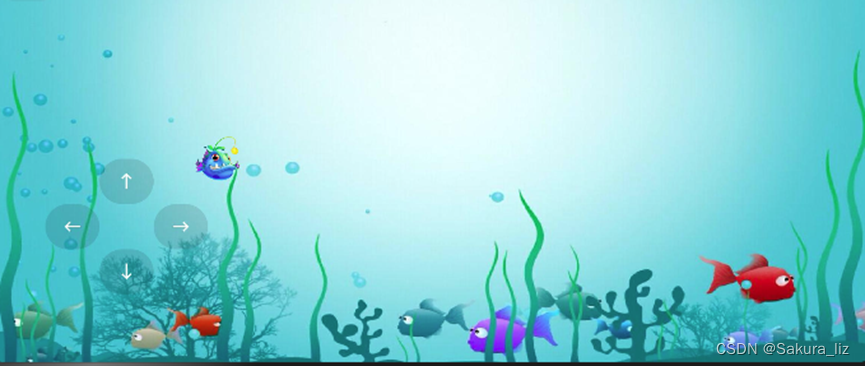
2.1 设置开始游戏和小鱼图片
设置一个isBegin 的默认值为False布尔变量,并且写一个小鱼图片地址的变量来处理转向的另一张图,再写小鱼的坐标变量。if判断,进而展示开始游戏按钮,然后游戏开始,就会显示小鱼图片以及操作按钮。代码如下:
@State isBegin: boolean = false
// 小鱼图片
@State src: Resource = $r('app.media.fish')
@State fishX: number = 200
@State fishY: number = 180

if(!this.isBegin){
  // 开始按钮
  Button('开始游戏')
    .onClick(() => {
      animateTo(
        {duration: 1000},
        () => {
          // 点击后显示小鱼
          this.isBegin = true
        }
      )
    })
}else{
  // 小鱼图片
  Image(this.src)
    .position({x: this.fishX - 20, y: this.fishY - 20})//使图片处于中间
    .rotate({angle:this.angle, centerX: '50%', centerY: '50%'})
    .width(40)
    .height(40)
2.2 设置操作按钮
通过线性布局设置操作按钮在屏幕的左下角,并设置背景色以及样式,代码如下:
Row(){
  Button('←').backgroundColor('#20101010')

  Column({space: 40}){
    Button('↑').backgroundColor('#20101010')
    Button('↓').backgroundColor('#20101010')
  }
  Button('→').backgroundColor('#20101010')
}
.height(240)
.width(240)
.justifyContent(FlexAlign.Center)
.position({x:0,y:120})
三、触发事件
3.1 左箭头的点击事件
要让鱼向左,那就用水平移动,向左变小,向右变大。所以代码如下:
.onClick(() => {
  this.fishX -= 20
})
3.2 右箭头的点击事件
要让鱼向右,那就用水平移动,向左变小,向右变大。所以代码如下:
.onClick(() => {
  this.fishX += 20
})
3.3 上箭头的点击事件
要让鱼向上,那就用垂直移动,向上变小,向下变大。所以代码如下:
.onClick(() => {
  this.fishY  -= 20
})
3.4 下箭头的点击事件
要让鱼向下,那就用垂直移动,向上变小,向下变大。所以代码如下:
.onClick(() => {
  this.fishY  += 20
})
四、添加动画
4.1 小鱼的动画
在小鱼图片属性下使用animation添加动画播放时长500ms,然后对左箭头的方向设置镜像图片。右箭头设置正常图片。具体代码如下:
.animation({duration: 500 })

  .onClick(() => {
    this.fishX -= 20
    this.src = $r('app.media.fish_rev')
  })


  .onClick(() => {
    this.fishX += 20
    this.src = $r('app.media.fish')
  })
4.2 显式动画优化
在箭头方向使用animateTo函数(全局函数)中设置 动画时长500ms,并移动坐标,改图片的镜像效果,代码如下:
Button('←').backgroundColor('#20101010')
  .onClick(() => {
    animateTo(
      {duration: 500},
      () => {
        this.fishX -= 20
        this.src = $r('app.media.fish_rev')
      }
    )
  })
然后复制粘贴三份,其中上下不需要修改图片,代码如下:
Button('↑').backgroundColor('#20101010')
  .onClick(() => {
    animateTo(
      {duration: 500},
      () => {
        this.fishY -= 20
      }
    )
  })
Button('↓').backgroundColor('#20101010')
  .onClick(() => {
    animateTo(
      {duration: 500},
      () => {
        this.fishY += 20
      }
    )
  })
Button('→').backgroundColor('#20101010')
  .onClick(() => {
    animateTo(
      {duration: 500},
      () => {
        this.fishX += 20
        this.src = $r('app.media.fish')
      }
    )
  })
4.3 转场动画
用transition给小鱼图片加转场动画,设置type的入场类型:TransitionType.Insert和不透明度opacity:0。然后使用translate来修改坐标,然后用animateTo来添加开始。
Image(this.src)
  .position({x: this.fishX - 20, y: this.fishY - 20})
  .rotate({angle:this.angle, centerX: '50%', centerY: '50%'})
  .width(40)
  .height(40)
  .animation({duration: 500, curve: Curve.Smooth})
  .transition({
    type: TransitionType.Insert,
    opacity: 0,
    translate: {x: -250}
  })
}
Button('开始游戏')
  .onClick(() => {
    animateTo(
      {duration: 1000},
      () => {
        // 点击后显示小鱼
        this.isBegin = true
      }
    )
五、源码
import router from '@ohos.router'
@Entry
@Component
struct AnimationPage {
  // 小鱼坐标
  @State fishX: number = 200
  @State fishY: number = 180
  // 小鱼角度
  @State angle: number = 0
  // 小鱼图片
  @State src: Resource = $r('app.media.fish')

  // 是否开始游戏
  @State isBegin: boolean = false

  build() {
    Row() {
      Stack(){
        // 返回按钮
        Button('返回')
          .position({x:0, y: 0})
          .backgroundColor('#20101010')
          .onClick(() => {
            // 返回上一页
            router.back()
          })

        if(!this.isBegin){
          // 开始按钮
          Button('开始游戏')
            .onClick(() => {
              animateTo(
                {duration: 1000},
                () => {
                  // 点击后显示小鱼
                  this.isBegin = true
                }
              )
            })
        }else{
          // 小鱼图片
          Image(this.src)
            .position({x: this.fishX - 20, y: this.fishY - 20})
            .rotate({angle:this.angle, centerX: '50%', centerY: '50%'})
            .width(40)
            .height(40)
            .animation({duration: 500, curve: Curve.Smooth})
            .transition({
              type: TransitionType.Insert,
              opacity: 0,
              translate: {x: -250}
            })
        }
        // 操作按钮
        Row(){
          Button('←').backgroundColor('#20101010')

          Column({space: 40}){
            Button('↑').backgroundColor('#20101010')
            Button('↓').backgroundColor('#20101010')
          }
          Button('→').backgroundColor('#20101010')
        }
        .height(240)
        .width(240)
        .justifyContent(FlexAlign.Center)
        .position({x:0,y:120})

      }
      .height('100%').width('100%')
    }
    .height('100%')
    .width('100%')
    .backgroundImage($r('app.media.sea'))
    .backgroundImageSize({height: '105%', width: '100%'})
  }
}

讨论HarmonyOS开发技术,专注于API与组件、DevEco Studio、测试、元服务和应用上架分发等。
更多推荐


 49
49 0
0- 0


 已为社区贡献5条内容

所有评论(0)