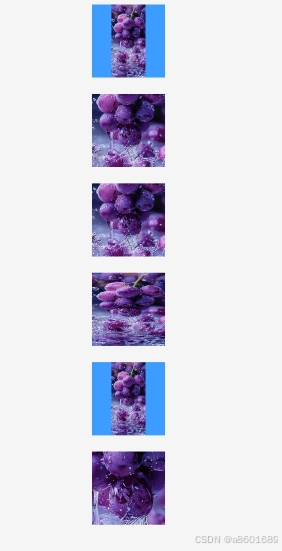
【安卓开发学习鸿蒙3】控件Image属性objectFit显示的6种方式
·
@Entry
@Component
struct Index {

  @State  imageUrl: string = 'https://img1.baidu.com/it/u=4133879726,3955771682&fm=253&fmt=auto&app=120&f=JPEG?w=500&h=1083';
  @State status: string = 'loading';
  @State loadingImg: Resource = $r('app.media.img_loading');
  @State errorImg: Resource = $r('app.media.img_error');


  build() {
    Column(){

      Image(this.imageUrl)
        .alt(this.status === 'loading' ? this.loadingImg : this.errorImg)// 使用alt,在网络图片加载成功前使用占位图
        .onError(() => {
          console.log('加载图片失败')
           this.status = 'error';
        })
        .width($r('app.float.img_size'))
        .height($r('app.float.img_size'))
        .margin({ top: 10, bottom: 8 ,left: 2, right: 2})
        .objectFit(ImageFit.Contain)//保持图片宽高比,缩小或者放大显示在容器内,确保图片完全显示在边界内
        .backgroundColor($r('app.color.light_blue'))  //外边距

      Image(this.imageUrl)
        .alt(this.status === 'loading' ? this.loadingImg : this.errorImg)// 使用alt,在网络图片加载成功前使用占位图
        .onError(() => {
          console.log('加载图片失败')
          this.status = 'error';
        })
        .width($r('app.float.img_size'))
        .height($r('app.float.img_size'))
        .margin({ top: 10, bottom: 8 ,left: 2, right: 2})
        .objectFit(ImageFit.Cover)//保持图片宽高比,是图片两边都大于或等于边界
        .backgroundColor($r('app.color.light_blue'))  //外边距

      Image(this.imageUrl)
        .alt(this.status === 'loading' ? this.loadingImg : this.errorImg)// 使用alt,在网络图片加载成功前使用占位图
        .onError(() => {
          console.log('加载图片失败')
          this.status = 'error';
        })
        .width($r('app.float.img_size'))
        .height($r('app.float.img_size'))
        .margin({ top: 10, bottom: 8 ,left: 2, right: 2})
        .objectFit(ImageFit.Auto)//图片会根据自身尺寸和组件尺寸进行缩放,在保存比例的同时填充视图
        .backgroundColor($r('app.color.light_blue'))  //外边距

      Image(this.imageUrl)
        .alt(this.status === 'loading' ? this.loadingImg : this.errorImg)// 使用alt,在网络图片加载成功前使用占位图
        .onError(() => {
          console.log('加载图片失败')
          this.status = 'error';
        })
        .width($r('app.float.img_size'))
        .height($r('app.float.img_size'))
        .margin({ top: 10, bottom: 8 ,left: 2, right: 2})
        .objectFit(ImageFit.Fill)//会使图片充满显示边界
        .backgroundColor($r('app.color.light_blue'))  //外边距

      Image(this.imageUrl)
        .alt(this.status === 'loading' ? this.loadingImg : this.errorImg)// 使用alt,在网络图片加载成功前使用占位图
        .onError(() => {
          console.log('加载图片失败')
          this.status = 'error';
        })
        .width($r('app.float.img_size'))
        .height($r('app.float.img_size'))
        .margin({ top: 10, bottom: 8 ,left: 2, right: 2})
        .objectFit(ImageFit.ScaleDown)//能让图片保存宽高比显示,图片缩小或者保持不变
        .backgroundColor($r('app.color.light_blue'))  //外边距

      Image(this.imageUrl)
        .alt(this.status === 'loading' ? this.loadingImg : this.errorImg)// 使用alt,在网络图片加载成功前使用占位图
        .onError(() => {
          console.log('加载图片失败')
          this.status = 'error';
        })
        .width($r('app.float.img_size'))
        .height($r('app.float.img_size'))
        .margin({ top: 10, bottom: 8 ,left: 2, right: 2})
        .objectFit(ImageFit.None)//按照原有尺寸显示
        .backgroundColor($r('app.color.light_blue'))  //外边距


  }
}

讨论HarmonyOS开发技术,专注于API与组件、DevEco Studio、测试、元服务和应用上架分发等。
更多推荐



 42
42 0
0- 0


 已为社区贡献5条内容

所有评论(0)