arkTS中实现页面跳转
·
arkTS中使用router进行页面跳转与数据传递操作
本文章仅使用于初学者快速上手实现功能,未对相应理论知识做出解释
第一步:创建跳转前的页面Index.ets和跳转后的页面Second.ets
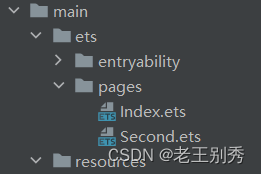
第二步:配置路由地址
在目录resources/base/profile下有一个文件main_pages.json,在该文件中添加跳转后的页面Second.ets的地址
{
  "src": [
    "pages/Index",
    "pages/Second"
  ]
}
第三步:上代码
跳转前页面Index.ets代码
//导入router
import router from '@ohos.router';
@Entry
@Component
struct Index {
  @State msg1:string="成功接收到传参"
  //声明变量,准备接收被调用页面返回的数据
  @State msg2:string="尚未返回数据"

  //函数onPagShow()能在每次跳转到本页面时执行
  //如果只在声明变量时接收返回数据,则只能在跳转前接收一次数据,而且因为接收数据发生在Second页面返回前所以不能成功接收数据,变量值为undefined
  onPageShow(){
    //每次返回本页面时接收一次返回的数据
    this.msg2=router.getParams()["msg2"]
  }
  build() {
    Column() {
      Row(){
        Text("这是第一页,"+this.msg2)
      }

      Row(){
        Button("下一页")
        .onClick(()=>{
          //使用router跳转
          router.pushUrl({
            //将要跳转页面的地址
            url:"pages/Second",
            //传递参数
            params:{
              msg1:this.msg1
            }
          })
        })
      }
    }
    .width('100%')
  }
}
将要跳转页面Second.ets代码
//导入router
import router from '@ohos.router';
@Entry
@Component
struct Second{
  //接受传参,方括号中的内容对应调用页面传递的参数名
  @State msg1:string=router.getParams()?.["msg1"]
  @State msg2:String="成功接收返回数据"
  build(){
    Column(){
      Row(){
        Text("这是第二页")
      }
      Row(){
        Text("接收到数据:"+this.msg1)
      }
      Row(){
        Button("返回")
        .onClick(()=>{
          //使用router返回跳转前的页面
          router.back({
            //返回页面地址,用逗号隔开
            url:"pages/Index",
            //返回数据
            params:{
              msg2:this.msg2
            }
          })
        })
      }
    }
    .width("100%")
  }
}
常见错误:
1、路由配置错误或没配置
2、接收返回数据时未使用onPageShow()函数

讨论HarmonyOS开发技术,专注于API与组件、DevEco Studio、测试、元服务和应用上架分发等。
更多推荐
 13
13 0
0- 0


 已为社区贡献3条内容

所有评论(0)