HarmonyOS NEXT 鸿蒙微信登录(保姆级)
·
一.在微信开放平台上申请AppID
需要填入Bundle ID(APP包名)和Identifier(AGC上架APP的标识)
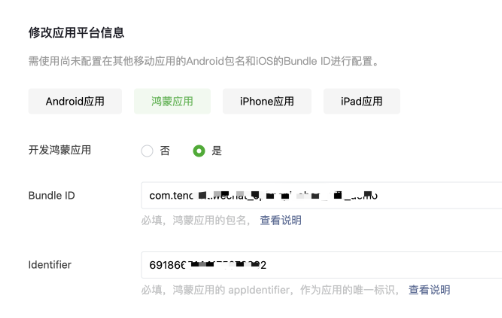
审核通过后,拿到一个APPID,在步骤3有大用
二.使用命令下载SDK依赖
ohpm i @tencent/wechat_open_sdk下载好了之后,oh-package中就有了微信的SDK

3.封装微信登录API,封装成一个.ets文件即可
import * as wxopensdk from '@tencent/wechat_open_sdk';
export const APP_ID: string = "" //微信开放平台上审核通过得到的APPID填进去

export type OnWXReq = (req: wxopensdk.BaseReq) => void
export type OnWXResp = (resp: wxopensdk.BaseResp) => void

class WXApiEventHandlerImpl implements wxopensdk.WXApiEventHandler {
  private onReqCallbacks: Map<OnWXReq, OnWXReq> = new Map
  private onRespCallbacks: Map<OnWXResp, OnWXResp> = new Map

  registerOnWXReqCallback(on: OnWXReq) {
    this.onReqCallbacks.set(on, on)
  }
  unregisterOnWXReqCallback(on: OnWXReq) {
    this.onReqCallbacks.delete(on)
  }

  registerOnWXRespCallback(on: OnWXResp) {
    this.onRespCallbacks.set(on, on)
  }
  unregisterOnWXRespCallback(on: OnWXResp) {
    this.onRespCallbacks.delete(on)
  }

  onReq(req: wxopensdk.BaseReq): void {
    wxopensdk.Log.i(kTag, "onReq:%s", JSON.stringify(req))
    this.onReqCallbacks.forEach((on) => {
      on(req)
    })
  }

  onResp(resp: wxopensdk.BaseResp): void {
    wxopensdk.Log.i(kTag, "onResp:%s", JSON.stringify(resp))
    this.onRespCallbacks.forEach((on) => {
      on(resp)
    })
  }
}

export const WXApi = wxopensdk.WXAPIFactory.createWXAPI(APP_ID) //用于调用sendReq,向微信端发送给消息
export const WXEventHandler = new WXApiEventHandlerImpl  //用于注册回调监听
4.在EntryAbility中添加代码,它们的作用:响应来自微信的回调
export default class EntryAbility extends UIAbility {
  onCreate(want: Want, _launchParam: AbilityConstant.LaunchParam): void {
    this.handleWeChatCallIfNeed(want)
  }

  onNewWant(want: Want, _launchParam: AbilityConstant.LaunchParam): void {
    this.handleWeChatCallIfNeed(want)
  }

  private handleWeChatCallIfNeed(want: Want) {  //放在与onCreate同级
    WXApi.handleWant(want, WXEventHandler)
  }
}
5.页面点击触发微信登录
import * as wxopensdk from '@tencent/wechat_open_sdk';
import { WXApi } from 'accomponentitemlib';
import { common } from '@kit.AbilityKit';

@State @Watch('wxLogin') authCode: string = '' // 拿到userCode就可以调用接口了
private onWXResp: OnWXResp = (resp) => {//从微信返回的回调
  this.authResult = JSON.stringify(resp ?? {}, null ,2)  //微信返回的数据
  this.authCode =JSON.parse(this.authResult).code
}

async wxLogin() {
//调用接口的逻辑(api)
}

async aboutToAppear() {
   WXEventHandler.registerOnWXRespCallback(this.onWXResp)
}

aboutToDisappear(){
  WXEventHandler.unregisterOnWXRespCallback(this.onWXResp)
}

text('微信登录').onClick(() => {
  let req = new wxopensdk.SendAuthReq  //new一个实例
  req.isOption1 = false
  req.nonAutomatic = true
  req.scope = 'snsapi_userinfo,snsapi_friend,snsapi_message,snsapi_contact'
  req.state = 'none'
  req.transaction ='test123'

  let loginState = await WXApi.sendReq(getContext() as common.UIAbilityContext, req)
  if (!loginState) {
    AlertDialog.show({ message: '微信未安装'})
  }
})
讨论HarmonyOS开发技术,专注于API与组件、DevEco Studio、测试、元服务和应用上架分发等。
更多推荐



 17
17 0
0- 0


 已为社区贡献6条内容

所有评论(0)