鸿蒙5.0开发【wukong稳定性工具使用指导】命令行工具
·
功能介绍
wukong是系统自带的一种命令行工具,支持Ability的随机事件注入、控件注入、异常捕获、报告生成和对Ability数据遍历截图等特性。通过模拟用户行为,对系统或应用进行稳定性压力测试。
wukong分为随机测试和专项测试。随机测试是指随机测试界面内容,支持的能力包括:shell启动、拉起整机应用、多种注入方式、设置随机种子、打印运行日志和生成报告。专项测试主要提供对指定应用控件进行测试,支持的能力包括:shell启动、顺序遍历及截图、测试休眠睡醒、录制回放、打印运行日志和生成报告。
实现原理
wukong部件架构图以及部件内子模块职责如下所述。
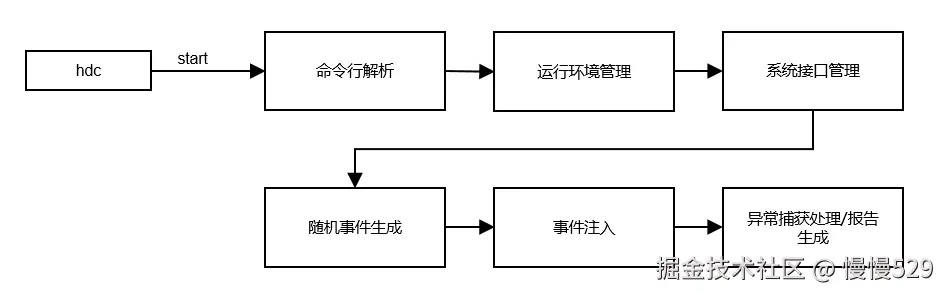
- 命令行解析:支持命令行获取参数并解析命令行参数。
- 运行环境管理:根据命令行初始化wukong整体运行环境。
- 系统接口管理:检查并获取指定的mgr,注册controller和dfx的faultlog的回调函数。
- 随机事件生成:通过random函数生成指定种子数的随机序列,生成事件。
- 事件注入:根据支持的事件类型向系统注入事件,依赖窗口、多模、安全等子系统。
- 异常捕获处理/报告生成:通过DFX子系统获取运行中的异常信息并记录log,生成报告。
约束与限制
-
wukong测试工具在API 9版本开始预置使用。
-
在低于API 9版本,不能随版本编译,使用时需自行编译后推送至被检测设备,具体步骤如下。
// 构建方式
./build.sh --product-name rk3568 --build-target wukong

// 推送方式
hdc shell mount -o rw,remount /
hdc file send wukong /
hdc shell chmod a+x /wukong
hdc shell mv /wukong /bin/
- PC被检测设备连接后,才可执行命令行,支持单个和多个设备。
功能特性及命令说明
| 命令 | 说明 | 备注 |
|---|---|---|
| version | 获取wukong版本信息。 | -v, --version。 |
| help | 获取wukong帮助信息。 | |
| appinfo | 查询支持拉起应用bundleName和对应的mainAbility名。 | |
| special | wukong专项测试。 | |
| exec | wukong随机测试。 | |
| focus | wukong专注测试。 |
随机测试
wukong随机测试命令参数
| 命令 | 功能 | 必选 | 备注 |
|---|---|---|---|
| -h,–help | 获取当前测试的帮助信息。 | 否 | |
| -c,–count | 设置执行次数,与设置执行时间-T冲突。二者取其一。 | 否 | 单位次数,默认10次。 |
| -i,–interval | 设置执行间隔。 | 否 | 单位ms,默认1500ms。 |
| -s,–seed | 设置随机种子。 | 否 | 配置相同随机种子,会生成相同随机事件序列。 |
| -b,–bundle[bundlename,……,bundlename] | 设置本次测试的允许应用名单,与-p冲突。 | 否 | 默认测试当前设备所有应用(应用名称用英文逗号隔开)。 |
| -p,–prohibit[bundlename,……,bundlename] | 设置本次测试的禁止应用名单,与-b冲突。 | 否 | 默认不禁止任何应用(应用名称用英文逗号隔开)。 |
| -d,–page[page,……,page] | 设置本次测试的禁止页面名单。 | 否 | 系统默认禁止pages/system页面(页面名称用逗号隔开)。 |
| -a,–appswitch | 设置应用随机拉起测试比例。 | 否 | 默认10%。 |
| -t,–touch | 设置屏幕随机touch测试比例。 | 否 | 默认10%。 |
| -S,–swap | 设置屏幕随机swap测试比例。 | 否 | 默认3%。 |
| -m,–mouse | 设置屏幕随机mouse测试比例。 | 否 | 默认1%。 |
| -k,–keyboard | 设置屏幕随机keyboard测试比例。 | 否 | 默认2%。 |
| -H,–hardkey | 设置随机hardkey测试比例。 | 否 | 默认2%。 |
| -r,–rotate | 设置随机rotate测试比例。 | 否 | 默认2%。 |
| -C, --component | 设置随机控件测试比例。 | 否 | 默认70%。 |
| -I, --screenshot | 控件测试截图。 | 否 | - |
| -T,–time | 设置测试总时间,与设置执行次数-c冲突。二者取其一。 | 否 | 单位分钟,默认10分钟。 |
| -e, --allow ability | 设置压测ability白名单 | 否 | - |
| -E, --block ability | 设置压测ability白名单 | 否 | - |
| -Y, --blockCompId | 设置不进行注入的CompId | 否 | - |
| -y, --blockCompType | 设置不进行注入的CompType | 否 | - |
| -B, --checkBWScreen | 设置启用黑白屏检测 | 否 | - |
专项测试
wukong专项测试命令参数
| 命令 | 功能 | 必选 | 备注 |
|---|---|---|---|
| -h, --help | 获取当前专项测试的帮助信息。 | 否 | |
| -k, --spec_insomnia | 休眠唤醒专项测试。 | 否 | - |
| -c, --count | 设置执行次数。 | 否 | 单位次数,默认10次。 |
| -i, --interval | 设置执行间隔。 | 否 | 单位ms,默认1500ms。 |
| -S, --swap | 滑动测试。 | 否 | - |
| -s, --start[x,y] | 设置滑动测试起点坐标。 | 否 | 坐标均为正值。 |
| -e, --end[x,y] | 设置滑动测试终点坐标。 | 否 | 坐标均为正值。 |
| -b, --bilateral | 设置往返滑动。 | 否 | 默认不往返滑动。 |
| -t, --touch[x,y] | 点击测试。 | 否 | - |
| -T, --time | 设置测试总时间。 | 否 | 单位分钟,默认10分钟。 |
| -C, --component | 控件顺序遍历测试。 | 否 | 需要设置测试应用名称。 |
| -r, --record | 录制。 | 否 | 需要指定录制文件。 |
| -R, --replay | 回放。 | 否 | 需要指定回放文件。 |
| -p, --screenshot | 控件测试截图。 | 否 | - |
专注测试
wukong专注测试命令参数
| 命令 | 功能 | 必选 | 备注 |
|---|---|---|---|
| -n,–numberfocus | 设置每个控件注入的次数。 | 否 | 单位次数。 |
| -f, --focustypes | 设置需要专注的控件类型。 | 否 | 以英文逗号隔开。 |
| 其余参数继承自随机测试命令参数。 |
命令行使用示例
以下操作需要先进入shell模式
#若为单设备,则直接输入如下命令进入shell模式
C:\Users>hdc shell
#

#若为多设备,则需先获取sn号,先输入hdc list targets获取sn号,然后进入shell模式
C:\Users>hdc list targets
15xxx424axxxx345209d94xxxx8fxx900
C:\Users>hdc -t 15xxx424axxxx345209d94xxxx8fxx900 shell
#
1.获取应用的bundle name和ability name
# wukong appinfo
BundleName:  com.ohos.adminprovisioning
AbilityName:  com.ohos.adminprovisioning.MainAbility
BundleName:  com.ohos.callui
AbilityName:  com.ohos.callui.MainAbility
2.执行随机测试命令
# wukong exec -s 10 -i 1000 -a 0.28 -t 0.72 -c 100
命令中各参数含义:
| 命令 | 参数值 | 说明 |
|---|---|---|
| wukong exec | - | 主命令。 |
| -s | 10 | 参数设置随机种子,10为种子值。 |
| -i | 1000 | 参数设置应用拉起间隔为1000ms。 |
| -a | 0.28 | 参数设置应用随机拉起测试比例28%。 |
| -t | 0.72 | 参数设置屏幕随机touch测试比例为72%。 |
| -c | 100 | 参数设置执行次数为100次。 |
3.执行专项测试命令
# wukong special -C [bundlename] -p
命令中各参数含义:
| 命令 | 参数值 | 说明 |
|---|---|---|
| wukong special | - | 主命令。 |
| -C [bundlename] | [bundlename] | 控件顺序遍历测试参数设置,bundlename为测试应用名称。 |
| -p | p | 表示截图。 |
4.执行查看帮助命令
C:\Users>hdc shell
# wukong --help        //wukong帮助菜单
wukong: '--help' is not a valid wukong command. See 'wukong help'.
usage: wukong <command> [<arguments>]
These are common wukong command list:
   help                       wukong help information
   -v/--version               wukong version
   exec                       run random test
   special                    run special test
   focus                      run focus test
   appinfo                    show all app information
# wukong exec -help   //wukong随机测试帮助菜单
usage: wukong exec [<arguments>]
These are wukong exec arguments list:
   -h, --help                 random test help
   -a, --appswitch            appswitch event percent
   -b, --bundle               the bundle name of allowlist
   -p, --prohibit             the bundle name of blocklist
   -d, --page                 block page list
   -t, --touch                touch event percent
   -c, --count                test count
   -i, --interval             interval
   -s, --seed                 random seed
   -m, --mouse                mouse event percent
   -k, --keyboard             keyboard event percent
   -H, --hardkey              hardkey event percent
   -S, --swap                 swap event percent
   -T, --time                 test time
   -C, --component            component event percent
   -r, --rotate               rotate event percent
   -e, --allow ability        the ability name of allowlist
   -E, --block ability        the ability name of blocklist
   -I, --screenshot           get screenshot(only in random input)
# wukong special -help    //wukong专项测试帮助菜单
usage: wukong special [<arguments>]
These are wukong special arguments list:
   -h, --help                 special test help
   -t, --touch[x,y]           touch event
   -c, --count                total count of test
   -i, --interval             interval
   -S, --swap[option]         swap event
                              option is -s| -e| -b
                              -s, --start: the start point of swap
                              -e, --end: the end point of swap
                              -b, --bilateral: swap go and back
   -k, --spec_insomnia        power on/off event
   -T, --time                 total time of test
   -C, --component            component event
   -p, --screenshot           get screenshot(only in componment input)
   -r, --record               record user operation
   -R, --replay               replay user operation
   -u, --uitest               uitest dumpLayout
查看测试结果
测试结果输出路径
执行完测试指令后,会自动生成测试结果,测试结果输出根路径如下:
- 2022/9/22之前的IDE版本,结果存放路径为:/data/local/wukong/report/xxxxxxxx_xxxxxx/
- 2022/9/22之后的IDE版本,结果存放路径为:/data/local/tmp/wukong/report/xxxxxxxx_xxxxxx/
测试报告文件目录
| 类型 | 描述 |
|---|---|
| exception/ | 存放本次测试产生的异常文件。 |
| screenshot/ | 存放测试遍历的截图。 |
| wukong_report.csv | 测试报告统计汇总。 |
| wukong.log | 测试操作历程。 |
查看操作日志
wukong支持通过hdc命令将日志获取到本地,查看操作历程。
// wukong.log文件对应路径如下
/data/local/tmp/wukong/report/xxxxxxxx_xxxxxx/wukong.log

// 查看wukong测试报告文件目录操作如下
# cd /data/local/tmp/wukong/report/20170805_170053
# ls
data.js  exception  wukong.log  wukong_report.csv

// 开启shell窗口,用hdc file recv获取wukong日志
C:\Users\xxx>hdc file recv /data/local/tmp/wukong/report/20170805_170053/wukong.log C:\Users\xxx\Desktop\log
[I][2024-01-03 20:08:02] HdcFile::TransferSummary success
FileTransfer finish, Size:76492, File count = 1, time:16ms rate:4780.75kB/s

讨论HarmonyOS开发技术,专注于API与组件、DevEco Studio、测试、元服务和应用上架分发等。
更多推荐

 8
8 0
0- 0


 已为社区贡献1211条内容

所有评论(0)