三方库适配实战:将Axios网络库迁移到鸿蒙平台
#跟着fruge365老师学鸿蒙# #鸿蒙# #harmonyOs# #三方库#
·
三方库适配实战:将Axios网络库迁移到鸿蒙平台
本文基于真实可运行的鸿蒙项目,完整展示如何将流行的Axios HTTP客户端库适配到HarmonyOS平台。
引言
在Web和Node.js开发中,Axios是最受欢迎的HTTP客户端库之一,拥有简洁的API、强大的拦截器机制和完善的错误处理。当我们将应用迁移到鸿蒙平台时,如何让熟悉的Axios继续工作?本文将以一个真实可运行的案例,详细讲解如何将Axios适配到鸿蒙平台,让您在鸿蒙开发中也能享受Axios带来的便利。
项目背景
我们要开发一个鸿蒙应用,需要调用JSONPlaceholder的RESTful API获取用户数据。团队成员都习惯使用Axios,希望能在鸿蒙平台上继续使用相同的API风格。因此,我们创建了一个Axios适配层,底层使用鸿蒙的@ohos.net.http模块,上层保持Axios的API接口。
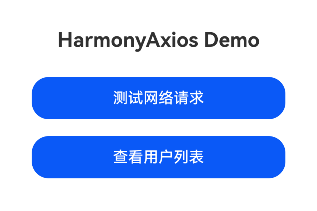
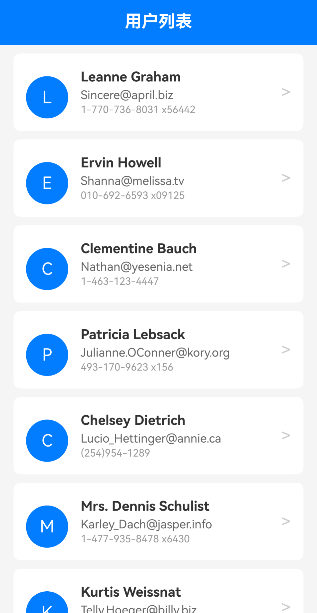
Demo演示功能:
- 首页快速测试网络请求
- 用户列表页面展示
- 用户详情查看与编辑
- 完整的加载状态和错误处理
核心目标
- 保持Axios的核心API风格(get、post、put、delete等)
- 支持超时控制和错误处理
- 完全基于鸿蒙原生API实现
- 提供完整的TypeScript类型支持
- 严格遵守ArkTS语法规范
一、ArkTS语法限制与解决方案
在开始实现之前,必须了解ArkTS的严格语法限制:
1.1 主要限制
| 限制类型 | 说明 | 解决方案 |
|---|---|---|
| 不支持any/unknown | 必须使用显式类型 | 使用Object、string或自定义类型 |
| 对象字面量不能作为类型 | 不能用interface定义复杂类型 |
改用class定义 |
| 不支持for...in循环 | 不能遍历对象属性 | 使用Map数据结构和forEach |
| 不支持展开运算符 | ...obj语法不可用 |
手动复制属性或使用Map |
| throw语句限制 | 只能throw Error类型 | 自定义Error子类 |
| 索引访问限制 | obj['key']不可用 |
使用点访问或Map |
1.2 类型系统差异
// 原始Axios写法(不符合ArkTS)
interface Config {
  headers?: Record<string, string>;
  data?: any;
}

// ArkTS兼容写法
export class Config {
  headers: Map<string, string> = new Map();
  data: string = '';
}
二、完整实现代码
2.1 核心类型定义
// entry/src/main/ets/common/utils/HarmonyAxios.ets

import http from '@ohos.net.http';

/**
 * HTTP请求方法枚举
 * 注意:ArkTS的@ohos.net.http只支持常见方法
 */
export enum Method {
  GET = 'GET',
  POST = 'POST',
  PUT = 'PUT',
  DELETE = 'DELETE'
}

/**
 * 请求配置类(使用class替代interface以符合ArkTS规范)
 */
export class AxiosRequestConfig {
  url: string = '';
  method: Method = Method.GET;
  baseURL: string = '';
  headers: Map<string, string> = new Map();  // 使用Map替代Record
  params: Map<string, string> = new Map();
  data: string = '';  // 明确类型为string
  timeout: number = 60000;
}

/**
 * 响应数据类
 */
export class AxiosResponse<T> {
  data: T;
  status: number = 0;
  statusText: string = '';
  headers: Map<string, string> = new Map();
  config: AxiosRequestConfig = new AxiosRequestConfig();

  constructor(data: T) {
    this.data = data;
  }
}

/**
 * 错误类
 */
export class AxiosError extends Error {
  config: AxiosRequestConfig = new AxiosRequestConfig();
  code: string = '';
  status: number = 0;
  isAxiosError: boolean = true;

  constructor(message: string) {
    super(message);
  }
}
2.2 HarmonyAxios核心实现
/**
 * HarmonyAxios - 符合ArkTS规范的Axios适配器
 */
export class HarmonyAxios {
  private defaultConfig: AxiosRequestConfig = new AxiosRequestConfig();

  constructor() {
    this.defaultConfig.timeout = 60000;
    this.defaultConfig.headers.set('Content-Type', 'application/json');
  }

  /**
   * 设置基础URL
   */
  setBaseURL(url: string): void {
    this.defaultConfig.baseURL = url;
  }

  /**
   * 设置超时时间
   */
  setTimeout(timeout: number): void {
    this.defaultConfig.timeout = timeout;
  }

  /**
   * 设置请求头
   */
  setHeader(key: string, value: string): void {
    this.defaultConfig.headers.set(key, value);
  }

  /**
   * 合并配置(避免使用展开运算符)
   */
  private mergeConfig(config: AxiosRequestConfig): AxiosRequestConfig {
    const merged = new AxiosRequestConfig();
    merged.url = config.url || this.defaultConfig.url;
    merged.method = config.method || this.defaultConfig.method;
    merged.baseURL = config.baseURL || this.defaultConfig.baseURL;
    merged.data = config.data || this.defaultConfig.data;
    merged.timeout = config.timeout || this.defaultConfig.timeout;

    // 使用Map.forEach替代for...in
    this.defaultConfig.headers.forEach((value: string, key: string) => {
      merged.headers.set(key, value);
    });
    config.headers.forEach((value: string, key: string) => {
      merged.headers.set(key, value);
    });

    // 合并params
    this.defaultConfig.params.forEach((value: string, key: string) => {
      merged.params.set(key, value);
    });
    config.params.forEach((value: string, key: string) => {
      merged.params.set(key, value);
    });

    return merged;
  }

  /**
   * 构建查询字符串
   */
  private buildQueryString(params: Map<string, string>): string {
    if (params.size === 0) {
      return '';
    }

    const parts: string[] = [];
    params.forEach((value: string, key: string) => {
      parts.push(`${encodeURIComponent(key)}=${encodeURIComponent(value)}`);
    });

    return '?' + parts.join('&');
  }

  /**
   * 核心请求方法
   */
  async request<T>(config: AxiosRequestConfig): Promise<AxiosResponse<T>> {
    const finalConfig = this.mergeConfig(config);

    // 构建完整URL
    let fullUrl = finalConfig.baseURL + finalConfig.url;
    if (finalConfig.params.size > 0) {
      fullUrl += this.buildQueryString(finalConfig.params);
    }

    const httpRequest = http.createHttp();

    try {
      // 转换Map为Record对象(鸿蒙HTTP API需要)
      const headerObj: Record<string, string> = {};
      finalConfig.headers.forEach((value: string, key: string) => {
        headerObj[key] = value;
      });

      // 转换HTTP方法
      let requestMethod = http.RequestMethod.GET;
      if (finalConfig.method === Method.GET) {
        requestMethod = http.RequestMethod.GET;
      } else if (finalConfig.method === Method.POST) {
        requestMethod = http.RequestMethod.POST;
      } else if (finalConfig.method === Method.PUT) {
        requestMethod = http.RequestMethod.PUT;
      } else if (finalConfig.method === Method.DELETE) {
        requestMethod = http.RequestMethod.DELETE;
      }

      // 发送请求
      const httpResponse = await httpRequest.request(fullUrl, {
        method: requestMethod,
        header: headerObj,
        extraData: finalConfig.data,
        readTimeout: finalConfig.timeout,
        connectTimeout: finalConfig.timeout
      });

      httpRequest.destroy();

      // 解析响应数据
      let responseData: T;
      if (typeof httpResponse.result === 'string') {
        try {
          responseData = JSON.parse(httpResponse.result) as T;
        } catch (e) {
          responseData = httpResponse.result as T;
        }
      } else {
        responseData = httpResponse.result as T;
      }

      // 构建响应对象
      const response = new AxiosResponse<T>(responseData);
      response.status = httpResponse.responseCode;
      response.statusText = httpResponse.responseCode === 200 ? 'OK' : 'Error';
      response.config = finalConfig;

      // 检查HTTP状态码
      if (httpResponse.responseCode < 200 || httpResponse.responseCode >= 300) {
        const error = new AxiosError(`Request failed with status code ${httpResponse.responseCode}`);
        error.config = finalConfig;
        error.status = httpResponse.responseCode;
        throw error;
      }

      return response;
    } catch (e) {
      httpRequest.destroy();
      if (e instanceof AxiosError) {
        throw e;
      }
      const error = new AxiosError('Network error');
      error.config = finalConfig;
      throw error;
    }
  }

  /**
   * GET请求
   */
  async get<T>(url: string): Promise<AxiosResponse<T>> {
    const config = new AxiosRequestConfig();
    config.url = url;
    config.method = Method.GET;
    return this.request<T>(config);
  }

  /**
   * POST请求
   */
  async post<T>(url: string, data: string): Promise<AxiosResponse<T>> {
    const config = new AxiosRequestConfig();
    config.url = url;
    config.method = Method.POST;
    config.data = data;
    return this.request<T>(config);
  }

  /**
   * PUT请求
   */
  async put<T>(url: string, data: string): Promise<AxiosResponse<T>> {
    const config = new AxiosRequestConfig();
    config.url = url;
    config.method = Method.PUT;
    config.data = data;
    return this.request<T>(config);
  }

  /**
   * DELETE请求
   */
  async delete<T>(url: string): Promise<AxiosResponse<T>> {
    const config = new AxiosRequestConfig();
    config.url = url;
    config.method = Method.DELETE;
    return this.request<T>(config);
  }
}

/**
 * 创建实例
 */
export function create(baseURL: string): HarmonyAxios {
  const instance = new HarmonyAxios();
  instance.setBaseURL(baseURL);
  return instance;
}

/**
 * 默认实例
 */
const defaultInstance = new HarmonyAxios();
export default defaultInstance;
三、实战应用场景
3.1 API配置
创建全局API客户端实例:
// entry/src/main/ets/common/utils/ApiConfig.ets

import { create } from './HarmonyAxios';

// 使用JSONPlaceholder作为测试API
const apiClient = create('https://jsonplaceholder.typicode.com');
apiClient.setTimeout(30000);
apiClient.setHeader('Content-Type', 'application/json');

export default apiClient;
3.2 用户服务封装
// entry/src/main/ets/services/UserService.ets

import apiClient from '../common/utils/ApiConfig';

// 用户数据类(使用class替代interface)
export class UserAddress {
  street: string = '';
  suite: string = '';
  city: string = '';
  zipcode: string = '';
}

export class UserCompany {
  name: string = '';
  catchPhrase: string = '';
  bs: string = '';
}

export class User {
  id: number = 0;
  name: string = '';
  username: string = '';
  email: string = '';
  phone: string = '';
  website: string = '';
  address: UserAddress = new UserAddress();
  company: UserCompany = new UserCompany();
}

class UserService {
  /**
   * 获取单个用户信息
   */
  async getUserInfo(userId: number): Promise<User> {
    const response = await apiClient.get<User>(`/users/${userId}`);
    return response.data;
  }

  /**
   * 获取用户列表
   */
  async getUserList(): Promise<User[]> {
    const response = await apiClient.get<User[]>('/users');
    return response.data;
  }

  /**
   * 更新用户信息
   */
  async updateUserInfo(userId: number, name: string, email: string): Promise<boolean> {
    const data = JSON.stringify({ name: name, email: email });
    const response = await apiClient.put<User>(`/users/${userId}`, data);
    return response.status === 200;
  }

  /**
   * 创建用户
   */
  async createUser(name: string, email: string): Promise<User> {
    const data = JSON.stringify({ name: name, email: email });
    const response = await apiClient.post<User>('/users', data);
    return response.data;
  }

  /**
   * 删除用户
   */
  async deleteUser(userId: number): Promise<boolean> {
    const response = await apiClient.delete<Object>(`/users/${userId}`);
    return response.status === 200;
  }
}

const userService = new UserService();
export default userService;
3.3 首页 - 快速测试
// entry/src/main/ets/pages/Index.ets

import router from '@ohos.router';
import axios from '../common/utils/HarmonyAxios';
import { User } from '../services/UserService';

@Entry
@Component
struct Index {
  @State message: string = 'HarmonyAxios Demo';
  @State testResult: string = '';
  @State isLoading: boolean = false;

  async testAxios() {
    this.isLoading = true;
    this.testResult = '请求中...';

    try {
      // 设置API地址
      axios.setBaseURL('https://jsonplaceholder.typicode.com');
      const response = await axios.get<User>('/users/1');
      const user = response.data;
      this.testResult = `请求成功!\n用户: ${user.name}\n邮箱: ${user.email}`;
    } catch (e) {
      this.testResult = `请求失败`;
    } finally {
      this.isLoading = false;
    }
  }

  navigateToUserList() {
    try {
      router.pushUrl({ url: 'pages/UserList' });
    } catch (e) {
      console.error('Navigation failed');
    }
  }

  build() {
    Column() {
      Text(this.message)
        .fontSize(24)
        .fontWeight(FontWeight.Bold)
        .margin({ top: 50, bottom: 30 })

      Button('测试网络请求')
        .width('80%')
        .height(50)
        .fontSize(18)
        .onClick(() => this.testAxios())

      Button('查看用户列表')
        .width('80%')
        .height(50)
        .fontSize(18)
        .margin({ top: 20 })
        .onClick(() => this.navigateToUserList())

      if (this.isLoading) {
        LoadingProgress()
          .width(50)
          .height(50)
          .margin({ top: 30 })
      }

      if (this.testResult) {
        Text(this.testResult)
          .fontSize(14)
          .width('80%')
          .margin({ top: 30 })
          .padding(15)
          .backgroundColor('#F5F5F5')
          .borderRadius(8)
      }
    }
    .width('100%')
    .height('100%')
    .justifyContent(FlexAlign.Center)
    .alignItems(HorizontalAlign.Center)
  }
}
3.4 用户列表页面
// entry/src/main/ets/pages/UserList.ets

import router from '@ohos.router';
import UserService, { User } from '../services/UserService';

// 路由参数类(避免使用any类型)
class RouterParams {
  userId: number = 0;
}

@Entry
@Component
struct UserList {
  @State users: User[] = [];
  @State isLoading: boolean = false;
  @State errorMessage: string = '';

  aboutToAppear() {
    this.loadUsers();
  }

  async loadUsers() {
    this.isLoading = true;
    this.errorMessage = '';

    try {
      this.users = await UserService.getUserList();
    } catch (e) {
      this.errorMessage = '加载失败,请稍后重试';
      console.error('加载用户列表失败');
    } finally {
      this.isLoading = false;
    }
  }

  navigateToDetail(userId: number) {
    try {
      const params = new RouterParams();
      params.userId = userId;
      router.pushUrl({
        url: 'pages/UserDetail',
        params: params
      });
    } catch (e) {
      console.error('Navigation failed');
    }
  }

  build() {
    Column() {
      // 标题栏
      Row() {
        Text('用户列表')
          .fontSize(20)
          .fontWeight(FontWeight.Bold)
          .fontColor(Color.White)
      }
      .width('100%')
      .height(56)
      .backgroundColor('#007DFF')
      .padding({ left: 16, right: 16 })
      .justifyContent(FlexAlign.Center)

      if (this.isLoading) {
        Column() {
          LoadingProgress()
            .width(50)
            .height(50)
            .color('#007DFF')
          Text('加载中...')
            .fontSize(14)
            .fontColor('#666666')
            .margin({ top: 10 })
        }
        .width('100%')
        .layoutWeight(1)
        .justifyContent(FlexAlign.Center)
      } else if (this.errorMessage) {
        Column() {
          Text(this.errorMessage)
            .fontSize(14)
            .fontColor(Color.Red)
          Button('重试')
            .margin({ top: 20 })
            .onClick(() => this.loadUsers())
        }
        .width('100%')
        .layoutWeight(1)
        .justifyContent(FlexAlign.Center)
      } else {
        List({ space: 10 }) {
          ForEach(this.users, (user: User) => {
            ListItem() {
              Row() {
                // 头像(使用首字母)
                Text(user.name.charAt(0).toUpperCase())
                  .fontSize(20)
                  .fontColor(Color.White)
                  .width(50)
                  .height(50)
                  .borderRadius(25)
                  .backgroundColor('#007DFF')
                  .textAlign(TextAlign.Center)
                  .margin({ top: 12 })

                // 用户信息
                Column() {
                  Text(user.name)
                    .fontSize(16)
                    .fontWeight(FontWeight.Bold)
                    .fontColor('#333333')
                  Text(user.email)
                    .fontSize(14)
                    .fontColor('#666666')
                    .margin({ top: 4 })
                  Text(user.phone)
                    .fontSize(12)
                    .fontColor('#999999')
                    .margin({ top: 2 })
                }
                .alignItems(HorizontalAlign.Start)
                .margin({ left: 15 })
                .layoutWeight(1)

                Text('>')
                  .fontSize(20)
                  .fontColor('#CCCCCC')
              }
              .width('100%')
              .padding(15)
              .backgroundColor(Color.White)
              .borderRadius(8)
              .onClick(() => this.navigateToDetail(user.id))
            }
          })
        }
        .width('100%')
        .layoutWeight(1)
        .padding({ left: 16, right: 16, top: 10, bottom: 10 })
      }
    }
    .width('100%')
    .height('100%')
    .backgroundColor('#F5F5F5')
  }
}
3.5 用户详情页面
// entry/src/main/ets/pages/UserDetail.ets

import router from '@ohos.router';
import promptAction from '@ohos.promptAction';
import UserService, { User } from '../services/UserService';

class RouterParams {
  userId: number = 0;
}

@Entry
@Component
struct UserDetail {
  @State userInfo: User | null = null;
  @State isLoading: boolean = false;
  @State errorMessage: string = '';
  @State isEditing: boolean = false;
  @State editName: string = '';
  @State editEmail: string = '';

  private userId: number = 0;

  aboutToAppear() {
    try {
      const params = router.getParams() as RouterParams;
      if (params) {
        this.userId = params.userId;
      }
    } catch (e) {
      this.userId = 1;
    }
    this.loadUserDetail();
  }

  async loadUserDetail() {
    this.isLoading = true;
    this.errorMessage = '';

    try {
      this.userInfo = await UserService.getUserInfo(this.userId);
      if (this.userInfo) {
        this.editName = this.userInfo.name;
        this.editEmail = this.userInfo.email;
      }
    } catch (e) {
      this.errorMessage = '加载失败,请稍后重试';
      console.error('加载用户详情失败');
    } finally {
      this.isLoading = false;
    }
  }

  async saveChanges() {
    if (!this.userInfo) return;

    try {
      const result = await UserService.updateUserInfo(
        this.userId,
        this.editName,
        this.editEmail
      );

      if (result) {
        try {
          promptAction.showToast({ message: '保存成功', duration: 2000 });
        } catch (e) {
          console.info('保存成功');
        }
        this.isEditing = false;
        await this.loadUserDetail();
      }
    } catch (e) {
      console.error('保存失败');
      try {
        promptAction.showToast({ message: '保存失败', duration: 2000 });
      } catch (e2) {
        console.error('Toast failed');
      }
    }
  }

  build() {
    Column() {
      // 标题栏
      Row() {
        Text('<')
          .fontSize(24)
          .fontColor(Color.White)
          .onClick(() => {
            try {
              router.back();
            } catch (e) {
              console.error('Back failed');
            }
          })

        Text('用户详情')
          .fontSize(20)
          .fontWeight(FontWeight.Bold)
          .fontColor(Color.White)
          .layoutWeight(1)
          .textAlign(TextAlign.Center)

        Text(this.isEditing ? '保存' : '编辑')
          .fontSize(16)
          .fontColor(Color.White)
          .onClick(() => {
            if (this.isEditing) {
              this.saveChanges();
            } else {
              this.isEditing = true;
            }
          })
      }
      .width('100%')
      .height(56)
      .backgroundColor('#007DFF')
      .padding({ left: 16, right: 16 })
      .justifyContent(FlexAlign.SpaceBetween)

      if (this.isLoading) {
        Column() {
          LoadingProgress()
            .width(50)
            .height(50)
            .color('#007DFF')
          Text('加载中...')
            .fontSize(14)
            .fontColor('#666666')
            .margin({ top: 10 })
        }
        .width('100%')
        .layoutWeight(1)
        .justifyContent(FlexAlign.Center)
      } else if (this.errorMessage) {
        Column() {
          Text(this.errorMessage)
            .fontSize(14)
            .fontColor(Color.Red)
          Button('重试')
            .margin({ top: 20 })
            .onClick(() => this.loadUserDetail())
        }
        .width('100%')
        .layoutWeight(1)
        .justifyContent(FlexAlign.Center)
      } else if (this.userInfo) {
        Scroll() {
          Column() {
            // 头像
            Text(this.userInfo.name.charAt(0).toUpperCase())
              .fontSize(40)
              .fontColor(Color.White)
              .width(100)
              .height(100)
              .borderRadius(50)
              .backgroundColor('#007DFF')
              .textAlign(TextAlign.Center)
              .margin({ top: 30, bottom: 8 })

            // 基本信息卡片
            Column() {
              if (this.isEditing) {
                // 编辑模式
                Column() {
                  Text('姓名')
                    .fontSize(14)
                    .fontColor('#666666')
                    .width('100%')
                  TextInput({ text: this.editName })
                    .fontSize(16)
                    .margin({ top: 5 })
                    .onChange((value: string) => {
                      this.editName = value;
                    })
                }
                .alignItems(HorizontalAlign.Start)
                .width('100%')
                .margin({ bottom: 15 })

                Column() {
                  Text('邮箱')
                    .fontSize(14)
                    .fontColor('#666666')
                    .width('100%')
                  TextInput({ text: this.editEmail })
                    .fontSize(16)
                    .margin({ top: 5 })
                    .onChange((value: string) => {
                      this.editEmail = value;
                    })
                }
                .alignItems(HorizontalAlign.Start)
                .width('100%')
                .margin({ bottom: 15 })
              } else {
                // 查看模式
                this.InfoRow('姓名', this.userInfo.name)
                this.InfoRow('用户名', this.userInfo.username)
                this.InfoRow('邮箱', this.userInfo.email)
              }

              this.InfoRow('电话', this.userInfo.phone)
              this.InfoRow('网站', this.userInfo.website)

              if (this.userInfo.address) {
                this.InfoRow('地址', `${this.userInfo.address.city}, ${this.userInfo.address.street}`)
              }

              if (this.userInfo.company) {
                this.InfoRow('公司', this.userInfo.company.name)
              }
            }
            .width('100%')
            .backgroundColor(Color.White)
            .borderRadius(8)
            .padding(20)
            .margin({ top: 20 })

            if (this.isEditing) {
              Button('取消')
                .width('100%')
                .height(45)
                .margin({ top: 20 })
                .backgroundColor('#CCCCCC')
                .onClick(() => {
                  this.isEditing = false;
                  if (this.userInfo) {
                    this.editName = this.userInfo.name;
                    this.editEmail = this.userInfo.email;
                  }
                })
            }
          }
          .width('100%')
          .padding(20)
        }
        .layoutWeight(1)
      }
    }
    .width('100%')
    .height('100%')
    .backgroundColor('#F5F5F5')
  }

  @Builder
  InfoRow(label: string, value: string) {
    Column() {
      Text(label)
        .fontSize(14)
        .fontColor('#666666')
        .width('100%')
      Text(value)
        .fontSize(16)
        .fontColor('#333333')
        .width('100%')
        .margin({ top: 5 })
    }
    .alignItems(HorizontalAlign.Start)
    .width('100%')
    .margin({ bottom: 15 })
  }
}
四、项目配置
4.1 配置网络权限
在entry/src/main/module.json5中添加:
{
  "module": {
    "requestPermissions": [
      {
        "name": "ohos.permission.INTERNET"
      }
    ]
  }
}

4.2 配置页面路由
在entry/src/main/resources/base/profile/main_pages.json中添加:
{
  "src": [
    "pages/Index",
    "pages/UserList",
    "pages/UserDetail"
  ]
}
4.3 项目结构
harmony_axios_demo/
├── entry/
│   └── src/
│       └── main/
│           ├── ets/
│           │   ├── common/
│           │   │   └── utils/
│           │   │       ├── HarmonyAxios.ets    # 核心适配器
│           │   │       └── ApiConfig.ets       # API配置
│           │   ├── services/
│           │   │   └── UserService.ets         # 用户服务
│           │   └── pages/
│           │       ├── Index.ets               # 首页
│           │       ├── UserList.ets            # 用户列表
│           │       └── UserDetail.ets          # 用户详情
│           ├── resources/
│           └── module.json5
└── README.md
五、关键技术点总结
5.1 ArkTS适配要点
-
使用Map替代对象字面量
// 不符合ArkTS headers: Record<string, string> // 符合ArkTS headers: Map<string, string> -
使用forEach替代for...in
// 不符合ArkTS for (const key in obj) { } // 符合ArkTS map.forEach((value, key) => { }) -
明确所有类型,避免any
// 不符合ArkTS data: any // 符合ArkTS data: string -
异常处理必须try-catch
// 所有可能抛出异常的API都要包裹
try {
  router.pushUrl({ url: 'pages/UserList' });
} catch (e) {
  console.error('Navigation failed');
}
5.2 HTTP请求处理
- 请求数据序列化:手动调用
JSON.stringify() - 响应数据解析:处理string和object两种情况
- HTTP方法映射:将Method枚举映射到
http.RequestMethod - 资源管理:请求完成后调用
httpRequest.destroy()
5.3 错误处理策略
- 网络错误:捕获连接失败、超时等异常
- HTTP错误:检查状态码,抛出AxiosError
- JSON解析错误:try-catch处理解析失败
- UI反馈:加载状态、错误提示、重试机制
八、参考资源
官方文档
相关技术

讨论HarmonyOS开发技术,专注于API与组件、DevEco Studio、测试、元服务和应用上架分发等。
更多推荐

 24
24 23
23- 0


 已为社区贡献7条内容

所有评论(0)