HarmonyOS Web子系统实战:打造高性能混合应用
#跟着fruge365老师学鸿蒙# #鸿蒙# #harmonyOs# #web子系统#
HarmonyOS Web子系统实战:打造高性能混合应用
引言
在移动应用开发领域,混合应用开发模式凭借其高开发效率、强跨平台能力以及灵活的内容更新机制,成为企业级应用开发的重要选择。HarmonyOS的Web子系统基于Chromium渲染引擎,为开发者提供了强大而完善的Web渲染能力,支持在原生应用中无缝嵌入Web内容。
本文将通过构建一个完整的"科技资讯"混合应用,系统性地讲解HarmonyOS Web子系统的核心功能和最佳实践。我们将涵盖原生与Web的双向通信、生命周期管理、性能优化策略、安全性考虑等关键技术点,并提供可直接运行的完整项目代码。
本文涵盖内容:
- Web组件的核心API使用方法
- JavaScript Bridge的实现机制
- 原生-Web通信的最佳实践
- 性能优化与调试技巧
- 最新SDK的API适配方案
一、项目案例介绍
1.1 案例背景与功能规划
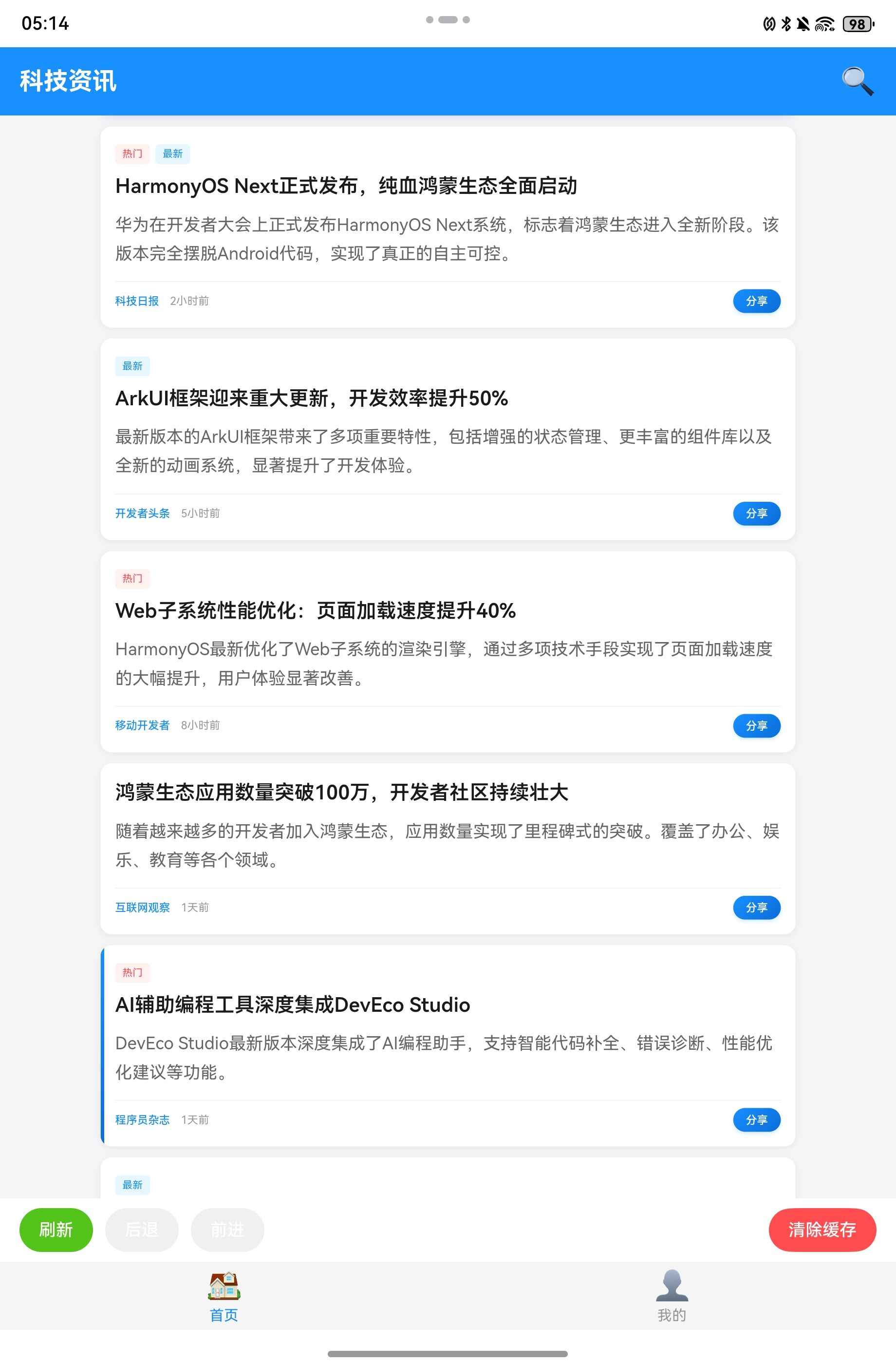
本文将构建一个"科技资讯"混合应用作为完整案例。该应用采用"原生框架+Web内容"的架构模式,充分发挥两者优势:原生层负责应用框架和核心交互,Web层负责内容展示和业务逻辑。
核心功能模块:
- 原生导航系统:Tab导航栏、页面路由管理
- Web内容展示:新闻列表页、新闻详情页
- 双向通信机制:原生调用Web方法、Web调用原生能力
- 用户体验优化:页面加载进度提示、错误处理
- 技术增强功能:JavaScript动态注入、本地资源访问
- 性能管理:页面缓存策略、历史记录管理
页面示例:
1.2 技术架构
本应用采用分层架构设计,清晰划分各层职责:
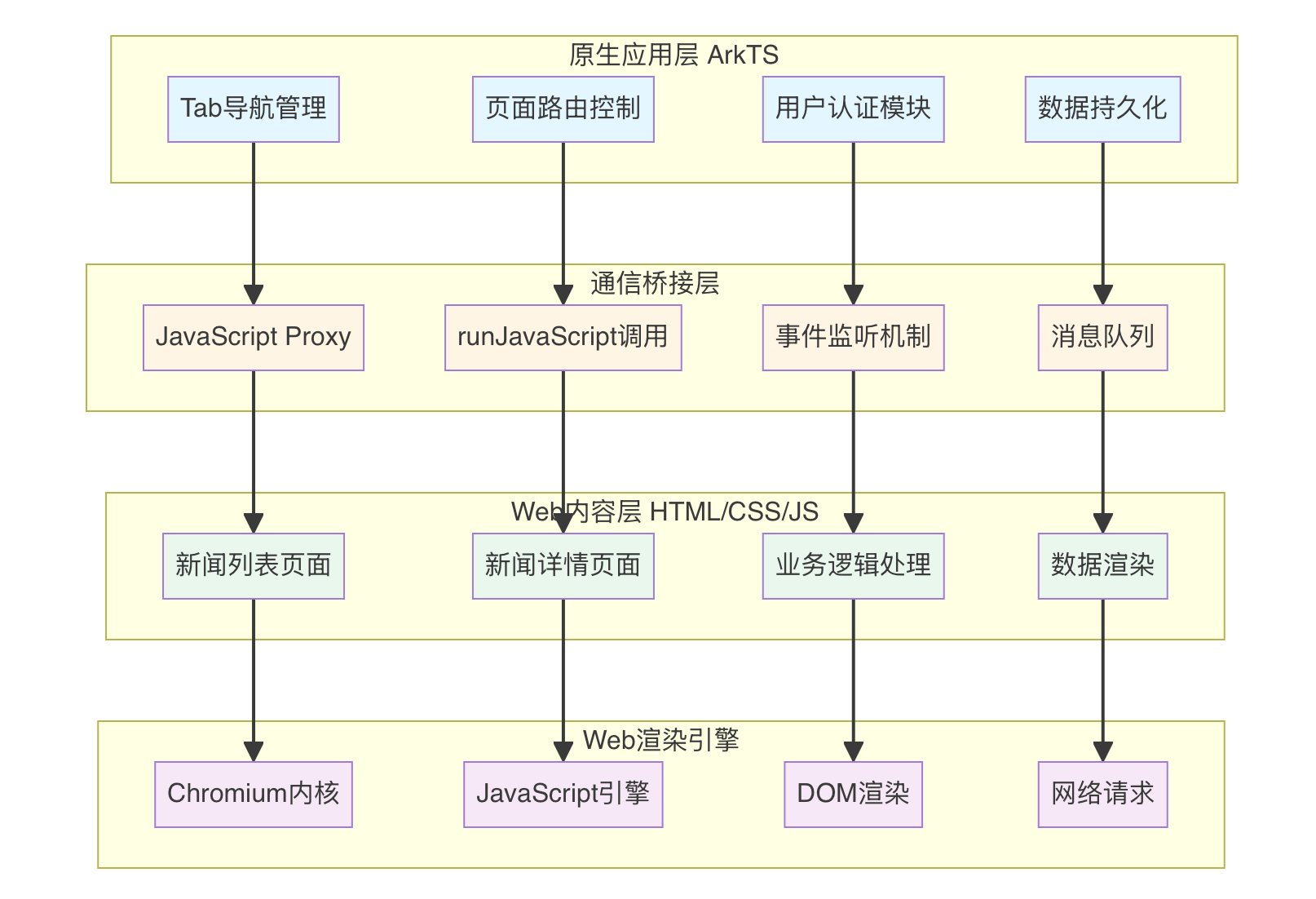
架构层级说明:
| 层级 | 职责 | 技术栈 |
|---|---|---|
| 原生应用层 | 应用框架、核心交互、系统能力调用 | ArkTS、ArkUI组件 |
| 通信桥接层 | 原生与Web的双向通信、数据转换 | WebviewController API |
| Web内容层 | 内容展示、用户交互、业务逻辑 | HTML5、CSS3、JavaScript |
| Web渲染引擎 | 页面渲染、脚本执行、网络请求 | Chromium |
数据流向:
- 下行通信:原生层 → 桥接层 → Web层(通过runJavaScript注入)
- 上行通信:Web层 → 桥接层 → 原生层(通过JavaScript Proxy调用)
二、Web组件核心能力
2.1 Web组件基础使用
Web组件是HarmonyOS提供的用于展示Web内容的容器组件。
基本用法:
import web_webview from '@ohos.web.webview'

@Entry
@Component
struct WebPage {
  webController: web_webview.WebviewController = new web_webview.WebviewController()

  build() {
    Column() {
      Web({
        src: 'https://www.example.com',
        controller: this.webController
      })
        .width('100%')
        .height('100%')
    }
  }
}
2.2 Web组件主要API
| API | 功能 | 使用场景 |
|---|---|---|
| loadUrl | 加载指定URL | 页面跳转、刷新 |
| loadData | 加载HTML数据 | 本地HTML渲染 |
| runJavaScript | 执行JavaScript | 调用网页方法 |
| registerJavaScriptProxy | 注册对象到网页 | 原生方法暴露给Web |
| onPageBegin | 页面开始加载回调 | 显示加载动画 |
| onPageEnd | 页面加载完成回调 | 隐藏加载动画 |
| onProgressChange | 加载进度回调 | 进度条更新 |
| onConsole | 控制台消息回调 | 调试Web内容 |
三、完整案例实现
3.1 项目结构
src/
├── main/
│   ├── ets/
│   │   ├── entryability/
│   │   │   └── EntryAbility.ets
│   │   └── pages/
│   │       ├── Index.ets              # 主页面
│   │       ├── NewsWebPage.ets        # 新闻Web页面
│   │       └── MinePage.ets           # 我的页面
│   └── resources/
│       ├── rawfile/
│       │   ├── news_list.html         # 新闻列表页
│       │   ├── news_detail.html       # 新闻详情页
│       │   └── js/
│       │       └── bridge.js          # 桥接脚本
│       └── base/
│           ├── element/
│           └── media/
3.2 主页面实现(Index.ets)
import web_webview from '@ohos.web.webview'

@Entry
@Component
struct Index {
  @State currentTabIndex: number = 0
  private tabsController: TabsController = new TabsController()

  build() {
    Column() {
      // 顶部导航栏
      Row() {
        Text('科技资讯')
          .fontSize(20)
          .fontWeight(FontWeight.Bold)
          .fontColor(Color.White)

        Blank()

        Image($r('app.media.search_icon'))
          .width(24)
          .height(24)
          .fillColor(Color.White)
          .onClick(() => {
            // 搜索功能
          })
      }
      .width('100%')
      .height(56)
      .padding({ left: 16, right: 16 })
      .backgroundColor('#1890ff')

      // 内容区域
      Tabs({
        barPosition: BarPosition.End,
        controller: this.tabsController
      }) {
        TabContent() {
          NewsWebPage()
        }
        .tabBar(this.TabBuilder(0, '首页', $r('app.media.home_icon')))

        TabContent() {
          MinePage()
        }
        .tabBar(this.TabBuilder(1, '我的', $r('app.media.mine_icon')))
      }
      .layoutWeight(1)
      .barMode(BarMode.Fixed)
      .onChange((index: number) => {
        this.currentTabIndex = index
      })
    }
    .width('100%')
    .height('100%')
    .backgroundColor('#f5f5f5')
  }

  @Builder TabBuilder(index: number, title: string, icon: Resource) {
    Column() {
      Image(icon)
        .width(24)
        .height(24)
        .fillColor(this.currentTabIndex === index ? '#1890ff' : '#999')

      Text(title)
        .fontSize(12)
        .fontColor(this.currentTabIndex === index ? '#1890ff' : '#999')
        .margin({ top: 4 })
    }
    .width('100%')
    .height('100%')
    .justifyContent(FlexAlign.Center)
  }
}
3.3 新闻Web页面核心实现(NewsWebPage.ets)
import web_webview from '@ohos.web.webview'
import router from '@ohos.router'
import promptAction from '@ohos.promptAction'

// 定义原生方法对象
class WebJavaScriptProxy {
  constructor() {}

  // 跳转到详情页
  openNewsDetail(newsId: string): void {
    console.info('打开新闻详情:' + newsId)
    router.pushUrl({
      url: 'pages/NewsDetailPage',
      params: { newsId: newsId }
    }).catch((error: Error) => {
      console.error('页面跳转失败:' + JSON.stringify(error))
    })
  }

  // 分享新闻
  shareNews(title: string, url: string): void {
    console.info('分享新闻:' + title + ', URL: ' + url)
    try {
      promptAction.showToast({
        message: '分享功能:' + title,
        duration: 2000
      })
    } catch (error) {
      console.error('显示Toast失败:' + error)
    }
  }

  // 获取用户Token
  getUserToken(): string {
    // 从原生存储中获取Token
    return 'user_token_123456789'
  }

  // 显示Toast
  showToast(message: string): void {
    try {
      promptAction.showToast({
        message: message,
        duration: 2000
      })
    } catch (error) {
      console.error('显示Toast失败:' + error)
    }
  }

  // 收藏新闻
  favoriteNews(newsId: string): void {
    console.info('收藏新闻:' + newsId)
    try {
      promptAction.showToast({
        message: '已添加到收藏',
        duration: 2000
      })
    } catch (error) {
      console.error('显示Toast失败:' + error)
    }
  }
}

@Component
export struct NewsWebPage {
  webController: web_webview.WebviewController = new web_webview.WebviewController()
  @State progressValue: number = 0
  @State isLoading: boolean = true
  @State canGoBack: boolean = false
  @State canGoForward: boolean = false
  javaScriptProxy: WebJavaScriptProxy = new WebJavaScriptProxy()

  aboutToAppear() {
    // 配置Web调试模式
    web_webview.WebviewController.setWebDebuggingAccess(true)
  }

  build() {
    Column() {
      // 加载进度条
      if (this.isLoading) {
        Progress({
          value: this.progressValue,
          total: 100,
          type: ProgressType.Linear
        })
          .width('100%')
          .height(3)
          .color('#1890ff')
      }

      // Web组件
      Web({
        src: $rawfile('news_list.html'),
        controller: this.webController
      })
        .width('100%')
        .layoutWeight(1)
        .javaScriptAccess(true)
        .domStorageAccess(true)
        .fileAccess(true)
        .mixedMode(MixedMode.All)
        .cacheMode(CacheMode.Default)
        .userAgent('HarmonyOS App/1.0')

        // 页面开始加载
        .onPageBegin((event) => {
          console.info('页面开始加载:' + event.url)
          this.isLoading = true
          this.progressValue = 0
        })

        // 页面加载完成
        .onPageEnd((event) => {
          if (event) {
            console.info('页面加载完成:' + event.url)
          }
          this.isLoading = false

          // 更新导航按钮状态
          this.canGoBack = this.webController.accessBackward()
          this.canGoForward = this.webController.accessForward()

          // 注册原生对象到Web环境
          try {
            this.webController.registerJavaScriptProxy(
              this.javaScriptProxy,
              'NativeBridge',
              ['openNewsDetail', 'shareNews', 'getUserToken', 'showToast', 'favoriteNews']
            )
            console.info('原生桥接对象注册成功')
          } catch (error) {
            console.error('注册原生对象失败:' + JSON.stringify(error))
          }

          // 注入初始化脚本
          this.injectInitScript()
        })

        // 加载进度变化
        .onProgressChange((event) => {
          this.progressValue = event.newProgress
          if (event.newProgress === 100) {
            setTimeout(() => {
              this.isLoading = false
            }, 300)
          }
        })

        // 控制台消息
        .onConsole((event) => {
          if (event && event.message) {
            const level = event.message.getMessageLevel()
            const message = event.message.getMessage()
            const lineNumber = event.message.getLineNumber()
            const sourceId = event.message.getSourceId()
            console.info(`[Web Console ${level}] ${sourceId}:${lineNumber} - ${message}`)
          }
          return false
        })

        // 错误处理
        .onErrorReceive((event) => {
          if (event && event.error) {
            console.error('页面加载错误:' + event.error.getErrorInfo())
          }
          this.isLoading = false
        })

        // 页面标题变化
        .onTitleReceive((event) => {
          if (event) {
            console.info('页面标题:' + event.title)
          }
        })

        // Alert对话框拦截
        .onAlert((event) => {
          if (event) {
            AlertDialog.show({
              title: '提示',
              message: event.message,
              confirm: {
                value: '确定',
                action: () => {
                  event.result.handleConfirm()
                }
              },
              cancel: () => {
                event.result.handleCancel()
              }
            })
          }
          return true
        })

        // Confirm对话框拦截
        .onConfirm((event) => {
          if (event) {
            AlertDialog.show({
              title: '确认',
              message: event.message,
              primaryButton: {
                value: '取消',
                action: () => {
                  event.result.handleCancel()
                }
              },
              secondaryButton: {
                value: '确定',
                action: () => {
                  event.result.handleConfirm()
                }
              }
            })
          }
          return true
        })

      // 底部工具栏
      Row() {
        Button('刷新')
          .fontSize(14)
          .height(36)
          .backgroundColor('#52c41a')
          .onClick(() => {
            this.webController.refresh()
          })

        Button('后退')
          .fontSize(14)
          .height(36)
          .margin({ left: 10 })
          .enabled(this.canGoBack)
          .backgroundColor(this.canGoBack ? '#1890ff' : '#d9d9d9')
          .onClick(() => {
            if (this.canGoBack) {
              this.webController.backward()
            }
          })

        Button('前进')
          .fontSize(14)
          .height(36)
          .margin({ left: 10 })
          .enabled(this.canGoForward)
          .backgroundColor(this.canGoForward ? '#1890ff' : '#d9d9d9')
          .onClick(() => {
            if (this.canGoForward) {
              this.webController.forward()
            }
          })

        Blank()

        Button('清除缓存')
          .fontSize(14)
          .height(36)
          .backgroundColor('#ff4d4f')
          .onClick(() => {
            this.webController.clearHistory()
            try {
              promptAction.showToast({
                message: '缓存已清除',
                duration: 2000
              })
            } catch (error) {
              console.error('显示Toast失败:' + error)
            }
          })
      }
      .width('100%')
      .padding({ left: 16, right: 16, top: 8, bottom: 8 })
      .backgroundColor(Color.White)
      .shadow({
        radius: 8,
        color: '#00000010',
        offsetX: 0,
        offsetY: -2
      })
    }
    .width('100%')
    .height('100%')
  }

  // 注入初始化脚本
  private injectInitScript() {
    const initScript = `
      (function() {
        // 初始化应用配置
        window.APP_CONFIG = {
          platform: 'HarmonyOS',
          version: '1.0.0',
          userToken: NativeBridge.getUserToken(),
          deviceType: 'phone'
        };

        console.log('应用配置初始化完成:', window.APP_CONFIG);

        // 通知Web页面原生环境已就绪
        if (typeof window.onNativeReady === 'function') {
          window.onNativeReady();
        } else {
          // 如果回调函数还未定义,触发自定义事件
          const event = new CustomEvent('nativeReady', { detail: window.APP_CONFIG });
          window.dispatchEvent(event);
        }

        console.log('原生桥接初始化完成');
      })();
    `

    this.webController.runJavaScript(initScript)
      .then(() => {
        console.info('初始化脚本执行成功')
      })
      .catch((error: Error) => {
        console.error('初始化脚本执行失败:' + JSON.stringify(error))
      })
  }

  // 组件即将销毁时清理资源
  aboutToDisappear() {
    console.info('NewsWebPage 组件销毁,清理资源')
  }
}
3.4 新闻列表HTML页面(news_list.html)
<!DOCTYPE html>
<html lang="zh-CN">
<head>
  <meta charset="UTF-8">
  <meta name="viewport" content="width=device-width, initial-scale=1.0">
  <title>新闻列表</title>
  <style>
    * {
      margin: 0;
      padding: 0;
      box-sizing: border-box;
    }

    body {
      font-family: -apple-system, BlinkMacSystemFont, 'Segoe UI', sans-serif;
      background-color: #f5f5f5;
      padding: 12px;
    }

    .news-item {
      background: white;
      border-radius: 8px;
      padding: 16px;
      margin-bottom: 12px;
      box-shadow: 0 2px 4px rgba(0, 0, 0, 0.08);
      transition: transform 0.2s;
    }

    .news-item:active {
      transform: scale(0.98);
      background-color: #f8f8f8;
    }

    .news-title {
      font-size: 16px;
      font-weight: bold;
      color: #333;
      margin-bottom: 8px;
      line-height: 1.5;
      display: -webkit-box;
      -webkit-line-clamp: 2;
      -webkit-box-orient: vertical;
      overflow: hidden;
    }

    .news-summary {
      font-size: 14px;
      color: #666;
      line-height: 1.6;
      margin-bottom: 12px;
      display: -webkit-box;
      -webkit-line-clamp: 2;
      -webkit-box-orient: vertical;
      overflow: hidden;
    }

    .news-meta {
      display: flex;
      justify-content: space-between;
      align-items: center;
      font-size: 12px;
      color: #999;
    }

    .news-source {
      display: flex;
      align-items: center;
    }

    .news-time {
      margin-left: 12px;
    }

    .share-btn {
      padding: 4px 12px;
      background-color: #1890ff;
      color: white;
      border: none;
      border-radius: 4px;
      font-size: 12px;
      cursor: pointer;
    }

    .share-btn:active {
      background-color: #0d7ddd;
    }

    .loading {
      text-align: center;
      padding: 20px;
      color: #999;
    }

    .error {
      text-align: center;
      padding: 40px 20px;
      color: #ff4d4f;
    }
  </style>
</head>
<body>
  <div id="newsList"></div>
  <div id="loading" class="loading">加载中...</div>

  <script>
    // 新闻数据
    const newsData = [
      {
        id: '1',
        title: 'HarmonyOS Next正式发布,纯血鸿蒙生态全面启动',
        summary: '华为在开发者大会上正式发布HarmonyOS Next系统,标志着鸿蒙生态进入全新阶段。该版本完全摆脱Android代码,实现了真正的自主可控。',
        source: '科技日报',
        time: '2小时前',
        url: 'https://example.com/news/1'
      },
      {
        id: '2',
        title: 'ArkUI框架迎来重大更新,开发效率提升50%',
        summary: '最新版本的ArkUI框架带来了多项重要特性,包括增强的状态管理、更丰富的组件库以及全新的动画系统,显著提升了开发体验。',
        source: '开发者头条',
        time: '5小时前',
        url: 'https://example.com/news/2'
      },
      {
        id: '3',
        title: 'Web子系统性能优化:页面加载速度提升40%',
        summary: 'HarmonyOS最新优化了Web子系统的渲染引擎,通过多项技术手段实现了页面加载速度的大幅提升,用户体验显著改善。',
        source: '移动开发者',
        time: '8小时前',
        url: 'https://example.com/news/3'
      },
      {
        id: '4',
        title: '鸿蒙生态应用数量突破100万,开发者社区持续壮大',
        summary: '随着越来越多的开发者加入鸿蒙生态,应用数量实现了里程碑式的突破。覆盖了办公、娱乐、教育等各个领域。',
        source: '互联网观察',
        time: '1天前',
        url: 'https://example.com/news/4'
      },
      {
        id: '5',
        title: 'AI辅助编程工具深度集成DevEco Studio',
        summary: 'DevEco Studio最新版本深度集成了AI编程助手,支持智能代码补全、错误诊断、性能优化建议等功能。',
        source: '程序员杂志',
        time: '1天前',
        url: 'https://example.com/news/5'
      },
      {
        id: '6',
        title: '分布式技术创新:多设备协同开发新范式',
        summary: 'HarmonyOS的分布式技术使得多设备协同工作变得前所未有的简单,为开发者提供了全新的应用场景和商业机会。',
        source: '云计算周刊',
        time: '2天前',
        url: 'https://example.com/news/6'
      }
    ];

    // 等待原生环境就绪
    window.onNativeReady = function() {
      console.log('原生环境已就绪');
      console.log('用户Token:', window.APP_CONFIG.userToken);
      renderNewsList();
    };

    // 渲染新闻列表
    function renderNewsList() {
      const container = document.getElementById('newsList');
      const loading = document.getElementById('loading');

      // 模拟异步加载
      setTimeout(() => {
        loading.style.display = 'none';

        const html = newsData.map(news => `
          <div class="news-item" onclick="openDetail('${news.id}')">
            <div class="news-title">${news.title}</div>
            <div class="news-summary">${news.summary}</div>
            <div class="news-meta">
              <div class="news-source">
                <span>${news.source}</span>
                <span class="news-time">${news.time}</span>
              </div>
              <button class="share-btn" onclick="shareNews(event, '${news.id}')">分享</button>
            </div>
          </div>
        `).join('');

        container.innerHTML = html;
      }, 500);
    }

    // 打开新闻详情
    function openDetail(newsId) {
      console.log('打开详情:', newsId);

      // 调用原生方法
      if (window.NativeBridge) {
        try {
          window.NativeBridge.openNewsDetail(newsId);
        } catch (error) {
          console.error('调用原生方法失败:', error);
          alert('打开详情失败');
        }
      } else {
        console.error('原生桥接对象未找到');
      }
    }

    // 分享新闻
    function shareNews(event, newsId) {
      event.stopPropagation();

      const news = newsData.find(item => item.id === newsId);
      if (news && window.NativeBridge) {
        try {
          window.NativeBridge.shareNews(news.title, news.url);
          window.NativeBridge.showToast('分享成功');
        } catch (error) {
          console.error('分享失败:', error);
        }
      }
    }

    // 页面加载完成后执行
    document.addEventListener('DOMContentLoaded', function() {
      console.log('页面DOM加载完成');

      // 如果原生环境已就绪,直接渲染
      if (window.APP_CONFIG) {
        renderNewsList();
      }
    });
  </script>
</body>
</html>
3.5 新闻详情页面(NewsDetailPage.ets)
import web_webview from '@ohos.web.webview'
import router from '@ohos.router'
import promptAction from '@ohos.promptAction'

@Entry
@Component
struct NewsDetailPage {
  @State newsId: string = ''
  webController: web_webview.WebviewController = new web_webview.WebviewController()
  @State pageTitle: string = '新闻详情'
  @State isLoading: boolean = true

  aboutToAppear() {
    const params = router.getParams() as Record<string, string>
    this.newsId = params['newsId'] || ''
    console.info('新闻ID:' + this.newsId)
  }

  build() {
    Column() {
      // 导航栏
      Row() {
        // 返回按钮
        Row() {
          Text('‹')
            .fontSize(28)
            .fontColor(Color.White)
            .fontWeight(FontWeight.Bold)
          Text('返回')
            .fontSize(16)
            .fontColor(Color.White)
            .margin({ left: 4 })
        }
        .onClick(() => {
          router.back()
        })

        // 标题
        Text(this.pageTitle)
          .fontSize(18)
          .fontColor(Color.White)
          .layoutWeight(1)
          .textAlign(TextAlign.Center)
          .maxLines(1)
          .textOverflow({ overflow: TextOverflow.Ellipsis })
          .margin({ left: 16, right: 16 })

        // 更多按钮
        Text('⋯')
          .fontSize(24)
          .fontColor(Color.White)
          .onClick(() => {
            this.showMoreOptions()
          })
      }
      .width('100%')
      .height(56)
      .padding({ left: 16, right: 16 })
      .backgroundColor('#1890ff')

      // 加载提示
      if (this.isLoading) {
        Row() {
          LoadingProgress()
            .width(40)
            .height(40)
            .color('#1890ff')
          Text('加载中...')
            .fontSize(14)
            .fontColor('#666')
            .margin({ left: 12 })
        }
        .width('100%')
        .height(100)
        .justifyContent(FlexAlign.Center)
      }

      // Web详情内容
      Web({
        src: $rawfile('news_detail.html'),
        controller: this.webController
      })
        .width('100%')
        .layoutWeight(1)
        .javaScriptAccess(true)
        .domStorageAccess(true)
        .fileAccess(true)
        .cacheMode(CacheMode.Default)

        // 页面开始加载
        .onPageBegin((event) => {
          if (event) {
            console.info('详情页开始加载:' + event.url)
          }
          this.isLoading = true
        })

        // 页面加载完成
        .onPageEnd((event) => {
          if (event) {
            console.info('详情页加载完成:' + event.url)
          }
          this.isLoading = false
          this.loadNewsDetail()
        })

        // 页面标题变化
        .onTitleReceive((event) => {
          if (event && event.title && event.title !== 'news_detail.html') {
            this.pageTitle = event.title
          }
        })

        // 控制台消息
        .onConsole((event) => {
          if (event && event.message) {
            console.info(`[详情页 Console] ${event.message.getMessage()}`)
          }
          return false
        })

        // 错误处理
        .onErrorReceive((event) => {
          if (event && event.error) {
            console.error('详情页加载错误:' + event.error.getErrorInfo())
          }
          this.isLoading = false
        })
    }
    .width('100%')
    .height('100%')
    .backgroundColor('#ffffff')
  }

  // 加载新闻详情
  private loadNewsDetail() {
    const script = `
      if (typeof loadNewsDetail === 'function') {
        loadNewsDetail('${this.newsId}');
      } else {
        console.error('loadNewsDetail 函数未定义');
      }
    `

    this.webController.runJavaScript(script)
      .then(() => {
        console.info('新闻详情加载脚本执行成功')
      })
      .catch((error: Error) => {
        console.error('新闻详情加载失败:' + JSON.stringify(error))
      })
  }

  // 显示更多选项
  private showMoreOptions() {
    ActionSheet.show({
      title: '更多操作',
      message: '选择您要进行的操作',
      confirm: {
        value: '取消',
        action: () => {
          console.info('取消操作')
        }
      },
      sheets: [
        {
          title: '在浏览器中打开',
          action: () => {
            this.openInBrowser()
          }
        },
        {
          title: '复制链接',
          action: () => {
            this.copyLink()
          }
        },
        {
          title: '收藏文章',
          action: () => {
            this.favoriteArticle()
          }
        },
        {
          title: '分享',
          action: () => {
            this.shareArticle()
          }
        }
      ]
    })
  }

  // 在浏览器中打开
  private openInBrowser() {
    this.webController.runJavaScript('window.location.href')
      .then((url) => {
        console.info('当前URL:' + url)
        try {
          promptAction.showToast({
            message: '在浏览器中打开:' + url,
            duration: 2000
          })
        } catch (error) {
          console.error('显示Toast失败:' + error)
        }
      })
      .catch((error: Error) => {
        console.error('获取URL失败:' + JSON.stringify(error))
      })
  }

  // 复制链接
  private copyLink() {
    const script = `
      (function() {
        const url = window.location.href;
        return JSON.stringify({ url: url, title: document.title });
      })();
    `

    this.webController.runJavaScript(script)
      .then((result) => {
        console.info('链接信息:' + result)
        try {
          promptAction.showToast({
            message: '链接已复制',
            duration: 2000
          })
        } catch (error) {
          console.error('显示Toast失败:' + error)
        }
      })
      .catch((error: Error) => {
        console.error('复制链接失败:' + JSON.stringify(error))
      })
  }

  // 收藏文章
  private favoriteArticle() {
    console.info('收藏文章,新闻ID:' + this.newsId)
    try {
      promptAction.showToast({
        message: '已添加到收藏',
        duration: 2000
      })
    } catch (error) {
      console.error('显示Toast失败:' + error)
    }

    // 通知Web页面更新收藏状态
    this.webController.runJavaScript(`
      if (typeof updateFavoriteStatus === 'function') {
        updateFavoriteStatus(true);
      }
    `)
  }

  // 分享文章
  private shareArticle() {
    console.info('分享文章,新闻ID:' + this.newsId)
    try {
      promptAction.showToast({
        message: '分享功能:' + this.pageTitle,
        duration: 2000
      })
    } catch (error) {
      console.error('显示Toast失败:' + error)
    }
  }

  // 页面即将销毁
  aboutToDisappear() {
    console.info('NewsDetailPage 销毁')
  }
}
3.6 新闻详情HTML页面(news_detail.html)
<!DOCTYPE html>
<html lang="zh-CN">
<head>
<meta charset="UTF-8">
<meta name="viewport" content="width=device-width, initial-scale=1.0">
<title>新闻详情</title>
<style>
* {
margin: 0;
padding: 0;
box-sizing: border-box;
}
body {
font-family: -apple-system, BlinkMacSystemFont, 'Segoe UI', sans-serif;
background-color: white;
padding: 16px;
line-height: 1.8;
color: #333;
}
.article-title {
font-size: 24px;
font-weight: bold;
margin-bottom: 16px;
line-height: 1.4;
}
.article-meta {
display: flex;
align-items: center;
padding: 12px 0;
border-bottom: 1px solid #eee;
margin-bottom: 20px;
font-size: 14px;
color: #999;
}
.article-source {
margin-right: 20px;
}
.article-content {
font-size: 16px;
line-height: 1.8;
}
.article-content p {
margin-bottom: 16px;
text-align: justify;
}
.article-content img {
width: 100%;
border-radius: 8px;
margin: 16px 0;
}
.loading-skeleton {
animation: pulse 1.5s ease-in-out infinite;
}
@keyframes pulse {
0%, 100% { opacity: 1; }
50% { opacity: 0.5; }
}
.skeleton-title {
height: 32px;
background: #f0f0f0;
border-radius: 4px;
margin-bottom: 16px;
}
.skeleton-line {
height: 20px;
background: #f0f0f0;
border-radius: 4px;
margin-bottom: 12px;
}
</style>
</head>
<body>
<div id="loading" class="loading-skeleton">
<div class="skeleton-title"></div>
<div class="skeleton-line"></div>
<div class="skeleton-line"></div>
<div class="skeleton-line" style="width: 70%;"></div>
</div>
<div id="article" style="display: none;"></div>
<script></script>
</body>
</html>
四、原生与Web通信详解
4.1 Web调用原生方法
注册步骤:
- 在原生代码中创建对象类
- 在
onPageEnd回调中注册对象 - 在Web中通过注册的对象名调用方法
示例:
// 原生侧
class NativeAPI {
  saveData(key: string, value: string): void {
    // 保存数据到本地
  }

  getData(key: string): string {
    // 从本地读取数据
    return 'value'
  }
}

// 注册
this.webController.registerJavaScriptProxy(
  new NativeAPI(),
  'NativeAPI',
  ['saveData', 'getData']
)
// Web侧
NativeAPI.saveData('username', 'zhangsan');
const username = NativeAPI.getData('username');
4.2 原生调用Web方法
使用runJavaScript方法:
// 调用Web中的全局函数
this.webController.runJavaScript('updateUserInfo("张三", 25)')
  .then((result) => {
    console.info('执行结果:' + result)
  })
  .catch((error) => {
    console.error('执行失败:' + error)
  })

// 获取Web中的数据
this.webController.runJavaScript('JSON.stringify(window.userData)')
  .then((jsonStr) => {
    const data = JSON.parse(jsonStr)
    console.info('用户数据:', data)
  })
4.3 消息通信机制
通过onConsole回调实现自定义消息通信:
// 原生侧
.onConsole((event) => {
  const message = event.message.getMessage()

  // 约定消息格式:[BRIDGE]command:data
  if (message.startsWith('[BRIDGE]')) {
    const content = message.substring(8)
    const [command, data] = content.split(':')

    switch (command) {
      case 'LOGIN':
        // 处理登录
        break
      case 'SHARE':
        // 处理分享
        break
    }
  }

  return false
})
// Web侧
function sendMessageToNative(command, data) {
  console.log(`[BRIDGE]${command}:${data}`);
}

// 使用
sendMessageToNative('LOGIN', 'username=zhangsan');
五、性能优化策略
5.1 缓存策略
Web({ src: url, controller: this.webController })
  .cacheMode(CacheMode.Default)  // 默认缓存策略
  // CacheMode.None - 不使用缓存
  // CacheMode.Online - 优先使用在线资源
  // CacheMode.Only - 只使用缓存
5.2 预加载技术
// 在应用启动时预创建Web组件
aboutToAppear() {
  web_webview.WebviewController.initializeWebEngine()

  // 预加载常用页面
  this.webController.prefetchPage('https://example.com/home')
}
5.3 资源拦截优化
.onInterceptRequest((event) => {
  // 拦截请求并返回本地资源
  if (event.request.getRequestUrl().includes('jquery.js')) {
    const response = new web_webview.WebResourceResponse()
    response.setResponseData($rawfile('js/jquery.min.js'))
    response.setResponseMimeType('application/javascript')
    return response
  }
  return null
})
5.4 内存管理
aboutToDisappear() {
  // 页面销毁时清理资源
  this.webController.clearHistory()
  this.webController.stop()
  console.info('Web组件资源已清理')
}
注意:clearCache() 方法在新版本SDK中已不可用,使用 clearHistory() 清理浏览历史即可。
六、常见问题与解决方案
6.1 跨域问题
问题:Web页面无法访问跨域资源
解决方案:
Web({ src: url, controller: this.webController })
  .mixedMode(MixedMode.All)  // 允许混合内容
  .domStorageAccess(true)    // 允许DOM存储
6.2 文件访问权限
问题:无法加载本地文件
解决方案:
Web({ src: $rawfile('index.html'), controller: this.webController })
  .fileAccess(true)  // 允许文件访问
6.3 JavaScript执行时机
问题:JavaScript执行过早导致方法未定义
解决方案:
.onPageEnd(() => {
  // 确保在页面加载完成后注册和执行
  this.webController.registerJavaScriptProxy(...)
  this.webController.runJavaScript(...)
})
6.4 内存泄漏
问题:长时间使用后应用卡顿
解决方案:
// 定期清理历史记录
setInterval(() => {
  this.webController.clearHistory()
}, 30 * 60 * 1000)  // 每30分钟清理一次

// 页面销毁时完全清理
aboutToDisappear() {
  this.webController.stop()
  console.info('Web组件已停止')
}
注意:新版本SDK中 clearCache() 方法已移除,改用 clearHistory() 清理浏览历史。
七、安全性考虑
7.1 URL白名单
.onLoadIntercept((event) => {
  const url = event.data.getRequestUrl()
  const whitelist = ['https://example.com', 'https://trusted.com']

  const isAllowed = whitelist.some(domain => url.startsWith(domain))
  if (!isAllowed) {
    console.warn('阻止访问未授权URL:' + url)
    return true  // 拦截请求
  }
  return false  // 允许请求
})
7.2 JavaScript注入防护
// 验证注入内容
private safeRunJavaScript(script: string) {
  // 检查是否包含危险操作
  const dangerousPatterns = ['eval(', 'Function(', 'setTimeout(']

  for (const pattern of dangerousPatterns) {
    if (script.includes(pattern)) {
      console.error('检测到危险JavaScript代码')
      return
    }
  }

  this.webController.runJavaScript(script)
}
7.3 数据传输加密
// 敏感数据加密传输
class SecureAPI {
  transferData(data: string): void {
    const encrypted = this.encrypt(data)
    // 传输加密后的数据
  }

  private encrypt(data: string): string {
    // 实现加密逻辑
    return data
  }
}
八、调试技巧
8.1 启用Web调试
aboutToAppear() {
  // 开启Web调试模式
  web_webview.WebviewController.setWebDebuggingAccess(true)
}
然后在Chrome浏览器中访问 chrome://inspect 进行远程调试。
8.2 控制台日志监听
.onConsole((event) => {
  const level = event.message.getMessageLevel()
  const message = event.message.getMessage()
  const lineNumber = event.message.getLineNumber()
  const sourceId = event.message.getSourceId()

  console.info(`[Web ${level}] ${sourceId}:${lineNumber} - ${message}`)
  return false
})
8.3 性能监控
@State loadTime: number = 0
private startTime: number = 0

.onPageBegin(() => {
  this.startTime = Date.now()
})

.onPageEnd(() => {
  this.loadTime = Date.now() - this.startTime
  console.info(`页面加载耗时:${this.loadTime}ms`)
})
九、最佳实践总结
9.1 开发建议
架构设计:
- 合理划分原生和Web边界:UI密集型、频繁交互的功能使用原生实现,内容展示型页面使用Web实现
- 减少通信频率:批量传输数据,避免频繁的原生-Web通信造成性能开销
- 统一错误处理:建立完善的错误处理机制,所有通信都应有异常保护
资源管理:
- 注意生命周期:在页面加载完成后注册JavaScript对象,页面销毁时及时清理资源
- 优化资源加载:优先使用本地资源、合理启用缓存策略、实现图片懒加载
十、SDK版本适配与API变更
10.1 已移除的API及迁移方案
在最新版本的HarmonyOS SDK中,部分API已被移除或标记为弃用。以下是主要变更及相应的迁移方案:
1. WebviewController.clearCache() 方法已移除
问题现象:
this.webController.clearCache()
// 编译错误:Property 'clearCache' does not exist on type 'WebviewController'
迁移方案:
// 推荐使用 clearHistory() 清理浏览历史
this.webController.clearHistory()
影响评估:
- 影响范围:所有使用
clearCache()的代码模块 - 功能差异:
clearHistory()主要清理浏览历史,而非完整缓存 - 迁移成本:低,仅需简单替换API调用
完整的清理API列表:
// 1. 清理浏览历史记录
this.webController.clearHistory()

// 2. 清理SSL证书缓存
this.webController.clearSslCache()

// 3. 清理客户端认证缓存
this.webController.clearClientAuthenticationCache()
2. promptAction.showToast() 方法标记为弃用
当前状态:
- API仍可正常使用
- 编译时会显示弃用警告(Deprecation Warning)
- 未来版本可能完全移除
最佳实践:
// 添加try-catch保护,确保向后兼容
try {
  promptAction.showToast({
    message: '操作成功',
    duration: 2000,
    bottom: 50
  })
} catch (error) {
  // 降级处理:输出日志或使用其他提示方式
  console.error('Toast显示失败:' + error)
}
10.2 类型安全与空值处理
HarmonyOS SDK对类型安全要求更加严格,所有回调函数参数都应进行空值检查,避免运行时错误。
不推荐的写法(可能导致空指针异常):
.onPageEnd((event) => {
  // 直接访问event属性,未做空值判断
  console.info('页面加载完成:' + event.url)  // 风险点
  this.pageTitle = event.title
})
推荐的写法(防御性编程):
.onPageEnd((event) => {
  // 先判断event对象是否存在
  if (event) {
    console.info('页面加载完成:' + event.url)
    if (event.title) {
      this.pageTitle = event.title
    }
  }
  // 执行必要的业务逻辑
  this.onPageLoadComplete()
})
关键回调函数的空值检查清单:
// 页面生命周期回调
.onPageBegin((event) => { if (event) { /* 处理逻辑 */ } })
.onPageEnd((event) => { if (event) { /* 处理逻辑 */ } })
.onTitleReceive((event) => { if (event) { /* 处理逻辑 */ } })

// 错误和日志回调
.onErrorReceive((event) => { if (event && event.error) { /* 错误处理 */ } })
.onConsole((event) => { if (event && event.message) { /* 日志处理 */ } })

// 对话框回调
.onAlert((event) => { if (event) { /* Alert处理 */ } })
.onConfirm((event) => { if (event) { /* Confirm处理 */ } })
10.3 异步操作的错误处理规范
所有异步操作和原生-Web通信都应该建立完善的错误处理机制,确保应用的稳定性和用户体验。
路由跳转的错误处理:
// 标准做法:Promise catch捕获路由错误
router.pushUrl({
  url: 'pages/NewsDetailPage',
  params: { newsId: newsId }
}).catch((error: Error) => {
  console.error('页面跳转失败:' + JSON.stringify(error))
  // 用户友好提示
  promptAction.showToast({ message: '页面打开失败,请重试' })
})
JavaScript执行的错误处理:
// 标准做法:then-catch链式处理
this.webController.runJavaScript(script)
  .then((result) => {
    console.info('JavaScript执行成功,返回值:' + result)
    // 处理返回结果
    this.handleJSResult(result)
  })
  .catch((error: Error) => {
    console.error('JavaScript执行失败:' + JSON.stringify(error))
    // 降级处理或用户提示
    this.handleJSError(error)
  })
综合错误处理示例:
// 封装带有完整错误处理的通信方法
private async callWebMethod(methodName: string, ...args: any[]): Promise<any> {
  try {
    // 检查Web组件是否已初始化
    if (!this.webController) {
      throw new Error('WebController未初始化')
    }

    // 构造JavaScript调用语句
    const argsStr = args.map(arg => JSON.stringify(arg)).join(',')
    const script = `${methodName}(${argsStr})`

    // 执行并返回结果
    const result = await this.webController.runJavaScript(script)
    console.info(`调用Web方法[${methodName}]成功`)
    return result

  } catch (error) {
    console.error(`调用Web方法[${methodName}]失败:` + JSON.stringify(error))
    // 可根据错误类型进行不同处理
    return null
  }
}
10.4 关键配置文件说明
1. 网络权限配置(module.json5)
Web子系统需要网络访问权限才能加载远程资源。在 module.json5 中添加:
{
  "module": {
    "requestPermissions": [
      {
        "name": "ohos.permission.INTERNET",
        "reason": "$string:internet_permission_reason",
        "usedScene": {
          "abilities": ["EntryAbility"],
          "when": "inuse"
        }
      }
    ]
  }
}
配置说明:
name:权限名称,INTERNET表示网络访问权限reason:权限申请理由,需在string.json中定义对应文案usedScene.when:使用场景,inuse表示应用使用期间
2. 页面路由配置(main_pages.json)
所有页面组件都需要在路由配置中注册:
{
  "src": [
    "pages/Index",
    "pages/NewsDetailPage"
  ]
}
注意事项:
- 路径相对于
ets/目录 - 不需要添加
.ets后缀 - 首个页面为应用启动页
3. 资源文件配置(string.json)
定义权限申请等文案资源:
{
  "string": [
    {
      "name": "internet_permission_reason",
      "value": "需要访问网络加载新闻内容"
    }
  ]
}
10.5 调试与开发工具
1. 启用Web调试功能
在开发阶段,建议启用Web调试以便使用Chrome DevTools:
aboutToAppear() {
  // 根据构建环境动态控制
  if (IS_DEBUG_MODE) {
    web_webview.WebviewController.setWebDebuggingAccess(true)
  }
}
重要提示:
- 开发环境:启用调试,方便排查问题
- 生产环境:务必关闭调试,避免安全风险
2. 使用Chrome远程调试
启用Web调试后,可以使用Chrome DevTools进行远程调试:
操作步骤:
- 在设备或模拟器上运行HarmonyOS应用
- 在PC端Chrome浏览器中访问
chrome://inspect - 在"Remote Target"列表中找到应用的Web页面
- 点击"inspect"打开DevTools
可调试内容:
- HTML结构和样式
- JavaScript代码执行
- Console日志输出
- 网络请求分析
- 性能指标监控
3. 日志输出规范
建立统一的日志输出规范,便于问题定位:
// 定义日志工具类
class Logger {
  private static TAG = 'WebSubsystem'

  static info(module: string, message: string) {
    console.info(`[${this.TAG}][${module}] ${message}`)
  }

  static error(module: string, message: string, error?: any) {
    console.error(`[${this.TAG}][${module}] ${message}`, error ? JSON.stringify(error) : '')
  }

  static warn(module: string, message: string) {
    console.warn(`[${this.TAG}][${module}] ${message}`)
  }
}

// 使用示例
Logger.info('NewsWebPage', '页面开始加载')
Logger.error('JSBridge', '方法调用失败', error)
日志分级建议:
console.info:正常流程信息(页面加载、方法调用等)console.warn:警告信息(API弃用、非预期但可处理的情况)console.error:错误信息(异常、失败等需要关注的问题)
参考资源
官方文档
开发工具
学习资源
技术支持

讨论HarmonyOS开发技术,专注于API与组件、DevEco Studio、测试、元服务和应用上架分发等。
更多推荐
 24
24 22
22- 0


 已为社区贡献7条内容

所有评论(0)