HarmonyOS应用开发实战 | ArkTS文本输入控件使用指南
摘要:本文由坚果派红目香薰分享,聚焦HarmonyOS开发中的文本输入控件(TextInput和TextArea)。通过精心设计的Demo,展示了登录表单、注册验证、搜索框等多场景应用,涵盖基础属性、输入类型、事件处理等核心技术。亮点包括实时输入验证、密码可见性切换、自定义样式设计,以及响应式布局适配。文章以简洁代码示例和模块化构建思路,帮助开发者快速掌握HarmonyOS输入控件的使用技巧,提升
💫 坚果派·红目香薰 倾情分享
🎯 用心打造每一个技术细节,为开发者创造更多价值
📱 让HarmonyOS开发变得更简单、更有趣
✨ 写在前面的话
嗨,亲爱的技术朋友们!👋
我是来自坚果派的红目香薰,一个热爱技术、专注HarmonyOS开发的程序媛。在这个数字化飞速发展的时代,HarmonyOS作为华为自主研发的操作系统,正在改变着我们的数字生活体验。
🌈 为什么要写这个系列?
-
💡 让复杂的技术变得简单易懂
-
🚀 帮助更多开发者快速上手HarmonyOS
-
💝 分享实战经验,避免踩坑
-
🌟 用代码创造美好,用技术传递温暖
每一个Demo都是我精心设计和反复测试的结果,希望能够为你的HarmonyOS开发之路点亮一盏明灯。✨
今天我们来深入学习HarmonyOS中用户交互的核心组件——文本输入控件(TextInput和TextArea)。从基础使用到高级定制,让我们一起打造优雅的输入体验!
📋 Demo功能说明
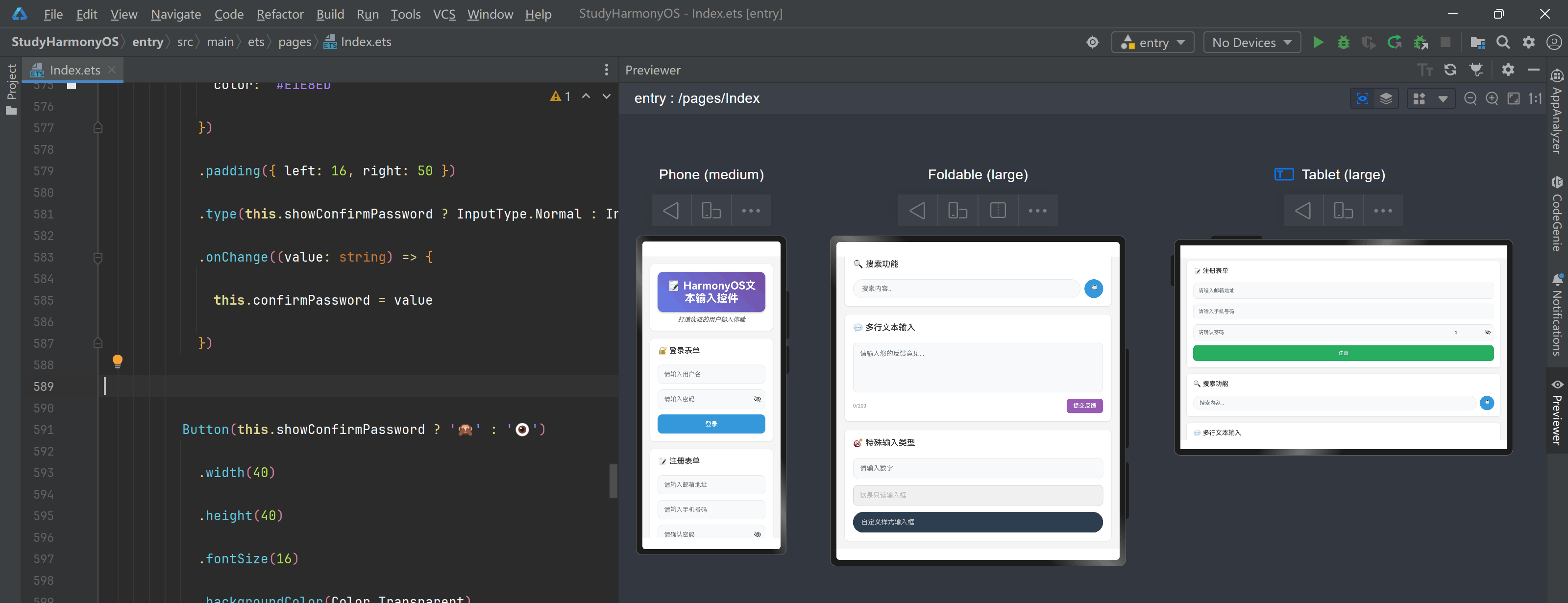
🎯 核心功能
本Demo展示了HarmonyOS中TextInput和TextArea组件的全面使用方法,包括:
-
📝 基础文本输入框
-
🔐 密码输入框
-
📧 邮箱输入框
-
📱 手机号输入框
-
💬 多行文本输入区域
-
🎨 自定义样式输入框
-
✅ 输入验证和提示
-
🔍 搜索框实现
✨ 特色亮点
-
🎨 视觉精美:多种输入框样式和动画效果
-
🛡️ 输入验证:实时验证用户输入内容
-
📱 响应式设计:适配不同屏幕尺寸
-
💡 用户友好:清晰的提示信息和错误反馈
-
🎯 实用性强:涵盖常见的输入场景
🎨 界面展示
界面采用现代化的卡片式设计:
-
登录表单区域:用户名、密码输入
-
注册表单区域:邮箱、手机号验证
-
搜索功能区域:实时搜索输入框
-
反馈区域:多行文本输入
-
设置区域:各种输入类型展示
📱 适用场景
-
🔐 登录注册页面
-
📝 表单填写应用
-
💬 聊天和社交应用
-
🔍 搜索功能实现
-
⚙️ 设置和配置页面
-
📊 数据录入应用
🔧 核心代码说明
📁 项目结构
TextInputDemo/

├── src/

│   ├── main/

│   │   ├── ets/

│   │   │   ├── pages/

│   │   │   │   └── Index.ets          // 主页面

│   │   │   └── entryability/

│   │   └── resources/

│   │       ├── base/

│   │       │   ├── element/

│   │       │   └── media/

│   │       └── rawfile/

│   └── module.json5
🎯 关键技术点
1. TextInput组件基础属性
TextInput({ placeholder: '请输入内容' })

  .width('100%')

  .height(40)

  .fontSize(16)

  .fontColor(Color.Black)

  .backgroundColor(Color.White)

  .borderRadius(8)
2. 输入类型设置
-
InputType.Normal: 普通文本输入
-
InputType.Password: 密码输入
-
InputType.Email: 邮箱输入
-
InputType.Number: 数字输入
-
InputType.PhoneNumber: 手机号输入
3. TextArea多行文本
TextArea({ placeholder: '请输入多行内容' })

  .width('100%')

  .height(100)

  .maxLines(5)
4. 输入事件处理
-
onChange: 文本内容变化时触发
-
onSubmit: 提交时触发
-
onFocus: 获得焦点时触发
-
onBlur: 失去焦点时触发
💡 技术要点解析
输入验证实现:
通过正则表达式和实时监听onChange事件,可以实现各种输入格式的验证。
密码可见性切换:
结合状态管理和InputType切换,实现密码显示/隐藏功能。
自定义样式设计:
通过border、backgroundColor、borderRadius等属性,创建美观的输入框样式。
📝 完整Demo代码
🏠 主页面代码
// src/main/ets/pages/Index.ets

@Entry

@Component

struct Index {

  @State username: string = ''

  @State password: string = ''

  @State email: string = ''

  @State phone: string = ''

  @State feedback: string = ''

  @State searchText: string = ''

  @State confirmPassword: string = ''

  @State showPassword: boolean = false

  @State showConfirmPassword: boolean = false

  @State usernameError: string = ''

  @State passwordError: string = ''

  @State emailError: string = ''

  @State phoneError: string = ''

  build() {

    Scroll() {

      Column({ space: 20 }) {

        // 标题区域

        this.buildTitleSection()


        // 登录表单

        this.buildLoginSection()


        // 注册表单

        this.buildRegisterSection()


        // 搜索功能

        this.buildSearchSection()


        // 多行文本输入

        this.buildTextAreaSection()


        // 特殊输入类型

        this.buildSpecialInputSection()

      }

      .width('100%')

      .padding(20)

    }

    .backgroundColor('#F5F5F5')

    .height('100%')

  }

  // 标题区域

  @Builder

  buildTitleSection() {

    Column({ space: 10 }) {

      Text('📝 HarmonyOS文本输入控件')

        .fontSize(28)

        .fontWeight(FontWeight.Bold)

        .fontColor(Color.White)

        .textAlign(TextAlign.Center)

        .width('100%')

        .padding(20)

        .borderRadius(15)

        .linearGradient({

          angle: 45,

          colors: [['#667eea', 0.0], ['#764ba2', 1.0]]

        })

        .shadow({

          radius: 10,

          color: '#40000000',

          offsetX: 0,

          offsetY: 5

        })

      Text('打造优雅的用户输入体验')

        .fontSize(16)

        .fontColor('#666666')

        .textAlign(TextAlign.Center)

        .fontStyle(FontStyle.Italic)

    }

    .width('100%')

    .backgroundColor(Color.White)

    .padding(20)

    .borderRadius(12)

    .shadow({

      radius: 8,

      color: '#20000000',

      offsetX: 0,

      offsetY: 2

    })

  }

  // 登录表单

  @Builder

  buildLoginSection() {

    Column({ space: 15 }) {

      Text('🔐 登录表单')

        .fontSize(20)

        .fontWeight(FontWeight.Medium)

        .fontColor('#333333')

        .margin({ bottom: 10 })

      // 用户名输入

      Column({ space: 5 }) {

        TextInput({ placeholder: '请输入用户名' })

          .width('100%')

          .height(50)

          .fontSize(16)

          .fontColor('#333333')

          .backgroundColor('#F8F9FA')

          .borderRadius(12)

          .border({

            width: this.usernameError ? 2 : 1,

            color: this.usernameError ? '#E74C3C' : '#E1E8ED'

          })

          .padding({ left: 16, right: 16 })

          .onChange((value: string) => {

            this.username = value

            this.validateUsername(value)

          })

          .onFocus(() => {

            this.usernameError = ''

          })

        if (this.usernameError) {

          Text(this.usernameError)

            .fontSize(12)

            .fontColor('#E74C3C')

            .margin({ left: 5 })

        }

      }

      .alignItems(HorizontalAlign.Start)

      // 密码输入

      Column({ space: 5 }) {

        Row() {

          TextInput({ placeholder: '请输入密码' })

            .layoutWeight(1)

            .height(50)

            .fontSize(16)

            .fontColor('#333333')

            .backgroundColor('#F8F9FA')

            .borderRadius(12)

            .border({

              width: this.passwordError ? 2 : 1,

              color: this.passwordError ? '#E74C3C' : '#E1E8ED'

            })

            .padding({ left: 16, right: 50 })

            .type(this.showPassword ? InputType.Normal : InputType.Password)

            .onChange((value: string) => {

              this.password = value

              this.validatePassword(value)

            })

            .onFocus(() => {

              this.passwordError = ''

            })

          Button(this.showPassword ? '🙈' : '👁️')

            .width(40)

            .height(40)

            .fontSize(16)

            .backgroundColor(Color.Transparent)

            .fontColor('#666666')

            .position({ x: '85%', y: 5 })

            .onClick(() => {

              this.showPassword = !this.showPassword

            })

        }

        .width('100%')

        if (this.passwordError) {

          Text(this.passwordError)

            .fontSize(12)

            .fontColor('#E74C3C')

            .margin({ left: 5 })

        }

      }

      .alignItems(HorizontalAlign.Start)

      // 登录按钮

      Button('登录')

        .width('100%')

        .height(50)

        .fontSize(16)

        .fontWeight(FontWeight.Medium)

        .backgroundColor('#3498DB')

        .borderRadius(12)

        .onClick(() => {

          this.handleLogin()

        })

    }

    .width('100%')

    .backgroundColor(Color.White)

    .padding(20)

    .borderRadius(12)

    .alignItems(HorizontalAlign.Start)

    .shadow({

      radius: 8,

      color: '#20000000',

      offsetX: 0,

      offsetY: 2

    })

  }

  // 注册表单

  @Builder

  buildRegisterSection() {

    Column({ space: 15 }) {

      Text('📝 注册表单')

        .fontSize(20)

        .fontWeight(FontWeight.Medium)

        .fontColor('#333333')

        .margin({ bottom: 10 })

      // 邮箱输入

      Column({ space: 5 }) {

        TextInput({ placeholder: '请输入邮箱地址' })

          .width('100%')

          .height(50)

          .fontSize(16)

          .fontColor('#333333')

          .backgroundColor('#F8F9FA')

          .borderRadius(12)

          .border({

            width: this.emailError ? 2 : 1,

            color: this.emailError ? '#E74C3C' : '#E1E8ED'

          })

          .padding({ left: 16, right: 16 })

          .type(InputType.Email)

          .onChange((value: string) => {

            this.email = value

            this.validateEmail(value)

          })

          .onFocus(() => {

            this.emailError = ''

          })

        if (this.emailError) {

          Text(this.emailError)

            .fontSize(12)

            .fontColor('#E74C3C')

            .margin({ left: 5 })

        }

      }

      .alignItems(HorizontalAlign.Start)

      // 手机号输入

      Column({ space: 5 }) {

        TextInput({ placeholder: '请输入手机号码' })

          .width('100%')

          .height(50)

          .fontSize(16)

          .fontColor('#333333')

          .backgroundColor('#F8F9FA')

          .borderRadius(12)

          .border({

            width: this.phoneError ? 2 : 1,

            color: this.phoneError ? '#E74C3C' : '#E1E8ED'

          })

          .padding({ left: 16, right: 16 })

          .type(InputType.PhoneNumber)

          .maxLength(11)

          .onChange((value: string) => {

            this.phone = value

            this.validatePhone(value)

          })

          .onFocus(() => {

            this.phoneError = ''

          })

        if (this.phoneError) {

          Text(this.phoneError)

            .fontSize(12)

            .fontColor('#E74C3C')

            .margin({ left: 5 })

        }

      }

      .alignItems(HorizontalAlign.Start)

      // 确认密码

      Column({ space: 5 }) {

        Row() {

          TextInput({ placeholder: '请确认密码' })

            .layoutWeight(1)

            .height(50)

            .fontSize(16)

            .fontColor('#333333')

            .backgroundColor('#F8F9FA')

            .borderRadius(12)

            .border({

              width: 1,

              color: '#E1E8ED'

            })

            .padding({ left: 16, right: 50 })

            .type(this.showConfirmPassword ? InputType.Normal : InputType.Password)

            .onChange((value: string) => {

              this.confirmPassword = value

            })

          Button(this.showConfirmPassword ? '🙈' : '👁️')

            .width(40)

            .height(40)

            .fontSize(16)

            .backgroundColor(Color.Transparent)

            .fontColor('#666666')

            .position({ x: '85%', y: 5 })

            .onClick(() => {

              this.showConfirmPassword = !this.showConfirmPassword

            })

        }

        .width('100%')

      }

      .alignItems(HorizontalAlign.Start)

      // 注册按钮

      Button('注册')

        .width('100%')

        .height(50)

        .fontSize(16)

        .fontWeight(FontWeight.Medium)

        .backgroundColor('#27AE60')

        .borderRadius(12)

        .onClick(() => {

          this.handleRegister()

        })

    }

    .width('100%')

    .backgroundColor(Color.White)

    .padding(20)

    .borderRadius(12)

    .alignItems(HorizontalAlign.Start)

    .shadow({

      radius: 8,

      color: '#20000000',

      offsetX: 0,

      offsetY: 2

    })

  }

  // 搜索功能

  @Builder

  buildSearchSection() {

    Column({ space: 15 }) {

      Text('🔍 搜索功能')

        .fontSize(20)

        .fontWeight(FontWeight.Medium)

        .fontColor('#333333')

        .margin({ bottom: 10 })

      Row({ space: 10 }) {

        TextInput({ placeholder: '搜索内容...' })

          .layoutWeight(1)

          .height(45)

          .fontSize(16)

          .fontColor('#333333')

          .backgroundColor('#F8F9FA')

          .borderRadius(25)

          .border({

            width: 1,

            color: '#E1E8ED'

          })

          .padding({ left: 20, right: 20 })

          .onChange((value: string) => {

            this.searchText = value

          })

          .onSubmit(() => {

            this.handleSearch()

          })

        Button('🔍')

          .width(45)

          .height(45)

          .fontSize(18)

          .backgroundColor('#3498DB')

          .borderRadius(25)

          .fontColor(Color.White)

          .onClick(() => {

            this.handleSearch()

          })

      }

      .width('100%')

      if (this.searchText) {

        Text(`搜索内容: ${this.searchText}`)

          .fontSize(14)

          .fontColor('#666666')

          .padding(10)

          .backgroundColor('#E8F4FD')

          .borderRadius(8)

          .width('100%')

      }

    }

    .width('100%')

    .backgroundColor(Color.White)

    .padding(20)

    .borderRadius(12)

    .alignItems(HorizontalAlign.Start)

    .shadow({

      radius: 8,

      color: '#20000000',

      offsetX: 0,

      offsetY: 2

    })

  }

  // 多行文本输入

  @Builder

  buildTextAreaSection() {

    Column({ space: 15 }) {

      Text('💬 多行文本输入')

        .fontSize(20)

        .fontWeight(FontWeight.Medium)

        .fontColor('#333333')

        .margin({ bottom: 10 })

      TextArea({ placeholder: '请输入您的反馈意见...' })

        .width('100%')

        .height(120)

        .fontSize(16)

        .fontColor('#333333')

        .backgroundColor('#F8F9FA')

        .borderRadius(12)

        .border({

          width: 1,

          color: '#E1E8ED'

        })

        .padding(16)

        .maxLines(6)

        .onChange((value: string) => {

          this.feedback = value

        })

      Row() {

        Text(`${this.feedback.length}/200`)

          .fontSize(12)

          .fontColor('#999999')

          .layoutWeight(1)

        Button('提交反馈')

          .height(35)

          .fontSize(14)

          .backgroundColor('#9B59B6')

          .borderRadius(8)

          .onClick(() => {

            this.handleFeedback()

          })

      }

      .width('100%')

    }

    .width('100%')

    .backgroundColor(Color.White)

    .padding(20)

    .borderRadius(12)

    .alignItems(HorizontalAlign.Start)

    .shadow({

      radius: 8,

      color: '#20000000',

      offsetX: 0,

      offsetY: 2

    })

  }

  // 特殊输入类型

  @Builder

  buildSpecialInputSection() {

    Column({ space: 15 }) {

      Text('🎯 特殊输入类型')

        .fontSize(20)

        .fontWeight(FontWeight.Medium)

        .fontColor('#333333')

        .margin({ bottom: 10 })

      // 数字输入

      TextInput({ placeholder: '请输入数字' })

        .width('100%')

        .height(50)

        .fontSize(16)

        .fontColor('#333333')

        .backgroundColor('#F8F9FA')

        .borderRadius(12)

        .border({

          width: 1,

          color: '#E1E8ED'

        })

        .padding({ left: 16, right: 16 })

        .type(InputType.Number)

      // 只读输入框

      TextInput({ text: '这是只读输入框' })

        .width('100%')

        .height(50)

        .fontSize(16)

        .fontColor('#666666')

        .backgroundColor('#F0F0F0')

        .borderRadius(12)

        .border({

          width: 1,

          color: '#CCCCCC'

        })

        .padding({ left: 16, right: 16 })

        .enabled(false)

      // 自定义样式输入框

      TextInput({ placeholder: '自定义样式输入框' })

        .width('100%')

        .height(50)

        .fontSize(16)

        .fontColor('#FFFFFF')

        .backgroundColor('#2C3E50')

        .borderRadius(25)

        .padding({ left: 20, right: 20 })

        .placeholderColor('#BDC3C7')

        .caretColor('#3498DB')

    }

    .width('100%')

    .backgroundColor(Color.White)

    .padding(20)

    .borderRadius(12)

    .alignItems(HorizontalAlign.Start)

    .shadow({

      radius: 8,

      color: '#20000000',

      offsetX: 0,

      offsetY: 2

    })

  }

  // 验证用户名

  validateUsername(value: string) {

    if (value.length < 3) {

      this.usernameError = '用户名至少3个字符'

    } else if (value.length > 20) {

      this.usernameError = '用户名不能超过20个字符'

    } else {

      this.usernameError = ''

    }

  }

  // 验证密码

  validatePassword(value: string) {

    if (value.length < 6) {

      this.passwordError = '密码至少6个字符'

    } else if (!/(?=.*[a-zA-Z])(?=.*\d)/.test(value)) {

      this.passwordError = '密码必须包含字母和数字'

    } else {

      this.passwordError = ''

    }

  }

  // 验证邮箱

  validateEmail(value: string) {

    const emailRegex = /^[^\s@]+@[^\s@]+\.[^\s@]+$/

    if (!emailRegex.test(value)) {

      this.emailError = '请输入有效的邮箱地址'

    } else {

      this.emailError = ''

    }

  }

  // 验证手机号

  validatePhone(value: string) {

    const phoneRegex = /^1[3-9]\d{9}$/

    if (!phoneRegex.test(value)) {

      this.phoneError = '请输入有效的手机号码'

    } else {

      this.phoneError = ''

    }

  }

  // 处理登录

  handleLogin() {

    if (this.username && this.password && !this.usernameError && !this.passwordError) {

      console.log('登录成功:', this.username)

      // 这里可以添加登录逻辑

    } else {

      console.log('请检查输入信息')

    }

  }

  // 处理注册

  handleRegister() {

    if (this.email && this.phone && !this.emailError && !this.phoneError) {

      console.log('注册信息:', { email: this.email, phone: this.phone })

      // 这里可以添加注册逻辑

    } else {

      console.log('请检查注册信息')

    }

  }

  // 处理搜索

  handleSearch() {

    if (this.searchText.trim()) {

      console.log('搜索:', this.searchText)

      // 这里可以添加搜索逻辑

    }

  }

  // 处理反馈

  handleFeedback() {

    if (this.feedback.trim()) {

      console.log('反馈内容:', this.feedback)

      // 这里可以添加反馈提交逻辑

    }

  }

}
⚙️ 配置文件
// module.json5 配置

{

  "module": {

    "name": "entry",

    "type": "entry",

    "description": "$string:module_desc",

    "mainElement": "EntryAbility",

    "deviceTypes": [

      "phone",

      "tablet"

    ],

    "deliveryWithInstall": true,

    "installationFree": false,

    "pages": "$profile:main_pages",

    "abilities": [

      {

        "name": "EntryAbility",

        "srcEntry": "./ets/entryability/EntryAbility.ts",

        "description": "$string:EntryAbility_desc",

        "icon": "$media:icon",

        "label": "$string:EntryAbility_label",

        "startWindowIcon": "$media:icon",

        "startWindowBackground": "$color:start_window_background"

      }

    ]

  }

}
🚀 运行效果
📱 界面展示
运行后的界面将展示:
-
🔐 完整的登录表单,包含用户名和密码输入
-
📝 注册表单,包含邮箱和手机号验证
-
🔍 实时搜索功能
-
💬 多行文本输入区域
-
🎯 各种特殊输入类型展示
-
✅ 实时输入验证和错误提示
✅ 功能验证
-
输入验证:测试各种输入格式的验证功能
-
密码可见性:点击眼睛图标切换密码显示状态
-
搜索功能:输入搜索内容并查看实时反馈
-
多行输入:测试TextArea的多行文本输入
-
特殊类型:验证数字输入、只读输入等特殊类型
💡 开发小贴士
🎯 最佳实践
-
💫 输入验证:使用正则表达式进行实时输入验证
-
🎨 视觉反馈:通过边框颜色变化提供即时反馈
-
⚡ 性能优化:避免在onChange中进行复杂计算
-
🔧 用户体验:提供清晰的占位符和错误提示
🚨 常见问题
-
输入框焦点问题:确保正确处理onFocus和onBlur事件
-
键盘遮挡问题:使用Scroll组件确保输入框可见
-
输入类型限制:不同InputType的键盘和输入限制不同
📚 扩展学习
-
自定义键盘:如何实现自定义输入键盘
-
输入法适配:处理不同输入法的兼容性
-
表单验证库:使用第三方验证库简化开发
🎉 总结与展望
通过这个Demo,我们学习了:
-
✨ TextInput和TextArea组件的基础使用
-
🎯 各种输入类型和验证方法
-
💡 创建美观输入界面的设计技巧
-
🛡️ 实现用户友好的输入验证
文本输入控件是用户与应用交互的重要桥梁,掌握其各种特性对于创建优秀的用户体验至关重要。希望这个示例能够帮助到正在学习HarmonyOS开发的你!
下一期我们将探索更多有趣的交互组件,敬请期待!如果你有任何问题或建议,欢迎在评论区留言交流。
🔗 相关资源
-
💬 坚果派技术社区
🌟 如果这篇文章对你有帮助,请点赞支持!🌟
让我们一起在HarmonyOS的世界里创造更多可能!
© 2024 坚果派·红目香薰 | 用心分享,用技术创造价值

讨论HarmonyOS开发技术,专注于API与组件、DevEco Studio、测试、元服务和应用上架分发等。
更多推荐


 21
21 0
0- 0


 已为社区贡献262条内容

所有评论(0)