【OpenHarmony】通过arkTS开发构建第二个页面
开发者也可以在右键点击“”文件夹时,选择“”,则无需手动配置相关页面的路由。添加文本及按钮。参照第一个页面,在第二个页面添加Text组件、Button组件等,并设置其样式。
·
目录
1、通过arkTS开发构建第二个页面
- 新建第二个页面文件。在“Project”窗口,打开“entry > src > main > ets > MainAbility”,右键点击“pages”文件夹,选择“New > eTS File”,命名为“second”,点击“Finish”。可以看到文件目录结构如下:
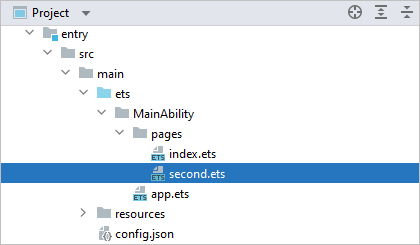
开发者也可以在右键点击“pages”文件夹时,选择“new > Page”,则无需手动配置相关页面的路由。
- 配置第二个页面的路由。在config.json文件中的“module - js - pages”下配置第二个页面的路由“pages/second”。示例如下:
  {
    ...
      "module": {
       ...
        "js": [
          {
            ...
            "pages": [
            "pages/index",
            "pages/second"
          ]
            ...
          }
      ]
    }
  }
添加文本及按钮。 参照第一个页面,在第二个页面添加Text组件、Button组件等,并设置其样式。“second.ets”文件的示例如下:
// second.ets
@Entry
@Component
struct Second {
  @State message: string = 'Hi there'

  build() {
    Row() {
      Column() {
        Text(this.message)
          .fontSize(50)
          .fontWeight(FontWeight.Bold)
        Button() {
          Text('Back')
            .fontSize(25)
            .fontWeight(FontWeight.Bold)
        }
        .type(ButtonType.Capsule)
        .margin({
          top: 20
        })
        .backgroundColor('#0D9FFB')
        .width('40%')
        .height('5%')
      }
      .width('100%')
    }
    .height('100%')
  }
}
2、实现页面间的跳转
页面间的导航可以通过页面路由router来实现。页面路由router根据页面url找到目标页面,从而实现跳转。使用页面路由请导入router模块。
第一个界面
第一个页面跳转到第二个页面。 在第一个页面中,跳转按钮绑定onClick事件,点击按钮时跳转到第二页。“index.ets”文件的示例如下:
// index.ets
import router from '@ohos.router';

@Entry
@Component
struct Index {
  @State message: string = 'Hello World'

  build() {
    Row() {
      Column() {
        Text(this.message)
          .fontSize(50)
          .fontWeight(FontWeight.Bold)
        // 添加按钮,以响应用户点击
        Button() {
          Text('Next')
            .fontSize(30)
            .fontWeight(FontWeight.Bold)
        }
        .type(ButtonType.Capsule)
        .margin({
          top: 20
        })
        .backgroundColor('#0D9FFB')
        .width('40%')
        .height('5%')
        // 跳转按钮绑定onClick事件,点击时跳转到第二页
        .onClick(() => {
          router.push({ url: 'pages/second' })
        })
      }
      .width('100%')
    }
    .height('100%')
  }
}
第二个界面
// second.ets
import router from '@ohos.router';

@Entry
@Component
struct Second {
  @State message: string = 'Hi there'

  build() {
    Row() {
      Column() {
        Text(this.message)
          .fontSize(50)
          .fontWeight(FontWeight.Bold)
        Button() {
          Text('Back')
            .fontSize(25)
            .fontWeight(FontWeight.Bold)
        }
        .type(ButtonType.Capsule)
        .margin({
          top: 20
        })
        .backgroundColor('#0D9FFB')
        .width('40%')
        .height('5%')
        // 返回按钮绑定onClick事件,点击按钮时返回到第一页
        .onClick(() => {
          router.back()
        })
      }
      .width('100%')
    }
    .height('100%')
  }
}
讨论HarmonyOS开发技术,专注于API与组件、DevEco Studio、测试、元服务和应用上架分发等。
更多推荐


 1
1 0
0- 0


 已为社区贡献2条内容

所有评论(0)