HarmonyOS NEXT - Form Kit
ArkTS卡片开放了自定义绘制的能力,在卡片上可以通过Canvas组件创建一块画布,然后通过对象在画布上进行自定义图形的绘制,如下示例代码实现了在画布的中心绘制了一个笑脸。@Entry@Component// 初始化CanvasRenderingContext2D和RenderingContextSettingsbuild() {Column() {Row() {// 在onReady回调中获取画
Form Kit简介
Form Kit(卡片开发服务)提供一种界面展示形式,可以将应用的重要信息或操作前置到服务卡片(以下简称“卡片”),以达到服务直达、减少跳转层级的体验效果。卡片常用于嵌入到其他应用(当前被嵌入方即卡片使用方只支持系统应用,例如桌面)中作为其界面显示的一部分,并支持拉起页面、发送消息等基础的交互能力。
服务卡片架构
图1 服务卡片架构
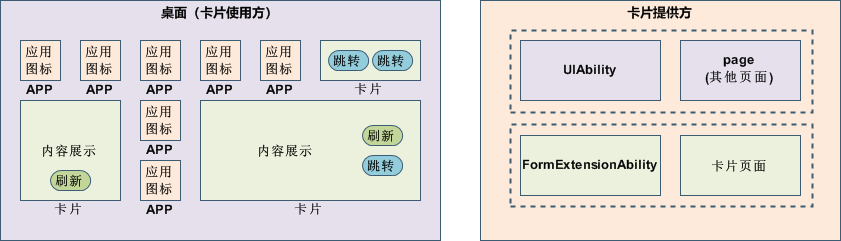
卡片的基本概念:
- 卡片使用方:如上图中的桌面,显示卡片内容的宿主应用,控制卡片在宿主中展示的位置。
- 卡片提供方:包含卡片的应用,提供卡片的显示内容、控件布局以及控件点击处理逻辑。
- FormExtensionAbility:卡片业务逻辑模块,提供卡片创建、销毁、刷新等生命周期回调。
- 卡片页面:卡片UI模块,包含页面控件、布局、事件等显示和交互信息。
卡片的常见使用步骤如下:
图2 卡片常见使用步骤
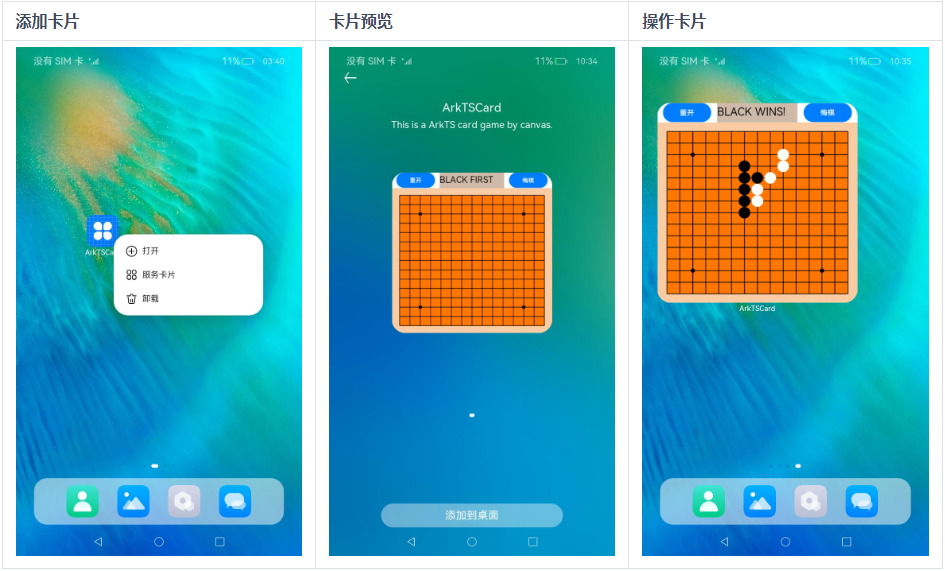
- 长按“桌面图标”,弹出操作菜单。
- 点击“服务卡片”选项,进入卡片预览界面。
- 点击“添加到桌面”按钮,即可在桌面上看到新添加的卡片。
亮点/特征
- 服务直达:将元服务/应用的重要信息以卡片形式展示在桌面,用户可以通过快捷手势使用卡片,通过轻量交互行为实现服务直达、减少层级跳转的目的。
- 永久在线:提供定时、代理等多种卡片刷新机制,实现卡片永久在线。
- 受限管控:卡片支持的组件、事件、动效、数据管理、状态管理和API能力均进行了一定限制,保障性能、功耗及安全可靠。
开发模式
Form Kit支持Stage开发模型(推荐)和FA开发模型。
- Stage模型支持两种卡片开发方式,可以基于声明式范式ArkTS语言开发ArkTS卡片、也可以基于类Web范式JS语言开发JS卡片。
- FA模型仅支持基于类Web范式JS语言开发JS卡片。
ArkTS卡片与JS卡片具备不同的实现原理及特征,在场景能力上的差异如下表所示。
| 类别 | JS卡片 | ArkTS卡片 |
|---|---|---|
| 开发范式 | 类Web范式 | 声明式范式 |
| 组件能力 | 支持 | 支持 |
| 布局能力 | 支持 | 支持 |
| 事件能力 | 支持 | 支持 |
| 自定义动效 | 不支持 | 支持 |
| 自定义绘制 | 不支持 | 支持 |
| 逻辑代码执行 | 不支持 | 支持 |
与相关Kit的关系
- Ability Kit: Form Kit内部实现依赖Ability Kit提供的Extension基础能力,与Ability Kit存在生命周期调度交互。
- ArkUI: Form Kit卡片提供方在卡片页面中可以使用ArkUI提供的部分组件、事件、动效、状态管理等能力。
约束限制
针对ArkTS卡片,主要存在如下使用限制:
- 当导入模块时,仅支持导入标识“支持在ArkTS卡片中使用”的模块。
- 仅支持声明式范式的部分组件、事件、动效、数据管理、状态管理和API能力。
- 卡片的事件处理和使用方的事件处理是独立的,建议在使用方支持左右滑动的场景下卡片内容不要使用左右滑动功能的组件,以防手势冲突影响交互体验。
- 暂不支持导入共享包及使用native语言开发。
- 暂不支持极速预览、断点调试能力、热重载及设置超时任务(setTimeOut)等能力。
针对JS卡片,主要存在如下使用限制:
- 不支持自定义动效、自定义绘制及逻辑代码执行能力。
服务卡片开发指导(Stage模型)
开发基于ArkTS UI的卡片
实现原理
图1 ArkTS卡片实现原理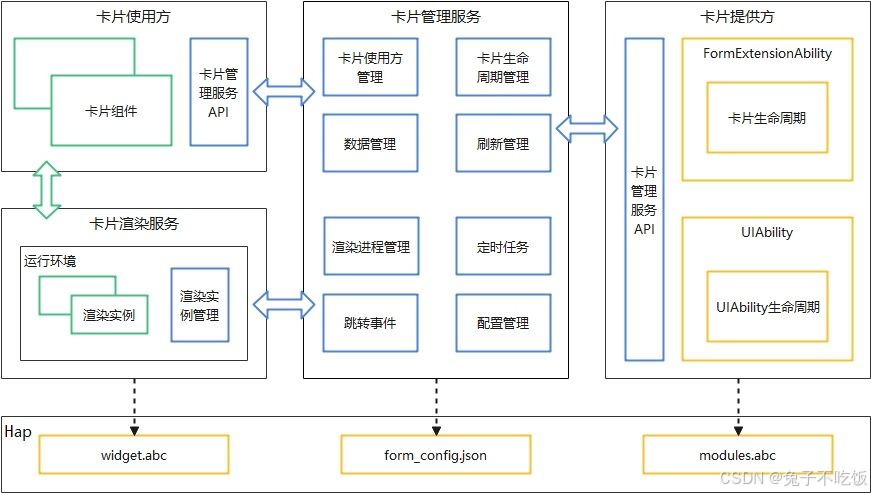
-
卡片使用方:显示卡片内容的宿主应用,控制卡片在宿主中展示的位置,当前仅系统应用可以作为卡片使用方。
-
卡片提供方:提供卡片显示内容的应用,控制卡片的显示内容、控件布局以及控件点击事件。
-
卡片管理服务:用于管理系统中所添加卡片的常驻代理服务,提供formProvider的接口能力,同时提供卡片对象的管理与使用以及卡片周期性刷新等能力。
-
卡片渲染服务:用于管理卡片渲染实例,渲染实例与卡片使用方上的卡片组件一一绑定。卡片渲染服务运行卡片页面代码widgets.abc进行渲染,并将渲染后的数据发送至卡片使用方对应的卡片组件。
图2 ArkTS卡片渲染服务运行原理
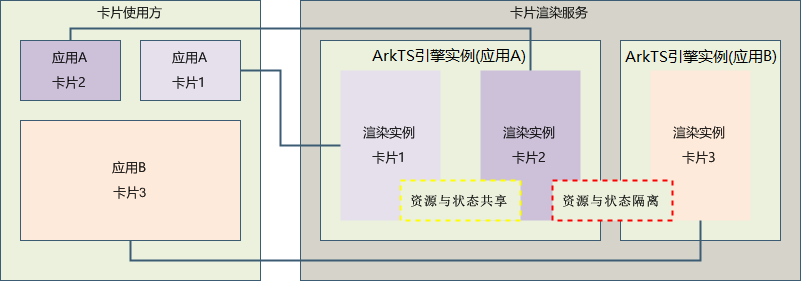
与动态卡片相比,静态卡片整体的运行框架和渲染流程是一致的,主要区别在于,卡片渲染服务将卡片内容渲染完毕后,卡片使用方会使用最后一帧渲染的数据作为静态图片显示,其次卡片渲染服务中的卡片实例会释放该卡片的所有运行资源以节省内存。因此频繁的刷新会导致静态卡片运行时资源不断的创建和销毁,增加卡片功耗。
与JS卡片相比,ArkTS卡片支持在卡片中运行逻辑代码,为确保ArkTS卡片发生问题后不影响卡片使用方应用的使用,ArkTS卡片新增了卡片渲染服务用于运行卡片页面代码widgets.abc,卡片渲染服务由卡片管理服务管理。卡片使用方的每个卡片组件都对应了卡片渲染服务里的一个渲染实例,同一应用提供方的渲染实例运行在同一个ArkTS虚拟机运行环境中,不同应用提供方的渲染实例运行在不同的ArkTS虚拟机运行环境中,通过ArkTS虚拟机运行环境隔离不同应用提供方卡片之间的资源与状态。开发过程中需要注意的是globalThis对象的使用,相同应用提供方的卡片globalThis对象是同一个,不同应用提供方的卡片globalThis对象是不同的。
ArkTS卡片的优势
卡片作为应用的一个快捷入口,ArkTS卡片相较于JS卡片具备如下几点优势:
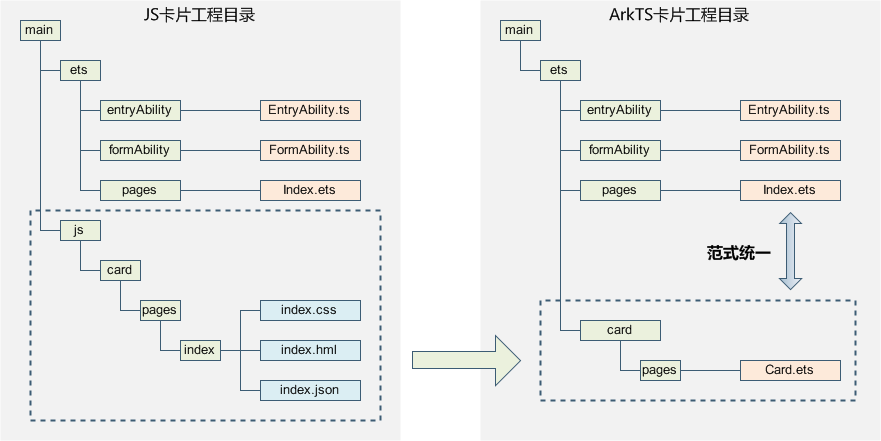
-
统一开发范式,提升开发体验和开发效率。
提供ArkTS卡片能力后,统一了卡片和页面的开发范式,页面的布局可以直接复用到卡片布局中,提升开发体验和开发效率。
图3 卡片工程结构对比
-
-
增强了卡片的能力,使卡片更加万能。
ArkTS卡片的约束
ArkTS卡片相较于JS卡片具备了更加丰富的能力,但也增加了使用卡片进行恶意行为的风险。由于ArkTS卡片显示在使用方应用中,使用方应用一般为桌面应用,为确保桌面的使用体验以及功耗相关考虑,对ArkTS卡片的能力做了以下约束:
-
当导入模块时,仅支持导入标识“支持在ArkTS卡片中使用”的模块。
-
不支持导入共享包。
-
不支持使用native语言开发。
-
仅支持声明式范式的部分组件、事件、动效、数据管理、状态管理和API能力。
-
卡片的事件处理和使用方的事件处理是独立的,建议在使用方支持左右滑动的场景下卡片内容不要使用左右滑动功能的组件,以防手势冲突影响交互体验。
除此之外,当前ArkTS卡片还存在如下约束:
-
暂不支持极速预览。
-
暂不支持断点调试能力。
-
暂不支持Hot Reload热重载。
-
暂不支持setTimeOut。
ArkTS卡片相关模块
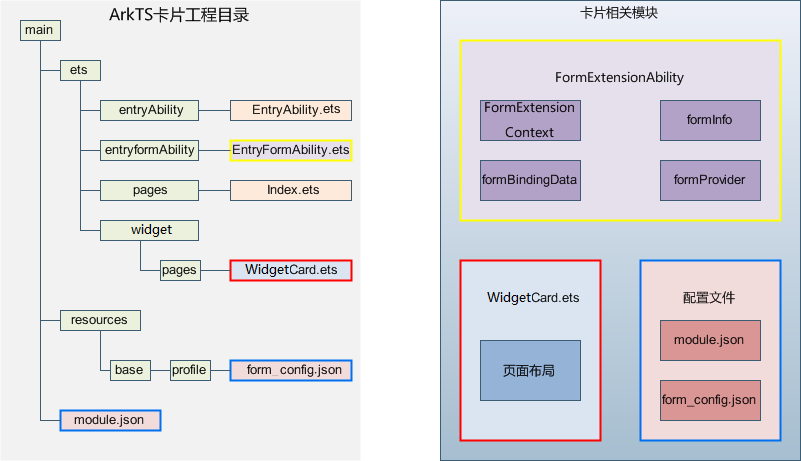
图1 ArkTS卡片相关模块
-
FormExtensionAbility:卡片扩展模块,提供卡片创建、销毁、刷新等生命周期回调。
-
FormExtensionContext:FormExtensionAbility的上下文环境,提供FormExtensionAbility具有的接口和能力。
-
formProvider:提供卡片提供方相关的接口能力,可通过该模块提供接口实现更新卡片、设置卡片更新时间、获取卡片信息、请求发布卡片等。
-
formInfo:提供了卡片信息和状态等相关类型和枚举。
-
formBindingData:提供卡片数据绑定的能力,包括FormBindingData对象的创建、相关信息的描述。
-
页面布局(WidgetCard.ets):提供声明式范式的UI接口能力。
- ArkTS卡片特有能力:postCardAction用于卡片内部和提供方应用间的交互,仅在卡片中可以调用。
- ArkTS卡片能力列表:列举了能在ArkTS卡片中使用的API、组件、事件、属性和生命周期调度。
-
卡片配置:包含FormExtensionAbility的配置和卡片的配置
- 在module.json5配置文件中的extensionAbilities标签下,配置FormExtensionAbility相关信息。
- 在resources/base/profile/目录下的form_config.json配置文件中,配置卡片(WidgetCard.ets)相关信息。
ArkTS卡片开发指导
创建一个ArkTS卡片
创建卡片当前有两种入口:
- 创建工程时,选择Application,默认不带卡片,可以在创建工程后右键新建卡片。
- 创建工程时,选择Atomic Service,也可以在创建工程后右键新建卡片。

说明
基于不同版本的DeEco Studio,请以实际界面为准。
在已有的应用工程中,可以通过右键新建ArkTS卡片,具体的操作方式如下。
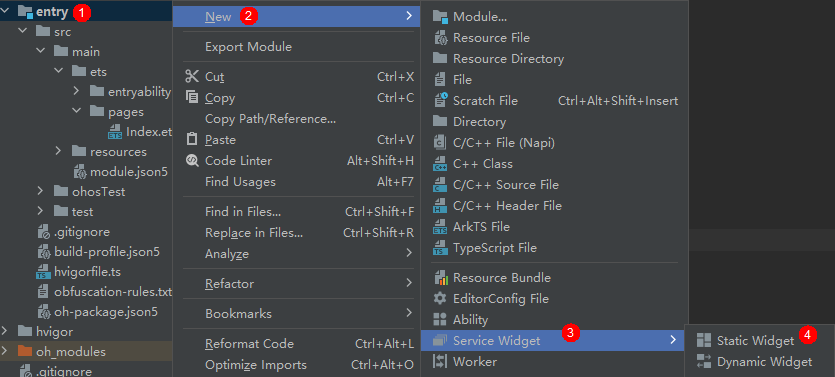
-
右键新建卡片。
说明
在API 10及以上 Stage模型的工程中,在Service Widget菜单可直接选择创建动态或静态服务卡片。创建服务卡片后,也可以在卡片的form_config.json配置文件中,通过isDynamic参数修改卡片类型:isDynamic置空或赋值为"true",则该卡片为动态卡片;isDynamic赋值为"false",则该卡片为静态卡片。
-
根据实际业务场景,选择一个卡片模板。

-
在选择卡片的开发语言类型(Language)时,选择ArkTS选项,然后单击“Finish”,即可完成ArkTS卡片创建。

ArkTS卡片创建完成后,工程中会新增如下卡片相关文件:卡片生命周期管理文件(EntryFormAbility.ets)、卡片页面文件(WidgetCard.ets)和卡片配置文件(form_config.json)。

配置卡片的配置文件
卡片相关的配置文件主要包含FormExtensionAbility的配置和卡片的配置两部分。
-
卡片需要在module.json5配置文件中的extensionAbilities标签下,配置FormExtensionAbility相关信息。FormExtensionAbility需要填写metadata元信息标签,其中键名称为固定字符串“ohos.extension.form”,资源为卡片的具体配置信息的索引。
配置示例如下:
{
  "module": {
    ...
    "extensionAbilities": [
      {
        "name": "EntryFormAbility",
        "srcEntry": "./ets/entryformability/EntryFormAbility.ets",
        "label": "$string:EntryFormAbility_label",
        "description": "$string:EntryFormAbility_desc",
        "type": "form",
        "metadata": [
          {
            "name": "ohos.extension.form",
            "resource": "$profile:form_config"
          }
        ]
      }
    ]
  }
}
卡片的具体配置信息。在上述FormExtensionAbility的元信息(“metadata”配置项)中,可以指定卡片具体配置信息的资源索引。例如当resource指定为$profile:form_config时,会使用开发视图的resources/base/profile/目录下的form_config.json作为卡片profile配置文件。内部字段结构说明如下表所示。
表1 卡片form_config.json配置文件
属性名称 含义 数据类型 是否可缺省 name 表示卡片的名称,字符串最大长度为127字节。 字符串 否 displayName 表示卡片的显示名称。取值可以是名称内容,也可以是对名称内容的资源索引,以支持多语言。字符串最小长度为1字节,最大长度为30字节。 字符串 是 description 表示卡片的描述。取值可以是描述性内容,也可以是对描述性内容的资源索引,以支持多语言。字符串最大长度为255字节。 字符串 可缺省,缺省为空。 src 表示卡片对应的UI代码的完整路径。当为ArkTS卡片时,完整路径需要包含卡片文件的后缀,如:"./ets/widget/pages/WidgetCard.ets"。当为JS卡片时,完整路径无需包含卡片文件的后缀,如:"./js/widget/pages/WidgetCard" 字符串 否 uiSyntax 表示该卡片的类型,当前支持如下两种类型:
- arkts:当前卡片为ArkTS卡片。
- hml:当前卡片为JS卡片。
字符串 可缺省,缺省值为hml window 用于定义与显示窗口相关的配置。 对象 可缺省,缺省值见表2。 isDefault 表示该卡片是否为默认卡片,每个UIAbility有且只有一个默认卡片。
- true:默认卡片。
- false:非默认卡片。
布尔值 否 colorMode 表示卡片的主题样式,取值范围如下:
- auto:跟随系统的颜色模式值选取主题。
- dark:深色主题。
- light:浅色主题。
字符串 可缺省,缺省值为“auto”。 supportDimensions 表示卡片支持的外观规格,取值范围:
- 1 * 2:表示1行2列的二宫格。
- 2 * 2:表示2行2列的四宫格。
- 2 * 4:表示2行4列的八宫格。
- 4 * 4:表示4行4列的十六宫格。
- 1 * 1:表示1行1列的圆形卡片。
- 6 * 4:表示6行4列的二十四宫格。
字符串数组 否 defaultDimension 表示卡片的默认外观规格,取值必须在该卡片supportDimensions配置的列表中。 字符串 否 updateEnabled 表示卡片是否支持周期性刷新(包含定时刷新和定点刷新),取值范围:
- true:表示支持周期性刷新,可以在定时刷新(updateDuration)和定点刷新(scheduledUpdateTime)两种方式任选其一,当两者同时配置时,定时刷新优先生效。
- false:表示不支持周期性刷新。
布尔类型 否 scheduledUpdateTime 表示卡片的定点刷新的时刻,采用24小时制,精确到分钟。
说明:
updateDuration参数优先级高于scheduledUpdateTime,两者同时配置时,以updateDuration配置的刷新时间为准。
字符串 可缺省,缺省时不进行定点刷新。 updateDuration 表示卡片定时刷新的更新周期,单位为30分钟,取值为自然数。
当取值为0时,表示该参数不生效。
当取值为正整数N时,表示刷新周期为30*N分钟。
说明:
updateDuration参数优先级高于scheduledUpdateTime,两者同时配置时,以updateDuration配置的刷新时间为准。
数值 可缺省,缺省值为“0”。 formConfigAbility 表示卡片的配置跳转链接,采用URI格式。 字符串 可缺省,缺省值为空。 metadata 表示卡片的自定义信息,参考Metadata数组标签。 对象 可缺省,缺省值为空。 dataProxyEnabled 表示卡片是否支持卡片代理刷新,取值范围:
- true:表示支持代理刷新。
- false:表示不支持代理刷新。
设置为true时,定时刷新和下次刷新不生效,但不影响定点刷新。
布尔类型 可缺省,缺省值为false。 isDynamic 表示此卡片是否为动态卡片(仅针对ArkTS卡片生效)。
- true:为动态卡片 。
- false:为静态卡片。
布尔类型 可缺省,缺省值为true。 formVisibleNotify 表示是否允许卡片使用卡片可见性通知(仅对系统应用的卡片生效)。 布尔类型 可缺省,缺省值为false。 transparencyEnabled 表示是否支持卡片使用方设置此卡片的背景透明度(仅对系统应用的ArkTS卡片生效。)。
- true:支持设置背景透明度 。
- false:不支持设置背景透明度。
布尔类型 可缺省,缺省值为false。 fontScaleFollowSystem 表示卡片使用方设置此卡片的字体是否支持跟随系统变化。
- true:支持跟随系统字体大小变化 。
- false:不支持跟随系统字体大小变化。
布尔类型 可缺省,缺省值为true。 supportShapes 表示卡片的显示形状,取值范围如下:
- rect:表示方形卡片。
- circle:表示圆形卡片。
字符串 可缺省,缺省值为“rect”。 表2 window对象的内部结构说明
属性名称 含义 数据类型 是否可缺省 designWidth 标识页面设计基准宽度。以此为基准,根据实际设备宽度来缩放元素大小。 数值 可缺省,缺省值为720px。 autoDesignWidth 标识页面设计基准宽度是否自动计算。当配置为true时,designWidth将会被忽略,设计基准宽度由设备宽度与屏幕密度计算得出。 布尔值 可缺省,缺省值为false。 配置示例如下:
{
  "forms": [
    {
      "name": "widget",
      "displayName": "$string:widget_display_name",
      "description": "$string:widget_desc",
      "src": "./ets/widget/pages/WidgetCard.ets",
      "uiSyntax": "arkts",
      "window": {
        "designWidth": 720,
        "autoDesignWidth": true
      },
      "colorMode": "auto",
      "isDefault": true,
      "updateEnabled": true,
      "scheduledUpdateTime": "10:30",
      "updateDuration": 1,
      "defaultDimension": "2*2",
      "supportDimensions": [
        "2*2"
      ],
      "formConfigAbility": "ability://EntryAbility",
      "dataProxyEnabled": false,
      "isDynamic": true,
      "transparencyEnabled": false,
      "metadata": []
    }
  ]
}
卡片生命周期管理
创建ArkTS卡片,需实现FormExtensionAbility生命周期接口。
-
在EntryFormAbility.ets中,导入相关模块。
import { formBindingData, FormExtensionAbility, formInfo, formProvider } from '@kit.FormKit'; import { Configuration, Want } from '@kit.AbilityKit'; import { BusinessError } from '@kit.BasicServicesKit'; import { hilog } from '@kit.PerformanceAnalysisKit';在EntryFormAbility.ets中,实现FormExtensionAbility生命周期接口,其中在onAddForm的入参want中可以通过FormParam取出卡片的相关信息。
const TAG: string = 'EntryFormAbility';
const DOMAIN_NUMBER: number = 0xFF00;

export default class EntryFormAbility extends FormExtensionAbility {
  onAddForm(want: Want): formBindingData.FormBindingData {
    hilog.info(DOMAIN_NUMBER, TAG, '[EntryFormAbility] onAddForm');

    // ...
    // 使用方创建卡片时触发,提供方需要返回卡片数据绑定类
    let obj: Record<string, string> = {
      'title': 'titleOnAddForm',
      'detail': 'detailOnAddForm'
    };
    let formData: formBindingData.FormBindingData = formBindingData.createFormBindingData(obj);
    return formData;
  }

  onCastToNormalForm(formId: string): void {
    // 使用方将临时卡片转换为常态卡片触发,提供方需要做相应的处理
    hilog.info(DOMAIN_NUMBER, TAG, '[EntryFormAbility] onCastToNormalForm');
  }

  onUpdateForm(formId: string): void {
    // 若卡片支持定时更新/定点更新/卡片使用方主动请求更新功能,则提供方需要重写该方法以支持数据更新
    hilog.info(DOMAIN_NUMBER, TAG, '[EntryFormAbility] onUpdateForm');
    let obj: Record<string, string> = {
      'title': 'titleOnUpdateForm',
      'detail': 'detailOnUpdateForm'
    };
    let formData: formBindingData.FormBindingData = formBindingData.createFormBindingData(obj);
    formProvider.updateForm(formId, formData).catch((error: BusinessError) => {
      hilog.info(DOMAIN_NUMBER, TAG, '[EntryFormAbility] updateForm, error:' + JSON.stringify(error));
    });
  }

  onChangeFormVisibility(newStatus: Record<string, number>): void {
    // 使用方发起可见或者不可见通知触发,提供方需要做相应的处理,仅系统应用生效
    hilog.info(DOMAIN_NUMBER, TAG, '[EntryFormAbility] onChangeFormVisibility');
  }

  onFormEvent(formId: string, message: string): void {
    // 若卡片支持触发事件,则需要重写该方法并实现对事件的触发
    hilog.info(DOMAIN_NUMBER, TAG, '[EntryFormAbility] onFormEvent');
    // ...
  }

  onRemoveForm(formId: string): void {
    // 删除卡片实例数据
    hilog.info(DOMAIN_NUMBER, TAG, '[EntryFormAbility] onRemoveForm');
    // 删除之前持久化的卡片实例数据
    // 此接口请根据实际情况实现,具体请参考:FormExtAbility Stage模型卡片实例
  }

  onConfigurationUpdate(config: Configuration) {
    // 当前formExtensionAbility存活时更新系统配置信息时触发的回调。
    // 需注意:formExtensionAbility创建后10秒内无操作将会被清理。
    hilog.info(DOMAIN_NUMBER, TAG, '[EntryFormAbility] onConfigurationUpdate:' + JSON.stringify(config));
  }

  onAcquireFormState(want: Want) {
    // 卡片提供方接收查询卡片状态通知接口,默认返回卡片初始状态。
    return formInfo.FormState.READY;
  }
}
说明
FormExtensionAbility进程不能常驻后台,即在卡片生命周期回调函数中无法处理长时间的任务,在生命周期调度完成后会继续存在10秒,如10秒内没有新的生命周期回调触发则进程自动退出。针对可能需要10秒以上才能完成的业务逻辑,建议拉起主应用进行处理,处理完成后使用updateForm通知卡片进行刷新。
开发卡片页面
开发者可以使用声明式范式开发ArkTS卡片页面。如下卡片页面由DevEco Studio模板自动生成,开发者可以根据自身的业务场景进行调整。
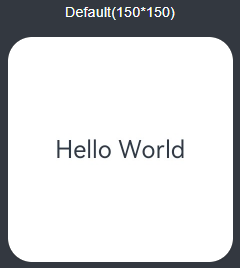
ArkTS卡片具备JS卡片的全量能力,并且新增了动效能力和自定义绘制的能力,支持声明式范式的部分组件、事件、动效、数据管理、状态管理能力,详见“ArkTS卡片支持的页面能力”。
ArkTS卡片支持的页面能力
ArkTS卡片支持的页面能力详见学习ArkTS语言和ArkTS声明式开发范式。
只有标识“支持在ArkTS卡片中使用”的组件和接口可用于ArkTS卡片,同时请留意卡片场景下的能力差异说明。
例如:以下说明表示@Component装饰器可在ArkTS卡片中使用。

卡片使用动效能力
ArkTS卡片开放了使用动画效果的能力,支持显式动画、属性动画、组件内转场能力。需要注意的是,ArkTS卡片使用动画效果时具有以下限制:
表1 动效参数限制
| 名称 | 参数说明 | 限制描述 |
|---|---|---|
| duration | 动画播放时长 | 限制最长的动效播放时长为1秒,当设置大于1秒的时间时,动效时长仍为1秒。 |
| tempo | 动画播放速度 | 卡片中禁止设置此参数,使用默认值1。 |
| delay | 动画延迟执行的时长 | 卡片中禁止设置此参数,使用默认值0。 |
| iterations | 动画播放次数 | 卡片中禁止设置此参数,使用默认值1。 |
说明
静态卡片不支持使用动效能力。
以下示例代码实现了按钮旋转的动画效果:
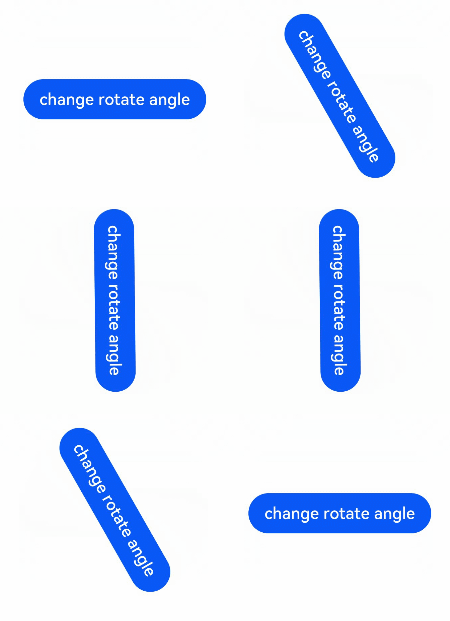
@Entry
@Component
struct AnimationCard {
  @State rotateAngle: number = 0;

  build() {
    Row() {
      Button('change rotate angle')
        .height('20%')
        .width('90%')
        .margin('5%')
        .onClick(() => {
          this.rotateAngle = (this.rotateAngle === 0 ? 90 : 0);
        })
        .rotate({ angle: this.rotateAngle })
        .animation({
          curve: Curve.EaseOut,
          playMode: PlayMode.Normal,
        })
    }.height('100%').alignItems(VerticalAlign.Center)
  }
}
卡片使用自定义绘制能力
ArkTS卡片开放了自定义绘制的能力,在卡片上可以通过Canvas组件创建一块画布,然后通过CanvasRenderingContext2D对象在画布上进行自定义图形的绘制,如下示例代码实现了在画布的中心绘制了一个笑脸。
@Entry
@Component
struct CustomCanvasDrawingCard {
  private canvasWidth: number = 0;
  private canvasHeight: number = 0;
  // 初始化CanvasRenderingContext2D和RenderingContextSettings
  private settings: RenderingContextSettings = new RenderingContextSettings(true);
  private context: CanvasRenderingContext2D = new CanvasRenderingContext2D(this.settings);

  build() {
    Column() {
      Row() {
        Canvas(this.context)
          .width('100%')
          .height('100%')
          .onReady(() => {
            // 在onReady回调中获取画布的实际宽和高
            this.canvasWidth = this.context.width;
            this.canvasHeight = this.context.height;
            // 绘制画布的背景
            this.context.fillStyle = '#EEF0FF';
            this.context.fillRect(0, 0, this.canvasWidth, this.canvasHeight);
            // 在画布的中心绘制一个圆
            this.context.beginPath();
            let radius = this.context.width / 3;
            let circleX = this.context.width / 2;
            let circleY = this.context.height / 2;
            this.context.moveTo(circleX - radius, circleY);
            this.context.arc(circleX, circleY, radius, 2 * Math.PI, 0, true);
            this.context.closePath();
            this.context.fillStyle = '#5A5FFF';
            this.context.fill();
            // 绘制笑脸的左眼
            let leftR = radius / 13;
            let leftX = circleX - (radius / 2.3);
            let leftY = circleY - (radius / 4.5);
            this.context.beginPath();
            this.context.arc(leftX, leftY, leftR, 0, 2 * Math.PI, true);
            this.context.closePath();
            this.context.strokeStyle = '#FFFFFF';
            this.context.lineWidth = 15;
            this.context.stroke();
            // 绘制笑脸的右眼
            let rightR = radius / 13;
            let rightX = circleX + (radius / 2.3);
            let rightY = circleY - (radius / 4.5);
            this.context.beginPath();
            this.context.arc(rightX, rightY, rightR, 0, 2 * Math.PI, true);
            this.context.closePath();
            this.context.strokeStyle = '#FFFFFF';
            this.context.lineWidth = 15;
            this.context.stroke();
            // 绘制笑脸的鼻子
            let startX = circleX;
            let startY = circleY - 20;
            this.context.beginPath();
            this.context.moveTo(startX, startY);
            this.context.lineTo(startX - 8, startY + 40);
            this.context.lineTo(startX + 8, startY + 40);
            this.context.strokeStyle = '#FFFFFF';
            this.context.lineWidth = 15;
            this.context.lineCap = 'round';
            this.context.lineJoin = 'round';
            this.context.stroke();
            // 绘制笑脸的嘴巴
            let mouthR = radius / 2;
            let mouthX = circleX;
            let mouthY = circleY + 10;
            this.context.beginPath();
            this.context.arc(mouthX, mouthY, mouthR, Math.PI / 1.4, Math.PI / 3.4, true);
            this.context.strokeStyle = '#FFFFFF';
            this.context.lineWidth = 15;
            this.context.stroke();
            this.context.closePath();
          })
      }
    }.height('100%').width('100%')
  }
}
运行效果如下图所示。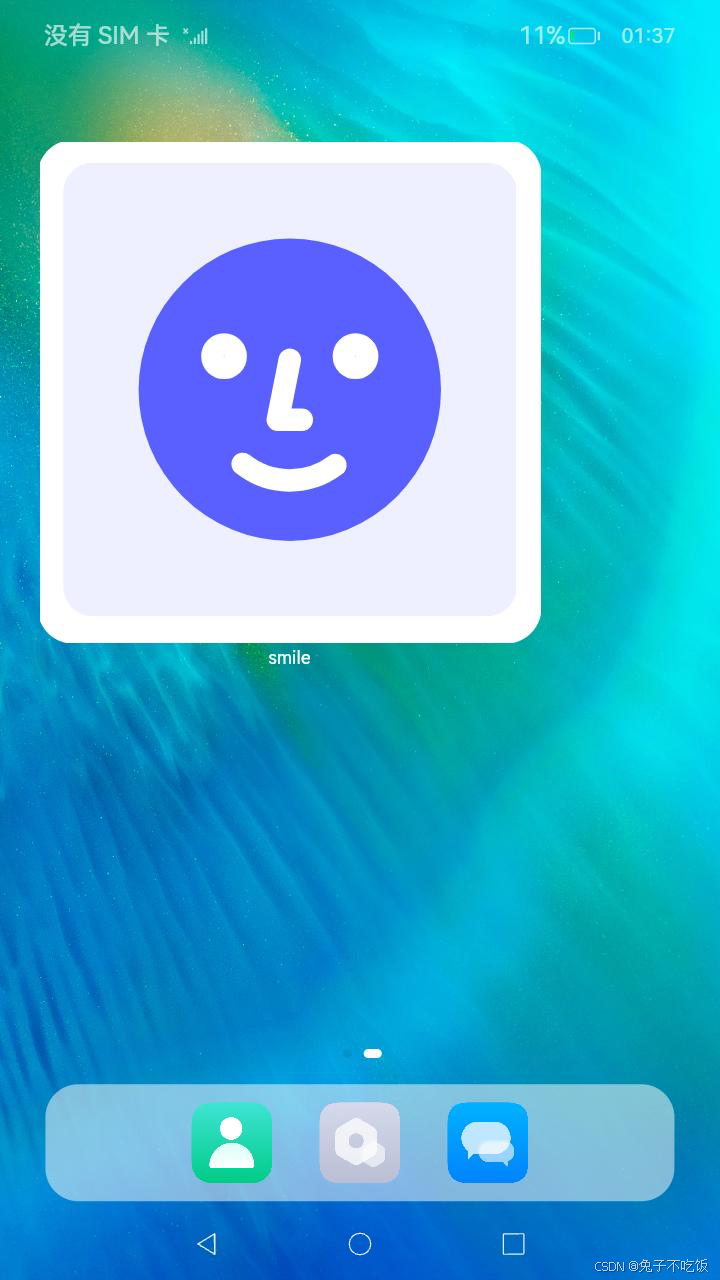
开发卡片事件
卡片事件能力说明
针对动态卡片,ArkTS卡片中提供了postCardAction接口用于卡片内部和提供方应用间的交互,当前支持router、message和call三种类型的事件,仅在卡片中可以调用。
针对静态卡片,ArkTS卡片提供了FormLink用于卡片内部和提供方应用间的交互。
动态卡片事件能力说明
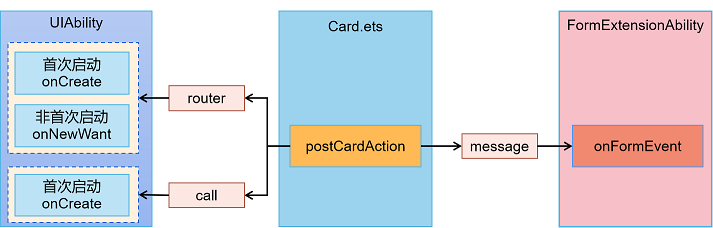
动态卡片事件的主要使用场景如下:
- router事件:可以使用router事件跳转到指定UIAbility,并通过router事件刷新卡片内容。
- call事件:可以使用call事件拉起指定UIAbility到后台,并通过call事件刷新卡片内容。
- message事件:可以使用message拉起FormExtensionAbility,并通过FormExtensionAbility刷新卡片内容。
静态卡片事件能力说明
请参见FormLink
使用router事件跳转到指定UIAbility
在卡片中使用postCardAction接口的router能力,能够快速拉起卡片提供方应用的指定UIAbility,因此UIAbility较多的应用往往会通过卡片提供不同的跳转按钮,实现一键直达的效果。例如相机卡片,卡片上提供拍照、录像等按钮,点击不同按钮将拉起相机应用的不同UIAbility,从而提高用户的体验。

说明
本文主要介绍动态卡片的事件开发。对于静态卡片,请参见FormLink。
通常使用按钮控件来实现页面拉起,示例代码如下:
-
在卡片页面中布局两个按钮,点击其中一个按钮时调用postCardAction向指定UIAbility发送router事件,并在事件内定义需要传递的内容。
@Entry
@Component
struct WidgetEventRouterCard {
  build() {
    Column() {
      Text($r('app.string.JumpLabel'))
        .fontColor('#FFFFFF')
        .opacity(0.9)
        .fontSize(14)
        .margin({ top: '8%', left: '10%' })
      Row() {
        Column() {
          Button() {
            Text($r('app.string.ButtonA_label'))
              .fontColor('#45A6F4')
              .fontSize(12)
          }
          .width(120)
          .height(32)
          .margin({ top: '20%' })
          .backgroundColor('#FFFFFF')
          .borderRadius(16)
          .onClick(() => {
            postCardAction(this, {
              action: 'router',
              abilityName: 'EntryAbility',
              params: { targetPage: 'funA' }
            });
          })

          Button() {
            Text($r('app.string.ButtonB_label'))
              .fontColor('#45A6F4')
              .fontSize(12)
          }
          .width(120)
          .height(32)
          .margin({ top: '8%', bottom: '15vp' })
          .backgroundColor('#FFFFFF')
          .borderRadius(16)
          .onClick(() => {
            postCardAction(this, {
              action: 'router',
              abilityName: 'EntryAbility',
              params: { targetPage: 'funB' }
            });
          })
        }
      }.width('100%').height('80%')
      .justifyContent(FlexAlign.Center)
    }
    .width('100%')
    .height('100%')
    .alignItems(HorizontalAlign.Start)
    .backgroundImage($r('app.media.CardEvent'))
    .backgroundImageSize(ImageSize.Cover)
  }
}
在UIAbility中接收router事件并获取参数,根据传递的params不同,选择拉起不同的页面。
import { AbilityConstant, UIAbility, Want } from '@kit.AbilityKit';
import { window } from '@kit.ArkUI';
import { hilog } from '@kit.PerformanceAnalysisKit';

const TAG: string = 'EntryAbility';
const DOMAIN_NUMBER: number = 0xFF00;

export default class EntryAbility extends UIAbility {
  private selectPage: string = '';
  private currentWindowStage: window.WindowStage | null = null;

  onCreate(want: Want, launchParam: AbilityConstant.LaunchParam): void {
    // 获取router事件中传递的targetPage参数
    hilog.info(DOMAIN_NUMBER, TAG, `Ability onCreate: ${JSON.stringify(want?.parameters)}`);
    if (want?.parameters?.params) {
      // want.parameters.params 对应 postCardAction() 中 params 内容
      let params: Record<string, Object> = JSON.parse(want.parameters.params as string);
      this.selectPage = params.targetPage as string;
      hilog.info(DOMAIN_NUMBER, TAG, `onCreate selectPage: ${this.selectPage}`);
    }
  }

  // 如果UIAbility已在后台运行,在收到Router事件后会触发onNewWant生命周期回调
  onNewWant(want: Want, launchParam: AbilityConstant.LaunchParam): void {
    hilog.info(DOMAIN_NUMBER, TAG, `Ability onNewWant: ${JSON.stringify(want?.parameters)}`);
    if (want?.parameters?.params) {
      // want.parameters.params 对应 postCardAction() 中 params 内容
      let params: Record<string, Object> = JSON.parse(want.parameters.params as string);
      this.selectPage = params.targetPage as string;
      hilog.info(DOMAIN_NUMBER, TAG, `onNewWant selectPage: ${this.selectPage}`);
    }
    if (this.currentWindowStage !== null) {
      this.onWindowStageCreate(this.currentWindowStage);
    }
  }

  onWindowStageCreate(windowStage: window.WindowStage): void {
    // Main window is created, set main page for this ability
    let targetPage: string;
    // 根据传递的targetPage不同,选择拉起不同的页面
    switch (this.selectPage) {
      case 'funA':
        targetPage = 'pages/FunA';
        break;
      case 'funB':
        targetPage = 'pages/FunB';
        break;
      default:
        targetPage = 'pages/Index';
    }
    if (this.currentWindowStage === null) {
      this.currentWindowStage = windowStage;
    }
    windowStage.loadContent(targetPage, (err, data) => {
      if (err.code) {
        hilog.error(DOMAIN_NUMBER, TAG, 'Failed to load the content. Cause: %{public}s', JSON.stringify(err) ?? '');
        return;
      }
      hilog.info(DOMAIN_NUMBER, TAG, 'Succeeded in loading the content. Data: %{public}s', JSON.stringify(data) ?? '');
    });
  }
}
使用call事件拉起指定UIAbility到后台
许多应用希望借助卡片的能力,实现和应用在前台时相同的功能。例如音乐卡片,卡片上提供播放、暂停等按钮,点击不同按钮将触发音乐应用的不同功能,进而提高用户的体验。在卡片中使用postCardAction接口的call能力,能够将卡片提供方应用的指定的UIAbility拉到后台。同时,call能力提供了调用应用指定方法、传递数据的功能,使应用在后台运行时可以通过卡片上的按钮执行不同的功能。
说明
本文主要介绍动态卡片的事件开发。对于静态卡片,请参见FormLink。
约束限制
提供方应用需要具备后台运行权限(ohos.permission.KEEP_BACKGROUND_RUNNING)。
开发步骤
通常使用按钮控件来触发call事件,示例代码如下:
-
在卡片页面中布局两个按钮,点击其中一个按钮时调用postCardAction向指定UIAbility发送call事件,并在事件内定义需要调用的方法和传递的数据。需要注意的是,method参数为必选参数,且类型需要为string类型,用于触发UIAbility中对应的方法。
@Entry @Component struct WidgetEventCallCard { @LocalStorageProp('formId') formId: string = '12400633174999288'; build() { Column() { //... Row() { Column() { Button() { //... } //... .onClick(() => { postCardAction(this, { action: 'call', abilityName: 'WidgetEventCallEntryAbility', // 只能跳转到当前应用下的UIAbility,与module.json5中定义保持 params: { formId: this.formId, method: 'funA' // 在EntryAbility中调用的方法名 } }); }) Button() { //... } //... .onClick(() => { postCardAction(this, { action: 'call', abilityName: 'WidgetEventCallEntryAbility', // 只能跳转到当前应用下的UIAbility,与module.json5中定义保持 params: { formId: this.formId, method: 'funB', // 在EntryAbility中调用的方法名 num: 1 // 需要传递的其他参数 } }); }) } }.width('100%').height('80%') .justifyContent(FlexAlign.Center) } .width('100%') .height('100%') .alignItems(HorizontalAlign.Center) } }在UIAbility中接收call事件并获取参数,根据传递的method不同,执行不同的方法。其余数据可以通过readString方法获取。需要注意的是,UIAbility需要onCreate生命周期中监听所需的方法。
import { AbilityConstant, UIAbility, Want } from '@kit.AbilityKit';
import { promptAction } from '@kit.ArkUI';
import { BusinessError } from '@kit.BasicServicesKit';
import { rpc } from '@kit.IPCKit';
import { hilog } from '@kit.PerformanceAnalysisKit';

const TAG: string = 'WidgetEventCallEntryAbility';
const DOMAIN_NUMBER: number = 0xFF00;
const CONST_NUMBER_1: number = 1;
const CONST_NUMBER_2: number = 2;

class MyParcelable implements rpc.Parcelable {
  num: number;
  str: string;

  constructor(num: number, str: string) {
    this.num = num;
    this.str = str;
  }

  marshalling(messageSequence: rpc.MessageSequence): boolean {
    messageSequence.writeInt(this.num);
    messageSequence.writeString(this.str);
    return true;
  }

  unmarshalling(messageSequence: rpc.MessageSequence): boolean {
    this.num = messageSequence.readInt();
    this.str = messageSequence.readString();
      return true;
  }
}

export default class WidgetEventCallEntryAbility extends UIAbility {
  // 如果UIAbility第一次启动,在收到call事件后会触发onCreate生命周期回调
  onCreate(want: Want, launchParam: AbilityConstant.LaunchParam): void {
    try {
      // 监听call事件所需的方法
      this.callee.on('funA', (data: rpc.MessageSequence) => {
        // 获取call事件中传递的所有参数
        hilog.info(DOMAIN_NUMBER, TAG, `FunACall param:  ${JSON.stringify(data.readString())}`);
        promptAction.showToast({
          message: 'FunACall param:' + JSON.stringify(data.readString())
        });
        return new MyParcelable(CONST_NUMBER_1, 'aaa');
      });
      this.callee.on('funB', (data: rpc.MessageSequence) => {
        // 获取call事件中传递的所有参数
        hilog.info(DOMAIN_NUMBER, TAG, `FunBCall param:  ${JSON.stringify(data.readString())}`);
        promptAction.showToast({
          message: 'FunBCall param:' + JSON.stringify(data.readString())
        });
        return new MyParcelable(CONST_NUMBER_2, 'bbb');
      });
    } catch (err) {
      hilog.error(DOMAIN_NUMBER, TAG, `Failed to register callee on. Cause: ${JSON.stringify(err as BusinessError)}`);
    }
  }

  // 进程退出时,解除监听
  onDestroy(): void | Promise<void> {
    try {
      this.callee.off('funA');
      this.callee.off('funB');
    } catch (err) {
      hilog.error(DOMAIN_NUMBER, TAG, `Failed to register callee off. Cause: ${JSON.stringify(err as BusinessError)}`);
    }
  }
}
通过message事件刷新卡片内容
在卡片页面中可以通过postCardAction接口触发message事件拉起FormExtensionAbility,然后由FormExtensionAbility刷新卡片内容,下面是这种刷新方式的简单示例。
说明
本文主要介绍动态卡片的事件开发。对于静态卡片,请参见FormLink。
-
在卡片页面通过注册Button的onClick点击事件回调,并在回调中调用postCardAction接口触发message事件拉起FormExtensionAbility。卡片页面中使用LocalStorageProp装饰需要刷新的卡片数据。
let storageUpdateByMsg = new LocalStorage(); @Entry(storageUpdateByMsg) @Component struct UpdateByMessageCard { @LocalStorageProp('title') title: ResourceStr = $r('app.string.default_title'); @LocalStorageProp('detail') detail: ResourceStr = $r('app.string.DescriptionDefault'); build() { Column() { Column() { Text(this.title) .fontColor('#FFFFFF') .opacity(0.9) .fontSize(14) .margin({ top: '8%', left: '10%' }) Text(this.detail) .fontColor('#FFFFFF') .opacity(0.6) .fontSize(12) .margin({ top: '5%', left: '10%' }) }.width('100%').height('50%') .alignItems(HorizontalAlign.Start) Row() { Button() { Text($r('app.string.update')) .fontColor('#45A6F4') .fontSize(12) } .width(120) .height(32) .margin({ top: '30%', bottom: '10%' }) .backgroundColor('#FFFFFF') .borderRadius(16) .onClick(() => { postCardAction(this, { action: 'message', params: { msgTest: 'messageEvent' } }); }) }.width('100%').height('40%') .justifyContent(FlexAlign.Center) } .width('100%') .height('100%') .alignItems(HorizontalAlign.Start) .backgroundImage($r('app.media.CardEvent')) .backgroundImageSize(ImageSize.Cover) } }在FormExtensionAbility的onFormEvent生命周期中调用updateForm接口刷新卡片。
import { BusinessError } from '@kit.BasicServicesKit';
import { formBindingData, FormExtensionAbility, formProvider } from '@kit.FormKit';
import { hilog } from '@kit.PerformanceAnalysisKit';

const TAG: string = 'EntryFormAbility';
const DOMAIN_NUMBER: number = 0xFF00;

export default class EntryFormAbility extends FormExtensionAbility {
  onFormEvent(formId: string, message: string): void {
    // Called when a specified message event defined by the form provider is triggered.
    hilog.info(DOMAIN_NUMBER, TAG, `FormAbility onFormEvent, formId = ${formId}, message: ${JSON.stringify(message)}`);

    class FormDataClass {
      title: string = 'Title Update.'; // 和卡片布局中对应
      detail: string = 'Description update success.'; // 和卡片布局中对应
    }

    let formData = new FormDataClass();
    let formInfo: formBindingData.FormBindingData = formBindingData.createFormBindingData(formData);
    formProvider.updateForm(formId, formInfo).then(() => {
      hilog.info(DOMAIN_NUMBER, TAG, 'FormAbility updateForm success.');
    }).catch((error: BusinessError) => {
      hilog.info(DOMAIN_NUMBER, TAG, `Operation updateForm failed. Cause: ${JSON.stringify(error)}`);
    })
  }
  //...
}
运行效果如下图所示。
初始状态 点击刷新 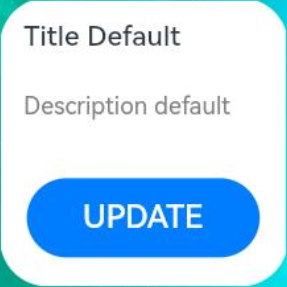

通过router或call事件刷新卡片内容
在卡片页面中可以通过postCardAction接口触发router事件或者call事件拉起UIAbility,然后由UIAbility刷新卡片内容,下面是这种刷新方式的简单示例。
说明
本文主要介绍动态卡片的事件开发。对于静态卡片,请参见FormLink。
通过router事件刷新卡片内容
-
在卡片页面通过注册Button的onClick点击事件回调,并在回调中调用postCardAction接口触发router事件拉起UIAbility。
let storageUpdateRouter = new LocalStorage(); @Entry(storageUpdateRouter) @Component struct WidgetUpdateRouterCard { @LocalStorageProp('routerDetail') routerDetail: ResourceStr = $r('app.string.init'); build() { Column() { Column() { Text(this.routerDetail) .fontColor('#FFFFFF') .opacity(0.9) .fontSize(14) .margin({ top: '8%', left: '10%', right: '10%' }) .textOverflow({ overflow: TextOverflow.Ellipsis }) .maxLines(2) }.width('100%').height('50%') .alignItems(HorizontalAlign.Start) Row() { Button() { Text($r('app.string.JumpLabel')) .fontColor('#45A6F4') .fontSize(12) } .width(120) .height(32) .margin({ top: '30%', bottom: '10%' }) .backgroundColor('#FFFFFF') .borderRadius(16) .onClick(() => { postCardAction(this, { action: 'router', abilityName: 'WidgetEventRouterEntryAbility', // 只能跳转到当前应用下的UIAbility params: { routerDetail: 'RouterFromCard', } }); }) }.width('100%').height('40%') .justifyContent(FlexAlign.Center) } .width('100%') .height('100%') .alignItems(HorizontalAlign.Start) .backgroundImage($r('app.media.CardEvent')) .backgroundImageSize(ImageSize.Cover) } }在UIAbility的onCreate或者onNewWant生命周期中可以通过入参want获取卡片的formID和传递过来的参数信息,然后调用updateForm接口刷新卡片。
import { AbilityConstant, UIAbility, Want } from '@kit.AbilityKit';
import { window } from '@kit.ArkUI';
import { BusinessError } from '@kit.BasicServicesKit';
import { formBindingData, formInfo, formProvider } from '@kit.FormKit';
import { hilog } from '@kit.PerformanceAnalysisKit';

const TAG: string = 'WidgetEventRouterEntryAbility';
const DOMAIN_NUMBER: number = 0xFF00;

export default class WidgetEventRouterEntryAbility extends UIAbility {
  onCreate(want: Want, launchParam: AbilityConstant.LaunchParam): void {
    this.handleFormRouterEvent(want, 'onCreate');
  }

  handleFormRouterEvent(want: Want, source: string): void {
    hilog.info(DOMAIN_NUMBER, TAG, `handleFormRouterEvent ${source}, Want: ${JSON.stringify(want)}`);
    if (want.parameters && want.parameters[formInfo.FormParam.IDENTITY_KEY] !== undefined) {
      let curFormId = want.parameters[formInfo.FormParam.IDENTITY_KEY].toString();
      // want.parameters.params 对应 postCardAction() 中 params 内容
      let message: string = (JSON.parse(want.parameters?.params as string))?.routerDetail;
      hilog.info(DOMAIN_NUMBER, TAG, `UpdateForm formId: ${curFormId}, message: ${message}`);
      let formData: Record<string, string> = {
        'routerDetail': message + ' ' + source + ' UIAbility', // 和卡片布局中对应
      };
      let formMsg = formBindingData.createFormBindingData(formData);
      formProvider.updateForm(curFormId, formMsg).then((data) => {
        hilog.info(DOMAIN_NUMBER, TAG, 'updateForm success.', JSON.stringify(data));
      }).catch((error: BusinessError) => {
        hilog.info(DOMAIN_NUMBER, TAG, 'updateForm failed.', JSON.stringify(error));
      });
    }
  }

  // 如果UIAbility已在后台运行,在收到Router事件后会触发onNewWant生命周期回调
  onNewWant(want: Want, launchParam: AbilityConstant.LaunchParam): void {
    hilog.info(DOMAIN_NUMBER, TAG, 'onNewWant Want:', JSON.stringify(want));
    this.handleFormRouterEvent(want, 'onNewWant');
  }

  onWindowStageCreate(windowStage: window.WindowStage): void {
    // Main window is created, set main page for this ability
    hilog.info(DOMAIN_NUMBER, TAG, '%{public}s', 'Ability onWindowStageCreate');

    windowStage.loadContent('pages/Index', (err, data) => {
      if (err.code) {
        hilog.error(DOMAIN_NUMBER, TAG, 'Failed to load the content. Cause: %{public}s', JSON.stringify(err) ?? '');
        return;
      }
      hilog.info(DOMAIN_NUMBER, TAG, 'Succeeded in loading the content. Data: %{public}s', JSON.stringify(data) ?? '');
    });
  }
  // ...
}
通过call事件刷新卡片内容
-
在使用postCardAction接口的call事件时,需要在FormExtensionAbility中的onAddForm生命周期回调中更新formId。
import { Want } from '@kit.AbilityKit';
import { formBindingData, FormExtensionAbility } from '@kit.FormKit';

export default class WidgetCalleeFormAbility extends FormExtensionAbility {
  onAddForm(want: Want): formBindingData.FormBindingData {
    class DataObj1 {
      formId: string = '';
    }

    let dataObj1 = new DataObj1();
    if (want.parameters && want.parameters['ohos.extra.param.key.form_identity'] !== undefined) {
      let formId: string = want.parameters['ohos.extra.param.key.form_identity'].toString();
      dataObj1.formId = formId;
    }
    let obj1 = formBindingData.createFormBindingData(dataObj1);
    return obj1;
  }
  // ...
}
在卡片页面通过注册Button的onClick点击事件回调,并在回调中调用postCardAction接口触发call事件拉起UIAbility。
let storageUpdateCall = new LocalStorage(); @Entry(storageUpdateCall) @Component struct WidgetUpdateCallCard { @LocalStorageProp('formId') formId: string = '12400633174999288'; @LocalStorageProp('calleeDetail') calleeDetail: ResourceStr = $r('app.string.init'); build() { Column() { Column() { Text(this.calleeDetail) .fontColor('#FFFFFF') .opacity(0.9) .fontSize(14) .margin({ top: '8%', left: '10%' }) }.width('100%').height('50%') .alignItems(HorizontalAlign.Start) Row() { Button() { Text($r('app.string.CalleeJumpLabel')) .fontColor('#45A6F4') .fontSize(12) } .width(120) .height(32) .margin({ top: '30%', bottom: '10%' }) .backgroundColor('#FFFFFF') .borderRadius(16) .onClick(() => { postCardAction(this, { action: 'call', abilityName: 'WidgetCalleeEntryAbility', // 只能拉起当前应用下的UIAbility params: { method: 'funA', formId: this.formId, calleeDetail: 'CallFrom' } }); }) }.width('100%').height('40%') .justifyContent(FlexAlign.Center) } .width('100%') .height('100%') .alignItems(HorizontalAlign.Start) .backgroundImage($r('app.media.CardEvent')) .backgroundImageSize(ImageSize.Cover) } }在UIAbility的onCreate生命周期中监听call事件所需的方法,然后在对应方法中调用updateForm接口刷新卡片。
import { AbilityConstant, UIAbility, Want } from '@kit.AbilityKit';
import { window } from '@kit.ArkUI';
import { BusinessError } from '@kit.BasicServicesKit';
import { formBindingData, formProvider } from '@kit.FormKit';
import { rpc } from '@kit.IPCKit';
import { hilog } from '@kit.PerformanceAnalysisKit';

const TAG: string = 'WidgetCalleeEntryAbility';
const DOMAIN_NUMBER: number = 0xFF00;
const MSG_SEND_METHOD: string = 'funA';
const CONST_NUMBER_1: number = 1;

class MyParcelable implements rpc.Parcelable {
  num: number;
  str: string;

  constructor(num: number, str: string) {
    this.num = num;
    this.str = str;
  };

  marshalling(messageSequence: rpc.MessageSequence): boolean {
    messageSequence.writeInt(this.num);
    messageSequence.writeString(this.str);
    return true;
  };

  unmarshalling(messageSequence: rpc.MessageSequence): boolean {
    this.num = messageSequence.readInt();
    this.str = messageSequence.readString();
    return true;
  };
}

// 在收到call事件后会触发callee监听的方法
let funACall = (data: rpc.MessageSequence): MyParcelable => {
  // 获取call事件中传递的所有参数
  let params: Record<string, string> = JSON.parse(data.readString());
  if (params.formId !== undefined) {
    let curFormId: string = params.formId;
    let message: string = params.calleeDetail;
    hilog.info(DOMAIN_NUMBER, TAG, `UpdateForm formId: ${curFormId}, message: ${message}`);
    let formData: Record<string, string> = {
      'calleeDetail': message
    };
    let formMsg: formBindingData.FormBindingData = formBindingData.createFormBindingData(formData);
    formProvider.updateForm(curFormId, formMsg).then((data) => {
      hilog.info(DOMAIN_NUMBER, TAG, `updateForm success. ${JSON.stringify(data)}`);
    }).catch((error: BusinessError) => {
      hilog.error(DOMAIN_NUMBER, TAG, `updateForm failed: ${JSON.stringify(error)}`);
    });
  }
  return new MyParcelable(CONST_NUMBER_1, 'aaa');
};

export default class WidgetCalleeEntryAbility extends UIAbility {
  onCreate(want: Want, launchParam: AbilityConstant.LaunchParam): void {
    try {
      // 监听call事件所需的方法
      this.callee.on(MSG_SEND_METHOD, funACall);
    } catch (error) {
      hilog.error(DOMAIN_NUMBER, TAG, `${MSG_SEND_METHOD} register failed with error ${JSON.stringify(error)}`);
    }
  }

  onWindowStageCreate(windowStage: window.WindowStage): void {
    // Main window is created, set main page for this ability
    hilog.info(DOMAIN_NUMBER, TAG, '%{public}s', 'Ability onWindowStageCreate');

    windowStage.loadContent('pages/Index', (err, data) => {
      if (err.code) {
        hilog.error(DOMAIN_NUMBER, TAG, 'Failed to load the content. Cause: %{public}s', JSON.stringify(err) ?? '');
        return;
      }
      hilog.info(DOMAIN_NUMBER, TAG, 'Succeeded in loading the content. Data: %{public}s', JSON.stringify(data) ?? '');
    });
  }
}
卡片数据交互
卡片数据交互说明
ArkTS卡片框架提供了updateForm接口和requestForm接口主动触发卡片的页面刷新,通过LocalStorageProp确认需要刷新的卡片数据。
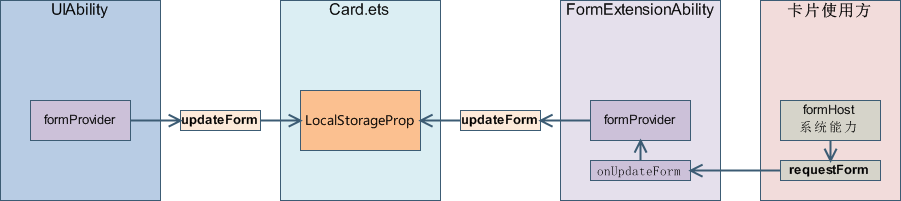
接口 是否系统能力 约束 updateForm 否 1. 提供方调用。
2. 提供方仅允许刷新自己的卡片,其他提供方的卡片无法刷新。
requestForm 是 1. 使用方调用。
2. 仅允许刷新添加到当前使用方的卡片,添加到其他使用方的卡片无法刷新。
下面介绍卡片页面刷新的典型场景。
- 卡片定时刷新和定点刷新
- 刷新本地图片和网络图片
- 根据卡片状态刷新不同内容
卡片定时刷新和定点刷新
当前卡片框架提供了如下几种按时间刷新卡片的方式:
-
定时刷新:表示在一定时间间隔内调用onUpdateForm的生命周期回调函数自动刷新卡片内容。可以在form_config.json配置文件的updateDuration字段中进行设置。例如,可以将刷新时间设置为每小时一次。
说明
-
在使用定时和定点刷新功能之前,需要在form_config.json配置文件中设置updateEnabled字段为true,以启用周期性刷新功能。
当配置了updateDuration(定时刷新)后,该设置会优先于scheduledUpdateTime(定点刷新)生效,即使同时配置了两者,定点刷新也会被忽略。
-
为减少卡片被动周期刷新进程启动次数,降低卡片刷新功耗,应用市场在安装应用时可以为该应用配置刷新周期,
也可以为已经安装的应用动态配置刷新周期,用来限制卡片刷新周期的时长,以达到降低周期刷新进程启动次数的目的。
● 当配置了updateDuration(定时刷新)后,若应用市场动态配置了该应用的刷新周期,
卡片框架会将form_config.json文件中配置的刷新周期与应用市场配置的刷新周期进行比较,取较长的刷新周期做为该卡片的定时刷新周期。
● 若应用市场未动态配置该应用的刷新周期,则以form_config.json文件中配置的刷新周期为准。
● 若该卡片取消定时刷新功能,该规则将无效。
● 卡片定时刷新的更新周期单位为30分钟。应用市场配置的刷新周期范围是1~336,即最短为半小时(1 * 30min)刷新一次,最长为一周(336 * 30min)刷新一次。
● 该规则从API11开始生效。若小于API11,则以form_config.json文件中配置的刷新周期为准。
-
{
  "forms": [
    {
      "name": "UpdateDuration",
      "description": "$string:widget_updateduration_desc",
      "src": "./ets/updateduration/pages/UpdateDurationCard.ets",
      "uiSyntax": "arkts",
      "window": {
        "designWidth": 720,
        "autoDesignWidth": true
      },
      "colorMode": "auto",
      "isDefault": true,
      "updateEnabled": true,
      "scheduledUpdateTime": "10:30",
      "updateDuration": 2,
      "defaultDimension": "2*2",
      "supportDimensions": [
        "2*2"
      ]
    }
  ]
}
定点刷新:表示在每天的某个特定时间点自动刷新卡片内容。可以在form_config.json配置文件中的scheduledUpdateTime字段中进行设置。例如,可以将刷新时间设置为每天的上午10点30分。
说明
当同时配置了定时刷新(updateDuration)和定点刷新(scheduledUpdateTime)时,定时刷新的优先级更高。如果想要配置定点刷新,则需要将updateDuration配置为0。
{
  "forms": [
      {
      "name": "ScheduledUpdateTime",
      "description": "$string:widget_scheupdatetime_desc",
      "src": "./ets/scheduledupdatetime/pages/ScheduledUpdateTimeCard.ets",
      "uiSyntax": "arkts",
      "window": {
        "designWidth": 720,
        "autoDesignWidth": true
      },
      "colorMode": "auto",
      "isDefault": true,
      "updateEnabled": true,
      "scheduledUpdateTime": "10:30",
      "updateDuration": 0,
      "defaultDimension": "2*2",
      "supportDimensions": [
        "2*2"
      ]
    }
  ]
}
下次刷新:表示指定卡片的下一次刷新时间。可以通过调用setFormNextRefreshTime接口来实现。最短刷新时间为5分钟。例如,可以在接口调用后的5分钟内刷新卡片内容。
import { FormExtensionAbility, formProvider } from '@kit.FormKit';
import { hilog } from '@kit.PerformanceAnalysisKit';
import { BusinessError } from '@kit.BasicServicesKit';

const TAG: string = 'UpdateByTimeFormAbility';
const FIVE_MINUTE: number = 5;
const DOMAIN_NUMBER: number = 0xFF00;

export default class UpdateByTimeFormAbility extends FormExtensionAbility {
  onFormEvent(formId: string, message: string): void {
    // Called when a specified message event defined by the form provider is triggered.
    hilog.info(DOMAIN_NUMBER, TAG, `FormAbility onFormEvent, formId = ${formId}, message: ${JSON.stringify(message)}`);
    try {
      // 设置过5分钟后更新卡片内容
      formProvider.setFormNextRefreshTime(formId, FIVE_MINUTE, (err: BusinessError) => {
        if (err) {
          hilog.info(DOMAIN_NUMBER, TAG, `Failed to setFormNextRefreshTime. Code: ${err.code}, message: ${err.message}`);
          return;
        } else {
          hilog.info(DOMAIN_NUMBER, TAG, 'Succeeded in setFormNextRefreshTiming.');
        }
      });
    } catch (err) {
      hilog.info(DOMAIN_NUMBER, TAG, `Failed to setFormNextRefreshTime. Code: ${(err as BusinessError).code}, message: ${(err as BusinessError).message}`);
    }
  }
  ...
}
在触发定时、定点或下次刷新后,系统会调用FormExtensionAbility的onUpdateForm生命周期回调,在回调中,可以使用updateForm进行提供方刷新卡片。onUpdateForm生命周期回调的使用请参见通过FormExtensionAbility刷新卡片内容。
说明
-
定时刷新有配额限制,每张卡片每天最多通过定时方式触发刷新50次,定时刷新包含卡片配置项updateDuration和调用setFormNextRefreshTime方法两种方式,当达到50次配额后,无法通过定时方式再次触发刷新,刷新次数会在每天的0点重置。
-
当前定时刷新使用同一个计时器进行计时,因此卡片定时刷新的第一次刷新会有最多30分钟的偏差。比如第一张卡片A(每隔半小时刷新一次)在3点20分添加成功,定时器启动并每隔半小时触发一次事件,第二张卡片B(每隔半小时刷新一次)在3点40分添加成功,在3点50分定时器事件触发时,卡片A触发定时刷新,卡片B会在下次事件(4点20分)中才会触发。
-
定时刷新和定点刷新仅在屏幕亮屏情况下才会触发,在灭屏场景下仅会记录刷新动作,待亮屏时统一进行刷新。
-
如果使能了卡片代理刷新,定时刷新和下次刷新不生效。
刷新本地图片和网络图片
在卡片上通常需要展示本地图片或从网络上下载的图片,获取本地图片和网络图片需要通过FormExtensionAbility来实现,如下示例代码介绍了如何在卡片上显示本地图片和网络图片。
-
下载网络图片需要使用到网络能力,需要申请ohos.permission.INTERNET权限,配置方式请参见声明权限。
-
在EntryFormAbility中的onAddForm生命周期回调中实现本地文件的刷新。
import { Want } from '@kit.AbilityKit';
import { BusinessError } from '@kit.BasicServicesKit';
import { fileIo } from '@kit.CoreFileKit';
import { formBindingData, FormExtensionAbility } from '@kit.FormKit';
import { hilog } from '@kit.PerformanceAnalysisKit';

const TAG: string = 'WgtImgUpdateEntryFormAbility';
const DOMAIN_NUMBER: number = 0xFF00;

export default class WgtImgUpdateEntryFormAbility extends FormExtensionAbility {
  // 在添加卡片时,打开一个本地图片并将图片内容传递给卡片页面显示
  onAddForm(want: Want): formBindingData.FormBindingData {
    // 假设在当前卡片应用的tmp目录下有一个本地图片:head.PNG
    let tempDir = this.context.getApplicationContext().tempDir;
    hilog.info(DOMAIN_NUMBER, TAG, `tempDir: ${tempDir}`);
    let imgMap: Record<string, number> = {};
    try {
      // 打开本地图片并获取其打开后的fd
      let file = fileIo.openSync(tempDir + '/' + 'head.PNG');
      imgMap['imgBear'] = file.fd;
    } catch (e) {
      hilog.error(DOMAIN_NUMBER, TAG, `openSync failed: ${JSON.stringify(e as BusinessError)}`);
    }

    class FormDataClass {
      text: string = 'Image: Bear';
      loaded: boolean = true;
      // 卡片需要显示图片场景, 必须和下列字段formImages 中的key 'imgBear' 相同。
      imgName: string = 'imgBear';
      // 卡片需要显示图片场景, 必填字段(formImages 不可缺省或改名), 'imgBear' 对应 fd
      formImages: Record<string, number> = imgMap;
    }

    let formData = new FormDataClass();
    // 将fd封装在formData中并返回至卡片页面
    return formBindingData.createFormBindingData(formData);
  }
  //...
}
在EntryFormAbility中的onFormEvent生命周期回调中实现网络文件的刷新。
import { BusinessError } from '@kit.BasicServicesKit';
import { fileIo } from '@kit.CoreFileKit';
import { formBindingData, FormExtensionAbility, formProvider } from '@kit.FormKit';
import { http } from '@kit.NetworkKit';
import { hilog } from '@kit.PerformanceAnalysisKit';

const TAG: string = 'WgtImgUpdateEntryFormAbility';
const DOMAIN_NUMBER: number = 0xFF00;

export default class WgtImgUpdateEntryFormAbility extends FormExtensionAbility {
  onFormEvent(formId: string, message: string): void {
    let param: Record<string, string> = {
      'text': '刷新中...'
    };
    let formInfo: formBindingData.FormBindingData = formBindingData.createFormBindingData(param);
    formProvider.updateForm(formId, formInfo);

    // 注意:FormExtensionAbility在触发生命周期回调时被拉起,仅能在后台存在5秒
    // 建议下载能快速下载完成的小文件,如在5秒内未下载完成,则此次网络图片无法刷新至卡片页面上
    let netFile = 'https://cn-assets.gitee.com/assets/mini_app-e5eee5a21c552b69ae6bf2cf87406b59.jpg'; // 需要在此处使用真实的网络图片下载链接
    let tempDir = this.context.getApplicationContext().tempDir;
    let fileName = 'file' + Date.now();
    let tmpFile = tempDir + '/' + fileName;

    let httpRequest = http.createHttp()
    httpRequest.request(netFile).then((data) => {
      if (data?.responseCode == http.ResponseCode.OK) {
        let imgFile = fileIo.openSync(tmpFile, fileIo.OpenMode.READ_WRITE | fileIo.OpenMode.CREATE);
        fileIo.write(imgFile.fd, data.result as ArrayBuffer).then((writeLen: number) => {
          hilog.info(DOMAIN_NUMBER, TAG, "write data to file succeed and size is:" + writeLen);
        }).catch((err: BusinessError) => {
          hilog.error(DOMAIN_NUMBER, TAG, "write data to file failed with error message: " + err.message + ", error code: " + err.code);
        }).finally(() => {
          fileIo.closeSync(imgFile);
        });

        hilog.info(DOMAIN_NUMBER, TAG, 'ArkTSCard download complete: %{public}s', tmpFile);
        let imgMap: Record<string, number> = {};
        try {
          let file = fileIo.openSync(tmpFile);
          imgMap[fileName] = file.fd;
        } catch (e) {
          hilog.error(DOMAIN_NUMBER, TAG, `openSync failed: ${JSON.stringify(e as BusinessError)}`);
        }

        class FormDataClass {
          text: string = 'Image: Bear' + fileName;
          loaded: boolean = true;
          // 卡片需要显示图片场景, 必须和下列字段formImages 中的key fileName 相同。
          imgName: string = fileName;
          // 卡片需要显示图片场景, 必填字段(formImages 不可缺省或改名), fileName 对应 fd
          formImages: Record<string, number> = imgMap;
        }

        let formData = new FormDataClass();
        let formInfo = formBindingData.createFormBindingData(formData);
        formProvider.updateForm(formId, formInfo).then(() => {
          hilog.info(DOMAIN_NUMBER, TAG, '%{public}s', 'FormAbility updateForm success.');
        }).catch((error: BusinessError) => {
          hilog.error(DOMAIN_NUMBER, TAG, `FormAbility updateForm failed: ${JSON.stringify(error)}`);
        });
      } else {
        hilog.error(DOMAIN_NUMBER, TAG, `ArkTSCard download task failed`);
        let param: Record<string, string> = {
          'text': '刷新失败'
        };
        let formInfo: formBindingData.FormBindingData = formBindingData.createFormBindingData(param);
        formProvider.updateForm(formId, formInfo);
      }
      httpRequest.destroy();
    })
  }
  //...
}
在卡片页面通过backgroundImage属性展示EntryFormAbility传递过来的卡片内容。
let storageWidgetImageUpdate = new LocalStorage();

@Entry(storageWidgetImageUpdate)
@Component
struct WidgetImageUpdateCard {
  @LocalStorageProp('text') text: ResourceStr = $r('app.string.loading');
  @LocalStorageProp('loaded') loaded: boolean = false;
  @LocalStorageProp('imgName') imgName: ResourceStr = $r('app.string.imgName');

  build() {
    Column() {
      Column() {
        Text(this.text)
          .fontColor('#FFFFFF')
          .opacity(0.9)
          .fontSize(12)
          .textOverflow({ overflow: TextOverflow.Ellipsis })
          .maxLines(1)
          .margin({ top: '8%', left: '10%' })
      }.width('100%').height('50%')
      .alignItems(HorizontalAlign.Start)

      Row() {
        Button() {
          Text($r('app.string.update'))
            .fontColor('#45A6F4')
            .fontSize(12)
        }
        .width(120)
        .height(32)
        .margin({ top: '30%', bottom: '10%' })
        .backgroundColor('#FFFFFF')
        .borderRadius(16)
        .onClick(() => {
          postCardAction(this, {
            action: 'message',
            params: {
              info: 'refreshImage'
            }
          });
        })
      }.width('100%').height('40%')
      .justifyContent(FlexAlign.Center)
    }
    .width('100%').height('100%')
    .backgroundImage(this.loaded ? 'memory://' + this.imgName : $r('app.media.ImageDisp'))
    .backgroundImageSize(ImageSize.Cover)
  }
}
说明
-
Image组件通过入参(memory://fileName)中的memory://标识来进行远端内存图片显示,其中fileName需要和EntryFormAbility传递对象('formImages': {key: fd})中的key相对应。
-
Image组件通过传入的参数是否有变化来决定是否刷新图片,因此EntryFormAbility每次传递过来的imgName都需要不同,连续传递两个相同的imgName时,图片不会刷新。
根据卡片状态刷新不同内容
相同的卡片可以添加到桌面上实现不同的功能,比如添加两张桌面的卡片,一张显示杭州的天气,一张显示北京的天气,设置每天早上7点触发定时刷新,卡片需要感知当前的配置是杭州还是北京,然后将对应城市的天气信息刷新到卡片上,以下示例介绍了如何根据卡片的状态动态选择需要刷新的内容。
-
卡片配置文件:配置每30分钟自动刷新。
{
  "forms": [
    {
      "name": "WidgetUpdateByStatus",
      "description": "$string:UpdateByStatusFormAbility_desc",
      "src": "./ets/widgetupdatebystatus/pages/WidgetUpdateByStatusCard.ets",
      "uiSyntax": "arkts",
      "window": {
        "designWidth": 720,
        "autoDesignWidth": true
      },
      "colorMode": "auto",
      "isDefault": true,
      "updateEnabled": true,
      "scheduledUpdateTime": "10:30",
      "updateDuration": 1,
      "defaultDimension": "2*2",
      "supportDimensions": [
        "2*2"
      ]
    }
  ]
}
卡片页面:卡片具备不同的状态选择,在不同的状态下需要刷新不同的内容,因此在状态发生变化时通过postCardAction通知EntryFormAbility。
let storageUpdateByStatus = new LocalStorage();

@Entry(storageUpdateByStatus)
@Component
struct WidgetUpdateByStatusCard {
  @LocalStorageProp('textA') textA: Resource = $r('app.string.to_be_refreshed');
  @LocalStorageProp('textB') textB: Resource = $r('app.string.to_be_refreshed');
  @State selectA: boolean = false;
  @State selectB: boolean = false;

  build() {
    Column() {
      Column() {
        Row() {
          Checkbox({ name: 'checkbox1', group: 'checkboxGroup' })
            .padding(0)
            .select(false)
            .margin({ left: 26 })
            .onChange((value: boolean) => {
              this.selectA = value;
              postCardAction(this, {
                action: 'message',
                params: {
                  selectA: JSON.stringify(value)
                }
              });
            })
          Text($r('app.string.status_a'))
            .fontColor('#000000')
            .opacity(0.9)
            .fontSize(14)
            .margin({ left: 8 })
        }
        .width('100%')
        .padding(0)
        .justifyContent(FlexAlign.Start)

        Row() {
          Checkbox({ name: 'checkbox2', group: 'checkboxGroup' })
            .padding(0)
            .select(false)
            .margin({ left: 26 })
            .onChange((value: boolean) => {
              this.selectB = value;
              postCardAction(this, {
                action: 'message',
                params: {
                  selectB: JSON.stringify(value)
                }
              });
            })
          Text($r('app.string.status_b'))
            .fontColor('#000000')
            .opacity(0.9)
            .fontSize(14)
            .margin({ left: 8 })
        }
        .width('100%')
        .position({ y: 32 })
        .padding(0)
        .justifyContent(FlexAlign.Start)
      }
      .position({ y: 12 })

      Column() {
        Row() { // 选中状态A才会进行刷新的内容
          Text($r('app.string.status_a'))
            .fontColor('#000000')
            .opacity(0.4)
            .fontSize(12)

          Text(this.textA)
            .fontColor('#000000')
            .opacity(0.4)
            .fontSize(12)
        }
        .margin({ top: '12px', left: 26, right: '26px' })

        Row() { // 选中状态B才会进行刷新的内容
          Text($r('app.string.status_b'))
            .fontColor('#000000')
            .opacity(0.4)
            .fontSize(12)
          Text(this.textB)
            .fontColor('#000000')
            .opacity(0.4)
            .fontSize(12)
        }.margin({ top: '12px', bottom: '21px', left: 26, right: '26px' })
      }
      .margin({ top: 80 })
      .width('100%')
      .alignItems(HorizontalAlign.Start)
    }.width('100%').height('100%')
    .backgroundImage($r('app.media.CardUpdateByStatus'))
    .backgroundImageSize(ImageSize.Cover)
  }
}
EntryFormAbility:将卡片的状态存储在本地数据库中,在刷新事件回调触发时,通过formId获取当前卡片的状态,然后根据卡片的状态选择不同的刷新内容。
import { Want } from '@kit.AbilityKit';
import { preferences } from '@kit.ArkData';
import { BusinessError } from '@kit.BasicServicesKit';
import { formBindingData, FormExtensionAbility, formInfo, formProvider } from '@kit.FormKit';
import { hilog } from '@kit.PerformanceAnalysisKit';

const TAG: string = 'UpdateByStatusFormAbility';
const DOMAIN_NUMBER: number = 0xFF00;

export default class UpdateByStatusFormAbility extends FormExtensionAbility {
  onAddForm(want: Want): formBindingData.FormBindingData {
    let formId: string = '';
    let isTempCard: boolean;
    if (want.parameters) {
      formId = JSON.stringify(want.parameters[formInfo.FormParam.IDENTITY_KEY]);
      isTempCard = want.parameters[formInfo.FormParam.TEMPORARY_KEY] as boolean;
      if (isTempCard === false) { // 如果为常态卡片,直接进行信息持久化
        hilog.info(DOMAIN_NUMBER, TAG, 'Not temp card, init db for:' + formId);
        let promise: Promise<preferences.Preferences> = preferences.getPreferences(this.context, 'myStore');
        promise.then(async (storeDB: preferences.Preferences) => {
          hilog.info(DOMAIN_NUMBER, TAG, 'Succeeded to get preferences.');
          await storeDB.put('A' + formId, 'false');
          await storeDB.put('B' + formId, 'false');
          await storeDB.flush();
        }).catch((err: BusinessError) => {
          hilog.info(DOMAIN_NUMBER, TAG, `Failed to get preferences. ${JSON.stringify(err)}`);
        });
      }
  }
    let formData: Record<string, Object | string> = {};
    return formBindingData.createFormBindingData(formData);
  }

  onRemoveForm(formId: string): void {
    hilog.info(DOMAIN_NUMBER, TAG, 'onRemoveForm, formId:' + formId);
    let promise = preferences.getPreferences(this.context, 'myStore');
    promise.then(async (storeDB) => {
      hilog.info(DOMAIN_NUMBER, TAG, 'Succeeded to get preferences.');
      await storeDB.delete('A' + formId);
      await storeDB.delete('B' + formId);
    }).catch((err: BusinessError) => {
    hilog.info(DOMAIN_NUMBER, TAG, `Failed to get preferences. ${JSON.stringify(err)}`);
    });
  }

  // 如果在添加时为临时卡片,则建议转为常态卡片时进行信息持久化
  onCastToNormalForm(formId: string): void {
    hilog.info(DOMAIN_NUMBER, TAG, 'onCastToNormalForm, formId:' + formId);
    let promise: Promise<preferences.Preferences> = preferences.getPreferences(this.context, 'myStore');
    promise.then(async (storeDB: preferences.Preferences) => {
      hilog.info(DOMAIN_NUMBER, TAG, 'Succeeded to get preferences.');
      await storeDB.put('A' + formId, 'false');
      await storeDB.put('B' + formId, 'false');
      await storeDB.flush();
    }).catch((err: BusinessError) => {
    hilog.info(DOMAIN_NUMBER, TAG, `Failed to get preferences. ${JSON.stringify(err)}`);
    });
  }

  onUpdateForm(formId: string): void {
    let promise: Promise<preferences.Preferences> = preferences.getPreferences(this.context, 'myStore');
    promise.then(async (storeDB: preferences.Preferences) => {
      hilog.info(DOMAIN_NUMBER, TAG, 'Succeeded to get preferences from onUpdateForm.');
      let stateA = await storeDB.get('A' + formId, 'false');
      let stateB = await storeDB.get('B' + formId, 'false');
      // A状态选中则更新textA
      if (stateA === 'true') {
        let param: Record<string, string> = {
          'textA': 'AAA'
        };
        let formInfo: formBindingData.FormBindingData = formBindingData.createFormBindingData(param);
        await formProvider.updateForm(formId, formInfo);
      }
      // B状态选中则更新textB
      if (stateB === 'true') {
        let param: Record<string, string> = {
          'textB': 'BBB'
        };
        let formInfo: formBindingData.FormBindingData = formBindingData.createFormBindingData(param);
      await formProvider.updateForm(formId, formInfo);
      }
      hilog.info(DOMAIN_NUMBER, TAG, `Update form success stateA:${stateA} stateB:${stateB}.`);
    }).catch((err: BusinessError) => {
      hilog.info(DOMAIN_NUMBER, TAG, `Failed to get preferences. ${JSON.stringify(err)}`);
    });
  }

  onFormEvent(formId: string, message: string): void {
    // 存放卡片状态
    hilog.info(DOMAIN_NUMBER, TAG, 'onFormEvent formId:' + formId + 'msg:' + message);
    let promise: Promise<preferences.Preferences> = preferences.getPreferences(this.context, 'myStore');
    promise.then(async (storeDB: preferences.Preferences) => {
      hilog.info(DOMAIN_NUMBER, TAG, 'Succeeded to get preferences.');
      let msg: Record<string, string> = JSON.parse(message);
      if (msg.selectA !== undefined) {
        hilog.info(DOMAIN_NUMBER, TAG, 'onFormEvent selectA info:' + msg.selectA);
        await storeDB.put('A' + formId, msg.selectA);
      }
      if (msg.selectB !== undefined) {
        hilog.info(DOMAIN_NUMBER, TAG, 'onFormEvent selectB info:' + msg.selectB);
        await storeDB.put('B' + formId, msg.selectB);
      }
      await storeDB.flush();
    }).catch((err: BusinessError) => {
      hilog.info(DOMAIN_NUMBER, TAG, `Failed to get preferences. ${JSON.stringify(err)}`);
    });
  }
}
说明
通过本地数据库进行卡片信息的持久化时,建议先在onAddForm生命周期中通过TEMPORARY_KEY判断当前添加的卡片是否为常态卡片:如果是常态卡片,则直接进行卡片信息持久化;如果为临时卡片,则可以在卡片转为常态卡片(onCastToNormalForm)时进行持久化;同时需要在卡片销毁(onRemoveForm)时删除当前卡片存储的持久化信息,避免反复添加删除卡片导致数据库文件持续变大。
开发基于JS UI的卡片
以下内容介绍基于类Web范式的JS UI卡片开发指南。
运作机制
卡片框架的运作机制如图1所示。
图1 卡片框架运作机制(Stage模型)
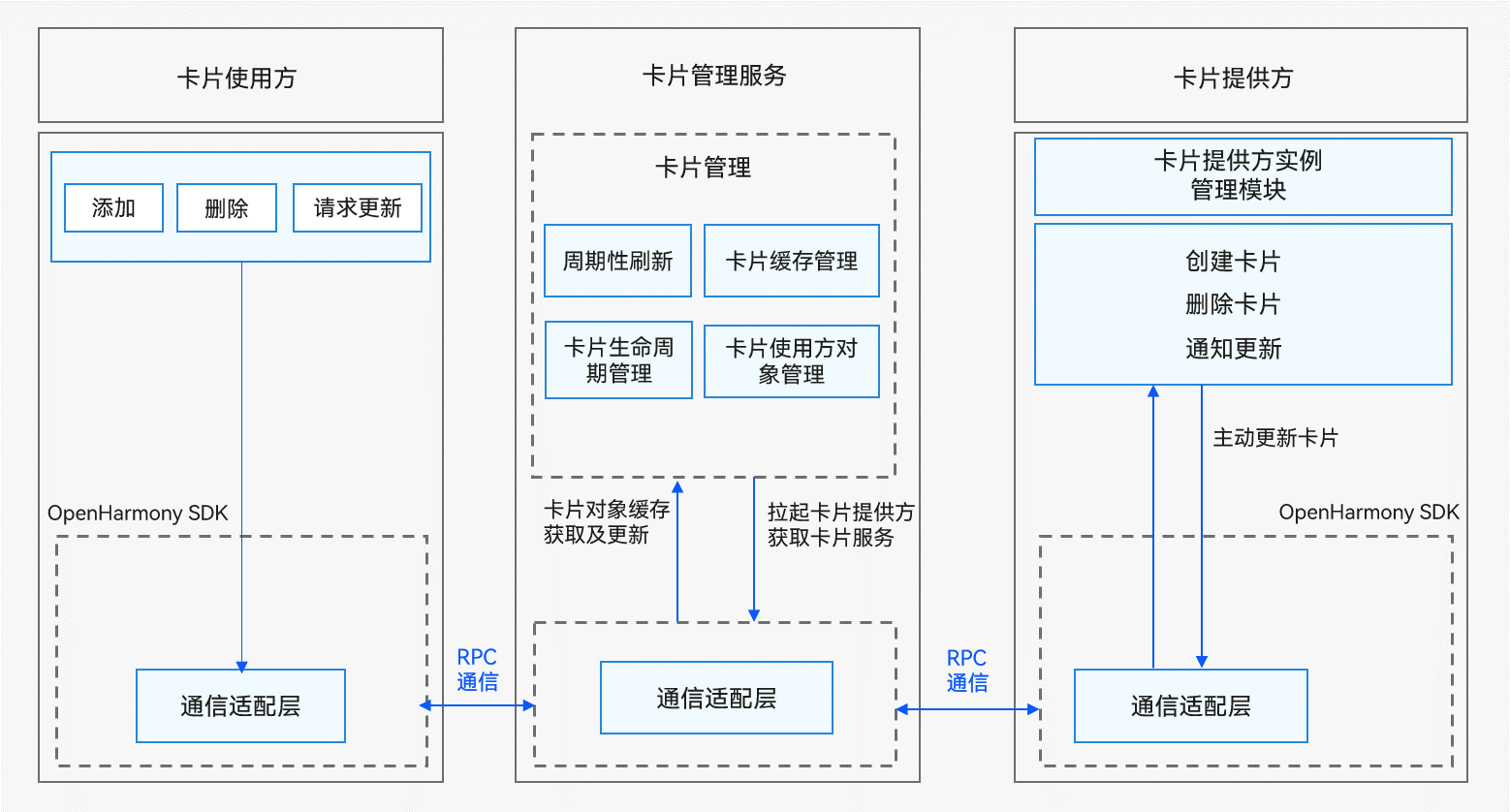
卡片使用方包含以下模块:
-
卡片使用:包含卡片的创建、删除、请求更新等操作。
-
通信适配层:由HarmonyOS SDK提供,负责与卡片管理服务通信,用于将卡片的相关操作到卡片管理服务。
卡片管理服务包含以下模块:
-
周期性刷新:在卡片添加后,根据卡片的刷新策略启动定时任务周期性触发卡片的刷新。
-
卡片缓存管理:在卡片添加到卡片管理服务后,对卡片的视图信息进行缓存,以便下次获取卡片时可以直接返回缓存数据,降低时延。
-
卡片生命周期管理:对于卡片切换到后台或者被遮挡时,暂停卡片的刷新;以及卡片的升级/卸载场景下对卡片数据的更新和清理。
-
卡片使用方对象管理:对卡片使用方的RPC对象进行管理,用于使用方请求进行校验以及对卡片更新后的回调处理。
-
通信适配层:负责与卡片使用方和提供方进行RPC通信。
卡片提供方包含以下模块:
-
卡片服务:由卡片提供方开发者实现,开发者实现生命周期处理创建卡片、更新卡片以及删除卡片等请求,提供相应的卡片服务。
-
卡片提供方实例管理模块:由卡片提供方开发者实现,负责对卡片管理服务分配的卡片实例进行持久化管理。
-
通信适配层:由HarmonyOS SDK提供,负责与卡片管理服务通信,用于将卡片的更新数据主动推送到卡片管理服务。
说明
实际开发时只需要作为卡片提供方进行卡片内容的开发,卡片使用方和卡片管理服务由系统自动处理。
接口说明
FormExtensionAbility类拥有如下API接口,具体的API介绍详见接口文档。
| 接口名 | 描述 |
|---|---|
| onAddForm(want: Want): formBindingData.FormBindingData | 卡片提供方接收创建卡片的通知接口。 |
| onCastToNormalForm(formId: string): void | 卡片提供方接收临时卡片转常态卡片的通知接口。 |
| onUpdateForm(formId: string): void | 卡片提供方接收更新卡片的通知接口。 |
| onChangeFormVisibility(newStatus: Record<string, number>): void | 卡片提供方接收修改可见性的通知接口。 |
| onFormEvent(formId: string, message: string): void | 卡片提供方接收处理卡片事件的通知接口。 |
| onRemoveForm(formId: string): void | 卡片提供方接收销毁卡片的通知接口。 |
| onConfigurationUpdate(newConfig: Configuration): void | 当系统配置更新时调用。 |
| onShareForm?(formId: string): Record<string, Object> | 卡片提供方接收卡片分享的通知接口。 |
formProvider类有如下API接口,具体的API介绍详见接口文档。
| 接口名 | 描述 |
|---|---|
| setFormNextRefreshTime(formId: string, minute: number, callback: AsyncCallback<void>): void | 设置指定卡片的下一次更新时间。 |
| setFormNextRefreshTime(formId: string, minute: number): Promise<void> | 设置指定卡片的下一次更新时间,以promise方式返回。 |
| updateForm(formId: string, formBindingData: formBindingData.FormBindingData, callback: AsyncCallback<void>): void | 更新指定的卡片。 |
| updateForm(formId: string, formBindingData: formBindingData.FormBindingData): Promise<void> | 更新指定的卡片,以promise方式返回。 |
formBindingData类有如下API接口,具体的API介绍详见接口文档。
| 接口名 | 描述 |
|---|---|
| createFormBindingData(obj?: Object | string): FormBindingData | 创建一个FormBindingData对象。 |
开发步骤
Stage卡片开发,即基于Stage模型的卡片提供方开发,主要涉及如下关键步骤:
-
创建卡片FormExtensionAbility:卡片生命周期回调函数FormExtensionAbility开发。
-
配置卡片配置文件:配置应用配置文件module.json5和profile配置文件。
-
卡片信息的持久化:对卡片信息进行持久化管理。
-
卡片数据交互:通过updateForm更新卡片显示的信息。
-
开发卡片页面:使用HML+CSS+JSON开发JS卡片页面。
-
开发卡片事件:为卡片添加router事件和message事件。
创建卡片FormExtensionAbility
创建Stage模型的卡片,需实现FormExtensionAbility生命周期接口。先参考DevEco Studio服务卡片开发指南生成服务卡片模板。
当卡片应用需要更新数据时(如触发了定时更新或定点更新),卡片应用获取最新数据,并调用updateForm()接口主动触发卡片的更新。
由于临时卡片的数据具有非持久化的特殊性,某些场景例如卡片服务框架死亡重启,此时临时卡片数据在卡片管理服务中已经删除,且对应的卡片ID不会通知到提供方,所以卡片提供方需要自己负责清理长时间未删除的临时卡片数据。同时对应的卡片使用方可能会将之前请求的临时卡片转换为常态卡片。如果转换成功,卡片提供方也需要对对应的临时卡片ID进行处理,把卡片提供方记录的临时卡片数据转换为常态卡片数据,防止提供方在清理长时间未删除的临时卡片时,把已经转换为常态卡片的临时卡片信息删除,导致卡片信息丢失。
卡片数据交互
-
在EntryFormAbility.ets中,导入相关模块。
import { Want } from '@kit.AbilityKit';
import { formBindingData, FormExtensionAbility, formInfo, formProvider } from '@kit.FormKit';
import { hilog } from '@kit.PerformanceAnalysisKit';
import { BusinessError } from '@kit.BasicServicesKit';

const TAG: string = 'JsCardFormAbility';
const DOMAIN_NUMBER: number = 0xFF00;
在EntryFormAbility.ets中,实现FormExtension生命周期接口。
export default class EntryFormAbility extends FormExtensionAbility {
  onAddForm(want: Want): formBindingData.FormBindingData {
    hilog.info(DOMAIN_NUMBER, TAG, '[EntryFormAbility] onAddForm');
    // 使用方创建卡片时触发,提供方需要返回卡片数据绑定类
    let obj: Record<string, string> = {
      'title': 'titleOnCreate',
      'detail': 'detailOnCreate'
    };
    let formData: formBindingData.FormBindingData = formBindingData.createFormBindingData(obj);
    return formData;
  }
  onCastToNormalForm(formId: string): void {
    // 使用方将临时卡片转换为常态卡片触发,提供方需要做相应的处理
    hilog.info(DOMAIN_NUMBER, TAG, '[EntryFormAbility] onCastToNormalForm');
  }
  onUpdateForm(formId: string): void {
    // 若卡片支持定时更新/定点更新/卡片使用方主动请求更新功能,则提供方需要重写该方法以支持数据更新
    hilog.info(DOMAIN_NUMBER, TAG, '[EntryFormAbility] onUpdateForm');
    let obj: Record<string, string> = {
      'title': 'titleOnUpdate',
      'detail': 'detailOnUpdate'
    };
    let formData: formBindingData.FormBindingData = formBindingData.createFormBindingData(obj);
    formProvider.updateForm(formId, formData).catch((error: BusinessError) => {
      hilog.info(DOMAIN_NUMBER, TAG, '[EntryFormAbility] updateForm, error:' + JSON.stringify(error));
    });
  }
  onChangeFormVisibility(newStatus: Record<string, number>): void {
    // 使用方发起可见或者不可见通知触发,提供方需要做相应的处理,仅系统应用生效
    hilog.info(DOMAIN_NUMBER, TAG, '[EntryFormAbility] onChangeFormVisibility');
    //...
  }
  onFormEvent(formId: string, message: string): void {
    // 若卡片支持触发事件,则需要重写该方法并实现对事件的触发
    hilog.info(DOMAIN_NUMBER, TAG, '[EntryFormAbility] onFormEvent');
  }
  onRemoveForm(formId: string): void {
    // 删除卡片实例数据
    hilog.info(DOMAIN_NUMBER, TAG, '[EntryFormAbility] onRemoveForm');
    //...
  }
  onAcquireFormState(want: Want): formInfo.FormState {
    return formInfo.FormState.READY;
  }
}
说明
FormExtensionAbility不能常驻后台,即在卡片生命周期回调函数中无法处理长时间的任务。
配置卡片配置文件
-
卡片需要在module.json5配置文件中的extensionAbilities标签下,配置ExtensionAbility相关信息。FormExtensionAbility需要填写metadata元信息标签,其中键名称为固定字符串"ohos.extension.form",资源为卡片的具体配置信息的索引。
配置示例如下:
{
  "module": {
    ...
    "extensionAbilities": [
      {
        "name": "JsCardFormAbility",
        "srcEntry": "./ets/jscardformability/JsCardFormAbility.ts",
        "description": "$string:JSCardFormAbility_desc",
        "label": "$string:JSCardFormAbility_label",
        "type": "form",
        "metadata": [
          {
            "name": "ohos.extension.form",
            "resource": "$profile:form_jscard_config"
          }
        ]
      }
    ]
  }
}
卡片的具体配置信息。在上述FormExtensionAbility的元信息("metadata"配置项)中,可以指定卡片具体配置信息的资源索引。例如当resource指定为$profile:form_config时,会使用开发视图的resources/base/profile/目录下的form_config.json作为卡片profile配置文件。内部字段结构说明如下表所示。
表1 卡片profile配置文件
属性名称 含义 数据类型 是否可缺省 name 表示卡片的类名,字符串最大长度为127字节。 字符串 否 description 表示卡片的描述。取值可以是描述性内容,也可以是对描述性内容的资源索引,以支持多语言。字符串最大长度为255字节。 字符串 可缺省,缺省为空。 src 表示卡片对应的UI代码的完整路径。 字符串 否 window 用于定义与显示窗口相关的配置。 对象 可缺省 isDefault 表示该卡片是否为默认卡片,每个UIAbility有且只有一个默认卡片。
- true:默认卡片。
- false:非默认卡片。
布尔值 否 colorMode 表示卡片的主题样式,取值范围如下:
- auto:自适应。
- dark:深色主题。
- light:浅色主题。
字符串 可缺省,缺省值为“auto”。 supportDimensions 表示卡片支持的外观规格,取值范围:
- 1 * 2:表示1行2列的二宫格。
- 2 * 2:表示2行2列的四宫格。
- 2 * 4:表示2行4列的八宫格。
- 4 * 4:表示4行4列的十六宫格。
字符串数组 否 defaultDimension 表示卡片的默认外观规格,取值必须在该卡片supportDimensions配置的列表中。 字符串 否 updateEnabled 表示卡片是否支持周期性刷新,取值范围:
- true:表示支持周期性刷新,可以在定时刷新(updateDuration)和定点刷新(scheduledUpdateTime)两种方式任选其一,优先选择定时刷新。
- false:表示不支持周期性刷新。
布尔类型 否 scheduledUpdateTime 表示卡片的定点刷新的时刻,采用24小时制,精确到分钟。
updateDuration参数优先级高于scheduledUpdateTime,两者同时配置时,以updateDuration配置的刷新时间为准。
字符串 可缺省,缺省值为“0:0”。 updateDuration 表示卡片定时刷新的更新周期,单位为30分钟,取值为自然数。
当取值为0时,表示该参数不生效。
当取值为正整数N时,表示刷新周期为30*N分钟。
updateDuration参数优先级高于scheduledUpdateTime,两者同时配置时,以updateDuration配置的刷新时间为准。
数值 可缺省,缺省值为“0”。 formConfigAbility 表示卡片的配置跳转链接,采用URI格式。 字符串 可缺省,缺省值为空。 formVisibleNotify 标识是否允许卡片使用卡片可见性通知。 字符串 可缺省,缺省值为空。 metaData 表示卡片的自定义信息,包含customizeData数组标签。 对象 可缺省,缺省值为空。 配置示例如下:
{
  "forms": [
    {
      "name": "WidgetJS",
      "description": "$string:JSCardEntryAbility_desc",
      "src": "./js/WidgetJS/pages/index/index",
      "window": {
        "designWidth": 720,
        "autoDesignWidth": true
      },
      "colorMode": "auto",
      "isDefault": true,
      "updateEnabled": true,
      "scheduledUpdateTime": "10:30",
      "updateDuration": 1,
      "defaultDimension": "2*2",
      "supportDimensions": [
        "2*2"
      ]
    }
  ]
}
卡片信息的持久化
因大部分卡片提供方都不是常驻服务,只有在需要使用时才会被拉起获取卡片信息,且卡片管理服务支持对卡片进行多实例管理,卡片ID对应实例ID,因此若卡片提供方支持对卡片数据进行配置,则需要对卡片的业务数据按照卡片ID进行持久化管理,以便在后续获取、更新以及拉起时能获取到正确的卡片业务数据。
import { common, Want } from '@kit.AbilityKit';
import { hilog } from '@kit.PerformanceAnalysisKit';
import { formBindingData, FormExtensionAbility } from '@kit.FormKit';
import { BusinessError } from '@kit.BasicServicesKit';
import { preferences } from '@kit.ArkData';

const TAG: string = 'JsCardFormAbility';
const DATA_STORAGE_PATH: string = '/data/storage/el2/base/haps/form_store';
const DOMAIN_NUMBER: number = 0xFF00;

let storeFormInfo = async (formId: string, formName: string, tempFlag: boolean, context: common.FormExtensionContext): Promise<void> => {
  // 此处仅对卡片ID:formId,卡片名:formName和是否为临时卡片:tempFlag进行了持久化
  let formInfo: Record<string, string | boolean | number> = {
    'formName': formName,
    'tempFlag': tempFlag,
    'updateCount': 0
  };
  try {
    const storage: preferences.Preferences = await preferences.getPreferences(context, DATA_STORAGE_PATH);
    // put form info
    await storage.put(formId, JSON.stringify(formInfo));
    hilog.info(DOMAIN_NUMBER, TAG, `[EntryFormAbility] storeFormInfo, put form info successfully, formId: ${formId}`);
    await storage.flush();
  } catch (err) {
    hilog.error(DOMAIN_NUMBER, TAG, `[EntryFormAbility] failed to storeFormInfo, err: ${JSON.stringify(err as BusinessError)}`);
  }
}

export default class JsCardFormAbility extends FormExtensionAbility {
  onAddForm(want: Want): formBindingData.FormBindingData {
    hilog.info(DOMAIN_NUMBER, TAG, '[JsCardFormAbility] onAddForm');

    if (want.parameters) {
      let formId = JSON.stringify(want.parameters['ohos.extra.param.key.form_identity']);
      let formName = JSON.stringify(want.parameters['ohos.extra.param.key.form_name']);
      let tempFlag = want.parameters['ohos.extra.param.key.form_temporary'] as boolean;
      // 将创建的卡片信息持久化,以便在下次获取/更新该卡片实例时进行使用
      // 此接口请根据实际情况实现,具体请参考:FormExtAbility Stage模型卡片实例
      storeFormInfo(formId, formName, tempFlag, this.context);
    }

    let obj: Record<string, string> = {
      'title': 'titleOnCreate',
      'detail': 'detailOnCreate'
    };
    let formData: formBindingData.FormBindingData = formBindingData.createFormBindingData(obj);
    return formData;
  }
}
且需要适配onRemoveForm卡片删除通知接口,在其中实现卡片实例数据的删除。
import { common } from '@kit.AbilityKit'; import { hilog } from '@kit.PerformanceAnalysisKit'; import { FormExtensionAbility } from '@kit.FormKit'; import { BusinessError } from '@kit.BasicServicesKit'; import { preferences } from '@kit.ArkData'; const TAG: string = 'JsCardFormAbility'; const DATA_STORAGE_PATH: string = '/data/storage/el2/base/haps/form_store'; const DOMAIN_NUMBER: number = 0xFF00; let deleteFormInfo = async (formId: string, context: common.FormExtensionContext): Promise<void> => { try { const storage: preferences.Preferences = await preferences.getPreferences(context, DATA_STORAGE_PATH); // del form info await storage.delete(formId); hilog.info(DOMAIN_NUMBER, TAG, `[EntryFormAbility] deleteFormInfo, del form info successfully, formId: ${formId}`); await storage.flush(); } catch (err) { hilog.error(DOMAIN_NUMBER, TAG, `[EntryFormAbility] failed to deleteFormInfo, err: ${JSON.stringify(err as BusinessError)}`); }; }; export default class JsCardFormAbility extends FormExtensionAbility { onRemoveForm(formId: string): void { // 删除卡片实例数据 hilog.info(DOMAIN_NUMBER, TAG, '[EntryFormAbility] onRemoveForm'); // 删除之前持久化的卡片实例数据 // 此接口请根据实际情况实现,具体请参考:FormExtAbility Stage模型卡片实例 deleteFormInfo(formId, this.context); } }具体的持久化方法可以参考轻量级数据存储开发指导。
需要注意的是,卡片使用方在请求卡片时传递给提供方应用的Want数据中存在临时标记字段,表示此次请求的卡片是否为临时卡片:
-
常态卡片:卡片使用方会持久化的卡片;
-
临时卡片:卡片使用方不会持久化的卡片;
当卡片应用需要更新数据时(如触发了定时更新或定点更新),卡片应用获取最新数据,并调用updateForm()接口主动触发卡片的更新。
import { hilog } from '@kit.PerformanceAnalysisKit';
import { formBindingData, FormExtensionAbility, formProvider } from '@kit.FormKit';
import { BusinessError } from '@kit.BasicServicesKit';

const TAG: string = 'JsCardFormAbility';
const DOMAIN_NUMBER: number = 0xFF00;

export default class EntryFormAbility extends FormExtensionAbility {
  onUpdateForm(formId: string): void {
    // 若卡片支持定时更新/定点更新/卡片使用方主动请求更新功能,则提供方需要重写该方法以支持数据更新
    hilog.info(DOMAIN_NUMBER, TAG, '[EntryFormAbility] onUpdateForm');
    let obj: Record<string, string> = {
      'title': 'titleOnUpdate',
      'detail': 'detailOnUpdate'
    };
    let formData: formBindingData.FormBindingData = formBindingData.createFormBindingData(obj);
    formProvider.updateForm(formId, formData).catch((error: BusinessError) => {
      hilog.info(DOMAIN_NUMBER, TAG, '[EntryFormAbility] updateForm, error:' + JSON.stringify(error));
    });
  }
}
开发卡片页面
开发者可以使用类Web范式(HML+CSS+JSON)开发JS卡片页面。生成如下卡片页面,可以这样配置卡片页面文件:

示例如下。
示例如下。
CSS文件
.container {
    flex-direction: column;
    justify-content: center;
    align-items: center;
}

.bg-img {
    flex-shrink: 0;
    height: 100%;
    z-index: 1;
}

.bottom-img {
    position: absolute;
    width: 150px;
    height: 56px;
    top: 63%;
    background-color: rgba(216, 216, 216, 0.15);
    filter: blur(20px);
    z-index: 2;
}

.container-inner {
    flex-direction: column;
    justify-content: flex-end;
    align-items: flex-start;
    height: 100%;
    width: 100%;
    padding: 12px;
}

.title {
    font-family: HarmonyHeiTi-Medium;
    font-size: 14px;
    color: rgba(255, 255, 255, 0.90);
    letter-spacing: 0.6px;
    font-weight: 500;
    width: 100%;
    text-overflow: ellipsis;
    max-lines: 1;
}

.detail_text {
    ffont-family: HarmonyHeiTi;
    font-size: 12px;
    color: rgba(255, 255, 255, 0.60);
    letter-spacing: 0.51px;
    font-weight: 400;
    text-overflow: ellipsis;
    max-lines: 1;
    margin-top: 6px;
    width: 100%;
}
JSON文件
{
  "data": {
    "title": "TitleDefault",
    "detail": "TextDefault"
  },
  "actions": {
    "routerEvent": {
      "action": "router",
      "abilityName": "JSCardEntryAbility",
      "params": {
        "info": "router info",
        "message": "router message"
      }
    },
    "messageEvent": {
      "action": "message",
      "params": {
        "detail": "message detail"
      }
    }
  }
}
说明:
"data"中JSON Value支持多级嵌套数据,在更新数据时,需要注意携带完整数据。
例如:当前卡片显示07.18日Mr.Zhang的课程信息,示例如下。
"data": {
    "Day": "07.18",
    "teacher": {
        "name": "Mr.Zhang",
        "course": "Math"
    }
}
当卡片内容需要更新为07.18日Mr.Li的课程信息时,需要传递待更新的完整数据,不能只传递单个数据项,如只传name或只传course,示例如下。
"teacher": {
    "name": "Mr.Li",
    "course": "English"
}
在UIAbility中接收router事件并获取参数
import UIAbility from '@ohos.app.ability.UIAbility';
import AbilityConstant from '@ohos.app.ability.AbilityConstant';
import Want from '@ohos.app.ability.Want';
import hilog from '@ohos.hilog';

const TAG: string = 'EtsCardEntryAbility';
const DOMAIN_NUMBER: number = 0xFF00;

export default class EtsCardEntryAbility extends UIAbility {
  onCreate(want: Want, launchParam: AbilityConstant.LaunchParam): void {
    if (want.parameters) {
      let params: Record<string, Object> = JSON.parse(JSON.stringify(want.parameters.params));
      // 获取router事件中传递的info参数
      if (params.info === 'router info') {
        // 执行业务逻辑
        hilog.info(DOMAIN_NUMBER, TAG, `router info: ${params.info}`);
      }
      // 获取router事件中传递的message参数
      if (params.message === 'router message') {
        // 执行业务逻辑
        hilog.info(DOMAIN_NUMBER, TAG, `router message: ${params.message}`);
      }
    }
  }
};
在FormExtensionAbility中接收message事件并获取参数
import FormExtension from '@ohos.app.form.FormExtensionAbility';
import hilog from '@ohos.hilog';

const TAG: string = 'FormAbility';
const DOMAIN_NUMBER: number = 0xFF00;

export default class FormAbility extends FormExtension {
  onFormEvent(formId: string, message: string): void {
    // 若卡片支持触发事件,则需要重写该方法并实现对事件的触发
    hilog.info(DOMAIN_NUMBER, TAG, '[EntryFormAbility] onFormEvent');
    // 获取message事件中传递的detail参数
    let msg: Record<string, string> = JSON.parse(message);
    if (msg.detail === 'message detail') {
      // 执行业务逻辑
      hilog.info(DOMAIN_NUMBER, TAG, 'message info:' + msg.detail);
    }
  }
};
服务卡片开发指导(FA模型)
卡片概述
服务卡片(以下简称“卡片”)是一种界面展示形式,可以将应用的重要信息或操作前置到卡片,以达到服务直达、减少体验层级的目的。
卡片常用于嵌入到其他应用(当前只支持系统应用)中作为其界面的一部分显示,并支持拉起页面、发送消息等基础的交互功能。
卡片的基本概念:
运作机制
卡片框架的运作机制如图1所示。
图1 卡片框架运作机制(FA模型)
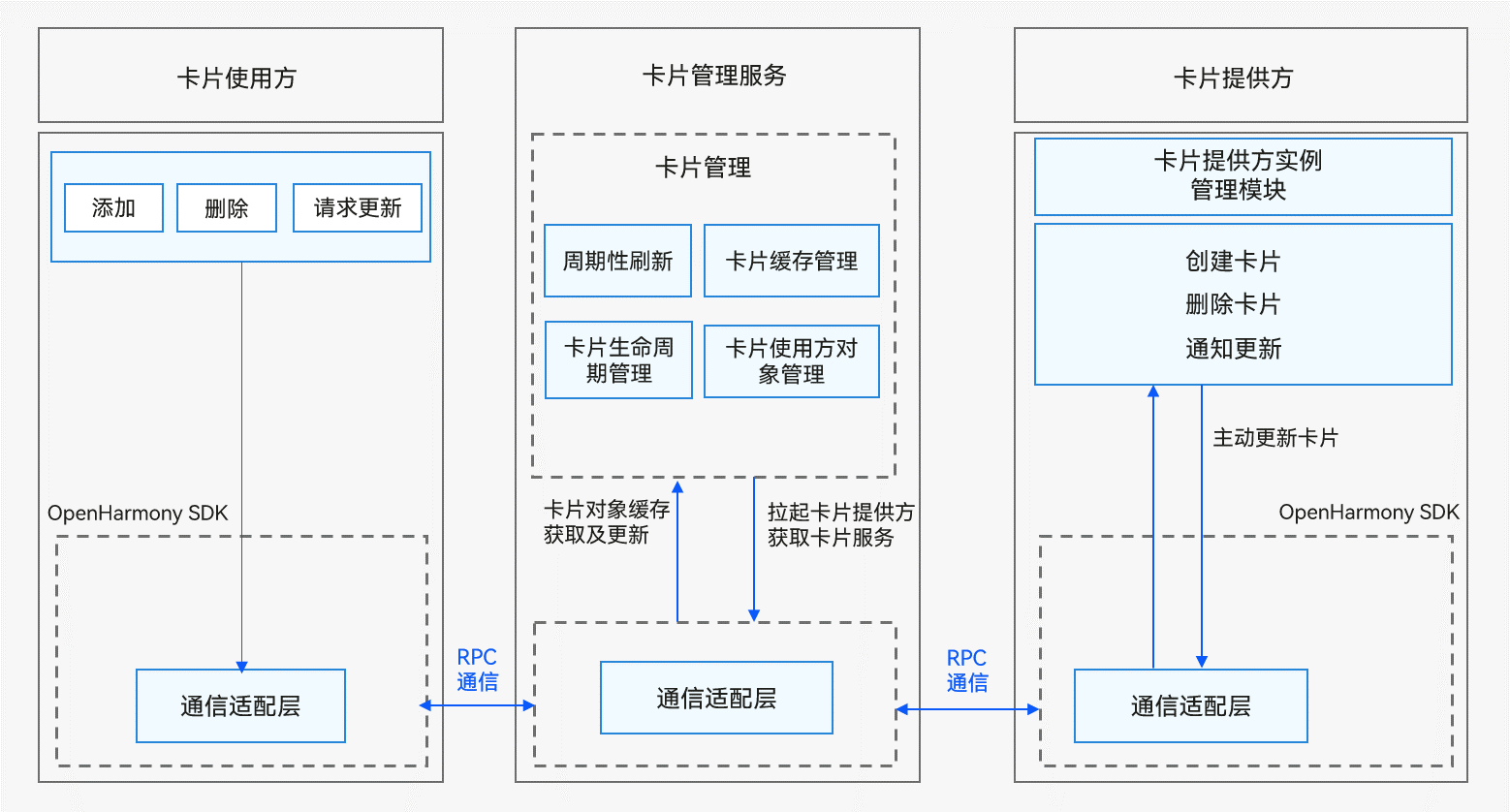
卡片使用方包含以下模块:
卡片管理服务包含以下模块:
卡片提供方包含以下模块:
说明
实际开发时只需要作为卡片提供方进行卡片内容的开发,卡片使用方和卡片管理服务由系统自动处理。
接口说明
FormAbility生命周期接口如下:
| 接口名 | 描述 |
|---|---|
| onCreate(want: Want): formBindingData.FormBindingData | 卡片提供方接收创建卡片的通知接口。 |
| onCastToNormal(formId: string): void | 卡片提供方接收临时卡片转常态卡片的通知接口 |
| onUpdate(formId: string): void | 卡片提供方接收更新卡片的通知接口。 |
| onVisibilityChange(newStatus: Record<string, number>): void | 卡片提供方接收修改可见性的通知接口。 |
| onEvent(formId: string, message: string): void | 卡片提供方接收处理卡片事件的通知接口。 |
| onDestroy(formId: string): void | 卡片提供方接收销毁卡片的通知接口。 |
| onAcquireFormState?(want: Want): formInfo.FormState | 卡片提供方接收查询卡片状态的通知接口。 |
| onShare?(formId: string): {[key: string]: any} | 卡片提供方接收卡片分享的通知接口。 |
| onShareForm?(formId: string): Record<string, Object> | 卡片提供方接收卡片分享的通知接口。推荐使用该接口替代onShare接口。如果了实现该接口,onShare将不再被回调。 |
FormProvider类有如下API接口,具体的API介绍详见接口文档。
| 接口名 | 描述 |
|---|---|
| setFormNextRefreshTime(formId: string, minute: number, callback: AsyncCallback<void>): void; | 设置指定卡片的下一次更新时间。 |
| setFormNextRefreshTime(formId: string, minute: number): Promise<void>; | 设置指定卡片的下一次更新时间,以promise方式返回。 |
| updateForm(formId: string, formBindingData: FormBindingData, callback: AsyncCallback<void>): void; | 更新指定的卡片。 |
| updateForm(formId: string, formBindingData: FormBindingData): Promise<void>; | 更新指定的卡片,以promise方式返回。 |
formBindingData类有如下API接口,具体的API介绍详见接口文档。
| 接口名 | 描述 |
|---|---|
| createFormBindingData(obj?: Object | string): FormBindingData | 创建一个FormBindingData对象。 |
开发步骤
FA卡片开发,即基于FA模型的卡片提供方开发,主要涉及如下关键步骤:
实现卡片生命周期接口
创建FA模型的卡片,需实现卡片的生命周期接口。先参考IDE开发服务卡片指南生成服务卡片模板。
-
HML:使用类Web范式的组件描述卡片的页面信息。
<div class="container">
  <stack>
    <div class="container-img">
      <image src="/common/widget.png" class="bg-img"></image>
    </div>
    <div class="container-inner">
      <text class="title">{{title}}</text>
      <text class="detail_text" onclick="routerEvent">{{detail}}</text>
    </div>
  </stack>
</div>
CSS:HML中类Web范式组件的样式信息。
.container {
  flex-direction: column;
  justify-content: center;
  align-items: center;
}

.bg-img {
  flex-shrink: 0;
  height: 100%;
}

.container-inner {
  flex-direction: column;
  justify-content: flex-end;
  align-items: flex-start;
  height: 100%;
  width: 100%;
  padding: 12px;
}

.title {
  font-size: 19px;
  font-weight: bold;
  color: white;
  text-overflow: ellipsis;
  max-lines: 1;
}

.detail_text {
  font-size: 16px;
  color: white;
  opacity: 0.66;
  text-overflow: ellipsis;
  max-lines: 1;
  margin-top: 6px;
}
JSON:卡片页面中的数据和事件交互。
{
  "data": {
    "title": "TitleDefault",
    "detail": "TextDefault"
  },
  "actions": {
    "routerEvent": {
      "action": "router",
      "abilityName": "EntryAbility",
      "params": {
        "message": "add detail"
      }
    }
  }
}
开发卡片事件
卡片支持为组件设置交互事件(action),包括router事件和message事件,其中router事件用于UIAbility跳转,message事件用于卡片开发人员自定义点击事件。
关键步骤说明如下:
-
在HML中为组件设置onclick属性,其值对应到JSON文件的actions字段中。
-
设置router事件:
- action属性值为"router"。
- abilityName为跳转目标的UIAbility名(支持跳转FA模型的PageAbility组件和Stage模型的UIAbility组件),如目前DevEco Studio创建的Stage模型的UIAbility默认名为EntryAbility。
- params为传递给跳转目标UIAbility的自定义参数,可以按需填写。其值可以在目标UIAbility启动时的want中的parameters里获取。如Stage模型MainAbility的onCreate生命周期里的入参want的parameters字段下获取到配置的参数。
-
HML文件
-
设置message事件:
- action属性值为"message"。
- params为message事件的用户自定义参数,可以按需填写。其值可以在卡片生命周期函数onFormEvent()中的message里获取。
-
HML文件
<div class="container">
    <stack>
        <div class="container-img">
            <image src="/common/CardWebImg.png" class="bg-img"></image>
            <image src="/common/CardWebImgMatrix.png"
                   class="bottom-img"/>
        </div>
        <div class="container-inner">
            <text class="title" onclick="routerEvent">{{ title }}</text>
            <text class="detail_text" onclick="messageEvent">{{ detail }}</text>
        </div>
    </stack>
</div>
-
卡片使用方:显示卡片内容的宿主应用,控制卡片在宿主中展示的位置。
-
卡片管理服务:用于管理系统中所添加卡片的常驻代理服务,包括卡片对象的管理与使用,以及卡片周期性刷新等。
-
卡片提供方:提供卡片显示内容元服务,控制卡片的显示内容、控件布局以及控件点击事件。
-
卡片使用:包含卡片的创建、删除、请求更新等操作。
-
通信适配层:由HarmonyOS SDK提供,负责与卡片管理服务通信,用于将卡片的相关操作到卡片管理服务。
-
周期性刷新:在卡片添加后,根据卡片的刷新策略启动定时任务周期性触发卡片的刷新。
-
卡片缓存管理:在卡片添加到卡片管理服务后,对卡片的视图信息进行缓存,以便下次获取卡片时可以直接返回缓存数据,降低时延。
-
卡片生命周期管理:对于卡片切换到后台或者被遮挡时,暂停卡片的刷新;以及卡片的升级/卸载场景下对卡片数据的更新和清理。
-
卡片使用方对象管理:对卡片使用方的RPC对象进行管理,用于使用方请求进行校验以及对卡片更新后的回调处理。
-
通信适配层:负责与卡片使用方和提供方进行RPC通信。
-
卡片服务:由卡片提供方开发者实现,开发者实现生命周期处理创建卡片、更新卡片以及删除卡片等请求,提供相应的卡片服务。
-
卡片提供方实例管理模块:由卡片提供方开发者实现,负责对卡片管理服务分配的卡片实例进行持久化管理。
-
通信适配层:由HarmonyOS SDK提供,负责与卡片管理服务通信,用于将卡片的更新数据主动推送到卡片管理服务。
-
实现卡片生命周期接口:开发FormAbility生命周期回调函数。
-
配置卡片配置文件:配置应用配置文件config.json。
-
卡片信息的持久化:对卡片信息进行持久化管理。
-
卡片数据交互:通过updateForm()更新卡片显示的信息。
-
开发卡片页面:使用HML+CSS+JSON开发JS卡片页面。
-
开发卡片事件:为卡片添加router事件和message事件。
-
在form.ts中,导入相关模块
import type featureAbility from '@ohos.ability.featureAbility';
import type Want from '@ohos.app.ability.Want';
import formBindingData from '@ohos.app.form.formBindingData';
import formInfo from '@ohos.app.form.formInfo';
import formProvider from '@ohos.app.form.formProvider';
import dataPreferences from '@ohos.data.preferences';
import hilog from '@ohos.hilog';
在form.ts中,实现卡片生命周期接口
const TAG: string = '[Sample_FAModelAbilityDevelop]';
const domain: number = 0xFF00;

const DATA_STORAGE_PATH: string = 'form_store';
let storeFormInfo = async (formId: string, formName: string, tempFlag: boolean, context: featureAbility.Context): Promise<void> => {
  // 此处仅对卡片ID:formId,卡片名:formName和是否为临时卡片:tempFlag进行了持久化
  let formInfo: Record<string, string | number | boolean> = {
    'formName': 'formName',
    'tempFlag': 'tempFlag',
    'updateCount': 0
  };
  try {
    const storage = await dataPreferences.getPreferences(context, DATA_STORAGE_PATH);
    // put form info
    await storage.put(formId, JSON.stringify(formInfo));
    hilog.info(domain, TAG, `storeFormInfo, put form info successfully, formId: ${formId}`);
    await storage.flush();
  } catch (err) {
    hilog.error(domain, TAG, `failed to storeFormInfo, err: ${JSON.stringify(err as Error)}`);
  }
};

let deleteFormInfo = async (formId: string, context: featureAbility.Context) => {
  try {
    const storage = await dataPreferences.getPreferences(context, DATA_STORAGE_PATH);
    // del form info
    await storage.delete(formId);
    hilog.info(domain, TAG, `deleteFormInfo, del form info successfully, formId: ${formId}`);
    await storage.flush();
  } catch (err) {
    hilog.error(domain, TAG, `failed to deleteFormInfo, err: ${JSON.stringify(err)}`);
  }
}

class LifeCycle {
  onCreate: (want: Want) => formBindingData.FormBindingData = (want) => ({ data: '' });
  onCastToNormal: (formId: string) => void = (formId) => {
  };
  onUpdate: (formId: string) => void = (formId) => {
  };
  onVisibilityChange: (newStatus: Record<string, number>) => void = (newStatus) => {
    let obj: Record<string, number> = {
      'test': 1
    };
    return obj;
  };
  onEvent: (formId: string, message: string) => void = (formId, message) => {
  };
  onDestroy: (formId: string) => void = (formId) => {
  };
  onAcquireFormState?: (want: Want) => formInfo.FormState = (want) => (0);
  onShareForm?: (formId: string) => Record<string, Object> = (formId) => {
    let obj: Record<string, number> = {
      'test': 1
    };
    return obj;
  };
}

let obj: LifeCycle = {
  onCreate(want: Want) {
    hilog.info(domain, TAG, 'FormAbility onCreate');
    if (want.parameters) {
      let formId = String(want.parameters['ohos.extra.param.key.form_identity']);
      let formName = String(want.parameters['ohos.extra.param.key.form_name']);
      let tempFlag = Boolean(want.parameters['ohos.extra.param.key.form_temporary']);
      // 将创建的卡片信息持久化,以便在下次获取/更新该卡片实例时进行使用
      // 此接口请根据实际情况实现,具体请参考:FormExtAbility Stage模型卡片实例
      hilog.info(domain, TAG, 'FormAbility onCreate' + formId);
      storeFormInfo(formId, formName, tempFlag, this.context);
    }

    // 使用方创建卡片时触发,提供方需要返回卡片数据绑定类
    let obj: Record<string, string> = {
      'title': 'titleOnCreate',
      'detail': 'detailOnCreate'
    };
    let formData: formBindingData.FormBindingData = formBindingData.createFormBindingData(obj);
    return formData;
  },
  onCastToNormal(formId: string) {
    // 使用方将临时卡片转换为常态卡片触发,提供方需要做相应的处理
    hilog.info(domain, TAG, 'FormAbility onCastToNormal');
  },
  onUpdate(formId: string) {
    // 若卡片支持定时更新/定点更新/卡片使用方主动请求更新功能,则提供方需要重写该方法以支持数据更新
    hilog.info(domain, TAG, 'FormAbility onUpdate');
    let obj: Record<string, string> = {
      'title': 'titleOnUpdate',
      'detail': 'detailOnUpdate'
    };
    let formData: formBindingData.FormBindingData = formBindingData.createFormBindingData(obj);
    // 调用updateForm接口去更新对应的卡片,仅更新入参中携带的数据信息,其他信息保持不变
    formProvider.updateForm(formId, formData).catch((error: Error) => {
      hilog.error(domain, TAG, 'FormAbility updateForm, error:' + JSON.stringify(error));
    });
  },
  onVisibilityChange(newStatus: Record<string, number>) {
    // 使用方发起可见或者不可见通知触发,提供方需要做相应的处理,仅系统应用生效
    hilog.info(domain, TAG, 'FormAbility onVisibilityChange');
  },
  onEvent(formId: string, message: string) {
    // 若卡片支持触发事件,则需要重写该方法并实现对事件的触发
    let obj: Record<string, string> = {
      'title': 'titleOnEvent',
      'detail': 'detailOnEvent'
    };
    let formData: formBindingData.FormBindingData = formBindingData.createFormBindingData(obj);
    // 调用updateForm接口去更新对应的卡片,仅更新入参中携带的数据信息,其他信息保持不变
    formProvider.updateForm(formId, formData).catch((error: Error) => {
      hilog.error(domain, TAG, 'FormAbility updateForm, error:' + JSON.stringify(error));
    });
    hilog.info(domain, TAG, 'FormAbility onEvent');
  },
  onDestroy(formId: string) {
    // 删除卡片实例数据
    hilog.info(domain, TAG, 'FormAbility onDestroy');
    // 删除之前持久化的卡片实例数据
    // 此接口请根据实际情况实现,具体请参考:FormExtAbility Stage模型卡片实例
    deleteFormInfo(formId, this.context);
  },
  onAcquireFormState(want: Want) {
    hilog.info(domain, TAG, 'FormAbility onAcquireFormState');
    return formInfo.FormState.READY;
  }
};

export default obj;
说明
FormAbility不能常驻后台,即在卡片生命周期回调函数中无法处理长时间的任务。
配置卡片配置文件
卡片需要在应用配置文件config.json中进行配置。
-
js模块,用于对应卡片的js相关资源,内部字段结构说明:
属性名称 含义 数据类型 是否可缺省 name 表示JS Component的名字。该标签不可缺省,默认值为default。 字符串 否 pages 表示JS Component的页面用于列举JS Component中每个页面的路由信息[页面路径+页面名称]。该标签不可缺省,取值为数组,数组第一个元素代表JS FA首页。 数组 否 window 用于定义与显示窗口相关的配置。 对象 可缺省 type 表示JS应用的类型。取值范围如下:
normal:标识该JS Component为应用实例。
form:标识该JS Component为卡片实例。
字符串 可缺省,缺省值为“normal” mode 定义JS组件的开发模式。 对象 可缺省,缺省值为空 配置示例如下:
"js": [
  ...
  {
    "name": "widget",
    "pages": [
      "pages/index/index"
    ],
    "window": {
      "designWidth": 720,
      "autoDesignWidth": true
      },
      "type": "form"
    }
  ]
abilities模块,用于对应卡片的FormAbility,内部字段结构说明:
属性名称 含义 数据类型 是否可缺省 name 表示卡片的类名。字符串最大长度为127字节。 字符串 否 description 表示卡片的描述。取值可以是描述性内容,也可以是对描述性内容的资源索引,以支持多语言。字符串最大长度为255字节。 字符串 可缺省,缺省为空。 isDefault 表示该卡片是否为默认卡片,每个Ability有且只有一个默认卡片。
true:默认卡片。
false:非默认卡片。
布尔值 否 type 表示卡片的类型。取值范围如下:
JS:JS卡片。
字符串 否 colorMode 表示卡片的主题样式,取值范围如下:
auto:自适应。
dark:深色主题。
light:浅色主题。
字符串 可缺省,缺省值为“auto”。 supportDimensions 表示卡片支持的外观规格,取值范围:
1 * 2:表示1行2列的二宫格。
2 * 2:表示2行2列的四宫格。
2 * 4:表示2行4列的八宫格。
4 * 4:表示4行4列的十六宫格。
字符串数组 否 defaultDimension 表示卡片的默认外观规格,取值必须在该卡片supportDimensions配置的列表中。 字符串 否 updateEnabled 表示卡片是否支持周期性刷新,取值范围:
true:表示支持周期性刷新,可以在定时刷新(updateDuration)和定点刷新(scheduledUpdateTime)两种方式任选其一,优先选择定时刷新。
false:表示不支持周期性刷新。
布尔类型 否 scheduledUpdateTime 表示卡片的定点刷新的时刻,采用24小时制,精确到分钟。
updateDuration参数优先级高于scheduledUpdateTime,两者同时配置时,以updateDuration配置的刷新时间为准。
字符串 可缺省,缺省值为“0:0”。 updateDuration 表示卡片定时刷新的更新周期,单位为30分钟,取值为自然数。
当取值为0时,表示该参数不生效。
当取值为正整数N时,表示刷新周期为30*N分钟。
updateDuration参数优先级高于scheduledUpdateTime,两者同时配置时,以updateDuration配置的刷新时间为准。
数值 可缺省,缺省值为“0”。 formConfigAbility 表示卡片的配置跳转链接,采用URI格式。 字符串 可缺省,缺省值为空。 formVisibleNotify 标识是否允许卡片使用卡片可见性通知。 字符串 可缺省,缺省值为空。 jsComponentName 表示JS卡片的Component名称。字符串最大长度为127字节。 字符串 否 metaData 表示卡片的自定义信息,包含customizeData数组标签。 对象 可缺省,缺省值为空。 customizeData 表示自定义的卡片信息。 对象数组 可缺省,缺省值为空。 配置示例如下:
"abilities": [
  ...
  {
    "name": ".FormAbility",
    "srcPath": "FormAbility",
    "description": "$string:FormAbility_desc",
    "icon": "$media:icon",
    "label": "$string:FormAbility_label",
    "type": "service",
    "formsEnabled": true,
    "srcLanguage": "ets",
    "forms": [
      {
        "jsComponentName": "widget",
        "isDefault": true,
        "scheduledUpdateTime": "10:30",
        "defaultDimension": "2*2",
        "name": "widget",
        "description": "This is a service widget.",
        "colorMode": "auto",
        "type": "JS",
        "formVisibleNotify": true,
        "supportDimensions": [
          "2*2"
        ],
        "updateEnabled": true,
        "updateDuration": 1
      }
    ]
  },
  ...
]
卡片信息的持久化
因大部分卡片提供方都不是常驻服务,只有在需要使用时才会被拉起获取卡片信息,且卡片管理服务支持对卡片进行多实例管理,卡片ID对应实例ID,因此若卡片提供方支持对卡片数据进行配置,则需要对卡片的业务数据按照卡片ID进行持久化管理,以便在后续获取、更新以及拉起时能获取到正确的卡片业务数据。且需要适配onDestroy卡片删除通知接口,在其中实现卡片实例数据的删除。
const TAG: string = '[Sample_FAModelAbilityDevelop]'; const domain: number = 0xFF00; const DATA_STORAGE_PATH: string = 'form_store'; let storeFormInfo = async (formId: string, formName: string, tempFlag: boolean, context: featureAbility.Context): Promise<void> => { // 此处仅对卡片ID:formId,卡片名:formName和是否为临时卡片:tempFlag进行了持久化 let formInfo: Record<string, string | number | boolean> = { 'formName': 'formName', 'tempFlag': 'tempFlag', 'updateCount': 0 }; try { const storage = await dataPreferences.getPreferences(context, DATA_STORAGE_PATH); // put form info await storage.put(formId, JSON.stringify(formInfo)); hilog.info(domain, TAG, `storeFormInfo, put form info successfully, formId: ${formId}`); await storage.flush(); } catch (err) { hilog.error(domain, TAG, `failed to storeFormInfo, err: ${JSON.stringify(err as Error)}`); } }; let deleteFormInfo = async (formId: string, context: featureAbility.Context) => { try { const storage = await dataPreferences.getPreferences(context, DATA_STORAGE_PATH); // del form info await storage.delete(formId); hilog.info(domain, TAG, `deleteFormInfo, del form info successfully, formId: ${formId}`); await storage.flush(); } catch (err) { hilog.error(domain, TAG, `failed to deleteFormInfo, err: ${JSON.stringify(err)}`); } } ... onCreate(want: Want) { hilog.info(domain, TAG, 'FormAbility onCreate'); if (want.parameters) { let formId = String(want.parameters['ohos.extra.param.key.form_identity']); let formName = String(want.parameters['ohos.extra.param.key.form_name']); let tempFlag = Boolean(want.parameters['ohos.extra.param.key.form_temporary']); // 将创建的卡片信息持久化,以便在下次获取/更新该卡片实例时进行使用 // 此接口请根据实际情况实现,具体请参考:FormExtAbility Stage模型卡片实例 hilog.info(domain, TAG, 'FormAbility onCreate' + formId); storeFormInfo(formId, formName, tempFlag, this.context); } // 使用方创建卡片时触发,提供方需要返回卡片数据绑定类 let obj: Record<string, string> = { 'title': 'titleOnCreate', 'detail': 'detailOnCreate' }; let formData: formBindingData.FormBindingData = formBindingData.createFormBindingData(obj); return formData; }, ... let deleteFormInfo = async (formId: string, context: featureAbility.Context): Promise<void> => { try { const storage = await dataPreferences.getPreferences(context, DATA_STORAGE_PATH); // del form info await storage.delete(formId); hilog.info(domain, TAG, `deleteFormInfo, del form info successfully, formId: ${formId}`); await storage.flush(); } catch (err) { hilog.error(domain, TAG, `failed to deleteFormInfo, err: ${JSON.stringify(err)}`); } }; ... // 适配onDestroy卡片删除通知接口,在其中实现卡片实例数据的删除。 onDestroy(formId: string) { // 删除卡片实例数据 hilog.info(domain, TAG, 'FormAbility onDestroy'); // 删除之前持久化的卡片实例数据 // 此接口请根据实际情况实现,具体请参考:FormExtAbility Stage模型卡片实例 deleteFormInfo(formId, this.context); } ...具体的持久化方法可以参考数据管理开发指导。
需要注意的是,卡片使用方在请求卡片时传递给提供方应用的Want数据中存在临时标记字段,表示此次请求的卡片是否为临时卡片:
-
常态卡片:卡片使用方会持久化的卡片。如添加到桌面的卡片。
-
临时卡片:卡片使用方不会持久化的卡片。如上划卡片应用时显示的卡片。
-
当卡片应用需要更新数据时(如触发了定时更新或定点更新),卡片应用获取最新数据,并调用updateForm()接口更新主动触发卡片的更新。
临时卡片转常态卡片:上划卡片应用后,此时会显示的卡片为临时卡片;点击卡片上的“图钉”按钮后添加到桌面,此时卡片转为常态卡片。
由于临时卡片的数据具有非持久化的特殊性,某些场景例如卡片服务框架死亡重启,此时临时卡片数据在卡片管理服务中已经删除,且对应的卡片ID不会通知到提供方,所以卡片提供方需要自己负责清理长时间未删除的临时卡片数据。同时对应的卡片使用方可能会将之前请求的临时卡片转换为常态卡片。如果转换成功,卡片提供方也需要对对应的临时卡片ID进行处理,把卡片提供方记录的临时卡片数据转换为常态卡片数据,防止提供方在清理长时间未删除的临时卡片时,把已经转换为常态卡片的临时卡片信息删除,导致卡片信息丢失。
卡片数据交互
当卡片应用需要更新数据时(如触发了定时更新或定点更新),卡片应用获取最新数据,并调用updateForm()接口更新主动触发卡片的更新。
-
const TAG: string = '[Sample_FAModelAbilityDevelop]';
const domain: number = 0xFF00;

onUpdate(formId: string) {
  // 若卡片支持定时更新/定点更新/卡片使用方主动请求更新功能,则提供方需要重写该方法以支持数据更新
  hilog.info(domain, TAG, 'FormAbility onUpdate');
  let obj: Record<string, string> = {
    'title': 'titleOnUpdate',
    'detail': 'detailOnUpdate'
  };
  let formData: formBindingData.FormBindingData = formBindingData.createFormBindingData(obj);
  // 调用updateForm接口去更新对应的卡片,仅更新入参中携带的数据信息,其他信息保持不变
  formProvider.updateForm(formId, formData).catch((error: Error) => {
    hilog.error(domain, TAG, 'FormAbility updateForm, error:' + JSON.stringify(error));
  });
}
开发卡片页面
开发者可以使用类Web范式(HML+CSS+JSON)开发JS卡片页面。生成如下卡片页面,可以这样配置卡片页面文件:

说明
FA模型当前仅支持JS扩展的类Web开发范式来实现卡片的UI。
-
HML:使用类Web范式的组件描述卡片的页面信息。
<div class="container">
    <stack>
        <div class="container-img">
            <image src="/common/widget.png" class="bg-img"></image>
            <image src="/common/rect.png" class="bottom-img"></image>
        </div>
        <div class="container-inner">
            <text class="title" onclick="routerEvent">{{title}}</text>
            <text class="detail_text" onclick="messageEvent">{{detail}}</text>
        </div>
    </stack>
</div>
CSS:HML中类Web范式组件的样式信息。
.container {
    flex-direction: column;
    justify-content: center;
    align-items: center;
}

.bg-img {
    flex-shrink: 0;
    height: 100%;
    z-index: 1;
}

.bottom-img {
    position: absolute;
    width: 150px;
    height: 56px;
    top: 63%;
    background-color: rgba(216, 216, 216, 0.15);
    filter: blur(20px);
    z-index: 2;
}

.container-inner {
    flex-direction: column;
    justify-content: flex-end;
    align-items: flex-start;
    height: 100%;
    width: 100%;
    padding: 12px;
}

.title {
    font-family: HarmonyHeiTi-Medium;
    font-size: 14px;
    color: rgba(255,255,255,0.90);
    letter-spacing: 0.6px;
}

.detail_text {
    font-family: HarmonyHeiTi;
    font-size: 12px;
    color: rgba(255,255,255,0.60);
    letter-spacing: 0.51px;
    text-overflow: ellipsis;
    max-lines: 1;
    margin-top: 6px;
}
JSON:卡片页面中的数据和事件交互。
{
  "data": {
    "title": "TitleDefault",
    "detail": "TextDefault"
  },
  "actions": {
    "routerEvent": {
      "action": "router",
      "abilityName": "com.samples.famodelabilitydevelop.MainAbility",
      "params": {
        "message": "add detail"
      }
    },
    "messageEvent": {
      "action": "message",
      "params": {
        "message": "add detail"
      }
    }
  }
}
开发卡片事件
卡片支持为组件设置交互事件(action),包括router事件和message事件,其中router事件用于Ability跳转,message事件用于卡片开发人员自定义点击事件。关键步骤说明如下:
-
在hml中为组件设置onclick属性,其值对应到json文件的actions字段中。
-
如何设置router事件:
- action属性值为"router";
- abilityName为跳转目标的Ability名(支持跳转FA模型的PageAbility组件和Stage模型的UIAbility组件),如目前DevEco创建的FA模型的UIAbility默认名为com.example.entry.EntryAbility;
- params为传递给跳转目标Ability的自定义参数,可以按需填写。其值可以在目标Ability启动时的want中的parameters里获取。如FA模型EntryAbility的onCreate生命周期里可以通过featureAbility.getWant()获取到want,然后在其parameters字段下获取到配置的参数;
-
如何设置message事件:
- action属性值为"message";
- params为message事件的用户自定义参数,可以按需填写。其值可以在卡片生命周期函数onEvent中的message里获取;
示例如下:
-
hml文件
<div class="container">
    <stack>
        <div class="container-img">
            <image src="/common/widget.png" class="bg-img"></image>
            <image src="/common/rect.png" class="bottom-img"></image>
        </div>
        <div class="container-inner">
            <text class="title" onclick="routerEvent">{{title}}</text>
            <text class="detail_text" onclick="messageEvent">{{detail}}</text>
        </div>
    </stack>
</div>
css文件
.container {
    flex-direction: column;
    justify-content: center;
    align-items: center;
}

.bg-img {
    flex-shrink: 0;
    height: 100%;
    z-index: 1;
}

.bottom-img {
    position: absolute;
    width: 150px;
    height: 56px;
    top: 63%;
    background-color: rgba(216, 216, 216, 0.15);
    filter: blur(20px);
    z-index: 2;
}

.container-inner {
    flex-direction: column;
    justify-content: flex-end;
    align-items: flex-start;
    height: 100%;
    width: 100%;
    padding: 12px;
}

.title {
    font-family: HarmonyHeiTi-Medium;
    font-size: 14px;
    color: rgba(255,255,255,0.90);
    letter-spacing: 0.6px;
}

.detail_text {
    font-family: HarmonyHeiTi;
    font-size: 12px;
    color: rgba(255,255,255,0.60);
    letter-spacing: 0.51px;
    text-overflow: ellipsis;
    max-lines: 1;
    margin-top: 6px;
}
json文件
{
  "data": {
    "title": "TitleDefault",
    "detail": "TextDefault"
  },
  "actions": {
    "routerEvent": {
      "action": "router",
      "abilityName": "com.samples.famodelabilitydevelop.MainAbility",
      "params": {
        "message": "add detail"
      }
    },
    "messageEvent": {
      "action": "message",
      "params": {
        "message": "add detail"
      }
    }
  }
}

讨论HarmonyOS开发技术,专注于API与组件、DevEco Studio、测试、元服务和应用上架分发等。
更多推荐

 27
27 0
0- 0


 已为社区贡献65条内容

所有评论(0)