使用ArkTS开发“星露谷物语“营业时间查询的UI实现
本文介绍了一个基于HarmonyOS 5.0开发的《星露谷物语》商店营业时间查询应用。作者使用ArkTS声明式UI语法,通过Column、Row等组件实现三层嵌套布局,采用像素风格的背景和虚线边框还原游戏视觉体验。项目重点解决了背景图片适配、文字溢出、安全区域适配等技术难题,并分享了使用layoutWeight、media资源引用等开发技巧。最终实现了一个包含11个商店营业信息的查询界面,具有游戏
《星露谷物语》作为一款经典的农场模拟游戏,商店有着不同的营业时间 —— 比如皮埃尔的杂货店周三休息、威利鱼店不下雨的周六不开门,这对刚接触游戏的玩家来说很容易记混。所以自学开发一个轻量化的营业时间查询页面。
我整理了如下核心点:
1.展示11个核心商店/地点的基础信息:名称,商店功能,营业时间以及具体地点。
2.UI风格贴合星露谷物语的“像素风格”。
3.要适配 HarmonyOS 设备的屏幕,合理布局。
目录
一、技术栈与核心组件选择
本次开发学习是基于HarmonyOS 5.0,主要使用的是ArkTS的声明式UI语法,核心组件如下:
| 组件/API | 用途 |
| Column/Row | 线性布局容器,实现页面整体和列表项的横竖排列 |
| List/ListItem | 列表容器,承载 11 个商店的信息,支持滚动 |
| Image | 展示商店图标 |
| Text | 显示商店的具体信息 |
| backgroundImage | 设置主题页面背景,贴合风格(采用了星露谷内部截图) |
| border/borderRadius | 实现图像边框,圆角,美化UI界面 |
| expandSafeArea | 实现安全区的适配(刘海屏以及功能导航栏) |
二、代码实现:从页面结构到细节优化
下面我要结合具体的UI代码,拆解开发过程中的关键步骤——“先整体,再局部;先布局,再内容,再美化”(老爹说过这一点很关键),每一步都贴和ArkTS的主题开发思想。
1.页面的整体布局:三层嵌套逻辑
由于要是配 HarmonyOS 设备的屏幕于是我采用了如手机音乐列表式的竖装分布,如下列表呈现:
| 图 片 |
商店名称: 营业时间: 非营业时间: |
由于主题是竖装分布,所以页面最外层采用了Column作为根容器,内部分为 “标题区” , “列表区” 这两层,这种结构符合 “从上而下” 的视觉体验。由于不支持单独的ArkTS语言,所以代码会以TS呈现。
@Entry
@Component
struct Index {
  build() {
    // 根容器:纵向排列,占满屏幕,设置背景图
    Column() {
      // 1. 标题区:展示页面主题
      Text("星露谷营业时间一览")
        // 标题样式(颜色、对齐、字体等)
        .fontColor("#FF8C00")
        .textAlign(TextAlign.Center)
        .fontSize(27)
        .fontWeight(FontWeight.Bold)
        // 内外边距:控制标题与其他元素的间距
        .margin({ top: 15, bottom: 10 })
        .padding({ left: 12, right: 12, top: 6, bottom: 6 })
        // 边框与背景:提升视觉层次
        .borderWidth(2)
        .borderColor("#FF8C00")
        .borderRadius(8)
        .backgroundColor('rgba(255, 255, 255, 0.7)')

      // 2. 列表区:展示11个商店的信息
      List() {
        // 每个商店对应一个ListItem(下文展开)
        ListItem() { /* 商店1:皮埃尔的杂货店 */ }
        ListItem() { /* 商店2:木匠的商店 */ }
        // ... 其余9个商店
      }
      .scrollBar(BarState.Off) // 隐藏滚动条,优化视觉
      .backgroundColor('rgba(255, 255, 255, 0.7)')
      .borderRadius(20)
      .padding({ left: 10, right: 10, top: 5, bottom: 5 })
    }
    // 根容器样式:占满屏幕,背景图覆盖,适配安全区域
    .backgroundImage($r('app.media.XLGbgd'), ImageRepeat.NoRepeat)//这里引用的背景图片是我从星露谷游戏中截取的游戏截图
    .width("100%")
    .height("100%")
    .backgroundImageSize(ImageSize.Cover)
    .expandSafeArea([SafeAreaType.SYSTEM], [SafeAreaEdge.TOP, SafeAreaEdge.BOTTOM])
    .padding({ left: 10, right: 10 })
  }
}
这里有几个细节需要注意:
1.背景图适配手机屏幕:这里我使用了backgroundImageSize(ImageSize.Cover)让背景图覆盖了整个容器,从而避免了拉伸后导致图片变形
2.安全区的适配:由于 HarmonyOS 的屏幕存在设备刘海以及底部导航栏,所以使用了expandSafeArea确保不会被遮挡,这是HarmonyOS适配多设备的重要API。
2.列表项实现:Row 嵌套 Column 的灵活布局
每个商店的信息用ListItem包裹,内部用Row实现“图片+文字+箭头”的横向排列,文字部分如有超出屏幕宽度的,再用Column纵向展示,结构如下:
ListItem() {
  Row() {
    // 左侧:商店图标
    Image($r("app.media.Pshop")) // 引用媒体资源(需提前放入media目录)
      .width(100)
      .height(100)
      .border({ // 虚线边框,贴合游戏的轻松风格
        radius: 10,
        width: 3,
        color: 'rgba(0, 255, 0, 0.7)',
        style: BorderStyle.Dashed,
      })
      .backgroundColor('rgba(200, 200, 200, 0.5)')
      .borderRadius(10)

    // 中间:商店信息(纵向排列)
    Column() {
      Text('皮埃尔的杂货店(各种商品)') // 商店名称+业务范围
        .fontSize(16)
        .fontWeight(FontWeight.Bold)
      Text('营业时间: 9:00 - 17:00') // 营业时间
        .fontSize(14)
      Text('非营业时间: 每周三') // 特殊规则
        .fontSize(14)
      Text('地点: 小镇北边') // 地点
        .fontSize(14)
    }
    .margin({ left: 10 }) // 与图标保持间距
    .layoutWeight(1) // 占满剩余横向空间,避免文字溢出
    .alignItems(HorizontalAlign.Start) // 文字左对齐

    // 右侧:箭头(提示可点击,预留交互扩展)
    Text('>')
      .fontSize(20)
      .margin({ left: 'auto', right: 10 }) // 右对齐
  }
  .width('100%')
  .height(140)
  .padding(10)
  .margin({ bottom: 8 }) // 列表项之间的间距
}
此代码有三处核心点:
1.layoutWeight的妙用:让中间的文字占满横向空间后,不会溢出屏幕,继续向下延申
2.media资源的引用:使用$r("app.media.xxx")可以引用提前放入“media”目录下的图片(图片名不可含有特殊符号)。
3.虚线边框:通过border的语句BorderStyle.Dashed实现虚线边框。
三、开发过程中遇见的问题
作为初学者,开发过程中也遇见了很多难以避免的问题,这里分享一下我遇见的问题以及解决方式,希望对大家有所帮助。
问题一:背景图片拉伸变形,以及背景图片未占满整个屏幕。
解决方案:使用backgroundImageSize(ImageSize.Cover)代替默认的Image.Auto,Cover会保证背景覆盖整个屏幕,从而也会保证图片的宽高比,只会裁剪多余部分。
问题二:文字溢出屏幕的问题
解决方案:我个人开始是想给每个列表装上一个左右滑轮,例如上下滚动的List。但是在总体架构中,这个方法会导致整体的大List架构重新布局(有能解决这个问题的高手也可以私信我)。所以我采用了更为简单的给中间的Column组件添加layoutWeight(1),让文字占满横向空间后,向下延申。
问题三:安全区域适配的问题
现象:由于很多手机都有刘海屏,所以导致标题会被遮挡,底部的功能列表也会留白
解决方案:在根Column组件中添加了expandSafeArea([SafeAreaType.SYSTEM], [SafeAreaEgde.TOP,SafeAreaEdge.BUTTOM]) 确保适配安全区域。
四、学习ArkTS心得感悟
通过这个小项目,我对 ArkTS 的理解从 “语法认知” 提升到了 “实战应用”,总结出 3 点学习心得:
1.申明式UI的核心是“描述结果”:不同于传统的命令式开发(一步步告诉 UI 如何渲染),ArkTS 只需描述 “UI 应该是什么样”(比如Column纵向排列、Text红色 27 号字),框架会自动处理渲染逻辑,效率更高。
2.组件化的思想:这个项目,每个组件都有着各自的作用,我们要做的就是要运用好这些组件,做到“先整体,再局部”,“先布局,再内容,后美化”的思想
3.多测试,适配才是关键:HarmonyOS 设备屏幕尺寸多样,开发时要多在不同模拟器或真机上测试,重点关注布局适配、文字溢出、安全区域等问题,避免 “开发时正常,运行时翻车”。
五、完整代码的实现,以及样式的展示:
@Entry
@Component
struct Index {
  build() {
    Column() {
      // 标题区
      Text("星露谷营业时间一览")
        .fontColor("#FF8C00")
        .textAlign(TextAlign.Center)
        .fontSize(27)
        .fontWeight(FontWeight.Bold)
        .margin({ top: 15, bottom: 10 })
        .padding({ left: 12, right: 12, top: 6, bottom: 6 })
        .borderWidth(2)
        .borderColor("#FF8C00")
        .borderRadius(8)
        .backgroundColor('rgba(255, 255, 255, 0.7)')

      // 列表区
      List() {
        // 1. 皮埃尔的杂货店
        ListItem() {
          Row() {
            Image($r("app.media.Pshop"))
              .width(100)
              .height(100)
              .border({ radius: 10, width: 3, color: 'rgba(0, 255, 0, 0.7)', style: BorderStyle.Dashed })
              .backgroundColor('rgba(200, 200, 200, 0.5)')
              .borderRadius(10)

            Column() {
              Text('皮埃尔的杂货店(各种商品)').fontSize(16).fontWeight(FontWeight.Bold)
              Text('营业时间: 9:00 - 17:00').fontSize(14)
              Text('非营业时间: 每周三').fontSize(14)
              Text('地点: 小镇北边').fontSize(14)
            }
            .margin({ left: 10 })
            .layoutWeight(1)
            .alignItems(HorizontalAlign.Start)

            Text('>').fontSize(20).margin({ left: 'auto', right: 10 })
          }
          .width('100%')
          .height(140)
          .padding(10)
          .margin({ bottom: 8 })
        }

        // 2. 木匠的商店
        ListItem() {
          Row() {
            Image($r("app.media.woodshop"))
              .width(100)
              .height(100)
              .border({ radius: 10, width: 3, color: 'rgba(0, 255, 0, 0.7)', style: BorderStyle.Dashed })
              .backgroundColor('rgba(200, 200, 200, 0.5)')
              .borderRadius(10)

            Column() {
              Text('木匠的商店(家具/建筑)').fontSize(16).fontWeight(FontWeight.Bold)
              Text('营业时间: 9:00 - 17:00').fontSize(14)
              Text('非营业时间: 周二').fontSize(14)
              Text('地点: 皮埃尔商店北').fontSize(14)
            }
            .margin({ left: 10 })
            .layoutWeight(1)
            .alignItems(HorizontalAlign.Start)

            Text('>').fontSize(20).margin({ left: 'auto', right: 10 })
          }
          .width('100%')
          .height(140)
          .padding(10)
          .margin({ bottom: 8 })
        }

        // 3. 玛妮的农场
        ListItem() {
          Row() {
            Image($r("app.media.MaYaForm"))
              .width(100)
              .height(100)
              .border({ radius: 10, width: 3, color: 'rgba(0, 255, 0, 0.7)', style: BorderStyle.Dashed })
              .backgroundColor('rgba(200, 200, 200, 0.5)')
              .borderRadius(10)

            Column() {
              Text('玛妮的农场(动物/工具)').fontSize(16).fontWeight(FontWeight.Bold)
              Text('营业时间: 9:00 - 16:00').fontSize(14)
              Text('非营业时间: 周一&周二&秋季/冬季18日').fontSize(14)
              Text('地点: 小镇广场北').fontSize(14)
            }
            .margin({ left: 10 })
            .layoutWeight(1)
            .alignItems(HorizontalAlign.Start)

            Text('>').fontSize(20).margin({ left: 'auto', right: 10 })
          }
          .width('100%')
          .height(140)
          .padding(10)
          .margin({ bottom: 8 })
        }

        // 4. 铁匠铺
        ListItem() {
          Row() {
            Image($r("app.media.BlacksmithShop"))
              .width(100)
              .height(100)
              .border({ radius: 10, width: 3, color: 'rgba(0, 255, 0, 0.7)', style: BorderStyle.Dashed })
              .backgroundColor('rgba(200, 200, 200, 0.5)')
              .borderRadius(10)

            Column() {
              Text('铁匠铺(矿石/砸晶球/工具升级)').fontSize(16).fontWeight(FontWeight.Bold)
              Text('营业时间: 9:00 - 16:00').fontSize(14)
              Text('非营业时间: 社区重建后的周五').fontSize(14)
              Text('地点: 小镇广场北').fontSize(14)
            }
            .margin({ left: 10 })
            .layoutWeight(1)
            .alignItems(HorizontalAlign.Start)

            Text('>').fontSize(20).margin({ left: 'auto', right: 10 })
          }
          .width('100%')
          .height(140)
          .padding(10)
          .margin({ bottom: 8 })
        }

        // 5. 法师塔
        ListItem() {
          Row() {
            Image($r("app.media.Magic"))
              .width(100)
              .height(100)
              .border({ radius: 10, width: 3, color: 'rgba(0, 255, 0, 0.7)', style: BorderStyle.Dashed })
              .backgroundColor('rgba(200, 200, 200, 0.5)')
              .borderRadius(10)

            Column() {
              Text('法师塔(魔法建筑物)').fontSize(16).fontWeight(FontWeight.Bold)
              Text('营业时间: 0:00 - 24:00').fontSize(14)
              Text('非营业时间: 全年无休').fontSize(14)
              Text('地点: 小镇广场北').fontSize(14)
            }
            .margin({ left: 10 })
            .layoutWeight(1)
            .alignItems(HorizontalAlign.Start)

            Text('>').fontSize(20).margin({ left: 'auto', right: 10 })
          }
          .width('100%')
          .height(140)
          .padding(10)
          .margin({ bottom: 8 })
        }

        // 6. 威利鱼店
        ListItem() {
          Row() {
            Image($r("app.media.FishShop"))
              .width(100)
              .height(100)
              .border({ radius: 10, width: 3, color: 'rgba(0, 255, 0, 0.7)', style: BorderStyle.Dashed })
              .backgroundColor('rgba(200, 200, 200, 0.5)')
              .borderRadius(10)

            Column() {
              Text('威利鱼店(鱼饵/钓鱼工具)').fontSize(16).fontWeight(FontWeight.Bold)
              Text('营业时间: 9:00 - 17:00').fontSize(14)
              Text('非营业时间: 不下雨的周六').fontSize(14)
              Text('地点: 沙滩海边').fontSize(14)
            }
            .margin({ left: 10 })
            .layoutWeight(1)
            .alignItems(HorizontalAlign.Start)

            Text('>').fontSize(20).margin({ left: 'auto', right: 10 })
          }
          .width('100%')
          .height(140)
          .padding(10)
          .margin({ bottom: 8 })
        }

        // 7. 哈维的诊所
        ListItem() {
          Row() {
            Image($r("app.media.HarveyClinic")) // 需替换为诊所图标资源
              .width(100)
              .height(100)
              .border({ radius: 10, width: 3, color: 'rgba(0, 255, 0, 0.7)', style: BorderStyle.Dashed })
              .backgroundColor('rgba(200, 200, 200, 0.5)')
              .borderRadius(10)

            Column() {
              Text('哈维的诊所(医疗用品)').fontSize(16).fontWeight(FontWeight.Bold)
              Text('营业时间: 9:00 - 15:00').fontSize(14)
              Text('全年无休').fontSize(14)
              Text('地点: 皮埃尔商店隔壁').fontSize(14)
            }
            .margin({ left: 10 })
            .layoutWeight(1)
            .alignItems(HorizontalAlign.Start)

            Text('>').fontSize(20).margin({ left: 'auto', right: 10 })
          }
          .width('100%')
          .height(140)
          .padding(10)
          .margin({ bottom: 8 })
        }

        // 8. joja超市
        ListItem() {
          Row() {
            Image($r("app.media.JojaShop"))
              .width(100)
              .height(100)
              .border({ radius: 10, width: 3, color: 'rgba(0, 255, 0, 0.7)', style: BorderStyle.Dashed })
              .backgroundColor('rgba(200, 200, 200, 0.5)')
              .borderRadius(10)

            Column() {
              Text('joja超市(各种商品)').fontSize(16).fontWeight(FontWeight.Bold)
              Text('营业时间: 9:00 - 23:00').fontSize(14)
              Text('全年无休').fontSize(14)
              Text('地点: 铁匠铺北').fontSize(14)
            }
            .margin({ left: 10 })
            .layoutWeight(1)
            .alignItems(HorizontalAlign.Start)

            Text('>').fontSize(20).margin({ left: 'auto', right: 10 })
          }
          .width('100%')
          .height(140)
          .padding(10)
          .margin({ bottom: 8 })
        }

        // 9. 星之果实餐厅
        ListItem() {
          Row() {
            Image($r("app.media.XLGbar"))
              .width(100)
              .height(100)
              .border({ radius: 10, width: 3, color: 'rgba(0, 255, 0, 0.7)', style: BorderStyle.Dashed })
              .backgroundColor('rgba(200, 200, 200, 0.5)')
              .borderRadius(10)

            Column() {
              Text('星之果实餐厅(菜品/菜谱)').fontSize(16).fontWeight(FontWeight.Bold)
              Text('营业时间: 12:00 - 24:00').fontSize(14)
              Text('非营业时间: 全年无休').fontSize(14)
              Text('地点: 小镇广场东').fontSize(14)
            }
            .margin({ left: 10 })
            .layoutWeight(1)
            .alignItems(HorizontalAlign.Start)

            Text('>').fontSize(20).margin({ left: 'auto', right: 10 })
          }
          .width('100%')
          .height(140)
          .padding(10)
          .margin({ bottom: 8 })
        }

        // 10. 探险家工会
        ListItem() {
          Row() {
            Image($r("app.media.ExplorerGuild"))
              .width(100)
              .height(100)
              .border({ radius: 10, width: 3, color: 'rgba(0, 255, 0, 0.7)', style: BorderStyle.Dashed })
              .backgroundColor('rgba(200, 200, 200, 0.5)')
              .borderRadius(10)

            Column() {
              Text('探险家工会(武器/装备/物品找回)').fontSize(16).fontWeight(FontWeight.Bold)
              Text('营业时间: 14:00 - 2:00').fontSize(14)
              Text('非营业时间: 全年无休').fontSize(14)
              Text('地点: 矿洞东面').fontSize(14)
            }
            .margin({ left: 10 })
            .layoutWeight(1)
            .alignItems(HorizontalAlign.Start)

            Text('>').fontSize(20).margin({ left: 'auto', right: 10 })
          }
          .width('100%')
          .height(140)
          .padding(10)
          .margin({ bottom: 8 })
        }

        // 11. 博物馆
        ListItem() {
          Row() {
            Image($r("app.media.Library"))
              .width(100)
              .height(100)
              .border({ radius: 10, width: 3, color: 'rgba(0, 255, 0, 0.7)', style: BorderStyle.Dashed })
              .backgroundColor('rgba(200, 200, 200, 0.5)')
              .borderRadius(10)

            Column() {
              Text('博物馆(捐献稀有矿物)').fontSize(16).fontWeight(FontWeight.Bold)
              Text('营业时间: 8:00 - 18:00').fontSize(14)
              Text('非营业时间: 全年无休').fontSize(14)
              Text('地点: 小镇广场东').fontSize(14)
            }
            .margin({ left: 10 })
            .layoutWeight(1)
            .alignItems(HorizontalAlign.Start)

            Text('>').fontSize(20).margin({ left: 'auto', right: 10 })
          }
          .width('100%')
          .height(140)
          .padding(10)
          .margin({ bottom: 8 })
        }
      }
      .scrollBar(BarState.Off)
      .backgroundColor('rgba(255, 255, 255, 0.7)')
      .borderRadius(20)
      .padding({ left: 10, right: 10, top: 5, bottom: 5 })
    }
    .backgroundImage($r('app.media.XLGbgd'), ImageRepeat.NoRepeat)
    .width("100%")
    .height("100%")
    .backgroundImageSize(ImageSize.Cover)
    .expandSafeArea([SafeAreaType.SYSTEM], [SafeAreaEdge.TOP, SafeAreaEdge.BOTTOM])
    .padding({ left: 10, right: 10 })
  }
}
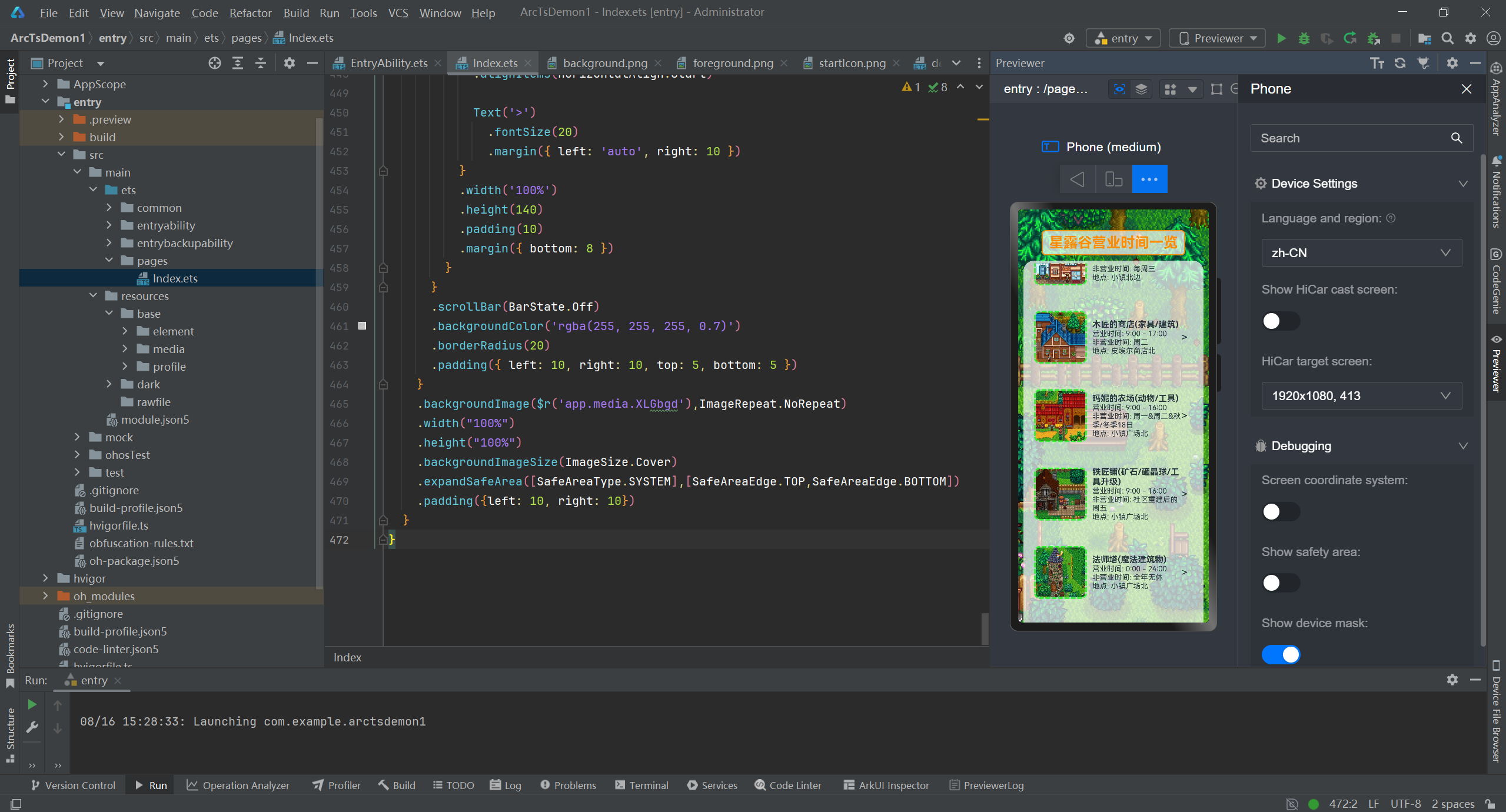
运行展示:如下图所示
六、总结
从构思到实现,这个《星露谷》营业时间查询页面让我切实感受到了 ArkTS 的便捷性 —— 声明式语法降低了 UI 开发的复杂度,丰富的组件库能快速实现个性化需求。对于初学者来说,最好的学习方式就是 “边做边学”:选一个自己感兴趣的小需求(比如游戏工具、生活助手),从简单的 UI 入手,逐步迭代功能,在解决问题的过程中积累经验。
如果你也在学习 ArkTS,欢迎在评论区交流心得;如果发现代码中的优化点,也请不吝赐教!

讨论HarmonyOS开发技术,专注于API与组件、DevEco Studio、测试、元服务和应用上架分发等。
更多推荐

 20
20 0
0- 0


 已为社区贡献1条内容

所有评论(0)