【综合案例】使用DevEco Studio编写抖音生肖抽奖卡案例
·
效果展示
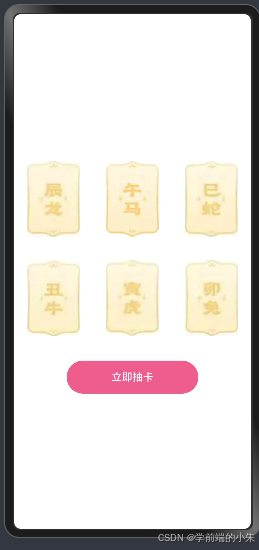
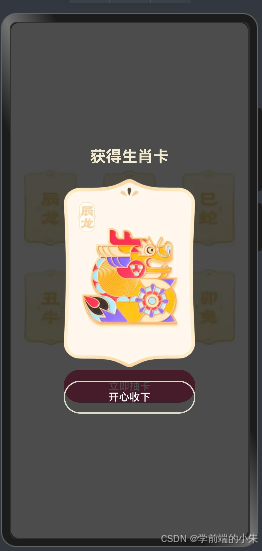
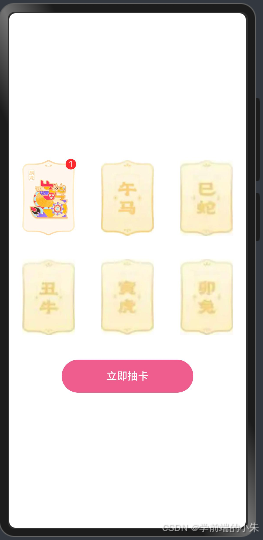
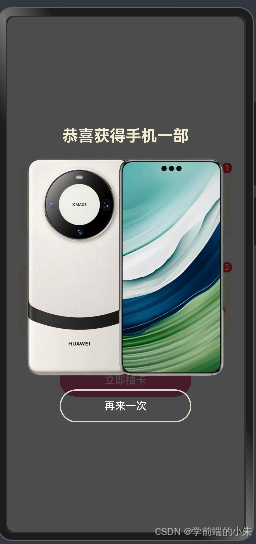
内容描述
页面上有六张生肖卡的背面图,点击立即抽卡的时候会从六张生肖卡中随机抽取一张,并将抽取到的生肖卡片的正面以遮罩层的形式显示在页面上方,点击开心收下按钮后,会将该卡片的背景图替换为正面图,并将其抽中的数量➕1,当六张卡片都集齐的时候,点击开心手下按钮的时候则会触发大奖,大奖是从奖励池中随机抽选一个奖励进行展示,点击再来一次的时候会将前期抽到的卡片及其数量全部重置,然后可以进行第二轮的抽奖。
知识点
1、对象数组
要先定义接口,然后根据接口去创建数组.
// 1.定义接口
interface Person {
    stuId: number,
    name: string,
    gender: string,
    age: number
}

// 2.基于接口构建对象数组
let pArr: Person[] = [
    {stuId: 1, name: '小朱', gender: '女', age: 3},
    {stuId: 2, name: '小吴', gender: '男', age: 18},
]
2、ForEach渲染控制
ForEach可以基于数组的个数,渲染组件的个数。
语法:
ForEach(要遍历的数组的名称, (item, index) => {})

ForEach(arr, (item, index) => {})
例如:
@State titles: string[] = ['电子产品','精品服饰','母婴产品','影音娱乐','海外旅游']

build() {
    Column() {
        ForEach(this.titles, (item: string, index:number)=>{
            Text(item)
                .fontSize('24')
                .fontWeight(700)
                .fontColor(Color.Orange)
                .width('100%')
                .padding(15)
        })

    }
}
3、Grid宫格布局
4、Badge角标组件
可以附加在单个组件上用于信息标记的容器组件。
语法:
Badge({
    count: 角标数值,
    position: 角标位置,
    style: {
        fontSize: 文字大小,
        badgeSize: 角标圆形大小
        badgeColor: 角标区域背景色
    }
}){
    //要给这个元素添加角标
}
说明:
角标的位置只有:右上角,左边,右边三个位置。
代码展示
interface Img {
  url: string,
  num: number
}

@Entry
@Component
struct Index {
  @State bgArr: Img[] = [
    { url: 'bg_00', num: 0 },
    { url: 'bg_01', num: 0 },
    { url: 'bg_02', num: 0 },
    { url: 'bg_03', num: 0 },
    { url: 'bg_04', num: 0 },
    { url: 'bg_05', num: 0 },
  ]
  @State random: number = -1 //随机生肖卡序号为0-5,-1表示还没抽卡
  @State level: number = 0 //层级
  @State maskOpacity: number = 0 //透明度
  @State scaleX: number = 0 //图片水平缩放大小
  @State scaleY: number = 0 //图片垂直缩放大小
  @State isGet: boolean = false //是否能够抽取大奖
  @State awardArr: string[] = ['xm', 'hw', 'pg'] //奖品池
  @State awardRandom: number = -1 //抽选的奖品下标

  build() {
    // 层叠布局
    Stack() {
      Column() {
        // 宫格布局
        Grid() {
          ForEach(this.bgArr, (item: Img, index: number) => {
            GridItem() {
              // 角标
              Badge({
                count: item.num, //角标数值
                // 角标的可选位置有,左边,右边,右上角
                position: BadgePosition.RightTop, //角标的位置,此处是右上角
                style: {
                  // 角标的样式
                  fontSize: 12, // 角标中文字大小
                  badgeSize: 16, //角标大小
                  badgeColor: '#fa2a2d', //角标底色
                },
              }) {
                // 要给谁加角标
                Image($r(`app.media.${item.url}`))
                  .width(80)
              }
            }
          })
        }
        .width('100%')
        .height(300)
        .columnsTemplate('1fr 1fr 1fr') //总共几列
        .rowsTemplate('1fr 1fr') //总共几行

        Button("立即抽卡")
          .onClick(() => {
            this.random = Math.floor(Math.random() * 6)
            // 点击立即抽卡的时候让遮罩层显示
            this.level = 2
            this.maskOpacity = 1
            // 点击立即抽卡的时候让图片进行缩放
            this.scaleX = 1
            this.scaleY = 1
          })
          .margin({ top: 20 })
          .width(200)
          .height(50)
          .fontColor('#fff')
          .backgroundColor('#EF5D8E')
      }
      .justifyContent(FlexAlign.Center)
      .height("100%")
      .width("100%")
      .backgroundColor('#fff')
      .zIndex(1)

      // 抽卡遮罩层
      Column() {
        Text("获得生肖卡")
          .fontSize(24)
          .fontWeight(FontWeight.Bold)
          .fontColor('#F3ECD2')
        Image($r(`app.media.img_0${this.random}`))
          .width(200)
          .margin({ top: 20, bottom: 20 })// 控制元素的缩放
          .scale({
            x: this.scaleX,
            y: this.scaleY
          })
          .animation({
            duration: 1000
          })
        Button("开心收下")
          .onClick(() => {
            this.level = 0
            this.maskOpacity = 0
            // 将图像缩放比重置为0
            this.scaleX = 0
            this.scaleY = 0
            // 将抽到的卡片的数量 +1,并且将背景图替换为卡片正面图
            // 注意:对象数组的情况下需要更新,需要修改替换整个对象
            this.bgArr[this.random] = {
              url: `img_0${this.random}`,
              num: this.bgArr[this.random].num + 1
            }
            // 每次收下卡片之后判断是否极其了六张卡片,如果集齐了就进行一次大奖
            if (!this.bgArr.every(item => item.num)) {
              this.isGet = false
            } else {
              this.awardRandom = Math.floor(Math.random() * 3)
              this.isGet = true
            }
          })
          .width(200)
          .height(50)
          .border({
            width: 2,
            color: '#DCD9C9'
          })
          .backgroundColor('transparent')
      }
      .justifyContent(FlexAlign.Center)
      .width('100%')
      .height('100%')
      .backgroundColor('rgba(0,0,0,0.7)')
      .zIndex(this.level)
      .opacity(this.maskOpacity)
      // 动画 animation,当元素有状态的改变,可以添加animation做动画
      .animation({
        duration: 200//动画时长
      })

      // 如果集齐了六张卡片就让其抽一次大奖
      if (this.isGet) {
        //   抽大奖的遮罩层
        Column() {
          Text("恭喜获得手机一部")
            .fontSize(24)
            .fontWeight(FontWeight.Bold)
            .fontColor('#F3ECD2')
          Image($r(`app.media.${this.awardArr[this.awardRandom]}`))
            .width(300)
            .margin({ top: 20, bottom: 20 }) // 控制元素的缩放
          Button("再来一次")
            .onClick(() => {
              // 重置数据
              this.bgArr = [
                { url: 'bg_00', num: 0 },
                { url: 'bg_01', num: 0 },
                { url: 'bg_02', num: 0 },
                { url: 'bg_03', num: 0 },
                { url: 'bg_04', num: 0 },
                { url: 'bg_05', num: 0 },
              ]
              this.random = Math.floor(Math.random() * 6)
              // 点击立即抽卡的时候让遮罩层显示
              this.level = 2
              this.maskOpacity = 1
              // 点击立即抽卡的时候让图片进行缩放
              this.scaleX = 1
              this.scaleY = 1
              this.isGet = false
            })
            .width(200)
            .height(50)
            .border({
              width: 2,
              color: '#DCD9C9'
            })
            .backgroundColor(Color.Transparent)
        }
        .justifyContent(FlexAlign.Center)
        .width('100%')
        .height('100%')
        .backgroundColor('rgba(0,0,0,0.7)')
        // 动画 animation,当元素有状态的改变,可以添加animation做动画
        .animation({
          duration: 200//动画时长
        })
        .zIndex(3)
      }
    }
  }
}
讨论HarmonyOS开发技术,专注于API与组件、DevEco Studio、测试、元服务和应用上架分发等。
更多推荐

 13
13 0
0- 0



 已为社区贡献4条内容

所有评论(0)