《跟我一起学“Harmony-ArkTS”》——ArkTs的网络技术应用
本章言简意赅的为大家介绍了ArkTs的网络技术应用的内容。
·
一、HTTP数据请求
通过HTTP发起一个数据请求,支持常见的GET、POST、OPTIONS、HEAD、PUT、DELETE、TRACE、CONNECT方法。
HTTP数据请求功能主要由http模块提供。
使用该功能需要申请ohos.permission.INTERNET权限。
{
  "module": {
    "name": "entry",
    "type": "entry",
    "description": "$string:module_desc",
    "mainElement": "EntryAbility",
    "deviceTypes": [
      "phone",
      "tablet",
      "2in1"
    ],
    // 申请网络权限
    "requestPermissions": [
      {
        "name": "ohos.permission.INTERNET"
      }
    ],
    "deliveryWithInstall": true,
    "installationFree": false,
    "pages": "$profile:main_pages",
    "abilities": [
      {
        "launchType": "multiton", // 多实例模式
        "name": "EntryAbility",
        "srcEntry": "./ets/entryability/EntryAbility.ets",
        "description": "$string:EntryAbility_desc",
        "icon": "$media:layered_image",
        "label": "$string:EntryAbility_label",
        "startWindowIcon": "$media:startIcon",
        "startWindowBackground": "$color:start_window_background",
        "exported": true,
        "skills": [
          {
            "entities": [
              "entity.system.home"
            ],
            "actions": [
              "action.system.home"
            ]
          }
        ]
      }
    ],
    "extensionAbilities": [
      {
        "name": "EntryBackupAbility",
        "srcEntry": "./ets/entrybackupability/EntryBackupAbility.ets",
        "type": "backup",
        "exported": false,
        "metadata": [
          {
            "name": "ohos.extension.backup",
            "resource": "$profile:backup_config"
          }
        ],
      }
    ]
  }
}
二、常用接口说明
| 属性 | 描述 |
|---|---|
| createHttp() | 创建一个http请求 |
| request() | 根据URL地址,发起HTTP网络请求 |
| requestInStream() | 根据URL地址,发起HTTP网络请求并返回流式响应 |
| destroy() | 中断请求任务 |
| on(type: ‘headersReceive’) | 订阅HTTP Response Header 事件 |
| off(type: ‘headersReceive’) | 取消订阅HTTP Response Header 事件 |
| once(‘headersReceive’) | 订阅HTTP Response Header 事件,但是只触发一次 |
三、request开发步骤
- 从@kit.NetworkKit中导入http命名空间;
- 调用createHttp()方法,创建一个HttpRequest对象;
- 调用该对象的on()方法,订阅http响应头事件,此接口会比request请求先返回。可以根据业务需要订阅此消息;
- 调用该对象的request()方法,传入http请求的url地址和可选参数,发起网络请求。
- 按照实际业务需要,解析返回结果;
- 调用该对象的off()方法,取消订阅http响应头事件;
- 当该请求使用完毕时,调用destroy()方法主动销毁。
import { http } from '@kit.NetworkKit';
import { BusinessError } from '@kit.BasicServicesKit';

@Entry
@Component
struct Index {
  build() {
    Column(){
      Button('request接口')
        .onClick(() => {
          // 每一个httpRequest对应一个HTTP请求任务,不可复用
          let httpRequest = http.createHttp();
          // 用于订阅HTTP响应头,此接口会比request请求先返回。可以根据业务需要订阅此消息
          // 从API 8开始,使用on('headersReceive', Callback)替代on('headerReceive', AsyncCallback)。 8+
          httpRequest.on('headersReceive', (header) => {
            console.info('header: ' + JSON.stringify(header));
          });
          httpRequest.request(
            // 填写HTTP请求的URL地址,可以带参数也可以不带参数。URL地址需要开发者自定义。请求的参数可以在extraData中指定
            "https://www.baidu.com/baidu?ie=utf-8&wd=鸿蒙",
            {
              method: http.RequestMethod.GET, // 可选,默认为http.RequestMethod.GET
              // 开发者根据自身业务需要添加header字段
              header: {
                'Content-Type': 'application/json'
              },
              // 当使用POST请求时此字段用于传递请求体内容,具体格式与服务端协商确定
              // extraData: "data to send",
              expectDataType: http.HttpDataType.STRING, // 可选,指定返回数据的类型
              usingCache: true, // 可选,默认为true
              priority: 1, // 可选,默认为1
              connectTimeout: 60000, // 可选,默认为60000ms
              readTimeout: 60000, // 可选,默认为60000ms
              usingProtocol: http.HttpProtocol.HTTP1_1, // 可选,协议类型默认值由系统自动指定
              usingProxy: false, // 可选,默认不使用网络代理,自API 10开始支持该属性
            }, (err: BusinessError, data: http.HttpResponse) => {
            if (!err) {
              // data.result为HTTP响应内容,可根据业务需要进行解析
              console.info('Result:' + JSON.stringify(data.result));
              console.info('code:' + JSON.stringify(data.responseCode));
              // data.header为HTTP响应头,可根据业务需要进行解析
              console.info('header:' + JSON.stringify(data.header));
              console.info('cookies:' + JSON.stringify(data.cookies)); // 8+
              // 当该请求使用完毕时,调用destroy方法主动销毁
              httpRequest.destroy();
            } else {
              console.error('error:' + JSON.stringify(err));
              // 取消订阅HTTP响应头事件
              httpRequest.off('headersReceive');
              // 当该请求使用完毕时,调用destroy方法主动销毁
              httpRequest.destroy();
            }
          }
          );
        })
    }
    .width('100%')
    .height('100%')
  }
}
注意:结果在日志中查看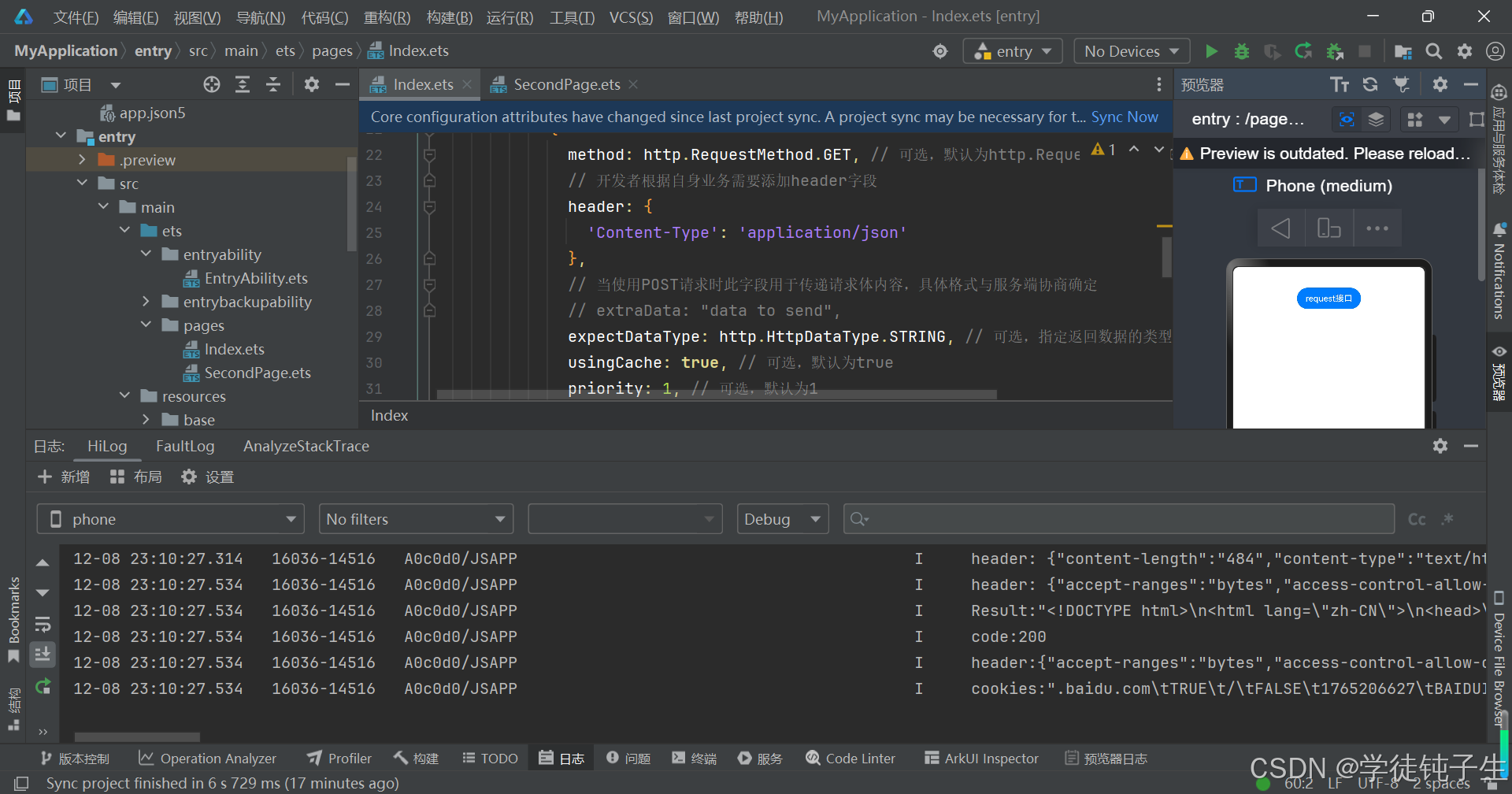
四、requestInStream开发步骤
- 从@kit.NetworkKit中导入http命名空间;
- 调用createHttp()方法,创建一个HttpRequest对象;
- 调用该对象的on()方法,可以根据业务需要订阅HTTP响应头事件、HTTP流式响应数据接收事件、HTTP流式响应数据接收进度事件和HTTP流式响应数据接收完毕事件;
- 调用该对象的requestInStream()方法,传入http请求的url地址和可选参数,发起网络请求;
- 按照实际业务需要,可以解析返回的响应码;
- 调用该对象的off()方法,取消订阅响应事件;
- 当该请求使用完毕时,调用destroy()方法主动销毁。
import { http } from '@kit.NetworkKit';

@Entry
@Component
struct Index {
  build() {
    Column(){
      Button('requestInStream接口')
        .onClick(() => {
          // 每一个httpRequest对应一个HTTP请求任务,不可复用
          let httpRequest = http.createHttp();
          // 用于订阅HTTP响应头事件
          httpRequest.on('headersReceive', (header: Object) => {
            console.info('header: ' + JSON.stringify(header));
          });
          // 用于订阅HTTP流式响应数据接收事件
          let res = new ArrayBuffer(0);
          httpRequest.on('dataReceive', (data: ArrayBuffer) => {
            const newRes = new ArrayBuffer(res.byteLength + data.byteLength);
            const resView = new Uint8Array(newRes);
            resView.set(new Uint8Array(res));
            resView.set(new Uint8Array(data), res.byteLength);
            res = newRes;
            console.info('res length: ' + res.byteLength);
          });
          // 用于订阅HTTP流式响应数据接收完毕事件
          httpRequest.on('dataEnd', () => {
            console.info('No more data in response, data receive end');
          });
          // 用于订阅HTTP流式响应数据接收进度事件
          class Data {
            receiveSize: number = 0;
            totalSize: number = 0;
          }
          httpRequest.on('dataReceiveProgress', (data: Data) => {
            console.log("dataReceiveProgress receiveSize:" + data.receiveSize + ", totalSize:" + data.totalSize);
          });

          let streamInfo: http.HttpRequestOptions = {
            method: http.RequestMethod.GET,  // 可选,默认为http.RequestMethod.GET
            // 开发者根据自身业务需要添加header字段
            header: {
              'Content-Type': 'application/json'
            },
            // 当使用POST请求时此字段用于传递请求体内容,具体格式与服务端协商确定
            // extraData: "data to send",
            expectDataType:  http.HttpDataType.STRING,// 可选,指定返回数据的类型
            usingCache: true, // 可选,默认为true
            priority: 1, // 可选,默认为1
            connectTimeout: 60000, // 可选,默认为60000ms
            readTimeout: 60000, // 可选,默认为60000ms。若传输的数据较大,需要较长的时间,建议增大该参数以保证数据传输正常终止
            usingProtocol: http.HttpProtocol.HTTP1_1 // 可选,协议类型默认值由系统自动指定
          }

          // 填写HTTP请求的URL地址,可以带参数也可以不带参数。URL地址需要开发者自定义。请求的参数可以在extraData中指定
          httpRequest.requestInStream("https://www.baidu.com/baidu?ie=utf-8&wd=鸿蒙", streamInfo).then((data: number) => {
            console.info("requestInStream OK!");
            console.info('ResponseCode :' + JSON.stringify(data));
            // 取消订阅HTTP响应头事件
            httpRequest.off('headersReceive');
            // 取消订阅HTTP流式响应数据接收事件
            httpRequest.off('dataReceive');
            // 取消订阅HTTP流式响应数据接收进度事件
            httpRequest.off('dataReceiveProgress');
            // 取消订阅HTTP流式响应数据接收完毕事件
            httpRequest.off('dataEnd');
            // 当该请求使用完毕时,调用destroy方法主动销毁
            httpRequest.destroy();
          }).catch((err: Error) => {
            console.info("requestInStream ERROR : err = " + JSON.stringify(err));
          });
        })
    }
    .width('100%')
    .height('100%')
  }
}
注意:结果在日志中查看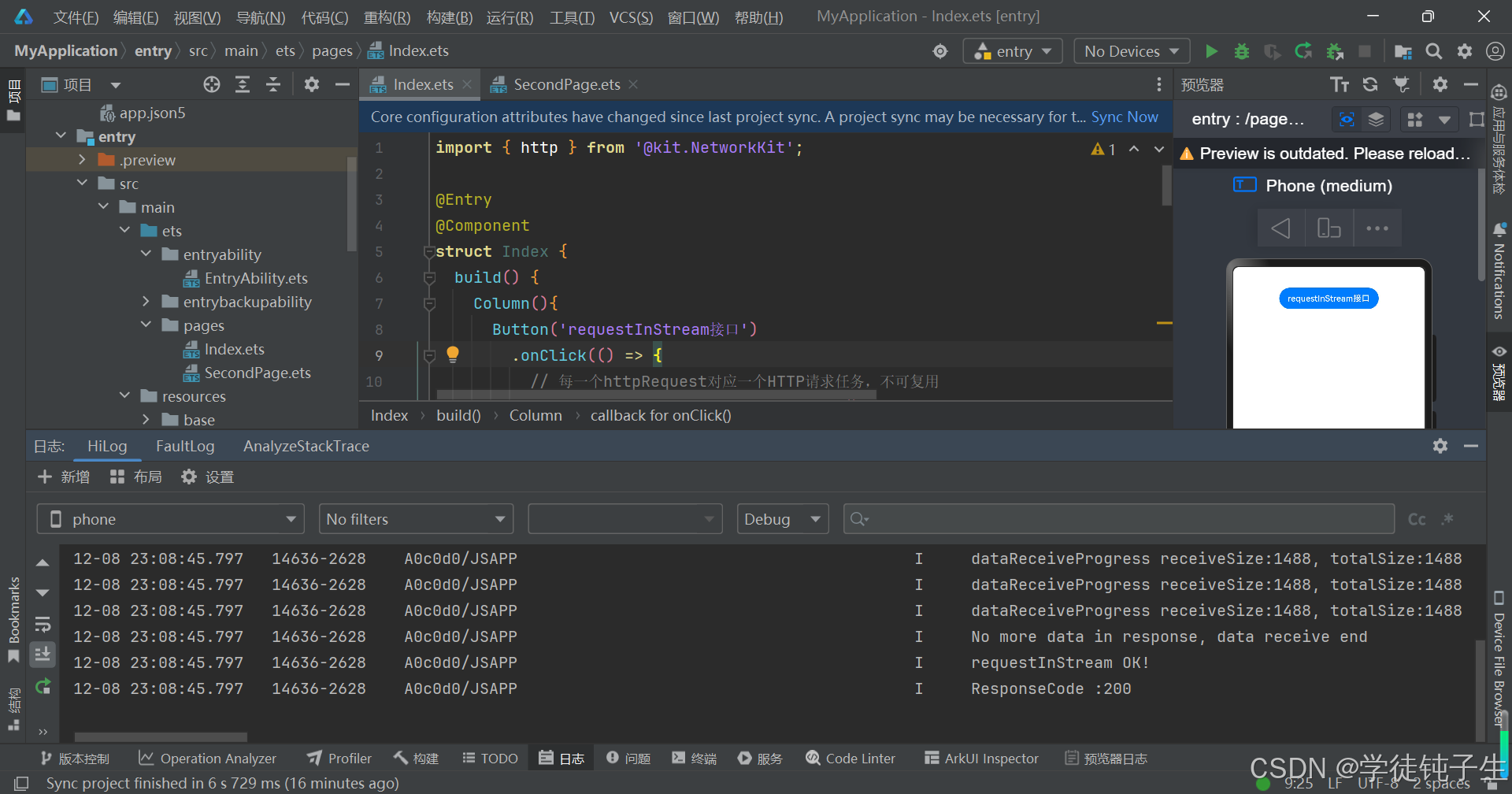
五、网络请求的其他用法
更多关于网络请求的用法,大家可以参考数据请求官方文档进行学习,这里我就列出大家最常见的用法。
六、小结
本章言简意赅的为大家介绍了ArkTs的网络技术应用,下一章,为大家介绍数据持久化的内容。最后,创作不易,如果大家觉得我的文章对学习鸿蒙有帮助的话,就动动小手,点个免费的赞吧!收到的赞越多,我的创作动力也会越大哦,谢谢大家🌹🌹🌹!!!

讨论HarmonyOS开发技术,专注于API与组件、DevEco Studio、测试、元服务和应用上架分发等。
更多推荐

 25
25 0
0- 0


 已为社区贡献30条内容

所有评论(0)