[SpringCloud] 入门-第三篇: 服务消费者(feign)
1. 什么是feign上个文章,我们是使用restTemplate + Ribbon 来实现分布式服务之间的生产和消费的调用的, 这篇文章来讲一讲SpringCloud分布式服务之间调用的另一个方案, feignFeign是一个声明式的伪Http客户端,它使得写Http客户端变得更简单。使用Feign,只需要创建一个接口并注解。它具有可插拔的注解特性,可使用Feign 注解和JAX-RS注...
1. 什么是feign
上个文章,我们是使用restTemplate + Ribbon 来实现分布式服务之间的生产和消费的调用的, 这篇文章来讲一讲SpringCloud分布式服务之间调用的另一个方案, feign
Feign是一个声明式的伪Http客户端,它使得写Http客户端变得更简单。使用Feign,只需要创建一个接口并注解。它具有可插拔的注解特性,可使用Feign 注解和JAX-RS注解。Feign支持可插拔的编码器和解码器。Feign默认集成了Ribbon,并和Eureka结合,默认实现了负载均衡的效果
重点:
- Feig采用的是基于接口的注解
- Feign整合了Ribbon
2. 创建feign的服务
这里接着上一篇使用Ribbon的文章继续进行
这个时候我们已经有:
1. eurekaServer — 注册中心
2. eureka-client-01 — 生产者,客户端
3. service-ribbon — 使用ribbon调用eureka-client-01方法的消费者
新建一个spring-boot工程,(怕麻烦的话其实可以直接复制上面的service-ribbon, 把所有ribbon换成feign, pom文件改吧改吧就好了)
pom.xml
<?xml version="1.0" encoding="UTF-8"?>
<project xmlns="http://maven.apache.org/POM/4.0.0"
         xmlns:xsi="http://www.w3.org/2001/XMLSchema-instance"
         xsi:schemaLocation="http://maven.apache.org/POM/4.0.0 http://maven.apache.org/xsd/maven-4.0.0.xsd">
    <modelVersion>4.0.0</modelVersion>
    <packaging>jar</packaging>
    <artifactId>service-feign</artifactId>


    <parent>
        <groupId>org.springframework.boot</groupId>
        <artifactId>spring-boot-starter-parent</artifactId>
        <version>1.5.2.RELEASE</version>
        <relativePath/> <!-- lookup parent from repository -->
    </parent>

    <properties>
        <project.build.sourceEncoding>UTF-8</project.build.sourceEncoding>
        <project.reporting.outputEncoding>UTF-8</project.reporting.outputEncoding>
        <java.version>1.8</java.version>
    </properties>

    <dependencies>
        <dependency>
            <groupId>org.springframework.cloud</groupId>
            <artifactId>spring-cloud-starter-eureka</artifactId>
        </dependency>
        <dependency>
            <groupId>org.springframework.cloud</groupId>
            <artifactId>spring-cloud-starter-feign</artifactId>
        </dependency>
        <dependency>
            <groupId>org.springframework.boot</groupId>
            <artifactId>spring-boot-starter-web</artifactId>
        </dependency>

        <dependency>
            <groupId>org.springframework.boot</groupId>
            <artifactId>spring-boot-starter-test</artifactId>
            <scope>test</scope>
        </dependency>
    </dependencies>

    <dependencyManagement>
        <dependencies>
            <dependency>
                <groupId>org.springframework.cloud</groupId>
                <artifactId>spring-cloud-dependencies</artifactId>
                <version>Dalston.RC1</version>
                <type>pom</type>
                <scope>import</scope>
            </dependency>
        </dependencies>
    </dependencyManagement>

    <build>
        <plugins>
            <plugin>
                <groupId>org.springframework.boot</groupId>
                <artifactId>spring-boot-maven-plugin</artifactId>
            </plugin>
        </plugins>
    </build>

    <repositories>
        <repository>
            <id>spring-milestones</id>
            <name>Spring Milestones</name>
            <url>https://repo.spring.io/milestone</url>
            <snapshots>
                <enabled>false</enabled>
            </snapshots>
        </repository>
    </repositories>


</project>
application.yml配置如下
eureka:
  client:
    serviceUrl:
      defaultZone: http://localhost:8761/eureka/
spring:
  application:
    name: service-feign
server:
  port: 8086
启动类上面打上@EnableFeignClients注解开启Feign的功能
package com.zgd.springcloud.eurekaClient;

import org.springframework.boot.SpringApplication;
import org.springframework.boot.autoconfigure.SpringBootApplication;
import org.springframework.cloud.client.discovery.EnableDiscoveryClient;
import org.springframework.cloud.client.loadbalancer.LoadBalanced;
import org.springframework.cloud.netflix.eureka.EnableEurekaClient;
import org.springframework.cloud.netflix.feign.EnableFeignClients;
import org.springframework.context.annotation.Bean;
import org.springframework.web.client.RestTemplate;


/**
 * eureka client 客户端
 */
@EnableDiscoveryClient
@EnableFeignClients
@SpringBootApplication(scanBasePackages = "com.zgd.springcloud.eurekaClient")
public class FeignApp {

    public static void main(String[] args) {
        SpringApplication.run(FeignApp.class, args);
    }

}
这里和ribbon区别的地方就来了
ribbon是直接定义一个serviceImpl, 在里面用restTemplate去访问暴露在外面的其他服务提供者的mvc接口
feign直接定义一个接口,通过@ FeignClient(“服务名”),来指定调用哪个服务
下面注解中的@RequestMapping的value都是eureka-client-01模块需要调用的方法的路由
package com.zgd.springcloud.eurekaClient.interf;

import org.springframework.cloud.netflix.feign.FeignClient;
import org.springframework.stereotype.Component;
import org.springframework.web.bind.annotation.RequestMapping;
import org.springframework.web.bind.annotation.RequestMethod;
import org.springframework.web.bind.annotation.RequestParam;

/**
 * @FeignClient value是指定的服务提供者在eurekaServer中的服务名,也就是eureka-client-01的applicationName: client01
 */
@FeignClient(value = "client01")
@Component
public interface FeignService{

    /**
     * 这里还是访问的eureka-client-01的
     *      com.zgd.springcloud.eurekaClient.controller.ProducerController
     *      的hello方法的路由
     * @param name
     * @return
     */
    @RequestMapping(value = "/hello",method = RequestMethod.GET)
    String hiService(@RequestParam(value = "name") String name);
}
在Web层的controller层, 对外暴露一个api接口
package com.zgd.springcloud.eurekaClient.controller;

import com.zgd.springcloud.eurekaClient.interf.FeignService;
import org.springframework.beans.factory.annotation.Autowired;
import org.springframework.web.bind.annotation.*;

@RestController
public class FeignController {

    @SuppressWarnings("SpringJavaInjectionPointsAutowiringInspection")

    @Autowired
    FeignService feignService;
    /**
     * 通过service层,用restTemplate访问Client01路由,间接调用了Client01工程的方法
     * @param name
     * @return
     */
    @RequestMapping(value = "/getHi",method = RequestMethod.GET)
    public String getHi(@RequestParam String name) {
        return feignService.hiService( name );
    }

}
这个时候因为接口没有实现类,不用担心会报错空指针异常, 前提是你的app启动类上确实用了@EnableFeignClients
4. 启动程序
- 启动eurekaServer
- 启动eureka-client-01, 更改端口号, 再次启动
- 启动service-feign
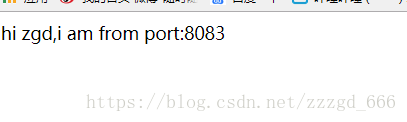
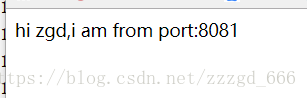
访问 http://localhost:8086/getHi?name=zgd
多次访问,可以看到轮询调用了两个端口
5.源码
https://github.com/zzzgd/SpringCloudDemo/tree/master/spring-cloud-part1

讨论HarmonyOS开发技术,专注于API与组件、DevEco Studio、测试、元服务和应用上架分发等。
更多推荐

 0
0 0
0- 0


 已为社区贡献2条内容

所有评论(0)