websocket-sharp使用详解及其调用原理
参考官方样例修改,简单实现以下实现两端消息发送。
Client端代码,直接发起连接,连接建立成功后发送初始消息,之后根据键入发送消息。
using System;
using System.Threading;
using WebSocketSharp;

namespace Example
{
  public class Program
  {
    public static void Main (string[] args)
    {

      using (var ws = new WebSocket ("ws://127.0.0.1:4649/MyChat"))
      {
        ws.OnOpen += (sender, e) => ws.Send ("Hi, there!");
        ws.Connect ();
        Console.WriteLine ("\nType 'exit' to exit.\n");
        while (true) {
          Thread.Sleep (1000);
          Console.Write ("> ");
          var msg = Console.ReadLine ();
          if (msg == "exit")
            break;
          // Send a text message.
          ws.Send (msg);
        }
      }
    }
  }
}
Server端代码
这里采用 HttpServer模式,该类不单可以提供正常的websocket服务,还可以作为Http服务使用。
using System;
using System.Configuration;
using System.Text;
using WebSocketSharp;
using WebSocketSharp.Net;
using WebSocketSharp.Server;

namespace Example3
{
    public class MyChat : WebSocketBehavior
    {
        private string _name;

        public MyChat(string name)
        {
            _name = name;
        }

        protected override void OnOpen()
        {
        }

        protected override void OnClose(CloseEventArgs e)
        {
        }

        protected override void OnMessage(MessageEventArgs e)
        {
            Send("receive succ:" + e.Data);
        }
    }

    public class Program
    {
        public static void Main (string[] args)
        {

          var httpsv = new HttpServer (4649);

          httpsv.DocumentRootPath = ConfigurationManager.AppSettings["DocumentRootPath"];

          // Set the HTTP GET request event.
          httpsv.OnGet += (sender, e) => {
              var req = e.Request;
              var res = e.Response;

              var path = req.RawUrl;
              if (path == "/")
                path += "index.html";

              byte[] contents;
              if (!e.TryReadFile (path, out contents)) {
                res.StatusCode = (int) HttpStatusCode.NotFound;
                return;
              }

              if (path.EndsWith (".html")) {
                res.ContentType = "text/html";
                res.ContentEncoding = Encoding.UTF8;
              }
              else if (path.EndsWith (".js")) {
                res.ContentType = "application/javascript";
                res.ContentEncoding = Encoding.UTF8;
              }

              res.ContentLength64 = contents.LongLength;
              res.Close (contents, true);
            };

          httpsv.AddWebSocketService("/MyChat", () => new MyChat("test"));

          httpsv.Start ();
          if (httpsv.IsListening) {
            Console.WriteLine ("Listening on port {0}, and providing WebSocket services:", httpsv.Port);
            foreach (var path in httpsv.WebSocketServices.Paths)
              Console.WriteLine ("- {0}", path);
          }

          Console.WriteLine ("\nPress Enter key to stop the server...");
          Console.ReadLine ();

          httpsv.Stop ();
        }
  }
}
下面开始解析HttpServer的调用过程
1.AddWebSocketService
通过该接口添加我们编写的MyChat服务,并通过事件回调MyChat类中对应的函数。
HttpServer 在构造函数中调用 init函数,分别初始化HttpListener 和 WebSocketServiceManager类实例。WebSocketServiceManager用于管理websocket service(即调用AddWebSocketService注册的服务)。每个注册服务以WebSocketServiceHost表示,该类中持有WebSocketSessionManager对象,用于保存建立的连接session(相当于websocket连接)。
这里关注下WebSocketServiceHost.cs代码中的WebSocketServiceHost类,该类为抽象类。而另外一个相似的源文件WebSocketServiceHost`1.cs中该类被再次继承。这里采用泛型模板,TBehavior其实便是我们定义的MyChat。
  internal class WebSocketServiceHost<TBehavior> : WebSocketServiceHost
    where TBehavior : WebSocketBehavior
当一个连接建立过程中,会通过WebSocketServiceHost的StartSession函数创建对应的MyChat对象。这一系列的调用发生在WebSocketServiceHost`1.cs文件中WebSocketServiceHost子类。StartSession -> CreateSession() -> _creator (),该 _creator对应的便是我们的MyChat的构造函数,这时对象构造出来,接着调用 Start 函数完成剩下的初始化操作,进入消息收发过程中。
2.Http服务调用过程
HttpServer在startReceiving函数中通过HttpListener分别实现监听和连接处理
private void startReceiving ()
{
    try {
        _listener.Start ();
    }
    catch (Exception ex) {
    var msg = "The underlying listener has failed to start.";
    throw new InvalidOperationException (msg, ex);
    }

    _receiveThread = new Thread (new ThreadStart (receiveRequest));
    _receiveThread.IsBackground = true;
    _receiveThread.Start ();
}
_listener.Start 调用开始,负责监听端口连接信息,并放入连接队列当中,大概调用如下
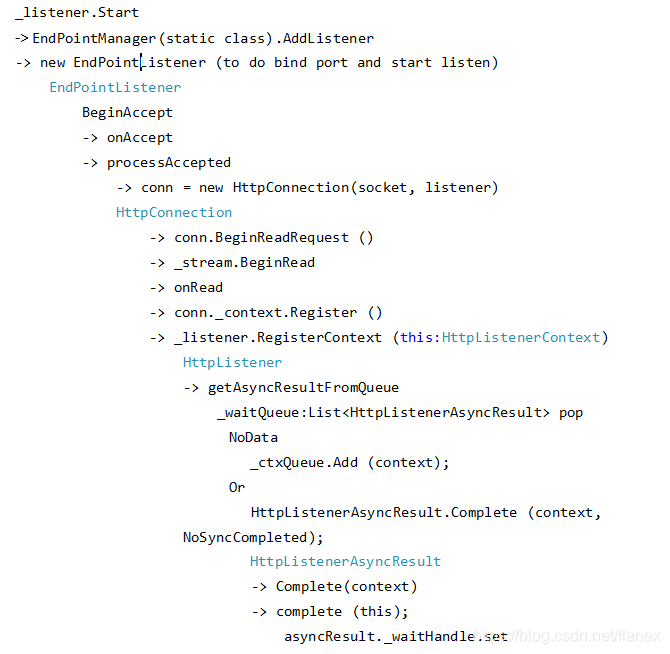
另外一个线程,通过回调receiveRequest 函数中循环检测是否有新的连接创建,并根据context(HttpListenerContext)判断时websocket连接还是http连接,分别调用对应的processRequest函数。
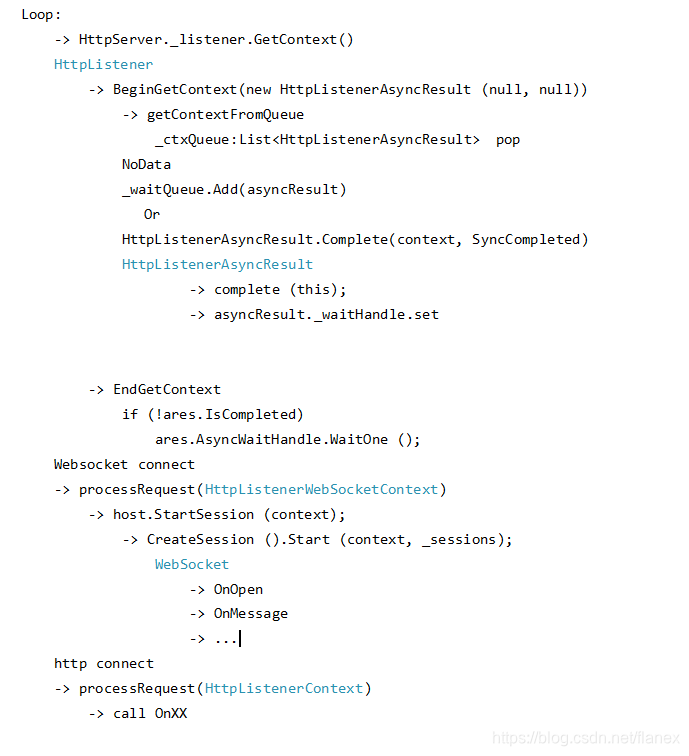
需要说明下这两个不同线程中用到的类
HttpListenerContext 主要用来封装访问Http请求的,由HttpConnection在构造函数中创建。
HttpConnection 可以理解为初始发起的websocket连接,此时需要根据协议进一步判断该连接时http还是websocket。
HttpListenerAsyncResult 主要作为配合HttpListenerContext使用,等待线程结果

讨论HarmonyOS开发技术,专注于API与组件、DevEco Studio、测试、元服务和应用上架分发等。
更多推荐
 2
2 0
0- 0


 已为社区贡献1条内容

所有评论(0)