C++ -- setfill()和setw()
1、setw(int n)只是对直接跟在(Sets the number of characters to be used as thefield width for the next insertion operation.)2、n是在输出时分配了n个字符的输出宽度,然后默认的是在n个字符宽度中右对齐输出,可以使用setiosflags(ios::left)设置为左对齐输出,可以使用
·
1、语法格式
C++ setw() 函数用于设置字段的宽度,语法格式如下:
setw(int n);
只是对直接跟在<<后的输出数据起作用,而在之后的<<需要在之前再一次使用setw;
(Sets the number of characters to be used as the field width for the next insertion operation.)
n 表示宽度,用数字表示。setw() 函数只对紧接着的输出产生作用。
当后面紧跟着的输出字段长度小于 n 的时候,在该字段前面用空格补齐;
当输出字段长度大于 n 时,全部整体输出。
2、左右对齐和填充
n是在输出时分配了n个字符的输出宽度,然后默认的是在n个字符宽度中右对齐输出,
可以使用setiosflags(ios::left)设置为左对齐输出;
可以使用setfill('char x')使用x来填充空下的空格;
使用 setprecision 可以设置浮点数的小数点后的位数;
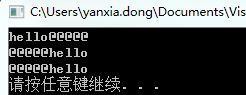
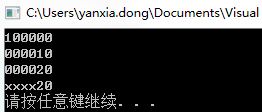
示例如下:
#include <iostream>
#include <iomanip>
using namespace std;
int main()
{
	char *str="hello";
	cout<<setw(10)<<setiosflags(ios::left)<<setfill('@')<<str<<endl;
	cout<<setw(10)<<setiosflags(ios::right)<<setfill('@')<<str<<endl;
	cout<<setw(10)<<setfill('@')<<str<<endl;
	system("pause");
	return 0;
}
#include <iostream>
#include <iomanip>
using namespace std;
int main()
{
	int a = 10,b = 20;
	cout<<setw(6)<<setiosflags(ios::left)<<setfill('0')<<a<<endl;
	cout<<setw(6)<<setiosflags(ios::right)<<setfill('0')<<a<<endl;
	cout<<setw(6)<<setiosflags(ios::right)<<setfill('0')<<b<<endl;
	cout<<setw(6)<<setfill('x')<<b<<endl;
	system("pause");
	return 0;
}

讨论HarmonyOS开发技术,专注于API与组件、DevEco Studio、测试、元服务和应用上架分发等。
更多推荐



 18
18 0
0- 0


 已为社区贡献1条内容

所有评论(0)