解决could not read ok from ADB Server.failed to start daemon error: cannot connect to daemon的问题
问题描述:执行命令adb connect 127.0.0.1:62001,报错如下:* daemon not running; starting now at tcp:5037could not read ok from ADB Server* failed to start daemonerror: cannot connect to daemon原因解析:使用命令查看端口是否被占用netsta
·
问题描述:
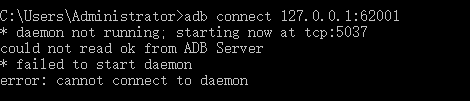
执行命令 adb connect 127.0.0.1:62001,报错如下:
* daemon not running; starting now at tcp:5037
could not read ok from ADB Server
* failed to start daemon
error: cannot connect to daemon
原因解析:
使用命令查看端口是否被占用netstat -ano | findstr "5037"

查看到5037端口被占用
解决方式:
执行命令kill进程,释放5037端口:
taskkill -f -pid 15276
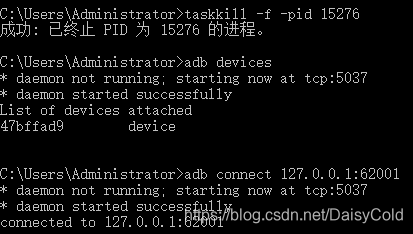
重新执行adb connect 127.0.0.1:62001命令,连接成功

讨论HarmonyOS开发技术,专注于API与组件、DevEco Studio、测试、元服务和应用上架分发等。
更多推荐



 6
6 0
0- 0


 已为社区贡献1条内容

所有评论(0)