【Python-PyQt5】PyQt5错误提示弹框
python文件代码:# -*- coding: utf-8 -*-import sysfrom PyQt5 import QtWidgetsclass MessageBox(QtWidgets.QWidget):#继承自父类QtWidgets.QWidgetdef __init__(self,parent = None):#parent = None代表此QWidget属...
·
python文件代码:
# -*- coding: utf-8 -*-


import sys
from PyQt5 import QtWidgets

class MessageBox(QtWidgets.QWidget):#继承自父类QtWidgets.QWidget
    def __init__(self,parent = None):#parent = None代表此QWidget属于最上层的窗口,也就是MainWindows.
        QtWidgets.QWidget.__init__(self)#因为继承关系,要对父类初始化
#通过super初始化父类,__init__()函数无self,若直接QtWidgets.QWidget.__init__(self),括号里是有self的
        self.setGeometry(300, 300, 1000,1000)  # setGeometry()方法完成两个功能--设置窗口在屏幕上的位置和设置窗口本身的大小。它的前两个参数是窗口在屏幕上的x和y坐标。后两个参数是窗口本身的宽和高
        self.setWindowTitle(u'窗口')  # 设置窗体标题,本行可有可无。
        self.button = QtWidgets.QPushButton(u'测试', self)  # 创建一个按钮显示‘测试’两字
        self.button.move(300,300)
        self.button.clicked.connect(self.show_message)  # 信号槽

    def show_message(self):
        QtWidgets.QMessageBox.critical(self, "错误", "系统错误请关机重启")
#内容要长,太短会导致标题显示不全!
app=QtWidgets.QApplication(sys.argv)
window=MessageBox()
window.show()
sys.exit(app.exec_())
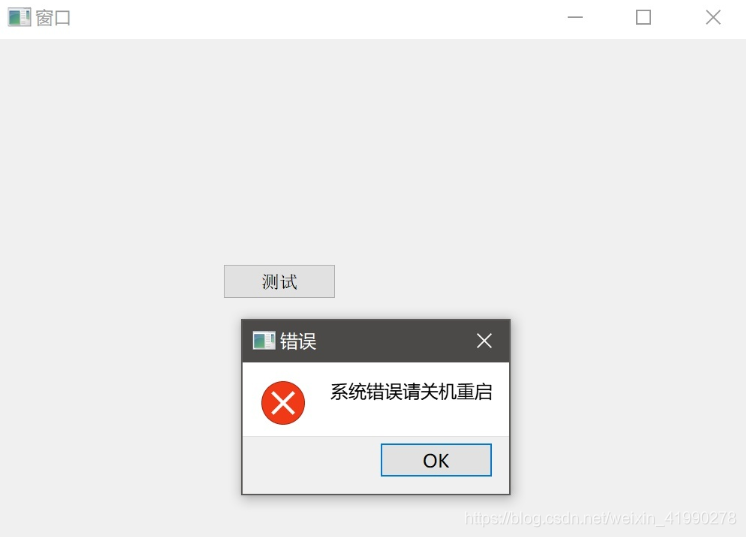
结果如下:

讨论HarmonyOS开发技术,专注于API与组件、DevEco Studio、测试、元服务和应用上架分发等。
更多推荐

 2
2 0
0- 0


 已为社区贡献1条内容

所有评论(0)