案例集合Tabs:自定义tabs突出(凸出)球体左右跟随滑动动画
·
🎯 案例集合Tabs:自定义tabs突出(凸出)球体左右跟随滑动动画
🌍 案例集合Tabs
🏷️ 效果图
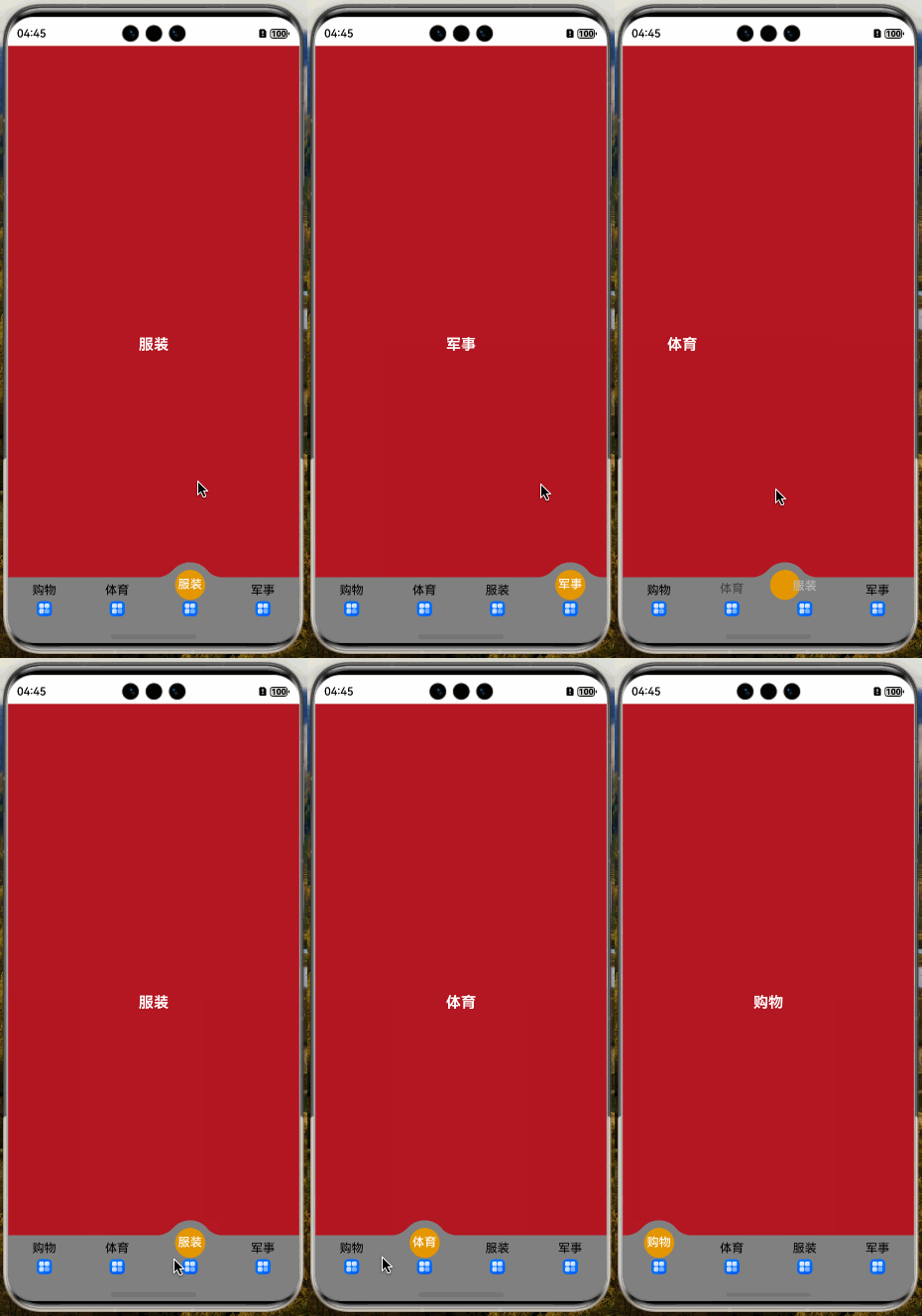
📖 参考
🧩 拆解
- 自定义tabs突出球 左右滑动
import { common } from "@kit.AbilityKit"
import { display, PathShape, window } from "@kit.ArkUI"

/**
 * 安全区高度
 */
interface AvoidArea {
  topRectHeight: number
  bottomRectHeight: number
}

/**
 * 凸起变化平滑属性
 */
interface BallSmooth {
  radialGradient: RadialGradientOptions
  clipShape: PathShape
  position: Position
}

/**
 * 安全类型边距枚举
 * statusBarType 状态栏
 * navBarType 导航栏
 */
const statusBarType = window.AvoidAreaType.TYPE_SYSTEM
const navBarType = window.AvoidAreaType.TYPE_NAVIGATION_INDICATOR

/**
 * tabs数据
 */
const mockData: string[] = ['购物', '体育', '服装', '军事']

@Component
export struct RaisedBallSmoothCase {
  /**
   * UI上下文
   */
  private context = this.getUIContext()?.getHostContext() as common.UIAbilityContext
  /**
   * 窗口对象
   */
  private windowClass = this.context.windowStage.getMainWindowSync()
  /**
   * 当前选中的Tabs下标
   */
  @State tabsCurSelectIdx: number = 0
  /**
   * 当前选中的Tabs下标(还未切换动画前获取)
   */
  @State animationStartIdx: number = 0
  /**
   * 安全区高度对象(状态栏、导航栏)
   */
  @State avoidArea: AvoidArea = { topRectHeight: 0, bottomRectHeight: 0 }
  /**
   * 凸起变化平滑裁剪
   */
  private vp2pxWidth: number = this.getUIContext().vp2px(44)
  private vp2pxHeight: number = this.getUIContext().vp2px(40)
  /**
   * 凸起Builder容器与tabs一致占屏幕的1/4
   */
  private raisedBallWidth: number = this.getUIContext().px2vp(display.getDefaultDisplaySync().width) / mockData.length
  /**
   * tabs | ball 颜色
   */
  private tabsAndBallColor: ResourceColor = Color.Gray


  aboutToAppear(): void {
    this.windowClass.setWindowLayoutFullScreen(true)
    this.windowClass.on('avoidAreaChange', this.onAvoidAreaChange)
    this.setAvoidArea()
  }

  aboutToDisappear(): void {
    this.windowClass.setWindowLayoutFullScreen(false)
    this.windowClass.off('avoidAreaChange', this.onAvoidAreaChange)
  }

  /**
   * 设置状态栏和导航栏避让区域 && 监听不同设备避让区域的变化
   */
  setAvoidArea() {
    const statusBarArea = this.windowClass.getWindowAvoidArea(statusBarType)
    this.avoidArea.topRectHeight = statusBarArea.topRect.height
    const navBarArea = this.windowClass.getWindowAvoidArea(navBarType)
    this.avoidArea.bottomRectHeight = navBarArea.bottomRect.height
  }

  onAvoidAreaChange = (data: window.AvoidAreaOptions) => {
    if (data.type === statusBarType) {
      this.avoidArea.topRectHeight = data.area.topRect.height
    } else if (data.type === navBarType) {
      this.avoidArea.bottomRectHeight = data.area.bottomRect.height
    }
  }

  /**
   * tab
   * @param label
   * @param idx
   */
  @Builder
  tabBuilder(label: string, idx: number) {
    Column({ space: 5 }) {
      Text(label)
        .fontSize(16)
        .fontColor(this.animationStartIdx === idx ? Color.White : Color.Black)
        .fontWeight(this.animationStartIdx === idx ? FontWeight.Medium : FontWeight.Normal)
        .offset({
          y: this.animationStartIdx === idx ? -8 : 0
        })
        .animation({ duration: 300, curve: Curve.Smooth })

      Image($r('app.media.startIcon'))
        .syncLoad(true)
        .draggable(false)
        .width(20)
        .height(20)
    }
    .id(`tabBuilder${idx}`)
    .height(60)
    .onClick(() => {
      this.tabsCurSelectIdx = this.animationStartIdx = idx
    })
    .justifyContent(FlexAlign.Center)
    .layoutWeight(1)
  }

  /**
   * 左右两边凸起球圆滑的图像
   * @param param
   */
  @Builder
  ballSmoothBuilder(param: BallSmooth) {
    Column()
      .width(44)
      .height(40)
      .radialGradient(param.radialGradient)
      .clipShape(param.clipShape) // 关键:路径裁剪
      .position(param.position)
      .zIndex(-1)
  }

  /**
   * 凸起的球
   */
  @Builder
  raisedBallBuilder() {
    /**
     * 这里包一层主要是处理居中问题
     */
    Row() {
      Row() {
        this.ballSmoothBuilder({
          radialGradient: {
            center: [0, 0],
            radius: 30,
            colors: [[Color.Transparent, 0.0], [Color.Transparent, 1], [this.tabsAndBallColor, 1]]
          },
          clipShape: new PathShape({
            commands: `M0 0 L0 ${this.vp2pxHeight} L${this.vp2pxWidth} ${this.vp2pxHeight} Z`
          }),
          position: { x: -15, y: -10 } // 横向负方向位移凸出球的1/4
        })

        Column() {
          Text()
            .width(40)
            .aspectRatio(1)
            .borderRadius(20)
            .backgroundColor(Color.Orange)
            .opacity(0.7)
        }
        .height(60)
        .aspectRatio(1)
        .borderRadius(30)
        .backgroundColor(this.tabsAndBallColor)
        .justifyContent(FlexAlign.Center)

        this.ballSmoothBuilder({
          radialGradient: {
            center: [44, 0],
            radius: 30,
            colors: [[Color.Transparent, 0.0], [Color.Transparent, 1], [this.tabsAndBallColor, 1]]
          },
          clipShape: new PathShape({
            commands: `M0 ${this.vp2pxHeight} L${this.vp2pxWidth} 0L${this.vp2pxWidth} ${this.vp2pxHeight} Z`
          }),
          position: { x: 30, y: -10 } // 横向正方向位移凸出球的1/2
        })
      }
      .width(60)
      .aspectRatio(1)
    }
    .width(this.raisedBallWidth)
    .height(60)
    .justifyContent(FlexAlign.Center)
    .position({
      x: this.raisedBallWidth * this.animationStartIdx,
      y: -20
    })
    .zIndex(-1)
    .animation({ duration: 300, curve: Curve.Smooth })
  }

  build() {
    Stack({ alignContent: Alignment.BottomStart }) {
      Tabs({ index: this.tabsCurSelectIdx }) {
        ForEach(mockData, (item: string) => {
          TabContent() {
            Column() {
              Text(item)
                .fontColor(Color.White)
                .fontSize(20)
                .fontWeight(FontWeight.Bold)
            }
            .width('100%')
            .height('100%')
            .justifyContent(FlexAlign.Center)
            .backgroundColor(Color.Brown)
          }
        })
      }
      .barHeight(0)
      .onChange((idx: number) => {
        this.tabsCurSelectIdx = idx
      })
      // 关键:切换动画开始时触发该回调:解决切换tabs延迟的问题
      .onAnimationStart((idx: number, targetIndex: number) => {
        if (idx === targetIndex) {
          return
        }
        this.animationStartIdx = targetIndex
      })

      // 自定义tabs
      Row() {
        ForEach(mockData, (item: string, idx: number) => {
          this.tabBuilder(item, idx)
        })

        this.raisedBallBuilder()
      }
      .width('100%')
      .backgroundColor(this.tabsAndBallColor)
      .padding({ bottom: this.avoidArea.bottomRectHeight + 'px' })
    }
    .width('100%')
    .height('100%')
    .padding({ top: this.avoidArea.topRectHeight + 'px' })
  }
}
🌸🌼🌺

讨论HarmonyOS开发技术,专注于API与组件、DevEco Studio、测试、元服务和应用上架分发等。
更多推荐
 0
0 0
0- 0



 已为社区贡献45条内容

所有评论(0)