鸿蒙原生能力跳转高德地图以及百度地图并开启导航,包括查询设备上应用信息方法
鸿蒙应用拉起地图并开启导航功能在鸿蒙应用开发中如何去实现拉起第三方的地图并开启导航功能?就以高德地图和百度地图为例,本人总结了一下几个步骤,也包括本人踩过的坑点,附上完整案例,希望能帮到各位。
·
项目场景:
鸿蒙应用拉起地图并开启导航功能
在鸿蒙应用开发中如何去实现拉起第三方的地图并开启导航功能?就以高德地图和百度地图为例,本人总结了一下几个步骤,也包括本人踩过的坑点,附上完整案例,希望能帮到各位
1、配置queryScheme:
鸿蒙中提供了原生能力去判断设备上是否安装了某个应用如下:
bundleManager.canOpenLink('scheme://应用包名')在我们去调用这个函数之前,我们需要在module.json5中配置queryScheme,才能去判断此应用是否安装,下图配置了高德地图和百度地图的scheme
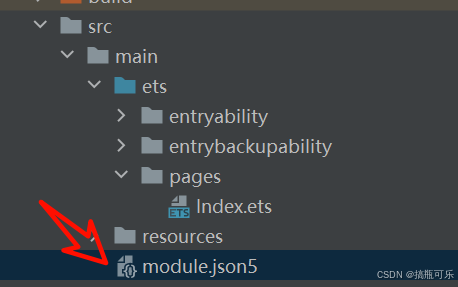
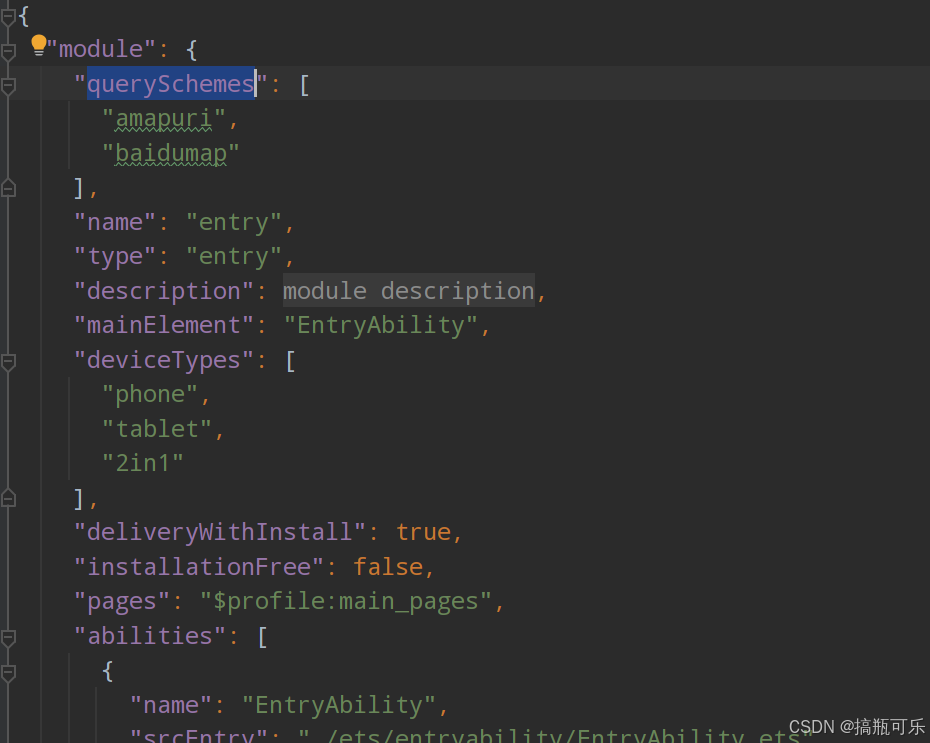
注:如何获取其他应用的scheme ?
在项目终端中运行 hdc shell 命令 才能运行 bm 命令去查询应用设备已安装的应用信息

再运行以下命令获取所有应用信息
# 显示所有已安装的Bundle名称
bm dump -a
找到包名之后运行以下命令查询相关应用信息
# 查询该应用的详细信息
bm dump -n com.ohos.app -u 100
在终端中ctrl+f 搜scheme 即可找到对应应用的scheme
2、地址转经纬度
这一步需要使用到一个第三方的工具包:
OpenHarmony三方库中心仓 https://ohpm.openharmony.cn/#/cn/detail/@pura%2Fharmony-utils在终端运行安装工具包
ohpm i @pura/harmony-utils
地址转经纬度函数
// LocationUtil.getAddressFromLocationName 为工具包中的LocationUtill模块下的方法
// address 为地理位置
const location = await LocationUtil.getAddressFromLocationName(address)
3、拉起地图并启动导航
以下函数可以实现拉起地图并开启导航
  async pullMap(address: string, map: string) {
    const location = await LocationUtil.getAddressFromLocationName(address)
    console.log('location' + JSON.stringify(location))
    if (map === '高德地图') {

      let want: Want = {
        uri: `amapuri://route/plan?dlat=${location.latitude}&dlon=${location.longitude}&dname=${address}&t=0`
      }
      const context = getContext() as common.UIAbilityContext
      context.startAbility(want, (err: BusinessError) => {
        if (err.code) {
          console.error(`业务逻辑错误 startAbility failed,code is ${err.code},message is ${err.message}`);
          return
        }
      })
    } else if (map === '百度地图') {
      let uri = 'baidumap://map/direction?' +
        `destination=latlng:${location.latitude},${location.longitude},|name:${address}&mode=driving`
      let want: Want = { uri: uri }
      const content = getContext() as common.UIAbilityContext
      content.startAbility(want, (err: BusinessError) => {
        if (err.code) {
          hilog.debug(1000, 'test', 'err=' + err)
        }
      })

    }

  }
4、完整案例
import { bundleManager, common, Want } from '@kit.AbilityKit';
import { LocationUtil } from '@pura/harmony-utils';
import { geoLocationManager } from '@kit.LocationKit';
import { BusinessError } from '@kit.BasicServicesKit';
import { hilog } from '@kit.PerformanceAnalysisKit';

@Entry
@Component
struct Index {
  @State address: string = '北京市朝阳区望京街道';
  isInstallGD: boolean = false;
  isInstallBD: boolean = false;
  @State location: geoLocationManager.GeoAddress = {}

  async pullMap(address: string, map: string) {
    const location = await LocationUtil.getAddressFromLocationName(address)
    console.log('location' + JSON.stringify(location))
    if (map === '高德地图') {

      let want: Want = {
        uri: `amapuri://route/plan?dlat=${location.latitude}&dlon=${location.longitude}&dname=${address}&t=0`
      }
      const context = getContext() as common.UIAbilityContext
      context.startAbility(want, (err: BusinessError) => {
        if (err.code) {
          console.error(`业务逻辑错误 startAbility failed,code is ${err.code},message is ${err.message}`);
          return
        }
      })
    } else if (map === '百度地图') {
      let uri = 'baidumap://map/direction?' +
        `destination=latlng:${location.latitude},${location.longitude},|name:${address}&mode=driving`
      let want: Want = { uri: uri }
      const content = getContext() as common.UIAbilityContext
      content.startAbility(want, (err: BusinessError) => {
        if (err.code) {
          hilog.debug(1000, 'test', 'err=' + err)
        }
      })

    }

  }

  build() {
    Column({ space: 20 }) {
      Text(this.address)
        .fontSize(30)
        .fontWeight(500)
      Button('判断是否安装高德地图')
        .onClick(() => {
          this.isInstallGD = bundleManager.canOpenLink('amapuri://com.amap.hmapp')
          AlertDialog.show({
            message: this.isInstallGD ? '高德地图已安装' : '高德地图未安装',
          })
        })
      Button('判断是否安装百度地图')
        .onClick(() => {
          this.isInstallBD = bundleManager.canOpenLink('baidumap://map/direction')
          AlertDialog.show({
            message: this.isInstallBD ? '百度地图已安装' : '百度地图未安装',
          })
        })
      Button('地理位信息转经纬度')
        .onClick(async () => {
          this.location = await LocationUtil.getAddressFromLocationName(this.address)
          AlertDialog.show({
            message: JSON.stringify(this.location),
          })
        })
      Button('跳转百度地图,并开启轨迹')
        .onClick(() => {
          this.pullMap(this.address, '百度地图')
        })

      Button('跳转高德地图,并开启轨迹')
        .onClick(() => {
          this.pullMap(this.address, '高德地图')
        })

    }.width('100%')
    .height('100%')
    .justifyContent(FlexAlign.Center)
  }
}
讨论HarmonyOS开发技术,专注于API与组件、DevEco Studio、测试、元服务和应用上架分发等。
更多推荐

 23
23 0
0- 0


 已为社区贡献17条内容

所有评论(0)