鸿蒙‘@ohos.deviceInfo‘模块:获取设备信息及网络状态
【代码】调用Harmony内置Api模块调用获取设备信息及网络状态。
·
开发工具Dev studio5.0
模拟器HarmonyOS Emulator-windows
import { NavigationTitleBuilder } from '../../common/builders';
import { SENSOR_NAME_LIST, SensorName } from '../../common/constants';
import { themeManager } from '../../manager';
import deviceInfo from '@ohos.deviceInfo'; //设备信息
import { process } from '@kit.ArkTS'; //系统运行时间
import { connection } from '@kit.NetworkKit'; //网络连接
import dayjs from 'dayjs';
import duration from 'dayjs/plugin/duration'
import { display } from '@kit.ArkUI'; //屏幕
import { sensor } from '@kit.SensorServiceKit'; //传感器数组Api

dayjs.extend(duration)

@Entry
@Component
struct HardwareIndexPage {
  // 产品名称
  @State marketName: string = '-'
  // 系统版本
  @State osFullName: string = '-'
  // 系统软件API版本
  @State sdkApiVersion: string = '-'
  // 设备类型
  @State deviceType: string = '-'
  // 获取当前系统已运行的秒数
  @State uptime: number = 0
  // 网络类型
  @State netBearType: string = '-'
  // IP 地址
  @State IPAddress: string = '0.0.0.0'
  // 子网掩码
  @State subnetMask: string = '0.0.0.0'
  // 广播地址
  @State broadcastAddress: string = '0.0.0.0'
  // 屏幕分辨率(像素)
  @State displayHeight: number = 0
  @State displayWidth: number = 0
  // 屏幕刷新率(Hz)
  @State displayRefreshRate: number = 0
  // 像素密度(PPI)
  @State displayDensityDPI: number = 0
  // 支持的传感器id列表
  @State supportSensorIds: number[] = []

  onPageShow() {
    themeManager.settingStatusBarWhite()
    this.getDeviceInfo()
  }

  onPageHide() {
    themeManager.settingStatusBarBlack()
  }

  // 获取设备硬件各项信息
  getDeviceInfo() {
    // 利用@ohos.deviceInfo获取设备信息
    this.marketName = deviceInfo.marketName
    this.osFullName = deviceInfo.osFullName
    this.sdkApiVersion = `${deviceInfo.sdkApiVersion}`
    this.deviceType = deviceInfo.deviceType
    //利用@kit.ArkTs获取系统运行时间,返回值是毫秒
    this.uptime = process.uptime()
    //   获取屏幕数据
    this.getScreenInfo()
    //   传感器获取
    this.getSenorIdArr()
    //   获取网络状态
    // 首先判断是否存在默认连接的网络
    const hasDefaultNet = connection.hasDefaultNetSync()
    // 没有网络
    if (!hasDefaultNet) {
      // this.netWorkType = '无网络'
      return
    } else {
      this.getConnectionNetBearType() //  获取网络类型
      this.getConnectionProperties() // IP地址
    }
  }

  // 获取网络类型
  getConnectionNetBearType() {
    // 1、获取默认连接的网络,defaultNet
    const defaultNet = connection.getDefaultNetSync()
    // 2、获取defaultNet对应的网络的能力信息(网络额能力集)getNetCapabilitySync()
    const netCapabilities = connection.getNetCapabilitiesSync(defaultNet)
    // 3、在网络的能力集中获取网络类型NetBearType
    if (netCapabilities.bearerTypes.includes(connection.NetBearType.BEARER_WIFI)) {
      this.netBearType = 'WIFI网络'
    } else if (netCapabilities.bearerTypes.includes(connection.NetBearType.BEARER_CELLULAR)) {
      this.netBearType = '蜂窝网络'
    } else if (netCapabilities.bearerTypes.includes(connection.NetBearType.BEARER_ETHERNET)) {
      // 温馨提示:模拟器为以太网网络(网线)
      this.netBearType = '以太网网络'
    }
  }

  // 获取链路信息--进行获取IP地址
  getConnectionProperties() {
    // 获取默认网络
    const defaultNet = connection.getDefaultNetSync()
    // 获取默认网络的链路信息
    const connectionProperties = connection.getConnectionPropertiesSync(defaultNet)
    // 提取链路信息
    const linkAddress = connectionProperties.linkAddresses[0]
    if (linkAddress) {
      // 获取 IP 地址
      this.IPAddress = linkAddress.address.address
      // 计算子网掩码(了解)
      this.subnetMask = this.calculateSubnetMask(linkAddress.prefixLength)
      // 计算广播地址(了解)
      this.broadcastAddress = this.calculateBroadcastAddress(this.IPAddress, this.subnetMask)
    }
  }

  /**
   * 计算子网掩码
   * @param prefixLength 前缀长度
   * @returns 子网掩码字符串
   */
  calculateSubnetMask(prefixLength: number): string {
    // 计算每个字节的子网掩码部分
    let subnetMask = '';
    for (let i = 0; i < 4; i++) {
      // 每个字节中的有效位数
      const bits = Math.min(prefixLength, 8);
      // 计算子网掩码字节的值并添加到结果字符串
      subnetMask += (256 - Math.pow(2, 8 - bits)) + '.';
      // 更新剩余的位数
      prefixLength -= bits;
    }
    // 去除末尾的点并返回子网掩码字符串
    return subnetMask.slice(0, -1);
  }

  /**
   * 计算广播地址
   * @param ipAddress IP地址字符串,例如 "192.168.2.13"
   * @param subnetMask 子网掩码字符串,例如 "255.255.255.0"
   * @returns 广播地址字符串
   */
  calculateBroadcastAddress(ipAddress: string, subnetMask: string): string {
    // 将IP地址字符串转换为数字数组
    const ipParts: number[] = ipAddress.split('.')
      .map(Number);
    // 将子网掩码字符串转换为数字数组
    const subnetParts: number[] = subnetMask.split('.')
      .map(Number);
    // 计算每个字节的广播地址部分
    const broadcastParts: number[] = [];
    for (let i = 0; i < 4; i++) {
      // 计算每个字节的广播地址值并添加到结果数组
      broadcastParts.push(ipParts[i] | (255 - subnetParts[i]));
    }
    // 将结果数组转换为字符串并使用点分隔
    return broadcastParts.join('.');
  }

  // 获取屏幕数据
  getScreenInfo() {
    const ScreenInfo = display.getDefaultDisplaySync()
    this.displayHeight = ScreenInfo.height
    this.displayWidth = ScreenInfo.width
    this.displayRefreshRate = ScreenInfo.refreshRate
    this.displayDensityDPI = ScreenInfo.densityDPI
  }

  // 获取传感器的数据
  async getSenorIdArr() {
    let SensorList = await sensor.getSensorList() //获取设备传感器的信息
    this.supportSensorIds = SensorList.map<number>(item => item.sensorId) //将设备传感器的ID赋值给supportSensorIds
  }

  @Builder
  ListTitle(title: string) {
    Text(title)
      .fontSize(16)
      .fontWeight(500)
      .fontColor($r('app.color.font'))
      .width('100%')
      .padding({
        left: 20,
        right: 20,
        top: 20,
        bottom: 10
      })
      .backgroundColor($r('app.color.white'))
  }

  build() {
    Navigation() {
      // 顶部硬件信息
      Column({ space: 20 }) {
        Text(this.marketName)
          .fontSize(16)
          .fontColor($r('app.color.white'))
        Column({ space: 10 }) {
          Text('系统版本:' + this.osFullName)
            .fontSize(12)
            .fontColor($r('app.color.white'))
          Text('API 版本:' + this.sdkApiVersion)
            .fontSize(12)
            .fontColor($r('app.color.white'))
          Text('设备类型:' + this.deviceType)
            .fontSize(12)
            .fontColor($r('app.color.white'))
        }
        .alignItems(HorizontalAlign.Start)
      }
      .width('100%')
      .padding({
        left: 20,
        right: 20,
        top: 30,
        bottom: 30
      })
      .alignItems(HorizontalAlign.Start)

      // 其他内容
      Column() {
        List() {
          ListItemGroup({ header: this.ListTitle('基本信息') }) {
            ListRow({ title: '上次启动', value: dayjs(Date.now() - this.uptime * 1000).format('YYYY-MM-DD HH:mm:ss') })
            ListRow({ title: '运行时间', value: dayjs.duration(this.uptime, 'seconds').format('D天H时mm分') })
          }

          ListItemGroup({ header: this.ListTitle('网络信息') }) {
            ListRow({ title: '网络类型', value: this.netBearType })
            ListRow({ title: 'IP地址', value: this.IPAddress })
            ListRow({ title: '子网掩码', value: this.subnetMask })
            ListRow({ title: '广播地址', value: this.broadcastAddress })
          }

          ListItemGroup({ header: this.ListTitle('硬件特性') }) {
            // 屏幕信息
            ListRow({ title: '屏幕分辨率(像素)', value: `${this.displayHeight}x${this.displayWidth}` })
            ListRow({ title: '屏幕刷新率(Hz)', value: this.displayRefreshRate })
            ListRow({ title: '像素密度(PPI)', value: this.displayDensityDPI })
            // 传感器信息
            ForEach(SENSOR_NAME_LIST, (item: SensorName) => {
              ListRow({
                title: item.sensorName,
                value: this.supportSensorIds.includes(item.sensorId) ? '有' : '-'
              })
            })
          }
        }
        .divider({ strokeWidth: 10 })
        .sticky(StickyStyle.Header)
        .height('100%')
        .width('100%')
      }
      .width('100%')
      .layoutWeight(1)
      .backgroundColor($r('app.color.white'))
      .borderRadius({ topLeft: 12, topRight: 12 })
      .clip(true)
    }
    .title(NavigationTitleBuilder('硬件信息'))
    .titleMode(NavigationTitleMode.Mini)
    .mode(NavigationMode.Stack)
    .hideBackButton(true)
    .linearGradient({
      angle: 180,
      colors: [[$r('app.color.brand'), 0], [$r('app.color.brand_light'), 0.4], [$r('app.color.white'), 0.4]]
    })
  }
}

@Component
struct ListRow {
  @Prop title: string = ''
  @Prop value: string | number = ''

  build() {
    Row() {
      Text(this.title)
        .fontSize(14)
        .fontColor($r('app.color.font'))
      Text(this.value.toString())
        .fontSize(12)
        .fontColor($r('app.color.font_sub'))
    }
    .padding({ left: 20, right: 20 })
    .height(40)
    .width('100%')
    .justifyContent(FlexAlign.SpaceBetween)
  }
}
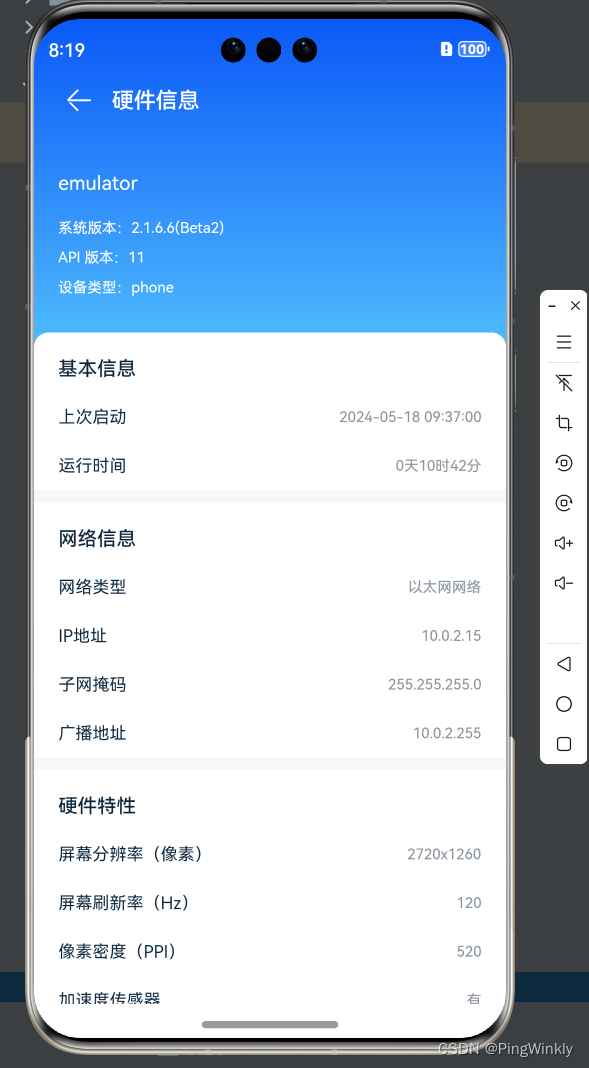
页面效果图展示:注意要在模拟器中才能显示效果
注意:获取网络状态需要在module.json5文件中开启网络访问权限:
{
  "module": {
    "requestPermissions": [
      {
        // 允许应用获取数据网络信息
        "name": "ohos.permission.GET_NETWORK_INFO"
      }
    ],
  }
}

讨论HarmonyOS开发技术,专注于API与组件、DevEco Studio、测试、元服务和应用上架分发等。
更多推荐

 11
11 0
0- 0


 已为社区贡献5条内容

所有评论(0)