鸿蒙HarmonyOS 5.0开发实战:Grid和List内拖拽交换子组件位置实现案例
本示例分别通过onItemDrop()和onDrop()回调,实现子组件在Grid和List中的子组件位置交换。
·
往期鸿蒙5.0全套实战文章必看:(文中附带鸿蒙5.0全栈学习资料)
Grid和List内拖拽交换子组件位置
介绍
本示例分别通过onItemDrop()和onDrop()回调,实现子组件在Grid和List中的子组件位置交换。
效果图预览
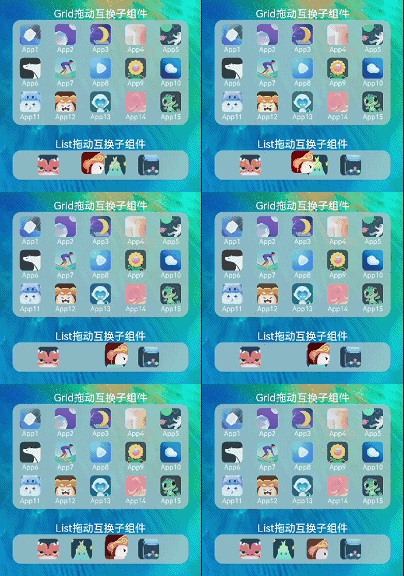
使用说明:
- 拖拽Grid中子组件,到目标Grid子组件位置,进行两者位置互换。
- 拖拽List中子组件,到目标List子组件位置,进行两者位置互换。
实现思路
-
在Grid组件中,通过editMode()打开编辑模式、通过onItemDragStart()指定拖拽时样式、通过onItemDrop()指定拖拽释放时的行为。
Grid() { ... } .editMode(true) // 设置Grid进入编辑模式 .onItemDragStart((event: ItemDragInfo, itemIndex: number) => { // 设置拖拽过程中显示的图形 this.movedItem = this.appInfoList[itemIndex]; // 记录原位置子组件信息 return this.itemWhileDrag(); }) .onItemDrop((event: ItemDragInfo, itemIndex: number, insertIndex: number, isSuccess: boolean) => { // 拖拽释放时,触发回调 // isSuccess=false时,说明drop的位置在grid外部;insertIndex > length时,说明有新增元素的事件发生 if (isSuccess && insertIndex < this.appInfoList.length) { this.changeIndex(itemIndex, insertIndex); // 互换子组件index值 } }) -
在List组件中,通过ListItem的onDragStart()方法指定拖拽开始时的行为,通过List的onTouch()指定拖拽释放时的行为。
List({ space: LIST_SPACE }) {
  ForEach(this.appInfoList, (item: AppInfo, index) => {
    ListItem() { ... }
    .onDragStart(() => {
      item.visible = false; // 拖拽时,设置子组件原位置图标不可见
    })
    .onTouch((event: TouchEvent) => { // 拖拽释放时,记录目标位置子组件index值
      if (event.type === TouchType.Down) {
        this.dragIndex = index;
      }
    })
  })
}
.onDrop((event: DragEvent, extraParams: string) => {
  let jsonString: JsonObjType = JSON.parse(extraParams) as JsonObjType; // 通过参数extraParams获取原位置子组件index值
  this.changeIndex(this.dragIndex, jsonString.insertIndex); // 互换子组件index值
  this.appInfoList[jsonString.insertIndex].visible = true; // 完成互换后,设置子组件原位置图标不可见
})
高性能知识点
不涉及
模块依赖
工程结构&模块类型
dragandexchange                  // har类型
|---pages
|---|---Launcher.ets             // 页面层-方案主页面
|---view
|---|---GridSceneView.ets        // 视图层-Grid拖拽页面
|---|---ListSceneView.ets        // 视图层-List拖拽页面
|---model
|---|---AppInfo.ets // 模型层-App信息模型 

讨论HarmonyOS开发技术,专注于API与组件、DevEco Studio、测试、元服务和应用上架分发等。
更多推荐


 27
27 0
0- 0


 已为社区贡献656条内容

所有评论(0)