鸿蒙开发-应用通知与提醒、axios
旨在让用户以合适的方式及时获得有用的新消息,帮助用户高效地处理任务。应用可发送通知消息,用户在通知栏能查看通知内容,也可点击来打开应用。在发出通知后,使用您之前使用的相同通知ID,再次调用notificationManager.publish来实现通知的更新。如果之前的通知是关闭的,将会创建新通知。将不同类型的通知分为不同的组,以便用户可以更好的管理他们。当同组的通知有多条的时候,会自动折叠起来,
通知
旨在让用户以合适的方式及时获得有用的新消息,帮助用户高效地处理任务。
应用可发送通知消息,用户在通知栏能查看通知内容,也可点击来打开应用。
- 显示接收到的短消息、即时消息
- 显示应用的推送,如广告、版本更新
- 显示当前正在进行的事件,如下载
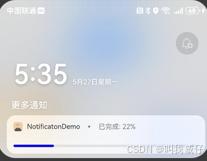
一则通知
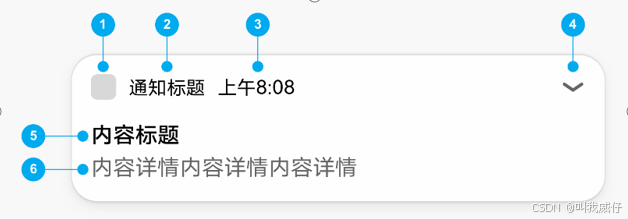
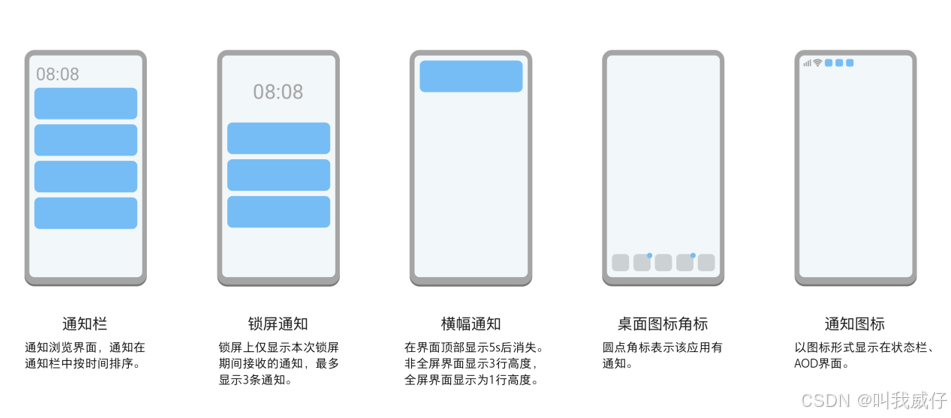
使用
- notificationManager模块提供通知管理的能力,包括发布、取消发布通知,创建、获取、移除通知通道等能力。
- 基础类型通知应用于发送短信息、提示信息、广告推送等,支持普通文本、长文本、多行文本,可以通过ContentType指定。
import { notificationManager } from '@kit.NotificationKit';
import { promptAction } from '@kit.ArkUI';

@Entry
@Component
struct Index {
  async notify(id:number, title: string, text: string){
    try {
      await notificationManager.requestEnableNotification()

      let request: notificationManager.NotificationRequest = {
        id: id,
        content: {
          notificationContentType:
          notificationManager.ContentType.NOTIFICATION_CONTENT_BASIC_TEXT,
          normal: {
            title: title,
            text: text
          }
        }
      }
      await notificationManager.publish(request)
      promptAction.showToast({message:'发布成功!'})

    } catch (e) {
      promptAction.showToast({message:'发布失败:' + JSON.stringify(e)})
    }
  }

  build() {
    Column({space: 10}){
      Button('发一个通知').onClick((event: ClickEvent) => {
        this.notify(101, '鸿蒙NEXT训练营本周六课延期通知',
          '各位同学好,原定本周六的课,改到周日下午4点到6点,敬请相互转告。')
      })

      Button('更新通知').onClick((event: ClickEvent) => {
        this.notify(101, '鸿蒙NEXT训练营',
          '各位同学好,下周课程按预定仍是周三周六。')
      })

      Button('取消通知').onClick((event: ClickEvent) => {
        notificationManager.cancel(101)
      })
    }
    .height('100%').width('100%')
    .justifyContent(FlexAlign.Center)

  }
}
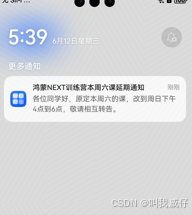
更新一个通知
在发出通知后,使用您之前使用的相同通知ID,再次调用notificationManager.publish来实现通知的更新。如果之前的通知是关闭的,将会创建新通知。
移除通知
- 通过通知ID和通知标签取消已发布的通知: notificationManager.cancel(id)
- 取消所有已发布的通知: notificationManager.cancelAll()
设置通知通道(SlotType)
- SlotType.SOCIAL_COMMUNICATION:社交类型,状态栏中显示通知图标,有横幅和提示音。
- SlotType.SERVICE_INFORMATION:服务类型,状态栏中显示通知图标,没有横幅但有提示音。
- SlotType.CONTENT_INFORMATION:内容类型,状态栏中显示通知图标,但没有横幅或提示音。
- SlotType.OTHER_TYPES:其它类型,状态栏中不显示通知图标,且没有横幅或提示音。
创建通知组
将不同类型的通知分为不同的组,以便用户可以更好的管理他们。当同组的通知有多条的时候,会自动折叠起来,避免通知比较多的时候,通知界面比较杂乱,例如当通知栏里有聊天消息通知和商品推荐通知时,我们只需要通过设置字段groupName,就可以对通知进行分组,给groupName设置不同的值可以将通知分为不同的组。
后台代理提醒
随着生活节奏的加快,我们有时会忘记一些重要的事情或日子,所以提醒功能必不可少。应用可能需要在指定的时刻,向用户发送一些业务提醒通知。
例如购物类应用,希望在指定时间点提醒用户有优惠活动。为满足此类业务诉求,HarmonyOS提供后台代理提醒功能,在应用退居后台或退出后,计时和提醒通知功能被系统后台代理接管。
axios
Axios是一个流行的网络请求库,运行在node.js和浏览器中。
OHPM版本基于原库做了适配,原用法和特性保持不变
- http 请求
- Promise API
- request 和 response 拦截器
- 转换 request 和 response 的 data 数据
- 自动转换 JSON data 数据
安装:ohpm install @ohos/axios
/*
 * The MIT License (MIT)
 * Copyright (C) 2023 Huawei Device Co., Ltd.
 *
 * Permission is hereby granted, free of charge, to any person obtaining a copy
 * of this software and associated documentation files (the "Software"), to deal
 * in the Software without restriction, including without limitation the rights
 * to use, copy, modify, merge, publish, distribute, sublicense, and/or sell
 * copies of the Software, and to permit persons to whom the Software is
 * furnished to do so, subject to the following conditions:
 *
 * The above copyright notice and this permission notice shall be included in
 * all copies or substantial portions of the Software.
 */
import axios, {
  AxiosError,
  AxiosResponse,
  AxiosProgressEvent,
  InternalAxiosRequestConfig,
  AxiosRequestConfig
} from '@ohos/axios'
import { FormData } from '@ohos/axios'
import fs from '@ohos.file.fs';
import { IdModel, InfoModel, UploadModel } from '../types/types'
import { DEMO_CONFIG, LOG } from '../common/Common'
import { writeFile, readFile } from '../common/fileFs'

axios.defaults.headers['authorization'] = 'customer-auto'
axios.defaults.baseURL = DEMO_CONFIG.baseUrl

const TAG = LOG.TAG

@Entry
@Component
struct Index {
  scroller: Scroller = new Scroller()
  @State status: string | number = ''
  @State message: string = ''
  @State performanceTiming: string = '';
  @State filename: string = 'blue.jpg'
  @State progress: string = ''
  @State downloadProgress: number = 0
  @State uploadProgress: number = 0
  @State showUrl: string = '';
  @State connectTimeout: number = 0;
  @State readTimeout: number = 0;
  @State startTime: number = 0;
  @State endTime: number = 0;
  @State maxBodyLength: number = -1;
  @State maxContentLength: number = -1;
  baseUrl: string = DEMO_CONFIG.baseUrl;
  getUrl: string = DEMO_CONFIG.getUrl;
  postUrl: string = DEMO_CONFIG.postUrl;
  putUrl: string = DEMO_CONFIG.putUrl;
  deleteUrl: string = DEMO_CONFIG.deleteUrl;
  downloadUrl: string = DEMO_CONFIG.downloadUrl;
  uploadUrl: string = DEMO_CONFIG.uploadUrl;
  clientCert_noPsw: string = DEMO_CONFIG.clientCert_noPsw;
  clientCert_hasPsw: string = DEMO_CONFIG.clientCert_hasPsw;
  proxyUrl: string = DEMO_CONFIG.proxyUrl;
  psw: string = DEMO_CONFIG.psw;
  host: string = DEMO_CONFIG.host;
  controller = new TextInputController()

  build() {
    Scroll(this.scroller) {
      Column() {
        //axios标题
        Text('axios使用案例 - 坚果派 张云波')
          .fontSize(20)
          .margin({ top: 10, bottom: 10 })

        //请求按钮
        Flex({
          direction: FlexDirection.Row,
          alignItems: ItemAlign.Start, wrap: FlexWrap.Wrap,
          justifyContent:FlexAlign.SpaceAround
        }) {
          Button('Create').onClick((e) => {
            this.create()
          }).margin({ bottom:5 })

          Button('Request').onClick((e) => {
            this.request()
          }).margin({ bottom:5 })

          Button('Get').onClick((e) => {
            this.get()
          }).margin({ bottom:5 })

          Button('Post').onClick((e) => {
            this.post()
          }).margin({ bottom:5 })

          Button('Put').onClick((e) => {
            this.put()
          }).margin({ bottom:5 })

          Button('Delete').onClick((e) => {
            this.delete()
          }).margin({ bottom:5 })

          Button('拦截器').onClick((e) => {
            this.interceptors()
          }).margin({ bottom:5 })

          Button('默认设置').onClick((e) => {
            this.defaultSetting()
          }).margin({ bottom:5 })

          Button('下载').onClick((e) => {
            this.download()
          }).margin({ bottom:5 })

          Button('上传').onClick((e) => {
            this.upload()
          }).margin({ bottom:5 })

          Button('设置响应类型').onClick((e) => {
            this.settingResponseType()
          }).margin({ bottom:5 })

          Button('设置代理').onClick((e) => {
            this.settingProxy()
          }).margin({ bottom:5 })

          Button('双向校验(无密码)').onClick((e) => {
            this.settingClientCert()
          }).margin({ bottom:5 })

          Button('双向校验(有密码)').onClick((e) => {
            this.settingClientCert_psw()
          }).margin({ bottom:5 })
        }

        //请求地址
        Column() {
          Text('网站:' + this.baseUrl)
            .fontSize(14)
            .fontWeight(FontWeight.Bold)
            .margin({ bottom: 10 ,top: 10})

          Row(){
            Text('路径:')
              .fontSize(14)

            TextInput({text: this.showUrl})
              .layoutWeight(1)
          }.width('100%')

        }
        // .margin({ top: 10, bottom: 20 })
        .alignItems(HorizontalAlign.Start)

        //请求结果
        Column() {
          Text('结果')
            .fontSize(14)
            .fontWeight(FontWeight.Bold)
            .margin({ bottom: 10 })
            .textAlign(TextAlign.Start)

          //进度条
          if (this.showUrl === this.uploadUrl) {
            Text('上传进度')
            Progress({ value: this.uploadProgress, type: ProgressType.Linear })
              .color('#009BE8').width('100%')
              .margin({ top: 8, right: 10 })
              .style({ strokeWidth: 10 })
          }
          if (this.showUrl === this.downloadUrl) {
            Text('下载进度')
            Progress({ value: this.downloadProgress, type: ProgressType.Linear })
              .color('#009BE8').width('100%')
              .margin({ top: 8, right: 10 })
              .style({ strokeWidth: 10 })
          }
          // 展示请求内容
          Flex({ direction: FlexDirection.Column, alignItems: ItemAlign.Start, }) {

            Text("响应时间: " + (this.endTime - this.startTime) + "毫秒")
              .width('100%')
              .fontSize(16)
              .fontWeight(700)
              .fontColor('#000000')
            Text("状态: " + this.status)
              .width('100%')
              .fontSize(16)
              .fontWeight(700)
              .fontColor('#000000')

            Text("数据: " + this.message)
              .width('100%')
              .fontSize(16)
              .fontWeight(700)
              .fontColor('#000000')
          }
          .width('100%')
          .padding({
            top: 20,
            bottom: 20,
            right: 15,
            left: 10
          })
          .margin({ right: 10 })
          .borderStyle(BorderStyle.Solid)
          .borderWidth(1)
          .borderColor('#E6E7E8')
        }
        .margin({ top: 10, bottom: 20 })
        .alignItems(HorizontalAlign.Start)

        Button('清空')
          .width(100).type(ButtonType.Normal)
          .borderRadius(10)
          .backgroundColor(Color.Green)
          .onClick((e) => {
          this.clear()
        })
      }
    }
    .scrollable(ScrollDirection.Vertical) // 滚动方向纵向
    .scrollBar(BarState.On) // 滚动条常驻显示
    .margin({ left: 10, right: 10 })
  }

  // Create请求: 使用get
  create() {
    this.clear()
    this.showUrl = this.getUrl
    const instance = axios.create();
    this.startTime = new Date().getTime();

    instance.get<string, AxiosResponse<string>, null>(this.getUrl, {
    }).then((res: AxiosResponse) => {
      this.status = res ? res.status : '';
      this.message = res ? JSON.stringify(res.data) : '';
      this.endTime = new Date().getTime();
    }).catch((err: AxiosError) => {
      this.status = '';
      this.message = err.message;
      this.endTime = new Date().getTime();
    })
  }

  // request请求
  request() {
    this.clear()
    this.showUrl = this.getUrl;
    this.startTime = new Date().getTime();

    axios.request<InfoModel, AxiosResponse<InfoModel>, IdModel>({
      url: this.getUrl,
      method: 'get',
    }).then((res: AxiosResponse<InfoModel>) => {
      this.status = res ? res.status : '';
      this.message = res ? JSON.stringify(res.data) : '';
      this.endTime = new Date().getTime();
    }).catch((err: AxiosError) => {
      this.status = '';
      this.message = err.message;
      this.endTime = new Date().getTime();
    })
  }

  // get请求
  get() {
    this.clear()
    this.showUrl = this.getUrl
    this.startTime = new Date().getTime();
    axios.get<string, AxiosResponse<string>, null>(this.getUrl, {
    }).then((res: AxiosResponse) => {
      this.status = res ? res.status : '';
      this.message = res ? JSON.stringify(res.data) : '';

      this.endTime = new Date().getTime();
    }).catch((err: AxiosError) => {
      this.status = '';
      this.message = err.message;
      this.endTime = new Date().getTime();
    })
  }

  // post请求
  post() {
    this.clear()
    this.showUrl = this.postUrl
    this.startTime = new Date().getTime();

    axios<InfoModel, AxiosResponse<InfoModel>, IdModel>({
      url: this.postUrl,
      method: 'post',
      data: {
        id: 591
      },
    }).then((res: AxiosResponse<InfoModel>) => {
      this.status = res ? res.status : '';
      this.message = res ? JSON.stringify(res.data) : '';
      this.endTime = new Date().getTime();
    }).catch((err: AxiosError) => {
      this.status = '';
      this.message = err.message;
      this.endTime = new Date().getTime();
    })
  }

  // put请求
  put() {
    this.clear()
    this.showUrl = this.putUrl;
    this.startTime = new Date().getTime();

    axios.put<string, AxiosResponse<string>, IdModel>(this.putUrl, { id: 590 }, {
    }).then((res: AxiosResponse) => {
      this.status = res ? res.status : '';
      this.message = res ? JSON.stringify(res.data) : '';
      this.endTime = new Date().getTime();
    }).catch((err: AxiosError) => {
      this.status = '';
      this.message = err.message;
      this.endTime = new Date().getTime();
    })
  }

  // delete请求
  delete() {
    this.clear()
    this.showUrl = this.deleteUrl;
    this.startTime = new Date().getTime();

    axios.delete<string, AxiosResponse<string>, IdModel>(this.deleteUrl, {
      data: {
        id: 591
      }
    }).then((res: AxiosResponse) => {
      this.status = res ? res.status : '';
      this.message = res ? JSON.stringify(res.data) : '';
      this.endTime = new Date().getTime();
    }).catch((err: AxiosError) => {
      this.status = '';
      this.message = err.message;
      this.endTime = new Date().getTime();
    })
  }

  // 拦截器
  interceptors() {
    this.clear()
    this.showUrl = this.getUrl
    this.startTime = new Date().getTime();

    const myInterceptor = axios.interceptors.response.use((response: AxiosResponse) => {
      // 对响应数据做点什么
      response.data = '在拦截器中,内容被更改了'
      return response;
    }, (error: AxiosError) => {
      // 对响应错误做点什么
      return Promise.reject(error);
    });

    axios<InfoModel[], AxiosResponse<InfoModel[]>, null>({
      url: this.getUrl,
      method: 'get',
    }).then((res: AxiosResponse<InfoModel[]>) => {
      this.status = res ? res.status : '';
      this.message = res ? JSON.stringify(res.data) : '';
      // 移除拦截器
      axios.interceptors.response.eject(myInterceptor);
      this.endTime = new Date().getTime();
    }).catch((err: AxiosError) => {
      this.status = '';
      this.message = err.message;
      // 移除拦截器
      axios.interceptors.response.eject(myInterceptor);
      this.endTime = new Date().getTime();
    })
  }

  // 默认设置
  defaultSetting() {
    this.clear()
    this.showUrl = this.postUrl
    this.startTime = new Date().getTime();

    axios.defaults.headers['customer-header'] = 'customer-value'
    axios.defaults.method = 'post'
    axios<InfoModel, AxiosResponse<InfoModel>, IdModel>({
      url: this.postUrl,
      data: {
        id: 590
      },
      // connectTimeout: this.connectTimeout,
      // readTimeout: this.readTimeout,
      // maxBodyLength: this.maxBodyLength,
      // maxContentLength: this.maxContentLength
    }).then((res: AxiosResponse<InfoModel>) => {
      this.status = res.status;
      this.message = JSON.stringify(res.data);
      axios.defaults.method = '';
      axios.defaults.headers['customer-header'] = null;
      this.endTime = new Date().getTime();
    }).catch((err: AxiosError) => {
      this.status = '';
      this.message = err.message;
      axios.defaults.method = '';
      axios.defaults.headers['customer-header'] = null
      this.endTime = new Date().getTime();
    })
  }

  // 下载
  download() {
    this.clear()
    this.showUrl = this.downloadUrl
    this.startTime = new Date().getTime();

    // let filePath = getContext(this).cacheDir + '/blue.jpg'
    let filePath = getContext(this).cacheDir + '/qq.exe'
    // 下载。如果文件已存在,则先删除文件。
    try {
      fs.accessSync(filePath);
      fs.unlinkSync(filePath);
    } catch (err) {
    }
    axios<string, AxiosResponse<string>, null>({
      url: this.downloadUrl,
      method: 'get',
      context: getContext(this),
      filePath: filePath,
      onDownloadProgress: (progressEvent: AxiosProgressEvent): void => {
        this.downloadProgress = progressEvent && progressEvent.loaded && progressEvent.total ?
        Math.ceil(progressEvent.loaded / progressEvent.total * 100) : 0;
      }
    }).then((res: AxiosResponse<string>) => {
      this.status = res ? res.status : '';
      this.message = res ? JSON.stringify(res.data) : '';
      this.endTime = new Date().getTime();
    }).catch((err: AxiosError) => {
      this.status = '下载失败!';
      this.message = err.message;
      this.endTime = new Date().getTime();
    })
  }

  // 上传
  upload() {
    this.clear()
    this.showUrl = this.uploadUrl
    this.startTime = new Date().getTime();

    let context: Context = getContext(this);
    // let fileBuf: Uint8Array = context.resourceManager.getRawFileContentSync("oneWayAuth/fileBuf.pem");
    let fileBuf: Uint8Array = context.resourceManager.getRawFileContentSync("readme.txt");
    let cacheDir: string = context.cacheDir;
    let buffer: ArrayBuffer = new ArrayBuffer(1024);
    try {
      writeFile(cacheDir, 'readme.txt', fileBuf.buffer);
      // 读取
      buffer = readFile(cacheDir + '/readme.txt');
    } catch (err) {
      console.error(TAG, JSON.stringify(err))
    }

    let formData = new FormData();
    formData.append('file', buffer, { filename: 'readme.txt', type: 'text/plain' });

    axios.post<UploadModel, AxiosResponse<UploadModel>, FormData>(this.uploadUrl, formData, {
      headers: { 'Content-Type': 'multipart/form-data' },
      context: getContext(this),
      onUploadProgress: (progressEvent: AxiosProgressEvent): void => {
        console.info(TAG, JSON.stringify(progressEvent))
        this.uploadProgress = progressEvent && progressEvent.loaded && progressEvent.total ?
        Math.ceil(progressEvent.loaded / progressEvent.total * 100) : 0;
      },
    }).then((res: AxiosResponse<UploadModel>) => {
      this.status = res ? res.status : '';
      this.message = res ? JSON.stringify(res.data) : '';
      console.info(TAG, JSON.stringify(res.headers));
      this.endTime = new Date().getTime();
    }).catch((err: AxiosError) => {
      this.status = '';
      this.message = err.message;
      this.endTime = new Date().getTime();
    })
  }

  // 设置双向证书校验(无密码)
  settingClientCert() {
    this.clear()
    this.showUrl = this.clientCert_noPsw
    this.startTime = new Date().getTime();

    let path_ca = ''; // 根证书路径
    let path_client = ''; // 客户端证书路径
    let path_key = ''; // 客户端密码路径

    // 获取根证书、客户端证书、客户端密码沙箱路径
    try {
      let context: Context = getContext(this);
      let ca: Uint8Array = context.resourceManager.getRawFileContentSync("oneWayAuth/ca.p12");
      let client: Uint8Array = context.resourceManager.getRawFileContentSync("mutualAuth_noPsw/p12/client.p12");
      let key: Uint8Array = context.resourceManager.getRawFileContentSync("mutualAuth_noPsw/p12/client.key");
      let cacheDir: string = context.cacheDir;

      if (ca != null) {
        path_ca = cacheDir + "/ca.crt";
        writeFile(cacheDir, 'ca.crt', ca.buffer)
      }
      if (client != null) {
        path_client = cacheDir + "/client.p12";
        writeFile(cacheDir, 'client.p12', client.buffer)
      }
      if (key != null) {
        path_key = cacheDir + "/client.key";
        writeFile(cacheDir, 'client.key', key.buffer)
      }
    } catch (err) {
      console.info(TAG, JSON.stringify(err));
    }

    axios<InfoModel, AxiosResponse<InfoModel>, null>({
      url: this.clientCert_noPsw,
      method: 'get',
      caPath: path_ca,
      clientCert: {
        certPath: path_client,
        certType: 'p12',
        keyPath: path_key,
      },
    }).then((res: AxiosResponse<InfoModel>) => {
      this.status = res ? res.status : '';
      this.message = res ? JSON.stringify(res.data) : '';
      this.endTime = new Date().getTime();
    }).catch((err: AxiosError) => {
      this.status = '';
      this.message = err.message;
      this.endTime = new Date().getTime();
    })
  }

  // 设置双向证书校验(有密码)
  settingClientCert_psw() {
    this.clear()
    this.showUrl = this.clientCert_hasPsw
    this.startTime = new Date().getTime();

    let path_ca = ''; // 根证书路径
    let path_client = ''; // 客户端证书路径
    let path_key = ''; // 客户端密码路径

    // 获取根证书、客户端证书、客户端密码沙箱路径
    try {
      let context: Context = getContext(this);
      let ca: Uint8Array = context.resourceManager.getRawFileContentSync("mutualAuth_hasPsw/ca.crt");
      let client: Uint8Array = context.resourceManager.getRawFileContentSync("mutualAuth_hasPsw/pem/client.pem");
      let key: Uint8Array = context.resourceManager.getRawFileContentSync("mutualAuth_hasPsw/pem/client.key");
      let cacheDir: string = context.cacheDir;

      if (ca != null) {
        path_ca = cacheDir + "/ca.crt";
        writeFile(cacheDir, 'ca.crt', ca.buffer)
      }
      if (client != null) {
        path_client = cacheDir + "/client.pem";
        writeFile(cacheDir, 'client.pem', client.buffer)
      }
      if (key != null) {
        path_key = cacheDir + "/client.key";
        writeFile(cacheDir, 'client.key', key.buffer)
      }
    } catch (err) {
      console.info(TAG, JSON.stringify(err));
    }

    axios<InfoModel, AxiosResponse<InfoModel>, null>({
      url: this.clientCert_hasPsw,
      method: 'get',
      caPath: path_ca,
      clientCert: {
        certPath: path_client,
        certType: 'pem',
        keyPath: path_key,
        keyPasswd: this.psw
      },
    }).then((res: AxiosResponse<InfoModel>) => {
      this.status = res ? res.status : '';
      this.message = res ? JSON.stringify(res.data) : '';
      this.endTime = new Date().getTime();
    }).catch((err: AxiosError) => {
      this.status = '';
      this.message = err.message;
      this.endTime = new Date().getTime();
    })
  }

  // 设置响应类型
  settingResponseType() {
    this.clear()
    this.showUrl = this.getUrl
    this.startTime = new Date().getTime();

    axios<string, AxiosResponse<string>, null>({
      url: this.getUrl,
      method: 'get',
      responseType: 'array_buffer',
    }).then((res: AxiosResponse) => {
      this.status = res ? res.status : '';
      if (res.data instanceof ArrayBuffer) {
        this.message = res ? 'responseType设置成功' : '';
      }
      this.endTime = new Date().getTime();
    }).catch((err: AxiosError) => {
      this.status = '';
      this.message = err.message;
      this.endTime = new Date().getTime();
    })
  }

  // 设置代理
  settingProxy() {
    this.clear()
    this.showUrl = this.proxyUrl
    this.startTime = new Date().getTime();

    axios<string, AxiosResponse<string>, null>({
      url: this.proxyUrl,
      method: 'get',
      proxy: {
        host: this.host,
        port: 6443,
        exclusionList: []
      },
    }).then((res: AxiosResponse) => {
      this.status = res ? res.status : '';
      this.message = res ? JSON.stringify(res.data) : '';
      this.endTime = new Date().getTime();
    }).catch((err: AxiosError) => {
      this.status = '';
      this.message = err.message;
      this.endTime = new Date().getTime();
    })
  }

  clear() {
    this.performanceTiming = '';
    this.uploadProgress = 0;
    this.downloadProgress = 0
    this.message = '';
    this.status = '';
    this.startTime = 0;
    this.endTime = 0;
  }
}

讨论HarmonyOS开发技术,专注于API与组件、DevEco Studio、测试、元服务和应用上架分发等。
更多推荐

 15
15 0
0- 0


 已为社区贡献5条内容

所有评论(0)