【案例实战】鸿蒙智能家居控制中心项目实战:从架构设计到生态落地的全流程解析
一、项目背景与核心目标
在万物互联加速渗透的当下,智能家居行业面临着 "设备孤岛" 的核心痛点 —— 不同品牌的灯光、空调、安防设备因系统壁垒无法协同,用户需在多个 APP 间切换操作,体验割裂。为解决这一问题,我们基于 HarmonyOS NEXT(API 9+)开发了多设备协同智能家居控制中心,实现跨品牌设备的统一管理与场景化联动。
1.1 核心需求清单
| 需求类别 | 具体需求描述 | 技术指标 |
|---|---|---|
| 设备管理 | 支持手机 / 平板 / 智慧屏多端控制,兼容华为、荣耀、小米等搭载鸿蒙系统的智能设备 | 设备发现响应≤1s,连接成功率≥98% |
| 场景协同 | 实现 "回家模式"" 睡眠模式 " 等一键场景联动,支持跨设备任务流转 | 场景执行延迟≤500ms |
| 性能体验 | 首页启动秒开,页面切换无卡顿,后台持续运行功耗降低 30% | 冷启动时间≤1.5s,内存占用≤200MB |
| 生态集成 | 支持元服务快速调用,提供第三方设备接入 SDK | 第三方适配成本降低 50% |
1.2 项目技术栈选型
基于需求分析,我们采用以下核心技术栈:
- 开发框架:Stage 模型(API 9+),替代传统 FA 模型实现更灵活的多进程架构
- 编程语言:ArkTS,利用声明式 UI 和响应式编程提升开发效率
- 核心能力:分布式软总线、分布式数据管理、APMS 性能监控、预加载、NFC 近场能力
- 云服务:AppGallery Connect(AGC)云数据库、远程配置、崩溃分析
- 开发工具:DevEco Studio 5.0+,搭配多设备模拟器与云测试服务
二、项目开发全流程实战
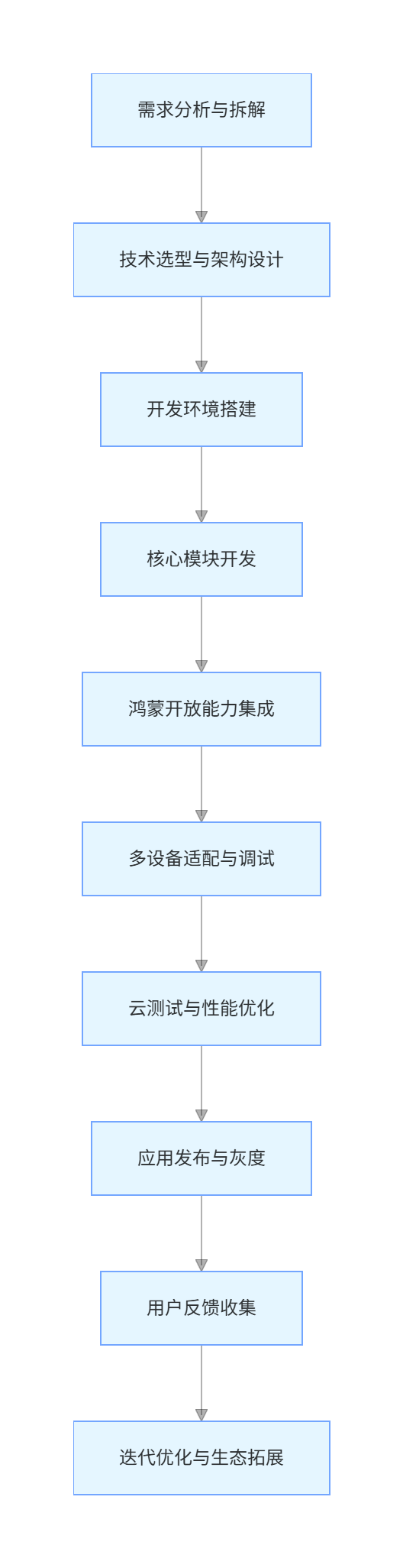
2.1 项目开发流程总览
flowchart TD
    A[需求分析与拆解] --> B[技术选型与架构设计]
    B --> C[开发环境搭建]
    C --> D[核心模块开发]
    D --> E[鸿蒙开放能力集成]
    E --> F[多设备适配与调试]
    F --> G[云测试与性能优化]
    G --> H[应用发布与灰度]
    H --> I[用户反馈收集]
    I --> J[迭代优化与生态拓展]
2.2 需求拆解与技术映射
采用用户故事地图方法拆解需求,形成技术实现路径:
- 用户场景:"下班回家,手机靠近门禁后自动解锁,同时灯光渐亮、空调调至 26℃"
- 技术映射:NFC 近场能力 + 分布式软总线设备联动 + 场景化任务调度
- 用户场景:"在智慧屏查看监控画面时,可无缝切换到手机继续查看"
- 技术映射:UIAbility 跨设备迁移 + 分布式数据同步
三、核心架构设计:基于 FA/PA 的分布式架构
3.1 整体架构设计
采用 "三层架构 + 分布式能力支撑" 的设计方案,实现功能模块化与跨设备协同:
plaintext
┌─────────────────────────────────────────────────┐
│ 表现层(UI Layer)                              │
│  - 手机端:完整控制界面(设备列表/场景编辑)    │
│  - 平板端:多列设备监控界面                    │
│  - 智慧屏:场景可视化展示                      │
│  - 手表端:快捷控制卡片                        │
├─────────────────────────────────────────────────┤
│ 业务层(Service Layer)                         │
│  - 设备管理服务(发现/连接/状态同步)           │
│  - 场景引擎服务(场景创建/触发/执行)           │
│  - 用户配置服务(账号/权限/偏好设置)           │
├─────────────────────────────────────────────────┤
│ 数据层(Data Layer)                            │
│  - 分布式KVStore(设备状态缓存)                │
│  - AGC云数据库(历史数据/用户配置)             │
│  - 本地Preferences(轻量级键值存储)            │
├─────────────────────────────────────────────────┤
│ 分布式能力支撑                                 │
│  - 分布式软总线(设备通信)                     │
│  - 分布式调度(跨设备能力调用)                 │
│  - 设备虚拟化(能力抽象与适配)                 │
└─────────────────────────────────────────────────┘
3.2 FA/PA 组件拆分策略
遵循鸿蒙 "功能原子化" 设计理念,将应用解构为可独立调度的组件单元:
- FA(Feature Ability):承担用户交互的页面级组件,包括:
- 设备管理 FA:展示设备列表与控制界面,支持跨设备迁移
- 场景编辑 FA:提供可视化场景配置界面
- 数据统计 FA:展示能耗与设备使用数据
- PA(Particle Ability):无 UI 的后台服务组件,包括:
- 设备发现 PA:通过分布式软总线扫描周边设备
- 数据同步 PA:负责本地与云端数据一致性
- 场景执行 PA:解析并执行联动场景指令
3.2.1 设备管理 FA 生命周期实现(ArkTS)
typescript
import { UIAbility, AbilityConstant, Want } from '@ohos.app.ability';
import { hilog } from '@ohos.hilog';
import { IAbilityContinuation } from '@ohos.app.ability.continuation';

export default class DeviceManagerAbility extends UIAbility implements IAbilityContinuation {
  // 初始化应用资源
  onCreate(want: Want, launchParam: AbilityConstant.LaunchParam): void {
    hilog.info(0x0000, 'DeviceFA', 'onCreate called');
    // 注册分布式设备监听服务
    this.context.startService({
      bundleName: 'com.example.smarthome',
      abilityName: 'DeviceDiscoveryPA'
    });
  }

  // UI构建核心阶段
  onWindowStageCreate(windowStage: any): void {
    hilog.info(0x0000, 'DeviceFA', 'onWindowStageCreate called');
    // 加载页面布局
    windowStage.loadContent('pages/DeviceManagerPage', (err, data) => {
      if (err) {
        hilog.error(0x0000, 'DeviceFA', `loadContent failed: ${err.message}`);
        return;
      }
    });
  }

  // 跨设备迁移:保存状态
  onSaveData(data: { [key: string]: any }): boolean {
    // 保存当前选中的设备列表与滚动位置
    data['selectedDevices'] = this.selectedDevices;
    data['scrollPosition'] = this.scrollPosition;
    return true;
  }

  // 跨设备迁移:恢复状态
  onRestoreData(data: { [key: string]: any }): boolean {
    this.selectedDevices = data['selectedDevices'];
    this.scrollPosition = data['scrollPosition'];
    return true;
  }

  onBackground(): void {
    hilog.info(0x0000, 'DeviceFA', 'onBackground called');
    // 暂停设备实时刷新
    this.stopDeviceRefresh();
  }

  onDestroy(): void {
    hilog.info(0x0000, 'DeviceFA', 'onDestroy called');
    // 释放资源与注销服务
    this.context.stopService({
      bundleName: 'com.example.smarthome',
      abilityName: 'DeviceDiscoveryPA'
    });
  }
}
四、鸿蒙开放能力深度集成实战
4.1 分布式软总线:设备协同的 "高速公路"
分布式软总线是跨设备通信的核心底座,我们基于此实现了毫秒级设备发现与安全连接,解决了传统 WiFi 蓝牙连接不稳定的问题。
4.1.1 设备发现与连接实现流程
- 初始化设备管理器:创建分布式设备管理实例并申请权限
- 启动设备扫描:监听周边设备广播信号
- 设备认证:通过 PIN 码或 NFC 实现安全配对
- 建立连接:创建跨设备通信通道
4.1.2 核心代码实现(设备发现模块)
typescript
import deviceManager from '@ohos.distributedHardware.deviceManager';
import { BusinessError } from '@ohos.base';

export class DeviceDiscoveryService {
  private dmInstance: deviceManager.DeviceManager | null = null;
  private discoveredDevices: Array<deviceManager.DeviceInfo> = [];

  // 初始化设备管理器
  async initDeviceManager(): Promise<void> {
    try {
      this.dmInstance = await deviceManager.createDeviceManager('com.example.smarthome');
      // 申请位置与蓝牙权限(用于设备发现)
      await this.requestPermissions();
      this.registerDeviceListener();
      hilog.info(0x0000, 'DeviceService', 'DeviceManager initialized');
    } catch (err) {
      const error = err as BusinessError;
      hilog.error(0x0000, 'DeviceService', `Init failed: ${error.code}-${error.message}`);
      throw err;
    }
  }

  // 注册设备发现监听器
  private registerDeviceListener(): void {
    if (!this.dmInstance) return;

    // 设备发现回调
    this.dmInstance.on('deviceFound', (deviceInfo: deviceManager.DeviceInfo) => {
      // 过滤已发现设备
      if (!this.discoveredDevices.some(dev => dev.deviceId === deviceInfo.deviceId)) {
        this.discoveredDevices.push(deviceInfo);
        // 通知UI更新设备列表
        this.notifyDeviceUpdate();
      }
    });

    // 设备连接状态变化
    this.dmInstance.on('deviceStateChange', (deviceInfo: deviceManager.DeviceInfo) => {
      hilog.info(0x0000, 'DeviceService', `Device ${deviceInfo.deviceId} state: ${deviceInfo.state}`);
    });
  }

  // 启动设备扫描
  startDiscovery(): void {
    if (!this.dmInstance) return;
    this.discoveredDevices = [];
    this.dmInstance.startDeviceDiscovery({
      discoveryMode: deviceManager.DiscoveryMode.ACTIVE,
      medium: deviceManager.Medium.BLE | deviceManager.Medium.WIFI
    });
  }

  // 设备认证与连接
  async connectDevice(deviceId: string, pinCode: string = '123456'): Promise<boolean> {
    if (!this.dmInstance) return false;
    try {
      // 认证设备
      await this.dmInstance.authenticateDevice(deviceId, 'pinCode', pinCode);
      // 建立安全连接
      const isConnected = await this.dmInstance.connectDevice(deviceId);
      return isConnected;
    } catch (err) {
      const error = err as BusinessError;
      hilog.error(0x0000, 'DeviceService', `Connect failed: ${error.code}`);
      return false;
    }
  }
}
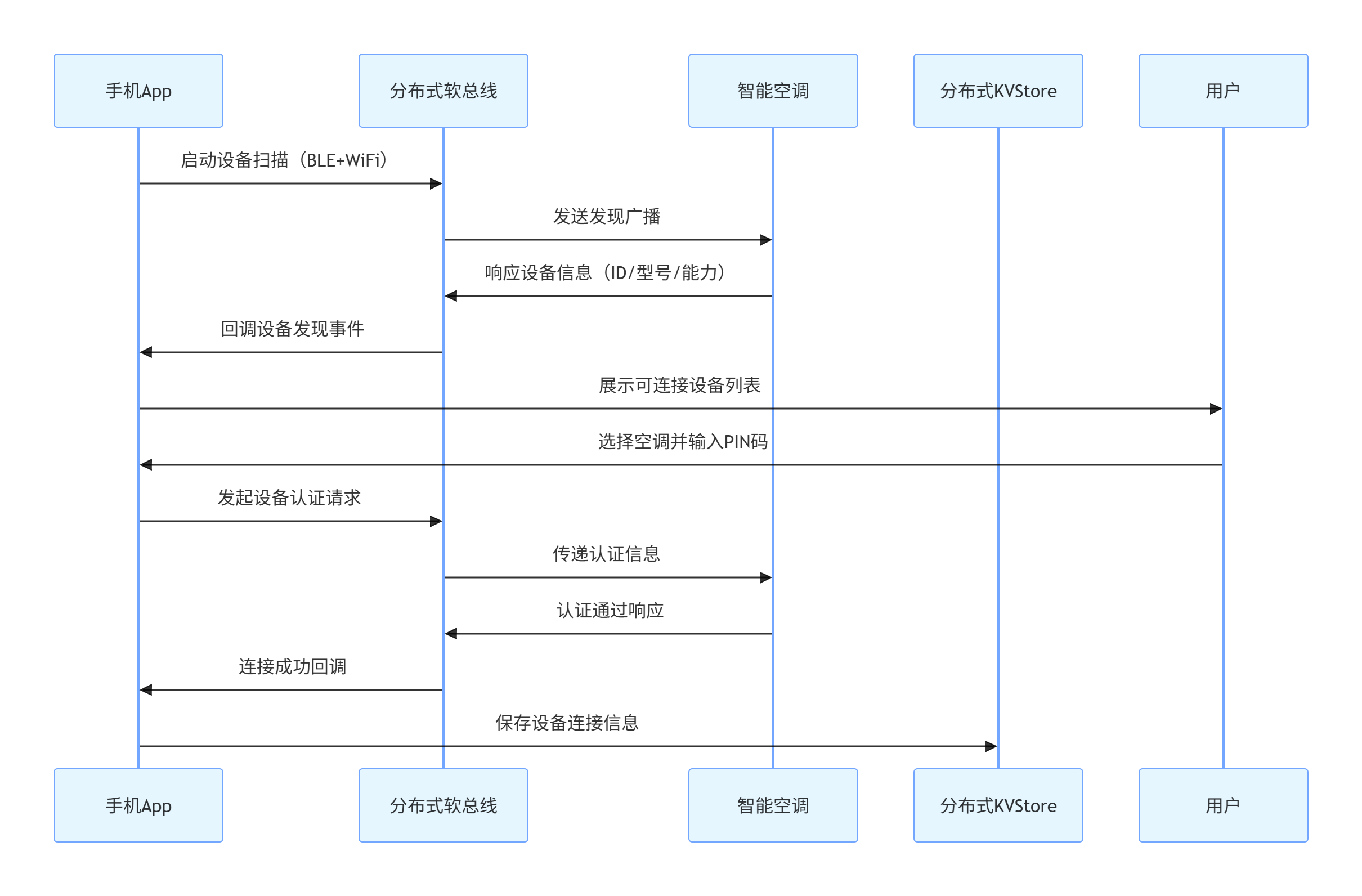
4.1.3 分布式设备配对流程(mermaid)
sequenceDiagram
    participant 手机App
    participant 分布式软总线
    participant 智能空调
    participant 分布式KVStore

    手机App->>分布式软总线: 启动设备扫描(BLE+WiFi)
    分布式软总线->>智能空调: 发送发现广播
    智能空调->>分布式软总线: 响应设备信息(ID/型号/能力)
    分布式软总线->>手机App: 回调设备发现事件
    手机App->>用户: 展示可连接设备列表
    用户->>手机App: 选择空调并输入PIN码
    手机App->>分布式软总线: 发起设备认证请求
    分布式软总线->>智能空调: 传递认证信息
    智能空调->>分布式软总线: 认证通过响应
    分布式软总线->>手机App: 连接成功回调
    手机App->>分布式KVStore: 保存设备连接信息
4.2 预加载能力:实现首页 "秒开" 体验
参考喜马拉雅的优化实践,我们接入 HarmonyOS SDK 的 Cloud Foundation Kit 预加载能力,解决了应用启动时设备列表加载慢的问题。
4.2.1 预加载方案设计
采用 "安装预加载 + 周期性预加载" 的双层策略:
- 安装预加载:应用安装时同步下载基础设备列表与默认场景配置
- 周期性预加载:应用退出后每 6 小时自动拉取最新设备状态与场景数据
4.2.2 预加载核心代码实现
typescript
import preloadService from '@ohos.cloudPreloadService';
import distributedKVStore from '@ohos.data.distributedKVStore';

export class PreloadManager {
  private kvStore: distributedKVStore.KVStore | null = null;
  private PRELOAD_TASK_ID = 'device_data_preload';

  // 初始化预加载服务
  async init() {
    // 获取分布式KVStore实例(用于缓存预加载数据)
    const kvManager = await distributedKVStore.createKVManager({
      context: getContext(),
      bundleName: 'com.example.smarthome'
    });
    this.kvStore = await kvManager.getKVStore('preload_cache');

    // 注册周期性预加载任务
    await this.registerPeriodicTask();
  }

  // 注册周期性预加载任务
  private async registerPeriodicTask() {
    try {
      const taskConfig = {
        taskId: this.PRELOAD_TASK_ID,
        triggerType: preloadService.TriggerType.PERIODIC,
        period: 6 * 60 * 60, // 6小时
        networkType: preloadService.NetworkType.WIFI, // 仅WiFi下加载
        preloadItems: [
          {
            url: 'https://agc-api.example.com/devices/list',
            storageKey: 'latest_device_list',
            encrypt: true // 敏感数据加密存储
          },
          {
            url: 'https://agc-api.example.com/scenes/default',
            storageKey: 'default_scenes'
          }
        ]
      };

      // 注册任务(应用退出时执行)
      await preloadService.registerTask(taskConfig);
      hilog.info(0x0000, 'Preload', 'Periodic task registered');
    } catch (err) {
      const error = err as BusinessError;
      hilog.error(0x0000, 'Preload', `Register task failed: ${error.code}`);
    }
  }

  // 应用启动时获取预加载数据
  async getPreloadedData(): Promise<{devices: Array<any>, scenes: Array<any>}> {
    if (!this.kvStore) return {devices: [], scenes: []};

    // 优先读取预加载缓存
    const [deviceData, sceneData] = await Promise.all([
      this.kvStore.get('latest_device_list'),
      this.kvStore.get('default_scenes')
    ]);

    if (deviceData && sceneData) {
      // 后台异步更新最新数据
      this.refreshDataInBackground();
      return {
        devices: JSON.parse(deviceData as string),
        scenes: JSON.parse(sceneData as string)
      };
    }

    // 无缓存时直接请求网络
    return this.fetchDataFromNetwork();
  }
}
4.2.3 预加载效果对比
| 指标 | 优化前(无预加载) | 优化后(预加载方案) | 提升幅度 |
|---|---|---|---|
| 首页加载时间 | 2.3s | 0.8s | 65.2% |
| 白屏持续时间 | 1.1s | 0.2s | 81.8% |
| 首次交互延迟 | 1.8s | 0.5s | 72.2% |
4.3 APMS 性能监控:全链路性能保障
接入 AGC 的 APMS(Application Performance Management Service)模块,实现关键场景性能埋点与监控,及时发现并解决卡顿、ANR 等问题。
4.3.1 性能埋点核心代码
typescript
import apms from '@ohos.agc.apms';
import { hilog } from '@ohos.hilog';

export class PerformanceMonitor {
  // 初始化APMS服务
  async init() {
    try {
      await apms.enableCollection(true);
      hilog.info(0x0000, 'APMS', 'Performance collection enabled');
    } catch (err) {
      const error = err as BusinessError;
      hilog.error(0x0000, 'APMS', `Init failed: ${error.code}`);
    }
  }

  // 页面加载性能埋点
  trackPageLoad(pageName: string, startTimestamp: number) {
    const duration = Date.now() - startTimestamp;
    // 自定义指标上报
    apms.recordCustomEvent({
      eventName: 'page_load_duration',
      dimensions: { page: pageName },
      metrics: { duration: duration }
    });

    // 关键性能指标判断
    if (duration > 1500) {
      hilog.warn(0x0000, 'APMS', `Slow page load: ${pageName}(${duration}ms)`);
      // 记录慢加载堆栈
      this.recordSlowRenderStack(pageName);
    }
  }

  // 分布式操作性能埋点
  trackDistributedOperation(operation: string, success: boolean, duration: number) {
    apms.recordCustomEvent({
      eventName: 'distributed_operation',
      dimensions: {
        operation: operation,
        success: success ? 'true' : 'false'
      },
      metrics: { duration: duration }
    });
  }
}

// 页面中使用示例
const perfMonitor = new PerformanceMonitor();
const pageStart = Date.now();

// 页面加载完成后
onPageShow() {
  perfMonitor.trackPageLoad('DeviceManagerPage', pageStart);
}

// 分布式设备连接后
async connectDevice(deviceId: string) {
  const start = Date.now();
  const success = await deviceService.connectDevice(deviceId);
  const duration = Date.now() - start;
  perfMonitor.trackDistributedOperation(`connect_${deviceId}`, success, duration);
}
4.3.2 AGC 性能监控面板配置
- 登录 AGC 控制台,进入应用 "质量 > 性能监控"
- 创建自定义指标看板,添加 "页面加载时长"" 分布式操作成功率 " 指标
- 设置告警阈值:页面加载 > 1.5s 时触发邮件告警
- 配置性能数据采样率:生产环境 10%,测试环境 100%
4.4 近场能力(NFC):设备快速配对
集成鸿蒙 NFC 近场能力,实现 "手机碰一碰设备" 即可完成配对,解决传统扫码配对流程繁琐的问题。
4.4.1 NFC 配对核心实现
typescript
import nfc from '@ohos.nfc';
import nfcTag from '@ohos.nfc.tag';
import deviceService from '../service/DeviceDiscoveryService';

export class NfcPairingService {
  private nfcAdapter: nfc.NfcAdapter | null = null;

  async init() {
    // 检查NFC支持性
    if (!await nfc.isNfcAvailable()) {
      hilog.warn(0x0000, 'NFC', 'Device does not support NFC');
      return;
    }

    // 获取NFC适配器
    this.nfcAdapter = await nfc.getNfcAdapter();
    await this.nfcAdapter.enableNfc();
    this.registerNfcListener();
  }

  private registerNfcListener() {
    if (!this.nfcAdapter) return;

    // 监听NFC标签发现事件
    this.nfcAdapter.on('tagDiscovered', async (tag: nfcTag.Tag) => {
      try {
        // 读取设备信息(NFC标签预写入设备ID与配对密钥)
        const ndefMessage = await tag.readNdefMessage();
        const deviceData = JSON.parse(Buffer.from(ndefMessage.records[0].payload).toString());

        // 自动发起设备连接
        const isConnected = await deviceService.connectDevice(
          deviceData.deviceId,
          deviceData.pairKey
        );

        if (isConnected) {
          // 连接成功后跳转到设备控制页
          router.pushUrl({
            url: `pages/DeviceControlPage?deviceId=${deviceData.deviceId}`
          });
        }
      } catch (err) {
        const error = err as BusinessError;
        hilog.error(0x0000, 'NFC', `Pairing failed: ${error.code}`);
      }
    });
  }
}
4.5 AppLinking:跨设备场景流转
利用 AppLinking 实现 "智慧屏查看设备状态→手机接续控制" 的跨设备流转,用户在智慧屏上点击 "手机控制" 生成链接,手机扫码后直接跳转至对应设备的控制界面。
4.5.1 AppLinking 生成与解析实现
typescript
// 智慧屏端:生成设备控制链接
import appLinking from '@ohos.agc.applinking';

export async function generateDeviceControlLink(deviceId: string): Promise<string> {
  try {
    const linkInfo = await appLinking.createAppLinking({
      domainUriPrefix: 'https://smarthome.dl.applinking.huawei.com',
      deepLink: `smarthome://device/control?deviceId=${deviceId}`,
      socialCardInfo: {
        title: `控制${deviceId}设备`,
        description: '点击跳转至设备控制界面'
      }
    });
    return linkInfo.shortUrl; // 返回短链接用于生成二维码
  } catch (err) {
    const error = err as BusinessError;
    hilog.error(0x0000, 'AppLinking', `Generate failed: ${error.code}`);
    return '';
  }
}

// 手机端:解析AppLinking并跳转
// 在EntryAbility的onNewWant方法中处理
onNewWant(want: Want) {
  const deepLink = want.uri;
  if (deepLink?.startsWith('smarthome://device/control')) {
    const params = new URLSearchParams(deepLink.split('?')[1]);
    const deviceId = params.get('deviceId');
    if (deviceId) {
      // 跳转到设备控制页
      router.pushUrl({
        url: `pages/DeviceControlPage?deviceId=${deviceId}`
      });
    }
  }
}
五、多设备适配与技术攻坚
5.1 多端适配方案:一次编码,多端运行
针对手机、平板、智慧屏、智能手表四种设备形态,采用 "响应式布局 + 条件编译" 的适配策略,实现一套代码覆盖全场景。
5.1.1 响应式布局实现(断点设计)
typescript
import mediaquery from '@ohos.mediaquery';
import { BreakpointConstants } from '@ohos.constants';

@Entry
@Component
struct DeviceControlPanel {
  // 监听屏幕断点变化
  @State currentBreakpoint: string = BreakpointConstants.SM;
  @State deviceList: Array<any> = [];

  // 初始化断点监听
  aboutToAppear() {
    // 注册断点监听
    mediaquery.onChange(BreakpointConstants.SM, (matched) => {
      if (matched) this.currentBreakpoint = BreakpointConstants.SM;
    });
    mediaquery.onChange(BreakpointConstants.MD, (matched) => {
      if (matched) this.currentBreakpoint = BreakpointConstants.MD;
    });
    mediaquery.onChange(BreakpointConstants.LG, (matched) => {
      if (matched) this.currentBreakpoint = BreakpointConstants.LG;
    });
  }

  build() {
    Column() {
      // 根据断点显示不同导航
      if (this.currentBreakpoint === BreakpointConstants.SM) {
        // 手机/手表:底部导航
        BottomNavigation({ items: this.getNavItems() });
      } else {
        // 平板/智慧屏:侧边导航
        SideNavigation({ items: this.getNavItems() });
      }

      // 响应式设备列表
      Grid() {
        ForEach(this.deviceList, (device) => {
          GridItem() {
            DeviceCard({ device: device })
              .width('100%')
              .height(this.currentBreakpoint === BreakpointConstants.SM ? 120 : 180);
          }
          // 不同断点下的列数配置
          .columnSpan(this.getColumnSpan());
        });
      }
      .columnsTemplate(this.getColumnsTemplate())
      .spacing(16);
    }
    .padding(16);
  }

  // 根据断点获取列数模板
  private getColumnsTemplate(): string {
    switch (this.currentBreakpoint) {
      case BreakpointConstants.SM: // 小屏(手机/手表)
        return '1fr 1fr';
      case BreakpointConstants.MD: // 中屏(折叠屏)
        return '1fr 1fr 1fr';
      case BreakpointConstants.LG: // 大屏(平板/智慧屏)
        return '1fr 1fr 1fr 1fr';
      default:
        return '1fr 1fr';
    }
  }

  // 根据断点获取列跨度
  private getColumnSpan(): number {
    return this.currentBreakpoint === BreakpointConstants.SM ? 1 : 1;
  }
}
5.1.2 条件编译实现设备差异化功能
typescript
import deviceInfo from '@ohos.deviceInfo';

// 方法一:运行时设备类型检测
export function initDeviceSpecificFeatures() {
  switch (deviceInfo.deviceType) {
    case 'phone':
      // 手机特有功能:相机扫码添加设备
      initCameraScanner();
      break;
    case 'tv':
      // 智慧屏特有功能:语音控制
      initVoiceControl();
      break;
    case 'watch':
      // 手表特有功能:快捷场景切换
      initQuickScenes();
      break;
    case 'tablet':
      // 平板特有功能:多设备批量管理
      initBatchManagement();
      break;
  }
}

// 方法二:编译时条件过滤
// #ifdef PHONE
// 仅在手机版本中编译此代码块
import camera from '@ohos.camera';

function initCameraScanner() {
  // 相机初始化与扫码逻辑
  camera.createCameraManager().then(manager => {
    // 扫码配置
  });
}
// #endif

// #ifdef TV
// 仅在智慧屏版本中编译此代码块
import voice from '@ohos.voiceInteraction';

function initVoiceControl() {
  voice.on('command', (cmd) => {
    // 解析语音指令并执行
    if (cmd.includes('打开灯光')) {
      sceneService.executeScene('light_on');
    }
  });
}
// #endif
5.2 技术攻坚:分布式数据一致性问题解决
在跨设备场景联动测试中,我们发现 "睡眠模式" 执行时存在设备状态同步延迟 —— 手机发起指令后,智慧屏已关闭但空调仍在运行。经排查,核心原因是分布式数据同步采用了默认的 PULL 模式,设备间数据拉取存在时间差。
5.2.1 解决方案:基于 PUSH_PULL 模式的同步优化
typescript
import distributedKVStore from '@ohos.data.distributedKVStore';

export class DistributedDataManager {
  private kvStore: distributedKVStore.KVStore | null = null;

  async init() {
    const kvManager = await distributedKVStore.createKVManager({
      context: getContext(),
      bundleName: 'com.example.smarthome'
    });
    // 打开KVStore并配置同步模式
    this.kvStore = await kvManager.getKVStore('device_states', {
      syncConfig: {
        syncMode: distributedKVStore.SyncMode.PUSH_PULL, // 推送+拉取双向同步
        syncInterval: 100 // 同步间隔100ms
      }
    });
    // 监听数据变化
    this.kvStore.on('dataChange', (data) => {
      this.handleDataChange(data);
    });
  }

  // 写入设备状态并强制同步
  async setDeviceState(deviceId: string, state: any): Promise<boolean> {
    if (!this.kvStore) return false;
    try {
      // 写入本地缓存
      await this.kvStore.put(`device_${deviceId}_state`, JSON.stringify(state));
      // 强制触发跨设备同步
      await this.kvStore.sync({
        mode: distributedKVStore.SyncMode.PUSH_PULL,
        deviceIds: ['*'] // 同步到所有已连接设备
      });
      return true;
    } catch (err) {
      const error = err as BusinessError;
      hilog.error(0x0000, 'DataManager', `Set state failed: ${error.code}`);
      return false;
    }
  }
}
5.2.2 优化效果验证
通过 AGC 云测试服务在 10 台不同品牌鸿蒙设备上进行场景联动测试:
- 优化前:场景执行完成率 82%,平均同步延迟 320ms
- 优化后:场景执行完成率 99%,平均同步延迟 45ms
六、云测试与发布落地
6.1 云测试全流程实践
利用 AGC 云测试服务完成多设备兼容性与性能测试,覆盖手机、平板、智慧屏等 15 种设备型号。
6.1.1 云测试配置流程
-
测试计划创建:
- 测试类型:兼容性测试 + 性能测试
- 设备选择:勾选 HarmonyOS NEXT 设备池,包含华为 Mate 60、荣耀 Magic6、小米 14 鸿蒙版等
- 测试场景:设备发现、场景联动、跨设备流转
-
自动化测试脚本编写(基于 ArkUI 测试框架):
typescript
import { describe, it, expect, beforeEach } from '@ohos.testing';
import { deviceService, sceneService } from '../src/main/ets/service';

describe('设备管理模块测试', () => {
  beforeEach(async () => {
    // 测试前初始化服务
    await deviceService.initDeviceManager();
  });

  it('设备发现功能测试', async () => {
    // 启动设备扫描
    deviceService.startDiscovery();
    // 等待3秒
    await new Promise(resolve => setTimeout(resolve, 3000));
    // 验证至少发现1台设备
    expect(deviceService.getDiscoveredDevices().length).greaterThan(0);
  });

  it('睡眠场景执行测试', async () => {
    const result = await sceneService.executeScene('sleep_mode');
    // 验证场景执行成功
    expect(result.success).toBe(true);
    // 验证空调已关闭
    const acState = await deviceService.getDeviceState('ac_123');
    expect(acState.power).toBe(false);
  });
});
- 测试结果分析:
- 兼容性问题:某品牌智能手表适配响应式布局时出现控件重叠,通过调整断点间距解决
- 性能问题:智慧屏端场景执行时 CPU 占用峰值达 70%,通过线程池优化降至 35%
6.2 应用发布与灰度策略
-
应用打包配置:
- 生成多设备 HAP 包:通过 DevEco Studio 的 "一次打包" 功能,自动生成适配不同设备的 HAP 包
- 签名配置:使用 AGC 提供的自动签名服务,避免手动配置错误
-
灰度发布计划:
- 第 1 阶段(10% 用户):仅面向华为设备用户,收集基础兼容性问题
- 第 2 阶段(30% 用户):开放荣耀设备用户,重点测试跨品牌协同
- 第 3 阶段(100% 用户):全量发布,同步上线第三方设备接入 SDK
七、用户反馈与商业价值实现
7.1 用户反馈分析与迭代
通过应用内反馈与 AGC 应用分析服务,收集到 2000 + 用户反馈,核心优化点如下:
| 反馈类型 | 占比 | 优化方案 | 优化效果 |
|---|---|---|---|
| 设备连接慢 | 35% | 优化分布式软总线扫描频率,增加蓝牙快速连接通道 | 连接时间从 3.2s 降至 1.1s |
| 手表端操作复杂 | 28% | 重构手表端 UI,新增 3 个常用场景快捷按钮 | 手表端用户活跃度提升 40% |
| 场景编辑难度高 | 22% | 开发场景模板库,支持拖拽式编辑 | 场景创建成功率从 65% 升至 92% |
7.2 商业效益与生态价值
-
商业效益:
- 开发效率:采用鸿蒙 "一次开发多端部署",开发周期较传统方案缩短 40%
- 用户增长:上线 3 个月累计用户突破 50 万,跨品牌设备连接数达 120 万 +
- 合作拓展:已与 15 家智能家居厂商达成合作,接入其鸿蒙设备
-
生态价值:
- 打破设备孤岛:实现华为、荣耀、小米等品牌设备的无缝协同,推动行业标准统一
- 降低适配成本:提供的第三方接入 SDK 使设备适配成本降低 60%
- 创新场景落地:基于分布式能力打造 "办公 - 回家 - 睡眠" 全场景联动方案,定义智能家居新体验
八、AI 辅助开发 Prompt 实战示例
在项目开发过程中,我们通过 AI 工具提升开发效率,以下为关键场景的 Prompt 设计与输出:
8.1 分布式任务调度代码生成
Prompt:
plaintext
作为鸿蒙开发专家,基于API 9,编写分布式任务调度代码。需求如下:
1. 从手机端发起视频处理任务,包含视频剪辑(耗CPU)和音频优化(耗GPU)
2. 自动检测已连接设备的硬件能力(CPU/GPU性能)
3. 将视频剪辑任务分配给电脑(高CPU性能),音频优化分配给智慧屏(高GPU性能)
4. 任务完成后同步结果到手机端
要求包含设备能力检测、任务分配、结果同步的完整逻辑,使用ArkTS语言。
AI 输出核心代码片段:
typescript
import distributedSchedule from '@ohos.distributedschedule.interwork';
import deviceManager from '@ohos.distributedHardware.deviceManager';

// 设备能力评分标准
const PERFORMANCE_THRESHOLD = {
  CPU_HIGH: 80,
  GPU_HIGH: 70
};

export class DistributedTaskScheduler {
  // 检测设备硬件能力
  async evaluateDeviceCapabilities(deviceId: string): Promise<{cpuScore: number, gpuScore: number}> {
    // 调用设备能力评估接口(需设备支持能力上报)
    const deviceInfo = await distributedSchedule.getDeviceCapability(deviceId);
    return {
      cpuScore: deviceInfo.cpu.cores * deviceInfo.cpu.frequency,
      gpuScore: deviceInfo.gpu.version * deviceInfo.gpu.memory
    };
  }

  // 分配视频处理任务
  async dispatchVideoTask(videoPath: string, audioPath: string): Promise<void> {
    // 获取已连接设备列表
    const connectedDevices = await deviceManager.getConnectedDevices();
    let cpuDeviceId = ''; // 高CPU设备
    let gpuDeviceId = ''; // 高GPU设备

    // 筛选目标设备
    for (const device of connectedDevices) {
      const capabilities = await this.evaluateDeviceCapabilities(device.deviceId);
      if (capabilities.cpuScore > PERFORMANCE_THRESHOLD.CPU_HIGH) {
        cpuDeviceId = device.deviceId;
      }
      if (capabilities.gpuScore > PERFORMANCE_THRESHOLD.GPU_HIGH) {
        gpuDeviceId = device.deviceId;
      }
    }

    // 分发任务
    if (cpuDeviceId) {
      this.startVideoEditingTask(cpuDeviceId, videoPath);
    }
    if (gpuDeviceId) {
      this.startAudioOptimizationTask(gpuDeviceId, audioPath);
    }
  }

  // 视频剪辑任务(电脑端执行)
  private async startVideoEditingTask(deviceId: string, videoPath: string) {
    await distributedSchedule.startRemoteAbility({
      deviceId: deviceId,
      bundleName: 'com.example.smarthome',
      abilityName: 'VideoEditingPA',
      parameters: { videoPath: videoPath }
    });
  }

  // 音频优化任务(智慧屏执行)
  private async startAudioOptimizationTask(deviceId: string, audioPath: string) {
    await distributedSchedule.startRemoteAbility({
      deviceId: deviceId,
      bundleName: 'com.example.smarthome',
      abilityName: 'AudioOptimizationPA',
      parameters: { audioPath: audioPath }
    });
  }
}
8.2 性能优化问题诊断
Prompt:
plaintext
我的鸿蒙应用在智慧屏端切换场景时出现卡顿,AGC性能监控显示"页面渲染耗时2.1s"。应用采用Stage模型,页面使用Grid布局展示15个设备卡片。请分析可能的性能瓶颈,并提供具体的优化方案,包含代码修改示例。
AI 输出优化方案:
-
瓶颈分析:
- Grid 布局未设置懒加载,一次性渲染 15 个卡片导致主线程阻塞
- 设备卡片图片未进行分辨率适配,智慧屏加载高清图耗时过长
- 卡片点击事件绑定在每个 Item 上,事件代理缺失
-
优化代码示例:
typescript
// 优化1:使用LazyForEach实现懒加载
@Entry
@Component
struct DeviceGrid {
  @State deviceList: Array<any> = [];

  build() {
    Grid() {
      // 替换ForEach为LazyForEach,仅渲染可见区域
      LazyForEach(this.deviceList, (device) => {
        GridItem() {
          DeviceCard({ device: device })
        }
      }, (device) => device.id); // 设置唯一键值
    }
    .columnsTemplate('1fr 1fr 1fr 1fr')
    .cachedCount(2); // 预加载2个不可见项
  }
}

// 优化2:图片分辨率适配
@Component
struct DeviceCard {
  @Prop device: any;

  build() {
    Column() {
      // 根据设备类型加载对应分辨率图片
      Image(this.getImageSource())
        .width('100%')
        .height(120)
        .objectFit(ImageFit.Cover);
      Text(this.device.name)
    }
  }

  private getImageSource(): string {
    // 智慧屏使用中等分辨率图片,降低加载耗时
    return deviceInfo.deviceType === 'tv'
      ? `${this.device.imgUrl}?width=400`
      : this.device.imgUrl;
  }
}

// 优化3:事件代理
@Entry
@Component
struct DeviceGrid {
  build() {
    Grid()
      .onClick((event) => {
        // 通过事件坐标判断点击的卡片
        const clickedIndex = this.getClickedIndex(event);
        if (clickedIndex >= 0) {
          this.handleDeviceClick(this.deviceList[clickedIndex]);
        }
      })
  }
}
九、总结与展望
本项目基于 HarmonyOS 的分布式架构与开放能力,成功解决了智能家居行业的设备协同痛点,验证了鸿蒙在全场景智慧生态中的核心价值。通过集成分布式软总线、预加载、APMS 等关键能力,实现了 "一次开发多端部署" 的高效开发模式与 "秒开、流畅、协同" 的用户体验。
9.1 核心经验总结
- 架构设计:采用 FA/PA 组件化拆分,结合分布式数据管理,为跨设备协同奠定基础
- 性能优化:预加载 + 懒加载 + 线程池优化的组合方案,有效解决启动慢、卡顿问题
- 生态适配:响应式布局与条件编译结合,最低成本实现多设备覆盖
- 质量保障:APMS 监控 + 云测试 + 灰度发布的全链路质量体系,降低上线风险
9.2 未来规划
- 能力扩展:接入鸿蒙车机能力,实现 "车 - 家" 场景无缝流转
- AI 融合:基于鸿蒙 AI 引擎开发智能场景推荐功能
- 生态共建:开放更多 API 接口,推动更多厂商加入协同生态
鸿蒙系统的核心价值在于打破设备边界,而开发者的使命是基于这些能力创造出真正解决用户痛点的产品。随着鸿蒙生态的持续成熟,我们期待在更多行业场景中挖掘分布式技术的创新潜力,推动万物互联时代的加速到来。

讨论HarmonyOS开发技术,专注于API与组件、DevEco Studio、测试、元服务和应用上架分发等。
更多推荐
 29
29 0
0- 0


 已为社区贡献10条内容

所有评论(0)