【鸿蒙初级知识点】拉起导航类应用(startAbilityByType)
本章节主要介绍拉起方应用如何通过指定应用类型、而非某个具体的应用,来实现应用跳转。通过startAbilityByType接口拉起垂类面板:调用startAbilityByType接口拉起对应的垂域面板(目前支持拉起导航、金融、邮件类应用面板),该面板将展示目标方接入的垂域应用,由用户选择打开指定应用以实现相应的垂类意图。通过mailto方式跳转电子邮件应用:通过mailto电子邮件协议,可以创建
🚀往期学习笔录🔰:
🔰 鸿蒙应用开发与鸿蒙系统开发哪个更有前景?
🔰 嵌入式开发适不适合做鸿蒙南向开发?看完这篇你就了解了~
🔰对于大前端开发来说,转鸿蒙开发究竟是福还是祸?
🔰 鸿蒙岗位需求突增!移动端、PC端、IoT到底该怎么选?
🔰 记录一场鸿蒙开发岗位面试经历~
🔰 持续更新中……
概述
本章节主要介绍拉起方应用如何通过指定应用类型、而非某个具体的应用,来实现应用跳转。通常有以下几种方式:
- 通过startAbilityByType接口拉起垂类面板:调用startAbilityByType接口拉起对应的垂域面板(目前支持拉起导航、金融、邮件类应用面板),该面板将展示目标方接入的垂域应用,由用户选择打开指定应用以实现相应的垂类意图。
- 通过mailto方式跳转电子邮件应用:通过mailto电子邮件协议,可以创建指向电子邮件地址的超链接,方便用户通过网页或应用中的超链接直接跳转电子邮件应用。
- 通过startAbility接口打开文件:开发者可以通过调用startAbility接口,由系统从已安装的应用中寻找符合要求的应用,打开特定类型的文件。
通过startAbilityByType接口拉起垂类面板
实现机制
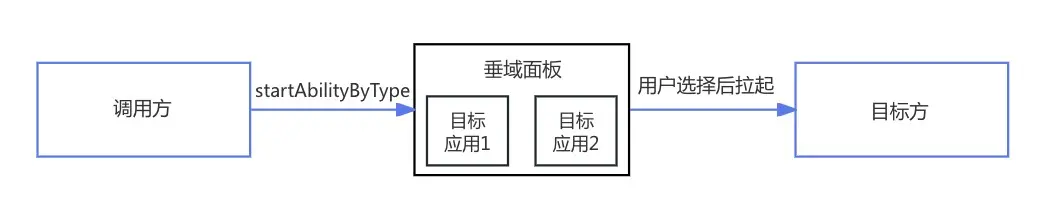
开发者可通过特定的业务类型如导航、金融、邮件等,调用startAbilityByType接口拉起对应的垂域面板,该面板将展示目标方接入的垂域应用,由用户选择打开指定应用以实现相应的垂类意图。
垂域面板为调用方提供统一的安全、可信的目标方应用,同时降低调用方的接入成本。
匹配规则
UIAbilityContext.startAbilityByType 和 UIExtensionContentSession.startAbilityByType 接口支持基于业务类型拉起垂域面板。调用方通过指定业务类型即可拉起对应的垂域面板,在垂域面板上将展示目标方接入的垂域应用。
系统会根据调用方在startAbilityByType接口传入的type与wantParams.sceneType取值,按照如下映射关系,匹配到在module.json5配置文件中声明了对应 linkFeature 的目标应用。
| 支持的功能 | 调用方(startAbilityByType接口入参) | 目标方(配置文件linkFeature取值) |
|---|---|---|
| 路线规划功能 | - type:navigation - wantParams.sceneType:1 |
RoutePlan |
| 导航功能 | - type:navigation - wantParams.sceneType:2 |
Navigation |
| 位置搜索功能 | - type:navigation - wantParams.sceneType:3 |
PlaceSearch |
| 转账汇款功能 | - type:finance - wantParams.sceneType:1 |
Transfer |
| 信用卡还款功能 | - type:finance - wantParams.sceneType:2 |
CreditCardRepayment |
| 撰写邮件功能 | - type:mail - wantParams.sceneType:1 |
ComposeMail |
通过mailto方式跳转电子邮件应用
通过mailto电子邮件协议,可以创建指向电子邮件地址的超链接,方便用户通过网页或应用中的超链接直接跳转电子邮件应用。
通过startAbility接口打开文件
开发者可以通过调用startAbility接口,由系统从已安装的应用中寻找符合要求的应用,打开特定类型的文件。
导航类应用扩展面板参数说明
startAbilityByType接口中type字段为navigation,支持路线规划、导航、位置搜索三种意图场景,对应的wantParam参数如下:
说明
本文中的经纬度均采用GCJ-02坐标系统。
- 路线规划场景
| 参数名 | 类型 | 必填 | 说明 |
|---|---|---|---|
| sceneType | number | 否 | 意图,默认为1,路线规划场景填1或不填 |
| originName | string | 否 | 起点名称 |
| originLatitude | number | 否 | 起点纬度 |
| originLongitude | number | 否 | 起点经度 |
| originPoiIds | Record<number, string> | 否 | 起点POI ID列表,当前仅支持传入花瓣地图和高德地图的POI ID |
| destinationName | string | 否 | 终点名称 |
| destinationLatitude | number | 是 | 终点纬度 |
| destinationLongitude | number | 是 | 终点经度 |
| destinationPoiIds | Record<number, string> | 否 | 终点POI ID列表,当前仅支持传入花瓣地图和高德地图的POI ID |
| vehicleType | number | 否 | 交通出行工具,取值:0-驾车,1-步行,2-骑行,3-公交; |
- 导航场景
| 参数名 | 类型 | 必填 | 说明 |
|---|---|---|---|
| sceneType | number | 是 | 意图,导航场景填2 |
| destinationName | string | 否 | 终点名称 |
| destinationLatitude | number | 是 | 终点纬度 |
| destinationLongitude | number | 是 | 终点经度 |
| destinationPoiIds | Record<number, string> | 否 | 终点POI ID列表,当前仅支持传入花瓣地图和高德地图的POI ID |
- 位置搜索场景
| 参数名 | 类型 | 必填 | 说明 |
|---|---|---|---|
| sceneType | number | 是 | 意图,位置搜索场景填3 |
| destinationName | string | 是 | 地点名称 |
拉起方开发步骤
- 导入ohos.app.ability.common模块。
import { common } from '@kit.AbilityKit';
- 构造接口参数并调用startAbilityByType接口。
终点POI ID列表(destinationPoiIds)和起点POI ID列表(originPoiIds)需开发者自行从各地图系统中获取,并按照对应关系传参。
let context = getContext(this) as common.UIAbilityContext;
let wantParam: Record<string, Object> = {
  'sceneType': 1,
  'destinationLatitude': 32.060844,
  'destinationLongitude': 118.78315,
  'destinationName': 'xx市xx路xx号',
  'destinationPoiIds': {
      1: '1111',  // key为1代表花瓣地图,value需为花瓣地图POI
      2: '2222'   // key为2代表高德地图,value需为高德地图POI
  } as Record<number, string>,
  'originName': 'xx市xx公园',
  'originLatitude': 31.060844,
  'originLongitude': 120.78315,
  'originPoiIds': {
      1: '3333',  // key为1代表花瓣地图,value需为花瓣地图POI
      2: '4444'   // key为2代表高德地图,value需为高德地图POI
  } as Record<number, string>,
  'vehicleType': 0
};
let abilityStartCallback: common.AbilityStartCallback = {
  onError: (code: number, name: string, message: string) => {
    console.log(`onError code ${code} name: ${name} message: ${message}`);
  },
  onResult: (result)=>{
    console.log(`onResult result: ${JSON.stringify(result)}`);
  }
}

context.startAbilityByType("navigation", wantParam, abilityStartCallback,
    (err) => {
        if (err) {
            console.error(`startAbilityByType fail, err: ${JSON.stringify(err)}`);
        } else {
            console.log(`success`);
        }
});
效果示例图:

目标方开发步骤
- 在module.json5中配置 uris ,步骤如下:
- 设置linkFeature属性以声明当前应用支持的特性功能,从而系统可以从设备已安装应用中找到当前支持该特性的应用,取值范围如下:
| 取值 | 含义 |
|---|---|
| Navigation | 声明应用支持导航功能 |
| RoutePlan | 声明应用支持路线规划功能 |
| PlaceSearch | 声明应用支持位置搜索功能 |
- 设置scheme、host、port、path/pathStartWith属性,与Want中URI相匹配,以便区分不同功能。
{
  "abilities": [
      {
      "skills": [
          {
          "uris": [
              {
              "scheme": "maps", // 这里仅示意,应用需确保这里声明的的uri能被外部正常拉起
              "host": "navigation",
              "path": "",
              "linkFeature": "Navigation" // 声明应用支持导航功能
              },
              {
              "scheme": "maps", // 这里仅示意,应用需确保这里声明的的uri能被外部正常拉起
              "host": "routePlan",
              "path": "",
              "linkFeature": "RoutePlan" // 声明应用支持路线规划功能
              },
              {
              "scheme": "maps", // 这里仅示意,应用需确保这里声明的的uri能被外部正常拉起
              "host": "search",
              "path": "",
              "linkFeature": "PlaceSearch" // 声明应用支持位置搜索功能
              }
          ]
          }
      ]
      }
  ]
}
- 解析参数并做对应处理。
UIAbility::onCreate(want: Want, launchParam: AbilityConstant.LaunchParam): void
在参数want.uri中会携带目标方配置的linkFeature对应的uri;
在参数want.parameters中会携带Caller方传入的参数,不同场景参数如下所示
- 路线规划场景
| 参数名 | 类型 | 必填 | 说明 |
|---|---|---|---|
| originName | string | 否 | 起点名称 |
| originLatitude | number | 否 | 起点纬度 |
| originLongitude | number | 否 | 起点经度 |
| originPoiId | string | 否 | 起点POI ID,当前仅支持花瓣地图和高德地图获取此参数 |
| destinationName | string | 否 | 终点名称 |
| destinationLatitude | number | 是 | 终点纬度 |
| destinationLongitude | number | 是 | 终点经度 |
| destinationPoiId | string | 否 | 终点POI ID,当前仅支持花瓣地图和高德地图获取此参数 |
| vehicleType | number | 否 | 交通出行工具,取值:0-驾车,1-步行,2-骑行,3-公交; |
- 导航场景
| 参数名 | 类型 | 必填 | 说明 |
|---|---|---|---|
| destinationName | string | 否 | 终点名称 |
| destinationLatitude | number | 是 | 终点纬度 |
| destinationLongitude | number | 是 | 终点经度 |
| destinationPoiId | string | 否 | 终点POI ID,当前仅支持花瓣地图和高德地图获取此参数 |
- 位置搜索场景
| 参数名 | 类型 | 必填 | 说明 |
|---|---|---|---|
| destinationName | string | 是 | 地点名称 |
应用可根据 linkFeature 中定义的特性功能,比如路线规划、导航和位置搜索,结合接收到的uri和参数开发不同的样式页面。
完整示例:
import { AbilityConstant, UIAbility, Want } from '@kit.AbilityKit';
import { hilog } from '@kit.PerformanceAnalysisKit';
import { window } from '@kit.ArkUI';

const TAG = 'EntryAbility'

export default class EntryAbility extends UIAbility {
    windowStage: window.WindowStage | null = null;

    uri?: string;
    destinationLatitude?: number;
    destinationLongitude?: number;
    destinationName?: string;
    originName?: string;
    originLatitude?: number;
    originLongitude?: number;
    vehicleType?: number;
    destinationPoiId?: string;
    originPoiId?: string;

    onCreate(want: Want, launchParam: AbilityConstant.LaunchParam): void {
        hilog.info(0x0000, TAG, `onCreate, want=${JSON.stringify(want)}`);
        super.onCreate(want, launchParam);
        this.parseWant(want);
    }

    onNewWant(want: Want, launchParam: AbilityConstant.LaunchParam): void {
        hilog.info(0x0000, TAG, `onNewWant, want=${JSON.stringify(want)}`);
        super.onNewWant(want, launchParam);
        this.parseWant(want);
        if (!this.windowStage) {
            hilog.error(0x0000, TAG, 'windowStage is null');
            this.context.terminateSelf();
            return;
        }
        this.loadPage(this.windowStage);
    }

    private parseWant(want: Want): void {
        this.uri = want.uri as string | undefined;
        this.destinationLatitude = want.parameters?.destinationLatitude as number | undefined;
        this.destinationLongitude = want.parameters?.destinationLongitude as number | undefined;
        this.destinationName = want.parameters?.destinationName as string | undefined;
        this.originName = want.parameters?.originName as string | undefined;
        this.originLatitude = want.parameters?.originLatitude as number | undefined;
        this.originLongitude = want.parameters?.originLongitude as number | undefined;
        this.vehicleType = want.parameters?.vehicleType as number | undefined;
        this.destinationPoiId = want.parameters?.destinationPoiId as string | undefined;
        this.originPoiId = want.parameters?.originPoiId as string | undefined;
    }

    private loadPage(windowStage: window.WindowStage): void {
        hilog.info(0x0000, TAG, `loadPage, uri=${this.uri}`);
        if (this.uri === 'maps://navigation') {
            // 构建导航场景参数
            const storage: LocalStorage = new LocalStorage({
                "destinationLatitude": this.destinationLatitude,
                "destinationLongitude": this.destinationLongitude,
                "destinationPoiId": this.destinationPoiId
            } as Record<string, Object>);
            // 拉起导航页面
            windowStage.loadContent('pages/NavigationPage', storage)
        } else if (this.uri === 'maps://routePlan') {
            // 构建路径规划场景参数
            const storage: LocalStorage = new LocalStorage({
                "destinationLatitude": this.destinationLatitude,
                "destinationLongitude": this.destinationLongitude,
                "destinationName": this.destinationName,
                "originName": this.originName,
                "originLatitude": this.originLatitude,
                "originLongitude": this.originLongitude,
                "vehicleType": this.vehicleType,
                "destinationPoiId": this.destinationPoiId,
                "originPoiId": this.originPoiId
            } as Record<string, Object>);
            // 拉起路径规划页面
            windowStage.loadContent('pages/RoutePlanPage', storage)
        }  else if (this.uri === 'maps://search') {
            // 构建位置搜索场景参数
            const storage: LocalStorage = new LocalStorage({
                "destinationName": this.destinationName
            } as Record<string, Object>);
            // 拉起位置搜索页面
            windowStage.loadContent('pages/PlaceSearchPage', storage)
        } else {
            // 默认拉起首页
            windowStage.loadContent('pages/Index', (err) => {
                if (err.code) {
                    hilog.error(0x0000, TAG, 'Failed to load the content. Cause: %{public}s',
                        JSON.stringify(err) ?? '');
                    return;
                }
                hilog.info(0x0000, TAG, 'Succeeded in loading the content.');
            });
        }
    }

    onDestroy(): void {
        hilog.info(0x0000, TAG, `onDestroy`);
    }

    onWindowStageCreate(windowStage: window.WindowStage): void {
        hilog.info(0x0000, TAG, `onWindowStageCreate`);
        this.windowStage = windowStage;
        this.loadPage(this.windowStage);
    }

    onWindowStageDestroy(): void {
        hilog.info(0x0000, TAG, '%{public}s', 'Ability onWindowStageDestroy');
    }

    onForeground(): void {
        hilog.info(0x0000, TAG, '%{public}s', 'Ability onForeground');
    }

    onBackground(): void {
        hilog.info(0x0000, TAG, '%{public}s', 'Ability onBackground');
    }
}

讨论HarmonyOS开发技术,专注于API与组件、DevEco Studio、测试、元服务和应用上架分发等。
更多推荐

 25
25 0
0- 0


 已为社区贡献18条内容

所有评论(0)