鸿蒙5.0开发进阶:通过Native保存图片到应用沙箱实现案例
往期鸿蒙全套实战文章必看:
介绍
本示例主要介绍Native如何将网络上的图片及Rawfile中的图片保存到应用沙箱中。
效果图预览
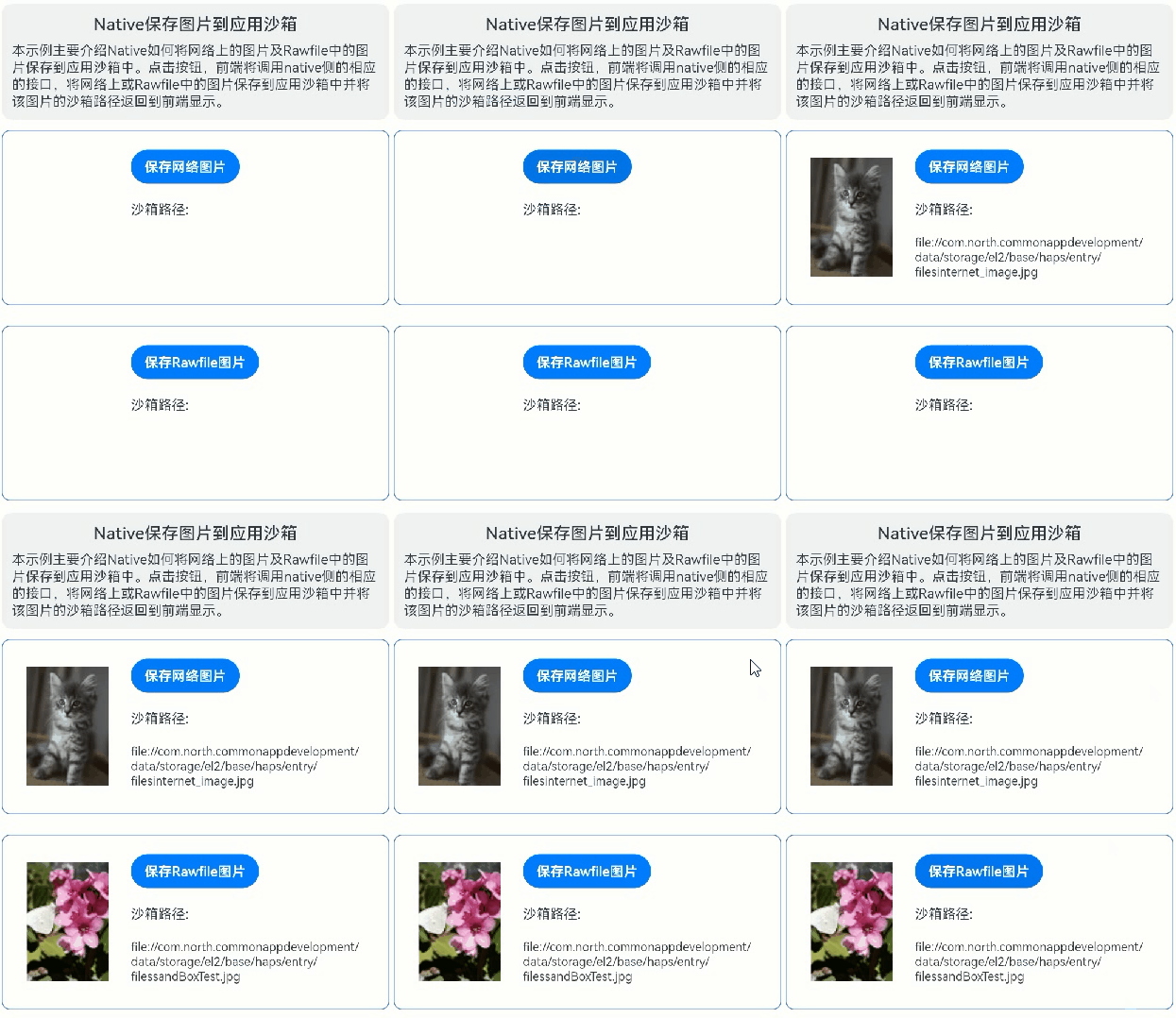
使用说明
-
rawfile路径下存有一张图片sandBoxTest.jpg。
-
设备连接上网络。
-
点击"保存Rawfile图片",前端通过调用Native侧暴露的saveImageOfRawfile接口将rawfile中的图片sandBoxTest.jpg保存到应用沙箱中并返回沙箱路径到前端进行显示;点击“保存网络图片”,前端通过调用Native侧暴露的saveImageOfInternet接口将网络图片http://placekitten.com/96/140保存到应用沙箱中并返回沙箱路径到前端进行显示。
具体代码可参考NativePictureToSandboxView.ets以及native_picture_to_sandbox.cpp。
实现思路
Native保存网络图片到沙箱的实现主要步骤如下:
-
参考libcurl编译,编译libcurl.so等相关库文件。当前编译后加载libcurl.so时,通过hilog日志发现依赖了libcurl.so libcurl.so.4 libnghttp2.so libnghttp2.so.14 libzstd.so几个so文件。
其中libcurl.so为开源的跨平台网络协议库,支持七层网络模型中应用层的各种协议;libnghttp2.so是一个HTTP/2和SPDY协议的实现,用于客户端,服务器,代理,和服务器推送应用;libzstd.so是一个实现了Zstandard算法的压缩库,常用于数据库、文件系统及网络传输等。 -
将开源库libcurl相关的so文件以及封装了libcurl下载功能的libcurlDownload.so放入模块下的libs相应目录。
-
在CMakeLists中导入相关库文件。
target_link_directories(nativesavepictosandbox PUBLIC ${CMAKE_CURRENT_SOURCE_DIR}/../../../libs/${OHOS_ARCH}/) target_link_libraries(nativesavepictosandbox PUBLIC libace_napi.z.so libcurlDownload.so libhilog_ndk.z.so librawfile.z.so) -
在前端通过调用Native中的saveImageOfInternet接口获取沙箱地址并将沙箱地址转换为url地址绑定到Image组件显示。传入的参数为js的资源对象、rawfile中的图片名、获取应用的文件路径。
Button($r('app.string.tbn_InternetPicture')) .onClick(() => { // TODO:知识点:通过Native暴露的接口saveImageOfInternet接口获取下载的网络图片保存在沙箱中的路径 let sandBoxPath: string = testNapi.saveImageOfInternet(this.internetPicUrl, this.fileDir, this.internetSandBoxFileName); if (sandBoxPath === undefined) { AlertDialog.show({ message: `网络图片写入失败`, alignment: DialogAlignment.Center }); this.internetSandBoxPath = ''; } else { // 将沙箱地址转换为url地址 this.internetSandBoxPath = fileUri.getUriFromPath(sandBoxPath); } }) -
在Native的saveImageOfInternet接口中通过调用libcurlDownload.so的接口将网络图片写入沙箱。
 void *handler = dlopen(libCurlDownload, RTLD_LAZY);
 if (handler == nullptr) {
     // 抛出加载库失败的错误
     dlerror();
     return nullptr;
 }

 // 声明函数指针类型
 typedef napi_value (*DownloadInternetFileFunc)(napi_env, napi_callback_info);
 DownloadInternetFileFunc downloadInternetWrapper =
     reinterpret_cast<DownloadInternetFileFunc>(dlsym(handler, "DownloadInternetFileWrapper"));
 if (downloadInternetWrapper) {
     // TODO:知识点:调用so的downloadInternetWrapper函数保存网路图片到沙箱
     napi_value result = downloadInternetWrapper(env, info);
     OH_LOG_Print(LOG_APP, LOG_INFO, GLOBAL_RESMGR, TAG, "saveImageOfInternet download finish");
     dlclose(handler);
     return result;
 } else {
     OH_LOG_Print(LOG_APP, LOG_ERROR, GLOBAL_RESMGR, TAG, "saveImageOfInternet download function is null");
     dlclose(handler);
     return nullptr;
 }
Native保存Rawfile图片到沙箱的实现主要步骤如下:
-
在前端通过调用Native中的saveImageOfRawfile接口获取沙箱地址并将沙箱地址转换为url地址绑定到Image组件显示。传入的参数为js的资源对象、rawfile中的图片名、获取应用的文件路径。
Button($r('app.string.tbn_RawFilePicture')) .onClick(() => { // TODO:知识点:通过Native暴露的接口saveImageOfRawfile接口获取rawfile中图片保存在沙箱中的路径 let sandBoxPath: string = testNapi.saveImageOfRawfile(this.resMgr, this.rawfilePicPath, this.fileDir); if (sandBoxPath === undefined) { AlertDialog.show({ message: `Rawfile图片写入失败`, alignment: DialogAlignment.Center }); this.rawfileSandBoxPath = ''; } else { // 将沙箱地址转换为url地址 this.rawfileSandBoxPath = fileUri.getUriFromPath(sandBoxPath); } }) -
在Native的saveImageOfRawfile接口中通过Rawfile的API接口以及文件流将图片资源写入沙箱。
 // 打开Rawfile文件。
 RawFile *rawFile = OH_ResourceManager_OpenRawFile(mNativeResMgr, rawFileName.c_str());
 if (rawFile == nullptr) {
     OH_LOG_Print(LOG_APP, LOG_ERROR, GLOBAL_RESMGR, TAG, "saveImageOfRawfile OpenRawFile fail!");
     // 释放资源
     OH_ResourceManager_ReleaseNativeResourceManager(mNativeResMgr);
     return nullptr;
 }
 // 获取文件大小
 long imageDataSize = OH_ResourceManager_GetRawFileSize(rawFile);
 // 申请内存
 std::unique_ptr<char[]> imageData = std::make_unique<char[]>(imageDataSize);
 // 读取rawfile
 long rawFileOffset = OH_ResourceManager_ReadRawFile(rawFile, imageData.get(), imageDataSize);
 // 保存目标网络图片的沙箱路径
 std::string targetSandboxPath = targetDirectory + rawFileName;
 // 打开沙箱文件的文件输出流
 std::ofstream outputFile(targetSandboxPath, std::ios::binary);
 if (!outputFile) {
     OH_LOG_Print(LOG_APP, LOG_ERROR, GLOBAL_RESMGR, TAG, "saveImageOfRawfile 创建沙箱目标文件失败");
     // 释放资源
     OH_ResourceManager_CloseRawFile(rawFile);
     OH_ResourceManager_ReleaseNativeResourceManager(mNativeResMgr);
     return nullptr;
 }
 // 写文件
 outputFile.write(imageData.get(), imageDataSize);
高性能知识点
不涉及
工程结构&模块类型
nativesavepictosandbox                               // har类型
|---src\main\ets\view\
|   |---NativePictureToSandboxView.ets               // 视图层-图片写入沙箱场景主页面
|---src\main\cpp\
|   |---native_picture_to_sandbox.cpp                // native层-图片写入沙箱业务逻辑
|---src\main\cpp\curl                                // libcurl三方库头文件

讨论HarmonyOS开发技术,专注于API与组件、DevEco Studio、测试、元服务和应用上架分发等。
更多推荐



 10
10 0
0- 0


 已为社区贡献14条内容

所有评论(0)