【HarmonyOS 】Decryption failed. Verify the encryption password, or delete the material folder wher...
验证加密密码,或删除.p12文件所在的材料文件夹,然后选择自动生成签名以重新签名文件。勾选Automatically generate signature,稍等片刻即可。
【HarmonyOS NEXT】Decryption failed. Verify the encryption password, or delete the material folder wher…
HarmonyOS NEXT
一、问题背景:
在HarmonyOS开发过程中,当尝试解密某些文件时,可能会遇到“Decryption failed”的错误提示。
该错误提示表明解密操作未能成功完成,可能是由于加密密码错误或文件损坏等原因导致的。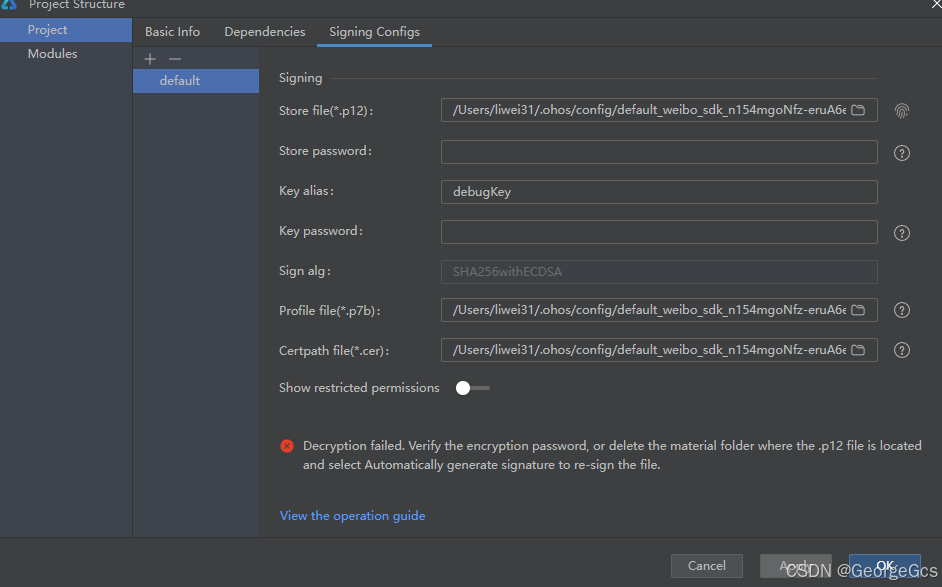
Decryption failed. Verify the encryption password, or delete the material folder where the .p12 file is locatedand select Automatically generate signature to re-sign the file.
解密失败。验证加密密码,或删除.p12文件所在的材料文件夹,然后选择自动生成签名以重新签名文件。
二、解决方案:
解决方案一: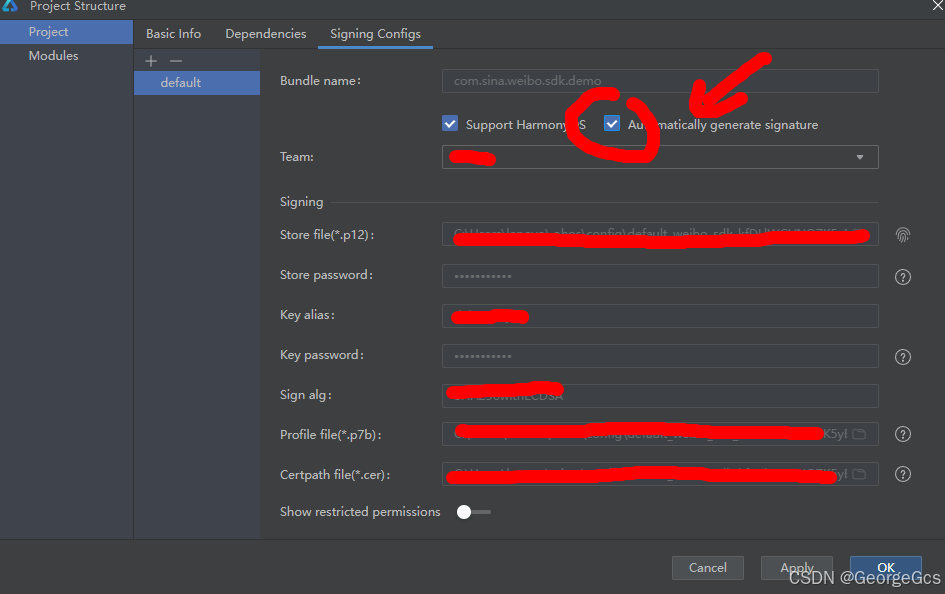
勾选Automatically generate signature,稍等片刻即可。
解决方案二:
如果加密密码正确但仍然无法解密,可能是文件已损坏或存在其他问题。
此时可以尝试删除包含.p12文件的材料文件夹,然后选择“Automatically generate signature”选项以重新生成签名文件。
重新生成签名后,再次尝试解密操作,看是否能够成功。
在选择“Automatically generate signature”选项后,IDE会自动生成新的签名文件。
这个过程通常只需要稍等片刻即可完成,无需手动进行复杂的操作。
注意:
在进行IDE签名配置时,需要确保设备已正确连接到电脑,并已被IDE识别。
如果设备未连接或未被识别,将无法成功创建配置文件并可能出现类似“Unable to create the profile due to a lack of a device”的错误提示。

讨论HarmonyOS开发技术,专注于API与组件、DevEco Studio、测试、元服务和应用上架分发等。
更多推荐

 9
9 0
0- 0


 已为社区贡献133条内容

所有评论(0)