HarmonyOS UI开发 PositionLayout(位置布局) 的使用
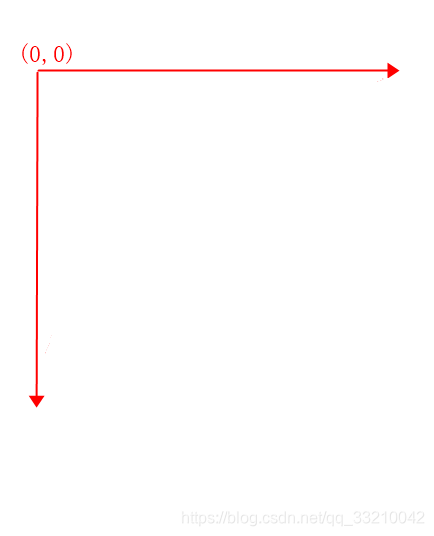
PositionLayout 是什么PositionLayout 是位置布局,在PositionLayout中,子组件通过指定准确的x/y坐标值在屏幕上显示。(0, 0)为左上角;当向下或向右移动时,坐标值变大;允许组件之间互相重叠。看到这个描述感觉实际开发中应该很少用到这个布局,本着学习的态度,简单的了解它的使用PositionLayout 的属性ohos:position_x 控制x 轴方向的
·
PositionLayout 是什么
PositionLayout 是位置布局,在PositionLayout中,子组件通过指定准确的x/y坐标值在屏幕上显示。(0, 0)为左上角;当向下或向右移动时,坐标值变大;允许组件之间互相重叠。看到这个描述感觉实际开发中应该很少用到这个布局,本着学习的态度,简单的了解它的使用
PositionLayout 的属性
ohos:position_x 控制x 轴方向的位置
ohos:position_y 控制y轴方向的位置
x轴,y轴在屏幕的右上角,具体如下图
demo 练习PositionLayout 的使用
<?xml version="1.0" encoding="utf-8"?>
<PositionLayout
    xmlns:ohos="http://schemas.huawei.com/res/ohos"
    ohos:height="match_parent"
    ohos:width="match_parent"
    ohos:background_element="#3387CEFA">

    <Button
        ohos:id="$+id:button1"
        ohos:height="50vp"
        ohos:width="100vp"
        ohos:position_x="0vp"
        ohos:position_y="0vp"
        ohos:background_element="#00FFFF"
        ohos:text="Java"
        ohos:text_alignment="center"
        ohos:text_size="20fp"/>

    <Button
        ohos:id="$+id:button2"
        ohos:height="50vp"
        ohos:width="100vp"
        ohos:position_x="35vp"
        ohos:position_y="35vp"
        ohos:background_element="#FF0000"
        ohos:text="Java"
        ohos:text_alignment="center"
        ohos:text_size="20fp"/>


    <Button
        ohos:id="$+id:button3"
        ohos:height="50vp"
        ohos:width="100vp"
        ohos:position_x="75vp"
        ohos:position_y="75vp"
        ohos:background_element="#00d8a0"
        ohos:text="Java"
        ohos:text_alignment="center"
        ohos:text_size="20fp"/>

    <Button
        ohos:id="$+id:button5"
        ohos:height="50vp"
        ohos:width="100vp"
        ohos:position_x="125vp"
        ohos:position_y="115vp"
        ohos:background_element="#8B00FF"
        ohos:text="Java"
        ohos:text_alignment="center"
        ohos:text_size="20fp"/>

    <Button
        ohos:id="$+id:button6"
        ohos:height="50vp"
        ohos:width="300vp"
        ohos:position_x="175vp"
        ohos:position_y="175vp"
        ohos:background_element="#8B00FF"
        ohos:text="Java"
        ohos:text_alignment="center"
        ohos:text_size="20fp"/>


</PositionLayout>
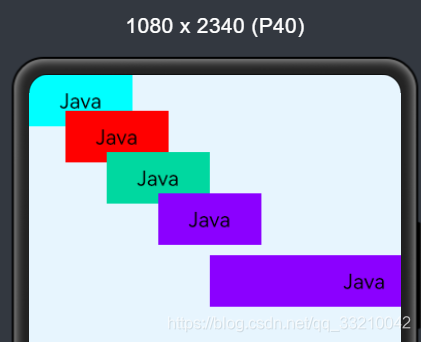
实现的效果图如下
其他想法
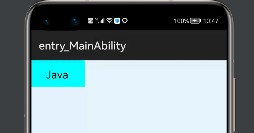
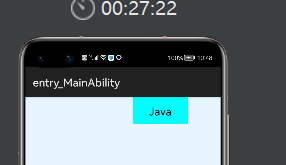
本想着到这就了解忘了,不过突然间想到了既然它是通过x,y轴来控制 控件的位置,我们可以通过它来实现一个简答的移动,就是xml 一个位置,java 代码在写一个位置
xml 代码如下
<?xml version="1.0" encoding="utf-8"?>
<PositionLayout
    xmlns:ohos="http://schemas.huawei.com/res/ohos"
    ohos:height="match_parent"
    ohos:width="match_parent"
    ohos:background_element="#3387CEFA">

    <Button
        ohos:id="$+id:button1"
        ohos:height="50vp"
        ohos:width="100vp"
        ohos:position_x="0vp"
        ohos:position_y="0vp"
        ohos:background_element="#00FFFF"
        ohos:text="Java"
        ohos:text_alignment="center"
        ohos:text_size="20fp"/>

</PositionLayout>
java 代码
package com.example.myapplication.slice;

import com.example.myapplication.ResourceTable;
import ohos.aafwk.ability.AbilitySlice;
import ohos.aafwk.ability.OnClickListener;
import ohos.aafwk.content.Intent;
import ohos.agp.components.AttrHelper;
import ohos.agp.components.Button;
import ohos.agp.components.Component;

public class MainAbilitySlice extends AbilitySlice {
    private Button button1;
    @Override
    public void onStart(Intent intent) {
        super.onStart(intent);
        super.setUIContent(ResourceTable.Layout_ability_main);
        button1= (Button) findComponentById(ResourceTable.Id_button1);

        button1.setClickedListener(new Component.ClickedListener() {
            @Override
            public void onClick(Component component) {
                button1.setPosition(vp2px(200), vp2px(0));
            }
        });
    }

    private int vp2px(float vp){
        return AttrHelper.vp2px(vp,this);
    }


    @Override
    public void onActive() {
        super.onActive();
    }

    @Override
    public void onForeground(Intent intent) {
        super.onForeground(intent);
    }
}
xml 的位置
点击button 移动之后的位置
其他的布局
HarmonyOS UI开发 TableLayout(表格布局) 的使用
HarmonyOS UI开发 AdaptiveBoxLayout(自适应盒子布局) 的使用
HarmonyOS UI开发 StackLayout(堆栈布局) 的使用

讨论HarmonyOS开发技术,专注于API与组件、DevEco Studio、测试、元服务和应用上架分发等。
更多推荐


 0
0 0
0- 0


 已为社区贡献20条内容

所有评论(0)