【鸿蒙征程】五.实现页面的跳转✨有参,无参,返回值✨
前言
页面的跳转。在同一个Page里的AbilitySlice1与AbilitySlice2间的跳转(无参,带参,回值)。
当一个Ability需要跳转到另一个Ability时,可以通过Intent指定启动的目标,并且携带相关数据,
一个Page可以包含多个AbilitySlice,但是进入前台时只默认展示一个AbilitySlice。并且默认通过setMainRoute()方法来指定,当需要展示多个AbilitySlice时,可以通过addActionRoute()方法为其他的AbilitySlice配置路由。
0.准备工作
建立两个slice:AbilitySlice1和AbilitySlice2
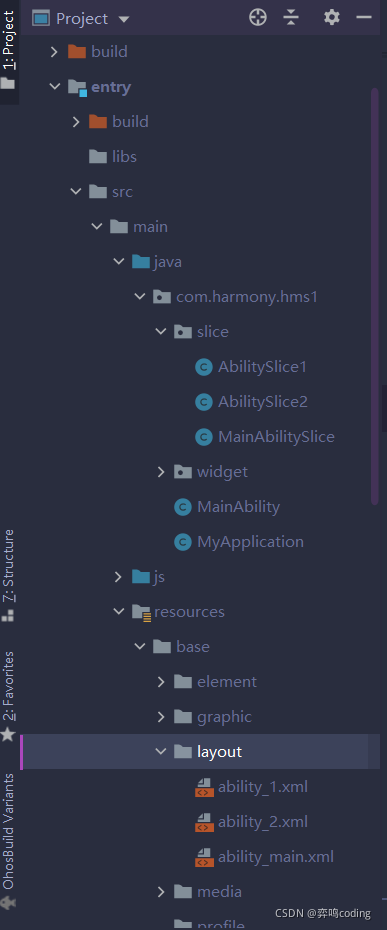 并且继承AbilitySlice,覆盖onStart方法
public class AbilitySlice1 extends AbilitySlice {
    // 继承,覆盖onstart
    protected void onStart(Intent intent){
        super.onStart(intent);
        //指定页面
        super.setUIContent(ResourceTable.Layout_ability_1);

        Text text = (Text) findComponentById(ResourceTable.Id_text_helloworld_ability1);
然后添加资源Id,创建两个文件在layout里面

设置资源id
<Text
        ohos:id="$+id:text_helloworld_ability1"
        ohos:height="match_content"
        ohos:width="match_content"
        ohos:background_element="$graphic:background_ability_main"
        ohos:layout_alignment="horizontal_center"
        ohos:text="HelloWorld11111"
        ohos:text_size="40vp"
        />
第一个为text_helloworld_ability1,第二个可以改为text_helloworld_ability2
然后将两个AbilitySlice和MainAbility关联起来

其中的action字符串在config.json中设置,并且在这是我们自己自定义的,随后注册到config.json中
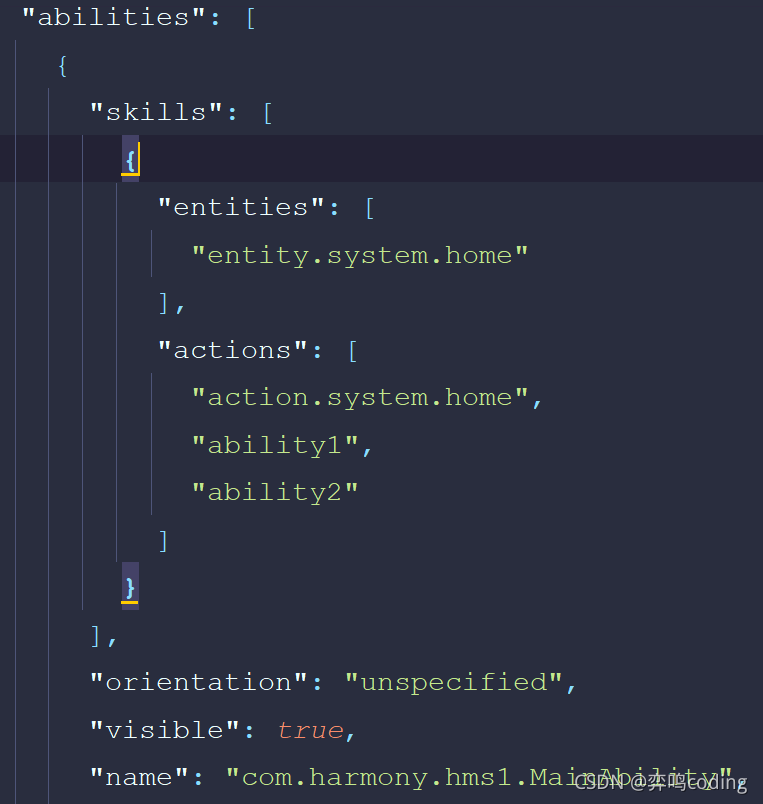
1.无参数跳转
MainAbilitySlice文件中代码实现,通过present()方法来实现跳转
public class MainAbilitySlice extends AbilitySlice {
    private Text text;
    @Override
    public void onStart(Intent intent) {
        super.onStart(intent);
        super.setUIContent(ResourceTable.Layout_ability_main);
        // 点击事件的监听
        text = (Text) findComponentById(ResourceTable.Id_text_helloworld);
        text.setClickedListener(Component -> {
            Intent intent1 = new Intent();
            present(new AbilitySlice1(),intent1);

        });

    }
}
2.带参数跳转
MainAbilitySlice的代码
private Text text;
    @Override
    public void onStart(Intent intent) {
        super.onStart(intent);
        super.setUIContent(ResourceTable.Layout_ability_main);
        // 点击事件的监听
        text = (Text) findComponentById(ResourceTable.Id_text_helloworld);
        text.setClickedListener(Component -> {
            Intent intent1 = new Intent();
            // 设置传key和值
            intent1.setParam("user","yiming");

            present(new AbilitySlice1(),intent1);
        });

    }
AbilitySlice1的代码
public class AbilitySlice1 extends AbilitySlice {
    // 继承,覆盖onstart
    protected void onStart(Intent intent){
        super.onStart(intent);
        //指定页面
        super.setUIContent(ResourceTable.Layout_ability_1);

        Text text = (Text) findComponentById(ResourceTable.Id_text_helloworld_ability1);
        // intent不为空时
        if (intent!=null){
        //  获取值
            String user = intent.getStringParam("user");
            text.append(","+user);
        }
    }
}
3.有返回值的跳转
这里需要用到presentForResult()这个方法来传一个requestcode
MainAbilitySlice的代码
private Text text;
    @Override
    public void onStart(Intent intent) {
        super.onStart(intent);
        super.setUIContent(ResourceTable.Layout_ability_main);
        // 点击事件的监听
        text = (Text) findComponentById(ResourceTable.Id_text_helloworld);
        text.setClickedListener(Component -> {
            Intent intent1 = new Intent();
            //
            intent1.setParam("user","yiming");

            //带有返回值
            presentForResult(new AbilitySlice1(), intent1,1234);
        });

    }
    // 用来接受并且处理返回值的方法。
    @Override
    protected void onResult(int requestCode, Intent resultIntent) {
        super.onResult(requestCode, resultIntent);
        if (requestCode == 1234){
            String pwd = resultIntent.getStringParam("pwd");
            text.append(",密码值:"+pwd);
        }
    }
我们还要用onResult方法接受并处理返回值的方法,并且requestCode指定了需要跳转的页面
AbilitySlice1代码
package com.harmony.hms1.slice;

import com.harmony.hms1.ResourceTable;
import ohos.aafwk.ability.AbilitySlice;
import ohos.aafwk.content.Intent;
import ohos.agp.components.Text;

public class AbilitySlice1 extends AbilitySlice {
    // 继承,覆盖onstart
    protected void onStart(Intent intent){
        super.onStart(intent);
        //指定页面
        super.setUIContent(ResourceTable.Layout_ability_1);

        Text text = (Text) findComponentById(ResourceTable.Id_text_helloworld_ability1);
        if (intent!=null){
            String user = intent.getStringParam("user");
            text.append(","+user);
        }
        // 接受文本,点击事件
        text.setClickedListener(component -> {
            // 返回值接受指令
            Intent intent1 = new Intent();
            intent1.setParam("pwd","12");

            setResult(intent1);
            // 关闭页面,返回上一页
            terminate();
        });
    }
}
如果需要完整的源码,加qq:2024810652,丰富学习资源可找我领取,一起学习一起进步。

讨论HarmonyOS开发技术,专注于API与组件、DevEco Studio、测试、元服务和应用上架分发等。
更多推荐

 2
2 0
0- 0


 已为社区贡献15条内容

所有评论(0)