Flutter & OpenHarmony OA系统员工列表组件开发指南
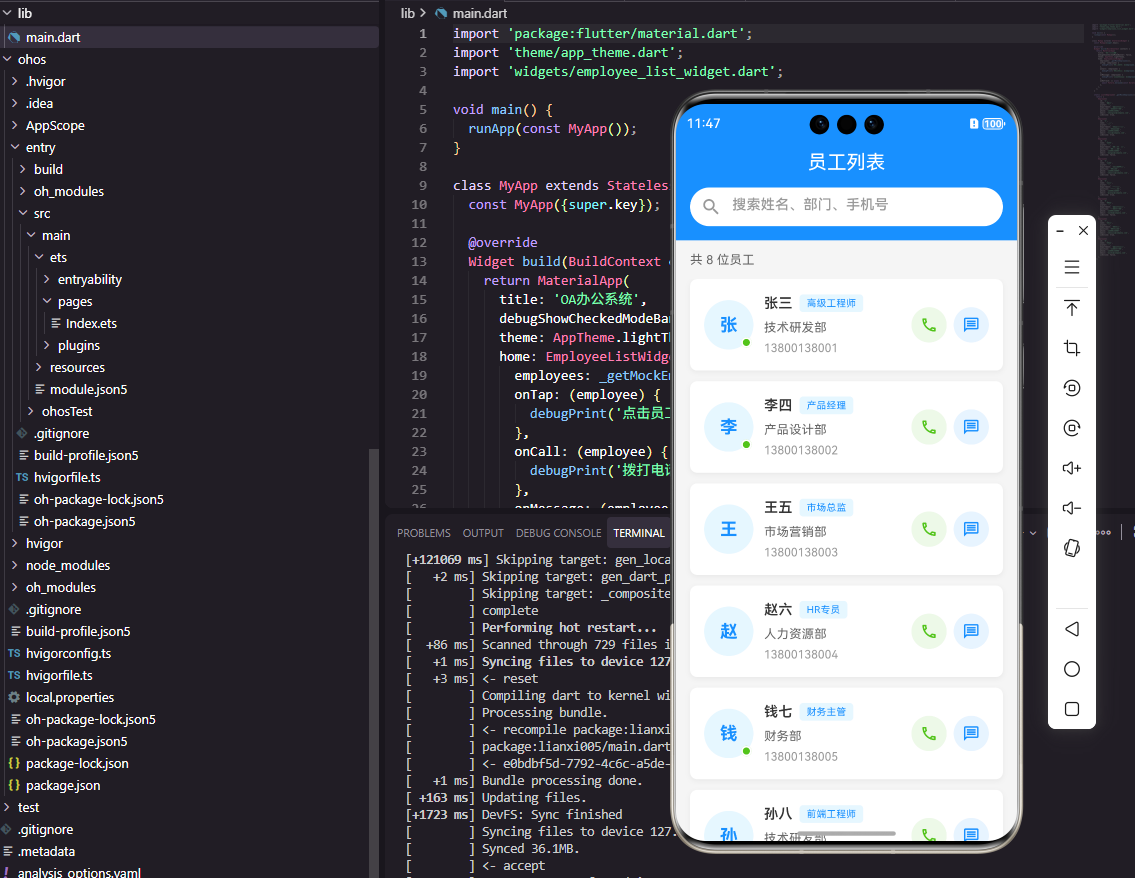
本文介绍了如何在Flutter和OpenHarmony鸿蒙系统中开发高效的员工列表组件。Flutter端使用ListView.builder实现懒加载,优化大数据量性能;鸿蒙端利用List组件内置虚拟列表功能。两者都实现了员工卡片UI、下拉刷新和搜索过滤功能,其中Flutter采用Material Design风格,鸿蒙则使用ArkTS声明式语法。文章详细展示了从数据模型定义到UI构建的全过程,为
前言
在OA办公自动化系统中,员工列表是一个核心功能模块,它承载着展示企业人员信息、支持快速查找同事、发起沟通协作等重要职责。一个优秀的员工列表组件需要具备高效的数据渲染能力、流畅的滚动体验、便捷的搜索过滤功能以及美观的界面设计。本文将深入探讨如何使用Flutter和OpenHarmony鸿蒙系统开发一个功能完善的员工列表组件,满足企业级OA应用的需求。
组件架构设计
员工列表组件的架构设计需要考虑数据量可能较大的情况,因此必须采用懒加载和虚拟列表技术来优化性能。同时,组件需要支持多种交互方式,包括点击查看详情、长按弹出操作菜单、下拉刷新、上拉加载更多等。在视觉设计上,每个员工卡片需要展示头像、姓名、部门、职位等关键信息,并通过合理的布局让用户能够快速获取所需信息。
Flutter端实现
首先定义员工数据模型:
class Employee {
  final String id;
  final String name;
  final String avatar;
  final String department;
  final String position;
  final String phone;

  Employee({
    required this.id,
    required this.name,
    required this.avatar,
    required this.department,
    required this.position,
    required this.phone,
  });
}
数据模型是组件开发的基础,它定义了员工信息的数据结构。使用required关键字确保所有必要字段在创建对象时都被正确初始化,这种设计可以在编译期就发现潜在的空值问题,提高代码的健壮性。在实际项目中,还可以添加fromJson和toJson方法来支持JSON序列化。
员工列表组件的基础结构:
class EmployeeListWidget extends StatefulWidget {
final List<Employee> employees;
final Function(Employee) onTap;
const EmployeeListWidget({
Key? key,
required this.employees,
required this.onTap,
}) : super(key: key);
State<EmployeeListWidget> createState() => _EmployeeListWidgetState();
}
组件接收员工列表数据和点击回调函数作为参数,这种设计使组件与业务逻辑解耦,父组件可以灵活处理点击事件,比如跳转到详情页或弹出操作菜单。
使用ListView.builder实现高效列表渲染:
ListView.builder(
  itemCount: widget.employees.length,
  itemBuilder: (context, index) {
    final employee = widget.employees[index];
    return EmployeeCard(
      employee: employee,
      onTap: () => widget.onTap(employee),
    );
  },
)
ListView.builder采用懒加载机制,只会渲染当前可见区域的列表项,这对于大数据量的员工列表来说至关重要。相比ListView直接传入children列表的方式,builder模式可以显著减少内存占用和提升滚动性能。
员工卡片组件的实现:
class EmployeeCard extends StatelessWidget {
final Employee employee;
final VoidCallback onTap;
Widget build(BuildContext context) {
return Card(
margin: EdgeInsets.symmetric(horizontal: 16, vertical: 8),
child: ListTile(
leading: CircleAvatar(
backgroundImage: NetworkImage(employee.avatar),
),
title: Text(employee.name),
subtitle: Text('${employee.department} · ${employee.position}'),
trailing: Icon(Icons.chevron_right),
onTap: onTap,
),
);
}
}
员工卡片使用Card和ListTile组合实现,这是Material Design推荐的列表项设计模式。CircleAvatar用于显示圆形头像,leading、title、subtitle、trailing的布局方式使信息层次分明。Card组件自带阴影效果,使每个员工卡片具有立体感。
OpenHarmony鸿蒙端实现
定义员工数据接口:
interface Employee {
  id: string
  name: string
  avatar: string
  department: string
  position: string
  phone: string
}
TypeScript的interface用于定义数据类型,与Dart的class不同,interface只定义类型约束而不包含实现。这种方式更加轻量,适合用于定义数据传输对象。鸿蒙的ArkTS完全支持TypeScript语法,可以充分利用类型系统的优势。
员工列表组件的基础结构:
@Component
struct EmployeeList {
  @Prop employeeList: Employee[] = []
  private onItemClick: (employee: Employee) => void = () => {}
}
@Prop装饰器用于声明从父组件传入的属性,与@State不同,@Prop是单向数据流,子组件不能直接修改。这种设计保证了数据流向的清晰性,便于调试和维护。
使用List组件实现列表渲染:
List({ space: 12 }) {
  ForEach(this.employeeList, (employee: Employee) => {
    ListItem() {
      this.EmployeeCard(employee)
    }
    .onClick(() => {
      this.onItemClick(employee)
    })
  })
}
.width('100%')
.padding({ left: 16, right: 16 })
鸿蒙的List组件是专门为列表场景优化的容器组件,内置了虚拟列表功能,可以高效处理大量数据。ForEach用于循环渲染列表项,space属性设置列表项之间的间距。与Flutter的ListView.builder类似,List组件也采用按需渲染的策略。
员工卡片的构建方法:
@Builder
EmployeeCard(employee: Employee) {
  Row() {
    Image(employee.avatar)
      .width(50)
      .height(50)
      .borderRadius(25)

    Column() {
      Text(employee.name)
        .fontSize(16)
        .fontWeight(FontWeight.Medium)
      Text(`${employee.department} · ${employee.position}`)
        .fontSize(14)
        .fontColor('#666666')
    }
    .alignItems(HorizontalAlign.Start)
    .margin({ left: 12 })
  }
  .width('100%')
  .padding(16)
  .backgroundColor(Color.White)
  .borderRadius(8)
}
@Builder装饰器用于定义可复用的UI构建方法,类似于Flutter中的独立Widget。Row和Column是鸿蒙的基础布局组件,分别用于水平和垂直排列子元素。通过链式调用设置样式属性,代码简洁易读。
添加下拉刷新功能:
Refresh({ refreshing: $$this.isRefreshing }) {
  List() {
    // 列表内容
  }
}
.onRefreshing(() => {
  this.loadEmployeeData()
})
鸿蒙提供了内置的Refresh组件来实现下拉刷新功能,$$语法用于双向绑定刷新状态。当用户下拉时,isRefreshing会自动变为true,刷新完成后设置为false即可收起刷新指示器。这种声明式的API设计大大简化了下拉刷新的实现。
搜索过滤功能
搜索框组件实现:
Search({ placeholder: '搜索员工姓名' })
  .width('100%')
  .height(40)
  .backgroundColor('#F5F5F5')
  .onChange((value: string) => {
    this.filterEmployees(value)
  })
Search组件是鸿蒙提供的搜索输入框,内置了搜索图标和清除按钮。onChange回调在用户输入时触发,我们可以在回调中实现实时过滤逻辑。对于大数据量的列表,建议添加防抖处理,避免频繁过滤影响性能。
过滤逻辑的实现:
private filterEmployees(keyword: string) {
  if (keyword.trim().length === 0) {
    this.displayList = this.employeeList
  } else {
    this.displayList = this.employeeList.filter(emp =>
      emp.name.includes(keyword) || emp.department.includes(keyword)
    )
  }
}
过滤函数支持按姓名和部门进行模糊搜索,使用数组的filter方法筛选匹配的员工。displayList是用于显示的列表,与原始数据employeeList分开管理,这样可以在清空搜索时快速恢复完整列表,无需重新请求数据。
总结
本文详细介绍了Flutter和OpenHarmony平台上员工列表组件的开发方法。两个平台都提供了高效的列表渲染机制,Flutter使用ListView.builder,鸿蒙使用List配合ForEach。在实际开发中,还需要考虑分页加载、缓存策略、骨架屏等优化手段,以提供更好的用户体验。员工列表作为OA系统的基础组件,其设计质量直接影响整个应用的使用体验。
欢迎加入开源鸿蒙跨平台社区:https://openharmonycrossplatform.csdn.net

讨论HarmonyOS开发技术,专注于API与组件、DevEco Studio、测试、元服务和应用上架分发等。
更多推荐

 22
22 0
0- 0


 已为社区贡献2条内容

所有评论(0)