BLoC状态管理架构 Flutter & OpenHarmony实战
摘要 本文深入探讨了Flutter中的BLoC状态管理模式,通过计数器示例和Todo列表案例展示了其实现原理。BLoC采用事件-状态机制实现业务逻辑与UI的完全分离,基于Stream和Sink实现单向数据流,使状态管理更清晰、可测试。文章详细解析了基础架构设计、复杂状态处理方案,并强调了BLoC在代码分离、测试便利性、状态可预测性等方面的优势。最后针对OpenHarmony PC端平台,提出了BL
引言
状态管理是 Flutter 应用开发中的核心问题。随着应用复杂度的增加,如何高效、清晰地管理应用状态变得越来越重要。BLoC(Business Logic Component)是一种流行的状态管理模式,它将业务逻辑从 UI 中完全分离出来,通过事件(Event)和状态(State)的概念,提供了清晰、可测试的状态管理方案。本文将深入探讨 BLoC 模式的实现原理和最佳实践,并结合 OpenHarmony PC 端的特性,展示如何在不同平台上实现高效的状态管理。
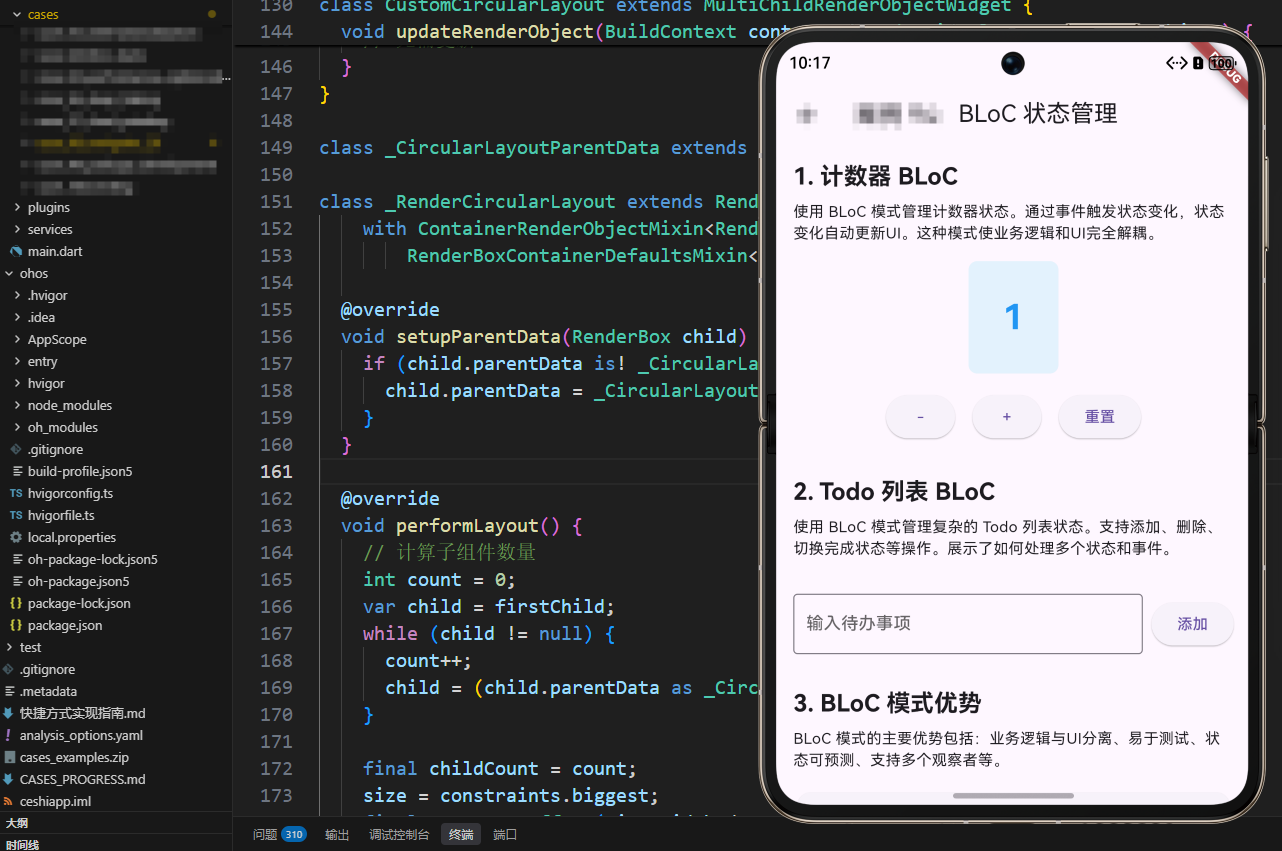
BLoC 模式的核心思想是单向数据流:UI 发送事件(Event)到 BLoC,BLoC 处理事件并产生新的状态(State),状态通过 Stream 流式传递给 UI,UI 根据状态更新界面。这种模式使得业务逻辑和 UI 完全解耦,便于测试和维护。
一、BLoC 模式基础架构
BLoC 模式基于 Stream 和 Sink 的概念。Stream 用于输出状态,Sink 用于接收事件。这种设计使得状态变化可以异步处理,非常适合处理网络请求、数据库操作等异步操作。
计数器 BLoC 实现
class CounterBloc {
  int _counter = 0;
  final _counterController = StreamController<int>.broadcast();

  Stream<int> get counterStream => _counterController.stream;

  void addEvent(CounterEvent event) {
    switch (event) {
      case CounterEvent.increment:
        _counter++;
        break;
      case CounterEvent.decrement:
        _counter--;
        break;
      case CounterEvent.reset:
        _counter = 0;
        break;
    }
    _counterController.add(_counter);
  }

  void dispose() {
    _counterController.close();
  }
}
代码解释: 这是 BLoC 的基础实现。_counter 是内部状态,_counterController 是 StreamController,用于管理状态流。broadcast() 方法创建了一个广播流,允许多个监听者同时监听。counterStream getter 暴露状态流,UI 可以通过 StreamBuilder 监听状态变化。addEvent 方法接收事件,根据事件类型更新状态,然后通过 add 方法将新状态推送到流中。dispose 方法关闭流控制器,释放资源。
事件枚举定义
enum CounterEvent { increment, decrement, reset }
代码解释: 使用枚举定义事件类型,这是类型安全的方式。枚举比字符串更安全,因为编译器可以检查类型错误。在实际应用中,事件可能包含数据,这时应该使用类而不是枚举。
UI 中的状态监听
StreamBuilder<int>(
  stream: _counterBloc.counterStream,
  initialData: 0,
  builder: (context, snapshot) {
    return Text('${snapshot.data ?? 0}');
  },
)
代码解释: StreamBuilder 是 Flutter 提供的用于监听 Stream 的 Widget。它自动监听流的变化,当有新数据时重建子 Widget。initialData 提供初始值,避免在流还没有数据时显示 null。snapshot.data 包含当前的状态值,?? 0 提供默认值。这种模式使得 UI 完全响应式,状态变化自动反映到界面上。
二、复杂状态管理:Todo 列表示例
对于更复杂的场景,如 Todo 列表,需要管理多个状态和多个事件。这展示了 BLoC 模式处理复杂状态的能力。
Todo 数据模型
class TodoItem {
  final String id;
  final String title;
  final bool completed;

  TodoItem({
    required this.id,
    required this.title,
    this.completed = false,
  });

  TodoItem copyWith({String? title, bool? completed}) {
    return TodoItem(
      id: id,
      title: title ?? this.title,
      completed: completed ?? this.completed,
    );
  }
}
代码解释: TodoItem 是不可变的数据模型,这是函数式编程的最佳实践。不可变对象更容易测试和调试,因为状态不会意外改变。copyWith 方法用于创建对象的副本并修改部分属性,这是更新不可变对象的常用方式。
Todo BLoC 实现
class TodoBloc {
  final List<TodoItem> _todos = [];
  final _todosController = StreamController<List<TodoItem>>.broadcast();
  final textController = TextEditingController();

  Stream<List<TodoItem>> get todosStream => _todosController.stream;

  TodoBloc() {
    _todosController.add(_todos);
  }

  void addEvent(TodoEvent event) {
    if (event is TodoAddEvent) {
      final title = textController.text.trim();
      if (title.isNotEmpty) {
        _todos.add(TodoItem(
          id: DateTime.now().millisecondsSinceEpoch.toString(),
          title: title,
        ));
        textController.clear();
      }
    } else if (event is TodoDeleteEvent) {
      _todos.removeWhere((todo) => todo.id == event.id);
    } else if (event is TodoToggleEvent) {
      final index = _todos.indexWhere((todo) => todo.id == event.id);
      if (index != -1) {
        _todos[index] = _todos[index].copyWith(completed: !_todos[index].completed);
      }
    }
    _todosController.add(List.from(_todos));
  }

  void dispose() {
    textController.dispose();
    _todosController.close();
  }
}
代码解释: Todo BLoC 管理一个 Todo 列表。_todos 是内部状态列表,_todosController 管理状态流。构造函数中立即发送初始状态(空列表),确保 UI 有初始数据。addEvent 方法根据事件类型执行不同的操作:添加、删除或切换完成状态。注意在更新状态后,使用 List.from(_todos) 创建新列表,而不是直接发送 _todos,这确保了状态的不变性。dispose 方法清理资源,包括文本控制器和流控制器。
事件类定义
abstract class TodoEvent {
  static TodoAddEvent add = TodoAddEvent();
  static TodoDeleteEvent delete(String id) => TodoDeleteEvent(id);
  static TodoToggleEvent toggle(String id) => TodoToggleEvent(id);
}

class TodoAddEvent extends TodoEvent {
  TodoAddEvent();
}

class TodoDeleteEvent extends TodoEvent {
  final String id;
  TodoDeleteEvent(this.id);
}

class TodoToggleEvent extends TodoEvent {
  final String id;
  TodoToggleEvent(this.id);
}
代码解释: 使用抽象类和继承定义事件类型。每个具体事件类可以包含数据(如 id),这使得事件更加灵活。静态工厂方法提供了便捷的事件创建方式。在实际应用中,可以使用 freezed 包来生成不可变的事件类,减少样板代码。
三、BLoC 模式的优势
业务逻辑与 UI 分离
BLoC 模式将业务逻辑完全从 UI 中分离出来,UI 只负责显示状态和发送事件。这种分离使得代码更加清晰,业务逻辑可以独立测试,UI 可以独立开发。
易于测试
由于业务逻辑在 BLoC 中,可以轻松编写单元测试。测试时只需要创建 BLoC 实例,发送事件,然后验证状态变化,不需要构建 UI。
状态可预测
BLoC 模式使用单向数据流,状态变化是可预测的。给定相同的事件序列,总是产生相同的状态序列。这使得调试变得容易,可以使用状态快照和重放来调试问题。
支持多个观察者
由于使用 Stream,多个 Widget 可以同时监听同一个 BLoC 的状态变化。这在需要多个地方显示相同数据的场景中非常有用。
异步处理
BLoC 模式天然支持异步操作。可以在事件处理中进行网络请求、数据库操作等异步操作,然后通过 Stream 异步推送结果。
四、OpenHarmony PC 端适配要点
在 OpenHarmony PC 端适配 BLoC 模式时,需要注意几个关键点:
状态持久化
PC 端应用通常需要持久化状态,以便用户关闭应用后重新打开时恢复状态。可以使用 shared_preferences 或数据库来持久化 BLoC 的状态。
性能优化
PC 端虽然性能更强,但对于大量数据的列表,仍需要注意性能。可以使用 StreamBuilder 的 buildWhen 参数来控制何时重建,避免不必要的重建。
多窗口支持
PC 端可能支持多窗口,不同窗口可能需要共享状态。可以使用全局的 BLoC 实例,或者使用状态管理方案(如 Provider)来共享 BLoC。
键盘快捷键
PC 端用户习惯使用键盘快捷键。可以在 BLoC 中处理键盘事件,或者使用 Shortcuts Widget 将快捷键映射到事件。
五、最佳实践
使用 flutter_bloc 包
对于生产环境,建议使用 flutter_bloc 包,它提供了更完善的 BLoC 实现,包括错误处理、状态转换、BlocObserver 等功能。
错误处理
BLoC 应该处理错误并转换为错误状态,而不是抛出异常。可以使用 StreamController 的 addError 方法发送错误,UI 可以通过 StreamBuilder 的 snapshot.hasError 检查错误。
状态不可变
状态应该是不可变的,每次状态变化都应该创建新对象。这确保了状态的可预测性和可调试性。
资源清理
BLoC 应该实现 dispose 方法,清理所有资源,包括 StreamController、Timer、Subscription 等。这防止内存泄漏。
六、Flutter 桥接 OpenHarmony 原理与 EntryAbility.ets 实现
BLoC 状态管理在 OpenHarmony 平台上的实现可能需要与原生系统进行交互,如状态持久化、系统服务调用等。理解 Flutter 与 OpenHarmony 的桥接机制对于实现这些功能至关重要。
Flutter 桥接 OpenHarmony 的架构原理
Flutter 与 OpenHarmony 的桥接基于 Platform Channel 机制,这是一个异步、类型安全的通信系统。BLoC 模式中的异步操作(如网络请求、数据库操作)可能需要调用 OpenHarmony 的原生能力。Platform Channel 提供了 Flutter 与 OpenHarmony 之间的双向通信通道,使得 BLoC 可以无缝访问原生功能。
状态持久化桥接: BLoC 的状态持久化通常需要将状态保存到本地存储。在 OpenHarmony 平台上,可以使用 shared_preferences 插件,它通过 Platform Channel 调用 OpenHarmony 的持久化存储 API。当 BLoC 需要保存状态时,通过 Platform Channel 将数据传递给原生层,原生层使用 OpenHarmony 的存储机制保存数据。读取时,原生层从存储中读取数据,通过 Platform Channel 返回给 Flutter。
EntryAbility.ets 中的状态管理桥接配置
import { FlutterAbility, FlutterEngine } from '@ohos/flutter_ohos';
import { GeneratedPluginRegistrant } from '../plugins/GeneratedPluginRegistrant';
import { MethodChannel } from '@ohos/flutter_ohos';
import { dataPreferences } from '@kit.ArkData';

export default class EntryAbility extends FlutterAbility {
  private _stateChannel: MethodChannel | null = null;
  private _preferences: dataPreferences.Preferences | null = null;

  configureFlutterEngine(flutterEngine: FlutterEngine) {
    super.configureFlutterEngine(flutterEngine)
    GeneratedPluginRegistrant.registerWith(flutterEngine)
    this._setupStateBridge(flutterEngine)
  }

  async _setupStateBridge(flutterEngine: FlutterEngine) {
    this._stateChannel = new MethodChannel(
      flutterEngine.dartExecutor,
      'com.example.app/state'
    );

    // 初始化数据存储
    const context = this.context;
    this._preferences = await dataPreferences.getPreferences(context, 'bloc_state');

    this._stateChannel.setMethodCallHandler(async (call, result) => {
      if (call.method === 'saveState') {
        const key = call.arguments['key'] as string;
        const value = call.arguments['value'] as string;
        await this._preferences.put(key, value);
        result.success(true);
      } else if (call.method === 'loadState') {
        const key = call.arguments['key'] as string;
        const value = await this._preferences.get(key, '');
        result.success(value);
      } else if (call.method === 'clearState') {
        await this._preferences.clear();
        result.success(true);
      } else {
        result.notImplemented();
      }
    });
  }
}
代码解释: _setupStateBridge 方法设置状态管理桥接。创建 MethodChannel 用于 Flutter 与 OpenHarmony 之间的状态数据传递。使用 OpenHarmony 的 dataPreferences API 实现持久化存储,这是 OpenHarmony 提供的键值对存储机制。saveState 方法保存状态数据,loadState 方法加载状态数据,clearState 方法清空所有状态。这些方法通过 Platform Channel 暴露给 Flutter,使得 BLoC 可以实现状态持久化。
BLoC 中的状态持久化实现
在 Flutter 端的 BLoC 中,可以使用 Platform Channel 实现状态持久化:
class CounterBloc {
  int _counter = 0;
  final _counterController = StreamController<int>.broadcast();
  static const _stateChannel = MethodChannel('com.example.app/state');

  Stream<int> get counterStream => _counterController.stream;

  CounterBloc() {
    _loadState();
  }

  Future<void> _loadState() async {
    try {
      final savedValue = await _stateChannel.invokeMethod('loadState', {'key': 'counter'});
      if (savedValue != null && savedValue.isNotEmpty) {
        _counter = int.parse(savedValue);
        _counterController.add(_counter);
      }
    } catch (e) {
      print('加载状态失败: $e');
    }
  }

  Future<void> _saveState() async {
    try {
      await _stateChannel.invokeMethod('saveState', {
        'key': 'counter',
        'value': _counter.toString(),
      });
    } catch (e) {
      print('保存状态失败: $e');
    }
  }

  void addEvent(CounterEvent event) {
    switch (event) {
      case CounterEvent.increment:
        _counter++;
        break;
      case CounterEvent.decrement:
        _counter--;
        break;
      case CounterEvent.reset:
        _counter = 0;
        break;
    }
    _counterController.add(_counter);
    _saveState(); // 状态变化时自动保存
  }

  void dispose() {
    _saveState(); // 销毁前保存状态
    _counterController.close();
  }
}
代码解释: BLoC 在构造函数中加载保存的状态,确保应用重启后可以恢复状态。_loadState 方法通过 Platform Channel 从 OpenHarmony 存储中读取状态,如果读取成功,恢复计数器值并通知 UI。_saveState 方法将当前状态保存到 OpenHarmony 存储中。在 addEvent 方法中,状态变化后自动保存,确保状态实时持久化。在 dispose 方法中,销毁前再次保存状态,防止数据丢失。
系统服务桥接
BLoC 可能需要访问 OpenHarmony 的系统服务,如网络状态、设备信息等:
import { networkManager } from '@kit.NetworkKit';
import { deviceInfo } from '@kit.DeviceInfoKit';

this._stateChannel.setMethodCallHandler(async (call, result) => {
  if (call.method === 'getNetworkState') {
    const networkType = networkManager.getDefaultNetSync();
    result.success({
      isConnected: networkType !== null,
      type: networkType?.netCapabilities?.bearerTypes?.[0] || 'unknown'
    });
  } else if (call.method === 'getDeviceInfo') {
    const info = deviceInfo.getDeviceInfoSync();
    result.success({
      model: info.model,
      manufacturer: info.manufacturer,
      osVersion: info.osFullName
    });
  } else {
    result.notImplemented();
  }
});
代码解释: 这里展示了如何为 BLoC 提供系统服务访问。getNetworkState 方法获取网络状态,BLoC 可以根据网络状态调整行为,如离线时禁用某些功能。getDeviceInfo 方法获取设备信息,BLoC 可以根据设备信息优化用户体验。这些系统服务通过 Platform Channel 暴露给 Flutter,使得 BLoC 可以访问 OpenHarmony 的原生能力。
应用生命周期桥接
BLoC 可能需要响应应用的生命周期变化,如应用进入后台时暂停某些操作:
export default class EntryAbility extends FlutterAbility {
  onForeground() {
    super.onForeground();
    if (this._stateChannel) {
      this._stateChannel.invokeMethod('onAppForeground');
    }
  }

  onBackground() {
    super.onBackground();
    if (this._stateChannel) {
      this._stateChannel.invokeMethod('onAppBackground');
    }
  }
}
代码解释: EntryAbility 的生命周期方法可以通知 Flutter 应用状态变化。onForeground 时通知 Flutter 应用进入前台,BLoC 可以恢复暂停的操作。onBackground 时通知 Flutter 应用进入后台,BLoC 可以暂停非关键操作以节省资源。这种桥接机制使得 BLoC 可以响应应用的生命周期,实现更智能的状态管理。
总结
BLoC 模式是一种强大而灵活的状态管理方案。通过将业务逻辑从 UI 中分离,它提供了清晰、可测试、可维护的代码结构。在 OpenHarmony PC 端,充分利用 BLoC 模式的优势,可以创建高效、可靠的应用。同时,要注意状态持久化、性能优化、多窗口支持等问题,确保在不同场景下都能提供良好的用户体验。
状态管理是应用架构的核心,选择合适的模式对项目的成功至关重要。BLoC 模式虽然不是唯一的选择,但它提供了很好的平衡:既强大又相对简单,既灵活又有一定的约束。通过不断学习和实践,我们可以掌握更多状态管理技术,创建出更加优秀的应用。
欢迎加入开源鸿蒙跨平台社区:https://openharmonycrossplatform.csdn.net

讨论HarmonyOS开发技术,专注于API与组件、DevEco Studio、测试、元服务和应用上架分发等。
更多推荐


 8
8 0
0- 0


 已为社区贡献5条内容

所有评论(0)