Qt-for-鸿蒙PC-动画效果集合开发实战
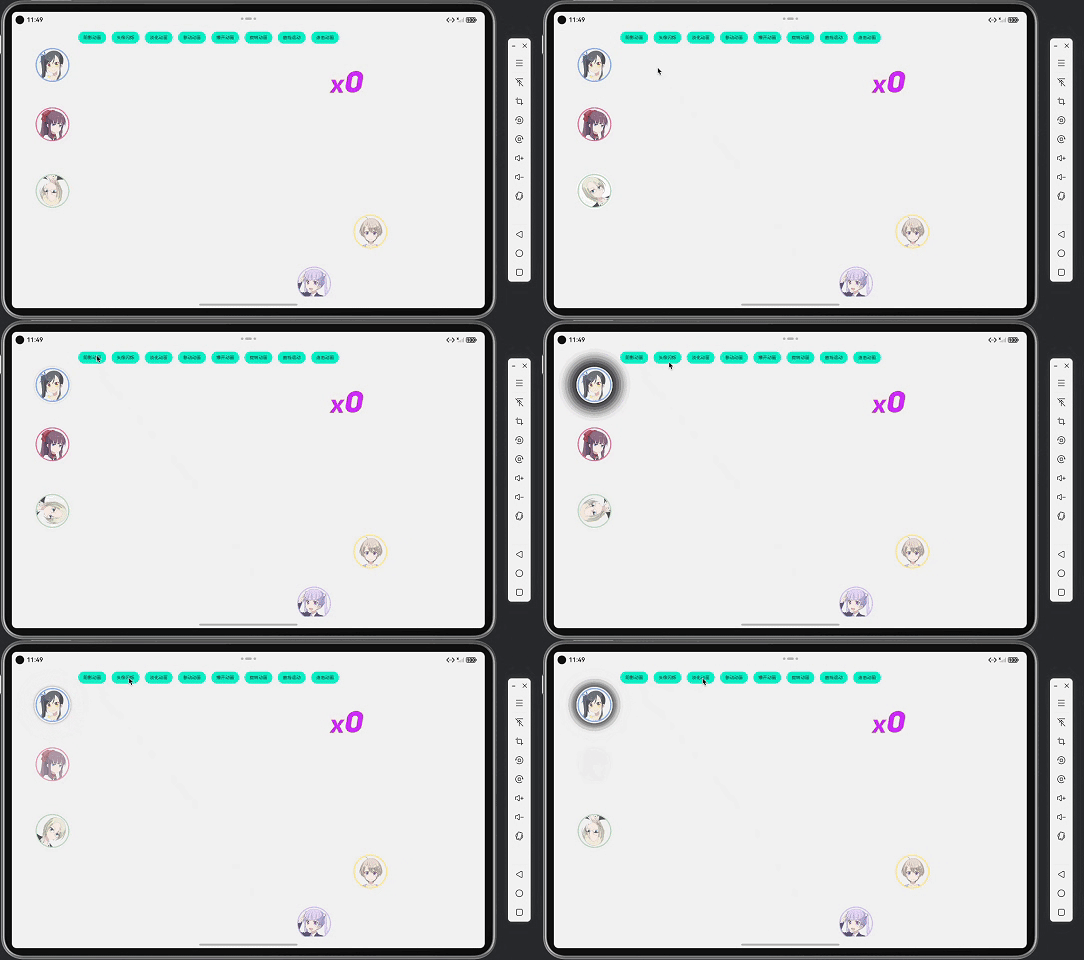
本文介绍了基于Qt/QML框架实现的8种HarmonyOS动画效果,包括阴影动画、头像闪烁、淡化动画等。项目采用QtQuick技术,通过PropertyAnimation、SequentialAnimation等核心组件实现多样化动画交互。每种动画都详细展示了实现原理与技术要点,如多层阴影渲染、透明度渐变控制等,具有组件化、高性能特点,适用于HarmonyOS应用开发中的UI动效需求。(150字)
目录
项目概述
项目地址:https://gitcode.com/szkygc/HarmonyOs_PC-PGC/blob/main/animation
项目背景
在HarmonyOS应用开发中,丰富的动画效果能够显著提升用户体验,使界面更加生动和吸引人。本项目基于Qt/QML框架,实现了8种不同类型的动画效果,展示了Qt for HarmonyOS在动画开发方面的强大能力。
项目特性
本项目实现的动画效果集合具有以下特性:
- ✅ 8种动画效果:阴影动画、头像闪烁、淡化动画、移动动画、爆开动画、旋转动画、曲线运动、连击动画
- ✅ 完整功能实现:涵盖位置、透明度、旋转、缩放等多种动画类型
- ✅ 响应式设计:支持不同屏幕尺寸,使用scaleFactor自动适配
- ✅ 性能优化:使用QML原生动画API,充分利用硬件加速
- ✅ 组件化设计:每个动画效果独立封装,便于复用和维护
- ✅ 精确控制:支持暂停、继续、重置等动画控制操作
动画效果列表
| 动画类型 | 描述 | 技术特点 |
|---|---|---|
| 阴影动画 | 圆形阴影从中心向外扩散再收缩 | 多层Rectangle + SequentialAnimation |
| 头像闪烁 | 图片透明度循环变化 | SequentialAnimation on opacity |
| 淡化动画 | 全屏图片淡入淡出效果 | Window + PropertyAnimation |
| 移动动画 | 图片在四个固定点间循环移动 | ParallelAnimation + 位置计算 |
| 爆开动画 | 多个图片从中心向四周散射 | Component动态创建 + 随机位置 |
| 旋转动画 | 图片持续旋转 | NumberAnimation on rotation |
| 曲线运动 | 图片沿预设路径移动 | SequentialAnimation + ParallelAnimation |
| 连击动画 | 数字递增显示效果 | Row + Image组合显示 |
技术栈选择
前端框架:Qt/QML
选择理由:
- 声明式动画:QML提供了丰富的声明式动画API,代码简洁直观
- 性能优势:基于OpenGL ES的渲染引擎,动画性能优异
- 跨平台能力:Qt for HarmonyOS保持了Qt的跨平台特性
- 组件化开发:QML组件系统便于代码组织和复用
核心技术点
- QtQuick 2.15:UI框架和动画系统
- PropertyAnimation:属性动画,用于位置、透明度、旋转等
- SequentialAnimation:顺序动画,用于组合多个动画步骤
- ParallelAnimation:并行动画,用于同时执行多个动画
- Component:动态组件创建,用于爆开动画
- Repeater:重复元素,用于阴影效果的多层实现
动画效果详解
1. 阴影动画(Shadow Animation)
效果描述:
圆形图片周围产生阴影效果,阴影半径从0逐渐增大到最大值,然后再收缩回0,形成呼吸灯效果。
实现原理:
Item {
    id: shadowContainer
    property real shadowRadius: 0

    // 使用Repeater创建多层阴影,实现平滑的阴影效果
    Repeater {
        model: 20
        Rectangle {
            anchors.centerIn: parent
            width: parent.width + shadowContainer.shadowRadius * 2 * (index / 20.0)
            height: parent.height + shadowContainer.shadowRadius * 2 * (index / 20.0)
            radius: 50 * scaleFactor + shadowContainer.shadowRadius * (index / 20.0)
            // 黑色阴影,透明度随半径和层级递减
            color: Qt.rgba(0, 0, 0, Math.max(0, 0.15 * (1 - index / 20.0) *
                (shadowContainer.shadowRadius / (50 * scaleFactor))))
            visible: shadowContainer.shadowRadius > 0
            z: -index - 1
        }
    }

    // 主图片
    Image {
        anchors.centerIn: parent
        source: "qrc:/animationTest/qrc/th-c11.png"
        z: 1
    }

    // 阴影半径动画
    SequentialAnimation on shadowRadius {
        id: shadowAnimation
        running: false
        loops: Animation.Infinite
        NumberAnimation {
            from: 0
            to: 50 * scaleFactor
            duration: 1000
            easing.type: Easing.InOutQuad
        }
        NumberAnimation {
            from: 50 * scaleFactor
            to: 0
            duration: 1000
            easing.type: Easing.InOutQuad
        }
    }
}
关键技术点:
- 多层阴影实现:使用
Repeater创建20层Rectangle,每层大小和透明度不同 - 透明度计算:
0.15 * (1 - index / 20.0) * (shadowRadius / maxRadius),确保阴影从内到外逐渐变淡 - SequentialAnimation:先放大后缩小,形成循环效果
- Easing.InOutQuad:使用缓动函数,使动画更自然
2. 头像闪烁动画(Opacity Flicker Animation)
效果描述:
图片透明度在1.0和0.0之间循环变化,形成闪烁效果。
实现原理:
Image {
    id: opacityEffectLabel
    source: "qrc:/animationTest/qrc/th-c4.png"

    SequentialAnimation on opacity {
        id: opacityEffectAnimation
        running: false
        loops: Animation.Infinite
        NumberAnimation {
            from: 1.0
            to: 0.0
            duration: 300  // 300ms淡出
            easing.type: Easing.InOutQuad
        }
        NumberAnimation {
            from: 0.0
            to: 1.0
            duration: 300  // 300ms淡入
            easing.type: Easing.InOutQuad
        }
    }
}
关键技术点:
- SequentialAnimation on opacity:直接在opacity属性上应用顺序动画
- duration设置:300ms的持续时间,既不会太快也不会太慢
- loops: Animation.Infinite:无限循环
3. 淡化动画(Fade Animation)
效果描述:
创建一个全屏窗口,显示图片并逐渐淡出,然后自动销毁。
实现原理:
function startOpacityAnimation() {
    if (!contentItem) {
        return
    }
    var fadeItem = fadeItemComponent.createObject(contentItem)
    if (fadeItem) {
        fadeItem.startFade()
    }
}

Component {
    id: fadeItemComponent

    Item {
        id: fadeItem
        anchors.fill: parent
        z: 1000

        Rectangle {
            anchors.fill: parent
            color: "transparent"

            Image {
                anchors.centerIn: parent
                width: 100 * root.scaleFactor
                height: 100 * root.scaleFactor
                source: "qrc:/animationTest/qrc/th-c1.png"
            }
        }

        SequentialAnimation {
            id: fadeAnimation

            PropertyAnimation {
                target: fadeItem
                property: "opacity"
                from: 1.0
                to: 0.0
                duration: 3000
            }

            onFinished: {
                fadeItem.destroy()
            }
        }

        function startFade() {
            fadeAnimation.start()
        }
    }
}
关键技术点:
- 动态组件创建:使用
Component.createObject()动态创建Item - 自动销毁:动画完成后调用
destroy()释放资源 - z-index管理:设置
z: 1000确保在最上层显示
4. 移动动画(Move Animation)
效果描述:
图片在四个固定点之间循环移动:(247, 640) → (247, 120) → (768, 120) → (768, 640) → (247, 640)。
实现原理:
Item {
    id: moveLabelContainer
    x: 768 * scaleFactor
    y: 640 * scaleFactor

    Image {
        anchors.fill: parent
        source: "qrc:/animationTest/qrc/th-c1.png"
    }
}

property bool moveAnimationPaused: false
property bool moveAnimationStarted: false

function toggleMoveAnimation() {
    // 如果正在运行,暂停
    if (moveParallelAnimation.running) {
        moveParallelAnimation.pause()
        moveAnimationPaused = true
        return
    }

    // 如果已暂停,恢复
    if (moveAnimationPaused) {
        moveAnimationPaused = false
        moveParallelAnimation.start()
        return
    }

    // 如果动画已启动过但已完成,继续下一个移动
    if (moveAnimationStarted) {
        continueMoveAnimation()
        return
    }

    // 第一次启动
    moveAnimationStarted = true
    var currentX = moveLabelContainer.x
    var currentY = moveLabelContainer.y

    moveXAnimation.from = currentX
    moveXAnimation.to = 247 * scaleFactor
    moveYAnimation.from = currentY
    moveYAnimation.to = currentY

    moveParallelAnimation.start()
}

function continueMoveAnimation() {
    moveAnimationPaused = false

    var currentX = moveLabelContainer.x
    var currentY = moveLabelContainer.y
    var target247 = 247 * scaleFactor
    var target768 = 768 * scaleFactor
    var target120 = 120 * scaleFactor
    var target640 = 640 * scaleFactor

    var tolerance = 5 * scaleFactor
    var nextX = currentX
    var nextY = currentY

    // 根据当前位置决定下一个目标位置
    if (Math.abs(currentX - target247) < tolerance && Math.abs(currentY - target640) < tolerance) {
        // (247, 640) → (247, 120)
        nextX = currentX
        nextY = target120
    } else if (Math.abs(currentX - target247) < tolerance && Math.abs(currentY - target120) < tolerance) {
        // (247, 120) → (768, 120)
        nextX = target768
        nextY = currentY
    } else if (Math.abs(currentX - target768) < tolerance && Math.abs(currentY - target120) < tolerance) {
        // (768, 120) → (768, 640)
        nextX = currentX
        nextY = target640
    } else if (Math.abs(currentX - target768) < tolerance && Math.abs(currentY - target640) < tolerance) {
        // (768, 640) → (247, 640)
        nextX = target247
        nextY = currentY
    }

    moveXAnimation.from = currentX
    moveXAnimation.to = nextX
    moveYAnimation.from = currentY
    moveYAnimation.to = nextY

    moveParallelAnimation.start()
}

ParallelAnimation {
    id: moveParallelAnimation

    PropertyAnimation {
        id: moveXAnimation
        target: moveLabelContainer
        property: "x"
        duration: 2000
    }

    PropertyAnimation {
        id: moveYAnimation
        target: moveLabelContainer
        property: "y"
        duration: 2000
    }

    onFinished: {
        if (!moveAnimationPaused) {
            continueMoveAnimation()
        }
    }
}
关键技术点:
- ParallelAnimation:同时动画x和y坐标,实现平滑的位置移动
- 位置判断:使用容差(tolerance)判断当前位置,避免浮点数误差
- 状态管理:通过
moveAnimationPaused和moveAnimationStarted管理动画状态 - 循环逻辑:在
onFinished中自动调用continueMoveAnimation()实现循环
5. 爆开动画(Pop Animation)
效果描述:
初始图片从右下角移动到中心,然后多个图片从中心向四周随机方向散射,最后整体淡出。
实现原理:
// PopAnimation.qml
Item {
    id: root
    property int animationNum: 12
    property bool animationRunning: false

    // 初始移动元素
    Image {
        id: initialItem
        source: "qrc:/animationTest/qrc/th-c1.png"
        visible: false

        ParallelAnimation {
            id: moveAnimation

            PropertyAnimation {
                id: moveXAnim
                target: initialItem
                property: "x"
                duration: 1000
            }

            PropertyAnimation {
                id: moveYAnim
                target: initialItem
                property: "y"
                duration: 1000
            }

            PropertyAnimation {
                id: moveOpacityAnim
                target: initialItem
                property: "opacity"
                from: 1.0
                to: 0.0
                duration: 1000
            }

            onFinished: {
                root.startPopAnimation()
            }
        }

        function startMove() {
            var startX = root.width - initialItem.width
            var startY = root.height - initialItem.height
            var endX = (root.width - initialItem.width) / 2
            var endY = (root.height - initialItem.height) / 2

            initialItem.x = startX
            initialItem.y = startY
            initialItem.opacity = 1.0
            initialItem.visible = true

            moveXAnim.from = startX
            moveXAnim.to = endX
            moveYAnim.from = startY
            moveYAnim.to = endY

            moveAnimation.start()
        }
    }

    function startPopAnimation() {
        // 显示所有元素并启动散射动画
        for (var i = 0; i < animationItems.length; i++) {
            if (animationItems[i]) {
                animationItems[i].visible = true
                animationItems[i].startPopAnimation()
            }
        }

        // 开始整体淡出动画
        fadeOutAnimation.start()
    }

    // 整体淡出动画:0.9之前保持1.0,然后150ms内淡出
    SequentialAnimation {
        id: fadeOutAnimation

        PauseAnimation {
            duration: 1350  // 0.9 * 1500 = 1350ms
        }

        PropertyAnimation {
            target: root
            property: "opacity"
            from: 1.0
            to: 0.0
            duration: 150  // 1500 - 1350 = 150ms
        }

        onFinished: {
            root.opacity = 1.0
            root.animationRunning = false
            resetAllItems()
        }
    }

    Component {
        id: animationItemComponent

        Image {
            id: popItem
            property int itemIndex: 0

            function startPopAnimation() {
                // 重置到中心位置
                var centerX = (root.width - width) / 2
                var centerY = (root.height - height) / 2

                x = centerX
                y = centerY

                // 随机目标位置
                var descX = root.width - width
                var descY = root.height - height
                var targetX = Math.floor(Math.random() * Math.max(1, descX))
                var targetY = Math.floor(Math.random() * Math.max(1, descY))

                // 设置动画值
                popXAnimation.from = centerX
                popXAnimation.to = targetX
                popYAnimation.from = centerY
                popYAnimation.to = targetY

                // 启动动画
                popXAnimation.start()
                popYAnimation.start()
            }

            PropertyAnimation on x {
                id: popXAnimation
                duration: 1500
                easing.type: Easing.InQuad
                running: false
            }

            PropertyAnimation on y {
                id: popYAnimation
                duration: 1500
                easing.type: Easing.InQuad
                running: false
            }
        }
    }
}
关键技术点:
- 两阶段动画:先移动初始元素到中心,再启动散射动画
- 动态组件创建:使用
Component.createObject()创建多个散射元素 - 随机位置计算:
Math.floor(Math.random() * Math.max(1, descX))实现随机位置生成 - 整体淡出时机:使用
PauseAnimation实现0.9时间点前保持不透明,然后快速淡出
6. 旋转动画(Rotation Animation)
效果描述:
图片持续旋转,支持启动和停止控制。
实现原理:
// RotationLabel.qml
Item {
    id: root
    property string imageSource: ""
    property bool isAnimating: false

    Image {
        anchors.fill: parent
        source: imageSource
        fillMode: Image.PreserveAspectFit
    }

    NumberAnimation on rotation {
        id: rotationAnimation
        from: 0
        to: 360
        duration: 2000
        loops: Animation.Infinite
        running: root.isAnimating
    }

    function toggleAnimation() {
        isAnimating = !isAnimating
    }
}
关键技术点:
- NumberAnimation on rotation:直接在rotation属性上应用动画
- loops: Animation.Infinite:无限循环旋转
- running绑定:通过
isAnimating属性控制动画运行状态
7. 曲线运动动画(Curve Animation)
效果描述:
图片沿预设的曲线路径移动,经过多个关键点。
实现原理:
Image {
    id: curveLabel
    x: 920 * scaleFactor
    y: 500 * scaleFactor
    source: "qrc:/animationTest/qrc/th-c12.png"
}

function startCurveAnimation() {
    if (curveAnimation.running) return

    curveLabel.x = 920 * scaleFactor
    curveLabel.y = 500 * scaleFactor
    curveAnimation.start()
}

SequentialAnimation {
    id: curveAnimation

    // 第一阶段:(920, 500) → (500, 300)
    ParallelAnimation {
        PropertyAnimation {
            target: curveLabel
            property: "x"
            from: 920 * scaleFactor
            to: 500 * scaleFactor
            duration: 750
        }
        PropertyAnimation {
            target: curveLabel
            property: "y"
            from: 500 * scaleFactor
            to: 300 * scaleFactor
            duration: 750
        }
    }

    // 第二阶段:(500, 300) → (310, 270)
    ParallelAnimation {
        PropertyAnimation {
            target: curveLabel
            property: "x"
            from: 500 * scaleFactor
            to: 310 * scaleFactor
            duration: 750
        }
        PropertyAnimation {
            target: curveLabel
            property: "y"
            from: 300 * scaleFactor
            to: 270 * scaleFactor
            duration: 750
        }
    }
}
关键技术点:
- SequentialAnimation + ParallelAnimation:组合使用实现多段路径动画
- 路径规划:通过多个关键点定义曲线路径
- 重置位置:每次启动前重置到起始位置
8. 连击动画(Combo Animation)
效果描述:
显示数字递增效果,每次点击数字加1,数字由多个图片组合显示。
实现原理:
// ComBo.qml
Item {
    id: root
    property int comboValue: 0

    Row {
        anchors.centerIn: parent
        spacing: 2 * scaleFactor

        Repeater {
            model: comboDigits.length
            Image {
                width: 30 * scaleFactor
                height: 40 * scaleFactor
                source: "qrc:/number/qrc/number/z" + comboDigits[index] + ".png"
                fillMode: Image.PreserveAspectFit
            }
        }
    }

    property var comboDigits: []

    function increment() {
        comboValue++
        updateDigits()
    }

    function updateDigits() {
        var digits = []
        var value = comboValue

        if (value === 0) {
            digits.push(0)
        } else {
            while (value > 0) {
                digits.unshift(value % 10)
                value = Math.floor(value / 10)
            }
        }

        comboDigits = digits
    }

    Component.onCompleted: {
        updateDigits()
    }
}
关键技术点:
- 数字分解:将整数分解为各位数字数组
- Repeater + Image:使用Repeater动态创建数字图片
- 图片资源:使用预制的数字图片(z0.png ~ z9.png)组合显示
核心实现技术
1. 动画状态管理
问题:
移动动画需要支持暂停、继续、循环等功能,需要精确的状态管理。
解决方案:
property bool moveAnimationPaused: false
property bool moveAnimationStarted: false

function toggleMoveAnimation() {
    if (moveParallelAnimation.running) {
        // 正在运行 → 暂停
        moveParallelAnimation.pause()
        moveAnimationPaused = true
    } else if (moveAnimationPaused) {
        // 已暂停 → 继续
        moveAnimationPaused = false
        moveParallelAnimation.start()
    } else if (moveAnimationStarted) {
        // 已完成 → 继续下一个移动
        continueMoveAnimation()
    } else {
        // 第一次启动
        // ...
    }
}
关键点:
- 使用布尔标志位管理状态
- 区分"暂停"和"停止"两种状态
- 在
onFinished中自动继续下一个动画
2. 位置计算与容差处理
问题:
浮点数计算可能导致位置判断不准确,影响动画循环。
解决方案:
var tolerance = 5 * scaleFactor

if (Math.abs(currentX - target247) < tolerance &&
    Math.abs(currentY - target640) < tolerance) {
    // 当前位置匹配目标位置
    nextX = target247
    nextY = target120
}
关键点:
- 使用容差(tolerance)处理浮点数误差
- 容差需要考虑scaleFactor的影响
- 确保动画能够正确循环
3. 动态组件创建与销毁
问题:
爆开动画和淡化动画需要动态创建和销毁组件,避免内存泄漏。
解决方案:
function startOpacityAnimation() {
    var fadeItem = fadeItemComponent.createObject(contentItem)
    if (fadeItem) {
        fadeItem.startFade()
    }
}

SequentialAnimation {
    onFinished: {
        fadeItem.destroy()  // 动画完成后销毁
    }
}
关键点:
- 使用
Component.createObject()动态创建 - 动画完成后调用
destroy()释放资源 - 检查创建是否成功,避免空指针
4. 尺寸初始化处理
问题:
组件创建时 width和 height可能为0,导致位置计算错误。
解决方案:
function startMove() {
    if (root.width <= 0 || root.height <= 0) {
        Qt.callLater(function() {
            if (root.width > 0 && root.height > 0) {
                startMove()
            }
        })
        return
    }
    // 正常处理...
}
关键点:
- 检查尺寸是否已初始化
- 使用
Qt.callLater延迟重试 - 避免在尺寸为0时进行计算
5. 随机数生成
问题:
需要生成随机位置,确保动画效果的随机性和多样性。
解决方案:
var targetX = Math.floor(Math.random() * Math.max(1, descX))
var targetY = Math.floor(Math.random() * Math.max(1, descY))
关键点:
Math.random()返回0-1之间的浮点数Math.floor()向下取整,得到整数位置Math.max(1, descX)防止除零错误,确保随机数范围有效
开发要点与技巧
1. 响应式设计
scaleFactor的使用:
readonly property real scaleFactor: width > 1000 ? 2.0 : 1.0

Item {
    x: 768 * scaleFactor
    y: 640 * scaleFactor
    width: 100 * scaleFactor
    height: 100 * scaleFactor
}
最佳实践:
- 所有位置和尺寸都乘以
scaleFactor - 使用
readonly property确保scaleFactor不会被修改 - 根据屏幕尺寸自动调整缩放比例
2. 动画性能优化
避免不必要的重绘:
// 好的做法:只在需要时运行动画
SequentialAnimation on opacity {
    running: root.visible && root.text !== ""
    // ...
}

// 避免:始终运行的动画
SequentialAnimation on opacity {
    running: true  // 即使不可见也运行,浪费资源
    // ...
}
最佳实践:
- 动画只在组件可见时运行
- 使用
loops: Animation.Infinite而非手动循环 - 合理设置
duration,避免过短或过长
3. 组件生命周期管理
正确的资源清理:
Component {
    id: fadeItemComponent

    Item {
        SequentialAnimation {
            onFinished: {
                // 动画完成后清理资源
                fadeItem.destroy()
            }
        }
    }
}
最佳实践:
- 动态创建的组件必须及时销毁
- 在动画完成时清理资源
- 避免内存泄漏
4. 状态同步
确保状态一致性:
function continueMoveAnimation() {
    // 清除暂停标志
    moveAnimationPaused = false

    // 计算下一个位置
    // ...

    // 设置动画值
    moveXAnimation.from = currentX
    moveXAnimation.to = nextX
    // ...

    // 启动动画
    moveParallelAnimation.start()
}
最佳实践:
- 在函数开始时清除相关标志
- 确保动画值在启动前正确设置
- 避免状态不一致导致的bug
5. 错误处理
边界情况处理:
function startPopAnimation() {
    if (!contentItem) {
        return  // 提前返回,避免错误
    }

    var popItem = popAnimationComponent.createObject(contentItem)
    if (popItem) {
        popItem.startAnimation()
    }
    // 创建失败时静默处理,不抛出异常
}
最佳实践:
- 检查必要的对象是否存在
- 检查动态创建是否成功
- 静默处理错误,避免应用崩溃
总结与展望
技术总结
本项目基于Qt for HarmonyOS QML平台,成功实现了8种不同类型的动画效果:
- 动画API丰富:QML提供了完整的动画API,能够满足各种动画需求
- 性能优异:基于OpenGL ES的渲染引擎,动画流畅度好
- 代码简洁:声明式语法使代码更易读易维护
- 组件化设计:每个动画效果独立封装,便于复用
性能优化建议
- 合理使用动画:避免同时运行过多动画,影响性能
- 及时清理资源:动态创建的组件要及时销毁
- 条件运行:动画只在需要时运行,节省资源
- 优化重绘:使用
clip属性限制绘制区域
扩展方向
- 动画组合:支持多个动画效果组合使用
- 自定义缓动:支持自定义缓动函数
- 动画录制:支持动画录制和回放功能
- 性能监控:添加动画性能监控工具
- 更多效果:添加弹性动画、路径动画等更多效果
最佳实践
- 状态管理:使用明确的标志位管理动画状态
- 错误处理:处理边界情况和异常情况
- 资源管理:及时清理动态创建的资源
- 响应式设计:使用scaleFactor适配不同屏幕
- 代码注释:为关键逻辑添加注释,便于维护
适用场景
动画效果集合适用于以下场景:
- 游戏开发:角色动画、特效展示
- UI增强:页面切换动画、交互动画
- 数据可视化:图表动画、数据展示动画
- 教育应用:演示动画、交互教学
- 营销展示:产品展示动画、广告动画
相关资源
- Qt官方文档:https://doc.qt.io/qt-5/qtquick-index.html
- QML动画文档:https://doc.qt.io/qt-5/qtquick-statesanimations-animations.html
- PropertyAnimation文档:https://doc.qt.io/qt-5/qml-qtquick-propertyanimation.html
- HarmonyOS开发文档:https://developer.harmonyos.com/

讨论HarmonyOS开发技术,专注于API与组件、DevEco Studio、测试、元服务和应用上架分发等。
更多推荐


 25
25 0
0- 0


 已为社区贡献216条内容

所有评论(0)