HarmonyOS ArkTS 组件进阶 - Polyline 自学指南
1. Polyline 是什么?
Polyline 是 ArkUI 提供的 折线绘制组件,简单说就是:给它一串点坐标,它会按顺序把这些点用线段连起来。
特点:
-
支持 任意多个点,适合绘制路径、折线图、轨迹线等;
-
可以控制:
- 宽高(绘制区域);
- 线条颜色、粗细、透明度;
- 虚线样式(线段长度/间隔长度);
- 拐角样式(圆角 / 斜接 / 斜切);
- 端点样式(方头 / 圆头等);
- 抗锯齿;
-
支持
attributeModifier动态更新属性(API 18+); -
支持通过
AttributeUpdater.updateConstructorParams更新构造参数(API 20+)。
基础信息:
-
组件名:
Polyline -
子组件:无(它就是绘制一条线,不是容器)
-
支持版本:
- API 7 起支持;
- ArkTS 卡片支持:API 9+;
- 元服务 API:API 11+;
PolylineOptions标准化:API 18+;updateConstructorParams:API 20+。
适用场景举例:
- 简单折线图、趋势线;
- 地图/路径轨迹(示意);
- 装饰线条(例如波浪线、路线引导);
- 连线类交互(比如“步骤 1→2→3”的可视化)。
2. 快速上手:画两条折线试试
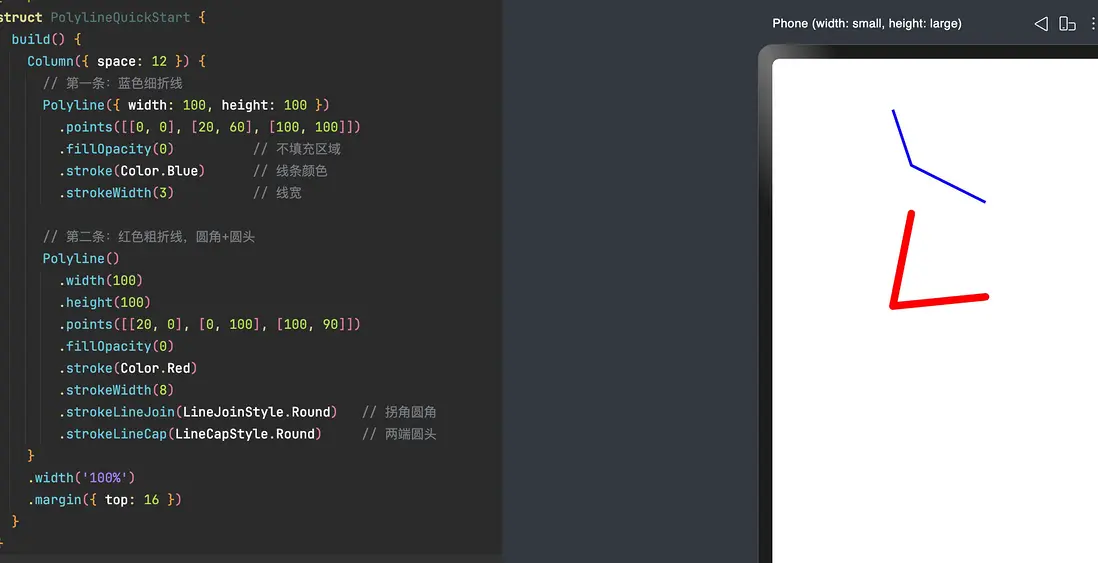
先不想太多,把它画出来再说。
// xxx.ets
@Entry
@Component
struct PolylineQuickStart {
  build() {
    Column({ space: 12 }) {
      // 第一条:蓝色细折线
      Polyline({ width: 100, height: 100 })
        .points([[0, 0], [20, 60], [100, 100]])
        .fillOpacity(0)          // 不填充区域
        .stroke(Color.Blue)      // 线条颜色
        .strokeWidth(3)          // 线宽

      // 第二条:红色粗折线,圆角+圆头
      Polyline()
        .width(100)
        .height(100)
        .points([[20, 0], [0, 100], [100, 90]])
        .fillOpacity(0)
        .stroke(Color.Red)
        .strokeWidth(8)
        .strokeLineJoin(LineJoinStyle.Round)   // 拐角圆角
        .strokeLineCap(LineCapStyle.Round)     // 两端圆头
    }
    .width('100%')
    .margin({ top: 16 })
  }
}
你已经用到了几个核心属性:
- 构造:
Polyline({ width, height })或先构造再.width()/.height(); points:折线经过的点;stroke/strokeWidth:线条样式;strokeLineJoin/strokeLineCap:拐角和两端的视觉风格。
3. 构造函数 & PolylineOptions
3.1 构造函数签名
Polyline(options?: PolylineOptions)
options可选;- 内部主要用于指定绘制区域的宽和高;
- 适用于普通页面、ArkTS 卡片、元服务。
3.2 PolylineOptions(API 18+)
官方把匿名对象规范了一次,现在是个标准对象:
interface PolylineOptions {
  width?: Length   // ≥ 0,默认 0vp
  height?: Length  // ≥ 0,默认 0vp
}
要点说明:
-
Length支持:- 数字:
100(vp) - 字符串:
'100' - 资源:
$r('app.string.PolylineWidth')等
- 数字:
-
异常值(
undefined、null、NaN、Infinity)会退回默认值 0; -
如果忘记设宽/高,默认 0×0,什么都看不到 —— 这是新手常见坑。
4. Polyline 核心属性详解
Polyline 支持通用属性(比如 width / height / offset 等),重点关注的是折线绘制相关属性。
4.1 points:折线经过的点
.points(value: Array<any>)
- 必填,默认是
[](空数组,不画任何东西); - 传入二维数组,每个子数组表示
[x, y],单位是 vp; - 坐标基于当前 Polyline 的宽高区域。
例子:
Polyline({ width: 120, height: 80 })
  .points([[0, 0], [30, 40], [80, 10], [120, 70]])
注意:
- Polyline 不会自动闭合路径——它只画「从第一个点到最后一个点」的折线;
- 如果你希望形成“封闭形状”,可以手动把首尾坐标设成一样,但那时更适合用
Polygon。
4.2 fill / fillOpacity:填充区域(理论上)
.fill(value: ResourceColor)
.fillOpacity(value: number | string | Resource)
虽然 Polyline 是折线组件,但也支持 fill / fillOpacity:
fill:填充颜色,默认Color.Black;fillOpacity:填充透明度,默认 1.0。
数值规则(和其他图形组件一致):
- 范围 [0.0, 1.0];
<0会被夹到 0;>1会被夹到 1;NaN用 0.0;undefined/null/Infinity用 1.0。
实战经验:
大多数时候你是把 Polyline 当成「线条」用,会设fillOpacity(0)或压根不管填充;
如果你把折线首尾连成封闭区域,fill才真正有意义——这时可考虑直接改成Polygon,语义更清晰。
4.3 stroke / strokeWidth / strokeOpacity:线条样式
.stroke(value: ResourceColor)
.strokeWidth(value: Length)
.strokeOpacity(value: number | string | Resource)
-
stroke:线条颜色;- 不设置时,默认透明度为 0,相当于“没有线”;
-
strokeWidth:线宽,默认1vp; -
strokeOpacity:线条透明度,默认继承stroke的透明度。
strokeWidth 要点:
- 取值 ≥ 0;
- 异常值(
undefined/null/NaN)使用默认值 1; Infinity按 0 处理(等效看不到线)。
strokeOpacity:
- 范围 [0.0, 1.0];
- 超出范围会被钳制到 0 或 1;
NaN→ 0.0;undefined/null/Infinity→ 1.0。
4.4 虚线:strokeDashArray / strokeDashOffset
.strokeDashArray(value: Array<any>)
.strokeDashOffset(value: number | string)
strokeDashArray:描述虚线的「线段长度 / 间隔长度」周期;strokeDashOffset:指定从哪里开始绘制这条虚线。
规则总结:
-
默认
[]:实线; -
数组元素单位为 vp,要求 ≥ 0;
-
偶数长度数组(例如
[a, b, c, d]):- 按顺序循环:线段 a → 间隙 b → 线段 c → 间隙 d → 线段 a → …;
-
奇数长度数组(例如
[a, b, c]):- 会被当成
[a, b, c, a, b, c],然后按上面的偶数规则使用。
- 会被当成
strokeDashOffset:
- 默认 0;
- 单位 vp;
- 如果传入
NaN或Infinity,会导致strokeDashArray失效(退变回实线)。
小技巧:
做“流动光线”效果时,可以按照时间周期不断改变strokeDashOffset的值,让虚线看起来像在移动。
4.5 拐角 & 端点样式:strokeLineJoin / strokeLineCap
.strokeLineJoin(value: LineJoinStyle)
.strokeLineCap(value: LineCapStyle)
-
strokeLineJoin控制折线在转折处的连接方式:- 常见枚举:
Miter(尖角)、Round(圆角)、Bevel(斜切角); - 默认:
LineJoinStyle.Miter。
- 常见枚举:
-
strokeLineCap控制折线末端的样子:- 常见枚举:
Butt(平头)、Round(圆头)、Square(方头); - 默认:
LineCapStyle.Butt。
- 常见枚举:
常见组合:
- 想要圆润一点:
strokeLineJoin(LineJoinStyle.Round).strokeLineCap(LineCapStyle.Round); - UI 比较硬朗:保持默认
Miter + Butt即可。
4.6 strokeMiterLimit:尖角的“尖锐程度”
.strokeMiterLimit(value: number | string)
这个属性只有当 strokeLineJoin = LineJoinStyle.Miter 时才生效,用来控制:
外侧尖角的长度 与 线宽 的最大比值。
-
默认:4;
-
合法值建议 ≥ 1.0:
[0,1)会按 1.0 处理;- 其他异常值按默认 4 来处理;
Infinity会直接让stroke失效。
如果折线存在非常尖锐的角,而 strokeWidth 又比较大,Miter + 大 strokeMiterLimit 会产生非常长的尖刺 —— 这时候可以:
- 降低
strokeMiterLimit; - 或者改用
LineJoinStyle.Round/Bevel。
4.7 antiAlias:抗锯齿开关
.antiAlias(value: boolean)
- 默认:
true; - 作用:控制边缘是否做抗锯齿处理;
- 通常 UI 场景下保持开启,线条更柔和。
只有在极致追求性能、线条尺寸较大且对美观不敏感时,才可能考虑关掉。
5. 实战示例:把 Polyline 用到实际界面
5.1 迷你折线图(趋势展示)
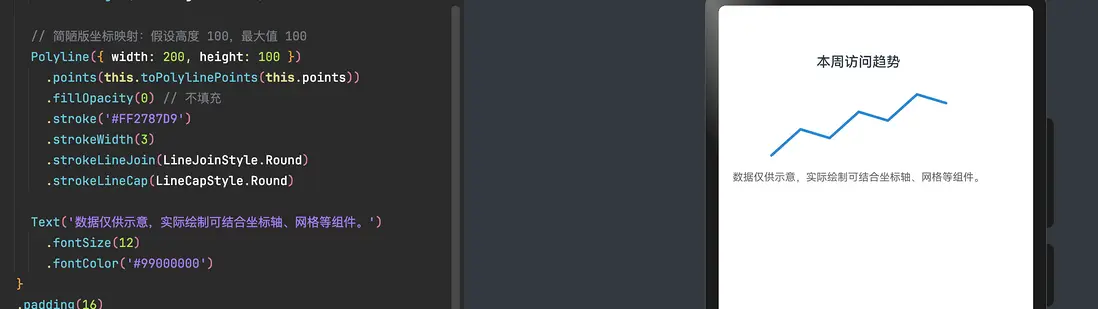
用 Polyline 做一个简单的“本周访问量折线图”。
@Entry
@Component
struct MiniChartExample {
  private points: number[] = [10, 40, 30, 60, 50, 80, 70]

  build() {
    Column({ space: 8 }) {
      Text('本周访问趋势')
        .fontSize(16)
        .fontWeight(FontWeight.Medium)

      // 简陋版坐标映射:假设高度 100,最大值 100
      Polyline({ width: 200, height: 100 })
        .points(this.toPolylinePoints(this.points))
        .fillOpacity(0) // 不填充
        .stroke('#FF2787D9')
        .strokeWidth(3)
        .strokeLineJoin(LineJoinStyle.Round)
        .strokeLineCap(LineCapStyle.Round)

      Text('数据仅供示意,实际绘制可结合坐标轴、网格等组件。')
        .fontSize(12)
        .fontColor('#99000000')
    }
    .padding(16)
  }

  private toPolylinePoints(values: number[]): number[][] {
    if (values.length === 0) {
      return []
    }
    const width = 200
    const height = 100
    const step = width / (values.length - 1)
    const max = 100 // 简化处理,假设最大值 100

    return values.map((v, index) => {
      const x = step * index
      const ratio = Math.min(Math.max(v / max, 0), 1)
      const y = height - ratio * height // 越大越靠上
      return [x, y]
    })
  }
}
这里演示了两件事:
- 如何将业务数据(数值数组)映射到 Polyline 的坐标;
- 如何用
strokeLineJoin/strokeLineCap做一条“圆润的趋势线”。
5.2 绘制路径引导线(配合图标)
比如在一个「设备连接」页面画一条连接两端设备的线:
@Entry
@Component
struct ConnectLineExample {
  build() {
    Row()
      .width('100%')
      .height(120)
      .backgroundColor('#FFF5F7FA')
      .alignItems(VerticalAlign.Center)
      .justifyContent(FlexAlign.Center) {

      // 左侧设备图标
      Column() {
        Image($r('app.media.device_left'))
          .width(40)
          .height(40)
        Text('设备 A').fontSize(12)
      }
      .margin({ right: 8 })

      // 中间折线路径
      Polyline({ width: 160, height: 40 })
        .points([[0, 20], [40, 0], [120, 40], [160, 20]])
        .fillOpacity(0)
        .stroke('#FF64BB5C')
        .strokeWidth(4)
        .strokeLineJoin(LineJoinStyle.Round)
        .strokeLineCap(LineCapStyle.Round)

      // 右侧设备图标
      Column() {
        Image($r('app.media.device_right'))
          .width(40)
          .height(40)
        Text('设备 B').fontSize(12)
      }
      .margin({ left: 8 })
    }
  }
}
这是典型的「Polyline 做连线 + 两边放组件」的布局方式,适合用在流程、拓扑、引导类 UI 中。
5.3 attributeModifier:统一管理线条风格
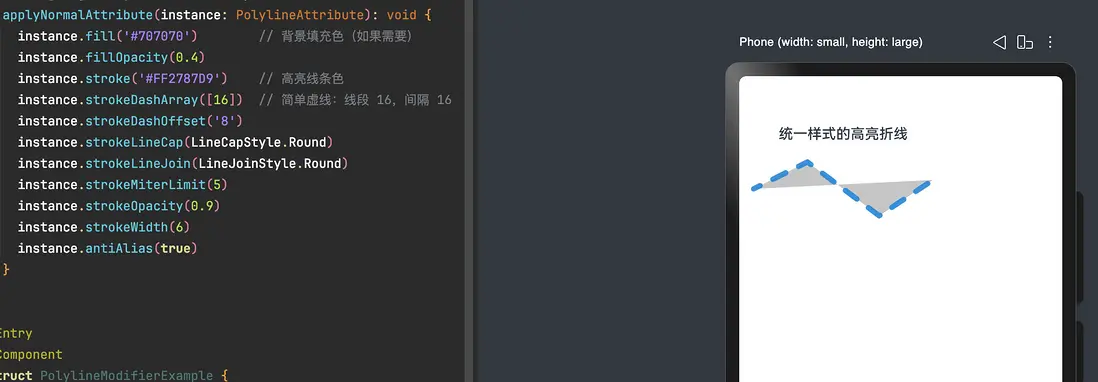
当你有很多 Polyline 样式是一致的,可以用 AttributeModifier 把线条风格收口。
// 统一定义一套“高亮轨迹”的样式
class HighlightPolylineModifier implements AttributeModifier<PolylineAttribute> {
  applyNormalAttribute(instance: PolylineAttribute): void {
    instance.fill('#707070')        // 背景填充色(如果需要)
    instance.fillOpacity(0.4)
    instance.stroke('#FF2787D9')    // 高亮线条色
    instance.strokeDashArray([16])  // 简单虚线:线段 16,间隔 16
    instance.strokeDashOffset('8')
    instance.strokeLineCap(LineCapStyle.Round)
    instance.strokeLineJoin(LineJoinStyle.Round)
    instance.strokeMiterLimit(5)
    instance.strokeOpacity(0.9)
    instance.strokeWidth(6)
    instance.antiAlias(true)
  }
}

@Entry
@Component
struct PolylineModifierExample {
  @State modifier: HighlightPolylineModifier = new HighlightPolylineModifier()

  build() {
    Column({ space: 12 }) {
      Text('统一样式的高亮折线')
        .fontSize(16)
        .fontWeight(FontWeight.Medium)

      Polyline()
        .width(200)
        .height(80)
        .points([[0, 40], [60, 10], [140, 70], [200, 30]])
        .attributeModifier(this.modifier)
    }
    .padding(16)
  }
}
好处:
- 样式集中管理,主题切换/重塑风格只改一处;
- 组件树更干净,Polyline 上不会挂一长串链式样式调用。
5.4 宽高的三种写法对比
@Entry
@Component
struct PolylineLengthTypeExample {
  build() {
    Column({ space: 10 }) {
      // string 类型
      Polyline({ width: '100', height: '100' })
        .points([[0, 0], [20, 60], [100, 100]])
        .fillOpacity(0)
        .stroke(Color.Blue)
        .strokeWidth(3)

      // number 类型
      Polyline({ width: 100, height: 100 })
        .points([[0, 0], [20, 60], [100, 100]])
        .fillOpacity(0)
        .stroke('#FFE84026')
        .strokeWidth(3)

      // Resource 类型(需在资源中定义字符串)
      Polyline({
        width: $r('app.string.PolylineWidth'),
        height: $r('app.string.PolylineHeight')
      })
        .points([[0, 0], [20, 60], [100, 100]])
        .fillOpacity(0)
        .stroke(Color.Green)
        .strokeWidth(3)
    }
    .width('100%')
    .padding(16)
  }
}
如果你团队习惯把尺寸参数都抽成资源,这种用法会更统一。
6. 常见坑与排查思路
-
什么都没画出来?
- 首先看
width/height是否为 0(默认就是 0); - 再看
points是否为空数组; - 最后确认
stroke是否设置了,默认是“有颜色但透明度为 0”的效果。
- 首先看
-
虚线效果失效?
- 检查
strokeDashArray是否为空; - 确认没有传
NaN/Infinity给strokeDashOffset,否则虚线配置会失效。
- 检查
-
线条看起来太“硬”、拐角刺眼?
- 考虑换成
strokeLineJoin(LineJoinStyle.Round); - 或者减小
strokeWidth,降低视觉冲击。
- 考虑换成
-
某些折线角度下出现很长的尖角?
- 典型是
LineJoinStyle.Miter+ 大线宽; - 可以调小
strokeMiterLimit或改用Round/Bevel。
- 典型是
-
边缘有明显锯齿?
- 确认是否误关了
.antiAlias(false); - 大多 UI 场景建议一直开启抗锯齿。
- 确认是否误关了

讨论HarmonyOS开发技术,专注于API与组件、DevEco Studio、测试、元服务和应用上架分发等。
更多推荐

 0
0 0
0- 0


 已为社区贡献24条内容

所有评论(0)