鸿蒙学习实战之路-Core Vision Kit骨骼点检测实现指南
害,之前咱们聊了 Core Vision Kit 的文字识别、人脸检测、人脸比对、主体分割、多目标识别,不少朋友问我:“西兰花啊,有没有能识别骨骼的?” 害,这问题可问对人了!今天这篇,我就手把手带你搞定这个能力,全程不超过 5 分钟(不含下载时间)~
鸿蒙学习实战之路-Core Vision Kit骨骼点检测实现指南
害,之前咱们聊了 Core Vision Kit 的文字识别、人脸检测、人脸比对、主体分割、多目标识别,不少朋友问我:“西兰花啊,有没有能识别骨骼的?” 害,这问题可问对人了!
今天这篇,我就手把手带你搞定 骨骼点检测 这个能力,全程不超过 5 分钟(不含下载时间)~
这玩意儿能干啥?
Core Vision Kit(基础视觉服务) 提供了机器视觉相关的基础能力,骨骼点检测就是其中之一。它能识别 17 个人体关键点,通过这些点来描述人体骨骼信息。
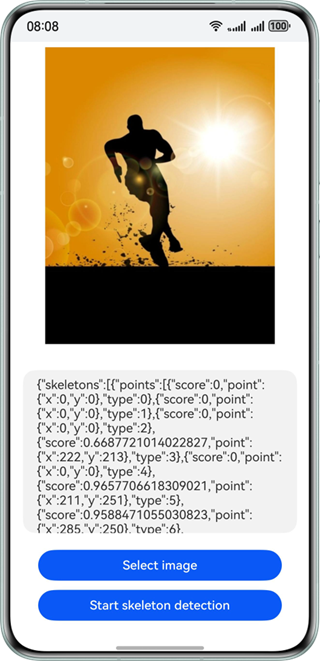
这 17 个关键点包括:
- 头部:鼻子、左右眼、左右耳
- 躯干:左右肩、左右髋
- 四肢:左右肘、左右手腕、左右膝、左右脚踝
那这玩意儿能用在哪里呢?场景可多了去了:
- 智能视频监控与安防系统(检测异常行为)
- 病人监护与康复辅助(监测运动轨迹)
- 人机交互与虚拟现实(体感游戏)
- 人体动画制作(动作捕捉)
- 智能家居控制(手势识别)
- 运动员训练分析(动作规范性检测)
🥦 西兰花小贴士:
骨骼点检测在多人场景下可能会影响精度,官方建议用于单人检测场景。如果你需要多人检测,可能需要结合多目标识别能力一起使用。
你需要知道的约束
在开始写代码之前,有些坑你得先知道:
| 约束项 | 具体说明 |
|---|---|
| 设备支持 | 不支持模拟器,必须在真机上调试 |
| 图像质量 | 建议 720p 以上,100px < 高度 < 10000px,100px < 宽度 < 10000px |
| 高宽比例 | 建议 5:1 以下(高度小于宽度的 5 倍) |
| 人体占比 | 图片中人体需占据足够比例,否则关键点检测精度会下降 |
🥦 西兰花警告:
这能力必须在真机上运行!我有个朋友在模拟器上调了两小时,结果发现文档里写着"不支持模拟器"…(┓( ´∀` )┏)浪费生命啊!
跟着我做,4 步搞定
1. 导入依赖
首先,你得把相关的 Kit 导进来:
import { image } from '@kit.ImageKit';
import { hilog } from '@kit.PerformanceAnalysisKit';
import { BusinessError } from '@kit.BasicServicesKit';
import { fileIo } from '@kit.CoreFileKit';
import { skeletonDetection, visionBase } from '@kit.CoreVisionKit';
import { photoAccessHelper } from '@kit.MediaLibraryKit';
这就像 Vue 里 import 组件一样,把要用到的工具包先拉进来。
2. 页面布局设计
页面结构很简单:一个 Image 显示待检测图片,一个 Text 显示结果,两个 Button 分别选图片和执行检测。
Column() {
  // 显示待检测图片
  Image(this.chooseImage)
    .objectFit(ImageFit.Fill)
    .height('60%')

  // 显示检测结果
  Text(this.dataValues)
    .copyOption(CopyOptions.LocalDevice)
    .height('15%')
    .margin(10)
    .width('60%')

  // 选择图片按钮
  Button('选择图片')
    .type(ButtonType.Capsule)
    .fontColor(Color.White)
    .alignSelf(ItemAlign.Center)
    .width('80%')
    .margin(10)
    .onClick(() => this.selectImage())

  // 开始检测按钮
  Button('开始骨骼点识别')
    .type(ButtonType.Capsule)
    .fontColor(Color.White)
    .alignSelf(ItemAlign.Center)
    .width('80%')
    .margin(10)
    .onClick(() => this.startSkeletonDetection())
}
.width('100%')
.height('100%')
.justifyContent(FlexAlign.Center)
3. 图片选择与加载
选图片的流程跟之前的视觉能力差不多:打开图库 → 获取 URI → 加载为 PixelMap。
// 选择图片
private async selectImage() {
  try {
    const uri = await this.openPhoto();
    if (uri) {
      this.loadImage(uri);
    } else {
      hilog.error(0x0000, 'skeletonDetectSample', "未获取到图片URI");
      this.dataValues = "未获取到图片,请重试";
    }
  } catch (err) {
    const error = err as BusinessError;
    hilog.error(0x0000, 'skeletonDetectSample', `选择图片失败: ${error.code} - ${error.message}`);
    this.dataValues = `选择图片失败: ${error.message}`;
  }
}

// 打开图库选择图片
private openPhoto(): Promise<string> {
  return new Promise<string>((resolve, reject) => {
    const photoPicker = new photoAccessHelper.PhotoViewPicker();
    photoPicker.select({
      MIMEType: photoAccessHelper.PhotoViewMIMETypes.IMAGE_TYPE,
      maxSelectNumber: 1 // 选择1张图片
    }).then(res => {
      resolve(res.photoUris[0]);
    }).catch((err: BusinessError) => {
      hilog.error(0x0000, 'skeletonDetectSample', `获取图片失败: ${err.code} - ${err.message}`);
      reject(err);
    });
  });
}

// 加载图片并转换为PixelMap
private loadImage(uri: string) {
  setTimeout(async () => {
    try {
      const fileSource = await fileIo.open(uri, fileIo.OpenMode.READ_ONLY);
      const imageSource = image.createImageSource(fileSource.fd);
      this.chooseImage = await imageSource.createPixelMap();
      await fileIo.close(fileSource);
      this.dataValues = "图片加载完成,请点击开始骨骼点识别";
    } catch (error) {
      hilog.error(0x0000, 'skeletonDetectSample', `图片加载失败: ${error}`);
      this.dataValues = "图片加载失败,请重试";
    }
  }, 100);
}
4. 执行骨骼点检测
核心部分来了!创建检测器 → 配置参数 → 执行检测 → 处理结果。
private async startSkeletonDetection() {
  if (!this.chooseImage) {
    this.dataValues = "请先选择图片";
    return;
  }

  try {
    // 创建骨骼点检测器实例
    const detector = await skeletonDetection.SkeletonDetector.create();

    // 配置检测请求参数
    const request: visionBase.Request = {
      inputData: { pixelMap: this.chooseImage }
    };

    // 执行骨骼点检测
    const result: skeletonDetection.SkeletonDetectionResponse = await detector.process(request);

    // 处理检测结果
    this.processDetectionResult(result);

  } catch (error) {
    const err = error as BusinessError;
    hilog.error(0x0000, 'skeletonDetectSample', `检测失败: ${err.code} - ${err.message}`);
    this.dataValues = `检测失败: ${err.message}`;
  }
}

// 处理检测结果
private processDetectionResult(result: skeletonDetection.SkeletonDetectionResponse) {
  if (!result || !result.skeletons || result.skeletons.length === 0) {
    this.dataValues = "未检测到人体骨骼点";
    return;
  }

  // 格式化输出检测结果
  let output = `检测到 ${result.skeletons.length} 个人体:\n\n`;

  result.skeletons.forEach((skeleton, personIndex) => {
    output += `人体 ${personIndex + 1} (置信度: ${skeleton.confidence?.toFixed(2) || '未知'}):\n`;

    if (skeleton.joints && skeleton.joints.length > 0) {
      // 关键点名称映射
      const jointNames = [
        "鼻子", "左眼", "右眼", "左耳", "右耳",
        "左肩", "右肩", "左肘", "右肘", "左手腕", "右手腕",
        "左髋", "右髋", "左膝", "右膝", "左脚踝", "右脚踝"
      ];

      skeleton.joints.forEach((joint, index) => {
        if (joint.score && joint.score > 0.5) { // 只显示置信度较高的关键点
          const name = jointNames[index] || `关键点 ${index}`;
          output += `${name}: (x:${joint.x.toFixed(2)}, y:${joint.y.toFixed(2)}, 置信度:${joint.score.toFixed(2)})\n`;
        }
      });
    } else {
      output += "未检测到关键点\n";
    }

    output += "\n";
  });

  this.dataValues = output;
}
完整代码示例
把上面的片段拼起来,就是一个能跑的完整页面了:
import { image } from '@kit.ImageKit';
import { hilog } from '@kit.PerformanceAnalysisKit';
import { BusinessError } from '@kit.BasicServicesKit';
import { fileIo } from '@kit.CoreFileKit';
import { skeletonDetection, visionBase } from '@kit.CoreVisionKit';
import { photoAccessHelper } from '@kit.MediaLibraryKit';
import { Button, ButtonType, Column, Image, ImageFit, ItemAlign, Text } from '@kit.ArkUI';

@Entry
@Component
struct SkeletonDetectionPage {
  private imageSource: image.ImageSource | undefined = undefined;
  @State chooseImage: PixelMap | undefined = undefined;
  @State dataValues: string = '';

  build() {
    Column() {
      Image(this.chooseImage)
        .objectFit(ImageFit.Fill)
        .height('60%')

      Text(this.dataValues)
        .copyOption(CopyOptions.LocalDevice)
        .height('15%')
        .margin(10)
        .width('60%')

      Button('选择图片')
        .type(ButtonType.Capsule)
        .fontColor(Color.White)
        .alignSelf(ItemAlign.Center)
        .width('80%')
        .margin(10)
        .onClick(() => this.selectImage())

      Button('开始骨骼点识别')
        .type(ButtonType.Capsule)
        .fontColor(Color.White)
        .alignSelf(ItemAlign.Center)
        .width('80%')
        .margin(10)
        .onClick(() => this.startSkeletonDetection())
    }
    .width('100%')
    .height('100%')
    .justifyContent(FlexAlign.Center)
  }

  private async selectImage() {
    try {
      const uri = await this.openPhoto();
      if (uri) {
        this.loadImage(uri);
      } else {
        hilog.error(0x0000, 'skeletonDetectSample', "未获取到图片URI");
        this.dataValues = "未获取到图片,请重试";
      }
    } catch (err) {
      const error = err as BusinessError;
      hilog.error(0x0000, 'skeletonDetectSample', `选择图片失败: ${error.code} - ${error.message}`);
      this.dataValues = `选择图片失败: ${error.message}`;
    }
  }

  private openPhoto(): Promise<string> {
    return new Promise<string>((resolve, reject) => {
      const photoPicker = new photoAccessHelper.PhotoViewPicker();
      photoPicker.select({
        MIMEType: photoAccessHelper.PhotoViewMIMETypes.IMAGE_TYPE,
        maxSelectNumber: 1
      }).then(res => {
        resolve(res.photoUris[0]);
      }).catch((err: BusinessError) => {
        hilog.error(0x0000, 'skeletonDetectSample', `获取图片失败: ${err.code} - ${err.message}`);
        reject(err);
      });
    });
  }

  private loadImage(uri: string) {
    setTimeout(async () => {
      try {
        const fileSource = await fileIo.open(uri, fileIo.OpenMode.READ_ONLY);
        this.imageSource = image.createImageSource(fileSource.fd);
        this.chooseImage = await this.imageSource.createPixelMap();
        await fileIo.close(fileSource);
        this.dataValues = "图片加载完成,请点击开始骨骼点识别";
      } catch (error) {
        hilog.error(0x0000, 'skeletonDetectSample', `图片加载失败: ${error}`);
        this.dataValues = "图片加载失败,请重试";
      }
    }, 100);
  }

  private async startSkeletonDetection() {
    if (!this.chooseImage) {
      this.dataValues = "请先选择图片";
      return;
    }

    try {
      const detector = await skeletonDetection.SkeletonDetector.create();

      const request: visionBase.Request = {
        inputData: { pixelMap: this.chooseImage }
      };

      const result: skeletonDetection.SkeletonDetectionResponse = await detector.process(request);

      this.processDetectionResult(result);

    } catch (error) {
      const err = error as BusinessError;
      hilog.error(0x0000, 'skeletonDetectSample', `检测失败: ${err.code} - ${err.message}`);
      this.dataValues = `检测失败: ${err.message}`;
    }
  }

  private processDetectionResult(result: skeletonDetection.SkeletonDetectionResponse) {
    if (!result || !result.skeletons || result.skeletons.length === 0) {
      this.dataValues = "未检测到人体骨骼点";
      return;
    }

    let output = `检测到 ${result.skeletons.length} 个人体:\n\n`;

    result.skeletons.forEach((skeleton, personIndex) => {
      output += `人体 ${personIndex + 1} (置信度: ${skeleton.confidence?.toFixed(2) || '未知'}):\n`;

      if (skeleton.joints && skeleton.joints.length > 0) {
        const jointNames = [
          "鼻子", "左眼", "右眼", "左耳", "右耳",
          "左肩", "右肩", "左肘", "右肘", "左手腕", "右手腕",
          "左髋", "右髋", "左膝", "右膝", "左脚踝", "右脚踝"
        ];

        // 筛选高置信度关键点
        const confidentJoints = skeleton.joints.filter(joint => joint.score && joint.score > 0.5);

        if (confidentJoints.length > 0) {
          confidentJoints.forEach((joint, index) => {
            const name = jointNames[index] || `关键点 ${index}`;
            output += `${name}: (x:${joint.x.toFixed(2)}, y:${joint.y.toFixed(2)}, 置信度:${joint.score!.toFixed(2)})\n`;
          });
        } else {
          output += "未检测到高置信度关键点\n";
        }
      } else {
        output += "未检测到关键点\n";
      }

      output += "\n";
    });

    this.dataValues = output;
  }
}
检测结果长啥样?
骨骼点检测返回的 SkeletonDetectionResponse 对象包含以下信息:
| 属性 | 类型 | 描述 |
|---|---|---|
skeletons |
Skeleton[] |
检测到的人体骨骼列表 |
version |
string |
算法版本号 |
Skeleton 对象的结构:
confidence:人体检测置信度(0-1 之间)joints:关键点列表,包含 17 个标准人体关键点width/height:检测区域宽度和高度
Joint 对象的结构:
x/y:关键点坐标score:关键点检测置信度(0-1 之间)type:关键点类型(对应 17 个标准关键点)
🥦 西兰花小贴士:
置信度 score 越高,说明这个关键点检测得越准。代码里我过滤了 score > 0.5 的关键点,避免显示那些不太确定的结果。你可以根据实际需求调整这个阈值。
还能怎么玩?
骨骼点检测只是个基础能力,结合其他技术能玩出更多花样:
- 姿态分析:通过关键点坐标计算人体姿态参数(如关节角度、肢体长度比例)
- 动作识别:结合时序数据识别特定动作(如跑步、跳跃、深蹲)
- 健康监测:分析人体姿态是否符合健康标准(如站姿、坐姿矫正)
- 运动辅助:实时反馈运动员动作规范性,辅助训练优化
把骨骼点检测和主体分割、人脸检测结合起来,就能搭建更复杂的人体分析系统啦!
下一步
👉 预告:《只会 HTML/CSS?别慌,鸿蒙页面没你想的那么难!》
📚 推荐资料:
- 官方骨骼点检测文档:Core Vision Kit 骨骼点检测
- 官方入门教程:开发者学堂
- Core Vision Kit 全能力概览:基础视觉服务
我是盐焗西兰花,
不教理论,只给你能跑的代码和避坑指南。
下期见!🥦

讨论HarmonyOS开发技术,专注于API与组件、DevEco Studio、测试、元服务和应用上架分发等。
更多推荐
 21
21 0
0- 0


 已为社区贡献63条内容

所有评论(0)