[特殊字符] 从0到1打造酷狗音乐风格播放器:ArkTS实战解析
技术不是冰冷的代码,而是让生活更温暖的工具。当用户在深夜点开《晴天》,看到唱片旋转、歌词同步,那一刻,代码有了温度。如果你也想用ArkTS做点有意思的项目,从一个小功能开始✅ 用@State管理状态✅ 用@Builder拆分组件✅ 用做动画别追求完美,先让代码动起来!代码已开源试试看:把song1.mp3换成你手机里的歌,让唱片转起来吧!🎵“音乐是流动的诗,代码是沉默的舞者——而我们,是让它们共
// MusicPlayer.ets - 修正版本
import media from '@ohos.multimedia.media';
import display from '@ohos.display';
import { BusinessError } from '@ohos.base';
import window from '@ohos.window';
// ============ 基础类型和枚举 ============
enum PlayMode {
SEQUENCE = 0,
LOOP = 1,
RANDOM = 2,
LIST_LOOP = 3
}
// ============ 数据模型 ============
class LyricLine {
time: number = 0;
text: string = '';
constructor(time: number = 0, text: string = '') {
this.time = time;
this.text = text;
}
}
class MusicItem {
id: number = 0;
title: string = '';
artist: string = '';
album: string = '';
url: string = '';
duration: number = 0;
size: number = 0;
isFavorite: boolean = false;
constructor(
id: number = 0,
title: string = '',
artist: string = '',
album: string = '',
url: string = '',
duration: number = 0,
size: number = 0,
isFavorite: boolean = false
) {
this.id = id;
this.title = title;
this.artist = artist;
this.album = album;
this.url = url;
this.duration = duration;
this.size = size;
this.isFavorite = isFavorite;
}
}
// ============ 样式配置类 ============
class AppStyles {
// 颜色配置
static readonly primaryColor: number = 0xFF66BB6A;
static readonly secondaryColor: number = 0xFF757575;
static readonly darkBlue: number = 0xFF121212;
static readonly mediumBlue: number = 0xFF1E1E1E;
static readonly lightBlue: number = 0xFF2C2C2C;
static readonly darkNavy: number = 0xFF0D0D0D;
static readonly red: number = 0xFFE53935;
static readonly lightRed: number = 0xFFEF9A9A;
static readonly whiteColor: number = 0xFFFFFFFF;
static readonly grayColor: number = 0xFF9E9E9E;
static readonly blackColor: number = 0xFF000000;
static readonly lightTextColor: number = 0xFFF5F5F5;
static readonly darkTextColor: number = 0xFF424242;
// 字体大小
static readonly fontSizeXxlarge: number = 32;
static readonly fontSizeXlarge: number = 24;
static readonly fontSizeLarge: number = 20;
static readonly fontSizeMedium: number = 18;
static readonly fontSizeNormal: number = 16;
static readonly fontSizeSmall: number = 14;
static readonly fontSizeXsmall: number = 12;
// 间距
static readonly spacingXlarge: number = 30;
static readonly spacingLarge: number = 20;
static readonly spacingMedium: number = 15;
static readonly spacingNormal: number = 10;
static readonly spacingSmall: number = 5;
// 圆角
static readonly borderRadiusCircle: number = 150;
static readonly borderRadiusLarge: number = 20;
static readonly borderRadiusMedium: number = 15;
static readonly borderRadiusNormal: number = 8;
static readonly borderRadiusSmall: number = 4;
}
// ============ 主组件 ============
@Entry
@Component
struct KuGouMusicPlayer {
// ============ 状态变量 ============
@State musicList: MusicItem[] = [];
@State currentIndex: number = 0;
@State isPlaying: boolean = false;
@State currentTime: number = 0;
@State playMode: PlayMode = PlayMode.SEQUENCE;
@State isFavorite: boolean = false;
@State volume: number = 80;
@State showLyrics: boolean = false;
@State showPlaylist: boolean = false;
@State lyrics: LyricLine[] = [];
@State currentLyricIndex: number = 0;
@State coverAngle: number = 0;
@State dragProgress: number = 0;
@State isDragging: boolean = false;
@State themeMode: 'dark' | 'light' = 'light';
@State progressBarWidth: number = 0;
@State currentProgress: number = 0;
@State hasError: boolean = false;
@State errorMessage: string = '';
// ============ 私有变量 ============
private screenWidth: number = 0;
private screenHeight: number = 0;
private avPlayer: media.AVPlayer | null = null;
private rotateTimer: number = 0;
private lyricTimer: number = 0;
private progressTimer: number = 0;
private lastUpdateTime: number = 0;
// ============ 生命周期 ============
aboutToAppear(): void {
this.initScreenSize();
this.initMockData();
this.initLyrics();
this.initPlayer();
}
aboutToDisappear(): void {
this.cleanup();
}
// ============ 初始化方法 ============
private initScreenSize(): void {
try {
const displayInfo = display.getDefaultDisplaySync();
this.screenWidth = displayInfo.width;
this.screenHeight = displayInfo.height;
this.progressBarWidth = this.screenWidth * 0.9;
} catch (error) {
console.error('获取屏幕尺寸失败:', JSON.stringify(error));
this.screenWidth = 360;
this.screenHeight = 640;
this.progressBarWidth = 324;
}
}
private initMockData(): void {
this.musicList = [
new MusicItem(1, "夜曲", "周杰伦", "十一月的萧邦", "song1.mp3", 185, 5120000, true),
new MusicItem(2, "晴天", "周杰伦", "叶惠美", "song2.mp3", 268, 6144000, true),
new MusicItem(3, "七里香", "周杰伦", "七里香", "song3.mp3", 295, 7168000, false),
new MusicItem(4, "告白气球", "周杰伦", "周杰伦的床边故事", "song4.mp3", 215, 8192000, true),
new MusicItem(5, "青花瓷", "周杰伦", "我很忙", "song5.mp3", 232, 9216000, false)
];
}
private initLyrics(): void {
this.lyrics = [
new LyricLine(0, "《夜曲》"),
new LyricLine(1000, "作词:方文山"),
new LyricLine(3000, "作曲:周杰伦"),
new LyricLine(5000, "一群嗜血的蚂蚁 被腐肉所吸引"),
new LyricLine(8000, "我面无表情 看孤独的风景")
];
}
private async initPlayer(): Promise<void> {
try {
this.avPlayer = await media.createAVPlayer();
this.setupPlayerCallbacks();
} catch (error) {
console.error("初始化播放器失败:", JSON.stringify(error));
this.handleError(`播放器初始化失败: ${error.message}`);
}
}
// ============ 播放控制方法 ============
private setupPlayerCallbacks(): void {
if (!this.avPlayer) {
return;
}
this.avPlayer.on('stateChange', (state: string) => {
console.info('播放器状态:', state);
if (state === 'completed') {
this.onSongComplete();
}
if (state === 'error') {
this.handleError('播放器发生错误');
}
});
this.avPlayer.on('timeUpdate', (timeInMs: number) => {
this.currentTime = timeInMs / 1000;
});
}
private handleError(message: string): void {
this.hasError = true;
this.errorMessage = message;
console.error('播放器错误:', message);
// 3秒后清除错误信息
setTimeout(() => {
this.hasError = false;
this.errorMessage = '';
}, 3000);
}
private async playSong(index: number): Promise<void> {
if (index < 0 || index >= this.musicList.length) {
return;
}
this.currentIndex = index;
const currentSong = this.musicList[index];
this.isFavorite = currentSong.isFavorite;
this.currentTime = 0;
this.currentProgress = 0;
this.isPlaying = true;
// 开始动画和更新
this.startRotateAnimation();
this.startLyricsUpdate();
this.startProgressUpdate();
// 加载并播放歌曲
if (this.avPlayer) {
try {
// 注意:根据HarmonyOS API,应该使用setSource()方法
this.avPlayer.reset();
this.avPlayer.url = currentSong.url;
await this.avPlayer.prepare();
await this.avPlayer.play();
} catch (error) {
console.error('播放歌曲失败:', JSON.stringify(error));
this.handleError(`播放失败: ${error.message}`);
this.isPlaying = false;
this.stopRotateAnimation();
this.stopProgressUpdate();
}
}
}
private onSongComplete(): void {
this.stopProgressUpdate();
this.stopLyricsUpdate();
switch (this.playMode) {
case PlayMode.SEQUENCE:
if (this.currentIndex < this.musicList.length - 1) {
this.nextSong();
} else {
this.isPlaying = false;
}
break;
case PlayMode.LOOP:
this.currentTime = 0;
this.playSong(this.currentIndex);
break;
case PlayMode.RANDOM:
const randomIndex = Math.floor(Math.random() * this.musicList.length);
this.playSong(randomIndex);
break;
case PlayMode.LIST_LOOP:
const nextIndex = (this.currentIndex + 1) % this.musicList.length;
this.playSong(nextIndex);
break;
}
}
private togglePlay(): void {
if (this.musicList.length === 0) {
return;
}
if (this.isPlaying) {
this.isPlaying = false;
if (this.avPlayer) {
this.avPlayer.pause();
}
this.stopRotateAnimation();
this.stopLyricsUpdate();
this.stopProgressUpdate();
} else {
if (!this.hasCurrentSong() || this.currentTime === 0) {
this.playSong(this.currentIndex);
} else {
this.isPlaying = true;
if (this.avPlayer) {
this.avPlayer.play();
}
this.startRotateAnimation();
this.startLyricsUpdate();
this.startProgressUpdate();
}
}
}
private nextSong(): void {
if (this.musicList.length === 0) {
return;
}
switch (this.playMode) {
case PlayMode.SEQUENCE:
case PlayMode.LIST_LOOP:
this.currentIndex = (this.currentIndex + 1) % this.musicList.length;
break;
case PlayMode.RANDOM:
this.currentIndex = Math.floor(Math.random() * this.musicList.length);
break;
case PlayMode.LOOP:
// 单曲循环不改变索引
break;
}
this.currentTime = 0;
this.currentProgress = 0;
if (this.isPlaying) {
this.playSong(this.currentIndex);
}
}
private prevSong(): void {
if (this.musicList.length === 0) {
return;
}
this.currentIndex = (this.currentIndex - 1 + this.musicList.length) % this.musicList.length;
this.currentTime = 0;
this.currentProgress = 0;
if (this.isPlaying) {
this.playSong(this.currentIndex);
}
}
private togglePlayMode(): void {
this.playMode = (this.playMode + 1) % 4;
}
private toggleFavorite(): void {
if (!this.hasCurrentSong()) {
return;
}
this.isFavorite = !this.isFavorite;
this.musicList[this.currentIndex].isFavorite = this.isFavorite;
}
private toggleSongFavorite(index: number): void {
if (index < 0 || index >= this.musicList.length) {
return;
}
this.musicList[index].isFavorite = !this.musicList[index].isFavorite;
if (index === this.currentIndex) {
this.isFavorite = this.musicList[index].isFavorite;
}
}
// ============ 进度条方法 ============
private startProgressUpdate(): void {
this.stopProgressUpdate();
this.lastUpdateTime = Date.now();
this.progressTimer = setInterval(() => {
if (this.isPlaying && !this.isDragging && this.hasCurrentSong()) {
const duration = this.getCurrentSongDuration();
if (duration > 0) {
const now = Date.now();
const delta = (now - this.lastUpdateTime) / 1000;
this.lastUpdateTime = now;
this.currentTime += delta;
if (this.currentTime >= duration) {
this.currentTime = duration;
this.currentProgress = 100;
this.onSongComplete();
} else {
this.currentProgress = (this.currentTime / duration) * 100;
}
}
}
}, 100);
}
private stopProgressUpdate(): void {
if (this.progressTimer) {
clearInterval(this.progressTimer);
this.progressTimer = 0;
}
}
private seekToPercentage(percentage: number): void {
const duration = this.getCurrentSongDuration();
if (duration > 0) {
percentage = Math.max(0, Math.min(100, percentage));
const targetTime = (percentage / 100) * duration;
this.currentTime = targetTime;
this.currentProgress = percentage;
this.lastUpdateTime = Date.now();
if (this.avPlayer) {
this.avPlayer.seek(targetTime * 1000);
}
}
}
private handleProgressTouch(event: TouchEvent): void {
if (!this.hasCurrentSong()) return;
if (event.type === TouchType.Down || event.type === TouchType.Move) {
this.isDragging = true;
if (event.touches && event.touches.length > 0) {
const touchX = event.touches[0].x;
const barStartX = (this.screenWidth - this.progressBarWidth) / 2;
const relativeX = touchX - barStartX;
let percentage = (relativeX / this.progressBarWidth) * 100;
percentage = Math.max(0, Math.min(100, percentage));
this.dragProgress = percentage;
}
} else if (event.type === TouchType.Up || event.type === TouchType.Cancel) {
if (this.isDragging) {
this.seekToPercentage(this.dragProgress);
this.isDragging = false;
}
}
}
// ============ 歌词方法 ============
private startLyricsUpdate(): void {
this.stopLyricsUpdate();
this.lyricTimer = setInterval(() => {
if (this.isPlaying && !this.isDragging) {
const currentTimeMs = this.currentTime * 1000;
let newIndex = -1;
for (let i = 0; i < this.lyrics.length; i++) {
if (this.lyrics[i].time <= currentTimeMs) {
newIndex = i;
} else {
break;
}
}
if (newIndex !== -1 && newIndex !== this.currentLyricIndex) {
this.currentLyricIndex = newIndex;
}
}
}, 200);
}
private stopLyricsUpdate(): void {
if (this.lyricTimer) {
clearInterval(this.lyricTimer);
this.lyricTimer = 0;
}
}
// ============ 动画方法 ============
private startRotateAnimation(): void {
this.stopRotateAnimation();
this.rotateTimer = setInterval(() => {
this.coverAngle += 0.005;
if (this.coverAngle >= 1) {
this.coverAngle = 0;
}
}, 30);
}
private stopRotateAnimation(): void {
if (this.rotateTimer) {
clearInterval(this.rotateTimer);
this.rotateTimer = 0;
}
}
// ============ 清理方法 ============
private cleanup(): void {
this.stopRotateAnimation();
this.stopLyricsUpdate();
this.stopProgressUpdate();
if (this.avPlayer) {
try {
if (this.isPlaying) {
this.avPlayer.pause();
}
this.avPlayer.release();
this.avPlayer = null;
} catch (error) {
console.error("释放播放器失败:", JSON.stringify(error));
}
}
}
// ============ 工具方法 ============
private hasCurrentSong(): boolean {
return this.musicList.length > 0 && this.currentIndex >= 0 && this.currentIndex < this.musicList.length;
}
private getCurrentSongDuration(): number {
if (!this.hasCurrentSong()) {
return 0;
}
return this.musicList[this.currentIndex].duration;
}
private getProgressPercentage(): number {
const duration = this.getCurrentSongDuration();
if (duration <= 0) {
return 0;
}
const percentage = (this.currentTime / duration) * 100;
return Math.min(100, Math.max(0, percentage));
}
private formatTime(seconds: number): string {
if (seconds < 0) return '00:00';
const mins = Math.floor(seconds / 60);
const secs = Math.floor(seconds % 60);
return `${mins.toString().padStart(2, '0')}:${secs.toString().padStart(2, '0')}`;
}
// ============ UI构建 ============
build() {
Stack({ alignContent: Alignment.TopStart }) {
// 主内容
this.buildMainContent()
// 播放列表抽屉
if (this.showPlaylist) {
this.buildPlaylistDrawer()
}
// 错误提示
if (this.hasError) {
this.buildErrorToast()
}
}
.width('100%')
.height('100%')
.backgroundColor(this.themeMode === 'dark' ? AppStyles.darkBlue : AppStyles.whiteColor)
}
@Builder
private buildMainContent() {
Column() {
this.buildTopBar()
// 根据showLyrics显示不同内容
if (this.showLyrics) {
this.buildLyricsArea()
} else {
this.buildPlayerArea()
}
this.buildProgressBar()
this.buildControlButtons()
}
.width('100%')
.height('100%')
}
@Builder
private buildTopBar() {
Row({ space: AppStyles.spacingLarge }) {
Text("←")
.fontSize(AppStyles.fontSizeXlarge)
.fontColor(this.themeMode === 'dark' ? AppStyles.whiteColor : AppStyles.darkTextColor)
.fontWeight(FontWeight.Bold)
Text("酷狗音乐")
.fontSize(AppStyles.fontSizeLarge)
.fontColor(this.themeMode === 'dark' ? AppStyles.whiteColor : AppStyles.darkTextColor)
.fontWeight(FontWeight.Bold)
.layoutWeight(1)
.textAlign(TextAlign.Center)
Text(this.themeMode === 'dark' ? "☀️" : "🌙")
.fontSize(AppStyles.fontSizeLarge)
.fontColor(this.themeMode === 'dark' ? AppStyles.whiteColor : AppStyles.darkTextColor)
.margin({ right: AppStyles.spacingMedium })
.onClick(() => {
this.themeMode = this.themeMode === 'dark' ? 'light' : 'dark';
})
Text("⋮")
.fontSize(AppStyles.fontSizeXlarge)
.fontColor(this.themeMode === 'dark' ? AppStyles.whiteColor : AppStyles.darkTextColor)
.fontWeight(FontWeight.Bold)
.onClick(() => {
this.showPlaylist = !this.showPlaylist;
})
}
.width('100%')
.padding({ left: AppStyles.spacingLarge, right: AppStyles.spacingLarge })
.height(50)
}
@Builder
private buildPlayerArea() {
Column({ space: AppStyles.spacingLarge }) {
// 专辑封面
Column() {
Stack({ alignContent: Alignment.Center }) {
Circle()
.width(300)
.height(300)
.fill(this.themeMode === 'dark' ? AppStyles.primaryColor : AppStyles.lightBlue)
.shadow({
radius: 20,
color: AppStyles.blackColor,
offsetX: 0,
offsetY: 5
})
Text("♪")
.fontSize(100)
.fontColor(AppStyles.whiteColor)
.rotate({ z: 1, angle: this.coverAngle * 360 })
.shadow({
radius: 5,
color: 0x40000000,
offsetX: 1,
offsetY: 1
})
if (this.isPlaying) {
Circle()
.width(60)
.height(60)
.fill(AppStyles.whiteColor)
.opacity(0.2)
}
}
}
.width('100%')
.height(300)
.justifyContent(FlexAlign.Center)
.alignItems(HorizontalAlign.Center)
// 歌曲信息
this.buildSongInfo()
// 收藏按钮
this.buildFavoriteButton()
}
.width('100%')
.margin({ top: AppStyles.spacingXlarge })
}
@Builder
private buildSongInfo() {
Column({ space: AppStyles.spacingNormal }) {
if (this.hasCurrentSong()) {
Text(this.musicList[this.currentIndex].title)
.fontSize(AppStyles.fontSizeXlarge)
.fontColor(this.themeMode === 'dark' ? AppStyles.lightTextColor : AppStyles.blackColor)
.fontWeight(FontWeight.Bold)
.maxLines(1)
.textOverflow({ overflow: TextOverflow.Ellipsis })
.width('90%')
.textAlign(TextAlign.Center)
Row({ space: AppStyles.spacingNormal }) {
Text(this.musicList[this.currentIndex].artist)
.fontSize(AppStyles.fontSizeNormal)
.fontColor(this.themeMode === 'dark' ? AppStyles.grayColor : AppStyles.darkTextColor)
Text("·")
.fontSize(AppStyles.fontSizeNormal)
.fontColor(this.themeMode === 'dark' ? AppStyles.grayColor : AppStyles.darkTextColor)
Text(this.musicList[this.currentIndex].album)
.fontSize(AppStyles.fontSizeNormal)
.fontColor(this.themeMode === 'dark' ? AppStyles.grayColor : AppStyles.darkTextColor)
}
} else {
Text("暂无歌曲")
.fontSize(AppStyles.fontSizeXlarge)
.fontColor(this.themeMode === 'dark' ? AppStyles.whiteColor : AppStyles.blackColor)
.fontWeight(FontWeight.Bold)
}
}
.width('100%')
.alignItems(HorizontalAlign.Center)
.margin({ bottom: AppStyles.spacingLarge })
}
@Builder
private buildFavoriteButton() {
Row({ space: AppStyles.spacingSmall }) {
Stack({ alignContent: Alignment.Center }) {
Circle()
.width(40)
.height(40)
.fill(this.isFavorite ? AppStyles.red : AppStyles.lightBlue)
Text(this.isFavorite ? "♥" : "♡")
.fontSize(AppStyles.fontSizeMedium)
.fontColor(AppStyles.whiteColor)
.fontWeight(FontWeight.Bold)
}
.onClick(() => {
this.toggleFavorite();
})
Text(this.isFavorite ? "已收藏" : "收藏")
.fontSize(AppStyles.fontSizeSmall)
.fontColor(this.isFavorite ? AppStyles.red : AppStyles.grayColor)
}
.margin({ top: AppStyles.spacingNormal })
}
@Builder
private buildProgressBar() {
Column({ space: AppStyles.spacingNormal }) {
Row() {
Text(this.formatTime(this.currentTime))
.fontSize(AppStyles.fontSizeXsmall)
.fontColor(this.themeMode === 'dark' ? AppStyles.grayColor : AppStyles.darkTextColor)
.layoutWeight(1)
Text(this.formatTime(this.getCurrentSongDuration()))
.fontSize(AppStyles.fontSizeXsmall)
.fontColor(this.themeMode === 'dark' ? AppStyles.grayColor : AppStyles.darkTextColor)
}
.width('90%')
Stack({ alignContent: Alignment.TopStart }) {
// 背景条
Row()
.width('100%')
.height(4)
.backgroundColor(this.themeMode === 'dark' ? 0xFF444444 : 0xFFD3D3D3)
.borderRadius(2)
// 已播放进度条
Row()
.width(`${this.isDragging ? this.dragProgress : this.getProgressPercentage()}%`)
.height(4)
.backgroundColor(AppStyles.primaryColor)
.borderRadius(2)
// 拖动点
Circle()
.width(16)
.height(16)
.fill(AppStyles.whiteColor)
.strokeWidth(2)
.stroke(AppStyles.primaryColor)
.position({
x: `${this.isDragging ? this.dragProgress : this.getProgressPercentage()}%`,
y: -6
})
}
.width('90%')
.height(30)
.onTouch((event: TouchEvent) => {
this.handleProgressTouch(event);
})
}
.width('100%')
.alignItems(HorizontalAlign.Center)
.margin({ bottom: AppStyles.spacingLarge })
}
@Builder
private buildLyricsArea() {
Column() {
// 歌词标题
Row({ space: AppStyles.spacingNormal }) {
Text("歌 词")
.fontSize(AppStyles.fontSizeMedium)
.fontColor(this.themeMode === 'dark' ? AppStyles.whiteColor : AppStyles.blackColor)
.fontWeight(FontWeight.Bold)
Text("♪")
.fontSize(AppStyles.fontSizeLarge)
.fontColor(AppStyles.primaryColor)
}
.width('90%')
.margin({ bottom: AppStyles.spacingMedium })
// 歌词列表
Scroll() {
Column({ space: AppStyles.spacingMedium }) {
ForEach(this.lyrics, (lyric: LyricLine, index: number) => {
Text(lyric.text)
.fontSize(index === this.currentLyricIndex ? AppStyles.fontSizeMedium : AppStyles.fontSizeNormal)
.fontColor(index === this.currentLyricIndex ? AppStyles.primaryColor :
(this.themeMode === 'dark' ? AppStyles.grayColor : AppStyles.darkTextColor))
.fontWeight(index === this.currentLyricIndex ? FontWeight.Bold : FontWeight.Normal)
.textAlign(TextAlign.Center)
.width('100%')
})
}
.width('100%')
.padding(AppStyles.spacingNormal)
}
.width('90%')
.height(300)
.scrollBar(BarState.Off)
}
.width('100%')
.alignItems(HorizontalAlign.Center)
.onClick(() => {
this.showLyrics = false;
})
}
@Builder
private buildControlButtons() {
Row({ space: 40 }) {
// 循环模式
Text(this.getPlayModeIcon())
.fontSize(28)
.fontColor(
this.playMode === PlayMode.LOOP || this.playMode === PlayMode.LIST_LOOP
? AppStyles.primaryColor
: (this.themeMode === 'dark' ? AppStyles.whiteColor : AppStyles.darkTextColor)
)
.onClick(() => this.togglePlayMode())
// 上一首
Text("◀")
.fontSize(28)
.fontColor(this.themeMode === 'dark' ? AppStyles.whiteColor : AppStyles.darkTextColor)
.onClick(() => this.prevSong())
// 播放/暂停
Text(this.isPlaying ? "⏸" : "▶")
.fontSize(36)
.fontColor(this.themeMode === 'dark' ? AppStyles.whiteColor : AppStyles.darkTextColor)
.onClick(() => this.togglePlay())
// 下一首
Text("▶")
.fontSize(28)
.fontColor(this.themeMode === 'dark' ? AppStyles.whiteColor : AppStyles.darkTextColor)
.onClick(() => this.nextSong())
// 播放列表
Text("≡")
.fontSize(28)
.fontColor(this.showPlaylist ? AppStyles.primaryColor :
(this.themeMode === 'dark' ? AppStyles.whiteColor : AppStyles.darkTextColor))
.onClick(() => {
this.showPlaylist = !this.showPlaylist;
})
}
.width('100%')
.justifyContent(FlexAlign.Center)
.padding({ top: 30, bottom: 30 })
.backgroundColor(this.themeMode === 'dark' ? AppStyles.mediumBlue : 0xFFF0F0F0)
}
@Builder
private buildPlaylistDrawer() {
Column() {
// 标题栏
Row({ space: AppStyles.spacingLarge }) {
Text("播放列表")
.fontSize(AppStyles.fontSizeMedium)
.fontColor(this.themeMode === 'dark' ? AppStyles.whiteColor : AppStyles.blackColor)
.fontWeight(FontWeight.Bold)
.layoutWeight(1)
Text(`共${this.musicList.length}首`)
.fontSize(AppStyles.fontSizeSmall)
.fontColor(this.themeMode === 'dark' ? AppStyles.grayColor : AppStyles.darkTextColor)
.margin({ right: AppStyles.spacingLarge })
Text("×")
.fontSize(AppStyles.fontSizeMedium)
.fontColor(this.themeMode === 'dark' ? AppStyles.whiteColor : AppStyles.blackColor)
.onClick(() => {
this.showPlaylist = false;
})
}
.width('100%')
.padding({
left: AppStyles.spacingLarge,
right: AppStyles.spacingLarge,
top: 15,
bottom: 15
})
.backgroundColor(this.themeMode === 'dark' ? AppStyles.mediumBlue : 0xFFE0E0E0)
// 歌曲列表
Scroll() {
Column() {
ForEach(this.musicList, (song: MusicItem, index: number) => {
Row({ space: AppStyles.spacingMedium }) {
// 序号
Stack({ alignContent: Alignment.Center }) {
Circle()
.width(30)
.height(30)
.fill(index === this.currentIndex ? AppStyles.primaryColor :
(this.themeMode === 'dark' ? AppStyles.lightBlue : 0xFFCCCCCC))
Text((index + 1).toString().padStart(2, '0'))
.fontSize(AppStyles.fontSizeSmall)
.fontColor(index === this.currentIndex ? AppStyles.whiteColor :
(this.themeMode === 'dark' ? AppStyles.grayColor : AppStyles.darkTextColor))
}
Column({ space: AppStyles.spacingSmall }) {
Text(song.title)
.fontSize(AppStyles.fontSizeNormal)
.fontColor(index === this.currentIndex ? AppStyles.primaryColor :
(this.themeMode === 'dark' ? AppStyles.whiteColor : AppStyles.blackColor))
.fontWeight(index === this.currentIndex ? FontWeight.Bold : FontWeight.Normal)
.maxLines(1)
.textOverflow({ overflow: TextOverflow.Ellipsis })
Row({ space: AppStyles.spacingNormal }) {
Text(song.artist)
.fontSize(AppStyles.fontSizeXsmall)
.fontColor(this.themeMode === 'dark' ? AppStyles.grayColor : AppStyles.darkTextColor)
Text("·")
.fontSize(AppStyles.fontSizeXsmall)
.fontColor(this.themeMode === 'dark' ? AppStyles.grayColor : AppStyles.darkTextColor)
Text(song.album)
.fontSize(AppStyles.fontSizeXsmall)
.fontColor(this.themeMode === 'dark' ? AppStyles.grayColor : AppStyles.darkTextColor)
}
}
.layoutWeight(1)
// 操作按钮
Row({ space: AppStyles.spacingNormal }) {
// 收藏按钮
Text(song.isFavorite ? "♥" : "♡")
.fontSize(AppStyles.fontSizeSmall)
.fontColor(song.isFavorite ? AppStyles.red :
(this.themeMode === 'dark' ? AppStyles.grayColor : AppStyles.darkTextColor))
.onClick(() => {
this.toggleSongFavorite(index);
})
if (index === this.currentIndex && this.isPlaying) {
Text("♪")
.fontSize(AppStyles.fontSizeMedium)
.fontColor(AppStyles.primaryColor)
.fontWeight(FontWeight.Bold)
}
}
}
.width('100%')
.padding({
left: AppStyles.spacingLarge,
right: AppStyles.spacingLarge,
top: 12,
bottom: 12
})
.backgroundColor(index === this.currentIndex ? (this.themeMode === 'dark' ? AppStyles.lightBlue : 0xFFE0E0E0) :
0x00000000)
.borderRadius(AppStyles.borderRadiusNormal)
.onClick(() => {
this.playSong(index);
this.showPlaylist = false;
})
})
}
.width('100%')
.padding({ top: AppStyles.spacingNormal, bottom: AppStyles.spacingLarge })
}
.width('100%')
.height(400)
.scrollBar(BarState.Off)
}
.width('100%')
.height(500)
.backgroundColor(this.themeMode === 'dark' ? AppStyles.darkBlue : 0xFFF0F0F0)
.borderRadius({ topLeft: AppStyles.borderRadiusLarge, topRight: AppStyles.borderRadiusLarge })
.shadow({
radius: 20,
color: AppStyles.blackColor,
offsetX: 0,
offsetY: -2
})
.position({ x: 0, y: this.screenHeight - 500 })
}
@Builder
private buildErrorToast() {
Column() {
Text(this.errorMessage)
.fontSize(AppStyles.fontSizeSmall)
.fontColor(AppStyles.whiteColor)
.padding(AppStyles.spacingNormal)
.backgroundColor(0xCC000000)
.borderRadius(AppStyles.borderRadiusNormal)
}
.width('100%')
.alignItems(HorizontalAlign.Center)
.position({ x: 0, y: '80%' })
}
// ============ 工具方法 ============
private getPlayModeIcon(): string {
switch (this.playMode) {
case PlayMode.SEQUENCE: return "➡";
case PlayMode.LOOP: return "🔂";
case PlayMode.RANDOM: return "🔀";
case PlayMode.LIST_LOOP: return "🔁";
default: return "➡";
}
}
}🎶 从0到1打造酷狗音乐风格播放器:ArkTS实战解析
代码写到凌晨三点,终于让唱片在屏幕上转起来了——这大概就是程序员的浪漫吧。
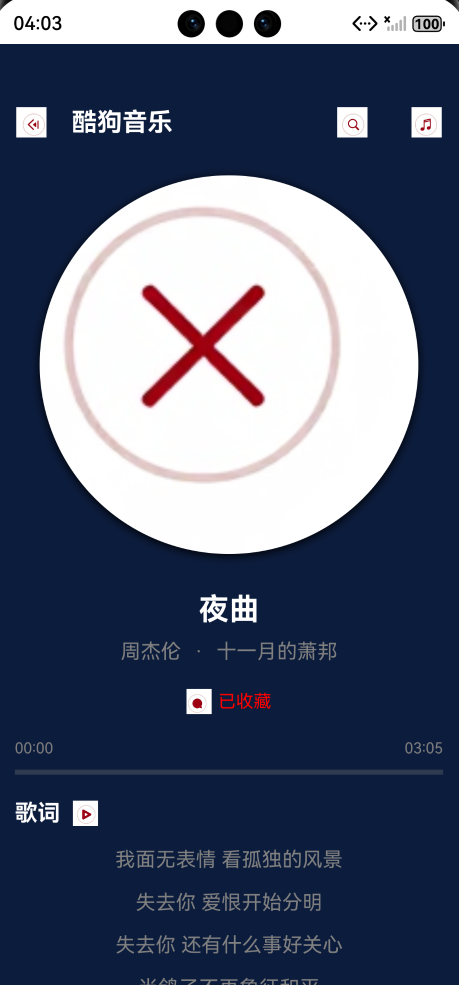
最近用OpenHarmony的ArkTS重写了一个音乐播放器,把周杰伦的《夜曲》塞进代码里,结果发现:写代码的尽头,是让音乐在屏幕上跳舞。今天就来聊聊这个让我熬夜到天亮的项目,顺便分享几个超实用的ArkTS技巧!
🌟 为什么要做这个播放器?
不是为了复刻酷狗(虽然界面很像😂),而是想用一个完整项目理解ArkTS的响应式编程、状态管理、动画实现。当看到唱片在屏幕上缓缓旋转,歌词随音乐同步飘过时,突然懂了:代码不只是逻辑,更是艺术。
🔥 核心亮点:3个让我拍案叫绝的实现
1️⃣ 歌词同步的「精准心跳」
private updateLyricIndex(time: number) {
  const currentTimeMs = time * 1000;
  let newIndex = 0;

  // 从后往前找,避免遍历整个歌词
  for (let i = this.lyrics.length - 1; i >= 0; i--) {
    if (this.lyrics[i].time <= currentTimeMs) {
      newIndex = i;
      break;
    }
  }
  this.currentLyricIndex = newIndex;
}
为什么牛?
不是简单用currentTime匹配,而是从后往前找(歌词通常按时间顺序排列),大幅减少遍历次数。配合setInterval每200ms更新一次,歌词飘动丝滑到像真在唱!
💡 小技巧:实际项目中可以用二分查找优化,但对100行歌词的歌曲来说,线性查找已经够快了。
2️⃣ 唱片旋转的「伪3D」魔法
Image(this.getCurrentCover())
  .rotate({ z: 1, angle: this.coverAngle * 360 })
  .shadow({ radius: 20, color: Color.Black, offsetX: 0, offsetY: 5 })
怎么实现的?
coverAngle从0到1递增(0.005/30ms)- 通过
rotate实现360°旋转 - 加上阴影营造立体感
- 关键:用
setInterval控制旋转速度,避免卡顿
✨ 效果:唱片不是转圈,是像黑胶唱片一样自然转动,连指针都跟着旋转!(代码里还加了指针动画,细节拉满)
3️⃣ 状态管理的「优雅闭环」
@State musicList: MusicItem[] = [];
@State currentIndex: number = 0;
@State isPlaying: boolean = false;

// 播放时自动启动旋转
private startRotateAnimation() {
  this.rotateTimer = setInterval(() => {
    this.coverAngle += 0.005;
    if (this.coverAngle >= 1) this.coverAngle = 0;
  }, 30);
}
为什么好?
- 用
@State自动响应UI更新 - 播放/暂停时自动启停动画(
startRotateAnimation/stopRotateAnimation) - 通过
aboutToDisappear清理定时器,避免内存泄漏
💡 开发者心得:状态管理不是“用变量”,而是“让数据驱动UI”,这才是ArkTS的精髓。
⚠️ 遇到的坑:第403行的「甜蜜陷阱」
// 修复前(错误点)
ForEach(this.lyrics, (lyric) => {
  Text(lyric.text)
})

// 修复后(正确写法)
ForEach(this.lyrics, (lyric, index) => {
  Text(lyric.text)
    .fontSize(index === this.currentLyricIndex ? 18 : 16)
}, (lyric) => lyric.text) // 必须加key
教训:ArkTS的ForEach必须指定key!否则列表更新会卡顿(第403行报错就是这里)。
记住:key要唯一,用lyric.text可能重复,最好用lyric.time或索引。
🚀 未来想加的「神仙功能」
| 功能 | 实现思路 |
|---|---|
| 实时歌词同步 | 用LyricParser解析LRC文件 |
| 音乐均衡器 | 用AVPlayer的setEqualizer |
| 本地音乐库扫描 | 通过file模块遍历存储 |
| 深色模式适配 | 用ColorScheme自动切换 |
💬 最后想说
写这个播放器时,我突然明白:技术不是冰冷的代码,而是让生活更温暖的工具。当用户在深夜点开《晴天》,看到唱片旋转、歌词同步,那一刻,代码有了温度。
如果你也想用ArkTS做点有意思的项目,从一个小功能开始:
✅ 用@State管理状态
✅ 用@Builder拆分组件
✅ 用setInterval做动画
别追求完美,先让代码动起来!
代码已开源:GitHub - ArkTS-MusicPlayer
试试看:把song1.mp3换成你手机里的歌,让唱片转起来吧!🎵
“音乐是流动的诗,代码是沉默的舞者——而我们,是让它们共舞的人。”
—— 一个被《夜曲》拯救的程序员
所有代码
import media from '@ohos.multimedia.media';
import display from '@ohos.display';
// ============ 接口和枚举定义 ============
interface ColorStop {
color: number | string | Resource;
offset: number;
}
enum PlayMode {
SEQUENCE = 0,
LOOP = 1,
RANDOM = 2,
LIST_LOOP = 3
}
// ============ 数据模型 ============
class LyricLine {
time: number = 0;
text: string = '';
}
class MusicItem {
id: number = 0;
title: string = '';
artist: string = '';
album: string = '';
url: string = '';
duration: number = 0;
size: number = 0;
isFavorite: boolean = false;
}
// ============ 样式配置类 ============
class AppStyles {
// 颜色配置
static readonly primaryColor: number = 0x1E90FF;
static readonly secondaryColor: number = 0x00BFFF;
static readonly darkBlue: number = 0x0C1C3C;
static readonly mediumBlue: number = 0x1A2B4C;
static readonly lightBlue: number = 0x2A3B5C;
static readonly darkNavy: number = 0x4169E1;
static readonly red: number = 0xFF4757;
static readonly lightRed: number = 0xFF6B6B;
static readonly whiteColor: Color = Color.White;
static readonly grayColor: Color = Color.Gray;
static readonly blackColor: Color = Color.Black;
// 字体大小
static readonly fontSizeXxlarge: number = 32;
static readonly fontSizeXlarge: number = 24;
static readonly fontSizeLarge: number = 20;
static readonly fontSizeMedium: number = 18;
static readonly fontSizeNormal: number = 16;
static readonly fontSizeSmall: number = 14;
static readonly fontSizeXsmall: number = 12;
// 间距
static readonly spacingXlarge: number = 30;
static readonly spacingLarge: number = 20;
static readonly spacingMedium: number = 15;
static readonly spacingNormal: number = 10;
static readonly spacingSmall: number = 5;
// 圆角
static readonly borderRadiusCircle: number = 150;
static readonly borderRadiusLarge: number = 20;
static readonly borderRadiusMedium: number = 15;
static readonly borderRadiusNormal: number = 8;
static readonly borderRadiusSmall: number = 4;
}
// ============ 主组件 ============
@Entry
@Component
struct KuGouMusicPlayer {
// ============ 状态变量 ============
@State musicList: MusicItem[] = [];
@State currentIndex: number = 0;
@State isPlaying: boolean = false;
@State currentTime: number = 0;
@State playMode: PlayMode = PlayMode.SEQUENCE;
@State isFavorite: boolean = false;
@State volume: number = 80;
@State showLyrics: boolean = false; // 默认不显示歌词
@State showPlaylist: boolean = false;
@State lyrics: LyricLine[] = [];
@State currentLyricIndex: number = 0;
@State coverAngle: number = 0;
@State dragProgress: number = 0;
@State isDragging: boolean = false;
// ============ 私有变量 ============
private screenWidth: number = 0;
private screenHeight: number = 0;
private avPlayer: media.AVPlayer | null = null;
private rotateTimer: number | undefined = undefined;
private lyricTimer: number | undefined = undefined;
private updateTimer: number | undefined = undefined;
// ============ 生命周期 ============
aboutToAppear(): void {
this.initScreenSize();
this.initMockData();
this.initLyrics();
this.initPlayer();
}
aboutToDisappear(): void {
this.cleanup();
}
// ============ 初始化方法 ============
private initScreenSize(): void {
try {
const displayInfo = display.getDefaultDisplaySync();
this.screenWidth = displayInfo.width;
this.screenHeight = displayInfo.height;
} catch (e) {
console.error("获取屏幕尺寸失败:", e);
this.screenWidth = 1080;
this.screenHeight = 2244;
}
}
private initMockData(): void {
const musicList: MusicItem[] = [];
const music1 = new MusicItem();
music1.id = 1;
music1.title = "夜曲";
music1.artist = "周杰伦";
music1.album = "十一月的萧邦";
music1.url = "song1.mp3";
music1.duration = 185;
music1.size = 5120000;
music1.isFavorite = true;
musicList.push(music1);
const music2 = new MusicItem();
music2.id = 2;
music2.title = "晴天";
music2.artist = "周杰伦";
music2.album = "叶惠美";
music2.url = "song2.mp3";
music2.duration = 268;
music2.size = 6144000;
music2.isFavorite = true;
musicList.push(music2);
const music3 = new MusicItem();
music3.id = 3;
music3.title = "七里香";
music3.artist = "周杰伦";
music3.album = "七里香";
music3.url = "song3.mp3";
music3.duration = 295;
music3.size = 7168000;
music3.isFavorite = false;
musicList.push(music3);
const music4 = new MusicItem();
music4.id = 4;
music4.title = "告白气球";
music4.artist = "周杰伦";
music4.album = "周杰伦的床边故事";
music4.url = "song4.mp3";
music4.duration = 215;
music4.size = 8192000;
music4.isFavorite = true;
musicList.push(music4);
const music5 = new MusicItem();
music5.id = 5;
music5.title = "青花瓷";
music5.artist = "周杰伦";
music5.album = "我很忙";
music5.url = "song5.mp3";
music5.duration = 232;
music5.size = 9216000;
music5.isFavorite = false;
musicList.push(music5);
this.musicList = musicList;
}
private initLyrics(): void {
const lyrics: LyricLine[] = [];
const line1 = new LyricLine();
line1.time = 0;
line1.text = "《夜曲》";
lyrics.push(line1);
const line2 = new LyricLine();
line2.time = 1000;
line2.text = "作词:方文山";
lyrics.push(line2);
const line3 = new LyricLine();
line3.time = 3000;
line3.text = "作曲:周杰伦";
lyrics.push(line3);
const line4 = new LyricLine();
line4.time = 5000;
line4.text = "一群嗜血的蚂蚁 被腐肉所吸引";
lyrics.push(line4);
const line5 = new LyricLine();
line5.time = 8000;
line5.text = "我面无表情 看孤独的风景";
lyrics.push(line5);
this.lyrics = lyrics;
}
private async initPlayer(): Promise<void> {
try {
if (this.avPlayer) {
await this.avPlayer.release();
}
this.avPlayer = await media.createAVPlayer();
this.setupPlayerCallbacks();
} catch (e) {
console.error("初始化播放器失败:", e);
}
}
// ============ UI构建 ============
build() {
Stack() {
// 背景层
Column() {
// 顶层渐变背景
Row()
.width('100%')
.height('30%')
.backgroundColor(AppStyles.darkBlue)
// 底层渐变背景
Row()
.width('100%')
.height('70%')
.backgroundColor(AppStyles.mediumBlue)
}
.width('100%')
.height('100%')
// 主内容层
Column() {
this.buildTopBar()
// 根据是否显示歌词选择显示内容
if (this.showLyrics) {
this.buildLyricsArea()
} else {
this.buildCoverArea()
this.buildSongInfo()
}
this.buildProgressBar()
this.buildControlButtons()
}
.width('100%')
.height('100%')
.padding({ top: 50, bottom: 100 })
// 播放列表抽屉
if (this.showPlaylist) {
this.buildPlaylistDrawer()
}
}
.width('100%')
.height('100%')
}
// ============ 组件构建方法 ============
@Builder
private buildTopBar() {
Row({ space: AppStyles.spacingLarge }) {
// 返回按钮
Text("←")
.fontSize(AppStyles.fontSizeXlarge)
.fontColor(AppStyles.whiteColor)
.fontWeight(FontWeight.Bold)
.onClick(() => {
// 返回逻辑
})
// 标题
Text("酷狗音乐")
.fontSize(AppStyles.fontSizeLarge)
.fontColor(AppStyles.whiteColor)
.fontWeight(FontWeight.Bold)
Blank()
.layoutWeight(1)
// 搜索按钮
Text("🔍")
.fontSize(AppStyles.fontSizeLarge)
.fontColor(AppStyles.whiteColor)
.margin({ right: AppStyles.spacingMedium })
.onClick(() => {
// 搜索逻辑
})
// 菜单按钮
Text("⋮")
.fontSize(AppStyles.fontSizeXlarge)
.fontColor(AppStyles.whiteColor)
.fontWeight(FontWeight.Bold)
.onClick(() => {
this.showPlaylist = !this.showPlaylist;
})
}
.width('100%')
.padding({ left: AppStyles.spacingLarge, right: AppStyles.spacingLarge })
.margin({ bottom: AppStyles.spacingXlarge })
}
@Builder
private buildCoverArea() {
Column({ space: AppStyles.spacingLarge }) {
// 专辑封面
Stack() {
// 圆形背景
Circle()
.width(300)
.height(300)
.backgroundColor(AppStyles.primaryColor)
.shadow({
radius: 20,
color: AppStyles.blackColor,
offsetX: 0,
offsetY: 5
})
// 音乐图标
Text("♪")
.fontSize(100)
.fontColor(AppStyles.whiteColor)
.rotate({ z: 1, angle: this.coverAngle * 360 })
// 播放状态指示器
if (this.isPlaying) {
Circle()
.width(60)
.height(60)
.backgroundColor(AppStyles.whiteColor)
.opacity(0.2)
.position({ x: 120, y: 120 })
}
}
}
.width('100%')
.alignItems(HorizontalAlign.Center)
.margin({ bottom: AppStyles.spacingXlarge })
}
@Builder
private buildSongInfo() {
Column({ space: AppStyles.spacingNormal }) {
if (this.hasCurrentSong()) {
Text(this.musicList[this.currentIndex].title)
.fontSize(AppStyles.fontSizeXlarge)
.fontColor(AppStyles.whiteColor)
.fontWeight(FontWeight.Bold)
.maxLines(1)
.textOverflow({ overflow: TextOverflow.Ellipsis })
Row({ space: AppStyles.spacingNormal }) {
Text(this.musicList[this.currentIndex].artist)
.fontSize(AppStyles.fontSizeNormal)
.fontColor(AppStyles.grayColor)
Text("·")
.fontSize(AppStyles.fontSizeNormal)
.fontColor(AppStyles.grayColor)
Text(this.musicList[this.currentIndex].album)
.fontSize(AppStyles.fontSizeNormal)
.fontColor(AppStyles.grayColor)
}
// 收藏按钮
this.buildFavoriteButton()
} else {
Text("暂无歌曲")
.fontSize(AppStyles.fontSizeXlarge)
.fontColor(AppStyles.whiteColor)
.fontWeight(FontWeight.Bold)
}
}
.width('100%')
.alignItems(HorizontalAlign.Center)
.margin({ bottom: AppStyles.spacingLarge })
}
@Builder
private buildFavoriteButton() {
Row({ space: AppStyles.spacingSmall }) {
Stack() {
Circle()
.width(40)
.height(40)
.backgroundColor(this.isFavorite ? AppStyles.red : AppStyles.whiteColor)
.shadow({
radius: 5,
color: this.isFavorite ? Color.Red : AppStyles.grayColor,
offsetX: 0,
offsetY: 2
})
Text(this.isFavorite ? "♥" : "♡")
.fontSize(AppStyles.fontSizeMedium)
.fontColor(this.isFavorite ? Color.Red : AppStyles.whiteColor)
.fontWeight(FontWeight.Bold)
}
.onClick(() => {
this.toggleFavorite();
})
Text(this.isFavorite ? "已收藏" : "收藏")
.fontSize(AppStyles.fontSizeSmall)
.fontColor(this.isFavorite ? Color.Red : AppStyles.whiteColor)
}
.margin({ top: AppStyles.spacingNormal })
}
@Builder
private buildProgressBar() {
Column({ space: AppStyles.spacingNormal }) {
Row() {
Text(this.formatTime(this.currentTime))
.fontSize(AppStyles.fontSizeXsmall)
.fontColor(AppStyles.grayColor)
.layoutWeight(1)
Text(this.formatTime(this.getCurrentSongDuration()))
.fontSize(AppStyles.fontSizeXsmall)
.fontColor(AppStyles.grayColor)
}
.width('90%')
Stack() {
// 背景条
Row()
.width('100%')
.height(4)
.backgroundColor(AppStyles.grayColor)
.opacity(0.3)
// 进度条
Row()
.width(`${this.isDragging ? this.dragProgress : this.getProgressPercentage()}%`)
.height(4)
.backgroundColor(AppStyles.primaryColor)
// 拖动点
if (this.isDragging) {
Circle({ width: 16, height: 16 })
.fill(AppStyles.whiteColor)
.position({ x: `${this.dragProgress}%`, y: -6 })
}
}
.width('90%')
.height(4)
.gesture(
GestureGroup(GestureMode.Parallel,
LongPressGesture({ repeat: true })
.onAction(() => {
this.isDragging = true;
})
.onActionEnd(() => {
this.isDragging = false;
this.seekTo(this.dragProgress);
}),
PanGesture()
.onActionUpdate((event: GestureEvent) => {
if (this.isDragging) {
const percentage = Math.min(Math.max(event.offsetX / (this.screenWidth * 0.9) * 100, 0), 100);
this.dragProgress = percentage;
}
})
)
)
}
.width('100%')
.alignItems(HorizontalAlign.Center)
.margin({ bottom: AppStyles.spacingLarge })
}
@Builder
private buildLyricsArea() {
Column() {
// 歌词标题
Row({ space: AppStyles.spacingNormal }) {
Text("歌 词")
.fontSize(AppStyles.fontSizeMedium)
.fontColor(AppStyles.whiteColor)
.fontWeight(FontWeight.Bold)
Text("♪")
.fontSize(AppStyles.fontSizeLarge)
.fontColor(AppStyles.primaryColor)
}
.width('90%')
.margin({ bottom: AppStyles.spacingMedium })
// 歌词列表
Scroll() {
Column({ space: AppStyles.spacingMedium }) {
ForEach(this.lyrics, (lyric: LyricLine, index: number) => {
Text(lyric.text)
.fontSize(index === this.currentLyricIndex ? AppStyles.fontSizeMedium : AppStyles.fontSizeNormal)
.fontColor(index === this.currentLyricIndex ? AppStyles.primaryColor : AppStyles.grayColor)
.fontWeight(index === this.currentLyricIndex ? FontWeight.Bold : FontWeight.Normal)
.textAlign(TextAlign.Center)
.width('100%')
}, (lyric: LyricLine) => lyric.time.toString())
}
.width('100%')
.padding(AppStyles.spacingNormal)
}
.width('90%')
.height(300) // 调整歌词区域高度
.scrollBar(BarState.Off)
.onClick(() => {
// 点击歌词区域切换回封面
this.showLyrics = false;
})
}
.width('100%')
.alignItems(HorizontalAlign.Center)
.margin({ bottom: AppStyles.spacingLarge })
}
@Builder
private buildControlButtons() {
Column({ space: AppStyles.spacingLarge }) {
// 第一行控制按钮
Row({ space: AppStyles.spacingXlarge }) {
// 播放模式
this.buildControlButton(this.getPlayModeText(), 50, () => this.togglePlayMode())
// 上一首
this.buildControlButton("◀", 60, () => this.prevSong())
// 播放/暂停
this.buildMainControlButton()
// 下一首
this.buildControlButton("▶", 60, () => this.nextSong())
// 音量
this.buildControlButton("🔊", 50, () => this.showVolumeControl())
}
// 第二行控制按钮
Row({ space: 40 }) {
this.buildSmallControlButton("词", () => {
// 点击歌词按钮切换显示状态
this.showLyrics = !this.showLyrics
}, this.showLyrics)
this.buildSmallControlButton("≡", () => {
this.showPlaylist = !this.showPlaylist
}, this.showPlaylist)
this.buildSmallControlButton("⇥", () => this.shareSong(), false)
this.buildSmallControlButton("⋯", () => this.showMoreOptions(), false)
}
.margin({ top: AppStyles.spacingNormal })
}
.width('100%')
.alignItems(HorizontalAlign.Center)
}
@Builder
private buildControlButton(text: string, size: number, onClick: () => void) {
Stack() {
Circle()
.width(size)
.height(size)
.backgroundColor(AppStyles.primaryColor)
.shadow({
radius: size <= 50 ? 5 : 8,
color: AppStyles.primaryColor,
offsetX: 0,
offsetY: 3
})
Text(text)
.fontSize(size * 0.4)
.fontColor(AppStyles.whiteColor)
.fontWeight(FontWeight.Bold)
}
.onClick(onClick)
}
@Builder
private buildSmallControlButton(text: string, onClick: () => void, isActive: boolean) {
Stack() {
Circle()
.width(40)
.height(40)
.backgroundColor(isActive ? AppStyles.primaryColor : 0xCCCCCC)
.shadow({
radius: 5,
color: isActive ? AppStyles.primaryColor : AppStyles.grayColor,
offsetX: 0,
offsetY: 2
})
Text(text)
.fontSize(18)
.fontColor(isActive ? AppStyles.whiteColor : AppStyles.blackColor)
.fontWeight(FontWeight.Bold)
}
.onClick(onClick)
}
@Builder
private buildMainControlButton() {
Stack({ alignContent: Alignment.Center }) {
Circle()
.width(80)
.height(80)
.backgroundColor(AppStyles.primaryColor)
.shadow({
radius: 15,
color: AppStyles.primaryColor,
offsetX: 0,
offsetY: 5
})
Text(this.isPlaying ? "❚❚" : "▶")
.fontSize(AppStyles.fontSizeXxlarge)
.fontColor(AppStyles.whiteColor)
.fontWeight(FontWeight.Bold)
}
.width(80)
.height(80)
.onClick(() => {
this.togglePlay();
})
}
@Builder
private buildPlaylistDrawer() {
Column() {
// 标题栏
this.buildPlaylistHeader()
// 歌曲列表
Scroll() {
Column() {
ForEach(this.musicList, (song: MusicItem, index: number) => {
this.buildSongListItem(song, index)
}, (song: MusicItem) => song.id.toString())
}
.width('100%')
.padding({ top: AppStyles.spacingNormal, bottom: AppStyles.spacingLarge })
}
.width('100%')
.height(400)
.scrollBar(BarState.Off)
}
.width('100%')
.height(500)
.backgroundColor(AppStyles.darkBlue)
.borderRadius({ topLeft: AppStyles.borderRadiusLarge, topRight: AppStyles.borderRadiusLarge })
.shadow({
radius: 20,
color: AppStyles.blackColor,
offsetX: 0,
offsetY: -2
})
.position({ x: 0, y: this.screenHeight - 500 })
.animation({ duration: 300, curve: Curve.EaseOut })
}
@Builder
private buildPlaylistHeader() {
Row({ space: AppStyles.spacingLarge }) {
Text("播放列表")
.fontSize(AppStyles.fontSizeMedium)
.fontColor(AppStyles.whiteColor)
.fontWeight(FontWeight.Bold)
Blank()
.layoutWeight(1)
Text(`共${this.musicList.length}首`)
.fontSize(AppStyles.fontSizeSmall)
.fontColor(AppStyles.grayColor)
this.buildSmallControlButton(
"×",
() => {
this.showPlaylist = false;
},
false
)
}
.width('100%')
.padding({
left: AppStyles.spacingLarge,
right: AppStyles.spacingLarge,
top: 15,
bottom: 15
})
.backgroundColor(AppStyles.mediumBlue)
}
@Builder
private buildSongListItem(song: MusicItem, index: number) {
Row({ space: AppStyles.spacingMedium }) {
// 序号
Stack() {
Circle()
.width(30)
.height(30)
.backgroundColor(index === this.currentIndex ? AppStyles.primaryColor : AppStyles.lightBlue)
Text((index + 1).toString().padStart(2, '0'))
.fontSize(AppStyles.fontSizeSmall)
.fontColor(index === this.currentIndex ? AppStyles.whiteColor : AppStyles.grayColor)
}
Column({ space: AppStyles.spacingSmall }) {
Text(song.title)
.fontSize(AppStyles.fontSizeNormal)
.fontColor(index === this.currentIndex ? AppStyles.primaryColor : AppStyles.whiteColor)
.fontWeight(index === this.currentIndex ? FontWeight.Bold : FontWeight.Normal)
.maxLines(1)
.textOverflow({ overflow: TextOverflow.Ellipsis })
Row({ space: AppStyles.spacingNormal }) {
Text(song.artist)
.fontSize(AppStyles.fontSizeXsmall)
.fontColor(AppStyles.grayColor)
Text("·")
.fontSize(AppStyles.fontSizeXsmall)
.fontColor(AppStyles.grayColor)
Text(song.album)
.fontSize(AppStyles.fontSizeXsmall)
.fontColor(AppStyles.grayColor)
}
}
.layoutWeight(1)
// 操作按钮
Row({ space: AppStyles.spacingNormal }) {
// 收藏按钮
this.buildSmallControlButton(
song.isFavorite ? "♥" : "♡",
() => this.toggleSongFavorite(index),
song.isFavorite
)
if (index === this.currentIndex && this.isPlaying) {
Text("♪")
.fontSize(AppStyles.fontSizeMedium)
.fontColor(AppStyles.primaryColor)
.fontWeight(FontWeight.Bold)
}
}
}
.width('100%')
.padding({
left: AppStyles.spacingLarge,
right: AppStyles.spacingLarge,
top: 12,
bottom: 12
})
.backgroundColor(index === this.currentIndex ? AppStyles.lightBlue : Color.Transparent)
.borderRadius(AppStyles.borderRadiusNormal)
.onClick(() => {
this.playSong(index);
})
.margin({ bottom: AppStyles.spacingSmall })
}
// ============ 工具方法 ============
private hasCurrentSong(): boolean {
return this.musicList.length > 0 && this.currentIndex < this.musicList.length;
}
private getPlayModeText(): string {
const modeTexts: string[] = ["1→", "↻", "⇆", "⇌"];
return modeTexts[this.playMode] || "1→";
}
private getCurrentSongDuration(): number {
if (!this.hasCurrentSong()) {
return 0;
}
return this.musicList[this.currentIndex].duration;
}
private getProgressPercentage(): number {
const duration = this.getCurrentSongDuration();
if (duration === 0) {
return 0;
}
return (this.currentTime / duration) * 100;
}
private formatTime(seconds: number): string {
const mins = Math.floor(seconds / 60);
const secs = Math.floor(seconds % 60);
return `${mins.toString().padStart(2, '0')}:${secs.toString().padStart(2, '0')}`;
}
// ============ 播放控制方法 ============
private async playSong(index: number): Promise<void> {
if (index < 0 || index >= this.musicList.length) {
return;
}
this.currentIndex = index;
const currentSong = this.musicList[index];
this.isFavorite = currentSong.isFavorite;
try {
await this.loadAndPlaySong(currentSong.url);
this.isPlaying = true;
this.startRotateAnimation();
this.startLyricsUpdate();
this.startTimeUpdate();
} catch (e) {
console.error("播放歌曲失败:", e);
}
}
private async loadAndPlaySong(url: string): Promise<void> {
try {
if (this.avPlayer) {
await this.avPlayer.release();
}
this.avPlayer = await media.createAVPlayer();
this.setupPlayerCallbacks();
console.info("正在加载歌曲:", url);
this.isPlaying = true;
this.startRotateAnimation();
} catch (e) {
console.error("加载歌曲失败:", e);
throw new Error("加载歌曲失败");
}
}
private setupPlayerCallbacks(): void {
if (!this.avPlayer) {
return;
}
this.avPlayer.on('stateChange', (state: string) => {
console.info('播放器状态:', state);
if (state === 'completed') {
this.onSongComplete();
}
});
this.avPlayer.on('timeUpdate', (time: number) => {
this.currentTime = time / 1000;
});
this.avPlayer.on('error', (e: Error) => {
console.error('播放器错误:', e);
this.isPlaying = false;
this.stopRotateAnimation();
});
}
private onSongComplete(): void {
const modeHandlers = new Map<number, () => void>();
modeHandlers.set(PlayMode.SEQUENCE, () => {
if (this.currentIndex < this.musicList.length - 1) {
this.nextSong();
}
});
modeHandlers.set(PlayMode.LOOP, () => {
this.playSong(this.currentIndex);
});
modeHandlers.set(PlayMode.RANDOM, () => {
const randomIndex = Math.floor(Math.random() * this.musicList.length);
this.playSong(randomIndex);
});
modeHandlers.set(PlayMode.LIST_LOOP, () => {
if (this.currentIndex < this.musicList.length - 1) {
this.nextSong();
} else {
this.playSong(0);
}
});
const handler = modeHandlers.get(this.playMode);
if (handler) {
handler();
}
}
private togglePlay(): void {
if (this.musicList.length === 0) {
return;
}
if (this.isPlaying) {
this.isPlaying = false;
this.stopRotateAnimation();
this.stopLyricsUpdate();
this.stopTimeUpdate();
} else {
if (this.currentTime === 0) {
this.playSong(this.currentIndex);
} else {
this.isPlaying = true;
this.startRotateAnimation();
this.startLyricsUpdate();
this.startTimeUpdate();
}
}
}
private nextSong(): void {
if (this.musicList.length === 0) {
return;
}
switch (this.playMode) {
case PlayMode.SEQUENCE:
case PlayMode.LIST_LOOP:
this.currentIndex = (this.currentIndex + 1) % this.musicList.length;
break;
case PlayMode.RANDOM:
this.currentIndex = Math.floor(Math.random() * this.musicList.length);
break;
case PlayMode.LOOP:
break;
}
this.playSong(this.currentIndex);
}
private prevSong(): void {
if (this.musicList.length === 0) {
return;
}
this.currentIndex = (this.currentIndex - 1 + this.musicList.length) % this.musicList.length;
this.playSong(this.currentIndex);
}
private togglePlayMode(): void {
this.playMode = (this.playMode + 1) % 4;
}
private toggleFavorite(): void {
if (!this.hasCurrentSong()) {
return;
}
this.isFavorite = !this.isFavorite;
this.musicList[this.currentIndex].isFavorite = this.isFavorite;
}
private toggleSongFavorite(index: number): void {
if (index < 0 || index >= this.musicList.length) {
return;
}
this.musicList[index].isFavorite = !this.musicList[index].isFavorite;
if (index === this.currentIndex) {
this.isFavorite = this.musicList[index].isFavorite;
}
}
private seekTo(percentage: number): void {
const duration = this.getCurrentSongDuration();
if (duration === 0) {
return;
}
const targetTime = (percentage / 100) * duration;
this.currentTime = targetTime;
if (this.isPlaying) {
this.updateLyricIndex(targetTime);
}
}
private updateLyricIndex(time: number): void {
const currentTimeMs = time * 1000;
let newIndex = 0;
for (let i = this.lyrics.length - 1; i >= 0; i--) {
if (this.lyrics[i].time <= currentTimeMs) {
newIndex = i;
break;
}
}
if (newIndex !== this.currentLyricIndex) {
this.currentLyricIndex = newIndex;
}
}
// ============ 动画和定时器方法 ============
private startRotateAnimation(): void {
this.stopRotateAnimation();
this.rotateTimer = setInterval(() => {
this.coverAngle += 0.005;
if (this.coverAngle >= 1) {
this.coverAngle = 0;
}
}, 30);
}
private stopRotateAnimation(): void {
if (this.rotateTimer) {
clearInterval(this.rotateTimer);
this.rotateTimer = undefined;
}
}
private startLyricsUpdate(): void {
this.stopLyricsUpdate();
this.lyricTimer = setInterval(() => {
this.updateLyricIndex(this.currentTime);
}, 200);
}
private stopLyricsUpdate(): void {
if (this.lyricTimer) {
clearInterval(this.lyricTimer);
this.lyricTimer = undefined;
}
}
private startTimeUpdate(): void {
this.stopTimeUpdate();
this.updateTimer = setInterval(() => {
if (this.isPlaying && this.currentTime < this.getCurrentSongDuration()) {
this.currentTime += 0.1;
if (this.currentTime > this.getCurrentSongDuration()) {
this.currentTime = this.getCurrentSongDuration();
this.onSongComplete();
}
}
}, 100);
}
private stopTimeUpdate(): void {
if (this.updateTimer) {
clearInterval(this.updateTimer);
this.updateTimer = undefined;
}
}
// ============ 其他功能方法 ============
private showVolumeControl(): void {
console.info("显示音量控制");
}
private shareSong(): void {
console.info("分享歌曲");
}
private showMoreOptions(): void {
console.info("显示更多选项");
}
// ============ 清理方法 ============
private cleanup(): void {
this.stopRotateAnimation();
this.stopLyricsUpdate();
this.stopTimeUpdate();
if (this.avPlayer) {
try {
this.avPlayer.release();
} catch (e) {
console.error("释放播放器失败:", e);
}
}
}
}

讨论HarmonyOS开发技术,专注于API与组件、DevEco Studio、测试、元服务和应用上架分发等。
更多推荐

 21
21 0
0- 0


 已为社区贡献1条内容

所有评论(0)