如何使用Flexbox或者Grid布局来设计你的任务列表页面,在React Native中实现鸿蒙跨平台开发,可以使用View和Text组件来构建基本的UI元素
本文介绍了使用React Native开发任务列表组件的过程。主要内容包括:1) 环境准备和项目创建;2) 任务列表页面设计,使用Flexbox布局和FlatList组件;3) 样式定义和数据结构管理;4) 实现添加/删除任务功能;5) 组件集成与测试。演示代码展示了完整的任务列表实现,包含添加、编辑、删除和标记任务功能,使用了状态管理(useState)和基本UI组件(View, Text, T
在React Native中开发一个Harmony组件(通常指的是鸿蒙操作系统,但考虑到你可能指的是一般的组件或模块,我将以一般的组件开发为例进行说明,特别是针对任务列表页面的设计及实现。任务列表页面在很多应用中都是一个常见的需求,比如待办事项列表、购物车列表等。
- 环境准备
确保你已经安装了React Native环境,包括Node.js、npm(或yarn)、React Native CLI和相应的开发工具(如Harmony Studio或Xcode)。
- 创建新项目
如果你还没有创建项目,可以使用以下命令来创建一个新的React Native项目:
npx react-native init TaskListApp
cd TaskListApp
- 设计任务列表页面
3.1 布局设计
使用Flexbox或者Grid布局来设计你的任务列表页面。在React Native中,你可以使用View和Text组件来构建基本的UI元素,例如:
import React from 'react';
import { View, Text, StyleSheet, FlatList, TouchableOpacity } from 'react-native';

const TaskItem = ({ task }) => (
  <TouchableOpacity style={styles.taskItem}>
    <Text style={styles.taskText}>{task.title}</Text>
  </TouchableOpacity>
);

const TaskList = ({ tasks }) => (
  <FlatList
    data={tasks}
    renderItem={({ item }) => <TaskItem task={item} />}
    keyExtractor={item => item.id.toString()}
  />
);
3.2 样式设计
使用StyleSheet来定义样式:
const styles = StyleSheet.create({
  taskItem: {
    padding: 16,
    backgroundColor: 'f2f2f2',
    marginVertical: 8,
    borderRadius: 4,
  },
  taskText: {
    fontSize: 18,
  },
});
- 数据管理
4.1 定义任务数据结构
定义一个简单的任务数据结构:
const tasks = [
  { id: '1', title: '学习React Native' },
  { id: '2', title: '完成项目文档' },
  // 更多任务...
];
4.2 使用状态管理(可选)
如果你需要管理更复杂的状态或者从API获取数据,可以使用React的useState或useReducer钩子,或者使用如Redux这样的状态管理库。例如,使用useState:
import React, { useState } from 'react';

const TaskListScreen = () => {
  const [tasks, setTasks] = useState([...]); // 初始任务数据
  // 其他逻辑...
};
- 实现功能(例如:添加、删除任务)
你可以通过在任务列表中添加按钮或使用其他交互方式来实现添加或删除任务的功能。例如,添加任务:
const addTask = (title) => {
  setTasks([...tasks, { id: Date.now().toString(), title }]); // 添加新任务到列表中
};
- 整合与测试
将任务列表组件整合到你的应用中,例如在App.js中:
import React from 'react';
import { View } from 'react-native';
import TaskList from './components/TaskList'; // 假设你的TaskList组件在这里定义
import { tasks } from './data/tasks'; // 假设你的任务数据在这里定义
import AddTaskButton from './components/AddTaskButton'; // 假设你有一个添加任务的按钮组件
import { useState } from 'react'; // 如果需要动态管理状态的话,记得导入useState等钩子函数。

const App = () => {
  const [tasks, setTasks] = useState(tasks); // 使用状态管理任务列表数据。如果数据是静态的,可以移除这行。
  const addTask = (title) => setTasks([...tasks, { id: Date.now().toString(), title }]); // 添加任务的函数。如果不需要动态添加,可以移除这行。
  return (
    <View style={{ flex: 1, padding: 16 }}>
      <AddTaskButton onPress={() => addTask('新任务标题')} /> {/* 如果需要动态添加 */}
      <TaskList
实际演示代码如下:
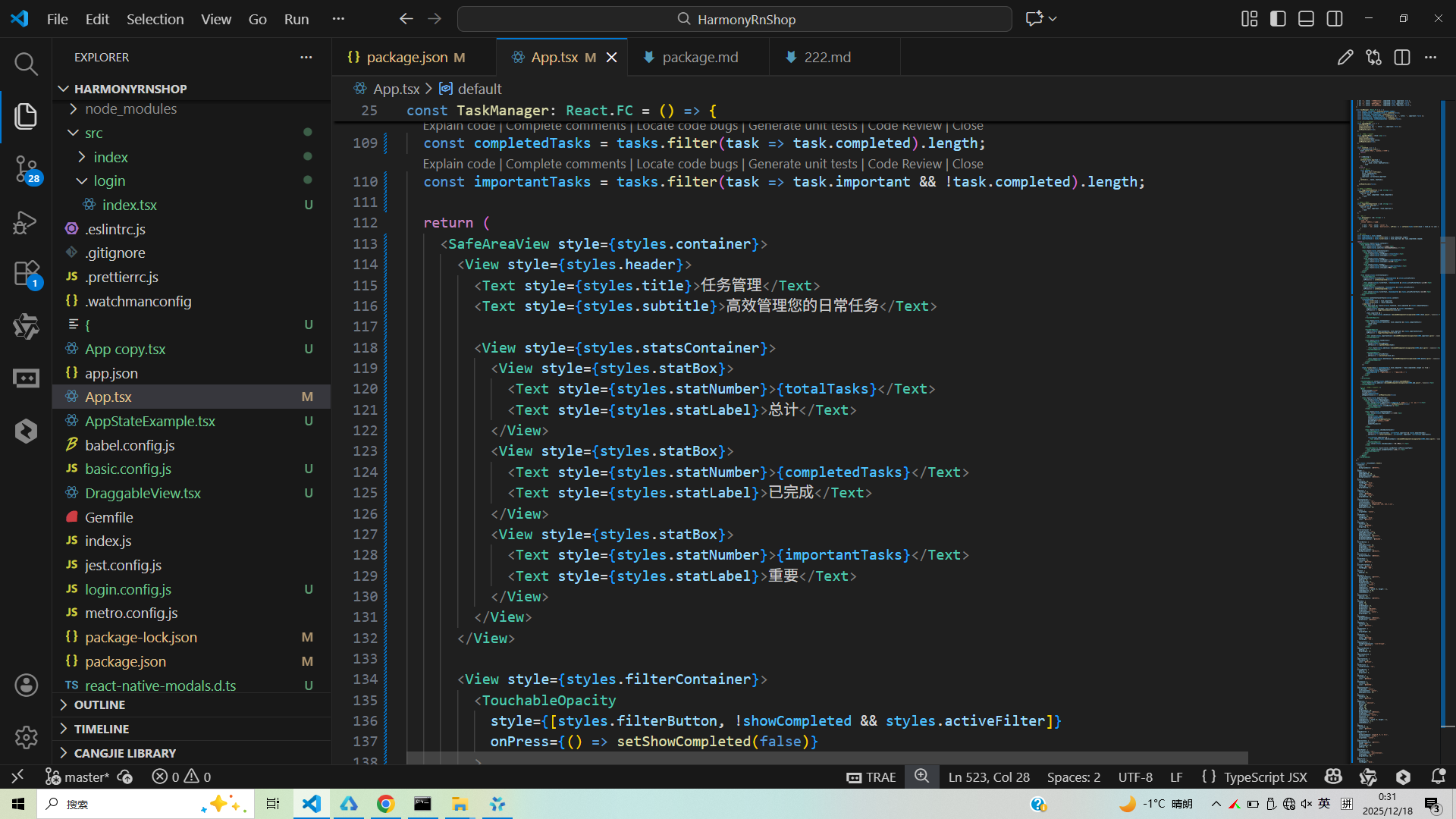
// app.tsx
import React, { useState } from 'react';
import { SafeAreaView, View, Text, StyleSheet, TouchableOpacity, ScrollView, TextInput, Modal, Alert } from 'react-native';

// Base64 图标库
const ICONS = {
  add: 'data:image/svg+xml;base64,PHN2ZyB4bWxucz0iaHR0cDovL3d3dy53My5vcmcvMjAwMC9zdmciIHZpZXdCb3g9IjAgMCAyNCAyNCIgZmlsbD0id2hpdGUiPjxwYXRoIGQ9Ik0xOSAxM2gtNnY2aC0ydi02SDV2LTJoNlY1aDJ2Nmg2djJ6Ii8+PC9zdmc+',
  check: 'data:image/svg+xml;base64,PHN2ZyB4bWxucz0iaHR0cDovL3d3dy53My5vcmcvMjAwMC9zdmciIHZpZXdCb3g9IjAgMCAyNCAyNCIgZmlsbD0id2hpdGUiPjxwYXRoIGQ9Ik05IDE2LjE3TDQuODMgMTJsLTEuNDIgMS40MUw5IDE5IDIxIDdsLTEuNDEtMS40MXoiLz48L3N2Zz4=',
  edit: 'data:image/svg+xml;base64,PHN2ZyB4bWxucz0iaHR0cDovL3d3dy53My5vcmcvMjAwMC9zdmciIHZpZXdCb3g9IjAgMCAyNCAyNCIgZmlsbD0id2hpdGUiPjxwYXRoIGQ9Ik0zIDE3LjI1VjIxaDMuNzVMMTcuODEgOS45NGwtMy43NS0zLjc1TDMgMTcuMjV6TTIwLjcxIDcuMDRjLjM5LS4zOS4zOS0xLjAyIDAtMS40MUwxOC4zNy4yOGMtLjM5LS4zOS0xLjAyLS4zOS0xLjQxIDBMMTUuMTMgMi4xMWwzLjc1IDMuNzVMMjAuNzEgNy4wNHoiLz48L3N2Zz4=',
  delete: 'data:image/svg+xml;base64,PHN2ZyB4bWxucz0iaHR0cDovL3d3dy53My5vcmcvMjAwMC9zdmciIHZpZXdCb3g9IjAgMCAyNCAyNCIgZmlsbD0id2hpdGUiPjxwYXRoIGQ9Ik02IDE5YzAgMS4xLjkgMiAyIDJoOGMxLjEgMCAyLS45IDItMlY3SDZ2MTJ6bTIuNDYtNy4xMmwxLjQxLTEuNDFMNy4wNSAxMi4zbDEuNDIgMS40MUwxMCAxMC44M2wxLjQxIDEuNDEgMS40Mi0xLjQxLTEuNDEtMS40MUwxMy44MyAxMmwuMDEtLjAxLTEuNDEtMS40MUwxMCA3LjE3bC0xLjQxIDEuNDFMOC41OSAxMmwuMDEuMDF6TTcgMkgxNkMxNy4xIDItMTggMi45LTE4IDR2MUgxNlY0SDh2MTJIMlY0YzAtMS4xLjktMiAyLTJ6Ii8+PC9zdmc+',
  close: 'data:image/svg+xml;base64,PHN2ZyB4bWxucz0iaHR0cDovL3d3dy53My5vcmcvMjAwMC9zdmciIHZpZXdCb3g9IjAgMCAyNCAyNCIgZmlsbD0id2hpdGUiPjxwYXRoIGQ9Ik0xOSA2LjQxTDE3LjU5IDUgMTIgMTAuNTkgNi40MSA1IDUgNi40MSAxMC41OSAxMiA1IDE3LjU5IDYuNDEgMTkgMTIgMTMuNDEgMTcuNTkgMTkgMTkgMTcuNTkgMTMuNDEgMTJ6Ii8+PC9zdmc+',
  task: 'data:image/svg+xml;base64,PHN2ZyB4bWxucz0iaHR0cDovL3d3dy53My5vcmcvMjAwMC9zdmciIHZpZXdCb3g9IjAgMCAyNCAyNCIgZmlsbD0id2hpdGUiPjxwYXRoIGQ9Ik0xNCAxMEg2djJIMTR2LTJ6bTAgNFY2SDZWMTBoOHptNi00aC00VjZoLTR2NGgtNHY0aDR2NGg0di00aDR2LTRoLTR6Ii8+PC9zdmc+',
  important: 'data:image/svg+xml;base64,PHN2ZyB4bWxucz0iaHR0cDovL3d3dy53My5vcmcvMjAwMC9zdmciIHZpZXdCb3g9IjAgMCAyNCAyNCIgZmlsbD0id2hpdGUiPjxwYXRoIGQ9Ik0xMiAyMS4zNWwtLjYxLS4yNy0yLjIxLS45OWMtLjM5LS4xOC0uNzEtLjQ5LS45MS0uODhsLS44OS0xLjg5Yy0uMTktLjM5LS40OS0uNzEtLjg4LS45MWwtMS44OS0uODljLS4zOS0uMTktLjcxLS40OS0uODgtLjg4bC0uOTktMi4yMWMtLjE4LS4zOS0uMjctLjYxLS4yNy0uNjFsLjI3LS42MS45OS0yLjIxYy4xOC0uMzkuNDktLjcxLjg4LS45MWwuODktMS44OWMuMTktLjM5LjQ5LS43MS44OC0uOTFsMi4yMS0uOTljLjM5LS4xOC42MS0uMjcuNjEtLjI3bC42MS4yNyAyLjIxLjk5Yy4zOS4xOC43MS40OS45MS44OGwuODkgMS44OWMuMTkuMzkuNDkuNzEuODguOTFsMS44OS44OWMuMzkuMTkuNzEuNDkuOTEuODhsLjk5IDIuMjFjLjE4LjM5LjI3LjYxLjI3LjYxbC0uMjcuNjEtLjk5IDIuMjFjLS4xOC4zOS0uNDkuNzEtLjg4LjkxbC0uODkgMS44OWMtLjE5LjM5LS40OS43MS0uODguOTFsLTIuMjEuOTljLS4zOS4xOC0uNjEuMjctLjYxLjI3eiIvPjxwYXRoIGQ9Ik0xMiAxN2MtLjU1IDAtMS0uNDUtMS0xczEuNDUtMSAxLTFjLjU1IDAgMSAuNDUgMSAxcy0uNDUgMS0xIDF6Ii8+PHBhdGggZD0iTTEyIDVjLS41NSAwLTEgLjQ1LTEgMXMxLjQ1IDEgMSAxcy0uNDUgMS0xIDFjLS41NSAwLTEtLjQ1LTEtMXMuNDUtMSAxLTF6Ii8+PC9zdmc+',
  completed: 'data:image/svg+xml;base64,PHN2ZyB4bWxucz0iaHR0cDovL3d3dy53My5vcmcvMjAwMC9zdmciIHZpZXdCb3g9IjAgMCAyNCAyNCIgZmlsbD0id2hpdGUiPjxwYXRoIGQ9Ik05IDE2LjE3TDQuODMgMTJsLTEuNDIgMS40MUw5IDE5IDIxIDdsLTEuNDEtMS40MXoiLz48L3N2Zz4=',
};

// 默认任务数据
const DEFAULT_TASKS = [
  { id: '1', title: '完成项目报告', completed: false, important: true },
  { id: '2', title: '购买生活用品', completed: false, important: false },
  { id: '3', title: '预约医生体检', completed: true, important: true },
  { id: '4', title: '阅读技术文档', completed: false, important: false },
];

const TaskManager: React.FC = () => {
  const [tasks, setTasks] = useState(DEFAULT_TASKS);
  const [modalVisible, setModalVisible] = useState(false);
  const [isEditing, setIsEditing] = useState(false);
  const [currentTask, setCurrentTask] = useState({ id: '', title: '', important: false });
  const [newTaskTitle, setNewTaskTitle] = useState('');
  const [showCompleted, setShowCompleted] = useState(false);

  // 打开添加任务模态框
  const openAddModal = () => {
    setIsEditing(false);
    setCurrentTask({ id: '', title: '', important: false });
    setNewTaskTitle('');
    setModalVisible(true);
  };

  // 打开编辑任务模态框
  const openEditModal = (task: any) => {
    setIsEditing(true);
    setCurrentTask(task);
    setNewTaskTitle(task.title);
    setModalVisible(true);
  };

  // 保存任务
  const saveTask = () => {
    if (!newTaskTitle.trim()) {
      Alert.alert('错误', '请输入任务内容');
      return;
    }

    if (isEditing) {
      // 编辑现有任务
      setTasks(tasks.map(task =>
        task.id === currentTask.id
          ? { ...task, title: newTaskTitle }
          : task
      ));
    } else {
      // 添加新任务
      const newTask = {
        id: Date.now().toString(),
        title: newTaskTitle,
        completed: false,
        important: currentTask.important
      };
      setTasks([...tasks, newTask]);
    }

    setModalVisible(false);
  };

  // 切换任务完成状态
  const toggleTaskCompletion = (id: string) => {
    setTasks(tasks.map(task =>
      task.id === id
        ? { ...task, completed: !task.completed }
        : task
    ));
  };

  // 切换任务重要性
  const toggleTaskImportance = (id: string) => {
    setTasks(tasks.map(task =>
      task.id === id
        ? { ...task, important: !task.important }
        : task
    ));
  };

  // 删除任务
  const deleteTask = (id: string) => {
    Alert.alert(
      '确认删除',
      '确定要删除这个任务吗?',
      [
        { text: '取消', style: 'cancel' },
        { text: '删除', style: 'destructive', onPress: () => setTasks(tasks.filter(task => task.id !== id)) }
      ]
    );
  };

  // 统计信息
  const totalTasks = tasks.length;
  const completedTasks = tasks.filter(task => task.completed).length;
  const importantTasks = tasks.filter(task => task.important && !task.completed).length;

  return (
    <SafeAreaView style={styles.container}>
      <View style={styles.header}>
        <Text style={styles.title}>任务管理</Text>
        <Text style={styles.subtitle}>高效管理您的日常任务</Text>

        <View style={styles.statsContainer}>
          <View style={styles.statBox}>
            <Text style={styles.statNumber}>{totalTasks}</Text>
            <Text style={styles.statLabel}>总计</Text>
          </View>
          <View style={styles.statBox}>
            <Text style={styles.statNumber}>{completedTasks}</Text>
            <Text style={styles.statLabel}>已完成</Text>
          </View>
          <View style={styles.statBox}>
            <Text style={styles.statNumber}>{importantTasks}</Text>
            <Text style={styles.statLabel}>重要</Text>
          </View>
        </View>
      </View>

      <View style={styles.filterContainer}>
        <TouchableOpacity
          style={[styles.filterButton, !showCompleted && styles.activeFilter]}
          onPress={() => setShowCompleted(false)}
        >
          <Text style={[styles.filterText, !showCompleted && styles.activeFilterText]}>未完成</Text>
        </TouchableOpacity>
        <TouchableOpacity
          style={[styles.filterButton, showCompleted && styles.activeFilter]}
          onPress={() => setShowCompleted(true)}
        >
          <Text style={[styles.filterText, showCompleted && styles.activeFilterText]}>已完成</Text>
        </TouchableOpacity>
      </View>

      <ScrollView contentContainerStyle={styles.content}>
        {(showCompleted
          ? tasks.filter(task => task.completed)
          : tasks.filter(task => !task.completed)
        ).map((task) => (
          <View key={task.id} style={[styles.taskCard, task.completed && styles.completedTask]}>
            <TouchableOpacity
              style={[styles.checkbox, task.completed && styles.checkedBox]}
              onPress={() => toggleTaskCompletion(task.id)}
            >
              {task.completed && (
                <Text style={styles.checkIcon}>{decodeURIComponent(escape(atob(ICONS.check.split(',')[1])))}</Text>
              )}
            </TouchableOpacity>

            <View style={styles.taskContent}>
              <Text style={[styles.taskTitle, task.completed && styles.completedText]}>
                {task.title}
              </Text>
            </View>

            <TouchableOpacity
              style={[styles.importantButton, task.important && styles.importantActive]}
              onPress={() => toggleTaskImportance(task.id)}
            >
              <Text style={styles.importantIcon}>{decodeURIComponent(escape(atob(ICONS.important.split(',')[1])))}</Text>
            </TouchableOpacity>

            <View style={styles.taskActions}>
              <TouchableOpacity
                style={styles.actionButton}
                onPress={() => openEditModal(task)}
              >
                <Text style={styles.editIcon}>{decodeURIComponent(escape(atob(ICONS.edit.split(',')[1])))}</Text>
              </TouchableOpacity>

              <TouchableOpacity
                style={styles.actionButton}
                onPress={() => deleteTask(task.id)}
              >
                <Text style={styles.deleteIcon}>{decodeURIComponent(escape(atob(ICONS.delete.split(',')[1])))}</Text>
              </TouchableOpacity>
            </View>
          </View>
        ))}

        {tasks.filter(task => showCompleted ? task.completed : !task.completed).length === 0 && (
          <View style={styles.emptyContainer}>
            <Text style={styles.emptyText}>
              {showCompleted ? '暂无已完成任务' : '暂无未完成任务'}
            </Text>
          </View>
        )}
      </ScrollView>

      <TouchableOpacity style={styles.addButton} onPress={openAddModal}>
        <Text style={styles.addIcon}>{decodeURIComponent(escape(atob(ICONS.add.split(',')[1])))}</Text>
      </TouchableOpacity>

      {/* 添加/编辑任务模态框 */}
      <Modal
        animationType="slide"
        transparent={true}
        visible={modalVisible}
        onRequestClose={() => setModalVisible(false)}
      >
        <View style={styles.modalOverlay}>
          <View style={styles.modalContent}>
            <View style={styles.modalHeader}>
              <Text style={styles.modalTitle}>{isEditing ? '编辑任务' : '添加新任务'}</Text>
              <TouchableOpacity onPress={() => setModalVisible(false)}>
                <Text style={styles.closeButton}>×</Text>
              </TouchableOpacity>
            </View>

            <View style={styles.inputContainer}>
              <Text style={styles.inputLabel}>任务内容</Text>
              <TextInput
                style={styles.input}
                value={newTaskTitle}
                onChangeText={setNewTaskTitle}
                placeholder="请输入任务内容"
                multiline
                numberOfLines={3}
              />
            </View>

            <View style={styles.checkboxContainer}>
              <TouchableOpacity
                style={[styles.modalCheckbox, currentTask.important && styles.modalChecked]}
                onPress={() => setCurrentTask({...currentTask, important: !currentTask.important})}
              >
                {currentTask.important && (
                  <Text style={styles.checkIconSmall}>{decodeURIComponent(escape(atob(ICONS.check.split(',')[1])))}</Text>
                )}
              </TouchableOpacity>
              <Text style={styles.checkboxLabel}>标记为重要任务</Text>
            </View>

            <TouchableOpacity style={styles.saveButton} onPress={saveTask}>
              <Text style={styles.saveButtonText}>保存任务</Text>
            </TouchableOpacity>
          </View>
        </View>
      </Modal>
    </SafeAreaView>
  );
};

const styles = StyleSheet.create({
  container: {
    flex: 1,
    backgroundColor: '#f5f7fa',
  },
  header: {
    paddingTop: 30,
    paddingBottom: 20,
    paddingHorizontal: 20,
    backgroundColor: '#4361ee',
  },
  title: {
    fontSize: 28,
    fontWeight: 'bold',
    color: '#ffffff',
    textAlign: 'center',
    marginBottom: 6,
  },
  subtitle: {
    fontSize: 16,
    color: '#e0e0e0',
    textAlign: 'center',
    marginBottom: 20,
  },
  statsContainer: {
    flexDirection: 'row',
    justifyContent: 'space-around',
    backgroundColor: 'rgba(255, 255, 255, 0.15)',
    borderRadius: 15,
    paddingVertical: 15,
  },
  statBox: {
    alignItems: 'center',
  },
  statNumber: {
    fontSize: 24,
    fontWeight: 'bold',
    color: '#ffffff',
  },
  statLabel: {
    fontSize: 14,
    color: '#e0e0e0',
    marginTop: 4,
  },
  filterContainer: {
    flexDirection: 'row',
    paddingHorizontal: 20,
    paddingVertical: 15,
    backgroundColor: '#ffffff',
    borderBottomWidth: 1,
    borderBottomColor: '#e0e0e0',
  },
  filterButton: {
    flex: 1,
    paddingVertical: 10,
    alignItems: 'center',
    borderRadius: 8,
    marginHorizontal: 5,
    backgroundColor: '#f0f2f5',
  },
  activeFilter: {
    backgroundColor: '#4361ee',
  },
  filterText: {
    fontSize: 16,
    color: '#6c757d',
  },
  activeFilterText: {
    color: '#ffffff',
    fontWeight: '600',
  },
  content: {
    padding: 16,
  },
  taskCard: {
    backgroundColor: '#ffffff',
    borderRadius: 12,
    padding: 16,
    marginBottom: 12,
    flexDirection: 'row',
    alignItems: 'center',
    elevation: 2,
    shadowColor: '#000',
    shadowOffset: { width: 0, height: 2 },
    shadowOpacity: 0.08,
    shadowRadius: 4,
  },
  completedTask: {
    opacity: 0.7,
    backgroundColor: '#f8f9fa',
  },
  checkbox: {
    width: 26,
    height: 26,
    borderRadius: 13,
    borderWidth: 2,
    borderColor: '#ced4da',
    alignItems: 'center',
    justifyContent: 'center',
    marginRight: 15,
  },
  checkedBox: {
    backgroundColor: '#4361ee',
    borderColor: '#4361ee',
  },
  checkIcon: {
    fontSize: 16,
    color: '#ffffff',
  },
  taskContent: {
    flex: 1,
    marginRight: 10,
  },
  taskTitle: {
    fontSize: 17,
    color: '#212529',
    fontWeight: '500',
  },
  completedText: {
    textDecorationLine: 'line-through',
    color: '#6c757d',
  },
  importantButton: {
    padding: 8,
    marginRight: 10,
  },
  importantActive: {
    opacity: 1,
  },
  importantIcon: {
    fontSize: 20,
    color: '#ffc107',
  },
  taskActions: {
    flexDirection: 'row',
  },
  actionButton: {
    padding: 8,
    marginLeft: 5,
  },
  editIcon: {
    fontSize: 18,
    color: '#4361ee',
  },
  deleteIcon: {
    fontSize: 18,
    color: '#e63946',
  },
  emptyContainer: {
    alignItems: 'center',
    justifyContent: 'center',
    paddingVertical: 50,
  },
  emptyText: {
    fontSize: 16,
    color: '#6c757d',
  },
  addButton: {
    position: 'absolute',
    bottom: 30,
    right: 30,
    width: 60,
    height: 60,
    borderRadius: 30,
    backgroundColor: '#4361ee',
    alignItems: 'center',
    justifyContent: 'center',
    elevation: 5,
    shadowColor: '#000',
    shadowOffset: { width: 0, height: 3 },
    shadowOpacity: 0.2,
    shadowRadius: 6,
  },
  addIcon: {
    fontSize: 28,
    color: '#ffffff',
  },
  modalOverlay: {
    flex: 1,
    backgroundColor: 'rgba(0, 0, 0, 0.5)',
    justifyContent: 'center',
    alignItems: 'center',
  },
  modalContent: {
    backgroundColor: '#ffffff',
    width: '85%',
    borderRadius: 20,
    padding: 25,
  },
  modalHeader: {
    flexDirection: 'row',
    justifyContent: 'space-between',
    alignItems: 'center',
    marginBottom: 20,
  },
  modalTitle: {
    fontSize: 22,
    fontWeight: 'bold',
    color: '#212529',
  },
  closeButton: {
    fontSize: 30,
    color: '#adb5bd',
    fontWeight: '200',
  },
  inputContainer: {
    marginBottom: 20,
  },
  inputLabel: {
    fontSize: 16,
    fontWeight: '600',
    color: '#495057',
    marginBottom: 10,
  },
  input: {
    borderWidth: 1,
    borderColor: '#ced4da',
    borderRadius: 12,
    paddingHorizontal: 15,
    paddingVertical: 12,
    fontSize: 16,
    backgroundColor: '#f8f9fa',
    minHeight: 100,
    textAlignVertical: 'top',
  },
  checkboxContainer: {
    flexDirection: 'row',
    alignItems: 'center',
    marginBottom: 25,
  },
  modalCheckbox: {
    width: 24,
    height: 24,
    borderRadius: 6,
    borderWidth: 2,
    borderColor: '#ced4da',
    alignItems: 'center',
    justifyContent: 'center',
    marginRight: 12,
  },
  modalChecked: {
    backgroundColor: '#4361ee',
    borderColor: '#4361ee',
  },
  checkIconSmall: {
    fontSize: 14,
    color: '#ffffff',
  },
  checkboxLabel: {
    fontSize: 16,
    color: '#495057',
  },
  saveButton: {
    backgroundColor: '#4361ee',
    paddingVertical: 15,
    borderRadius: 12,
    alignItems: 'center',
  },
  saveButtonText: {
    fontSize: 18,
    fontWeight: 'bold',
    color: '#ffffff',
  },
});

export default TaskManager;
这段React Native代码实现了一个任务管理系统,其核心架构基于函数组件和Hooks状态管理机制。系统通过useState Hook维护任务数据的状态树,包含任务列表、模态框可见性、编辑状态等关键状态。UI层面采用原生组件构建列表布局,每个任务卡片通过内联样式动态绑定完成状态和重要性属性,实现视觉差异化。模态框组件通过透明遮罩和滑动动画提供流畅的用户体验,数据持久化可通过集成AsyncStorage实现本地存储。
在鸿蒙生态适配方面,该系统可作为任务管理应用的基础模块。通过ArkTS桥接可实现跨平台运行,利用HarmonyOS分布式能力扩展至多设备协同场景。系统架构支持动态加载任务图标资源,便于后续集成鸿蒙系统的图形渲染优化特性。鸿蒙特有的Ability框架可将该管理系统封装为独立服务能力,通过Intent机制实现应用间数据传递。在UI层面,可借助鸿蒙ArkUI框架的声明式语法重构组件,利用其响应式渲染机制提升性能。系统还可接入鸿蒙生态的任务调度服务,实现任务与设备通知系统的深度融合,构建完整的任务管理解决方案。
从技术实现角度看,该系统展现了现代化前端开发的核心理念。状态管理采用单向数据流模式,通过useState Hook实现响应式更新,确保UI与数据同步。组件设计遵循单一职责原则,将展示逻辑与业务逻辑分离,提高代码可维护性。模态框的实现利用了React Native的Modal组件,通过透明背景和滑动动画增强用户体验。任务卡片采用Flexbox布局实现响应式列表,适配不同屏幕尺寸。
在鸿蒙系统集成方面,该React Native应用可通过HarmonyOS的React Native支持运行。鸿蒙的分布式数据管理能力可为任务数据提供云端同步功能,实现多设备间数据一致性。系统可利用鸿蒙的AbilitySlice机制重构导航结构,通过Page Ability管理不同功能页面。鸿蒙的资源管理框架支持多语言、多分辨率资源适配,提升国际化支持能力。设备间的数据流转可通过鸿蒙的分布式软总线实现,用户可在手机、平板、智能手表等设备间无缝切换任务管理体验。
数据持久化方案在鸿蒙生态中有多种选择。除React Native的AsyncStorage外,还可集成鸿蒙的轻量级数据存储Preference,或使用关系型数据库RelationalStore存储复杂数据结构。对于需要云端同步的数据,可接入鸿蒙的云开发服务AppGallery Connect,实现数据的远程存储和同步。鸿蒙的统一数据管理服务可为任务数据提供标准化的数据模型,便于与其他任务管理应用进行数据交换。
打包
接下来通过打包命令npn run harmony将reactNative的代码打包成为bundle,这样可以进行在开源鸿蒙OpenHarmony中进行使用。

打包之后再将打包后的鸿蒙OpenHarmony文件拷贝到鸿蒙的DevEco-Studio工程目录去:

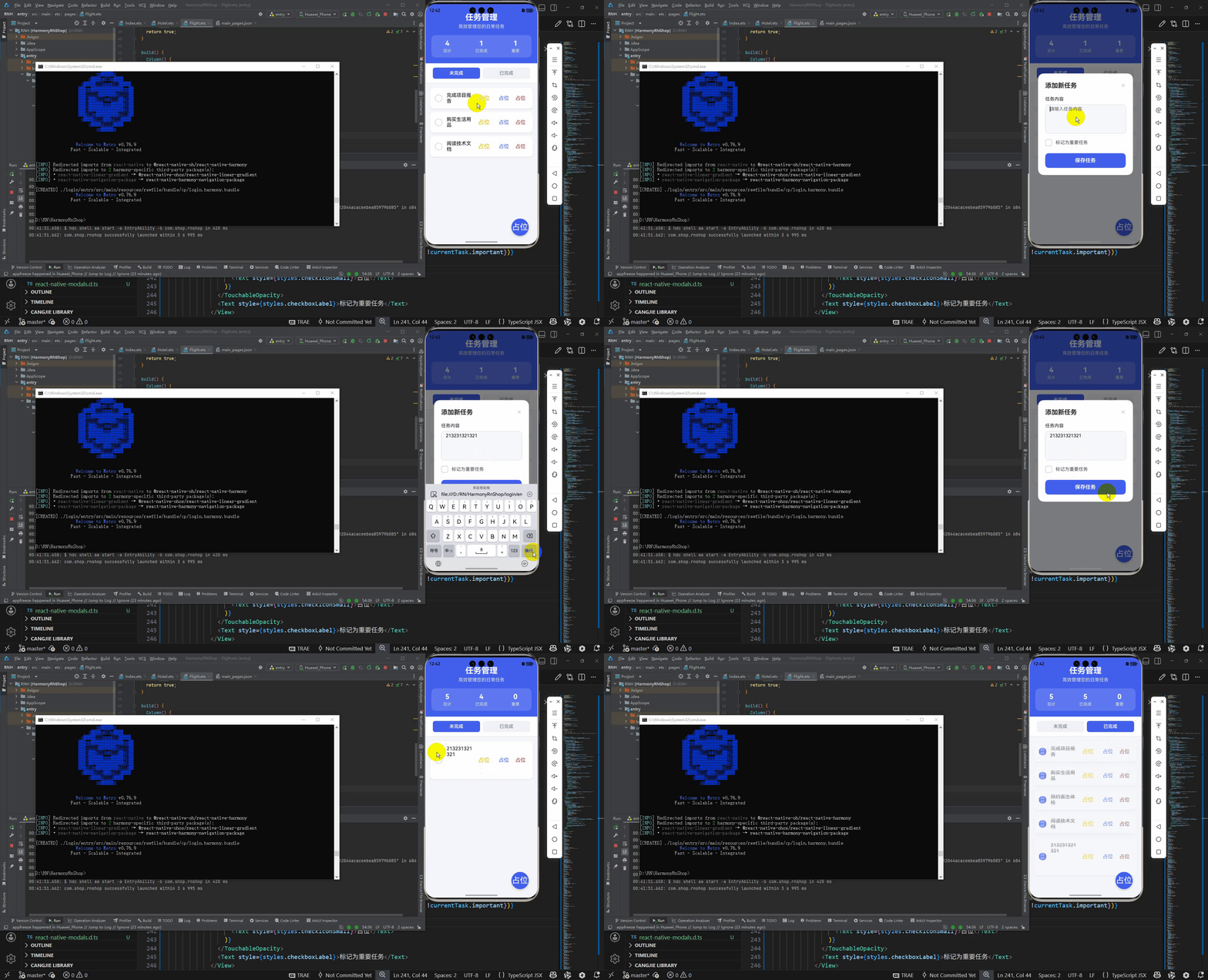
最后运行效果图如下显示:
欢迎大家加入开源鸿蒙跨平台开发者社区,一起共建开源鸿蒙跨平台生态。

讨论HarmonyOS开发技术,专注于API与组件、DevEco Studio、测试、元服务和应用上架分发等。
更多推荐
 23
23 0
0- 0


 已为社区贡献23条内容

所有评论(0)