【中工开发者】—— 天气查询
开发鸿蒙天气查询应用是挑战与成长并存之旅。技术层面,深入掌握 ArkUI 高效构建界面、数据绑定机制优化交互,熟悉网络请求、JSON 解析处理数据流程,数据库操作管理城市信息,整合多技术实现完整功能闭环;设计思维上,聚焦用户习惯打磨界面,权衡简洁与详尽,如天气展示主次分明、城市管理便捷易用;适配多端时,钻研布局响应式调整,保障体验一致性。
该文章为鸿蒙期末作业,本次项目是开发一款基于鸿蒙的天气查询app,通过利用现有的网络开源API提供的服务快速获取天气信息并显示到手机终端上,该app简单实现的功能点:
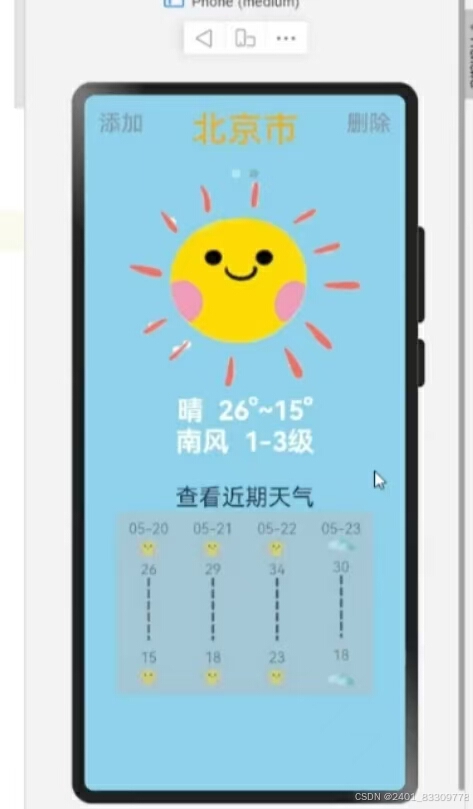
(1)显示当前城市当日以及近期天气数据
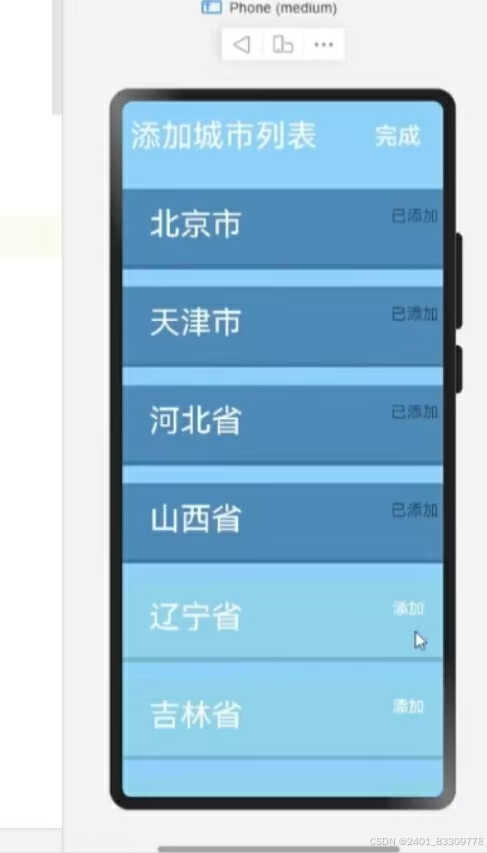
(2)城市添加功能
(3)删除城市功能
在智能设备日益普及的当下,天气查询应用已然成为人们日常生活中不可或缺的实用工具。借助鸿蒙系统强大的分布式能力与便捷开发框架,打造一款专属的天气查询应用别具意义。以下将详述开发过程,涵盖从数据获取到功能完善,再到项目心得总结的全方位历程。项目的设计是通过图片和文字显示当前和未来的天气状况。这些天气数据是通过访问一个API接口获取的,这里面的信息按照一定的时间间隔实时更新,通过网络获取天气预报信息,并将天气信息保存在数据库中。
1.数据接口获取
精准且稳定的天气数据是应用核心。经多方调研评估,选定专业气象数据平台提供的开放接口,如知名天气数据服务商的 API。注册开发者账号后,获取专属密钥与调用权限,接口支持以 JSON 格式返回丰富天气信息,涵盖实时温度、湿度、风力风向、未来多日预报详情等,且按城市名称或经纬度精准定位地区天气状况,为后续数据解析、展示筑牢根基。通信协议基于 HTTP/HTTPS,保障数据安全、高效传输,遵循接口规范设置请求参数,如 city(城市名)、lang(语言)、unit(温度单位)等,确保获取贴合用户习惯、适配应用场景的数据内容。这里我们以高德地图为例:
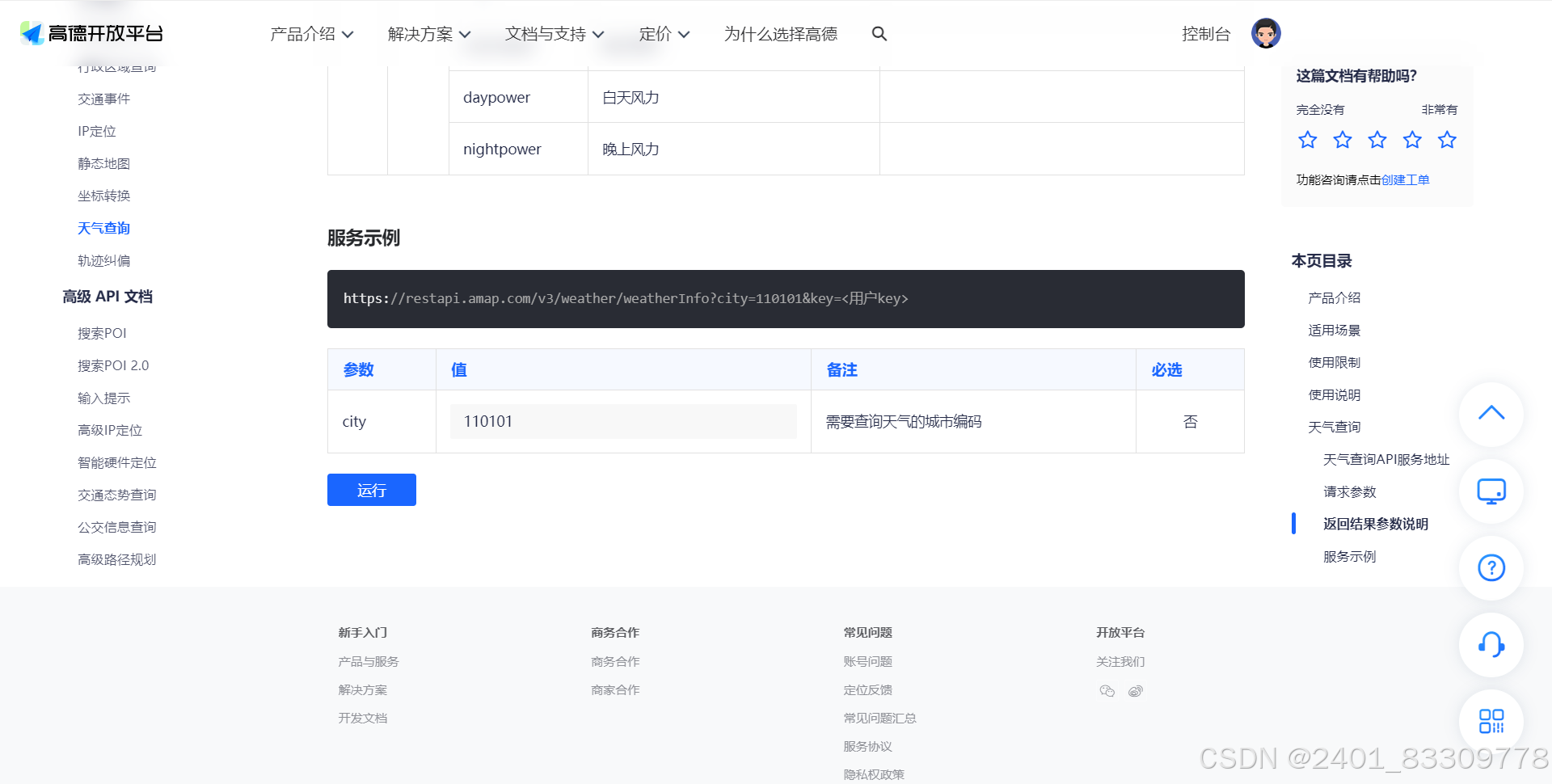
登录高德地图,通过控制台完成认证获得key,可以获得有关于实时天气的json文件。
2.对象创建
在鸿蒙开发框架下,构建数据模型类以承接解析后天气数据。例如创建 WeatherData 类,成员变量包含 温度、湿度、风向、多日预报列表等,各变量与接口返回数据字段精准对应,借助 JSON.parseObject() 等方法,实例化对象时将原始 JSON 数据填充转化,实现结构化数据存储,方便业务逻辑处理、页面数据绑定,契合鸿蒙面向对象编程范式,增强代码可读性、可维护性。现在在casts.ets中创建对象来保证Json数据返回有所对应:
export class casts{
  date:string
  dayweather:string
  nightweather:string
  daytemp:number
  nighttemp:number
  daywind:string
  daypower:string
  daytemp_float:number
  nighttemp_float:number
}
3.获取数据
在应用业务层,封装数据获取方法。依托鸿蒙网络请求库 HttpURLConnection 或 OkHttp(适配鸿蒙生态)发起异步请求,于 onCreate() 或特定触发时机,拼接含密钥、城市标识参数 URL 向接口发送 GET 请求。成功回调里,依接口文档规范解析 JSON 数据填充getWaetherUtil对象,失败回调则精准提示用户网络或数据获取异常,同时设置缓存策略,定时更新基础上优先展示本地缓存数据,优化用户体验、减轻服务器压力,确保天气信息及时性与稳定性。创建getWaetherUtil.ets
import {WeatherModel} from  "../viewmodel/WeatherModel"
import http from '@ohos.net.http';

export  class WeatherUtilModel{

  //获取数据
  getWeather(cityCode:number){
    return new Promise<WeatherModel>((resolve,reject)=>{
      //创建
      let request = http.createHttp()
      let url= `https://restapi.amap.com/v3/weather/weatherInfo?key=a8e665a4907d417eff4cc99e0a1899f4&city=${cityCode}&extensions=all`

      let options = {
        method:http.RequestMethod.GET,
        header:{'Content-Type':'application/json'},
      } as http.HttpRequestOptions
      let result = request.request(url,options)

      result.then((res)=>{
        if (res.responseCode === 200) {
          // console.log(res.result.toString())
          resolve( JSON.parse(res.result.toString()))
        }
      }).catch((err)=>{
        console.log(err)
      })
    })
  }

  //直接获取所有数据
  async  getWeathers (cityCodeList:Array<number>){
    let WeathersDate: Array<WeatherModel> = []
    let promises :Array<Promise<WeatherModel>> = []
    for (let i = 0; i < cityCodeList.length; i++) {
      promises.push(this.getWeather(cityCodeList[i]))
    }
    await Promise.all(promises).then(result =>{
      for (const element of result) {
        console.log(element.forecasts[0].city);
      }
      WeathersDate = result
    })
    return WeathersDate
  }


}

let getWeatherUtil = new WeatherUtilModel()
export default getWeatherUtil as WeatherUtilModel
4.主页面构建
采用鸿蒙 ArkUI 框架设计界面,遵循简洁直观原则。顶部导航栏安置城市名称、城市的添加和删除,用户可根据要求点击;主体区域划分实时天气展示区(大字体温度、天气图标依晴雨等状况切换)、详情区、未来多日预报列表,整体布局运用 Flex、Grid 组件灵活排版,色彩搭配契合天气氛围,适配多终端屏幕尺寸,从手机到平板皆有良好视觉呈现、交互效果。
import getWeatherUtil from "../viewmodel/WeatherUtilModel"
import { WeatherModel } from "../viewmodel/WeatherModel"
import { cityView } from '../view/cityView'
import router from '@ohos.router'


@Entry
@Component
struct Index {

  //城市信息集合
  @State cityWeatherList: Array<WeatherModel> = []
  //城市名字集合
  @State cityNameList: Array<string> = []
  //当前城市代码列表
  @State cityCodeList: Array<number> = [110000,120000]
  //当前tab组件索引
  @State cityIndex: number = 0
  //tab控制器
  tabcontroller: TabsController = new TabsController()


  onPageShow() {
    let params = router.getParams()
    if (params) {
      this.cityCodeList = params["Codes"]
      this.cityWeatherList = []
      this.cityNameList = []
      this.initData()
    }
  }


  //tarBar 自定义函数
  @Builder tabBuild(index: number) {
    Circle({ width: 10, height: 10 }).fill(this.cityIndex === index ? Color.White : Color.Gray).opacity(0.4)
  }

  aboutToAppear() {
    this.initData()
  }

  async  initData() {
    //所有数据的集合
   let result :Array<WeatherModel> = await getWeatherUtil.getWeathers(this.cityCodeList)

    for (let i = 0; i < result.length; i++) {
        let ACityWeather = new WeatherModel();
        ACityWeather = result[i]
        this.cityWeatherList.push(ACityWeather)
        let  cityName = this.cityWeatherList[i].forecasts[0].city
        this.cityNameList.push(cityName)
    }
  }


  build() {
    Column() {
      //城市选择+城市标题
      Row() {
        Button("添加")
          .fontSize(25)
          .fontColor(Color.Gray)
          .opacity(0.7)
          .backgroundColor("#87CEEB")
          .margin({ bottom: 15 })
          .onClick(() => {
            router.pushUrl({
              url: "pages/AddCity",
              params: {
                Codes: this.cityCodeList,
                Names: this.cityNameList
              }
            })
          })
        Text(this.cityNameList[this.cityIndex]).fontSize(40).fontColor(Color.Orange)
        Button("删除")
          .fontSize(25)
          .fontColor(Color.Gray)
          .opacity(0.7)
          .backgroundColor("#87CEEB")
          .margin({ bottom: 15 })
          .onClick(() => {
            AlertDialog.show({ title: "删除",
              message: `你确定要删除${this.cityNameList[this.cityIndex]}消息吗?`,
              confirm: {
                value: "确定",
                action: () => {
                  this.cityNameList = this.cityNameList.filter(item => item !== this.cityNameList[this.cityIndex])
                  this.cityCodeList = this.cityCodeList.filter(item => item !== this.cityCodeList[this.cityIndex])
                  this.cityWeatherList = this.cityWeatherList.filter(item => item !== this.cityWeatherList[this.cityIndex])

                }
              }
            })
          })
      }.height("10%")
      .width("100%")
      .justifyContent(FlexAlign.SpaceBetween)


      //城市切换
      Tabs({ barPosition: BarPosition.Start, controller: this.tabcontroller }) {
        ForEach(this.cityWeatherList, (cityWeatherList: WeatherModel) => {
          TabContent() {
            cityView({ casts: cityWeatherList.forecasts[0].casts })
          }.tabBar(this.tabBuild(this.cityWeatherList.findIndex(obj => obj === cityWeatherList)))
        })

      }
      .barHeight(20)
      .barWidth(40)
      .onChange((index: number) => {
        this.cityIndex = index
      })

    }.backgroundColor("#87CEEB")
    .width("100%").height("100%")

  }
}
5.天气数据展示
借由 @Component、@Builder 等装饰器双向绑定 GetWeatherUtil 对象数据与 UI 组件,如 Text 组件展示温度,Row 依天气状况代码选对应晴天、多云、雨等本地图标资源展示,多日预报 ForEach 循环 List 渲染卡片,数据更新瞬间驱动 UI 同步变化,结合动画过渡效果(如渐变、缩放),增强数据展示生动性、直观性,让用户一眼洞悉天气全貌,交互上可点击预报卡片展开详情,深挖特定日天气细节。
import { casts } from "../viewmodel/casts"

@Component
export struct cityView {

  //当前城市天气
  casts: casts[] = []

  @Builder weatherImage(dayweather: string) {
    if (dayweather === "晴") {
      Image($r('app.media.sun')).width(30)
    }
    if (dayweather === "多云") {
      Image($r("app.media.cloud")).width(30)
    }
    if (dayweather === "阴") {
      Image($r("app.media.cloud")).width(30)
    }
    if (dayweather.includes("雨")) {
      Image($r("app.media.rain")).width(30)
    }
  }

  build() {
    //单个tabcontent 展示的所有内容
    Column() {
      ForEach(this.casts, (cast: casts) => {
        if (cast === this.casts[0]) {
          //上半部分 图片+当天天气
          //图片
          Row() {
            if (cast.dayweather === "晴") {
              Image($r('app.media.sun')).width(260)
            }
            if (cast.dayweather === "多云") {
              Image($r("app.media.cloud")).width(260)
            }
            if (cast.dayweather === "阴") {
              Image($r("app.media.cloud")).width(260)
            }
            if (cast.dayweather.includes("雨")) {
              Image($r("app.media.rain")).width(260)
            }
          }.height("30%")

          Column() {
            //天气 温度
            Row() {
              Text(cast.dayweather).fontSize(30).fontColor(Color.White).fontWeight(FontWeight.Bold)
              Text("  " + cast.daytemp + "°~" + cast.nighttemp + "°")
                .fontSize(30)
                .fontColor(Color.White)
                .fontWeight(FontWeight.Bold)
            }
            //风力 等级
            Row() {
              Text(cast.daywind + "风  ").fontSize(30).fontColor(Color.White).fontWeight(FontWeight.Bold)
              Text(cast.daypower + "级").fontSize(30).fontColor(Color.White).fontWeight(FontWeight.Bold)
            }

          }.margin({ top: 10 })
        }
      })


      //近期天气列表
      Column() {
        Text("查看近期天气").fontSize(26).margin({ top: 30 })
        //天气列表
        Row() {
          ForEach(this.casts, (cast: casts) => {
            Column() {
              Text("查看近期天气").fontSize(26).margin({ top: 30 })
        //天气列表
        Row() {
          ForEach(this.casts, (cast: casts) => {
            Column() {
              Text(cast.date.substring(5))
              this.weatherImage(cast.dayweather)
              Blank()
              Text(cast.daytemp.toString())
              Line()
                .width(20).height(80).startPoint([10, 0])
                .endPoint([10, 70]).stroke(Color.Black)
                .strokeWidth(3).strokeDashArray([10, 3])
              Text(cast.nighttemp.toString())
              Blank()
              this.weatherImage(cast.dayweather)
            }.height("90%").width("20%")
          })
        }
        .width("80%")
        .height("60%")
        .backgroundColor("#ffbab8b8")
        .opacity(0.5)
        .justifyContent(FlexAlign.SpaceAround)

      }.height("45%").width("100%")

    }.width("100%").height("100%")

  }
}
6.城市添加删除功能
添加城市,于界面设添加按钮,里面包含热门城市推荐列表,返回匹配城市供选择;选中城市后,将其信息存入本地数据库(鸿蒙 SQLite 轻量数据库),列表展示已添加城市,切换便捷。删除功能,在城市列表项点击删除确认框,点击确认则从数据库移除对应城市记录,关联天气数据一并清理,实时更新列表、刷新页面,保障城市管理高效、流畅,契合用户个性化需求。
import router from '@ohos.router'
@Entry
@Component
struct AddCity {

  @State AllCityCodeList :Array<number> = [110000,120000,130000,140000,210000,220000,310000]
  @State AllCityNameList :Array<string> = ["北京市","天津市","河北省","山西省","辽宁省","吉林省","上海市"]

  //当前城市代码列表 接收传入数据的载体
  @State cityCodeList :Array<number> = []
  @State cityNameList :Array<string> = []


  onPageShow(){
    let params = router.getParams()
    this.cityCodeList = params["Codes"]
    this.cityNameList = params["Names"]
  }
  build() {
    //加入
    Column(){
      Row(){
        Text("添加城市列表").fontSize(35).fontColor(Color.White)
        Blank()
        Button("完成").backgroundColor("").fontSize(26)
          .onClick(()=>{
            router.back({
              url:"pages/Index",
              params:{
                Codes:this.cityCodeList
              }
            })
          })
      }.height("10%").width("95%")
      //城市列表
      Column() {
        List() {
          ForEach(this.AllCityNameList, (name: string) => {
            ListItem() {
              if (this.cityNameList.includes(name)) {
                Column() {
                  Row() {
                    Text(name).fontSize(35).fontColor(Color.White).width("60%")
                      .margin({ top: 20, left: 30 })
                    Blank()
                    Text("已添加").backgroundColor("").fontSize(18)
                      .margin({ right: 5 })
                      .opacity(0.8)
                  }.width("100%")

                  Blank()
                  Divider().strokeWidth(5)
                }.height(90).width("100%").margin({ top: 20 })
                .backgroundColor("#4682B4")
              } else {
                Column() {
                  Row() {
                    Text(name).fontSize(35).fontColor(Color.White).width("60%")
                      .margin({ top: 20, left: 30 })
                    Blank()
                    Button("添加").backgroundColor("").fontSize(18)
                      .margin({ right: 5 })
                      .onClick(() => {//根据name 获取所在索引
                        let index = this.AllCityNameList.findIndex(obj => obj === name)
                        console.log("index:"+index)
                        //根据索引获得 城市对应的编码
                        let cityCode: number = this.AllCityCodeList[index]
                        console.log("cityCode= "+cityCode)
                        //将编码加入列表
                        this.cityCodeList.push(cityCode)
                        this.cityNameList.push(name)
                        console.log(this.cityCodeList.toString())
                      })
                  }.width("100%")

                  Blank()
                  Divider().strokeWidth(5)
                }.height(90).width("100%").margin({ top: 20 })
                .backgroundColor("#87CEEB")
              }


            }
          })
        }
      }.width("100%").height("90%")
    }.width("100%").height("100%").backgroundColor("#87CEFA")
  }
}
7.项目展示以及作业心得
项目心得总结
开发鸿蒙天气查询应用是挑战与成长并存之旅。技术层面,深入掌握 ArkUI 高效构建界面、数据绑定机制优化交互,熟悉网络请求、JSON 解析处理数据流程,数据库操作管理城市信息,整合多技术实现完整功能闭环;设计思维上,聚焦用户习惯打磨界面,权衡简洁与详尽,如天气展示主次分明、城市管理便捷易用;适配多端时,钻研布局响应式调整,保障体验一致性。同时,遇数据格式兼容、网络异常处理难题,经查阅文档、社区求助攻克,未来可深挖鸿蒙分布式特性,跨设备共享天气、拓展智能场景,持续迭代优化,为用户呈上更优质天气查询服务,这次作业使我收获颇丰。

讨论HarmonyOS开发技术,专注于API与组件、DevEco Studio、测试、元服务和应用上架分发等。
更多推荐

 31
31 0
0- 0


 已为社区贡献1条内容

所有评论(0)