Vision Kit(人脸活体检测)
Vision Kit(场景化视觉服务)集成了视觉类AI能力,包括人脸活体检测(interactiveLiveness)能力、卡证识别(CardRecognition)能力、文档扫描(DocumentScanner)能力、AI识图控件(visionImageAnalyzer)能力。人脸活体检测能力便于用户与设备进行互动,验证用户是否为真实活体;卡证识别能力可提供身份证、行驶证、驾驶证、护照、银行卡等
文章目录



一、Vision Kit 简介
Vision Kit(场景化视觉服务)集成了视觉类AI能力,包括人脸活体检测(interactiveLiveness)能力、卡证识别(CardRecognition)能力、文档扫描(DocumentScanner)能力、AI识图控件(visionImageAnalyzer)能力。人脸活体检测能力便于用户与设备进行互动,验证用户是否为真实活体;卡证识别能力可提供身份证、行驶证、驾驶证、护照、银行卡等证件的结构化识别服务;文档扫描控件可提供拍摄文档并转换为高清扫描件的服务;AI识图控件可提供场景化的文本识别、主体分割、识图搜索功能。其中动作活体检测能力、卡证识别能力实施试用期免费的计费政策,试用期至2026年12月31日。开始正式收费前,华为将会提前通过正式途径发布计费调整通告。
场景介绍
Vision Kit提供了人脸活体检测能力、卡证识别能力、文档扫描能力和AI识图能力,具体如下:
- 人脸活体检测:通过动作活体检测,验证用户是否为真实活体。
- 卡证识别:多证件的结构化识别服务。
- 文档扫描:提供拍摄文档并转换为高清扫描件的服务。
- AI识图:提供场景化的文本识别、主体分割、识图搜索功能。
说明
人脸活体检测、卡证识别和文档扫描不支持2in1设备。
约束与限制
| AI能力 | 约束 |
|---|---|
| 人脸活体检测 | 支持的文本语种类型:简体中文、繁体中文、英文、维吾尔文、藏文。支持的播报语种类型:简体中文、英文。人脸活体检测服务暂不支持横屏、分屏进行检测。 |
| 卡证识别 | 支持的语种类型:简体中文、英文。卡证识别暂时只支持身份证、行驶证、驾驶证、护照、银行卡5种卡证。不允许被其他组件或窗口遮挡。 |
| 文档扫描 | 支持的语种类型:简体中文、英文。文档扫描暂时只支持手机、平板设备。不允许被其他组件或窗口遮 |
| AI识图 | 支持的文本语种类型:简体中文、繁体中文、英文、维吾尔文、藏文。支持图片最小规格100*100分辨率。支持翻译的图片宽高最小比例为1:3,支持文本识别的图片宽高最小比例为1:7。 |
二、人脸活体检测
人脸活体检测支持动作活体检测模式。 动作活体检测支持实时捕捉人脸,需要用户配合做指定动作就可以判断是真实活体,还是非活体攻击(比如:打印图片、人脸翻拍视频以及人脸面具等)。
注意
活体检测是一项纯端侧算法、试用期免费的系统基础服务,推荐开发者使用在考勤打卡、辅助登录和实名认证等低危业务场景中。
端侧算法在HarmonyOS NEXT/5.0.x已完成权威机构(CFCA)检测认证。鉴于支付和金融应用的高风险性,建议开发者基于现有的安全性,针对不同的功能场景进行风险评估和风控策略评估,并采取必要的安全措施。
图1 权威认证增强级检测报告
图2 活体检测示意图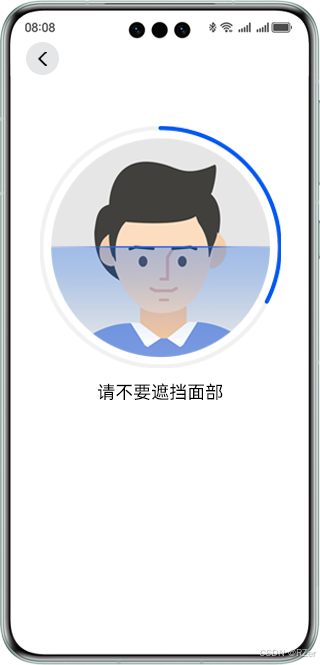
约束与限制
该能力当前不支持模拟器。
接口说明
以下仅列出demo中调用的部分主要接口,具体API说明详见API参考。
| 接口名 | 描述 |
|---|---|
| startLivenessDetection(config: InteractiveLivenessConfig): Promise; | 跳转到人脸活体检测页面的入口 |
| getInteractiveLivenessResult(): Promise | 获取人脸活体检测的结果。使用Promise异步回调 |
开发步骤
- 将实现人脸活体检测相关的类添加至工程。
import { interactiveLiveness } from '@kit.VisionKit';
- 在module.json5文件中添加CAMERA权限,其中reason,abilities标签必填,配置方式参见requestPermissions标签说明。
"requestPermissions":[
  {
    "name": "ohos.permission.CAMERA",
    "reason": "$string:camera_desc",
    "usedScene": {"abilities": []}
  }
]
- 简单配置页面的布局,选择人脸活体检测验证完后的跳转模式。如果使用back跳转模式,表示的是在检测结束后使用router.back()返回。如果使用replace跳转模式,表示的是检测结束后使用router.replaceUrl()去跳转相应页面。默认选择的是replace跳转模式。
Flex({ direction: FlexDirection.Row, justifyContent: FlexAlign.Start, alignItems: ItemAlign.Center }) {
  Text("验证完的跳转模式:")
    .fontSize(18)
    .width("25%")
  Flex({ direction: FlexDirection.Row, justifyContent: FlexAlign.Start, alignItems: ItemAlign.Center }) {
    Row() {
      Radio({ value: "replace", group: "routeMode" }).checked(true)
        .height(24)
        .width(24)
        .onChange((isChecked: boolean) => {
          this.routeMode = "replace"
        })
      Text("replace")
        .fontSize(16)
    }
    .margin({ right: 15 })

    Row() {
      Radio({ value: "back", group: "routeMode" }).checked(false)
        .height(24)
        .width(24)
        .onChange((isChecked: boolean) => {
          this.routeMode = "back";
        })
      Text("back")
        .fontSize(16)
    }
  }
  .width("75%")
}
- 填写验证的动作个数。
Flex({ direction: FlexDirection.Row, justifyContent: FlexAlign.Start, alignItems: ItemAlign.Center }) {
  Text("动作数量:")
    .fontSize(18)
    .width("25%")
  TextInput({
    placeholder: this.actionsNum != 0 ? this.actionsNum.toString() : "动作数量为3或4个"
  })
    .type(InputType.Number)
    .placeholderFont({
      size: 18,
      weight: FontWeight.Normal,
      family: "HarmonyHeiTi",
      style: FontStyle.Normal
    })
    .fontSize(18)
    .fontWeight(FontWeight.Bold)
    .fontFamily("HarmonyHeiTi")
    .fontStyle(FontStyle.Normal)
    .width("65%")
    .onChange((value: string) => {
      this.actionsNum = Number(value) as interactiveLiveness.ActionsNumber;
    })
}
- 点击“开始检测“按钮,触发点击事件。
Button("开始检测", { type: ButtonType.Normal, stateEffect: true })
  .width(192)
  .height(40)
  .fontSize(16)
  .backgroundColor(0x317aff)
  .borderRadius(20)
  .margin({
    bottom: 56
  })
  .onClick(() => {
    this.privateStartDetection();
  })
- 触发CAMERA权限校验。
// 校验CAMERA权限
private privateStartDetection() {
  abilityAccessCtrl.createAtManager().requestPermissionsFromUser(this.context, this.array).then((res) => {
    for (let i = 0; i < res.permissions.length; i++) {
      if (res.permissions[i] === "ohos.permission.CAMERA" && res.authResults[i] === 0) {
        this.privateRouterLibrary();
      }
    }
  }).catch((err: BusinessError) => {
    hilog.error(0x0001, "LivenessCollectionIndex", `Failed to request permissions from user. Code is ${err.code}, message is ${err.message}`);
  })
}
- 配置人脸活体检测控件的配置项InteractiveLivenessConfig,用于跳转到人脸活体检测控件。
配置中具体的参数可参考API文档。
let routerOptions: interactiveLiveness.InteractiveLivenessConfig = {
  isSilentMode: this.isSilentMode as interactiveLiveness.DetectionMode,
  routeMode: this.routeMode as interactiveLiveness.RouteRedirectionMode,
  actionsNum: this.actionsNum
};
- 调用interactiveLiveness的startLivenessDetection接口,判断跳转到人脸活体检测控件是否成功。
// 跳转到人脸活体检测控件
private privateRouterLibrary() {
  if (canIUse("SystemCapability.AI.Component.LivenessDetect")) {
    interactiveLiveness.startLivenessDetection(routerOptions).then((DetectState: boolean) => {
      hilog.info(0x0001, "LivenessCollectionIndex", `Succeeded in jumping.`);
    }).catch((err: BusinessError) => {
      hilog.error(0x0001, "LivenessCollectionIndex", `Failed to jump. Code:${err.code},message:${err.message}`);
    })
  } else {
    hilog.error(0x0001, "LivenessCollectionIndex", 'this api is not supported on this device');
  }
}
- 检测结束后回到当前界面,可调用interactiveLiveness的getInteractiveLivenessResult接口,验证人脸活体检测的结果。
// 获取验证结果
private getDetectionResultInfo() {
  // getInteractiveLivenessResult接口调用完会释放资源
  if (canIUse("SystemCapability.AI.Component.LivenessDetect")) {
    let resultInfo = interactiveLiveness.getInteractiveLivenessResult();
    resultInfo.then(data => {
      this.resultInfo = data;
    }).catch((err: BusinessError) => {
      this.failResult = {
        "code": err.code,
        "message": err.message
      }
    })
  } else {
    hilog.error(0x0001, "LivenessCollectionIndex", 'this api is not supported on this device');
  }
}
开发实例
import { common, abilityAccessCtrl, Permissions } from '@kit.AbilityKit';
import { interactiveLiveness } from '@kit.VisionKit';
import { BusinessError } from '@kit.BasicServicesKit';
import { hilog } from '@kit.PerformanceAnalysisKit';

@Entry
@Component
struct LivenessIndex {
  private context: common.UIAbilityContext = getContext(this) as common.UIAbilityContext;
  private array: Array<Permissions> = ["ohos.permission.CAMERA"];
  @State actionsNum: number = 0;
  @State isSilentMode: string = "INTERACTIVE_MODE";
  @State routeMode: string = "replace";
  @State resultInfo: interactiveLiveness.InteractiveLivenessResult = {
    livenessType: 0
  };
  @State failResult: Record<string, number | string> = {
    "code": 1008302000,
    "message": ""
  };

  build() {
    Stack({
      alignContent: Alignment.Top
    }) {
      Column() {
        Row() {
          Flex({ direction: FlexDirection.Row, justifyContent: FlexAlign.Start, alignItems: ItemAlign.Center }) {
            Text("验证完的跳转模式:")
              .fontSize(18)
              .width("25%")
            Flex({ direction: FlexDirection.Row, justifyContent: FlexAlign.Start, alignItems: ItemAlign.Center }) {
              Row() {
                Radio({ value: "replace", group: "routeMode" }).checked(true)
                  .height(24)
                  .width(24)
                  .onChange((isChecked: boolean) => {
                    this.routeMode = "replace"
                  })
                Text("replace")
                  .fontSize(16)
              }
              .margin({ right: 15 })

              Row() {
                Radio({ value: "back", group: "routeMode" }).checked(false)
                  .height(24)
                  .width(24)
                  .onChange((isChecked: boolean) => {
                    this.routeMode = "back";
                  })
                Text("back")
                  .fontSize(16)
              }
            }
            .width("75%")
          }
        }
        .margin({ bottom: 30 })

          Row() {
            Flex({ direction: FlexDirection.Row, justifyContent: FlexAlign.Start, alignItems: ItemAlign.Center }) {
              Text("动作数量:")
                .fontSize(18)
                .width("25%")
              TextInput({
                placeholder: this.actionsNum != 0 ? this.actionsNum.toString() : "动作数量为3或4个"
              })
                .type(InputType.Number)
                .placeholderFont({
                  size: 18,
                  weight: FontWeight.Normal,
                  family: "HarmonyHeiTi",
                  style: FontStyle.Normal
                })
                .fontSize(18)
                .fontWeight(FontWeight.Bold)
                .fontFamily("HarmonyHeiTi")
                .fontStyle(FontStyle.Normal)
                .width("65%")
                .onChange((value: string) => {
                  this.actionsNum = Number(value) as interactiveLiveness.ActionsNumber;
                })
            }
          }
      }
      .margin({ left: 24, top: 80 })
      .zIndex(1)

      Stack({
        alignContent: Alignment.Bottom
      }) {
        if (this.resultInfo?.mPixelMap) {
          Image(this.resultInfo?.mPixelMap)
            .width(260)
            .height(260)
            .align(Alignment.Center)
            .margin({ bottom: 260 })
          Circle()
            .width(300)
            .height(300)
            .fillOpacity(0)
            .strokeWidth(60)
            .stroke(Color.White)
            .margin({ bottom: 250, left: 0 })
        }

        Text(this.resultInfo.mPixelMap ?
          "检测成功" :
          this.failResult.code != 1008302000 ?
            "检测失败" :
            "")
          .width("100%")
          .height(26)
          .fontSize(20)
          .fontColor("#000000")
          .fontFamily("HarmonyHeiTi")
          .margin({ top: 50 })
          .textAlign(TextAlign.Center)
          .fontWeight("Medium")
          .margin({ bottom: 240 })

        if(this.failResult.code != 1008302000) {
          Text(this.failResult.message as string)
            .width("100%")
            .height(26)
            .fontSize(16)
            .fontColor(Color.Gray)
            .textAlign(TextAlign.Center)
            .fontFamily("HarmonyHeiTi")
            .fontWeight("Medium")
            .margin({ bottom: 200 })
        }

        Button("开始检测", { type: ButtonType.Normal, stateEffect: true })
          .width(192)
          .height(40)
          .fontSize(16)
          .backgroundColor(0x317aff)
          .borderRadius(20)
          .margin({
            bottom: 56
          })
          .onClick(() => {
            this.privateStartDetection();
          })
      }
      .height("100%")
    }
  }

  onPageShow() {
    this.resultRelease();
    this.getDetectionResultInfo();
  }

  // 跳转到人脸活体检测控件
  private privateRouterLibrary() {
    let routerOptions: interactiveLiveness.InteractiveLivenessConfig = {
      isSilentMode: this.isSilentMode as interactiveLiveness.DetectionMode,
      routeMode: this.routeMode as interactiveLiveness.RouteRedirectionMode,
      actionsNum: this.actionsNum
    }

    if (canIUse("SystemCapability.AI.Component.LivenessDetect")) {
      interactiveLiveness.startLivenessDetection(routerOptions).then((DetectState: boolean) => {
        hilog.info(0x0001, "LivenessCollectionIndex", `Succeeded in jumping.`);
      }).catch((err: BusinessError) => {
        hilog.error(0x0001, "LivenessCollectionIndex", `Failed to jump. Code:${err.code},message:${err.message}`);
      })
    } else {
      hilog.error(0x0001, "LivenessCollectionIndex", 'this api is not supported on this device');
    }
  }

  // 校验CAMERA权限
  private privateStartDetection() {
    abilityAccessCtrl.createAtManager().requestPermissionsFromUser(this.context, this.array).then((res) => {
      for (let i = 0; i < res.permissions.length; i++) {
        if (res.permissions[i] === "ohos.permission.CAMERA" && res.authResults[i] === 0) {
        this.privateRouterLibrary();
      }
     }
    }).catch((err: BusinessError) => {
      hilog.error(0x0001, "LivenessCollectionIndex", `Failed to request permissions from user. Code is ${err.code}, message is ${err.message}`);
    })
  }

  // 获取验证结果
  private getDetectionResultInfo() {
    // getInteractiveLivenessResult接口调用完会释放资源
    if (canIUse("SystemCapability.AI.Component.LivenessDetect")) {
      let resultInfo = interactiveLiveness.getInteractiveLivenessResult();
      resultInfo.then(data => {
        this.resultInfo = data;
      }).catch((err: BusinessError) => {
        this.failResult = {
          "code": err.code,
          "message": err.message
        }
      })
    } else {
      hilog.error(0x0001, "LivenessCollectionIndex", 'this api is not supported on this device');
    }
  }

  // result release
  private resultRelease() {
    this.resultInfo = {
      livenessType: 0
    }
    this.failResult = {
      "code": 1008302000,
      "message": ""
    }
  }
}


讨论HarmonyOS开发技术,专注于API与组件、DevEco Studio、测试、元服务和应用上架分发等。
更多推荐
 40
40 0
0- 0


 已为社区贡献29条内容

所有评论(0)