腾讯位置商业授权鸿蒙系统绘制点标记SDK
绘制点标记
点标记,是在地图上用来标记一个经纬度坐标的覆盖物,包括点图标和浮在点之上的信息窗(常称之为InfoWindow)。腾讯地图SDK为点标记提供了丰富的样式和场景使用,那么接下来我们来详细介绍点标记:
- 绘制普通点标记
- 绘制带InfoWindow的点标记
- 点标记的增删改
- 点标记的点击事件
- 点标记碰撞
- 点标记实现小车平滑移动
绘制普通点标记
效果图如下:
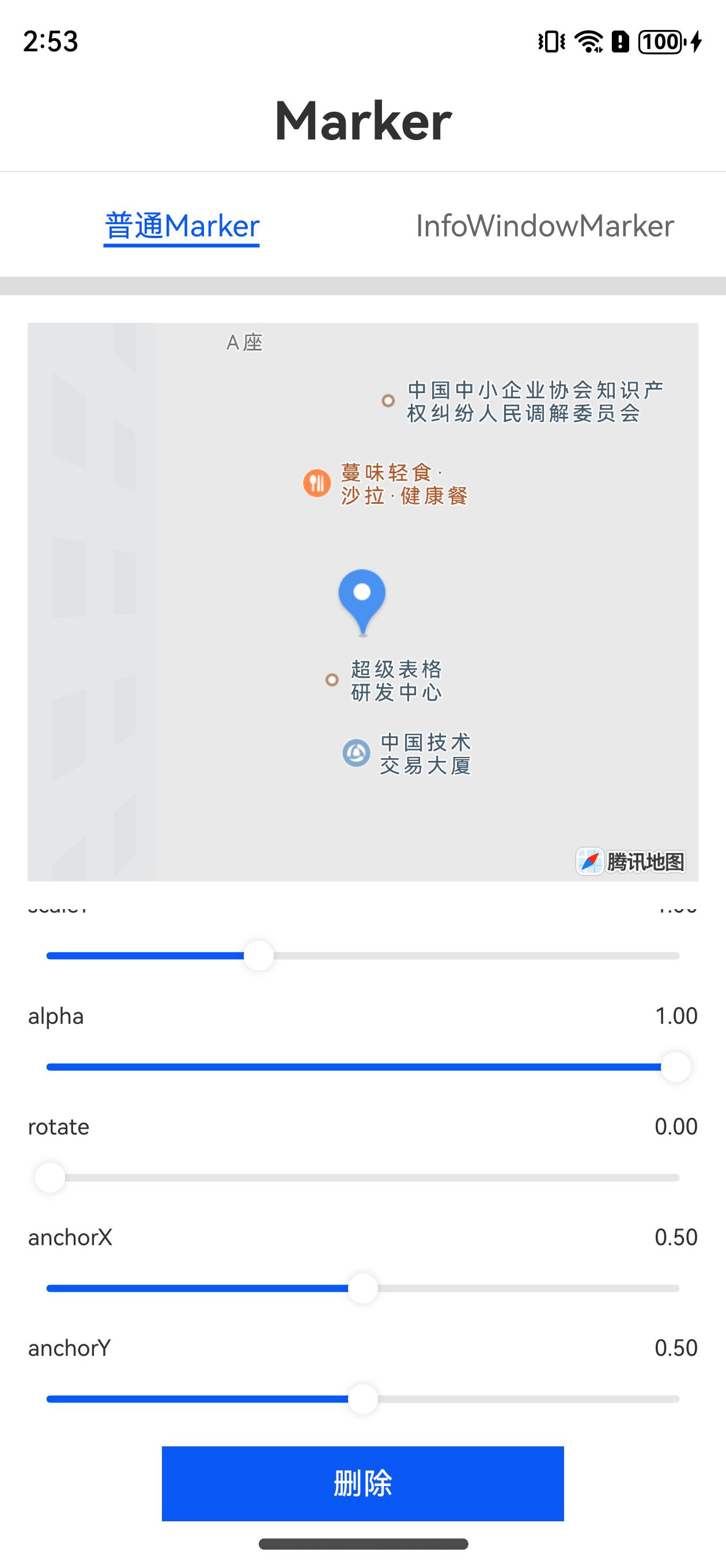
Marker标记支持添加、更新、删除、点击事件
添加Marker
build() {
  MapComponent({
    onReady: (err: BusinessError, mapController: MapController) => {
      this.mapController = mapController
      this.marker = new Marker(
        {
          position: new LatLng(39.984186, 116.307503),
          icon: { uri: "rawfile://BLUE.png" },
          alpha: 1.0,
          rotate: 0,
          scaleX: 1.0,
          scaleY: 1.0,
          anchorX: 0.5,
          anchorY: 0.5
        }
      );
      this.mapController?.addMarker(this.marker)

    }
  }).width("100%").height("100%")
}
常见参数说明:
MarkerOptions对象规范
关于Marker图像,控制显示尺寸的方法:
- 1.5.0以前版本利用图像原始尺寸和scale来控制显示大小;sdk统一按照2倍图来进行缩放,实际尺寸设置参考eg: 设计稿设计尺寸为’100vp’ x ‘100vp’,则应该准备’200px’ x ‘200px’ 的原始图片;若需要使用三倍图(‘300px’ x ‘300px’)来增强清晰图并达到’100vp’的大小效果,应配合scaleX、scaleY一起使用,300px / 2 * scale = 100vp ,则scale = 0.6666;
- 1.5.0及后续版本支持设置width、height来控制图像显示尺寸;若不填按照默认算法展示
注意若覆盖物创建完成后,对MarkerOptions中属性的更新必须手动调用地图控制器中对应的更新方法才生效,否则图上覆盖物样式不会变更
| 名称 | 类型 | 说明 |
|---|---|---|
| icon | ImageEntity | 可选;点标记图像实体对象,默认情况下图像作为Marker的碰撞和moveAlong主体;(2.0.0由必填改为可选) |
| anchorX | number | 可选;点标记图像锚点横轴方向与点标记经纬度的对应位置;以图像左上点为原点,向右为正,默认为0.5;单位为图像实际显示宽度(图像宽度乘以缩放比例)百分比 |
| anchorY | number | 可选;点标记图像锚点纵轴方向与点标记经纬度的对应位置;以图像左上点为原点,向下为正,默认为0.5;单位为图像实际显示高度(图像高度乘以缩放比例)百分比 |
| alpha | number | 可选;点标记图像透明度,范围0~1,默认为1 |
| rotate | number | 可选;点标记图像的旋转角度,旋转原点为锚点位置,顺时针为正,范围0~360;默认为0 |
| scaleX | number | 可选;点标记图像横轴方向的缩放倍数,缩放原点为锚点位置,默认为1 |
| scaleY | number | 可选;点标记图像纵轴方向的缩放倍数,缩放原点为锚点位置,默认为1 |
| level | OverlayLevel | 可选;设置点标记的图像在地图上的显示层级;默认为OverlayLevel.OverlayLevelAboveLabels在Poi之上; 相同Level内的显示层级关系通过zIndex来控制,zIndex越大越靠上显示。 level优先级高于zIndex |
| clickable | boolean | 可选;设置图像是否支持点击 |
| position | LatLng | 必填;点标记的位置 |
| width(1.5.0版本新增) | number | 可选;点标记主区域显示宽度,icon图像会自动适配该宽度;单位为屏幕像素;若不填或设置为非正数但有图像,则为图像原始宽度 * Display.scaledDensity / 2,否则为0;InfoWindow会相对该宽度进行定位; |
| height(1.5.0版本新增) | number | 可选;主区域显示高度,icon图像会自动适配该高度;单位为屏幕像素,若不填或设置为非正数但有图像,则为图像原始高度 * Display.scaledDensity / 2 ,否则为0;InfoWindow会相对该宽度进行定位; |
| visible | boolean | 可选;设置点标记是否可见 |
| zIndex | number | 可选;设置点标记的显示顺序,默认为0 |
| avoidAnnotation | boolean | 可选;控制点标记碰撞主体与地图poi有压盖时,是否隐藏poi,默认为false |
| avoidMarker (1.5.0版本新增) | boolean | 可选;控制点标记碰撞主体与跟其他marker的图像或者InfoWindow压盖后,隐藏zIndex低的;默认为false |
| collisionRelation(1.5.0版本新增) | string | 可选;设置点标记碰撞主体与信息窗等附件的碰撞关联关系;字符串’together’代表maker碰撞主体跟各附件作为整体去碰撞来进行显隐,忽略各信息窗附件的avoidAnnotation和avoidMarker属性全部采用MarkerOptions中的avoidAnnotation和avoidMarker属性设置;字符串’alone’代表marker碰撞与各个附件独立进行碰撞,非碰撞主体部件可独立设置avoidAnnotation和avoidMarker属性,非主体被碰撞隐藏不会影响marker碰撞主体,但marker碰撞主体被隐藏则各个信息窗附件都会被隐藏;默认为’together’ |
ImageEntity
图像实体对象
| 名称 | 类型 | 说明 |
|---|---|---|
| uri | string | 必填;点标记图像的资源位置;类型为RawFile时,读取rawfile目录下的资源,类型为LocalFile时,读取文件系统下的资源; !!#ff0000 1.5.0之前版本仅支持鸿蒙工程目录下的rawfile路径位置,eg: rawfile://BLUE.png;!! |
| type(1.5.0版本新增) | ImageSourceType | 可选;图像类型;默认值为RawFile |
ImageSourceType
枚举类型;Marker图像资源的类型(1.5.0版本新增)
| 枚举值 | 说明 |
|---|---|
| RawFile | 读取rawfile目录文件 |
| LocalFile | 读取本地文件系统 |
| PixelMap(2.0.0版本新增) | 图片为PixelMap类型 |
| Url(2.0.0版本新增) | 图片url |
绘制带InfoWindow的Marker
可以在地图上添加带InfoWindow的Marker
效果图如下:
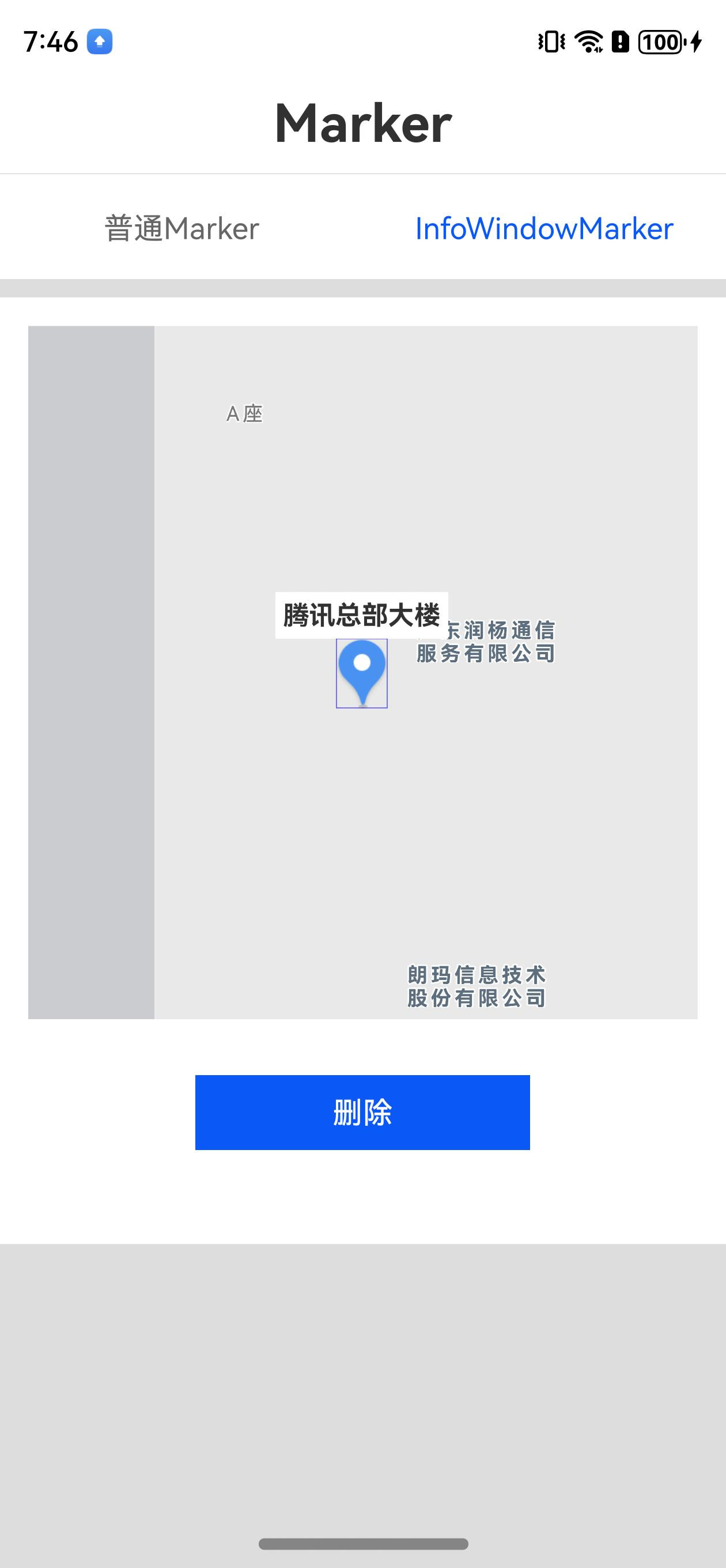
Marker标记支持添加、更新、删除、点击事件
添加Marker
- 声明一个成员InfoWindowInfo类型
@State
private infoWindowInfo: InfoWindowInfo = new InfoWindowInfo();
- 可以把任意Component作为InfoWindow,比如示例中的Text。将Text与MapComponent放到同一容器下,Text需要设置id, visibility, position 3个属性,其中visibility和position属性固定设置为
.visibility(this.infoWindowInfo.visible ? Visibility.Visible : Visibility.Hidden)
.position({ x: this.infoWindowInfo.x, y: this.infoWindowInfo.y })
- 设置marker的infoWindowList属性,关联第1步的infoWindowInfo对象和第2步的id
this.marker.infoWindowList = [{
  componentId: "my_info_window",
  infoWindowInfo: this.infoWindowInfo,
  offsetX: 0,
  offsetY: 0
}]
注:offsetX和offsetY可以调整infoWindow的位置,单位像素(px)
完整示例如下:
build() {
  Column() {
    MapComponent({
      onReady: (err: BusinessError, mapController: MapController) => {
        this.mapController = mapController
        this.addMarker();
      }
    }).width("100%").height("100%")

    Text("腾讯总部大楼")
      .id("my_info_window")
      .fontSize(14)
      .backgroundColor("#ffffff")
      .padding(4)
      .visibility(this.infoWindowInfo.visible ? Visibility.Visible : Visibility.Hidden)
      .fontWeight(FontWeight.Bold)
      .position({ x: this.infoWindowInfo.x, y: this.infoWindowInfo.y })
  }

}

@State
private infoWindowInfo: InfoWindowInfo = new InfoWindowInfo();

setInfoWindow() {
  if (this.marker) {
    this.marker.infoWindow = new InfoWindow("my_info_window", this.infoWindowInfo);
  }
}
InfoWindow支持显示隐控制
this.marker.showInfoWindow(componentId)
this.makrer.hideInfoWindow(componentId)
InfoWindow常见属性
| 名称 | 类型 | 说明 |
|---|---|---|
| componentId | string | 必填;鸿蒙组件对象的id |
| infoWindowInfo | InfoWindowInfo | 必填;必须声明为对应鸿蒙组件的state对象; |
| offsetX | number | 可选;点标记的信息窗相对于自身默认位置横轴的偏移量,向右为正,默认为0,单位为物理像素 |
| offsetY | number | 可选;点标记的信息窗相对于自身默认位置纵轴的偏移量,向下为正,默认为0,单位为物理像素 |
| align(1.5.0版本新增) | Align | 可选;信息窗相对于marker图像的位置;默认为Top; |
| avoidAnnotation (1.5.0版本新增) | boolean | 可选;控制点标记InfoWindow与地图poi有压盖时,是否隐藏poi,默认为false;该属性只在对应MarkerOptions的collisionRelation为alone时生效;若不设置则与MarkerOptions的avoidAnnotation保持一致;若该InfoWindow被设置为碰撞主体,则应用MarkerOptions中的设置; |
| avoidMarker (1.5.0版本新增) | boolean | 可选;控制点标记InfoWindow与跟其他marker的图像或者InfoWindow压盖后,隐藏zIndex低的;默认为false;该属性只在对应MarkerOptions的collisionRelation为alone时生效;若不设置则与MarkerOptions的avoidMarker保持一致;若该InfoWindow被设置为碰撞主体,则应用MarkerOptions中的设置; |
InfoWindowInfo
只读对象;点标记信息窗的信息载体;用户只应该创建,传递给InfoWindow实例后,作为只读对象在InfoWindow关联的组件中使用;注意:该对象必须声明为鸿蒙组件的state形式,可参考https://lbs.qq.com/mobile/harmonyMapSDK/guide/overlay/marker/infoWindowMarker;
| 属性 | 类型 |
|---|---|
| visible | boolean |
| x | number |
| y | number |
| rotate(!!#ff0000 2.0.0版本新增!!) | number |
| zIndex(!!#ff0000 2.0.0版本新增!!) | number |
Align
枚举类型;InfoWindow相对于Marker图像的位置( 1.5.0版本新增)
| 枚举值 | 说明 |
|---|---|
| Center | 信息窗位中心点位于Marker经纬度对应屏幕位置 |
| Top | 信息窗中心点位于Marker经纬度对应屏幕位置上方“一半图像高度+一半信息窗高度”的位置 |
| Bottom | 信息窗中心点位于Marker经纬度对应屏幕位置下方“一半图像高度+一半信息窗高度”的位置 |
| Left | 信息窗中心点位于Marker经纬度对应屏幕位置左方“一半图像宽度+一半信息窗宽度”的位置 |
| Right | 信息窗中心点位于Marker经纬度对应屏幕位置右方“一半图像宽度+一半信息窗宽度”的位置 |
点标记的增删改
新增Marker
this.mapController?.addMarker(this.marker)
更新Marker
this.mapController?.updateMarker(this.marker)
删除Marker
this.mapController?.removeMarker(this.marker)
点标记的事件
目前支持点击事件;
          let geo = new LatLng(39.984186, 116.307503);

          this.marker = new Marker(
            {
              position: geo,
              icon: { uri: this.bigMarker ? "rawfile://1M.jpg" : "rawfile://1.jpg" },
              alpha: this.alpha,
              rotate: this.markerRotate,
              scaleX: this.scaleX,
              scaleY: this.scaleY,
              anchorX: this.anchorX,
              anchorY: this.anchorY,
              avoidMarker: true
            }
          );
          this.marker.setOnClickListener(() => {
            this.marker && promptAction.showToast({
              message: '点击marker ' ,
              duration: 2000,
            });
          })

          this.mapController?.addMarker(this.marker);
          this.mapController?.moveCamera([geo], 0, true);
对于InfoWindow的点击事件,需要开发者手动绑定对应UI元素的click事件
          Image($r('app.media.logo'))
            .id("marker1_info_window1")
            .backgroundColor("#ffffff")
            .width(100)
            .padding(4)
            .visibility(this.infoWindowInfo1.visible ? Visibility.Visible : Visibility.Hidden)
            .position({ x: this.infoWindowInfo1.x, y: this.infoWindowInfo1.y })
            .rotate({
              angle: this.infoWindowInfo1.rotate
            })
            .hitTestBehavior(HitTestMode.Transparent)
            .onClick(() => {
              promptAction.showToast({
                message: 'marker1_info_window1',
                duration: 2000,
              });
            })
            .opacity(0.3)
点标记的碰撞
碰撞体系
点标记的碰撞分为两部分,碰撞主体和碰撞附件;默认Marker中的icon作为碰撞主体,其他作为碰撞附件;如果希望某一个InfoWindow作为碰撞主体,需要先将该InfoWindow设置为碰撞主体。
this.marker.updateCollisionMainComponent(this.marker.infoWindowList[0]);
碰撞类型
碰撞类型分为与poi碰撞和与其他Marker碰撞;主要通过MarkerOptions和InfoWindow属性中的avoidAnnotation和avoidMarker来控制;Marker的碰撞优先级永远高于Poi,两个Marker之间的碰撞优先级通过zIndex决定; 注意:Marker的level属性必须为OverlayLevelAboveLabels时碰撞才会生效;
碰撞关系
碰撞关系分为联合碰撞和独立碰撞;联合碰撞下,不论碰撞主体和碰撞附件,只要有一个部分被高优先的Marker碰掉,则该Marker整体隐藏,并触发相关碰撞事件回调;独立碰撞下,若碰撞主体被高优先级碰掉,则该Marker整体隐藏,并触发相关碰撞事件回调,若非碰撞主体被碰掉,则仅对应碰撞附件会隐藏,且不触发碰撞事件回调。
碰撞相关属性位于MarkerOptions和InfoWindow属性中。
MarkerOptions相关碰撞属性:
| 属性 | 类型 | 说明 |
|---|---|---|
| avoidAnnotation | boolean | 可选;控制点标记碰撞主体与地图poi有压盖时,是否隐藏poi,默认为false |
| avoidMarker (1.5.0版本新增) | boolean | 可选;控制点标记碰撞主体与跟其他marker的图像或者InfoWindow压盖后,隐藏zIndex低的;默认为false |
| collisionRelation(1.5.0版本新增) | string | 可选;设置点标记碰撞主体与信息窗等附件的碰撞关联关系;字符串’together’代表maker碰撞主体跟各附件作为整体去碰撞来进行显隐,忽略各信息窗附件的avoidAnnotation和avoidMarker属性全部采用MarkerOptions中的avoidAnnotation和avoidMarker属性设置;字符串’alone’代表marker碰撞与各个附件独立进行碰撞,非碰撞主体部件可独立设置avoidAnnotation和avoidMarker属性,非主体被碰撞隐藏不会影响marker碰撞主体,但marker碰撞主体被隐藏则各个信息窗附件都会被隐藏;默认为’together’ |
InfoWindow中的碰撞相关属性:
| 名称 | 类型 | 说明 |
|---|---|---|
| avoidAnnotation (1.5.0版本新增) | boolean | 可选;控制点标记InfoWindow与地图poi有压盖时,是否隐藏poi,默认为false;该属性只在对应MarkerOptions的collisionRelation为alone时生效;若不设置则与MarkerOptions的avoidAnnotation保持一致;若该InfoWindow被设置为碰撞主体,则应用MarkerOptions中的设置; |
| avoidMarker (1.5.0版本新增) | boolean | 可选;控制点标记InfoWindow与跟其他marker的图像或者InfoWindow压盖后,隐藏zIndex低的;默认为false;该属性只在对应MarkerOptions的collisionRelation为alone时生效;若不设置则与MarkerOptions的avoidMarker保持一致;若该InfoWindow被设置为碰撞主体,则应用MarkerOptions中的设置; |
碰撞事件
需要通过MapController的方法来添加和删除对应回调监听函数
| 属性 | 类型 |
|---|---|
| MarkerCollisionStatusChangeEvent) => void)(2.0.0版本添加) | void |
| removeMarkerCollisionStatusChangeListener(listener: (evt: MarkerCollisionStatusChangeEvent) => void) (2.0.0版本添加) | void |
MarkerCollisionStatusChangeEvent
Marker碰撞的显隐状态变更时触发 (2.0.0添加)
| 名称 | 类型 | 说明 |
|---|---|---|
| showMarkers | Marker[] | 开启碰撞,并由隐藏变为显示的Marker |
| hideMarkers | Marker[] | 开启碰撞,并由显示变为隐藏的Marker |
代码示例
          let geo = new LatLng(39.984186, 116.307503);

          this.marker = new Marker(
            {
              position: geo,
              icon: { uri: "rawfile://BLUE.png" },
              avoidAnnotation: true,
              width: 200,
              collisionRelation: 'alone',
              avoidMarker: true
            }
          );
          this.marker.infoWindowList = [
            {
              componentId: "marker1_info_window1",
              infoWindowInfo: this.infoWindowInfo1,
              offsetX: 0,
              offsetY: 0,
              avoidAnnotation: true,
              avoidMarker: true,
              align:Align.Top
            },
            {
              componentId: "marker1_info_window2",
              infoWindowInfo: this.infoWindowInfo2,
              offsetX: 0,
              offsetY: 0,
              avoidAnnotation: true,
              avoidMarker: true,
              align:Align.Right
            }
          ]

          this.marker2 = new Marker(
            {
              position: new LatLng(39.98411625253175, 116.30740776658058),
              icon: { uri: "rawfile://BLUE.png" },
              avoidAnnotation: true,
              width: 200,
              collisionRelation: 'alone',
              avoidMarker: true,
              zIndex: 10
            }
          );
          this.marker2.infoWindowList = [
            {
              componentId: "marker2_info_window1",
              infoWindowInfo: this.infoWindowInfo21,
              offsetX: 0,
              offsetY: 0,
              align:Align.Top
            }
          ]

          this.mapController?.addMarker(this.marker);
          this.marker.updateCollisionMainComponent(this.marker.infoWindowList[1]);


    this.mapController?.addMarkerCollisionStatusChangeListener(evt => {
      const showIds = evt.showMarkers.map(m => m.id);
      const hideIds = evt.hideMarkers.map(m => m.id);
      LogUtil.i(tag, `DynamicMarker markerCollistionStatusChange showIds: ${JSON.stringify(showIds)} hideIds: ${JSON.stringify(hideIds)}`);
    });
点标记实现小车平滑移动功能
通过添加Marker并调用MapController.moveAlong方法可以实现小车平滑移动
    this.moveMarker1 = new Marker(
      {
        position: this.latLngPath[0],
        icon: { uri: "rawfile://BLUE.png" },
        avoidAnnotation: true,
        width: 200,
        height: 100,
        anchorX: 0.5,
        anchorY: 0.5
        // avoidMarker: true
      }
    );
    this.mapController?.addMarker(this.moveMarker1);
    this.mapController?.moveAlong(this.moveMarker1, {
      paths: this.latLngPath,
      duration: 5000,
      distanceDelta: -20,
      autoRotation: true,
      startCallback: evt => {
        LogUtil.i("startMoveAlong", `id:${evt.target.id}, position:${evt.position.lat} ${evt.position.lng}, rotate:${evt.rotate}, pathIndex:${evt.pathIndex}`);
      },
      stopCallback: evt => {
        LogUtil.i("stopMoveAlong", `id:${evt.target.id}, position:${evt.position.lat} ${evt.position.lng}, rotate:${evt.rotate}, pathIndex:${evt.pathIndex}`);
      },
      endCallback: evt => {
        this.mapController?.setPassedRoute(this.moveLine1!, evt.pathIndex, evt.position);
        LogUtil.i("endMoveAlong", `id:${evt.target.id}, position:${evt.position.lat} ${evt.position.lng}, rotate:${evt.rotate}, pathIndex:${evt.pathIndex}`);
      },
      movingCallback: evt => {
        LogUtil.i("movingCallback", `id:${evt.target.id}, position:${evt.position.lat} ${evt.position.lng}, rotate:${evt.rotate}, pathIndex:${evt.pathIndex}`);
        this.mapController?.setPassedRoute(this.moveLine1!, evt.pathIndex, evt.position);
      }
    });
若要将某个InfoWindow作为小车平滑移动过程中的方向旋转主体,需要先将对应InfoWindow设置为移动主体
this.moveMarker1.updateMoveAlongMainComponent(this.moveMarker1.infoWindowList![0]);
讨论HarmonyOS开发技术,专注于API与组件、DevEco Studio、测试、元服务和应用上架分发等。
更多推荐

 11
11 0
0- 0


 已为社区贡献3条内容

所有评论(0)