鸿蒙分享(七):接入微信分享全流程
·
现在是2026年的1月6日,恍惚间又一年,不知道还能干多久,记录下踩坑,希望各位对接顺利!!!
步骤一:微信公众平台创建鸿蒙应用
https://developers.weixin.qq.com/doc/oplatform/Mobile_App/Access_Guide/ohos.html
Bundle ID 指的是鸿蒙应用的包名
Identifier 指的是鸿蒙应用的 appIdentifier(应该在华为后台创建应用后才会有)
import { AppUtil } from '@pura/harmony-utils';

//appIdentifier可能为空,应该华为后台创建应用才有
let appIdentifier=AppUtil.getBundleInfoSync()?.signatureInfo?.appIdentifier
BaseDialog.showToast(appIdentifier??"")
步骤二:引入第三方库
1 ohpm install @zyl/wxcommonlibhar (地址)
2 ohpm i @tencent/wechat_open_sdk (微信库)
添加一些配置:
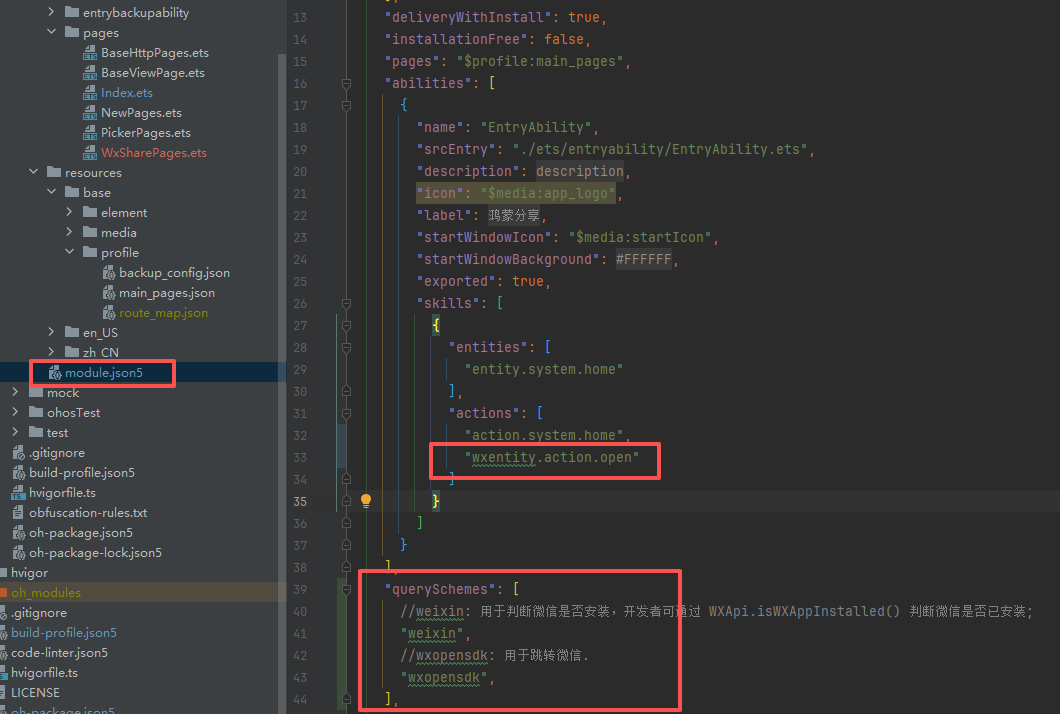
module.json5添加下面配置:
"wxentity.action.open"

    "querySchemes": [
      //weixin: 用于判断微信是否安装,开发者可通过 WXApi.isWXAppInstalled() 判断微信是否已安装;
      "weixin",
      //wxopensdk: 用于跳转微信.
      "wxopensdk",
    ],
接入步骤
1.为了后续能够方便替换其他库或者使用原生库,这里封装了一个工具类WxUtil:
import { checkWeChatApp, handleWeChatCallIfNeed, MyWXApi, ShareWxSdk } from '@zyl/wxcommonlibhar';
import { common, Want } from '@kit.AbilityKit';
import { BaseResp, SendMessageToWXReq, WXMediaMessage, WXWebpageObject } from '@tencent/wechat_open_sdk';
import { image } from '@kit.ImageKit';
import { WxShareWebBean } from '../bean/WxShareWebBean';

/**
 * 打印
 */
export class WxUtil {
  static noInstall = "微信未安装"
  static APP_ID_WX = "申请的微信应用id"

  static handleWeChatCallIfNeed(want: Want) {
    handleWeChatCallIfNeed(want, WxUtil.APP_ID_WX)
  }

  static checkWeChatApp() {
    return checkWeChatApp()
  }

  //微信分享文字
  static wechatSendText(text: string, callback?: (isSuccess: boolean, msg: string) => void) {
    if (checkWeChatApp() == false) {
      callback?.(false, WxUtil.noInstall)
      return
    }
    const share = new ShareWxSdk(WxUtil.APP_ID_WX)
    share.wechatSendTextV2(text, 0, (flag) => {
    }).then((res: BaseResp) => {
      if (res.errCode === 0) {
        callback?.(true, '分享成功')
      } else {
        callback?.(false, '分享失败:' + res.errStr)
      }
    })
  }

  //微信分享图片
  static wechatSendImagrOrUrl(pixelBufferOrStr: ArrayBuffer | string, callback: (isSuccess: boolean, msg: string) => void) {
    if (checkWeChatApp() == false) {
      callback(false, WxUtil.noInstall)
      return
    }
    let share = new ShareWxSdk(WxUtil.APP_ID_WX)
    share.wechatSendImagrOrUrlV2(pixelBufferOrStr).then((res: BaseResp) => {
      if (res.errCode === 0) {
        callback(true, '分享成功')
      } else {
        callback(false, '分享失败:' + res.errStr)
      }
    })
  }

  //微信分享网页
  static async wechatSendWeb(context: Context, bean: WxShareWebBean, icon: Resource, callback: (isSuccess: boolean, msg: string) => void) {
    if (checkWeChatApp() == false) {
      callback(false, WxUtil.noInstall)
      return
    }
    const wxApi = MyWXApi(WxUtil.APP_ID_WX)
    const webpageObject = new WXWebpageObject()
    webpageObject.webpageUrl = bean.webpageUrl
    const mediaMessage = new WXMediaMessage()
    mediaMessage.mediaObject = webpageObject
    mediaMessage.title = bean.title
    mediaMessage.description = bean.description
    const thumbData = await context.resourceManager.getMediaContent(icon)
    const thumbPixel = image.createImageSource(thumbData.buffer).createPixelMapSync()
    const thumbBuffer = await image.createImagePacker().packToData(thumbPixel, { format: "image/png", quality: 100 })
    mediaMessage.thumbData = new Uint8Array(thumbBuffer)
    const req = new SendMessageToWXReq()
    //            req.callbackAbility = 'callbackAbility'  //加了这个会导致分享完成,不会回到本app
    req.scene = SendMessageToWXReq.WXSceneSession
    req.message = mediaMessage
    wxApi.sendReq(context as common.UIAbilityContext, req)
    //监听--无效
    // const onWXResp = (resp: BaseResp): void => {
    //   BaseLog.i("resp:")
    //   resp.errCode === 0 ? callback(true, '') : callback(false, resp?.errStr?.toString() ?? "")
    //   // 用完销毁
    //   WXEventHandler.unregisterOnWXRespCallback(onWXResp)
    // }
    // // 订阅微信的回调
    // WXEventHandler.registerOnWXRespCallback(onWXResp)
  }
}
@Observed
export class WxShareWebBean {
  webpageUrl ?: string
  title ?: string
  description ?: string
}
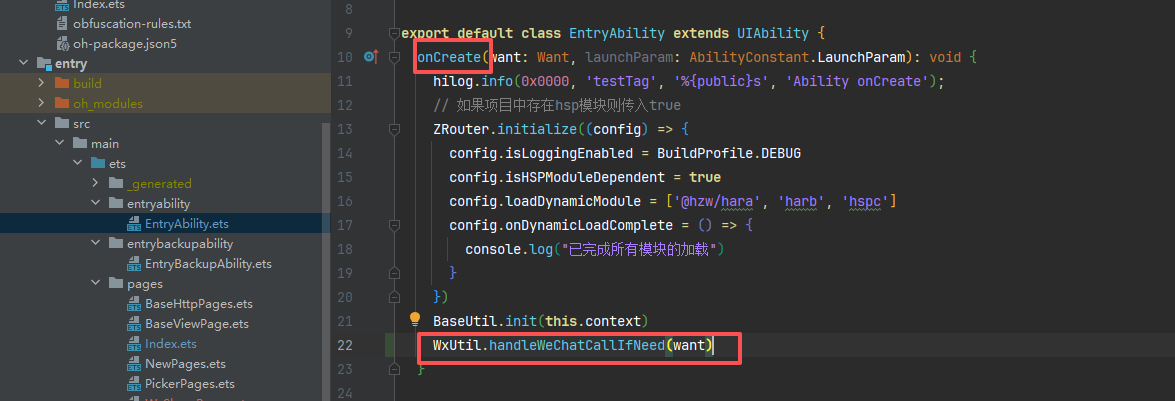
2.初始化库
步骤三:使用
微信分享图片
import { Route } from '@hzw/zrouter';
import { AppUtil, FileUtil, ImageUtil, SnapshotUtil } from '@pura/harmony-utils';
import { BaseDialog, BaseHead, BaseRouter, BaseText } from 'common';
import fs from '@ohos.file.fs'
import { WxUtil } from 'common/src/main/ets/utils/WxUtil';

BaseText({
        text: "分享图片",
        fontColor: $r('app.color.color_DD2942')
      }).margin({
        top: 10
      }).onClick(async () => {
        let fileName = "分享.png"
        //这里实现的功能是获取id为shareImg的view生成图片进行分享,wechatSendImagrOrUrl:ArrayBuffer或者网络url
        let pixelMap1 = await SnapshotUtil.get('shareImg')
        ImageUtil.savePixelMap(pixelMap1, FileUtil.getFilesDirPath(""), fileName).then((result) => {
          this.imageToArrayBuffer(result).then((buffer) => {
            WxUtil.wechatSendImagrOrUrl(buffer, (isSuccess, msg) => {
              if (!isSuccess) {
                BaseDialog.showToast("分享失败:" + msg)
              }
            })
          }).catch((error: Error) => {
            BaseDialog.showToast("分享失败:" + error.message)
          })
        }).catch((error: Error) => {
          BaseDialog.showToast("分享失败:" + error.message)
        })
微信分享链接
import { Route } from '@hzw/zrouter';
import { AppUtil, FileUtil, ImageUtil, SnapshotUtil } from '@pura/harmony-utils';
import { BaseDialog, BaseHead, BaseRouter, BaseText } from 'common';
import fs from '@ohos.file.fs'
import { WxUtil } from 'common/src/main/ets/utils/WxUtil';
import { WxShareWebBean } from 'common/src/main/ets/bean/WxShareWebBean';

BaseText({
        text: "分享链接",
        fontColor: $r('app.color.color_DD2942')
      }).margin({
        top: 10
      }).onClick(async () => {
        let bean = new WxShareWebBean()
        bean.webpageUrl = "http:baidu.com"
        bean.title = '您的朋友向您发出邀约'
        bean.description = '【接受邀约】点击查看好友邀约吧~'
        WxUtil.wechatSendWeb(AppUtil.getContext(), bean, $r('app.media.app_icon'), (isSuccess, msg) => {
          if (isSuccess) {
            BaseDialog.showToast("分享成功")
          } else {
            BaseDialog.showToast(msg)
          }
        })
      })
微信分享文字
      BaseText({
        text: "分享文字",
        fontColor: $r('app.color.color_DD2942')
      }).margin({
        top: 10
      }).onClick(async () => {
        WxUtil.wechatSendText("分享文字", (isSuccess, msg) => {
          if (isSuccess) {
            BaseDialog.showToast("分享成功")
          } else {
            BaseDialog.showToast(msg)
          }
        })
      })
讨论HarmonyOS开发技术,专注于API与组件、DevEco Studio、测试、元服务和应用上架分发等。
更多推荐


 5
5 0
0- 0



 已为社区贡献6条内容

所有评论(0)