HarmonyOS 实战-老己聊天器(语音识别与聊天界面的实现)
·
HarmonyOS 实战-老己聊天器(语音识别与聊天界面的实现)
概述
本文将深入讲解如何基于 HarmonyOS 的 @kit.CoreSpeechKit 实现一个简约舒心的老己聊天器,让你在一个安静的午后能够和老己畅快的交心。我们将采用流式识别架构,实现"长按录音、松手自动发送"的即时通讯体验,同时支持身份切换功能以模拟双向对话场景,沉浸式体验和老己的聊天过程。
技术选型
- 语音引擎:CoreSpeechKit 的
SpeechRecognitionEngine - 音频参数:PCM 16kHz 单声道 16bit
- 识别模式:流式识别(
startListeningAPI) - 架构模式:单例模式管理引擎生命周期
效果展示
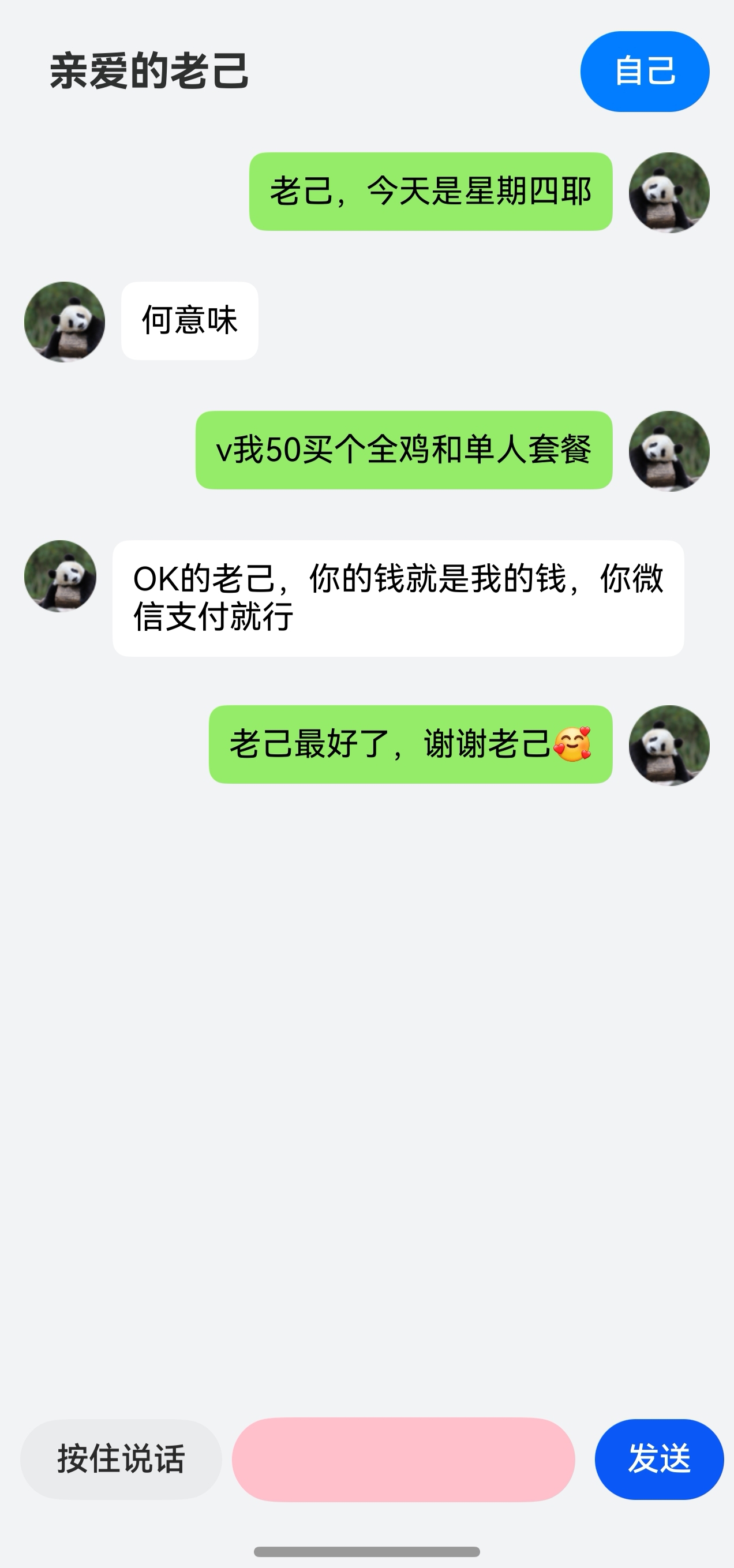
第一步:配置麦克风权限
在 entry/src/main/module.json5 的 module 节点下声明运行时权限。该权限将在应用首次启动时触发动态授权弹窗。
{
  "module": {
    "requestPermissions": [
      {
        "name": "ohos.permission.MICROPHONE",
        "reason": "$string:EntryAbility_desc",
        "usedScene": {
          "abilities": ["EntryAbility"],
          "when": "always"
        }
      }
    ]
  }
}
第二步:封装语音识别引擎
创建 utils/SpeechRecognizerU.ets,采用单例模式确保全局唯一引擎实例,避免多实例导致的资源竞争与内存泄漏。
2.1 引擎初始化与生命周期管理
import { speechRecognizer } from '@kit.CoreSpeechKit';
import { BusinessError } from '@kit.BasicServicesKit';

export class SpeechRecognizerU {
  private static instance: SpeechRecognizerU;
  asrEngine: speechRecognizer.SpeechRecognitionEngine | undefined = undefined;
  message: string = '';
  sessionId: string = '';
  isRecording: boolean = false;
  onCompleteCallback?: () => void;

  private constructor() {}

  public static getInstance(): SpeechRecognizerU {
    if (!SpeechRecognizerU.instance) {
      SpeechRecognizerU.instance = new SpeechRecognizerU();
    }
    return SpeechRecognizerU.instance;
  }

  // 初始化引擎并设置监听
  async initEngine(): Promise<void> {
    if (this.asrEngine) return;
    return new Promise((resolve, reject) => {
      speechRecognizer.createEngine({
        language: 'zh-CN', online: 1 // 实际是离线模式
      }, (err, engine) => {
        if (!err) {
          this.asrEngine = engine;
          this.setListener();
          resolve();
        } else reject(err);
      });
    });
  }

  private setListener() {
    this.asrEngine?.setListener({
      onResult: (sid, res) => {
        this.message = res.result.endsWith('。') ? res.result.slice(0, -1) : res.result;
      },
      onComplete: () => {
        this.isRecording = false;
        if (this.onCompleteCallback) this.onCompleteCallback();
      },
      onError: () => { this.isRecording = false; }
    });
  }

  // 开始实时监听
  async startListening() {
    await this.initEngine();
    this.sessionId = Date.now().toString();
    this.message = '';
    this.asrEngine?.startListening({
      sessionId: this.sessionId,
      audioInfo: { audioType: 'pcm', sampleRate: 16000, soundChannel: 1, sampleBit: 16 }
    });
    this.isRecording = true;
  }

  stopListening() {
    if (this.isRecording) {
      this.asrEngine?.finish(this.sessionId);
      this.isRecording = false;
    }
  }
}
第三步:构建聊天交互界面
创建 pages/Chat.ets,实现消息列表渲染、长按手势录音、以及身份切换(模拟双向对话)功能。
3.1 导入模块与权限请求
import { LengthMetrics, PromptAction } from '@kit.ArkUI';
import { abilityAccessCtrl, bundleManager, common, Permissions } from '@kit.AbilityKit';
import { BusinessError } from '@kit.BasicServicesKit';
import { SpeechRecognizerU } from '../utils/SpeechRecognizerU';
import { hilog } from '@kit.PerformanceAnalysisKit';

const PERMISSIONS: Array<Permissions> = ['ohos.permission.MICROPHONE'];

function reqPermissionsFromUser(permissions: Array<Permissions>, context: common.UIAbilityContext): void {
  let atManager: abilityAccessCtrl.AtManager = abilityAccessCtrl.createAtManager();
  atManager.requestPermissionsFromUser(context, permissions).then(() => {
  }).catch((err: BusinessError) => {
    console.error(`请求权限失败:错误码${err.code},错误信息${err.message}`);
  });
}
3.2 定义消息数据模型
使用 @ObservedV2 装饰器实现响应式数据驱动,当消息内容或发送方发生变化时,UI 自动更新。
@ObservedV2
class OneVoice {
  @Trace textMsg: string;
  @Trace isSelf: boolean;

  constructor(textMsg: string, isSelf: boolean) {
    this.textMsg = textMsg;
    this.isSelf = isSelf;
  }
}
3.3 页面逻辑核心实现
@Entry
@Component
struct Chat {
  listScroller: Scroller = new Scroller();
  @State handlePopup: boolean = false;
  @State speechRecognizerU: SpeechRecognizerU = SpeechRecognizerU.getInstance();
  @State @Watch('onChangedData') messageArr: OneVoice[] = [];
  @StorageProp('bottomRectHeight') bottomRectHeight: number = 0;
  @StorageProp('topRectHeight') topRectHeight: number = 0;
  uiContext: UIContext = this.getUIContext();
  promptAction: PromptAction = this.uiContext.getPromptAction();
  context: common.UIAbilityContext = this.uiContext.getHostContext() as common.UIAbilityContext;
  @State tokenID: number = 0;
  @State text_audio: string = "";
  @State isSelfMode: boolean = true;

  aboutToAppear(): void {
    let bundleFlags = bundleManager.BundleFlag.GET_BUNDLE_INFO_WITH_APPLICATION;
    try {
      bundleManager.getBundleInfoForSelf(bundleFlags).then((data) => {
        this.tokenID = data.appInfo.accessTokenId;
      });
    } catch (err) {
      hilog.error(0x0000, 'testTag', '获取应用信息异常: %{public}s', (err as BusinessError).message);
    }
    reqPermissionsFromUser(PERMISSIONS, this.context);
    this.speechRecognizerU.initEngine();
    this.speechRecognizerU.onCompleteCallback = () => {
      if (this.speechRecognizerU.message) {
        this.text_audio = this.speechRecognizerU.message;
        this.messageArr.push(new OneVoice(this.text_audio, this.isSelfMode));
        this.text_audio = '';
      }
    };
  }

  onChangedData() {
    this.listScroller.scrollEdge(Edge.End);
  }
关键逻辑说明:
@Watch('onChangedData'):监听messageArr变化,新消息添加后自动滚动到底部tokenID:用于运行时检查麦克风权限授权状态onCompleteCallback:识别完成后自动将结果插入消息列表
3.4 构建消息气泡组件
  @Builder
  getAudioUI(index: number, one: OneVoice) {
    Row() {
      Text(this.messageArr[index].textMsg)
        .fontSize(16).fontWeight(400).fontColor('#000000')
        .padding(10).borderRadius(8).backgroundColor('#95EC69')
    }
  }

  @Builder
  getAudioUI_1(index: number, one: OneVoice) {
    Row() {
      Text(this.messageArr[index].textMsg)
        .fontSize(16).fontWeight(400).fontColor('#000000')
        .padding(10).borderRadius(8).backgroundColor('#FFFFFF')
    }
  }
设计规范:
- 自己发送的消息使用微信风格绿色气泡
#95EC69 - 对方消息使用白色气泡
#FFFFFF - 文字统一黑色
#000000,确保可读性
3.5 实现语音输入与长按手势
  @Builder
  voiceInput() {
    Row() {
      Button($r('app.string.to_speech'))
        .margin({ left: 10 }).width(100).type(ButtonType.Capsule)
        .backgroundColor('#08000000').fontColor(0x2A2929)
        .gesture(
          LongPressGesture({ repeat: false })
            .onAction(async (event: GestureEvent | undefined) => {
              try {
                this.handlePopup = true;
                await this.speechRecognizerU.startListening();
              } catch (e) {
                console.error('开始录音失败: ' + JSON.stringify(e));
              }
            })
            .onActionEnd(() => {
              try {
                this.speechRecognizerU.stopListening();
                this.handlePopup = false;
                let atManager: abilityAccessCtrl.AtManager = abilityAccessCtrl.createAtManager();
                let permissionName: Permissions = 'ohos.permission.MICROPHONE';
                let data: abilityAccessCtrl.GrantStatus = atManager.checkAccessTokenSync(this.tokenID, permissionName);
                if (data !== 0) {
                  this.promptAction.showToast({ message: '请前往应用设置授予麦克风权限', duration: 3000 });
                }
              } catch (e) {
                console.error('停止录音失败: ' + JSON.stringify(e));
              }
            })
        )
        .bindPopup(this.handlePopup, {
          message: '语音录制中',
          onStateChange: (e) => {
            if (!e.isVisible) { this.handlePopup = false; }
          }
        });
      TextInput({ text: this.text_audio })
        .padding(10).layoutWeight(1).margin({ left: 5, right: 5 })
        .backgroundColor(Color.Pink).height(42).borderRadius(23)
        .onChange((value: string) => { this.text_audio = value; })
      Button("发送").onClick(() => {
        if (this.text_audio) {
          this.messageArr.push(new OneVoice(this.text_audio, this.isSelfMode));
          this.text_audio = '';
        } else {
          this.promptAction.showToast({ message: '无法发送空信息', duration: 500 });
        }
      }).margin({ left: 5, right: 5 })
    }
    .margin({ top: 6, bottom: 6 }).width('100%').height(40);
  }
交互流程:
- 长按按钮触发
onAction→ 调用startListening()开始录音 - 松手触发
onActionEnd→ 调用stopListening()停止录音 - 识别引擎触发
onComplete回调 → 自动将结果插入消息列表 - 若权限未授予,弹出 Toast 提示用户前往设置
3.6 渲染消息列表与顶部工具栏
  build() {
    Column() {
      Row() {
        Text($r('app.string.name')).height(27).fontSize(20).fontWeight(700).margin({ left: 12 });
        Button(this.isSelfMode ? '自己' : '对方')
          .margin({ right: 12 }).type(ButtonType.Capsule)
          .backgroundColor(this.isSelfMode ? '#007DFF' : '#FF6B6B')
          .onClick(() => {
            this.isSelfMode = !this.isSelfMode;
            this.promptAction.showToast({
              message: this.isSelfMode ? '切换为:自己发送' : '切换为:对方发送',
              duration: 500
            });
          })
      }.padding({ left: 12 }).justifyContent(FlexAlign.SpaceBetween).height(56).width('100%');

      List({ scroller: this.listScroller }) {
        ForEach(this.messageArr, (item: OneVoice, index: number) => {
          ListItem() {
            Flex({
              direction: item.isSelf ? FlexDirection.RowReverse : FlexDirection.Row,
              space: { main: LengthMetrics.vp(8) }
            }) {
              Image(item.isSelf ? $r('app.media.img_2') : $r('app.media.img_2'))
                .width(40).aspectRatio(1)
                .scale({ x: item.isSelf ? 1 : -1, y: 1 });
              if (item.isSelf) { this.getAudioUI(index, item); }
              else { this.getAudioUI_1(index, item); }
            }.width('100%');
          }.margin(12);
        }, (item: OneVoice) => JSON.stringify(item));
      }
      .width('100%').height('100%').layoutWeight(1).scrollBar(BarState.Off)
      .edgeEffect(EdgeEffect.None);

      Column() {
        this.voiceInput()
      }.height(52).width('100%');
    }
    .padding({ top: this.uiContext.px2vp(this.topRectHeight), bottom: this.uiContext.px2vp(this.bottomRectHeight) })
    .height('100%').width('100%').backgroundColor('#F1F3F5');
  }
}
消息列表渲染逻辑:
- 使用
Flex容器动态控制消息方向(FlexDirection.RowReverse实现右侧对齐) - 通过
scale({ x: -1 })实现对方头像水平镜像,复用同一张图片资源 ForEach遍历messageArr,自动响应数组变化
第四步:EntryAbility 生命周期管理
在 entryability/EntryAbility.ets 中处理全屏沉浸式布局和引擎销毁。
import { AbilityConstant, UIAbility, Want } from '@kit.AbilityKit';
import { window } from '@kit.ArkUI';
import { SpeechRecognizerU } from '../utils/SpeechRecognizerU';

export default class EntryAbility extends UIAbility {
  onDestroy(): void {
    SpeechRecognizerU.getInstance().asrEngine?.shutdown();
  }

  onWindowStageCreate(windowStage: window.WindowStage): void {
    windowStage.loadContent('pages/Chat', (err) => {
      if (err.code) return;
    });
    let windowClass: window.Window = windowStage.getMainWindowSync();
    windowClass.setWindowLayoutFullScreen(true);
    let avoidArea = windowClass.getWindowAvoidArea(window.AvoidAreaType.TYPE_SYSTEM);
    AppStorage.setOrCreate('topRectHeight', avoidArea.topRect.height);
    avoidArea = windowClass.getWindowAvoidArea(window.AvoidAreaType.TYPE_NAVIGATION_INDICATOR);
    AppStorage.setOrCreate('bottomRectHeight', avoidArea.bottomRect.height);
  }
}
关键点:
shutdown():应用销毁时释放语音引擎,防止内存泄漏AppStorage:通过全局状态管理实现沉浸式布局的安全区适配
技术总结
完整项目结构
entry/src/main/
├── ets/
│   ├── entryability/EntryAbility.ets
│   ├── pages/Chat.ets
│   └── utils/
│       ├── SpeechRecognizerU.ets
│       └── Logger.ets
├── resources/
└── module.json5

讨论HarmonyOS开发技术,专注于API与组件、DevEco Studio、测试、元服务和应用上架分发等。
更多推荐

 32
32 0
0- 0


 已为社区贡献4条内容

所有评论(0)