Harmony OS开发-ArkUI框架速成六之颜色渐变和阴影效果
主要是带你轻松拿下,ArkUI中的渐变色的实现和阴影效果的实现,以及提供了一个综合实现效果,供你参考,来学!
·
程序员Feri一名12年+的程序员,做过开发带过团队创过业,擅长Java相关开发、鸿蒙开发、人工智能等,专注于程序员搞钱那点儿事,希望在搞钱的路上有你相伴!君志所向,一往无前!
1.颜色渐变
1.1 颜色渐变
作用:设置组件颜色渐变效果
分类:线性渐变 和 径向渐变
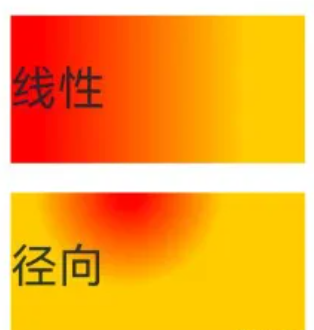
颜色渐变属于组件内容,绘制在背景上方。
颜色渐变不支持宽高显式动画,执行宽高动画时颜色渐变会直接过渡到终点
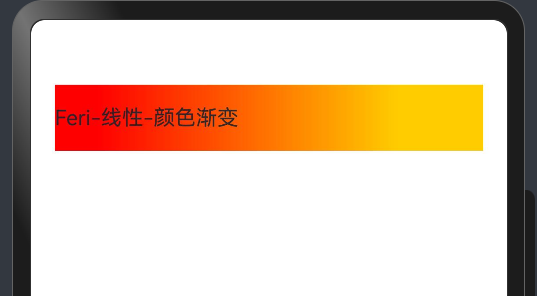
1.2 线性渐变
属性:linearGradient()
参数:
{
 angle?:  线性渐变的起始角度,
 direction?: 线性渐变的方向,
 colors: [[颜色1, 颜色1所处位置], [颜色2, 颜色2所处位置], ......],
 repeating?: 是否重复着色
}
属性详解:
● angle:线性渐变的起始角度。
0点方向顺时针旋转为正向角度,默认值:180
● direction: 线性渐变的方向,设置 angle 后不生效,值为 枚举类型 GradientDirection
○ Left:从右向左
○ Top:从下向上
○ Right:从左向右
○ Bottom:从上向下
○ LeftTop:从右下 到 左上
○ LeftBottom:从右上 到 左下
○ RightTop:从左下 到 右上
○ RightBottom:从左上 到 右下
@Entry
@Component
struct ArkUIStudy{
  build() {
    Column(){
      Text('Feri-线性-颜色渐变')
        .width("90%").height(50).backgroundColor(Color.Pink)
        .linearGradient({
          direction: GradientDirection.Right,
          colors: [['red', 0.1], ['#fc0', 0.8]]
        }).margin(10)
    }.width("100%")
  }
}
1.3 径向渐变
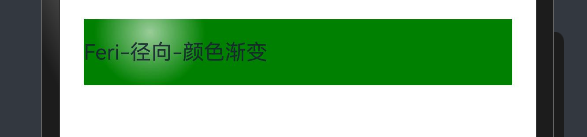
属性:radialGradient()
参数:
{
 center:  径向渐变的中心点坐标,
 radius: 径向渐变的半径,
 colors: [[颜色1, 颜色1所处位置], [颜色2, 颜色2所处位置], ......],
 repeating?: 是否重复着色
}
● center:径向渐变的中心点,即相对于当前组件左上角的坐标,写法[x坐标, y坐标]
 Text('Feri-径向-颜色渐变')
        .width("90%").height(50).backgroundColor(Color.Green)
        .radialGradient({
          center: [50, 10],
          radius: 42,
          colors: [
            ['rgba(255, 255, 255, 0.6)', 0],
            ['rgba(255, 255, 255, 0)', 1]
          ]
        })
2.阴影
2.1 阴影效果
作用:为组件添加阴影效果
属性:shadow()
参数:{}
参数写法
{
  radius: 模糊半径,
  type?: 阴影类型,
  color?: 阴影颜色,
  offsetX?: X轴偏移,
  offsetY?: Y轴偏移,
  fill?: 是否内部填充
}
来,看看具体的代码实现,如下所示:
      Row() {
        Text("阴影效果,睁大眼看,要不然看不见").
        textAlign(TextAlign.Center).width("100%")
      }
      .width('90%').height(200)
      .shadow({
        // 模糊半径
        radius: 30,
        // 阴影类型
        type: ShadowType.COLOR,
        // 阴影颜色
        color: Color.Gray,
        // X 轴偏移
        offsetX: 0,
        // Y 轴偏移
        offsetY: 0,
        // 是否内部填充,值为布尔型,默认为flase
        fill: false
      })
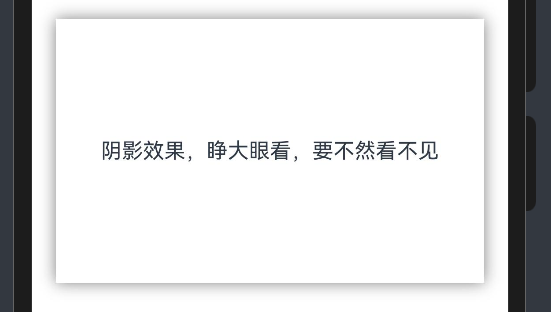
来自Feri的提示,眼要睁开,要不然看不见哟
3.综合效果实现
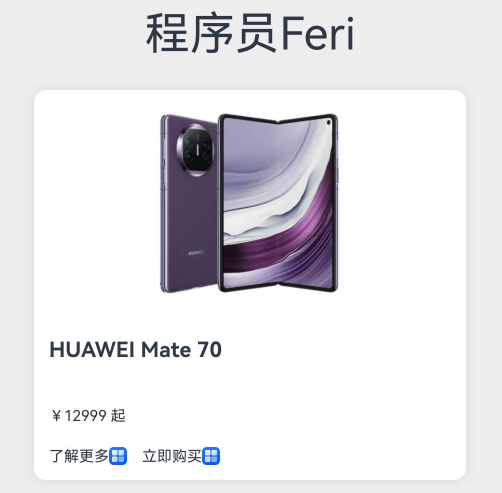
@Entry
@Component
struct MyStudy1 {

  build() {
    Column() {
      Text("程序员Feri").fontSize(30).margin(10)
      Column() {
        Image($r('app.media.phone'))
          .width(150)
          .margin({bottom: 20})
        Text('HUAWEI Mate 70')
          .width('100%')
          .fontSize(14)
          .fontWeight(700)
          .margin({bottom: 30})
        Text('¥12999 起')
          .width('100%')
          .fontSize(10)
          .margin({bottom: 15})
        Row() {
          Row(){
            Text('了解更多')
              .fontSize(10)
            Image($r('app.media.startIcon'))
              .width(12)
          }
          .margin({right: 10})
          Row(){
            Text('立即购买')
              .fontSize(10)
            Image($r('app.media.startIcon'))
              .width(12)
          }
        }
        .width('100%')
      }
      .width("80%")
      .backgroundColor('#fff')
      .padding(10)
      .margin(10)
      .shadow({
        radius: 20,
        color:'#1a000000'
      }).borderRadius(8)
    }.width('100%')
    .backgroundColor('#eee')
  }
}

讨论HarmonyOS开发技术,专注于API与组件、DevEco Studio、测试、元服务和应用上架分发等。
更多推荐
 4
4 0
0- 0


 已为社区贡献27条内容

所有评论(0)