HarmonyOS APP AI赋能:在“美寇商城”中集成DeepSeek实现智能导购
一、 摘要与引言
在电商应用高度同质化的今天,如何通过智能化手段提升用户体验、增强用户黏性成为破局关键。美寇商城作为基于HarmonyOS NEXT 5.0构建的原生应用,集成DeepSeek等先进大语言模型(LLM),旨在构建一个能够理解用户、主动服务、深度交互的“智能导购”系统。
实现智能导购将赋予美寇商城三大核心价值:
- 体验升维:从被动搜索到主动“对话式”导购,用户可以用最自然的语言描述复杂、模糊的需求(如“我需要一套适合油性皮肤、预算在500元以内的夏日护肤品套装”)。
- 转化提效:AI导购通过多轮交互精准洞察用户意图,进行个性化商品推荐与对比,大幅缩短决策路径,提升购买转化率与客单价。
- 服务延伸:提供7x24小时在线的专业购物顾问,解答产品疑问、提供搭配建议、生成购物清单,构建有温度的购物陪伴感。
二、 系统架构设计
智能导购系统设计遵循鸿蒙应用架构原则,采用“前端交互、中台调度、后端融合”的模式,将AI能力与商城核心业务数据安全、可控地结合。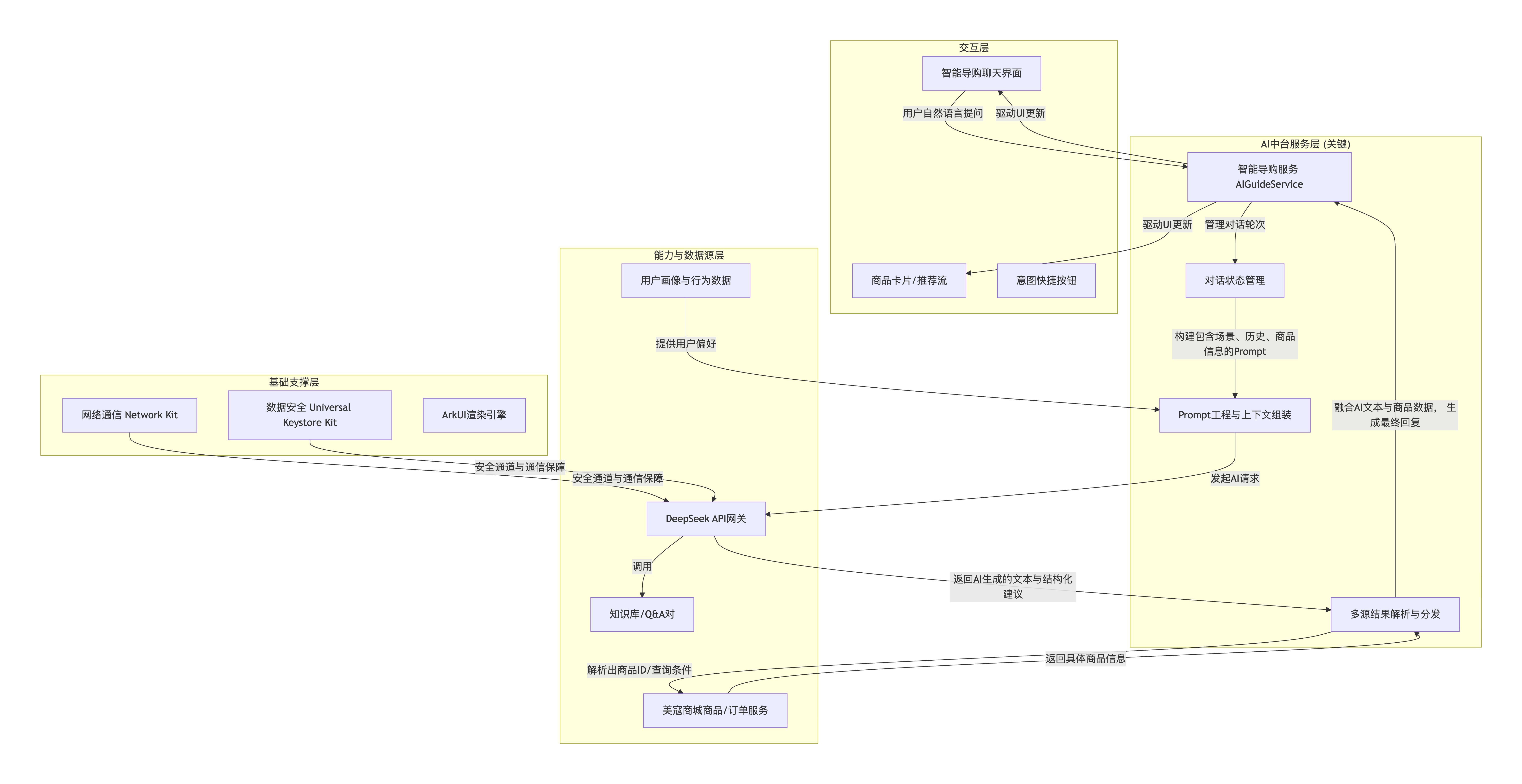
架构层次说明:
-
交互层:
- 聊天主界面:仿即时通讯的对话界面,支持文本、语音输入(可结合之前实现的语音搜索),展示AI回复与丰富的商品卡片。
- 富媒体回复:AI回复中可嵌入可点击的商品卡片、商品对比表格、用户意图确认按钮(如“是这套吗?”)。
- 快捷入口:提供“帮我推荐”、“预算内选择”、“对比商品”等预设意图按钮,降低用户输入成本。
-
AI中台服务层 (核心):
AIGuideService:服务总控,处理用户查询,协调对话状态、Prompt组装和结果解析。DialogueStateManager:维护当前对话的上下文历史,理解指代关系(如“上面的第一个”),实现连贯的多轮对话。PromptEngine:安全与效果的关键。负责将用户问题、对话历史、用户画像、可用的商品数据字段组合成符合DeepSeek API格式的、高质量的提示词(Prompt),明确设定AI的“导购员”角色和输出格式规范。ResponseParser:解析DeepSeek返回的文本,从中提取出结构化信息(如商品ID、属性过滤器),并调用商城服务获取真实数据,组装成最终回复。
-
能力与数据源层:
- DeepSeek API:提供核心的自然语言理解与生成能力。通过安全的网络网关进行调用。
- 商城业务服务:提供实时、准确的商品库存、价格、详情数据,是AI推荐可信的基石。
- 用户与知识数据:用户历史行为、偏好标签用于个性化;商品知识库(Q&A)用于快速回答常见问题。
-
基础支撑层:
- Network Kit:管理所有网络请求,支持重试、超时等策略。
- Universal Keystore Kit:安全地管理调用DeepSeek API所需的密钥,避免在客户端代码中硬编码。
三、 核心实现流程与代码
3.1 开发准备与环境配置
-
权限与依赖配置:在
module.json5中声明网络权限;在oh-package.json5中添加Network Kit依赖。// module.json5 片段 { "module": { "requestPermissions": [ { "name": "ohos.permission.INTERNET" } ] } } // oh-package.json5 片段 { "dependencies": { "@ohos/net.http": "2.0.0" } } -
安全配置:在华为开发者联盟配置应用签名,并在服务端部署代理网关或使用华为统一安全管控服务来中转DeepSeek API请求,避免客户端直接暴露API Key。
3.2 核心业务流程与代码实现
智能导购的核心流程是“用户输入 -> 上下文管理 -> Prompt组装 -> AI调用 -> 结果解析与执行 -> 回复呈现”的闭环。下图详细展示了这一交互循环:
步骤1:AI导购核心服务 (AIGuideService.ets)
此服务是智能导购的大脑,负责完整的对话处理流水线。
// AIGuideService.ets - 智能导购服务
import { http, HttpRequestOptions } from '@ohos/net.http';
import { BusinessError } from '@ohos.base';

// 定义消息类型
export interface ChatMessage {
  role: 'user' | 'assistant' | 'system';
  content: string;
  timestamp: number;
  extras?: { // 扩展数据,用于携带商品等信息
    productIds?: string[];
    quickReplies?: string[];
  };
}

// 定义导购服务返回的增强结果
export interface GuideResult {
  replyText: string;
  products?: ProductInfo[]; // 关联的商品信息
  quickReplies?: string[]; // 快捷回复建议
}

export class AIGuideService {
  private static instance: AIGuideService;
  private dialogueHistory: ChatMessage[] = [];
  private readonly maxHistoryLength: number = 10; // 控制上下文长度
  private deepSeekProxyUrl: string = 'https://api.meikou.com/ai/deepseek/chat'; // 企业代理网关
  private productServiceUrl: string = 'https://api.meikou.com/products/batch';

  static getInstance(): AIGuideService {
    if (!AIGuideService.instance) {
      AIGuideService.instance = new AIGuideService();
      // 初始化系统消息,设定AI角色
      AIGuideService.instance.initializeDialogue();
    }
    return AIGuideService.instance;
  }

  private initializeDialogue(): void {
    const systemPrompt: ChatMessage = {
      role: 'system',
      content: `你是一名专业、友善的美寇商城智能导购员。你的核心任务是:
1. 理解用户关于购物、商品咨询的任何需求。
2. 根据需求,从以下商品信息中推荐最匹配的1-3个商品。商品信息格式为:[ID: 商品ID, 名称: 商品名, 关键属性: ...]。
3. 你的回复必须严格遵循此格式:
   - **推荐理由**:(用口语化说明为什么推荐)
   - **推荐商品**:(列出商品ID,格式如:["P1001", "P1002"])
   - **后续建议**:(提出一个引导性提问或给出下一步建议)
如果无法找到匹配商品,请诚实告知,并尝试询问更具体的信息。`,
      timestamp: Date.now()
    };
    this.dialogueHistory = [systemPrompt];
  }

  // 主接口:发送用户消息并获取导购回复
  async sendMessage(userInput: string): Promise<GuideResult> {
    // 1. 更新对话历史
    this.addUserMessage(userInput);

    // 2. 构建面向DeepSeek的Prompt
    const promptForAI = this.buildPromptForAI();

    // 3. 调用DeepSeek API(通过安全代理)
    const aiRawResponse = await this.callDeepSeekAPI(promptForAI);

    // 4. 解析AI回复,提取结构化信息
    const parsedResponse = this.parseAIResponse(aiRawResponse);

    // 5. 如果有关联商品ID,则获取详细商品信息
    let products: ProductInfo[] = [];
    if (parsedResponse.productIds && parsedResponse.productIds.length > 0) {
      products = await this.fetchProductDetails(parsedResponse.productIds);
    }

    // 6. 将AI回复加入对话历史
    this.addAssistantMessage(parsedResponse.replyText, parsedResponse.productIds);

    // 7. 构造最终返回结果
    return {
      replyText: parsedResponse.replyText,
      products: products,
      quickReplies: this.generateQuickReplies(parsedResponse.replyText, products)
    };
  }

  private addUserMessage(content: string): void {
    this.dialogueHistory.push({ role: 'user', content, timestamp: Date.now() });
    // 保持历史记录长度
    if (this.dialogueHistory.length > this.maxHistoryLength) {
      // 保留系统消息,截断最早的普通消息
      const systemMsg = this.dialogueHistory[0];
      this.dialogueHistory = [systemMsg, ...this.dialogueHistory.slice(-(this.maxHistoryLength - 1))];
    }
  }

  private addAssistantMessage(content: string, productIds?: string[]): void {
    this.dialogueHistory.push({
      role: 'assistant',
      content,
      timestamp: Date.now(),
      extras: { productIds }
    });
  }

  private buildPromptForAI(): string {
    // 将对话历史转换为API所需的messages格式
    const messages = this.dialogueHistory.map(msg => ({ role: msg.role, content: msg.content }));
    // 在实际调用前,可以在此处动态注入当前可售的商品列表摘要,使AI推荐更实时
    const productSummary = this.getCurrentProductSummary(); // 从状态或参数获取
    if (productSummary) {
      // 将商品信息作为系统消息的补充
      messages[0].content += `\n\n当前可参考的商品摘要:${productSummary}`;
    }
    return JSON.stringify({ messages });
  }

  private async callDeepSeekAPI(prompt: string): Promise<string> {
    const httpRequest = http.createHttp();
    try {
      const options: HttpRequestOptions = {
        method: http.RequestMethod.POST,
        header: { 'Content-Type': 'application/json' },
        extraData: prompt
      };
      const response = await httpRequest.request(this.deepSeekProxyUrl, options);
      if (response.responseCode === 200) {
        const result = JSON.parse(response.result as string);
        return result.choices?.[0]?.message?.content || '抱歉,我暂时无法回答。';
      } else {
        throw new Error(`API请求失败: ${response.responseCode}`);
      }
    } catch (error) {
      const err: BusinessError = error as BusinessError;
      console.error(`调用DeepSeek API失败: ${err.message}`);
      throw err;
    } finally {
      httpRequest.destroy();
    }
  }

  private parseAIResponse(rawText: string): { replyText: string; productIds: string[] } {
    // 简易解析:根据预设格式提取商品ID。实际应用可使用更稳定的JSON格式或正则。
    let replyText = rawText;
    const productIds: string[] = [];
    const idPattern = /\["([P0-9]+)"(?:, "[P0-9]+")*\]/; // 匹配 ["P123", "P456"]
    const match = rawText.match(idPattern);
    if (match) {
      // 从匹配的字符串中提取所有ID
      const idsStr = match[0];
      const extractedIds = idsStr.match(/"([P0-9]+)"/g)?.map(id => id.replace(/"/g, '')) || [];
      productIds.push(...extractedIds);
      // 可以选择从回复文本中移除原始的ID数组,使文本更自然,这里选择保留。
    }
    return { replyText, productIds };
  }

  private async fetchProductDetails(productIds: string[]): Promise<ProductInfo[]> {
    if (productIds.length === 0) return [];
    const httpRequest = http.createHttp();
    try {
      const response = await httpRequest.request(this.productServiceUrl, {
        method: http.RequestMethod.POST,
        header: { 'Content-Type': 'application/json' },
        extraData: JSON.stringify({ productIds })
      });
      if (response.responseCode === 200) {
        const result = JSON.parse(response.result as string);
        return result.data || [];
      }
      return [];
    } catch (error) {
      console.error(`获取商品详情失败: ${error}`);
      return [];
    } finally {
      httpRequest.destroy();
    }
  }

  private generateQuickReplies(replyText: string, products: ProductInfo[]): string[] {
    const replies: string[] = [];
    // 基于回复内容和商品生成快捷问题
    if (products && products.length > 0) {
      replies.push(`“${products[0]?.name}”有优惠吗?`);
      replies.push('还有更便宜的选择吗?');
      replies.push('帮我加入购物车');
    }
    replies.push('推荐其他类型的'); // 通用回复
    return replies.slice(0, 3); // 最多返回3个
  }

  // 清空对话历史(开始新会话)
  clearHistory(): void {
    this.initializeDialogue();
  }
}
步骤2:智能导购聊天界面 (SmartGuidePage.ets)
此界面提供与AI导购交互的直观前端。
// SmartGuidePage.ets - 智能导购聊天页面
import { AIGuideService, GuideResult, ChatMessage } from '../services/AIGuideService';
import { ProductInfo } from '../services/AIGuideService'; // 假设ProductInfo有基础字段
import { router } from '@ohos.router';

@Entry
@Component
struct SmartGuidePage {
  @State messageList: ChatMessage[] = [];
  @State inputText: string = '';
  @State isSending: boolean = false;
  @State quickReplies: string[] = [];

  private guideService: AIGuideService = AIGuideService.getInstance();
  private scrollController: ScrollController = new ScrollController();

  build() {
    Column() {
      // 1. 聊天消息列表
      List({ space: 10, initialIndex: 0 }) {
        ForEach(this.messageList, (msg: ChatMessage, index) => {
          ListItem() {
            this.buildMessageBubble(msg, index)
          }
        }, (msg: ChatMessage) => msg.timestamp.toString())
      }
      .layoutWeight(1) // 占据主要空间
      .width('100%')
      .padding(10)
      .onReachEnd(() => { /* 可选:加载历史消息 */ })
      .controller(this.scrollController)

      // 2. 快捷回复区域
      if (this.quickReplies.length > 0) {
        Wrap({ spacing: 8, direction: FlexDirection.Horizontal }) {
          ForEach(this.quickReplies, (reply: string) => {
            Button(reply, { type: ButtonType.Capsule })
              .fontSize(12)
              .backgroundColor('#F0F0F0')
              .fontColor('#333')
              .onClick(() => {
                this.inputText = reply;
                this.sendMessage();
              })
          })
        }
        .width('100%')
        .padding({ left: 10, right: 10, bottom: 8 })
        .justifyContent(FlexAlign.Start)
      }

      // 3. 输入区域
      Row({ space: 10 }) {
        TextInput({ placeholder: '问问我,比如“送女友生日礼物推荐”...', text: this.inputText })
          .layoutWeight(1)
          .height(40)
          .border({ width: 1, color: '#DDD', radius: 20 })
          .padding({ left: 15, right: 15 })
          .onChange((value: string) => {
            this.inputText = value;
          })
          .onSubmit(() => this.sendMessage()) // 键盘回车发送

        Button(this.isSending ? '...' : '发送')
          .width(60)
          .height(40)
          .backgroundColor(this.inputText.trim() && !this.isSending ? '#FF2D79' : '#CCC')
          .enabled(!!this.inputText.trim() && !this.isSending)
          .onClick(() => this.sendMessage())
      }
      .width('100%')
      .padding(10)
      .backgroundColor(Color.White)
      .shadow({ radius: 2, color: '#10000000', offsetX: 0, offsetY: -2 })
    }
    .width('100%')
    .height('100%')
    .backgroundColor('#F8F9FA')
    .onAppear(() => {
      // 页面加载时,可以加载默认欢迎语
      this.addWelcomeMessage();
    })
  }

  @Builder
  buildMessageBubble(msg: ChatMessage, index: number) {
    const isUser = msg.role === 'user';
    Column({ space: 5 }) {
      // 消息文本
      Text(msg.content)
        .fontSize(14)
        .fontColor(isUser ? Color.White : '#333')
        .backgroundColor(isUser ? '#0089FF' : Color.White)
        .borderRadius(12)
        .padding(10)
        .maxLines(20)
        .textOverflow({ overflow: TextOverflow.Ellipsis })
        .alignSelf(isUser ? HorizontalAlign.End : HorizontalAlign.Start)
        .width('70%') // 限制宽度

      // 如果是AI消息且有关联商品,展示商品卡片
      if (msg.role === 'assistant' && msg.extras?.productIds && msg.extras.productIds.length > 0) {
        // 此处应有一个商品卡片组件,根据ID展示。为简化,用文本示意。
        ForEach(msg.extras.productIds, (id: string) => {
          Text(`[关联商品: ${id}]`)
            .fontSize(12)
            .fontColor('#666')
            .margin({ top: 4 })
            .alignSelf(HorizontalAlign.Start)
            .onClick(() => {
              // 点击跳转到商品详情页
              router.pushUrl({ url: `pages/ProductDetail?productId=${id}` });
            })
        })
      }
    }
    .width('100%')
    .alignItems(isUser ? HorizontalAlign.End : HorizontalAlign.Start)
    .margin({ bottom: 15 })
  }

  private addWelcomeMessage(): void {
    const welcomeMsg: ChatMessage = {
      role: 'assistant',
      content: '你好!我是美寇智能导购小美。你可以告诉我你的需求,比如想买什么、给谁用、预算多少,我会为你推荐合适的商品!',
      timestamp: Date.now(),
      extras: {
        quickReplies: ['护肤品推荐', '200元以内礼物', '查看爆款']
      }
    };
    this.messageList.push(welcomeMsg);
    this.quickReplies = welcomeMsg.extras?.quickReplies || [];
  }

  private async sendMessage(): Promise<void> {
    const text = this.inputText.trim();
    if (!text || this.isSending) return;

    // 更新UI:添加用户消息,清空输入框
    const userMsg: ChatMessage = { role: 'user', content: text, timestamp: Date.now() };
    this.messageList.push(userMsg);
    this.inputText = '';
    this.quickReplies = []; // 发送时清空旧快捷回复
    this.isSending = true;

    // 滚动到底部
    setTimeout(() => {
      this.scrollController.scrollEdge(Edge.Bottom);
    }, 50);

    try {
      // 调用AI导购服务
      const result: GuideResult = await this.guideService.sendMessage(text);

      // 更新UI:添加AI回复
      const aiMsg: ChatMessage = {
        role: 'assistant',
        content: result.replyText,
        timestamp: Date.now(),
        extras: {
          productIds: result.products?.map(p => p.productId),
          quickReplies: result.quickReplies
        }
      };
      this.messageList.push(aiMsg);
      this.quickReplies = result.quickReplies || [];

      // 如果有推荐的商品,可以在此处触发一个更丰富的商品卡片组件的渲染
      // 例如:this.showProductCards(result.products);

    } catch (error) {
      console.error(`发送消息失败: ${error}`);
      const errorMsg: ChatMessage = {
        role: 'assistant',
        content: '网络好像不太稳定,请稍后再试。',
        timestamp: Date.now()
      };
      this.messageList.push(errorMsg);
    } finally {
      this.isSending = false;
      // 再次滚动到底部
      setTimeout(() => {
        this.scrollController.scrollEdge(Edge.Bottom);
      }, 100);
    }
  }
}
四、 效果对比与最佳实践
4.1 智能导购与传统商品列表/搜索对比
| 对比维度 | 传统模式 (列表/关键词搜索) | AI智能导购模式 |
|---|---|---|
| 需求入口 | 用户需将模糊需求(如“显白、滋润的口红”)自我拆解为分类、关键词、筛选条件。 | 自然语言直接描述模糊、复杂、跨品类的需求(如“我要去海边度假,需要推荐防晒和拍照好看的衣服”)。 |
| 理解深度 | 基于字面关键词匹配,无法理解“送礼”、“性价比高”、“适合妈妈”等抽象概念和上下文。 | 基于语义理解与推理,能理解场景、对象、偏好、预算等复合维度,并关联商品知识。 |
| 交互方式 | 单向、静态的筛选与浏览,用户需要不断手动调整条件试错。 | 多轮、对话式交互,AI通过提问澄清需求,用户可随时补充或纠正,体验更接近线下导购。 |
| 结果呈现 | 平铺的商品列表,需要用户逐一点开判断是否匹配。 | 结构化、解释性回复,提供推荐理由、商品对比,并直接嵌入核心商品信息卡片,决策效率高。 |
| 个性化程度 | 依赖有限的用户历史点击数据,千人一面或粗略分群。 | 实时、上下文驱动的个性化,结合当前会话意图和用户画像进行动态推荐,更精准。 |
| 长尾需求满足 | 难以处理非标、小众、描述不清的商品需求。 | 通过语义泛化、知识联想,能更好地挖掘和满足长尾需求。 |
4.2 关键实践、安全与优化建议
-
Prompt工程是核心:
- 角色设定与边界:必须在系统Prompt中明确AI的角色、职责和禁止事项(如不承诺疗效、不讨论政治、不生成虚假信息)。
- 输出格式控制:强制要求AI以结构化格式(如JSON、特定标记)回复,便于客户端准确解析,这是实现“AI决策+数据渲染”分离的关键。
- 上下文管理:精心设计上下文窗口,保留关键历史,定期总结或清理过期信息,以节省Token并保持焦点。
-
安全与合规第一:
- 代理网关:所有AI API调用必须通过企业自建的安全代理网关,实现鉴权、限流、审计、敏感词过滤和数据脱敏(用户手机号、地址等绝不传入AI)。
- 内容审核:对AI生成的内容,在敏感场景下应进行二次审核(可接入华为内容安全服务或自建审核系统)。
- 用户知情同意:在隐私政策中明确说明智能导购功能的工作原理、数据使用方式,并获取用户授权。
-
性能与体验优化:
- 流式输出:对于长回复,可探索使用AI API的流式响应(Streaming),实现打字机效果,提升响应感知。
- 本地缓存与预加载:对高频商品详情、通用话术进行本地缓存;在AI生成推荐的同时,并行预加载商品图片,减少用户等待。
- 降级与熔断:当AI服务不可用或超时时,应有优雅降级方案(如切换到基于规则的商品推荐或显示客服入口)。
-
持续迭代与评估:
- 日志与反馈:详细记录用户与AI的对话日志(脱敏后),用于分析效果、发现bad case、优化Prompt和模型。
- A/B测试:对不同版本的Prompt或推荐策略进行A/B测试,以点击率、转化率、会话满意度等核心指标指导优化。
- 人工干预与纠正:提供用户“反馈结果不佳”的入口,并将相关案例反馈给运营或算法团队,用于模型迭代。
五、 总结与展望
在美寇商城中集成DeepSeek实现智能导购,标志着应用从“功能堆砌”向“智能服务”的范式转移。通过构建一个安全、高效、可控的AI中台服务层,我们成功地将大语言模型的强大理解与生成能力,与商城的实时商品数据、用户数据相结合,创造出了一个真正懂用户、会推销、有温度的虚拟购物伙伴。
展望未来,基于此智能导购基础,可向更广阔的领域探索:
- 多模态交互:结合视觉AI,支持用户“拍图找同款”或“上传图片让AI点评搭配”,实现图文并茂的导购。
- 跨设备协同:利用HarmonyOS的分布式能力,实现手机发起咨询、平板浏览商品详情、智慧屏进行家庭讨论的 seamless 购物体验。
- 预测式服务:基于用户历史对话和购物行为,构建更精细的用户意图模型,在特定场景(如节日、季节变换)主动推送个性化的购物建议或清单。
- 与元服务深度融合:将智能导购的核心问答能力封装为元服务(Atomic Service),使其可以脱离主应用,在系统全局搜索、负一屏、智慧语音助手等入口被直接唤醒和使用,实现“服务无处不在”。
智能导购不仅是提升GMV的工具,更是构建品牌情感连接、打造差异化竞争力的战略资产。在HarmonyOS全场景智慧生态中,它将成为连接用户与海量商品、服务的最自然、最智能的桥梁。
如果您有任何疑问、对文章写的不满意、发现错误或者有更好的方法,欢迎在评论、私信或邮件中提出,非常感谢您的支持。🙏
嘻嘻嘻,关注我!!!黑马波哥
也可以关注我的抖音号: 黑马程序员burger 在直播间交流(18:00-21:00)

讨论HarmonyOS开发技术,专注于API与组件、DevEco Studio、测试、元服务和应用上架分发等。
更多推荐
 9
9 0
0- 0


 已为社区贡献64条内容

所有评论(0)