【HarmonyOS】鸿蒙开发(五):购物页面与循环渲染实践(附完整代码)
【HarmonyOS】鸿蒙开发(五):购物页面与循环渲染实践(附完整代码)1.完成购物页面布局,包含顶部标题栏、搜索框、广告轮播区、横向分类导航、筛选栏及商品列表2.定义Product接口规范商品数据结构,包含商品 ID、标题、规格、价格、折扣信息等 12 项属性3.使用ForEach循环渲染商品列表,高效展示多条商品数据,减少重复代码4.商品卡片需展示完整信息:图片、标题、规格、新旧程度、价格、
目录
- 一、实验内容细化
- 二、开发过程详解(含代码细节)
- 三、运行效果细节
- 四、学习总结与问题解决
一、实验内容细化
本次实验聚焦于“河你交易”二手平台的购物页面开发,整体效果如下: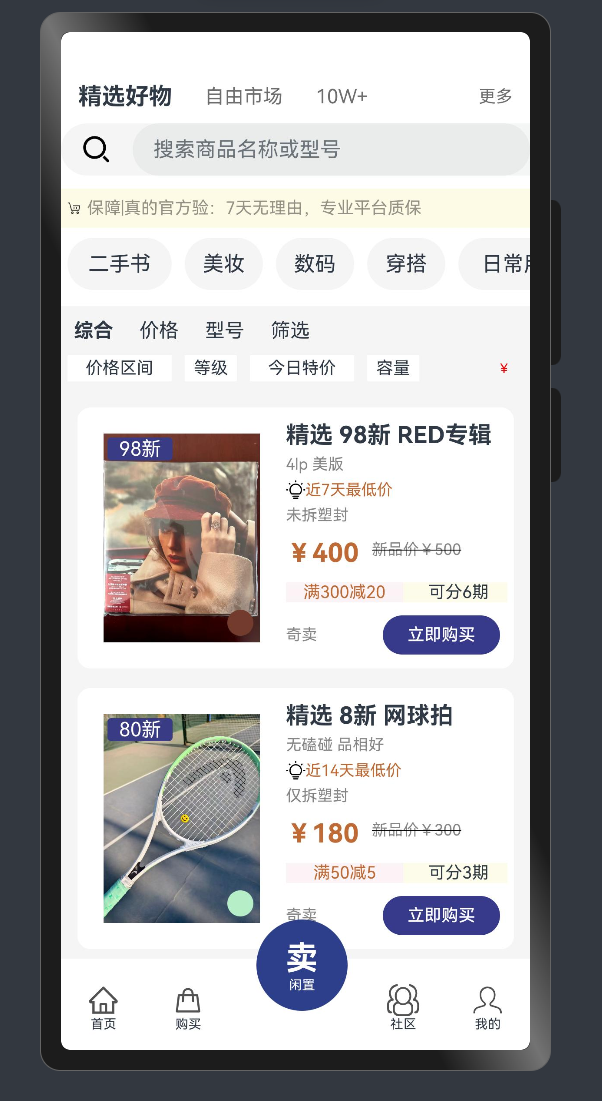
具体需求拆解如下:
-
页面模块划分:需包含6大核心区域,每个区域有明确的样式和功能要求
-
顶部标题区:显示“精选好物”“自由市场”“10W+”“更多”文字,字体大小和颜色有层级区分

-
搜索区:带搜索图标的输入框,背景色#f5f5f5,圆角20px,高度40px

-
广告轮播区:展示平台保障信息(“保障|真的官方验:7天无理由,专业平台质保”),背景色#fdfbe6,高度30px

-
横向分类导航:包含“二手书”“美妆”“数码”“穿搭”“日常用品”“猜你喜欢”“其它”7个分类项,每项为圆角20px的灰色背景(#f5f5f5),支持水平滚动

-
筛选栏:分两级展示筛选条件,一级为“综合”“价格”“型号”“筛选”,二级为“价格区间”“等级”“今日特价”“容量”

-
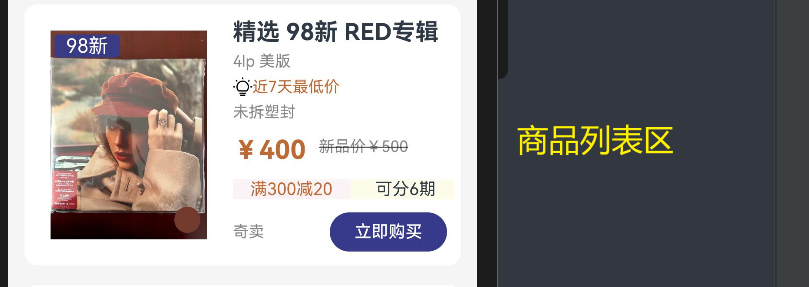
商品列表区:通过循环渲染展示商品卡片,每卡片需包含图片、新旧标签、颜色指示器、标题、规格、折扣信息、状态、价格(现价+原价)、优惠信息、购买按钮等11项内容
-
-
数据规范:定义
Product接口,包含12个必填字段(具体字段及含义见下文)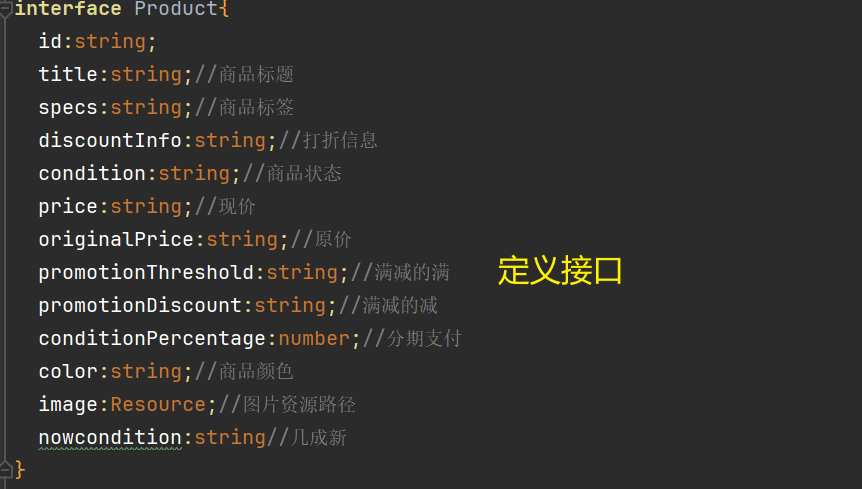
-
核心功能:使用
ForEach循环渲染商品列表,实现“数据驱动UI”,新增商品仅需补充数据无需修改UI代码
二、开发过程详解(含代码细节)
1. 商品数据结构设计(Product接口)
// 定义商品数据接口,明确每个字段的含义和用途
interface Product {
  id: string; // 商品唯一标识,用于区分不同商品
  title: string; // 商品标题,如“精选 98新 RED专辑”
  specs: string; // 商品规格,如“4lp 美版”
  discountInfo: string; // 折扣提示,如“近7天最低价”
  condition: string; // 商品状态,如“未拆塑封”
  price: string; // 现价,如“¥400”
  originalPrice: string; // 原价,如“新品价¥500”
  promotionThreshold: string; // 满减门槛,如“满300”
  promotionDiscount: string; // 满减金额,如“减20”
  conditionPercentage: number; // 分期数,如6(可分6期)
  color: string; // 商品颜色(十六进制色值),如“#723b2d”
  image: Resource; // 商品图片资源,通过$r('app.media.xxx')引用
  nowcondition: string; // 新旧程度,如“98新”
}
设计细节:每个字段都对应UI中的具体展示项,例如nowcondition直接对应商品图片左上角的“98新”标签,color对应图片右下角的颜色指示器,确保数据与UI一一映射。
2. 页面布局实现(按区域拆解)
(1)顶部标题区
Row() {
  Text('精选好物')
    .fontSize(18) // 主标题字号最大
    .fontWeight(FontWeight.Bold) // 加粗突出
    .padding({ right: 25 }) // 与右侧元素保持距离
  Text('自由市场')
    .fontSize(15) // 次级标题字号稍小
    .fontColor('#6d6d6d') // 灰色弱化
    .padding({ right: 25 })
  Text('10W+')
    .fontSize(15)
    .fontColor('#6d6d6d')
    .padding({ right: 15 })
  Text('更多')
    .fontSize(13) // 辅助文字字号最小
    .fontColor('#6d6d6d')
    .padding({ left: 70 }) // 右对齐布局
}
.padding({ bottom: 10 }) // 与下方搜索区保持距离
布局逻辑:通过字号、颜色、权重区分标题层级,使用padding控制元素间距,实现视觉上的主次分明。
(2)搜索区
Row() {
  // 搜索图标
  Image($r('app.media.search'))
    .padding({ left: 15, right: 15 }) // 图标左右留白
    .width(55) // 固定图标尺寸
  // 输入框
  TextInput({ placeholder: '搜索商品名称或型号' })
    // 不设置固定宽度,自动占满剩余空间
}
.width('100%') // 占满屏幕宽度
.borderRadius(20) // 圆角设计,增强视觉柔和度
.height(40) // 固定高度
.backgroundColor('#f5f5f5') // 浅灰色背景,与页面区分
交互细节:输入框默认显示提示文本(placeholder),用户输入时自动替换,图标与输入框在同一行,形成一体化搜索组件。
(3)广告轮播区(Swiper组件)
Swiper() {
  // 轮播内容:图标+文本
  Row() {
    Image($r('app.media.shopCar')).width(20) // 购物车图标
      .padding({ right: 5, left: 5 }) // 与文本保持距离
    Text('保障|真的官方验:7天无理由,专业平台质保')
      .fontSize(13) // 小字展示
      .fontColor('#959186') // 浅灰配色,不抢焦点
  }
}
.indicator(false) // 隐藏轮播指示器(简化设计)
.backgroundColor('#fdfbe6') // 浅黄色背景,突出重要信息
.margin({ top: 10 }) // 与上方搜索区留白
.width('100%')
.height(30) // 矮高度设计,避免占用过多空间
轮播逻辑:虽然示例中只有一条内容,但通过Swiper组件预留了轮播能力,后续添加多条内容可自动轮播。
(4)横向分类导航(Scroll+Row)
Scroll() { // 外层滚动容器
  Row() { // 内层横向布局
    // 分类项1:二手书
    Row() {
      Text('二手书').fontSize(16)
    }
    .margin({ left: 5, right: 10 }) // 项与项之间的间距
    .backgroundColor('#f5f5f5') // 灰色背景
    .height(40) // 固定高度
    .width(80) // 固定宽度(根据文字长度调整)
    .borderRadius(20) // 圆角设计
    .justifyContent(FlexAlign.Center) // 文字居中

    // 分类项2:美妆(尺寸稍小,适配文字长度)
    Row() {
      Text('美妆').fontSize(16)
    }
    .margin({ right: 10 })
    .backgroundColor('#f5f5f5')
    .height(40)
    .width(60) // 比“二手书”窄
    .borderRadius(20)
    .justifyContent(FlexAlign.Center)

    // 其余分类项(数码、穿搭等,结构同上,宽度按需调整)
  }
}
.backgroundColor('#fff') // 白色背景,与页面区分
.width('100%')
.height(40)
.scrollable(ScrollDirection.Horizontal) // 开启水平滚动
滚动逻辑:当分类项总宽度超过屏幕宽度时,用户可左右滑动查看全部,解决了“分类过多显示不下”的问题。
(5)筛选栏(两级筛选)
Column() {
  // 一级筛选:综合、价格等
  Row(){
    Text('综合')
      .fontSize(15)
      .fontWeight(FontWeight.Bold) // 默认选中项加粗
      .padding({ right: 20, left: 10 })
    Text('价格').fontSize(15).padding({ right: 20 })
    Text('型号').fontSize(15).padding({ right: 20 })
    Text('筛选').fontSize(15)
  }.width('100%').padding({ top: 10 }) // 与上方分类区留白

  // 二级筛选:价格区间、等级等
  Row(){
    // 价格区间
    Row(){Text('价格区间').fontSize(13)}
      .margin({ left: 5, right: 10 })
      .backgroundColor(Color.White) // 白色背景,突出可点击
      .height(20) // 矮高度,避免视觉冗余
      .width(80)
      .justifyContent(FlexAlign.Center)
    // 等级
    Row(){Text('等级').fontSize(13)}
      .margin({ right: 10 })
      .backgroundColor(Color.White)
      .height(20)
      .width(40)
      .justifyContent(FlexAlign.Center)
    // 其余二级筛选项(今日特价、容量,结构同上)
  }.width('100%').padding({ top: 10, bottom: 20 }) // 与下方商品区留白
}
层级设计:一级筛选为核心条件,二级为辅助条件,通过字号和高度区分层级,避免信息混乱。
3. 核心:ForEach循环渲染商品列表
(1)初始化商品数据
@Entry
@Component
struct Index {
  // 商品数据数组(符合Product接口规范)
  @State product: Product[] = [
    {
      id: '0001',
      title: '精选 98新 RED专辑',
      specs: '4lp 美版',
      discountInfo: '近7天最低价',
      condition: '未拆塑封',
      price: '¥400',
      originalPrice: '新品价¥500',
      promotionThreshold: '满300',
      promotionDiscount: '减20',
      conditionPercentage: 6,
      color: '#723b2d', // 棕色(专辑封面主色)
      image: $r('app.media.red'), // 引用本地图片资源
      nowcondition: '98新'
    },
    {
      id: '0002',
      title: '精选 8新 网球拍',
      specs: '无磕碰 品相好',
      discountInfo: '近14天最低价',
      condition: '仅拆塑封',
      price: '¥180',
      originalPrice: '新品价¥300',
      promotionThreshold: '满50',
      promotionDiscount: '减5',
      conditionPercentage: 3,
      color: '#b5eec7', // 浅绿色(网球拍主色)
      image: $r('app.media.qiupai'),
      nowcondition: '80新'
    },
    {
      id: '0003',
      title: '精选 9新 贵州冰箱贴',
      specs: '当地正品',
      discountInfo: '近21天最低价',
      condition: '有包装盒',
      price: '¥40',
      originalPrice: '¥新品价60',
      promotionThreshold: '满10',
      promotionDiscount: '减2',
      conditionPercentage: 2,
      color: '#837a65', // 深棕色(冰箱贴主色)
      image: $r('app.media.bingxiangtie'),
      nowcondition: '90新'
    }
  ]
  // ...
}
数据特点:每个商品的color字段与图片主色匹配,nowcondition与商品新旧程度对应,确保数据与视觉一致。
(2)循环渲染实现(ForEach)
Scroll() { // 商品列表滚动容器
  Column() { // 纵向排列商品卡片
    // ForEach循环:遍历product数组,生成商品卡片
    ForEach(
      this.product, // 待遍历的商品数组
      (item: Product) => { // 回调函数:处理单个商品数据
        // 单个商品卡片(Row布局,左侧图片+右侧信息)
        Row() {
          // 左侧:商品图片区
          Column(){
            // 商品主图
            Image(item.image)
              .width(140) // 固定图片宽度
              .padding({ left: 20 }) // 左留白,避免贴边

            // 新旧程度标签(悬浮在图片左上角)
            Row(){
              Text(item.nowcondition)
                .fontSize(15)
                .fontColor(Color.White) // 白色文字
            }
            .backgroundColor('#393b85') // 深蓝色背景
            .position({ x: 23, y: 3 }) // 绝对定位:左上角偏移
            .width(50) // 固定宽度
            .borderRadius(3) // 小圆角
            .justifyContent(FlexAlign.Center) // 文字居中

            // 颜色指示器(悬浮在图片右下角)
            Row(){} // 空Row,仅作为颜色块
              .backgroundColor(item.color) // 使用商品color字段
              .position({ x: 115, y: 135 }) // 右下角偏移
              .borderRadius(20) // 圆形
              .width(20).height(20) // 固定大小
          }

          // 右侧:商品信息区(纵向排列)
          Column(){
            // 1. 商品标题
            Text(item.title)
              .fontSize(18)
              .fontWeight(FontWeight.Bold) // 加粗突出
              .width('100%') // 占满父容器宽度
              .padding({ bottom: 5 }) // 与下方内容留白

            // 2. 商品规格
            Text(item.specs)
              .fontSize(12)
              .fontColor('#868688') // 灰色弱化
              .width('100%')
              .padding({ bottom: 5 })

            // 3. 折扣信息(带图标)
            Row(){
              Image($r('app.media.ic_gallery_create')).width(15) // 小图标
              Text(item.discountInfo)
                .fontColor('#bf6a35') // 橙色突出折扣
                .fontSize(12)
            }.width('100%').padding({ bottom: 5 })

            // 4. 商品状态
            Text(item.condition)
              .fontSize(12)
              .fontColor('#868688')
              .width('100%')
              .padding({ bottom: 5 })

            // 5. 价格信息(现价+原价)
            Row(){
              Text(item.price)
                .fontSize(20)
                .fontColor('#bf6a35') // 红色突出现价
                .fontWeight(FontWeight.Bold)
                .padding({ top: 5 })
              Text(item.originalPrice)
                .fontSize(12)
                .fontColor('#868688')
                .decoration({ type: TextDecorationType.LineThrough }) // 原价加删除线
                .padding({ left: 10 }) // 与现价保持距离
            }.padding({ bottom: 3 }).width('100%')

            // 6. 优惠信息(满减+分期)
            Row(){
              // 满减信息
              Row(){
                Text(item.promotionThreshold + item.promotionDiscount)
                  .fontSize(13)
                  .fontColor('#bf6a35')
              }
              .backgroundColor('#fcf3f6') // 浅红背景
              .width(90)
              .justifyContent(FlexAlign.Center)

              // 分期信息
              Row(){
                Text('可分' + item.conditionPercentage + '期')
                  .fontSize(13)
              }
              .backgroundColor('#fdfbea') // 浅黄背景
              .width(80)
              .justifyContent(FlexAlign.Center)
              .padding({ left: 5 }) // 与满减信息留白
            }.width('100%').padding({ top: 8 })

            // 7. 购买按钮
            Row(){
              Text('奇卖').fontSize(12).fontColor('#868688') // 辅助文字
              Button('立即购买')
                .backgroundColor('#373a8b') // 深蓝色按钮
                .fontSize(13)
                .margin({ left: 50 }) // 与左侧文字保持距离
                .height(30)
                .width(90)
            }.width('100%').padding({ top: 10 })
          }
          .padding({ left: 20 }) // 与左侧图片区留白
          .width('100%') // 占满剩余宽度
        }
        // 商品卡片样式
        .width('95%') // 宽度略小于屏幕,左右留白
        .height(200) // 固定高度
        .margin({ bottom: 15 }) // 卡片之间留白
        .backgroundColor(Color.White) // 白色背景,突出卡片
        .borderRadius(10) // 圆角设计
      }
    )
  }
  .backgroundColor('#f5f5f5') // 页面背景色,与卡片区分
}
.width('98%')
.backgroundColor('#f5f5f5')
循环细节:
ForEach自动根据product数组长度生成对应数量的商品卡片,数组有3条数据则生成3个卡片- 每个卡片的所有动态内容(如标题、价格、图片)均通过
item.字段名从数据中获取,实现“数据变则UI变” - 绝对定位(
position)的使用让标签(新旧程度、颜色指示器)精准悬浮在图片指定位置,增强视觉层次感
4. 底部导航组件复用
复用之前定义的myComponent作为底部导航,包含“首页”“购买”“卖闲置”“社区”“我的”5个选项,每个选项通过onClick事件绑定路由跳转(具体路由逻辑见下一篇博客)。
三、运行效果细节
购物页面运行后,各区域效果如下:
- 顶部标题区:“精选好物”加粗突出,“自由市场”“10W+”“更多”依次弱化,形成清晰的视觉层级
- 搜索区:浅灰色背景的搜索框居中显示,左侧搜索图标与提示文本“搜索商品名称或型号”左对齐
- 广告轮播区:浅黄色背景的轮播条展示平台保障信息,无指示器,简洁不干扰
- 横向分类导航:7个分类项横向排列,超出屏幕部分可左右滑动,每个项圆角清晰,背景色统一
- 筛选栏:一级筛选加粗突出“综合”,二级筛选项为白色背景小标签,与一级筛选形成层级
- 商品列表区:
- 商品卡片间距均匀,白色背景与页面浅灰背景形成明显区分
- 每张卡片左上角显示“98新”“80新”等标签,右下角显示对应商品颜色的圆形指示器
- 商品标题加粗,规格和状态为灰色小字,折扣信息为橙色突出
- 价格区现价红色加粗,原价带删除线,对比清晰
- 满减和分期信息分别用浅红、浅黄背景区分,视觉上易于识别
- “立即购买”按钮为深蓝色,在卡片底部右侧突出显示
- 底部导航:固定在页面底部,“卖闲置”按钮悬浮突出,与其他选项区分
四、学习总结与问题解决
掌握的核心知识点
-
ForEach循环渲染:深入理解“数据驱动UI”的思想,通过遍历数组自动生成UI组件,大幅减少重复代码。关键是明确ForEach的两个参数(数据源、生成子组件的回调函数)的用法,以及如何通过item参数获取单条数据。 -
复杂布局嵌套:熟练使用
Column、Row、Scroll的多层嵌套实现复杂页面结构,例如“商品卡片=Row(左侧Column+右侧Column)”“右侧Column=纵向排列7个信息项”,每层布局都通过width、height、padding、margin精确控制尺寸和间距。 -
绝对定位与视觉层次:通过
position({x,y})实现标签悬浮效果(如新旧程度标签、颜色指示器),让UI元素突破正常布局流,增强页面立体感。 -
样式精细化控制:掌握文本样式(颜色、字号、加粗、删除线)、背景色(通过色值区分功能区域)、圆角(
borderRadius)的使用,使页面视觉统一且层次清晰。
遇到的问题及解决过程
-
问题:
ForEach循环生成的商品卡片样式不一致,部分卡片文字超出边界。
原因:未统一设置卡片内文本的width属性,导致不同长度的标题/规格文本排版混乱。
解决:为每个文本组件添加width('100%'),使其占满父容器宽度,超出部分自动换行,确保所有卡片样式统一。 -
问题:横向分类导航无法滚动,超出屏幕的分类项被截断。
原因:Scroll组件未明确设置scrollable(ScrollDirection.Horizontal),默认不开启横向滚动。
解决:为Scroll组件添加scrollable(ScrollDirection.Horizontal),开启水平滚动,实现分类项的完整展示。 -
问题:商品图片上的标签(如“98新”)位置不固定,不同图片显示位置不一致。
原因:标签使用相对布局,受图片尺寸影响导致位置偏移。
解决:改用绝对定位position({x:23, y:3}),基于父容器(图片所在Column)固定标签位置,确保无论图片尺寸如何,标签始终显示在左上角。
完整代码
// 导入路由模块,用于页面跳转
import { BusinessError } from '@ohos.base';
import router from '@ohos.router';

/**
 * 定义商品数据结构接口
 * 规范商品信息的字段和类型,确保数据一致性
 */
interface Product {
  id: string; // 商品唯一标识
  title: string; // 商品标题(如"精选 98新 RED专辑")
  specs: string; // 商品规格(如"4lp 美版")
  discountInfo: string; // 折扣信息(如"近7天最低价")
  condition: string; // 商品状态(如"未拆塑封")
  price: string; // 现价(如"¥400")
  originalPrice: string; // 原价(如"新品价¥500")
  promotionThreshold: string; // 满减门槛(如"满300")
  promotionDiscount: string; // 满减金额(如"减20")
  conditionPercentage: number; // 分期数(如6期)
  color: string; // 商品颜色(十六进制色值,如"#723b2d")
  image: Resource; // 商品图片资源
  nowcondition: string; // 新旧程度(如"98新")
}

/**
 * 底部导航组件
 * 复用组件,包含首页、购买、卖闲置、社区、我的五个选项
 */
@Component
struct myComponent {
  build() {
    Row() {
      // 首页导航项
      Column() {
        Image($r('app.media.home')) // 首页图标
          .width(25)
          .padding({ top: 5 })
        Text('首页').fontSize(10) // 文字说明
      }.padding({ left: 20 })
      .onClick(() => { // 点击跳转首页
        router.pushUrl({ url: 'pages/Zhuye' })
          .then(() => console.info('跳转到首页成功'))
          .catch((err: BusinessError) =>
            console.error(`跳转失败,错误码:${err.code},信息:${err.message}`)
          )
      })

      // 购买导航项
      Column() {
        Image($r('app.media.buy_icon')) // 购买图标
          .width(25)
          .padding({ top: 5 })
        Text('购买').fontSize(10)
      }.padding({ left: 40 })
      .onClick(() => { // 点击跳转购物页(当前页)
        router.pushUrl({ url: 'pages/Shop' })
          .then(() => console.info('跳转到购物页成功'))
          .catch((err: BusinessError) =>
            console.error(`跳转失败,错误码:${err.code},信息:${err.message}`)
          )
      })

      // 卖闲置导航项(突出显示)
      Column() {
        Text('卖').fontColor('#fff').fontSize(25)
          .padding({ top: 15 }).fontWeight(FontWeight.Bold)
        Text('闲置').fontColor('#fff').fontSize(10)
      }
      .layoutWeight(1)
      .backgroundColor('#2d3f8b') // 深蓝色背景
      .width(70).height(70)
      .border({ radius: 35 }) // 圆形设计
      .position({ x: 150, y: -30 }) // 向上悬浮效果

      // 社区导航项
      Column() {
        Image($r('app.media.she_qu')) // 社区图标
          .width(25)
          .padding({ top: 5 })
        Text('社区').fontSize(10)
      }.padding({ left: 140 })

      // 我的导航项
      Column() {
        Image($r('app.media.wo_de')) // 我的图标
          .width(25)
          .padding({ top: 5 })
        Text('我的').fontSize(10)
      }.padding({ left: 40 })
      .onClick(() => { // 点击跳转个人中心
        router.pushUrl({ url: 'pages/Wode' })
          .then(() => console.info('跳转到个人中心成功'))
          .catch((err: BusinessError) =>
            console.error(`跳转失败,错误码:${err.code},信息:${err.message}`)
          )
      })
    }
    .width('100%').height(70).backgroundColor('#fff') // 底部导航栏样式
  }
}

/**
 * 购物页面主组件
 * 包含商品列表、筛选栏、分类导航等核心功能
 */
@Entry
@Component
struct Index {
  // 商品数据数组,初始化三条商品信息
  @State product: Product[] = [
    {
      id: '0001',
      title: '精选 98新 RED专辑',
      specs: '4lp 美版',
      discountInfo: '近7天最低价',
      condition: '未拆塑封',
      price: '¥400',
      originalPrice: '新品价¥500',
      promotionThreshold: '满300',
      promotionDiscount: '减20',
      conditionPercentage: 6,
      color: '#723b2d', // 棕色(匹配专辑封面)
      image: $r('app.media.red'), // 引用专辑图片资源
      nowcondition: '98新'
    },
    {
      id: '0002',
      title: '精选 8新 网球拍',
      specs: '无磕碰 品相好',
      discountInfo: '近14天最低价',
      condition: '仅拆塑封',
      price: '¥180',
      originalPrice: '新品价¥300',
      promotionThreshold: '满50',
      promotionDiscount: '减5',
      conditionPercentage: 3,
      color: '#b5eec7', // 浅绿色(匹配网球拍)
      image: $r('app.media.qiupai'), // 引用网球拍图片资源
      nowcondition: '80新'
    },
    {
      id: '0003',
      title: '精选 9新 贵州冰箱贴',
      specs: '当地正品',
      discountInfo: '近21天最低价',
      condition: '有包装盒',
      price: '¥40',
      originalPrice: '¥新品价60',
      promotionThreshold: '满10',
      promotionDiscount: '减2',
      conditionPercentage: 2,
      color: '#837a65', // 深棕色(匹配冰箱贴)
      image: $r('app.media.bingxiangtie'), // 引用冰箱贴图片资源
      nowcondition: '90新'
    }
  ]

  build() {
    Column() {
      // 页面主体内容区
      Column() {
        // 1. 顶部标题栏
        Row() {
          Text('精选好物').fontSize(18).fontWeight(FontWeight.Bold)
            .padding({ right: 25 }) // 主标题突出显示
          Text('自由市场').fontSize(15).fontColor('#6d6d6d')
            .padding({ right: 25 }) // 次级标题弱化
          Text('10W+').fontSize(15).fontColor('#6d6d6d')
            .padding({ right: 15 })
          Text('更多').fontSize(13).fontColor('#6d6d6d')
            .padding({ left: 70 }) // 靠右显示
        }.padding({ bottom: 10 })

        // 2. 搜索框
        Row() {
          Image($r('app.media.search')).padding({ left: 15, right: 15 }).width(55) // 搜索图标
          TextInput({ placeholder: '搜索商品名称或型号' }) // 搜索输入框
        }
        .width('100%').borderRadius(20).height(40)
        .backgroundColor('#f5f5f5') // 浅灰背景

        // 3. 广告轮播区
        Swiper() {
          Row() {
            Image($r('app.media.shopCar')).width(20)
              .padding({ right: 5, left: 5 }) // 购物车图标
            Text('保障|真的官方验:7天无理由,专业平台质保')
              .fontSize(13).fontColor('#959186') // 保障信息
          }
        }
        .indicator(false) // 隐藏轮播指示器
        .backgroundColor('#fdfbe6') // 浅黄色背景
        .margin({ top: 10 })
        .width('100%').height(30)

        // 4. 横向分类导航(支持滚动)
        Row() {
          Scroll() {
            Row() {
              // 分类项1:二手书
              Row() { Text('二手书').fontSize(16) }
                .margin({ left: 5, right: 10 })
                .backgroundColor('#f5f5f5').height(40).width(80)
                .borderRadius(20).justifyContent(FlexAlign.Center)

              // 分类项2:美妆
              Row() { Text('美妆').fontSize(16) }
                .margin({ right: 10 })
                .backgroundColor('#f5f5f5').height(40).width(60)
                .borderRadius(20).justifyContent(FlexAlign.Center)

              // 分类项3:数码
              Row() { Text('数码').fontSize(16) }
                .margin({ right: 10 })
                .backgroundColor('#f5f5f5').height(40).width(60)
                .borderRadius(20).justifyContent(FlexAlign.Center)

              // 分类项4:穿搭
              Row() { Text('穿搭').fontSize(16) }
                .margin({ right: 10 })
                .backgroundColor('#f5f5f5').height(40).width(60)
                .borderRadius(20).justifyContent(FlexAlign.Center)

              // 分类项5:日常用品
              Row() { Text('日常用品').fontSize(16) }
                .margin({ right: 10 })
                .backgroundColor('#f5f5f5').height(40).width(100)
                .borderRadius(20).justifyContent(FlexAlign.Center)

              // 分类项6:猜你喜欢
              Row() { Text('猜你喜欢').fontSize(16) }
                .margin({ right: 10 })
                .backgroundColor('#f5f5f5').height(40).width(100)
                .borderRadius(20).justifyContent(FlexAlign.Center)

              // 分类项7:其它
              Row() { Text('其它').fontSize(16) }
                .backgroundColor('#f5f5f5').height(40).width(50)
                .borderRadius(20).justifyContent(FlexAlign.Center)
            }
          }
          .backgroundColor('#fff').width('100%').height(40)
          .scrollable(ScrollDirection.Horizontal) // 开启水平滚动
        }.height(60).padding({ bottom: 5 })

        // 5. 筛选栏
        Column() {
          // 一级筛选条件
          Row(){
            Text('综合').fontSize(15).fontWeight(FontWeight.Bold)
              .padding({ right: 20, left: 10 }) // 默认选中项加粗
            Text('价格').fontSize(15).padding({ right: 20 })
            Text('型号').fontSize(15).padding({ right: 20 })
            Text('筛选').fontSize(15)
          }.width('100%').padding({ top: 10 })

          // 二级筛选条件
          Row(){
            Row(){ Text('价格区间').fontSize(13) }
              .margin({ left: 5, right: 10 })
              .backgroundColor(Color.White).height(20).width(80)
              .justifyContent(FlexAlign.Center)

            Row(){ Text('等级').fontSize(13) }
              .margin({ right: 10 })
              .backgroundColor(Color.White).height(20).width(40)
              .justifyContent(FlexAlign.Center)

            Row(){ Text('今日特价').fontSize(13) }
              .margin({ right: 10 })
              .backgroundColor(Color.White).height(20).width(80)
              .justifyContent(FlexAlign.Center)

            Row(){ Text('容量').fontSize(13) }
              .margin({ right: 10 })
              .backgroundColor(Color.White).height(20).width(40)
              .justifyContent(FlexAlign.Center)

            Text('¥').fontColor(Color.Red).padding({ left: 50 }).fontSize(10)
          }.width('100%').padding({ top: 10, bottom: 20 })
        }

        // 6. 商品列表(循环渲染)
        Scroll(){
          Column(){
            // 使用ForEach循环遍历商品数组,生成商品卡片
            ForEach(this.product, (item: Product) => {
              // 单个商品卡片
              Row(){
                // 左侧:商品图片及标签
                Column(){
                  Image(item.image).width(140).padding({ left: 20 }) // 商品主图

                  // 新旧程度标签(左上角悬浮)
                  Row(){ Text(item.nowcondition).fontSize(15).fontColor(Color.White) }
                    .backgroundColor('#393b85')
                    .position({ x: 23, y: 3 }) // 绝对定位
                    .width(50).borderRadius(3)
                    .justifyContent(FlexAlign.Center)

                  // 颜色指示器(右下角悬浮)
                  Row(){}.backgroundColor(item.color)
                    .position({ x: 115, y: 135 }) // 绝对定位
                    .borderRadius(20).width(20).height(20)
                }

                // 右侧:商品信息
                Column(){
                  Text(item.title).fontSize(18).fontWeight(FontWeight.Bold)
                    .width('100%').padding({ bottom: 5 }) // 商品标题

                  Text(item.specs).fontSize(12).fontColor('#868688')
                    .width('100%').padding({ bottom: 5 }) // 商品规格

                  Row(){ // 折扣信息(带图标)
                    Image($r('app.media.ic_gallery_create')).width(15)
                    Text(item.discountInfo).fontColor('#bf6a35').fontSize(12)
                  }.width('100%').padding({ bottom: 5 })

                  Text(item.condition).fontSize(12).fontColor('#868688')
                    .width('100%').padding({ bottom: 5 }) // 商品状态

                  // 价格信息(现价+原价)
                  Row(){
                    Text(item.price).fontSize(20).fontColor('#bf6a35')
                      .fontWeight(FontWeight.Bold).padding({ top: 5 })
                    Text(item.originalPrice).fontSize(12).fontColor('#868688')
                      .decoration({ type: TextDecorationType.LineThrough }) // 原价加删除线
                      .padding({ left: 10 })
                  }.padding({ bottom: 3 }).width('100%')

                  // 优惠信息(满减+分期)
                  Row(){
                    Row(){ // 满减信息
                      Text(item.promotionThreshold + item.promotionDiscount)
                        .fontSize(13).fontColor('#bf6a35')
                    }.backgroundColor('#fcf3f6').width(90)
                    .justifyContent(FlexAlign.Center)

                    Row(){ // 分期信息
                      Text('可分' + item.conditionPercentage + '期').fontSize(13)
                    }.backgroundColor('#fdfbea').width(80)
                    .justifyContent(FlexAlign.Center).padding({ left: 5 })
                  }.width('100%').padding({ top: 8 })

                  // 购买按钮区
                  Row(){
                    Text('奇卖').fontSize(12).fontColor('#868688')
                    Button('立即购买').backgroundColor('#373a8b')
                      .fontSize(13).margin({ left: 50 }).height(30).width(90)
                  }.width('100%').padding({ top: 10 })
                }.padding({ left: 20 }).width('100%')
              }
              .width('95%').height(200).margin({ bottom: 15 })
              .backgroundColor(Color.White).borderRadius(10) // 卡片样式
            })

            // 占位行(避免最后一个商品被底部导航遮挡)
            Row(){}.width('98%').height(80).backgroundColor('f5f5f5')
          }.backgroundColor('#f5f5f5')
        }.width('98%').backgroundColor('#f5f5f5')

        // 底部导航组件
        myComponent().zIndex(5)
      }
    }
  }
}
本次实验通过开发购物页面,深入实践了循环渲染和复杂布局技巧,理解了“数据驱动UI”的核心思想,为后续开发动态列表页面(如订单列表、收藏列表)积累了关键经验。

讨论HarmonyOS开发技术,专注于API与组件、DevEco Studio、测试、元服务和应用上架分发等。
更多推荐
 30
30 0
0- 0


 已为社区贡献4条内容

所有评论(0)