7、鸿蒙HarmonyOS Next开发:弹性布局 (Flex)
目录
概述
弹性布局(Flex)提供更加有效的方式对容器中的子元素进行排列、对齐和分配剩余空间。常用于页面头部导航栏的均匀分布、页面框架的搭建、多行数据的排列等。
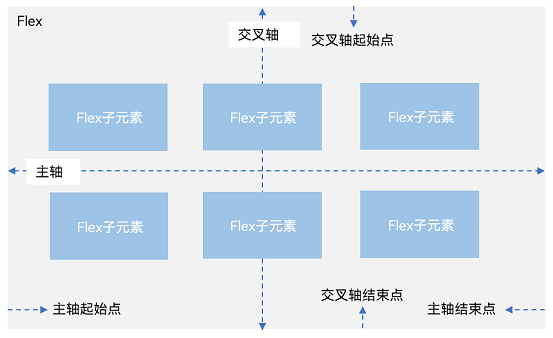
容器默认存在主轴与交叉轴,子元素默认沿主轴排列,子元素在主轴方向的尺寸称为主轴尺寸,在交叉轴方向的尺寸称为交叉轴尺寸。
图1 主轴为水平方向的Flex容器示意图
基本概念
-
主轴:Flex组件布局方向的轴线,子元素默认沿着主轴排列。主轴开始的位置称为主轴起始点,结束位置称为主轴结束点。
-
交叉轴:垂直于主轴方向的轴线。交叉轴开始的位置称为交叉轴起始点,结束位置称为交叉轴结束点。
布局方向
在弹性布局中,容器的子元素可以按照任意方向排列。通过设置参数direction,可以决定主轴的方向,从而控制子元素的排列方向。
图2 弹性布局方向图
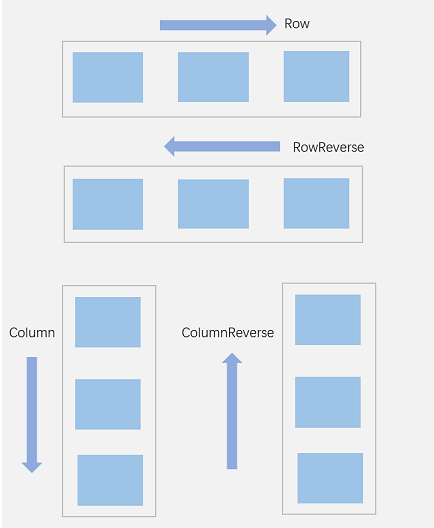
- FlexDirection.Row(默认值):主轴为水平方向,子元素从起始端沿着水平方向开始排布。
-
Flex({ direction: FlexDirection.Row }) {
  Text('1').width('33%').height(50).backgroundColor('#F5DEB3')
  Text('2').width('33%').height(50).backgroundColor('#D2B48C')
  Text('3').width('33%').height(50).backgroundColor('#F5DEB3')
}
.height(70)
.width('90%')
.padding(10)
.backgroundColor('#AFEEEE')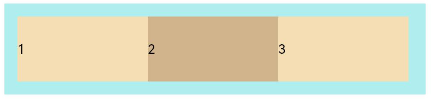
- FlexDirection.RowReverse:主轴为水平方向,子元素从终点端沿着FlexDirection. Row相反的方向开始排布。
-
Flex({ direction: FlexDirection.RowReverse }) {
  Text('1').width('33%').height(50).backgroundColor('#F5DEB3')
  Text('2').width('33%').height(50).backgroundColor('#D2B48C')
  Text('3').width('33%').height(50).backgroundColor('#F5DEB3')
}
.height(70)
.width('90%')
.padding(10)
.backgroundColor('#AFEEEE')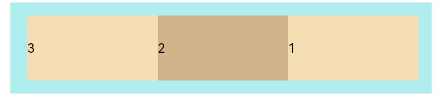
- FlexDirection.Column:主轴为垂直方向,子元素从起始端沿着垂直方向开始排布。
-
Flex({ direction: FlexDirection.Column }) {
  Text('1').width('100%').height(50).backgroundColor('#F5DEB3')
  Text('2').width('100%').height(50).backgroundColor('#D2B48C')
  Text('3').width('100%').height(50).backgroundColor('#F5DEB3')
}
.height(70)
.width('90%')
.padding(10)
.backgroundColor('#AFEEEE')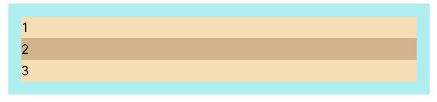
- FlexDirection.ColumnReverse:主轴为垂直方向,子元素从终点端沿着FlexDirection. Column相反的方向开始排布。
-
Flex({ direction: FlexDirection.ColumnReverse }) {
  Text('1').width('100%').height(50).backgroundColor('#F5DEB3')
  Text('2').width('100%').height(50).backgroundColor('#D2B48C')
  Text('3').width('100%').height(50).backgroundColor('#F5DEB3')
}
.height(70)
.width('90%')
.padding(10)
.backgroundColor('#AFEEEE')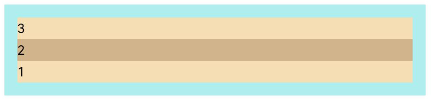
布局换行
弹性布局分为单行布局和多行布局。默认情况下,Flex容器中的子元素都排在一条线(又称“轴线”)上。wrap属性控制当子元素主轴尺寸之和大于容器主轴尺寸时,Flex是单行布局还是多行布局。在多行布局时,通过交叉轴方向,确认新行排列方向。
- FlexWrap. NoWrap(默认值):不换行。如果子元素的宽度总和大于父元素的宽度,则子元素会被压缩宽度。
-
Flex({ wrap: FlexWrap.NoWrap }) {
  Text('1').width('50%').height(50).backgroundColor('#F5DEB3')
  Text('2').width('50%').height(50).backgroundColor('#D2B48C')
  Text('3').width('50%').height(50).backgroundColor('#F5DEB3')
}
.width('90%')
.padding(10)
.backgroundColor('#AFEEEE')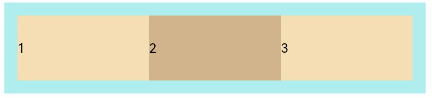
- FlexWrap. Wrap:换行,每一行子元素按照主轴方向排列。
-
Flex({ wrap: FlexWrap.Wrap }) {
  Text('1').width('50%').height(50).backgroundColor('#F5DEB3')
  Text('2').width('50%').height(50).backgroundColor('#D2B48C')
  Text('3').width('50%').height(50).backgroundColor('#D2B48C')
}
.width('90%')
.padding(10)
.backgroundColor('#AFEEEE')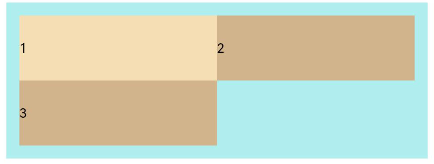
- FlexWrap. WrapReverse:换行,每一行子元素按照主轴反方向排列。
-
Flex({ wrap: FlexWrap.WrapReverse}) {
  Text('1').width('50%').height(50).backgroundColor('#F5DEB3')
  Text('2').width('50%').height(50).backgroundColor('#D2B48C')
  Text('3').width('50%').height(50).backgroundColor('#F5DEB3')
}
.width('90%')
.padding(10)
.backgroundColor('#AFEEEE')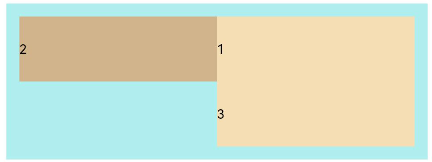
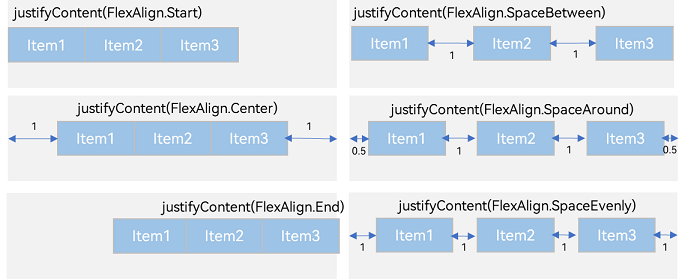
主轴对齐方式
通过justifyContent参数设置子元素在主轴方向的对齐方式。
交叉轴对齐方式
容器和子元素都可以设置交叉轴对齐方式,且子元素设置的对齐方式优先级较高
容器组件设置交叉轴对齐
可以通过Flex组件的alignItems参数设置子元素在交叉轴的对齐方式。
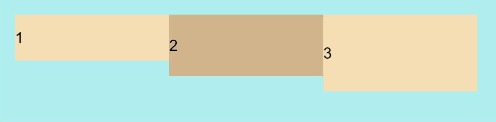
- ItemAlign.Auto:使用Flex容器中默认配置。
Flex({ alignItems: ItemAlign.Auto }) {
  Text('1').width('33%').height(30).backgroundColor('#F5DEB3')
  Text('2').width('33%').height(40).backgroundColor('#D2B48C')
  Text('3').width('33%').height(50).backgroundColor('#F5DEB3')
}
.size({ width: '90%', height: 80 })
.padding(10)
.backgroundColor('#AFEEEE')
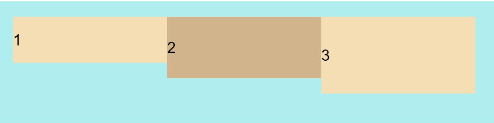
- ItemAlign.Start:交叉轴方向首部对齐。
Flex({ alignItems: ItemAlign.Start }) {
  Text('1').width('33%').height(30).backgroundColor('#F5DEB3')
  Text('2').width('33%').height(40).backgroundColor('#D2B48C')
  Text('3').width('33%').height(50).backgroundColor('#F5DEB3')
}
.size({ width: '90%', height: 80 })
.padding(10)
.backgroundColor('#AFEEEE')
- ItemAlign.Center:交叉轴方向居中对齐。
Flex({ alignItems: ItemAlign.Center }) {
  Text('1').width('33%').height(30).backgroundColor('#F5DEB3')
  Text('2').width('33%').height(40).backgroundColor('#D2B48C')
  Text('3').width('33%').height(50).backgroundColor('#F5DEB3')
}
.size({ width: '90%', height: 80 })
.padding(10)
.backgroundColor('#AFEEEE')
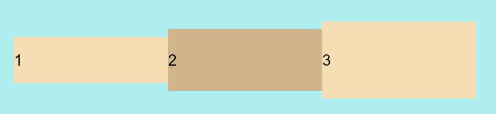
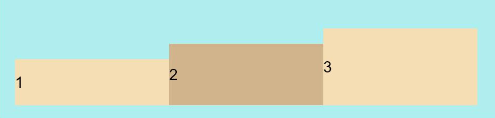
- ItemAlign.End:交叉轴方向底部对齐。
Flex({ alignItems: ItemAlign.End }) {
  Text('1').width('33%').height(30).backgroundColor('#F5DEB3')
  Text('2').width('33%').height(40).backgroundColor('#D2B48C')
  Text('3').width('33%').height(50).backgroundColor('#F5DEB3')
}
.size({ width: '90%', height: 80 })
.padding(10)
.backgroundColor('#AFEEEE')
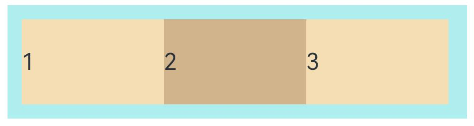
- ItemAlign.Stretch:交叉轴方向拉伸填充,在未设置尺寸时,拉伸到容器尺寸
Flex({ alignItems: ItemAlign.Stretch }) {
  Text('1').width('33%').height(30).backgroundColor('#F5DEB3')
  Text('2').width('33%').height(40).backgroundColor('#D2B48C')
  Text('3').width('33%').height(50).backgroundColor('#F5DEB3')
}
.size({ width: '90%', height: 80 })
.padding(10)
.backgroundColor('#AFEEEE')
- ItemAlign. Baseline:交叉轴方向文本基线对齐。
Flex({ alignItems: ItemAlign.Baseline }) {
  Text('1').width('33%').height(30).backgroundColor('#F5DEB3')
  Text('2').width('33%').height(40).backgroundColor('#D2B48C')
  Text('3').width('33%').height(50).backgroundColor('#F5DEB3')
}
.size({ width: '90%', height: 80 })
.padding(10)
.backgroundColor('#AFEEEE')
子元素设置交叉轴对齐
子元素的alignSelf属性也可以设置子元素在父容器交叉轴的对齐方式,且会覆盖Flex布局容器中alignItems配置。如下例所示
Flex({ direction: FlexDirection.Row, alignItems: ItemAlign.Center }) { // 容器组件设置子元素居中
  Text('alignSelf Start').width('25%').height(80)
    .alignSelf(ItemAlign.Start)
    .backgroundColor('#F5DEB3')
  Text('alignSelf Baseline')
    .alignSelf(ItemAlign.Baseline)
    .width('25%')
    .height(80)
    .backgroundColor('#D2B48C')
  Text('alignSelf Baseline').width('25%').height(100)
    .backgroundColor('#F5DEB3')
    .alignSelf(ItemAlign.Baseline)
  Text('no alignSelf').width('25%').height(100)
    .backgroundColor('#D2B48C')
  Text('no alignSelf').width('25%').height(100)
    .backgroundColor('#F5DEB3')

}.width('90%').height(220).backgroundColor('#AFEEEE')
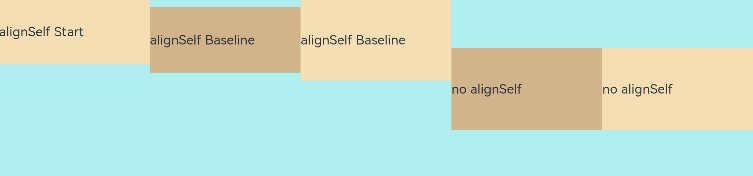
上例中,Flex容器中alignItems设置交叉轴子元素的对齐方式为居中,子元素自身设置了alignSelf属性的情况,覆盖父组件的alignItems值,表现为alignSelf的定义。
内容对齐
可以通过alignContent参数设置子元素各行在交叉轴剩余空间内的对齐方式,只在多行的Flex布局中生效,可选值有:
- FlexAlign.Start:子元素各行与交叉轴起点对齐。
-
Flex({ justifyContent: FlexAlign.SpaceBetween, wrap: FlexWrap.Wrap, alignContent: FlexAlign.Start }) {
  Text('1').width('30%').height(20).backgroundColor('#F5DEB3')
  Text('2').width('60%').height(20).backgroundColor('#D2B48C')
  Text('3').width('40%').height(20).backgroundColor('#D2B48C')
  Text('4').width('30%').height(20).backgroundColor('#F5DEB3')
  Text('5').width('20%').height(20).backgroundColor('#D2B48C')
}
.width('90%')
.height(100)
.backgroundColor('#AFEEEE')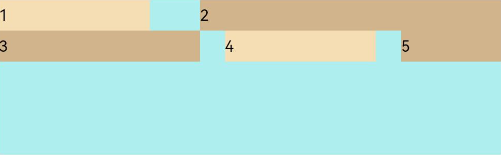
- FlexAlign.Center:子元素各行在交叉轴方向居中对齐。
-
Flex({ justifyContent: FlexAlign.SpaceBetween, wrap: FlexWrap.Wrap, alignContent: FlexAlign.Center }) { Text('1').width('30%').height(20).backgroundColor('#F5DEB3') Text('2').width('60%').height(20).backgroundColor('#D2B48C') Text('3').width('40%').height(20).backgroundColor('#D2B48C') Text('4').width('30%').height(20).backgroundColor('#F5DEB3') Text('5').width('20%').height(20).backgroundColor('#D2B48C') } .width('90%') .height(100) .backgroundColor('#AFEEEE') -
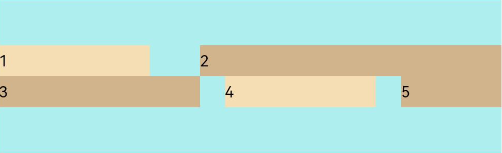
- FlexAlign.End:子元素各行与交叉轴终点对齐。
-
Flex({ justifyContent: FlexAlign.SpaceBetween, wrap: FlexWrap.Wrap, alignContent: FlexAlign.End }) {
  Text('1').width('30%').height(20).backgroundColor('#F5DEB3')
  Text('2').width('60%').height(20).backgroundColor('#D2B48C')
  Text('3').width('40%').height(20).backgroundColor('#D2B48C')
  Text('4').width('30%').height(20).backgroundColor('#F5DEB3')
  Text('5').width('20%').height(20).backgroundColor('#D2B48C')
}
.width('90%')
.height(100)
.backgroundColor('#AFEEEE')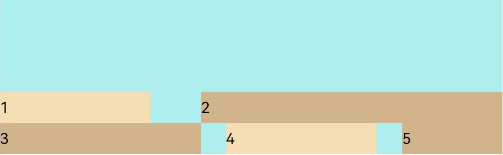
- FlexAlign.SpaceBetween:子元素各行与交叉轴两端对齐,各行间垂直间距平均分布。
-
Flex({ justifyContent: FlexAlign.SpaceBetween, wrap: FlexWrap.Wrap, alignContent: FlexAlign.SpaceBetween }) {
  Text('1').width('30%').height(20).backgroundColor('#F5DEB3')
  Text('2').width('60%').height(20).backgroundColor('#D2B48C')
  Text('3').width('40%').height(20).backgroundColor('#D2B48C')
  Text('4').width('30%').height(20).backgroundColor('#F5DEB3')
  Text('5').width('20%').height(20).backgroundColor('#D2B48C')
}
.width('90%')
.height(100)
.backgroundColor('#AFEEEE')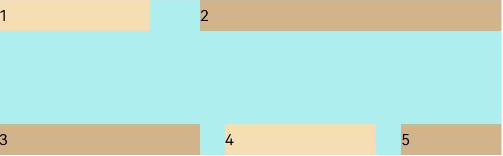
- FlexAlign.SpaceAround:子元素各行间距相等,是元素首尾行与交叉轴两端距离的两倍
-
Flex({ justifyContent: FlexAlign.SpaceBetween, wrap: FlexWrap.Wrap, alignContent: FlexAlign.SpaceAround }) {
  Text('1').width('30%').height(20).backgroundColor('#F5DEB3')
  Text('2').width('60%').height(20).backgroundColor('#D2B48C')
  Text('3').width('40%').height(20).backgroundColor('#D2B48C')
  Text('4').width('30%').height(20).backgroundColor('#F5DEB3')
  Text('5').width('20%').height(20).backgroundColor('#D2B48C')
}
.width('90%')
.height(100)
.backgroundColor('#AFEEEE')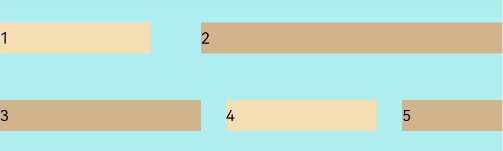
- FlexAlign.SpaceEvenly: 子元素各行间距,子元素首尾行与交叉轴两端距离都相等。
-
Flex({ justifyContent: FlexAlign.SpaceBetween, wrap: FlexWrap.Wrap, alignContent: FlexAlign.SpaceEvenly }) {
  Text('1').width('30%').height(20).backgroundColor('#F5DEB3')
  Text('2').width('60%').height(20).backgroundColor('#D2B48C')
  Text('3').width('40%').height(20).backgroundColor('#D2B48C')
  Text('4').width('30%').height(20).backgroundColor('#F5DEB3')
  Text('5').width('20%').height(20).backgroundColor('#D2B48C')
}
.width('90%')
.height(100)
.backgroundColor('#AFEEEE')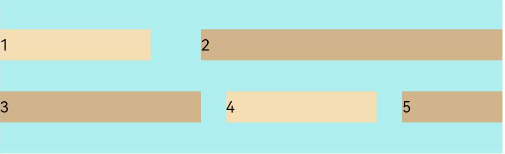
自适应拉伸
在弹性布局父组件尺寸过小时,通过子元素的以下属性设置其在父容器的占比,达到自适应布局。
- flexBasis:设置子元素在父容器主轴方向上的基准尺寸。如果设置了该属性,则子项占用的空间为该属性所设置的值;如果没设置该属性,那子项的空间为width/height的值。
-
Flex() {
  Text('flexBasis("auto")')
    .flexBasis('auto') // 未设置width以及flexBasis值为auto,内容自身宽度
    .height(100)
    .backgroundColor('#F5DEB3')
  Text('flexBasis("auto")'+' width("40%")')
    .width('40%')
    .flexBasis('auto') //设置width以及flexBasis值auto,使用width的值
    .height(100)
    .backgroundColor('#D2B48C')

  Text('flexBasis(100)')  // 未设置width以及flexBasis值为100,宽度为100vp
    .flexBasis(100)
    .height(100)
    .backgroundColor('#F5DEB3')

  Text('flexBasis(100)')
    .flexBasis(100)
    .width(200) // flexBasis值为100,覆盖width的设置值,宽度为100vp
    .height(100)
    .backgroundColor('#D2B48C')
}.width('90%').height(120).padding(10).backgroundColor('#AFEEEE')
- flexGrow:设置父容器的剩余空间分配给此属性所在组件的比例。用于分配父组件的剩余空间。
-
Flex() {
  Text('flexGrow(2)')
    .flexGrow(2)
    .width(100)
    .height(100)
    .backgroundColor('#F5DEB3')
  Text('flexGrow(3)')
    .flexGrow(3)
    .width(100)
    .height(100)
    .backgroundColor('#D2B48C')

  Text('no flexGrow')
    .width(100)
    .height(100)
    .backgroundColor('#F5DEB3')
}.width(420).height(120).padding(10).backgroundColor('#AFEEEE')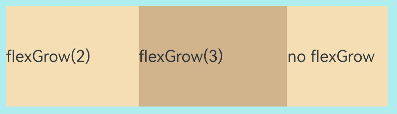
父容器宽度420vp,三个子元素原始宽度为100vp,左右padding为20vp,总和320vp,剩余空间100vp根据flexGrow值的占比分配给子元素,未设置flexGrow的子元素不参与“瓜分”。
第一个元素以及第二个元素以2:3分配剩下的100vp。第一个元素为100vp+100vp * 2/5=140vp,第二个元素为100vp+100vp * 3/5=160vp。
- flexShrink: 当父容器空间不足时,子元素的压缩比例。
-
Flex({ direction: FlexDirection.Row }) {
  Text('flexShrink(3)')
    .flexShrink(3)
    .width(200)
    .height(100)
    .backgroundColor('#F5DEB3')

  Text('no flexShrink')
    .width(200)
    .height(100)
    .backgroundColor('#D2B48C')

  Text('flexShrink(2)')
    .flexShrink(2)
    .width(200)
    .height(100)
    .backgroundColor('#F5DEB3')
}.width(400).height(120).padding(10).backgroundColor('#AFEEEE')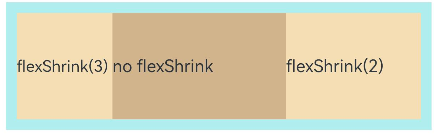

讨论HarmonyOS开发技术,专注于API与组件、DevEco Studio、测试、元服务和应用上架分发等。
更多推荐

 14
14 0
0- 0


 已为社区贡献35条内容

所有评论(0)